1
HOW TO OPERATE
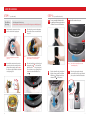
STEP 1
Note |
STEP 2
Note |
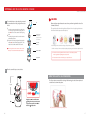
After preparing the ingredients, plug the power cord into a wall outlet.
• Do not touch the power cord with wet hands. It may cause electrical shock,
short-circuit, or fire.
• Check the safety of the wall outlet.
Press the FORWARD button to operate.
• Forward: Pulls down and slowly masticates the ingredients.
• Reverse: Pushes the ingredients back up to dislodge them.
STEP 3
Insert the prepared ingredients one piece at a time.
Note | • Fibrous leafy vegetables (celery, kale, etc.):
» Separate each stem. Cut the outer stems that are thick and tough to 4 inches long or
less.
» Bundle up the leafy vegetables as inserting into the juicer. Alternate between leafy
parts and stems.
• Before extracting, remove hard seeds or pits in ingredients.
• When juicing frozen fruits with small seeds, ensure that even the seeds are completely
thawed.
• Insert the ingredients one piece at a time.
Tip |
If the ingredients become jammed in the screw and the drum lid does not open, press the OFF
button. Then press and hold the REVERSE button until the ingredients become dislodged.
Repeat REVERSE - OFF - FORWARD as often as needed to achieve the desired result.
• Align the dots ● and slide the pusher in.
• After inserting ingredients, use the pusher when it is necessary. Too much use of the
pusher may affect the juice quality.
» Intermittently use the pusher for soft ingredients like tomatoes and apples. Constant
use of pusher for soft ingredients may affect the juice quality.
STEP 4
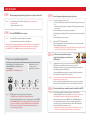
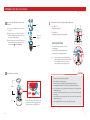
If the juicer stops during operation:
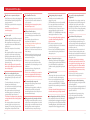
Use the smart cap to make mixed juices,
stop juice from dripping, or rinse between
different juices.
Smart cap
Switch the button to OFF position then press and
hold the REVERSE button until the ingredients
become dislodged.
Repeat REVERSE - OFF - FORWARD as needed.
2
1
OFF
▶
FORWARD : Pulls down the food
OFF : Stops the operation
REVERSE : Pushes the food back up
REVERSE
▶
OFF
▶
FORWARD
Note | • REVERSE: Pushes the ingredients back up to dislodge them.
The REVERSE button only works while holding down the switch.
• Switch OFF ensuring that the juicer comes to a complete stop. Then press REVERSE.
Hold the REVERSE button for 2-3 seconds and release. Repeat as needed. Let the
juicer stop completely before using the REVERSE button to prevent malfunction.
• If the juicer does not work after these steps, disassemble and clean the parts
before operating the juicer again.
10
• Juicing with the smart cap closed creates various mixed juice creations when
different fruits and vegetables, milk, banana, beans etc. are selected.
• After juicing, close the smart cap to stop the juice from dripping, especially when
disassembling the juicing bowl off the base.
• When making different juices quickly rinse away any leftover flavors by running a
glass of water in the juicer with the smart cap closed.
Note | • Leave the smart cap open when juicing ingredients that create excessive foam
during extraction, (e.g. apples, celery).
• Pay close attention when operating with the smart cap closed. Juice may overflow
if the juice collected in the juicing bowl exceeds its capacity marked on the bowl.
4
3
Tip |
STEP 5
After juice and pulp are completely extracted, switch the unit OFF.
Note | • If the remaining ingredients in the juicing bowl have not been extracted
completely, the drum lid may not open easily. After each extraction, run the juicer
for an additional 30 seconds to let the juicer extract the remaining pulp.
• When the drum lid is stuck, press the REVERSE - OFF - FORWARD button in this
order; switching back and forth 2 or 3 times to dislodge the ingredients. Then
place hands on top of the drum lid and firmly press down while simultaneously
turning the drum lid counter clockwise to open.
» Depending on the ingredients, pour water down the feeding tube to rinse out
the interior of the juicing bowl and then attempt to remove the drum lid.
11