1
Car mu1ti1ncdia s
Car mu1timcdia s
RADIo oPERTAION
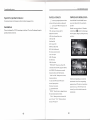
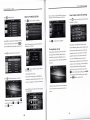
CD/DVD operations:
press¤
¤on homc pageitcomesto disk pla弘
scc below∶
Enterto homc page by press口
■
CDC function introductioⅡ
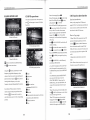
When CD is playing,press■ 田 to copy songs
function introduction
from CD to UsB orsD,press■ ■ to stop
,aIld ag缸 n prcss田 ω contlnue
whcn you p1ay songsfrom CD(doCs not
support I冫
When VCD and DVD is playing,prcss oncc
■■to
VD),ifyou find songs you1ikc and
Wantto storcin your sD card or USB,it can
pre~stop,the disk wⅡ l stop rotating
s1owly within35seconds,when resume
be rca1ized via this(∶
DC function
p1ay,it wi11play again from where the disk
stopped Press■ ■twice wⅡ lstop,when
Defaultin FM mode
How to Copy songs
rcsumc play,it、 vill start from the bcginning
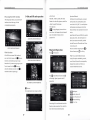
1When UsB or sD isconnected,insert CD
ofthe song.
and cnter CD playing intcrface as sho`^`n
Press■ ■ forPLAY″ 叭 UsE,blltthe disk wⅢ
CD disk p1aying intcrface
2Click“
continuc running,
Press圃
ohoose destina“ on media storagc(EithCr
ω rcstore tllc currcnt statc ofphy
UsB or sD thatis connectcd to thc unit),and
PressI口 :to return Previous andHto NEXT
Press蚪
for back`丙
Currcnt playing song、 vill be copied to U sB
vard
`ard and for、
or sD
Press H forRDM,prcss again for playing
鹦 mck ω岫岫 bCtb een d犰
clIck囵 ωa“ o“ m statlon⒌
butt。 n,search
(NotC∶ P1easc do notretrcat when copy is not
according to different disk
fInishcd,or copy will be incffective)
a For CD/VCD,defalIltin FULL CD/VCD
p1ay Prcss again for stop rcpcating,t、 vicc
for REPEAT oNE,thrcctimcs for REPEAT
from1ow radlo
ALL
frcqucncy to high radio frequOncy,when a
匾 copy
station is found via search,stop searching and
■ play/pause
回 p1叩
■ 蚰p
■ 口 prCv and
p1ay t"s sta“ clll;bng press图 butt。 n,se盯 csll
fron1high radio frequcnCy to1ow radio
frcqucncy,stop searching and p1ay this station,
b For DVD disk,defau1tin REPEAT OFF,
press once for title rcpeat,twice for
CHAPTERs REPEAT,three tlmes for
T ALL,fourtimcs for defau1t,the
REPEz令 Ⅰ
nc对
screen wi11havc prompt、 vritten for cach
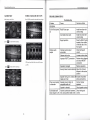
CD PLAYINGINTERFACE
cliok
Store station∶ When a station is found via
RDM process
-playing
曰 REPEAT
囡
searCh,long prcss thc preset positions atthe
botton,cg罾 黠蕙for more than3seoonds to
围
store this station as prcsetin the corresponding
Ellter track h吼 and categorI“ sel∞ 妯“
among vidco,audio and piotures
position
■■channel
囤
title
selection
When CD isp1aying,the lower right corner
ic° n1目
囝is
for1ist ofp1aying,you can choose
your favoritc song in the list,
When VCD is playing,to ohoose proper
默 者驳糊r默
黯嚣
subtitlc,click again to sho、
he
λ
`the subtit1e
CD RIP
o5
norc
songs
Press■ 日 for REPEAT,it work diffcrcntly
lcllt ban电
DⅤ D disk playing intcrface
Long prcss口
3Rcpcat above opgrationsto oopy】
order
Dcfaultin AM mode
’
’
Ⅱ
歪
■button。 n thc left bottom to
Ⅱ
06