1
Calibration
VRinsight offers default values for MSFS9 /MSFSX. Default values are decided made by
testers (over hundreds). However, default values are not absolute and you can simply
change these values with “HAT-Track” program.
Before Calibration
First. Run your games (MSFS9 2004 or MSFSX).
Second. Clip the transmitter onto your headset and place the receiver on the left & top of
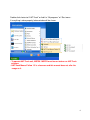
your monitor. Connect the transmitter with receiver. Plug it to the USB port and run “HATTrack” program.
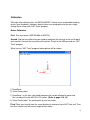
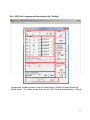
When you run “HAT-Track” program, below picture will be shown;
HAT-Track
1
2
1) Dead Zone
2) Virtual Center-point
1) Dead Zone : in this area, your head movement will not be reflected to game view.
You can adjust the size with DH & DV values. (Refer to page 13 & 14)
2) Virtual Center-point : the center point of your transmitter.
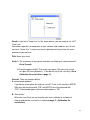
Third. Place your head to face the same direction of receiver of your HAT-Track unit. Then
new line(=Vector line) with certain angle will be shown :
9