1
A COUPLE OF TROUBLESHOTS
This is a manual to accompany v1.0 of a totally new line for Spitfire. With a totally new set of samples, scripts, and
UI. We have used our experience as busy film composers to deliver something that we’d like.
It is our hope that you keep in touch with us to let us know how you’re getting on, how you’re using BML, how
you’re finding it, and, if we were to consider looking at areas in the future, what you’d like us to look at. From this
we’ll form a consensus and wholeheartedly pledge that we will act upon it wherever possible or practical.
We’ve already recorded new material which will be distributed for free in service updates. We do this because, even
after years of experience, it’s not always easy to predict how things turn out. So we leave space in our budgets to
go back and record stuff that may not have worked as well as we like, may need expanding upon, or to widen the
scope of something that’s surprised us and we want to make more of.
Keep an eye on your in-box and our site for new additions to the BML range and others and of course our site.
A couple of commonly asked questions...
• This library really isn’t behaving how I’d expect. - OK, so we’re now officially blue in the face. But before you go
ANY further please check you are using the ABSOLUTE latest version of Kontakt. Visit your trusty service centre
and we hope this page remains relatively under-thumbed.
• My instrument or patch seems to be playing just bits of sound, some keys are missing, and there’s lots of clicks
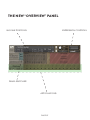
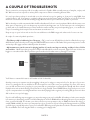
and crackles. - Make sure that your patch is fully loaded (detailed on the front panel, page 8). Some of these are
biggies so can take a while. But if problems persist make sure Kontakt memory manager is activated:
then:
You’ll have to restart this instance of Kontakt to feel it’s benefits.
Another reason your system may be struggling is that you’re using too many mics live for the spec of your machine. Try cutting the mics as detailed on the front panel to see if this cures your problem. If it does, don’t worry
you can still use these mics, just play in your parts with one active (we recommend the T(ree)) and then activate
multiple mics and render down (eg. freeze function in Logic Studio). Some DAWS (ahem, Logic) only use one core
of your computer when recording but will use more when playing back so again try recording with just one mic then
dial in others once you’re happy.
If you’re still suffering may we suggest you try and manage your pre-load buffer. Kontakt pre-loads some samples
into memory so that when you hit a note Kontakt plays it out from RAM whilst addressing the rest of your samples
from your hard drive(s). The slower your drives, the more you may want to rely on RAM, the faster the drives, or
smaller RAM available, the more you may want to rely or your drives. If you’re using the latest generation of SSDs
you’ll find you can radically reduce your pre-load buffer. Referring to the plate above tick the “Instruments Default
Pre-Load Buffer Size” and drag the fader to a setting you’re happy with.
PAGE 21