1
Summary
1.
GENERAL PROVISIONS................................................................................................................................... 3
1.1
SAFETY INSTRUCTIONS: ..................................................................................................................... 3
1.2 ELECTRICAL SUPPLY ................................................................................................................................. 3
1.3 ISTRUCTION FOR USE ............................................................................................................................... 3
1.4 DISPOSAL OF PACKAGING AND APPLIANCE.................................................................................. 4
1.5 DISPOSAL OF RESIN ................................................................................................................................... 4
2.
LET’S GET STARTED ...................................................................................................................................... 5
2.1
COMPANY INFORMATION ................................................................................................................20
2.2 INTENDED USE .............................................................................................................................................. 5
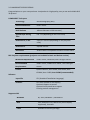
2.3 LUMIPOCKET SPECIFICATIONS............................................................................................................ 6
3. SETTING UP YOUR LUMIPOCKET 3D PRINTER ................................................................................... 7
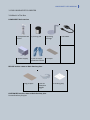
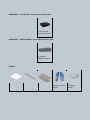
3.1 What’s in The Box ....................................................................................................................................... 7
LUMIPOCKET Basic version........................................................................................................................... 7
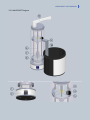
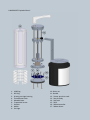
3.2 LUMIPOCKET Diagram ............................................................................................................................. 8
3.3
1.
SOFTWARE OUTLOOK (DA INSERIRE????) ...... Errore. Il segnalibro non è definito.
LUMIPOCKET SET UP....................................................................................................................................11
4.1 SOFTWARE DOWNLOAD and INSTALLATION .................................................................................11
4.2 Installing printing carriage an vat on LUMIPOCKET ......................................................................11
4.3 Installing DLP projector ............................................................................................................................12
4.4 Connecting LUMIPOCKET .........................................................................................................................12
-
Connect your Lumipocket to the computer USB port using the cable supplied ............12
5.LET’S START PRINTING: ....................................................................................................................................13
5.1 Phase 1: SLICING ..........................................................................................................................................13
Levelling the printing carriage .......................................................................................................................14
5.2
Phase 2 CALIBRATION..........................................................................................................................15
-
Be sure Lumipocket carriage is inside the vat at the starting position (see point 4.2)
15
-
In Lumipocket software phase 2c ....................................................................................................15
5.3 Phase 3: printing ..........................................................................................................................................16
5 FINISHING OF THE PRINTED PARTS ...........................................................................................................18
6 TROUBLESHOOTING, DIAGNOSTICS, AND MAINTENANCE................................................................19
6.1 Troubleshooting ...........................................................................................................................................19