1
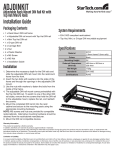
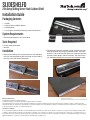
3.Attach the front rack mounting bracket to the sliding rail. The
front bracket is the short bracket. Two screws will fasten the
bracket to the rail. Make sure the screw is inserted from
inside the rails, so the nuts and washers are on the outside.
7.Slide the shelf onto the rails from the front and push the shelf
all the way to the back until it stops.
8.Pull the shelf out and ensure that it stops and locks when fully
extended.
9.If the shelf needs to be removed (i.e. to be flipped over), refer
to Step 1.
4.The rear rack mounting bracket can be fastened to the rails
in the same manner as the front. These should not be fully
tightened however, so they can be adjusted to the exact
length needed to fit the rack/cabinet.
5.Fasten the completed rails into the cabinet/rack using the
appropriate hardware for your cabinet/rack. Make sure to
fully tighten the rear bracket to the rails, if they were left loose
from the previous step.
6.The revolving front handle can be inserted into the opening
on the front of the shelf and fastened from the rear/inside with
two screws.
Specifications
Description
Material
22in Deep Sliding Server Rack Cabinet Shelf
Aluminum
Color
Black
Maximum Weight Capacity
25 kg
Min/Max Mounting Depth
Mounting Height
Dimensions (WxD)
20in / 24in
1U
444.5mm x 559.0mm
Net Weight
5680 g
Certifications
RoHS