1
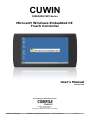
CUWIN
5000/6000/CWV Series
Microsoft Windows Embedded CE
Touch Controller
User's Manual
2014-10-01
“Everything for Embedded Control”
Comfile Technology Inc.
www.cubloc.com
Copyright 1996,2010 Comfile Technology
Comfile Technology
CUWIN 5000/6000/CWV Series – User's Manual
1 of 73
Table of Contents
Preface.........................................................................................................3
Overview......................................................................................................4
Powering On the CUWIN for the First Time...................................................6
Setting the CUWIN's Operating Mode..............................................................6
Powering On the CUWIN................................................................................7
Connecting the CUWIN to a Personal Computer (PC)....................................9
Installing the USB Driver...............................................................................9
ActiveSync (Windows XP)............................................................................13
Windows Mobile Device Center (Windows Vista, 7)..........................................21
Setting the CUWIN’s Ethernet MAC Address................................................27
CUWIN 5xxx & 6xxx....................................................................................27
CUWIN CWV Series.....................................................................................27
Developing Software for the CUWIN...........................................................29
Installing Visual Studio 2008........................................................................29
Installing the CUWIN Software Development Kit (SDK)....................................33
Creating Our First CUWIN Program................................................................38
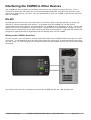
Interfacing the CUWIN to Other Devices.....................................................46
RS-232.....................................................................................................46
Writing to the CUWIN's Serial Port.............................................................46
Reading from the CUWIN's Serial Port........................................................55
Modbus.....................................................................................................59
Using Modbus to Interface the CUWIN to the CUBLOC...................................59
Setting Up the CUBLOC............................................................................62
Programming the CUWIN..........................................................................64
Comfile Technology
CUWIN 5000/6000/CWV Series – User's Manual
2 of 73
Preface
This document was created to help our customers quickly explore and enjoy the CUWIN without having
to spend much effort reading documentation and experimenting beforehand. This document will help
users connect the CUWIN to a PC, transfer files to and from the CUWIN and a PC, program the CUWIN,
and interface the CUWIN to other digital devices like the CUBLOC.
The exercises in this document will make use of Visual Studio 2008, the C# programming language,
and the .Net Compact Framework, but the CUWIN can be programmed in any programming language
and development environment that is compatible with Windows Embedded CE 6.0 and the CUWIN's
processor. This includes, but is not limited to, Visual Basic and C++.
This document will make use of the CUWIN5200, but all examples can be easily adaptable to any
CUWIN model with little or no modification.
We hope this document will reveal just how easy it is to quickly begin using the CUWIN, develop
software, and interface the CUWIN to almost any digital device.
Comfile Technology
CUWIN 5000/6000/CWV Series – User's Manual
3 of 73
Overview
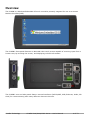
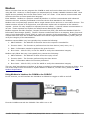
The CUWIN is a Windows Embedded CE touch controller primarily targeted for use as a Human
Machine Interface(HMI).
The CUWIN's front panel features an 800x480 color touch screen capable of receiving input from a
human user, by touching the screen, and displaying colorful information.
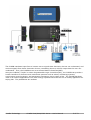
The CUWIN's rear and side panels feature several interfaces (RS232/485, USB, Ethernet, Audio, SD
Card) for communicating with many different electronic devices.
Comfile Technology
CUWIN 5000/6000/CWV Series – User's Manual
4 of 73
The CUWIN translates input from a human user to signals that electronic devices can understand, and
receives signals from those electronic devices, translating them to colorful output that the user can
understand. Thus, the CUWIN serves as a Human Machine Interface(HMI).
Using the CUBLOC, TinyPLC or other Programmable Logic Controllers(PLC), the CUWIN can provide a
human interface to electronic and mechanical systems such as robots, monitoring systems,
environment control systems, and automation equipment just to name a few. The CUWIN has been
used in all kinds of applications from solar energy systems that track the sun to beauty appliances for
styling hair. The possibilities are endless.
Comfile Technology
CUWIN 5000/6000/CWV Series – User's Manual
5 of 73
Powering On the CUWIN for the First Time
Setting the CUWIN's Operating Mode
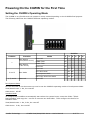
The CUWIN is very flexible and can operate in many modes depending on the CUWIN's final purpose.
The following table lists the CUWIN's different operating modes.
Position
Position
1
2 and 3
4, 5, and 6
Function
Mode
1
Boot Device
(5000/6000 Series)
Reserved
Off
NAND Flash
On
Boot Device
(CWV Series)
NAND Flash
Off
Reserved
On
Boot Mode
Reserved
2
3
4
Reserved
On On
Auto-Run Mode
On Off
Development Mode
Off Off
OS Image Download Mode
Off On
5
6
Reserved
Development Mode
For the exercises in this document we need to set the CUWIN's operating mode to Development Mode.
5000/6000 Series: 1-On, the rest Off
CWV Series: All Off
AutoRun Mode
To configure the CUWIN to automatically start when the system boots, create the folder “\Flash
Disk\AutoRun” and copy the *.exe file to execute into that folder. Then configure the device for
AutoRun mode.
5000/6000 Series: 1-On, 2-On, the rest Off
CWV Series: 2-On, the rest Off
Comfile Technology
CUWIN 5000/6000/CWV Series – User's Manual
6 of 73
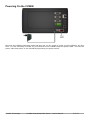
Powering On the CUWIN
Now that the CUWIN's operating mode has been set, we are ready to power on the CUWIN for the first
time. It is not necessary to make any connections to the CUWIN except the power cable. Connect the
power cable and power on the CUWIN by depressing the power switch.
Comfile Technology
CUWIN 5000/6000/CWV Series – User's Manual
7 of 73
After a few seconds the Windows Embedded CE desktop will appear. To complete the exercises in this
document, it is not necessary to understand each of these features. For now, a simple overview will
suffice.
Item
Description
1
My Device
Opens the file explorer.
2
Recycle Bin
Storage for deleted files before permanent deletion.
3
Internet Explorer Internet browser
4
MacUtil
Utility to change the Network Interface Card(NIC)'s Media Access
Control(MAC) address. CUWIN 5000 & 6000 series only.
5
Media Player
Windows CE Media player for playing audio and video files.
6
SaveRegs
Utility to permanently save any changes to the device's registry.
7
Start Button
Opens the Windows CE Start Menu
8
System Tray
Windows CE System Tray
9
Show Desktop
Minimizes any open windows and shows the Windows CE desktop.
10
Input Panel
Opens the Windows CE Input Panel (onscreen keyboard)
Comfile Technology
CUWIN 5000/6000/CWV Series – User's Manual
8 of 73
Connecting the CUWIN to a Personal Computer (PC)
In order to customize the CUWIN for your needs you will likely need to transfer data and programs to
the CUWIN. Typically this is done by connecting the CUWIN to a Personal Computer (PC).
In order for a PC to communicate with the CUWIN, a USB device driver must be installed on the PC.
Once the driver is installed, ActiveSync (Windows XP) or Windows Mobile Device Center (Windows
Vista and Windows 7) can be used to copy data and programs to and from a PC and the CUWIN.
Installing the USB Driver
The following instructions describe how to install the CUWIN's USB driver on the PC. Although the
instructions are illustrated using Windows XP, the same procedure should be followed for Windows
Vista or Windows 7.
1. Download the “ActiveSync USB Driver [CUWIN5000 series]” file from the Comfile Technology
website at http://www.cubloc.com/data/07.php, and unzip the file to a folder of your choosing.
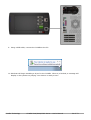
2. Using a USB cable, connect the CUWIN to the PC.
Comfile Technology
CUWIN 5000/6000/CWV Series – User's Manual
9 of 73
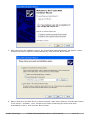
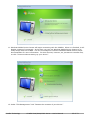
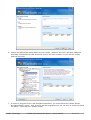
3. After connecting the CUWIN to the PC, the “Found New Hardware Wizard” will appear. Select
“Install from a list or specific location(Advanced)” and click the “Next” button.
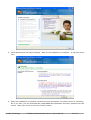
4. Select “Search for the best driver in these locations” radio button and the “Include this location
in the search:” checkbox. Then, browse to the folder containing the drivers that were
downloaded in step 1, and click the “Next” button.
Comfile Technology
CUWIN 5000/6000/CWV Series – User's Manual
10 of 73
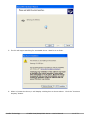
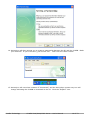
5. The PC will begin searching for a suitable driver. Wait for it to finish.
6. When it locates the driver, it will display a dialog box as shown above. Click the “Continue
Anyway” button.
Comfile Technology
CUWIN 5000/6000/CWV Series – User's Manual
11 of 73
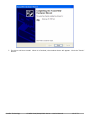
7. The driver will then install. When it is finished, the window above will appear. Click the “Finish”
button.
Comfile Technology
CUWIN 5000/6000/CWV Series – User's Manual
12 of 73
ActiveSync (Windows XP)
After the USB driver has been installed, ActiveSync (Windows XP) or Windows Mobile Device Center
(Windows Vista, or Windows 7) can be installed.
If you are running Windows XP, please perform the following procedure to install ActiveSync.
1. Download ActiveSync – At the time of this writing, the latest version was 4.5 and could be
downloaded from http://www.microsoft.com/windowsmobile/enus/downloads/microsoft/activesync-download.mspx
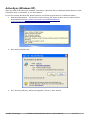
2. Run the downloaded file.
3. If a “Security Warning” dialog box appears, click the “Run” button.
Comfile Technology
CUWIN 5000/6000/CWV Series – User's Manual
13 of 73
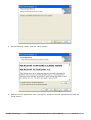
4. On the following screen, click the “Next” button.
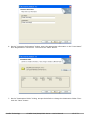
5. Read the license agreement and, if you agree, accept the license agreement and click the
“Next” button.
Comfile Technology
CUWIN 5000/6000/CWV Series – User's Manual
14 of 73
6. On the “Customer Information” dialog, enter the appropriate information in the “User Name”
and “Organization” text boxes. Then click the “Next” button.
7. On the “Destination Folder” dialog, accept the default or change the destination folder. Then
click the “Next” button.
Comfile Technology
CUWIN 5000/6000/CWV Series – User's Manual
15 of 73
8. A dialog will appear telling you that you are ready to install the program. Click the “Install”
button.
9. A new dialog with a progress bar will then appear showing the status of the installation. Wait
for it to complete.
Comfile Technology
CUWIN 5000/6000/CWV Series – User's Manual
16 of 73
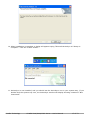
10. When installation is complete, a dialog will appear saying “Microsoft ActivSync 4.5 Setup is
complete”. Click the “Finish” button.
11. ActiveSync is now installed, and you should see the ActiveSync icon in your system tray. If you
double-click the system tray icon, the ActiveSync window will display showing a status of “Not
Connected.”
Comfile Technology
CUWIN 5000/6000/CWV Series – User's Manual
17 of 73
12. Using a USB cable, connect the CUWIN to the PC.
13. You will probably hear a few sounds from the PC and the CUWIN and a small dialog will briefly
appear on the CUWIN.
Comfile Technology
CUWIN 5000/6000/CWV Series – User's Manual
18 of 73
14. ActiveSync will then prompt you to create a partnership between the PC and the CUWIN. Make
your selection. If you're not sure, just choose “No”. Then click the “Next” button.
15. ActiveSync will now show a status of “Connected”, and the ActiveSync system tray icon will
change indicating the CUWIN is connected to the PC. Click the “Explore” icon.
Comfile Technology
CUWIN 5000/6000/CWV Series – User's Manual
19 of 73
16. Using Windows Explorer, you will now be able to view the CUWIN's file system and transfer files
to and from the CUWIN just as you would on the PC.
Comfile Technology
CUWIN 5000/6000/CWV Series – User's Manual
20 of 73
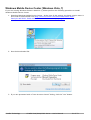
Windows Mobile Device Center (Windows Vista, 7)
If you are running Windows Vista or Windows 7, please perform the following procedure to install
Windows Mobile Device Center.
1. Download Windows Mobile Device Center. At the time of this writing, the latest version was 6.1
and could be downloaded from http://www.microsoft.com/downloads/details.aspx?
FamilyId=46F72DF1-E46A-4A5F-A791-09F07AAA1914&displaylang=en
2. Run the downloaded file.
3. If you are presented with a “User Account Control” dialog, click the “Yes” button.
Comfile Technology
CUWIN 5000/6000/CWV Series – User's Manual
21 of 73
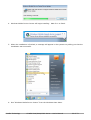
4. Windows Mobile Device Center will begin installing. Wait for it to finish.
5. When the installation is finished, a message will appear in the system tray telling you that the
installation was successful.
6. Run “Windows Media Device Center” from the Windows Start Menu.
Comfile Technology
CUWIN 5000/6000/CWV Series – User's Manual
22 of 73
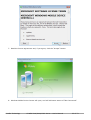
7. Read the license agreement and, if you agree, click the “Accept” button.
8. Windows Mobile Device Center will open, and will indicate a status of “Not Connected”.
Comfile Technology
CUWIN 5000/6000/CWV Series – User's Manual
23 of 73
9. Using a USB cable, connect the CUWIN to the PC.
10. Windows will begin installing a driver for the CUWIN. When it is finished, a message will
display in the system tray saying “Your device is ready to use.”
Comfile Technology
CUWIN 5000/6000/CWV Series – User's Manual
24 of 73
11. Windows Mobile Device Center will begin connecting with the CUWIN. When it is finished, it will
display a status of connected. At this time you can use Windows Mobile Device Center to do
many things with the CUWIN. You are encouraged to read the Windows Mobile Device Center
documentation for more information. For this exercise, however, we just want to transfer files,
so click “Connect without setting up your device”.
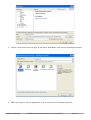
12. Under “File Management” click “Browse the contents of your device.”
Comfile Technology
CUWIN 5000/6000/CWV Series – User's Manual
25 of 73
13. Using Windows Explorer you will be able to view the CUWIN's file system and transfer files to
and from the CUWIN just as you would on the PC.
Comfile Technology
CUWIN 5000/6000/CWV Series – User's Manual
26 of 73
Setting the CUWIN’s Ethernet MAC Address
CUWIN 5xxx & 6xxx
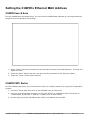
For the CUWIN 5000 and 6000 series, you can set the CUWIN’s MAC address by running the MacUtil
program from the Windows CE Desktop.
1. Select “2450” and use the buttons to set the last two bytes of the MAC address. The first four
bytes are fixed.
2. Press the “Save” button and the new value will be committed to the devices registry.
3. Press the “Close” button when finished.
CUWIN CWV Series
For the CUWIN CWV series, you must boot the device in a special mode to bring up the configuration
console.
1. Connect a serial cable from a PC to the CUWIN’s Com 3 Serial port.
2. Use your favorite terminal program (in this case PuTTY) to establish a serial connection at
115200 baud, 8 data bits, 1 stop bit, no parity, and no flow control.
3. On the right side of the CUWIN set dip switch 3 to ON and the rest OFF.
Comfile Technology
CUWIN 5000/6000/CWV Series – User's Manual
27 of 73
4. Reboot the CUWIN and a configuration menu will appear.
5. Type “C” to bring up the “Bootloader Configurations” menu.
6. Type “7” to configure the MAC address. Enter a hexadecimal MAC address of your choice. In
this example “00.00.12.34.ab.cd”.
7. Reset the dip switch on the right side of the CUWIN and reboot.
Comfile Technology
CUWIN 5000/6000/CWV Series – User's Manual
28 of 73
Developing Software for the CUWIN
In order to develop software for the CUWIN a software development environment must be installed.
This document will make use of Microsoft's Visual Studio 2008 as a development environment, but any
software development environment capable of producing Windows Embedded CE programs compatible
with the CUWIN's processor can be used.
Visual Studio supports several programming languages; primarily Visual C++, C#, and Visual
Basic.Net, and can produce two kinds of programs: managed and unmanaged(native) programs.
Managed programs rely on the .Net Framework while unmanaged programs do not. Visual C++ can
produce either managed or unmanaged programs, but C# and Visual Basic.Net are primarily used to
produce managed programs. For this document we will be programming in C# so our programs will be
managed and will thus rely on the .Net Framework.
The .Net Framework is an extremely large collection of libraries and application programming
interfaces (APIs) for Windows operating systems. It is much too large for embedded systems that are
intended to be small and light, like the CUWIN. Therefore, Microsoft has created the .Net Compact
Framework to suit the small and light needs of the embedded systems market. The CUWIN comes
with the .Net Compact Framework 3.5 pre-installed and the example programs produced in this
document will be built to make use of it.
Installing Visual Studio 2008
At the time of writing this document, Visual Studio Express editions didn't support smart device
development. Also, at the time of writing this document, Visual Studio 2010 didn't yet support smart
device development. Therefore, Visual Studio 2008 will be our development environment of choice for
this document.
This document will only show the installation process for Windows XP, the but installation process for
Windows Vista and Windows 7 is quite similar.
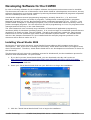
1. If you don't yet own Visual Studio 2008, you can download a 90-day trial version at
http://www.microsoft.com/downloads/details.aspx?FamilyID=83c3a1ec-ed72-4a79-896125635db0192b. The downloaded file must be burned to a DVD. Use a DVD burner to burn the
*.iso image to a DVD disc.
2. Insert your Visual Studio 2008 DVD into your DVD drive to begin the installation.
3. Click the “Install Visual Studio 2008” link to begin the installation.
Comfile Technology
CUWIN 5000/6000/CWV Series – User's Manual
29 of 73
4. A welcome screen will appear. Click “Next” to continue.
5. Read the license agreement and, if you agree, check the “I have read and accept the license
terms.” Enter an appropriate name in the “Name” text box and click the “Next” button.
Comfile Technology
CUWIN 5000/6000/CWV Series – User's Manual
30 of 73
6. Choose an appropriate setup option for your needs. “Default” and “Full” will both install the
necessary components for this document, but we will use “Custom” so you can see exactly
what we will need.
7. In order to program for the .Net Compact Framework, you must choose the “Smart Device
Programmability” option. And, since we will be programming in C#, be sure to check the Visual
C# option. Then click the “Install” button.
Comfile Technology
CUWIN 5000/6000/CWV Series – User's Manual
31 of 73
8. Visual Studio 2008 will begin installing. Wait for the installation to complete. It may take some
time.
9. When the installation is complete, the above screen will appear. No further action is necessary,
but if you wish, you can download and install MSDN documentation and other updates from this
screen. Make your choice or click the “Finish” button.
Comfile Technology
CUWIN 5000/6000/CWV Series – User's Manual
32 of 73
10. The above screen will then appear. From this screen you can modify your Visual Studio
installation, install MSDN documentation, and/or check for updates. At this time it is
recommended that you update your computer by clicking the “Check for Service Releases” link,
or by using Windows Update. Make your choice or click the “Exit” button.
Installing the CUWIN Software Development Kit (SDK)
IMPORTANT: You must install Visual Studio before installing the SDK or the installation may fail.
In order for Visual Studio to build and debug applications specific to the CUWIN, you must download
and install the CUWIN Software Development Kit (SDK).
1. Download the SDK from http://www.cubloc.com/data/07.php
2. Execute the downloaded file to begin the installation.
Comfile Technology
CUWIN 5000/6000/CWV Series – User's Manual
33 of 73
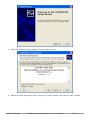
3. When the welcome screen appears, click the “Next” button.
4. Read the license agreement and, if you agree, choose “Accept” and click the “Next” button.
Comfile Technology
CUWIN 5000/6000/CWV Series – User's Manual
34 of 73
5. On the “Customer Information” dialog, enter the appropriate information the in “User Name”
and “Organization” text boxes. Then click the “Next” button.
6. Choose “Custom”. If you choose “Complete” the installation may fail.
Comfile Technology
CUWIN 5000/6000/CWV Series – User's Manual
35 of 73
7. Remove the “Documentation” feature from the installation. If you don't do this, the installation
may fail.
8. We are now ready to begin the installation. Click the “Install” button to begin.
Comfile Technology
CUWIN 5000/6000/CWV Series – User's Manual
36 of 73
9. The SDK will begin installing. Wait for it to finish.
10. When the installation is finished a dialog will display saying “Completing the CUWIN2450 Setup
Wizard”. Click the “Finish” button.
Comfile Technology
CUWIN 5000/6000/CWV Series – User's Manual
37 of 73
Creating Our First CUWIN Program
Now that the development environment is installed, we are ready to develop programs for the CUWIN.
In this section, we will create a very simple “Hello World” program. Although this program is very
simple, it will illustrate the process that we must go through to develop, deploy and debug any CUWIN
program.
1. Start Visual Studio 2008 by selecting it from the Start Menu.
2. If this is your first time to run Visual Studio, it will ask you to choose your primary development
environment. For the exercises in this document, it is recommended that you choose “Visual
C# Development Settings”. Then click the “Start Visual Studio” button.
Comfile Technology
CUWIN 5000/6000/CWV Series – User's Manual
38 of 73
3. Visual Studio will open to the “Start Page”. Now we need to create a project.
4. Select “File”->”New...”->”Project...” from the menu.
Comfile Technology
CUWIN 5000/6000/CWV Series – User's Manual
39 of 73
5. Select “Visual C#”->“Smart Device” from the “Project Types” tree, and “Smart Device Project”
from the “Templates” list. Makes sure “.Net Framework 3.5” is selected from the top, righthand corner, and change the “Name” of the project to “HelloWorld”. Then click the “OK” button.
6. Another dialog will display asking for more project configuration. Select “Windows CE” from the
“Target Platform” list, and “.Net Compact Framework 3.5” from the “.Net Compact Framework
Version” list. Then, select “Device Application” from the “Templates” list, and click the “OK”
button.
Comfile Technology
CUWIN 5000/6000/CWV Series – User's Manual
40 of 73
7. Finally, the project will open, and we are ready to start programming.
8. Move your mouse over the “Toolbox” tab on the left side of the screen, and the “Toolbox” menu
will open. Select or drag a “Button” to the form. A new button labeled “button1” will appear on
the form.
Comfile Technology
CUWIN 5000/6000/CWV Series – User's Manual
41 of 73
9. Position the button to the bottom of the form, and resize the button so it is easy to touch on
the touch screen.
10. If the “Properties” window is not yet displayed, select “View”->”Properties Window” from the
menu, and it should appear in the bottom, right-hand corner of the screen.
Comfile Technology
CUWIN 5000/6000/CWV Series – User's Manual
42 of 73
11. In the “Properties” Window change the “Text” property to “Say Hello” and press the “Enter” key.
You'll see the button's label change to “Say Hello”
12. Now, double-click on the button and you will be taken to the button's event handler. It is here
you you tell the program what to do when the button is clicked. Add the line
MessageBox.Show(“Say Hello!”);
Comfile Technology
CUWIN 5000/6000/CWV Series – User's Manual
43 of 73
13. We are finished editing the code necessary to build this program. Now, we need to make some
project configuration changes in order to build the program for the CUWIN. Right-click the
“Hello World” project node in the “Solution Explorer” window, and choose “Properties”.
14. Choose the “Devices” tab on the left-hand side of the screen. Under “Deployment Options”
change the “Target Device” to “CUWIN2450 ARMV4I Device”. The CUWIN comes with the .Net
Compact Framework 3.5 pre-installed, so if you don't have any updates, uncheck the “Deploy
the latest version of the .Net Compact Framework (including Service Packs)” checkbox.
Comfile Technology
CUWIN 5000/6000/CWV Series – User's Manual
44 of 73
15. To execute the program, ensure the CUWIN in powered on and is connected to the PC, and click
the “Start Debugging” button on the toolbar.
16. If a “Deploy HelloWorld” dialog is displayed, choose “CUWIN2450 ARMV4I Device” from the
“Device” options, and click the “Deploy” button. The program will compile, upload to the
CUWIN, and begin executing.
17. The program's main window will then appear on the CUWIN. Touch the “Say Hello” button and
a message box will appear saying “Hello!”.
Comfile Technology
CUWIN 5000/6000/CWV Series – User's Manual
45 of 73
Interfacing the CUWIN to Other Devices
The CUWIN has several different interfaces with which it can interface to other devices. In the
exercises to follow we will make use of the Recommended Standard 232 (RS-232) interface, also
known as a serial port or com port. We will use RS-232 to have the CUWIN communicate with a PC
and the CUBLOC.
RS-232
RS-232 has been around for many years and is commonly used in the HMI industry as a way for
devices to communicate with one another. To illustrate how the CUWIN can use RS-232 to
communicate with other devices, we will program the CUWIN to send messages to a PC. The PC will
display the received messages in HyperTerminal. HyperTerminal is an application included in all the
latest versions of Windows, and is well-suited for RS-232 communication. Finally we will modify this
program to read keystrokes in HyperTerminal and display them on the CUWIN.
Writing to the CUWIN's Serial Port
For this exercise, you will need to connect an RS-232 cable from CUWIN's COM1 serial port to a PC's
serial port. The CUWIN and most PCs have more than one serial port, so be aware which serial port
you are using. For this exercise, we will assume that both the CUWIN and the PC will use their COM1
serial port.
You should now have two connections between the CUWIN and the PC: USB and RS-232.
Comfile Technology
CUWIN 5000/6000/CWV Series – User's Manual
46 of 73
1. Create a new smart device project as we did for HelloWorld, and name it HelloHyperTerminal.
2. Make the project a “Device Application” just as we did for the HelloWorld project.
Comfile Technology
CUWIN 5000/6000/CWV Series – User's Manual
47 of 73
3. Add a large button to the form and label it “Say Hello” just as we did for the HelloWorld project.
1
2
3
4
5
6
7
8
9
10
11
12
13
14
15
16
17
18
19
20
21
22
23
24
25
26
27
28
using
using
using
using
System;
System.ComponentModel;
System.Windows.Forms;
System.IO.Ports;
namespace HelloHyperTerminal
{
public partial class Form1 : Form
{
public Form1()
{
InitializeComponent();
}
private SerialPort _port;
private void Form1_Load(object sender, EventArgs e)
{
_port = new SerialPort("Com1", //Com port
19200,
//Baud Rate
Parity.None,
//Parity
8,
//Data Bits
StopBits.One); //Stop Bits
_port.Open();
}
}
}
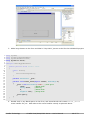
4. Double-click in any blank space on the form, and Visual Studio will create a Form1_OnLoad
event handler for you. Add code to this event handler exactly as pictured above.
Comfile Technology
CUWIN 5000/6000/CWV Series – User's Manual
48 of 73
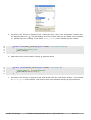
5. Go back to the “Form1.cs [Design]” tab. Select the form, and in the “Properties” window click
the lightning bolt icon
. This will display all of the events that you can attach event handlers
to. Double-click the “Closing” event and a Form1_Closing event handler will be created.
28
29
30
31
32
private void Form1_Closing(object sender, CancelEventArgs e)
{
//Close the serial port
_port.Close();
}
6. Add code to this event handler exactly as pictured above.
34
35
36
37
38
private void button1_Click(object sender, EventArgs e)
{
//Send "Hello!" to HyperTerminal
_port.Write("Hello!\r\n");
}
7. Go back to the “Form1.cs [Design]” tab, and double-click the “Say Hello” button. This will add
a button1_Click event handler. Add code to this event handler exactly as pictured above.
Comfile Technology
CUWIN 5000/6000/CWV Series – User's Manual
49 of 73
8. Finally adjust the project properties just as we did in the HelloWorld project.
How the Code Works:
1. When the form opens, the form's Load event fires executing the Form1_Load event handler.
This event handler configures the COM1 serial port and opens it so we can write to it.
2. When we close the form, the form's Closing event fires calling the Form1_Closing event
handler. This event handler closes the COM1 serial port.
3. When we touch the “Say Hello” button, the button's Click event fires calling the
button1_Click event handler. This event handler writes “Hello!” to the serial port. The “\r”
and “\n” characters are a carriage return and line feed, so each “Hello!” we send appears on a
new line.
Comfile Technology
CUWIN 5000/6000/CWV Series – User's Manual
50 of 73
Displaying our “Hello!” Message on the PC
We now need some device to read and display the “Hello!” being sent from the CUWIN. For this we
will use the program HyperTerminal which is included in all recent versions of Windows.
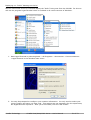
1. Start HyperTerminal by selecting Start-->All Programs-->Accessories-->Communications->HyperTerminal in the Windows start menu.
2. You may be prompted to configure your Location information. You only need to select your
country/region and enter you area code. This settings are not necessary for this experiment,
but HyperTerminal requires it. After you are finished, click the “OK” button.
Comfile Technology
CUWIN 5000/6000/CWV Series – User's Manual
51 of 73
3. You may then be prompted to edit dialing rules. Again, this is not necessary for this
experiment. Just click the “OK” button.
4. HyperTerminal will open and display a “Connection Description” dialog. It is here we need to
configure the PC's serial port. Enter “CUWIN” in the “Name” textbox and click the “OK” button.
Comfile Technology
CUWIN 5000/6000/CWV Series – User's Manual
52 of 73
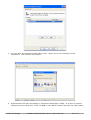
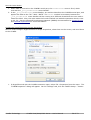
5. In the “Connect Using” drop-down list, select the serial port you wish to use. Note that this is
the PC's serial port, not the CUWIN's serial port; they may be different. Then, click the “OK”
button.
6. A new dialog will appear asking for your port settings. These settings must match those
settings made in the Form1_Load event handler of the CUWIN program or the PC and the
CUWIN will not be able to communicate with one another. Adjust the settings appropriately,
then click the “OK” button.
Comfile Technology
CUWIN 5000/6000/CWV Series – User's Manual
53 of 73
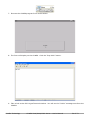
7. Execute the CUWIN program from Visual Studio.
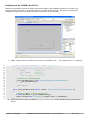
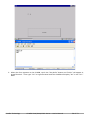
8. The form will display on the CUWIN. Click the “Say Hello” button.
9. Take a look at the PC's HyperTerminal window. You will see the “Hello!” message sent from the
CUWIN.
Comfile Technology
CUWIN 5000/6000/CWV Series – User's Manual
54 of 73
Reading from the CUWIN's Serial Port
We have successfully built an program that writes data to the CUWIN's serial port, sending it to
HyperTerminal on the PC, but communication is usually bi-directional. We will now modify this
program to read input from HyperTerminal, and send it to the CUWIN.
1. Add a “Label” from the Toolbox to the form, and label it “PC: ” by changing its Text property.
17
18
19
20
21
22
23
24
25
26
27
28
29
30
31
32
33
34
35
36
37
private void Form1_Load(object sender, EventArgs e)
{
_port = new SerialPort("Com1", //Com port
19200,
//Baud Rate
Parity.None,
//Parity
8,
//Data Bits
StopBits.One); //Stop Bits
//Listen for incoming data
_port.DataReceived += new SerialDataReceivedEventHandler(
_port_DataReceived);
_port.Open();
}
void _port_DataReceived(object sender, SerialDataReceivedEventArgs e)
{
//Update label1 with the data read
string dataRead = _port.ReadExisting();
label1.Invoke(new Action(() => label1.Text += dataRead));
}
2. Go to the Form.cs tab, and add the _port_DataReceived event handler exactly as pictured
above.
Comfile Technology
CUWIN 5000/6000/CWV Series – User's Manual
55 of 73
How the Code Works:
1. When data is received on the CUWIN's serial port, the DataReceived event is fired, which
executes the _port_DataRecieved event handler.
2. In the _port_DataRecieved event handler, we read the data from the CUWIN's serial port, and
append the data to the “PC:” label. NOTE: The Invoke method is necessary because the
_port_DataRecieved event handler will be running on a different thread than the one used to
create the label. Also, the code inside the Invoke method is a lambda expression which is new
to C# 3.0. See the Microsoft Development Network (MSDN) documentation for Control.Invoke
and Lambda Expressions for more information.
Configuring HyperTerminal to Accept Keystrokes
Now we must configure HyperTerminal to accept keystrokes, show them on the screen, and send them
to the CUWIN.
1. In HyperTerminal with the CUWIN connection open, select File->Properties from the menu. The
“CUWIN Properties” dialog will appear. On the “Settngs” tab, click the “ASCII Settup...” button.
Comfile Technology
CUWIN 5000/6000/CWV Series – User's Manual
56 of 73
2. Check the “Echo typed characters locally” checkbox. This will ensure that as we type in
HyperTerminal, our keystrokes will appear on the screen. Click the “OK” button, then click the
“OK” button on the “CUWIN Properties” dialog.
3. Hyperterminal will not accept keyboard input until the Scroll Lock is turned off. Press the
“Scroll Lock” key on your keyboard until the status bar shows “Scroll” in gray (disabled). Now if
we type in HyperTerminal, what we type will display on the screen and will be sent to the
CUWIN.
Running the Program
We are now ready to run the program.
1. Once again, execute the CUWIN program from Visual Studio.
Comfile Technology
CUWIN 5000/6000/CWV Series – User's Manual
57 of 73
2. When the form appears on the CUWIN, touch the “Say Hello” button and “Hello!” will appear in
HyperTerminal. Then type “Hi!” in HyperTerminal and the CUWIN will display “Hi!” in the “PC:”
label.
Comfile Technology
CUWIN 5000/6000/CWV Series – User's Manual
58 of 73
Modbus
We've now seen how we can program the CUWIN to send and receive data over the its serial port
using RS-232. However, in that program we transmitted only human readable character data. Most
digital devices probably don't know what “Hello!” and “Hi!” mean. If we want to communicate with
electronic devices we must speak their language.
Enter Modbus. Modbus is a protocol created by Modicon in 1979 to communicate with industrial
electronic devices, and has proliferated to become the de facto standard in the industry.
Modbus uses a request/reply protocol with a single master device and one or more slave devices. The
master sends a request to a single slave, and that slave replies with a response to the master's
request. A slave can only respond to requests from the master; it cannot initiate communication on
its own. These requests and replies are called Protocol Data Units (PDUs).
Modbus supports two PDU formats: Remote Terminal Unit (RTU) and American Standard Code for
Information Interchange (ASCII). The RTU format encodes each PDU in a compact, binary form and
uses a Cyclic Redundancy Check (CRC) to verify the integrity of the transmission. The ASCII format
encodes each PDU as a set of ASCII characters and uses a Longitudinal Redundancy Check (LRC) to
verify the integrity of the transmission.
Modubus request PDUs vary, but typically they contain the following:
1. Slave Address – The address of the slave device the request is intended for
2. Function Code – The function to performed on the slave device (read, write, etc...)
3. Data – Information needed to perform the given function
4. Error Code – CRC for RTU, or LRC for ASCII to verify the transmission integrity
Modbus reply PDUs also vary, but typically they contain the following:
1. Slave Address – The address of slave device the reply is from
2. Function Code – The function performed by the slave device
3. Data – Information about the function performed
4. Error Code – CRC for RTU, or LRC for ASCII to verify the transmission integrity
This very brief introduction to Modbus is all that is needed to understand the exercises to follow. It is
out of the scope of this document to explain Modbus in detail so, to learn more, please see The
Modbus Organization.
Using Modbus to Interface the CUWIN to the CUBLOC
In this exercise, we will interface the CUWIN to a CUBLOC to toggle an LED on and off.
First the CUWIN must ask the CUBLOC if the LED is on or off.
Comfile Technology
CUWIN 5000/6000/CWV Series – User's Manual
59 of 73
Then, the CUWIN will tell the CUBLOC to turn the LED on (if the LED was off), or off (if the LED was
on).
The following Modbus PDUs are listed here to help you understand the exercise to follow. To keep this
exercise simple for the purpose of learning, we will hard-code these PDUs in our program.
Reading the State of the LED
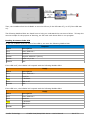
To ask the CUBLOC what the state of the LED is, we issue the following Modbus PDU.
Request
Value
Description
0x01
Slave Address 1
0x02
Read Bit
0x0000
Register Address 0 (Port 0)
0x0001
Read only 1 bit
0xB9CA
CRC
If the LED is off, the CUBLOC will respond with the following Modbus PDU:
Reply
Value
Description
0x01
Slave Address 1
0x02
Read Bit
0x01
1 Bit Read
0x00
LED is off
0xA188
CRC
If the LED is on, the CUBLOC will respond with the following Modbus PDU:
Reply
Value
Description
0x01
Slave Address 1
0x02
Read Bit
0x00
1 Bit Read
0x01
LED is on
0x6048
CRC
Comfile Technology
CUWIN 5000/6000/CWV Series – User's Manual
60 of 73
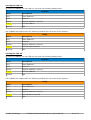
Turning the LED On:
To have the CUBLOC turn the LED on, we issue the following Modbus PDU.
Request
Value
Description
0x01
Slave Address 1
0x05
Write bit
0x0000
Register Address 0 (Port 0)
0xFF00
Turn the LED on
0x8C3A
CRC
The CUBLOC will respond with the following Modbus PDU (an echo of the request):
Reply
Value
Description
0x01
Slave Address 1
0x05
Read Bit
0x0000
Register Address 0 (Port 0)
0xFF00
The LED was turned on
0x8C3A
CRC
Turning the LED Off
To have the CUBLOC turn the LED off, we issue the following Modbus PDU.
Request
Value
Description
0x01
Slave Address 1
0x05
Write bit
0x0000
Register Address 0 (Port 0)
0x0000
Turn the LED off
0xCDCA
CRC
The CUBLOC will respond with the following Modbus PDU (an echo of the request):
Reply
Value
Description
0x01
Slave Address 1
0x05
Read Bit
0x0000
Register Address 0 (Port 0)
0x0000
The LED was turned off
0xCDCA
CRC
Comfile Technology
CUWIN 5000/6000/CWV Series – User's Manual
61 of 73
Setting Up the CUBLOC
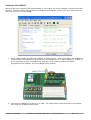
Now that we have a general idea what Modbus is, we need to set up the CUBLOC to perform the task
at hand. Follow the following procedures to program the CUBLOC, connect one of its I/O ports to an
LED, and connect it to the CUWIN.
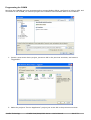
1. Using Cubloc Studio, program the CUBLOC as shown above. This will configure the CUBLOC to
communicate via Modbus over its serial port, and enable port 0 to apply voltage to an LED. It
is not necessary to fully understand this program. If you want to learn more about
programming the CUBLOC, see the CUBLOC's user manual.
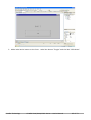
2. Connect the CUBLOC's I/O port 0 to an LED. The image above illustrates how to accomplish
this using the CUBLOC Study Board.
Comfile Technology
CUWIN 5000/6000/CWV Series – User's Manual
62 of 73
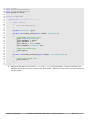
3. Connect the CUBLOC's serial port to the CUWIN's COM1 serial port. The image above illustrates
how to accomplish this using the CUBLOC Study Board. There will now be two connections to
the CUWIN: a USB connection to the PC, and an RS-232 connection to the CUBLOC Study
Board.
Comfile Technology
CUWIN 5000/6000/CWV Series – User's Manual
63 of 73
Programming the CUWIN
Now that the CUBLOC has been programmed to process Modbus PDUs, configured to light an LED, and
connected to the CUWIN, we need to program the CUWIN to send Modbus PDUs to the CUBLOC.
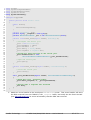
1. Create a new smart device project just as we did in the previous exercises, and name it
“ToggleLED”.
2. Make the project a “Device Application” project just as we did in the previous exercises.
Comfile Technology
CUWIN 5000/6000/CWV Series – User's Manual
64 of 73
3. Add a label and a button to the form. Label the button “Toggle” and the label “LED State”.
Comfile Technology
CUWIN 5000/6000/CWV Series – User's Manual
65 of 73
38
39
40
41
42
43
44
45
46
47
48
49
50
51
52
53
54
55
56
57
58
59
60
61
62
63
64
65
66
67
68
69
70
71
72
73
using
using
using
using
System;
System.ComponentModel;
System.Windows.Forms;
System.IO.Ports;
namespace ToggleLED
{
public partial class Form1 : Form
{
public Form1()
{
InitializeComponent();
}
private SerialPort _port;
private void Form1_Load(object sender, EventArgs e)
{
//Configure the serial port
_port = new SerialPort();
_port.BaudRate = 19200;
_port.DataBits = 8;
_port.Parity = Parity.None;
_port.StopBits = StopBits.One;
}
//Open the serial port
_port.Open();
private void Form1_Closing(object sender, CancelEventArgs e)
{
//Close the serial port
_port.Close();
}
}
}
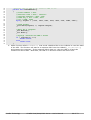
4. Add the code above to the form's Load and Closing event handlers. This will configure the
CUWIN's serial port and open it when the form loads. When the form closes, the the serial port
will be closed.
Comfile Technology
CUWIN 5000/6000/CWV Series – User's Manual
66 of 73
1
2
3
4
5
6
7
8
9
10
11
12
13
14
15
16
17
18
19
20
21
22
23
24
25
26
27
28
29
30
31
32
33
34
35
36
37
38
39
40
41
42
43
44
45
46
47
48
49
50
51
52
using
using
using
using
using
System;
System.ComponentModel;
System.Windows.Forms;
System.IO.Ports;
System.Threading;
namespace ToggleLED
{
public partial class Form1 : Form
{
public Form1()
{
InitializeComponent();
}
private SerialPort _port;
private byte[] _response = new byte[8];
private ManualResetEvent _evt = new ManualResetEvent(false);
private void Form1_Load(object sender, EventArgs e)
{
//Configure the serial port
_port = new SerialPort();
_port.BaudRate = 19200;
_port.DataBits = 8;
_port.Parity = Parity.None;
_port.StopBits = StopBits.One;
//Listen for data arriving on the serial port
_port.DataReceived += new
SerialDataReceivedEventHandler(_port_DataReceived);
//Open the serial port
_port.Open();
}
private void Form1_Closing(object sender, CancelEventArgs e)
{
//Close the serial port
_port.Close();
}
void _port_DataReceived(object sender, SerialDataReceivedEventArgs e)
{
//Read data into _response buffer
_port.Read(_response, 0, _port.BytesToRead);
}
}
//Notify that a response was received
_evt.Set();
}
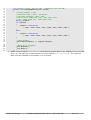
5. Attach an event handler to the serial ports DataReceived event. This event handler will store
the PDU received from the CUBLOC in the _response buffer, and notify the the form's thread
(See ManualResetEvent for more information) that the PDU was received.
Comfile Technology
CUWIN 5000/6000/CWV Series – User's Manual
67 of 73
52
53
54
55
56
57
58
59
60
61
62
63
64
65
66
67
68
69
70
71
72
73
74
//Returns true if LED is on, false if LED is off
private bool ReadLEDState()
{
//slave address = 0x01
//function code = 0x02 - read bit
//register address = 0x00, 0x00
//read only 1 bit = 0x00, 0x01
//crc = 0xB9, 0xCA
byte[] request = { 0x01, 0x02, 0x00, 0x00, 0x00, 0x01, 0xB9, 0xCA };
//send request
_port.Write(request, 0, request.Length);
//Wait for a response
_evt.WaitOne();
_evt.Reset();
//byte[3] contains the LED's status
if (_response[3] == 0)
return false;
else
return true;
}
6. Add a function called ReadLEDState that sends a Modbus PDU to the CUBLOC to read the state
of the LED. This function will wait for a response PDU from the CUBLOC (_evt.WaitOne()),
and examine the response. If the response PDU's data is 0, then the LED is off and this
method will return false. Otherwise, the LED is on and this method will return true.
Comfile Technology
CUWIN 5000/6000/CWV Series – User's Manual
68 of 73
76
77
78
79
80
81
82
83
84
85
86
87
88
89
90
91
92
93
94
95
96
97
98
99
100
101
102
//If turnOn is true, turn on LED. Otherwise turn off LED
private void ChangeLEDState(bool turnOn)
{
//slave address = 0x01
//function code = 0x05 - write bit
//register address = 0x00, 0x00
//On or Off = OxFF 0x00 (on), 0x00 0x00 (0ff)
//crc = 0x8C 0x3A (on), 0xCD 0xCA (off)
byte[] request;
if (turnOn)
{
request = new byte[]
{ 0x01, 0x05, 0x00, 0x00, 0xFF, 0x00, 0x8C, 0x3A };
}
else
{
request = new byte[]
{ 0x01, 0x05, 0x00, 0x00, 0x00, 0x00, 0xCD, 0xCA };
}
//send request
_port.Write(request, 0, request.Length);
//Wait for a response
_evt.WaitOne();
_evt.Reset();
}
7. Add a function called ChangeLEDState that sends a Modbus PDU to the CUBLOC to turn the LED
on or off, and waits for a response PDU from the CUBLOC (_evt.WaitOne()). The response
PDU from the CUBLOC is not needed, so it is ignored.
Comfile Technology
CUWIN 5000/6000/CWV Series – User's Manual
69 of 73
104
105
106
107
108
109
110
111
112
113
114
115
116
117
118
119
120
20
21
22
23
24
25
26
27
28
29
30
31
32
33
34
35
36
37
38
39
40
41
42
43
44
private void button1_Click(object sender, EventArgs e)
{
//Is LED on or off?
bool isOn = ReadLEDState();
//Toggle LED
ChangeLEDState(!isOn);
//Confirm: Is LED on or off?
isOn = ReadLEDState();
//Update label
if (isOn)
label1.Text = "On";
else
label1.Text = "Off";
}
8. We now have functions for reading and changing the state of the LED. We now need to add
attach an event handler to the button's Click event to toggle the state of the LED. After the
state is changed, the program will read the state of the LED and update the “LED State” label.
private void Form1_Load(object sender, EventArgs e)
{
//Configure the serial port
_port = new SerialPort();
_port.BaudRate = 19200;
_port.DataBits = 8;
_port.Parity = Parity.None;
_port.StopBits = StopBits.One;
//Listen for data arriving on the serial port
_port.DataReceived += new
SerialDataReceivedEventHandler(_port_DataReceived);
//Open the serial port
_port.Open();
//Is LED on or off?
bool isOn = ReadLEDState();
//Update label
if (isOn)
label1.Text = "On";
else
label1.Text = "Off";
}
9. When the form loads, we should update the “LED State” label with the LED's initial state. To do
this, modify the Form1_Load event handler as shown above.
Comfile Technology
CUWIN 5000/6000/CWV Series – User's Manual
70 of 73
10. Finally, adjust the project properties as we did in the previous exercises.
How the Code Works:
1. When the form loads, the form's Load event fires, calling the Form1_Load event handler. This
event handler configures the CUWIN's serial port, attaches the _port_DataReceived event
handler, opens the port, and initializes the “LED State” label with the current state of the LED:
“On” or “Off”.
2. When the “Toggle” button is clicked, the button's Click event fires, calling the button1_Click
event handler. This event handler reads the state of the LED, reverses the LED's state,
confirms the new state of the LED, and updates the “LED State” label with the LED's new state.
✔
The ReadLEDStatus function sends a Modbus PDU to the CUBLOC asking for the value in
register 0x0000 (the value of port 0), then waits for a response from the CUBLOC.
✔
The ChangeLEDStatus function sends a Modbus PDU to either set the value in register
0x0000 to 1 (turn on the LED), or set the value in register 0x0000 to 0 (turn off the LED)
depending on the value of the turnOn parameter. NOTE: The Modbus protocol requires us
to send a value of 0x00FF to change register 0x0000's value to 1.
✔
The _port_DataReceived event handler receives a Modbus response PDU from the
CUBLOC, stores the PDU in the _response buffer, then notifies the form that the response
has been received.
3. Finally when the form closes, the form's Close event fires, calling the Form1_Closing event
handler. This event handler closes the CUWIN's serial port.
Comfile Technology
CUWIN 5000/6000/CWV Series – User's Manual
71 of 73
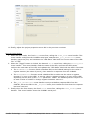
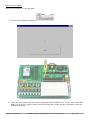
Running the Program
We are now ready to run the program.
1. Execute the CUWIN program from Visual Studio.
2. When the form loads, you will see the “LED State” label update to the current state of the LED.
When you click the “Toggle” button, the LED's state will change and the “LED State” label will
update accordingly.
Comfile Technology
CUWIN 5000/6000/CWV Series – User's Manual
72 of 73
Final Thoughts
In an effort to keep this exercise simple for the purpose of learning, we have made several
concessions. To name a few, we are not generating the request PDU's CRC dynamically, we are not
checking the response PDU's CRC for transmission integrity, and we are waiting indefinitely for a
response after issuing a request. Please keep this in mind as you explore the design of your own
programs.
Comfile Technology
CUWIN 5000/6000/CWV Series – User's Manual
73 of 73