1
Operation
Operating the PDA
The PDA is supplied with a number of software applications installed, including the Quattro
application. Refer to the PDA user documentation for operating instructions including how to use the
touchscreen and stylus.
Launching the Quattro PDA application
To launch the Quattro application:
•
From the PDA menu, select START > QUATTRO.
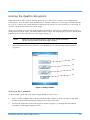
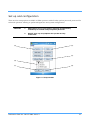
When the Quattro application is launched, the main window appears (Figure 3). The main window
comprises a main message window (13) and a series of function keys (2)–(5), (9)–(12).
About calibrating the Quattro SE system
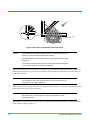
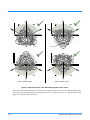
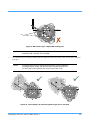
Pedestal floor travel and orientation are set relative to a studio floor target (Figure 6) (Figure 7),
which is detected by sensors mounted in the base of the pedestal. All other axes of movement are
homed either relative to an index point on the axis encoder or a repeatable end-stop on the axis. This
ensures that zoom, focus, pan, tilt and height axes produce repeatable positional feedback.
Initial system start up
When the HPM is powered up, the Quattro PDA application automatically begins to configure the
Quattro SE system (comprising the Quattro-SE pedestal and either the Vector 950E or the Vision
250E pan/tilt head). The Quattro PDA application will prompt you throughout the initial start up
process required to calibrate all movement axes, pan, tilt, zoom, focus, height and wheels (steering).
Details of the steps in this process are explained in the following sections of this guide.
When the initial start up calibration procedure is complete, each calibration step can be selected
individually by the operator. This allows zeroing and referencing of a specific axis without having to
repeat the system calibration.
NOTE:
The Genlock signal indicators (8) display a ‘tick’ when a signal
is detected from the connected equipment to aid diagnostics.
The left hand box indicates a Genlock signal is present at the
pedestal base and the right hand box indicates a Genlock signal
is present at the head.
Publication Part No. V4015-4980 Issue 2
17