1
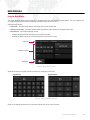
Network
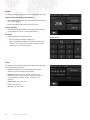
The Network screen displays the node's network related
information.
+ IP Address: Displays the assigned IP address of the node.
+ Subnet Mask: Displays the networking subnet for node
communication.
+ MAC Address: Displays the internal MAC address of the
node's networking port.
+ Serial Number: Displays the node’s unique factoryassigned serial number.
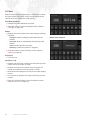
Monitor
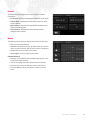
The Monitor screen provides status information for each port.
+ Port: currently selected port.
+ Universe: associated universe. (In S400 mode, this field is
active so that the Series 400 universe may be configured.)
+ Arrow Left: moves to lower port number.
+ Arrow Right: moves to higher port number.
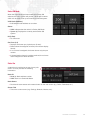
Universe Monitor
+ Displays a live updating table of DMX values active in the
currently selected universe.
+ Actively changing values are represented in white text.
+ Press the Top Half of the Monitor section to Scroll Up.
+ Press the Bottom Half of the Monitor section to Scroll
Down.
SUPER NODE™ USER MANUAL
19