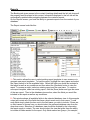
1
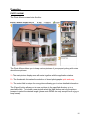
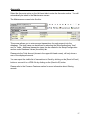
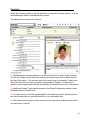
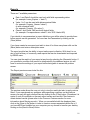
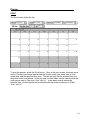
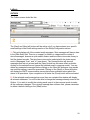
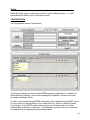
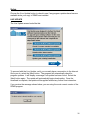
Real Estate Management System User’s Manual Introduction Congratulations on purchasing the Real Estate Management System (REMS). Included in this manual is everything you need to know to use REMS effectively. Please take a moment to look through this manual before you get started with the software. The manual is broken down into sections that are easy to follow. The sections are: System Requirements Getting Started (Installation) Common Features Calculators Properties Accounts Contacts Reports Planner Letters Setup Help Definitions Thank you for your decision to acquire REMS. Successful Managing! 2 System Requirements Your computer must have the following to install REMS: Windows - Versions: 95, 98, ME, 2000, NT or XP 400 MHz or faster Pentium 64 MB Ram CD-ROM drive (for hard copy version only) Mouse Additional Information: MAC users must use a PC emulator, which can be found at most computer stores. REMS is written in Delphi program To find out if your computer meets these minimum requirements, follow these steps: 1. Right click on the My Computer icon on your computer (If you do not have a My Computer icon, see below instructions) 2. Go to Properties 3. Look under tab named General This will tell you all of the above information regarding your computer If you do not have a My Computer icon on your desktop, follow these steps: 1. Click on the Start menu 2. Go to Settings 3. Go to Control Panel 4. When Control Panel box pops up, use pull down arrow and choose My Computer 5. When My Computer box pops up, right click anywhere in a blank area of the box 6. Choose Properties 7. Look under tab named General to find out information regarding your computer You must also have a minimum Screen Resolution of 800 X 600 pixels. To find out what your screen resolution is, follow these steps: 1. Right click anywhere in the blank space on your desktop 2. Go to Properties 3. Look under the tab named Settings 4. In the lower, left hand corner you will see an area named Screen Resolution 3 Getting Started SOFTWARE SETUP AND INSTALLATION Electronic Version Once you have purchased the electronic version of REMS, you will receive an email message from our REMS server. This message contains two important items. The first item is the link to download the REMS setup file from the website, and the second is the Serial Number for your copy of REMS. Please write down the serial number for future use. The first step in the installation process is to click on the link in the email message. A new dialog box will appear; select the |save| option. The file will download to your designated temporary location. Remember this location. To locate the download file, open Windows Explorer and navigate to your previously selected location. The file is called REMSSETUP.EXE. Once the file is located, doubleclick the file and the REMS program installation begins. It is recommended to accept all the default options during the program installation. Hard Copy Version Once you have purchased REMS on a CD, insert the disk into your CD Rom drive and close the tray. Your computer should recognize a disk was inserted and will start up an install wizard that will walk you through the installation process. Simply click “Next” and accept all of the default settings. When finished, continue with the instructions below. If auto play is not active on your computer and the install wizard does not appear, please find the file “remssetup.exe” on the CD, (for example by using Windows Explorer), and double click on this file. Registration After REMS is installed, an icon is placed on your desktop. Double-click this icon to open REMS. The first time you run REMS, a window will appear prompting you to register your copy of REMS. 4 Getting Started You must provide your email address and a valid REMS serial number. Once this is done the “Next” arrow will be displayed on the screen. If your computer is connected to the Internet, simply click on the arrow button. This will automatically send details of your Serial Number and License Code to our server and we will then automatically register your copy of REMS while you are still online, and send an email as a back-up with the unlock code to the email address that you specified. If no Internet connection is present or the registration server cannot be contacted, the manual mode will be activated. If your computer is connected to the Internet but the automatic registration failed, you should click on the arrow button again to let the application launch the default Internet browser and point it to the manual registration page. Otherwise you need to write down your Licence Code and complete the registration process using another computer that is connected to the Internet. Once you arrive at the www.dolfderoos.com website, at the bottom of the home page you will see a button that says “Click here to register REMS.” Click this button and you will be prompted to enter the REMS Serial Number, License Code, and your email address. After the manual registration is completed you will receive an email message with the unlock code required to activate REMS. Return to the REMS Registration Window and click on the |Unlock| button. You are then prompted to enter the Unlock Code. You can now type the code (or use cut and paste) and press the Enter key to continue. 5 Getting Started Once you have successfully installed REMS onto your computer, double-click on your REMS icon to start the program. The main navigation panel is located on the left-hand side. Please note that every main section has multiple modules that can be accessed by clicking on the corresponding name. 6 Common Features Most of the database maintenance screens use the buttons shown below. 1. Record Navigation Bar It is essential to click on the |Post| button every time you have modified or created a new record. Failure to do so may result in the loss of information. 2. Button This button brings up the find dialog that supports an incremental search of the active field specified in the |Search By| drop down box. The user can select a record by double clicking on the corresponding row or using the |OK| button. 7 Common Features 3. Button This dialog supports extensive filtering of multiple fields within the report preview screen. Conditions can be defined using values and ranges. Partial match options can be also selected for all available text fields. Depending on the user selection results can be displayed in Alphabetical or Logical order. Click on the |OK| button to apply the defined filters. 4. Button This button disables filtering to display all of the available records. 5. Text Editor This Rich Text editor dialog will be displayed every time the user will click on the windows containing notes. Features of this editor are very similar to the WordPad application included with your operating system. 8 Calculators Once you click on the |Calculators| button, you automatically enter the Depreciation screen. DEPRECIATION The Depreciation screen looks like this: The personal property items (chattels) to be depreciated are entered in this screen. 1 - The depreciation calculator contains definitions of items that can be depreciated. Rate is defined as a percentage value per year and the minimum value sets the limit to determine when the asset should be written off. You may choose between straight-line and diminishing-value depreciation. Straight-line depreciation means the purchase price of the asset is depreciated by the depreciation rate every year. Diminishing-value depreciation uses the written down book value and each year the written down book value is used to determine the amount of depreciation for that year. The written down book value for next year will be diminished by the written down book value of this year. 2 - Every item can have multiple, special conditions to allow for different rates or fixed depreciation values at any given point in time (for example, the first year can have a higher depreciation rate or a fixed value that can be deducted). If both value and rate are assigned, the amount resulting in a higher dollar value will be used for calculations. 3 - Every Property can have its own list of items together with the purchase date and initial value. To create a list of depreciable assets you need to first select the desired property and then ensure all items you want to enter are already defined. 9 Calculators Proper setting of the last day of the financial year is critical for calculations, as day precision is used when calculating depreciation for items purchased during the current financial year. 4 - Two reports are available: the value that can be deducted [Depreciation] and the value of the assets [Asset value]. The selected report type will be displayed in the top left corner of the report. Select the |Generate| button located to the right of the two report types (Depreciation & Asset Value). The Report screen looks like this: This report can be saved or exported to Excel for further processing. To save to a diskette or hard drive, select the |Save to File| button. This will bring up the Save As window to select the location where the file will be saved. It will be saved as a comma separated values file. To export it to Excel, select the |Send to Excel| button at the top of the screen. It will automatically open a new Excel document for you and name it “temp.csv” (please note this option is only available if you have MS Excel installed on your computer). 10 Calculators INVESTMENT The Investment screen looks like this: On this screen you can choose from four investment calculators: Final Value, Annual Interest Rate, Initial Principal and Investment Term. Each calculator will assist you to quickly compute the results for your specific investment. For each calculator, enter the appropriate information for each field. It is not necessary to include dollar signs, commas or percent signs. You may click on the calculator icon to use a virtual keypad. The results are computed automatically. 11 Calculators MORTGAGE The Mortgage screen looks like this: On this screen, enter the appropriate information for each field. Once all data is entered, select the |Calculate| button to generate the Repayment Schedule. NOTE: The Repayments per month field typically is “1” unless you intend to make additional full payments each month. The repayment schedule report shows detailed information, for the life of the Mortgage, based on the information entered. You can print the Repayment Schedule by selecting the |Print| button in the upper right-hand corner or convert it to a HTML file by clicking on the |Send to IE| button. 12 Calculators LOAN The Loan screen looks like this: On this screen you can choose from three loan calculators, Payment, Number of Payments and Principal. Each calculator will assist you to quickly compute the results for your specific loan. For each calculator, enter the appropriate information for each field. It is not necessary to include dollar signs, commas or percent signs. You may click on the calculator icon to use a virtual keypad. The results are computed automatically. 13 Properties Select the Properties option on the left-hand side to enter the Properties section. You will automatically be taken to the Maintenance screen. The Maintenance screen looks like this: 1 - On this screen, you can add each of your properties, as well as information pertaining to each property. Additional Property Type and Status information can be created in the Setup/Configuration section under Database values (Properties) tab. 2 – These fields contain the Property address details. 3 – This is an unlimited notes field (click once anywhere in this window to activate the editor). 4 - These tabs allow you to switch between manager, ownership and banking details. There can be only one manager assigned to each property. However, one property can have more than one owner (in this case you will need to specify the percentage of 14 Properties _______________________ ownership for each). Before you add a manager or an owner, make sure their contact records were created in the Contacts/Maintenance screen. When assigning managers or owners, appropriate filters will be applied to the contact records so only managers or owners will be displayed. 5 - In this grid you can create lease records. Each lease can have multiple tenants. The tenancy record contains the start date and lease expiration date (finish date is for archive purposes). 6 - This window contains additional lease information, “Rent advance” describes how many weeks or months the rent must be paid in advance. “Terms” is a note field that can be used to describe any variations from the normal terms of tenancy. 7 - The user can add as many tenants as required using the |Add Tenant| button or remove existing entries by selecting the |Remove Tenant| button (please note that filtering applies when adding a tenant - only contacts defined as tenants will be available for selection). 15 Properties _________________________________________ PHOTO ALBUM The Photo Album screen looks like this: The Photo Album allows you to keep various pictures of your property along with notes about those pictures. 1 - The main picture display area will resize together with the application window. 2 – The thumbnails list makes the selection of stored photographs quick and easy. 3 – The notes field is unique for every picture allowing you to store detailed information. The |Export| button allows you to save a picture to the specified directory or to a removable disk. To include a new picture select the |Add| button and use the picture browser to select the desired image (please note REMS can only accept files in a jpg or bmp format). 16 Accounts Select the Accounts option on the left-hand side to enter the Accounts section. You will automatically be taken to the Maintenance screen. The Maintenance screen looks like this: This screen allows you to enter account transactions for each property into the database. The time frame can be defined by selecting the Show transactions “from” and “to” fields. Additional transaction types can be created in the Setup/Configuration section under Database Values (Accounts) tab. Please note the Total Amount (shown in the upper left-hand corner), will only show a sum of the displayed records. You can export the visible list of transactions to Excel by clicking on the |Send to Excel| button or convert it to a HTML file by clicking on the |Send to IE| button. Please refer to the Common Features section for more information about filtering records. 17 Contacts Select the Contacts option on the left-hand side to enter the Contacts section. You will automatically be taken to the Maintenance screen. The Maintenance screen looks like this: 1 - The Maintenance screen allows you to enter information for each of your contacts. The list of contacts can be filtered by selecting the down arrow next to |Show type| at the top of the screen. You can then select the contact type (for example, Tenant) and the list will now show only those contacts categorized as Tenants. A search for a specific contact can be performed by selecting the |Find| button at the top of the screen. 2 - Additional Contact Types can be created in the Setup/Configuration section under Database values (Contacts) tab. 3 - You may choose to include a photograph for the selected contact. Stored pictures can also be exported to a specified directory or to a removable disk. 4 - The notes field is unique for every contact and can store any additional information you may want to include. 18 Reports The Banking tab gives access to the contact’s banking details and the Info tab shows all the property records related to this contact. Information displayed in the Info tab will be automatically updated while navigating between the contacts records. On the Reports screen, you have the ability to generate reports from the content of your database. The Report screen looks like this: 1 - This section allows the user to select existing report templates to use, rename or to generate new report templates. To load the report, highlight the report name and select the |Open| button to list the available fields. Select the fields you would like included in the report as well as any conditions and then select the |Generate| button to view the report. To rename a report, select an existing report and the new name. To create a new report template, select an existing report, click the |Save| button and type the name of the new report. Then in the database view section, select the fields you would like included in the report as well as any conditions. 2 - This window shows all available fields in the selected database view. In this example output will contain all of the fields that have a check mark next to their name. To add more fields simply check the box next to the field name you wish to include. If there are no field names to choose from you should select the preferred database view from the drop-down menu. Selection of a database view should be dictated by the information the report needs to contain. The user should select the view that gives them the ability to include all fields needed for the report. Only fields marked as <group> (for example, 19 Reports _______________________ Database view - Accounts, Field – Balance) are calculated and contain a sum of the field values instead of information within the selected field. 3 - The Field name label shows which field is currently active. To change to another field, simply highlight the desired field name located in the Database View [please note that the active field doesn’t have to be included in the report]. Conditions creator makes it easier to filter the output of your report. In this example only records relating to leases that have expired after the 7/1/2002 (see Parameters in point 5) will be displayed. The condition symbols have the following meanings: “=” “>” “<” “<>” “like” equal to greater than less than not equal to allows for partial matching of string values. The report conditions also use the wildcard character “%” to match any string of characters. (Please note that searching is case sensitive) For example: To find all the contacts whose First Name starts with “J” Eg. John, Jordan, James select the condition “like” and enter the value “J%” To find text beginning with “bro” eg. Brown, Bronwin, Broth select the condition “=” and enter the value “Bro%” To find text ending with “son” eg. Simpson, Johnson select the condition “=” and enter the value “%son” To find text with “ra” in any position eg. Frank, Tracy, Randall, Sinatra select the condition “=” and enter the value “%ra%” Settings in “Join with” determine the logical joints on multiple conditions (for example: to look for John that lives in Alaska you would use “and” but to look for all the people with name John together with all the people living in Alaska you would use “or”). You can clear the conditions by clicking on the |Clear| button or edit the content manually. If you are familiar with SQL syntax you may create custom conditions yourself. 4 - Order list specifies the order in which the results will be displayed, in this case by the contacts last name from A to Z [please note that ASC stands for ascending and DESC for descending]. You can sort by more than one field at the same time. To include the active field please click on the |Add| button. 5 - When you create a new report you may consider using Parameters to simplify handling of variable conditions. Instead of defining the values with conditions simply assign an appropriate parameter that can be easily changed. 20 Reports There are 7 available parameters: Date 1 and Date 2 should be used only with fields representing dates (for example: Lease_Expires > ’:date1’) Value 1 to 3 can be used with alphanumerical fields (for example: Property_Name=‘:value1’) or with numerical fields (for example: Property_ID=:value1) Check 1 and Check 2 will work with logical fields (for example: Correspondence=:check1, tick=YES / blank=NO) If you decide to use parameters in report definitions you will be asked to provide them before reports can be generated. You can clear the Parameters by clicking on the |Clear| button. If you have created a new report and wish to store it for future use please click on the |Save| button and enter a descriptive name. The report module has the ability to import native report collection. With time it is our aim to build a library of commonly used reports that can be downloaded and imported by REMS users. You can view the results of your report at any time by selecting the |Generate| button. If you specified a condition that cannot be interpreted by the database engine you will have to review the settings of your report before being able to access the preview screen. The Report preview screen looks like this: The preview mode allows the user not only to view the results but also to apply various filters. If you experienced any problems while specifying conditions on the previous screen you may still apply custom filters by clicking on the |Filter| button. Sometimes it is easier to omit all conditions on the main report screen and use this Filter feature to obtain desired results (please refer to the Common Features section for more information about filtering records). When you are satisfied with the displayed data, click on the |Save to file| button in order to create a comma separated values file or if you have MS Excel installed on your computer you my choose to transfer your data by clicking on the |Send to Excel| button. 21 Planner ____________ Select the Planner option on the left-hand side to enter the Planner section. You will automatically be taken to the Schedule screen. SCHEDULE The Schedule screen looks like this: The planner can show detailed schedule information for one to seven days. You can use the |Show| drop-down box at the top of the screen to select how many days you would like to view. The planner can also be split accordingly into time increments ranging from 5 to 60 minutes by selecting the desired time scale. Most of the features are accessible through the right mouse click. 1 - To enter an event into a time slot, double click on the desired time to pull up the event screen. The event can then be entered with a specified date, the start and end time, a category, whether it is a recurring event, as well as setting a reminder notice. Notes may also be entered for the event (for example, attendees, location) at the bottom of the event screen. 22 Planner The Event screen looks like this: 2 – The calendar not only helps with quick navigation between dates but also indicates which days have assigned events. 3 - To enter a task, double click in the |Task List| to pull up the task screen. A task can then be entered with a due date. Although the due date may have passed, until the task is checked “complete” it will remain on the task list as you proceed through the calendar. 23 Planner PRINT The Print screen looks like this: To print the planner, select the |Print| button. Once in the print screen, the down arrow next to |Format| (see above) can be selected to print a day view, week view or a full month view with the specified time slots. The task list may also be selected from this drop-down menu and printed. In the day view, the time frame can be selected with the down arrows next to |Day time| “from” and “to”. In the week view as well as the calendar view, the time period can be selected with the down arrows next to |Date| “from” and “to”. 24 Letters On this screen you have the ability to create common letters that will assist you with managing your properties. CREATE LETTER The Create Letter screen looks like this: 1 - To create additional letters, select the + at the top of the window, then choose from the |Letter Type| drop-down menu and enter the Letter Name. Additional Letter Types can be created in the Setup/Configuration section under Database values (Letters) tab. 2 – The description field contains information about the nature of the selected letter. 3 - This window displays the body of the active letter. You can choose between fixed templates that need to be modified each time you are creating a letter, or a more dynamic structure that merges the data with static text. Each dynamic field is defined by <[xxx]>, where xxx is the name used for merging. The user can choose any name if only default values need to be stored. 25 Letters To edit the body of the active letter simply click on it and a letter editor window will be displayed. If you want to insert a dynamic field into the body of your letter you can click on the |Insert field| button to display the insert field dialog screen. This screen allows you to select a field from the REMS database or to define a custom field. To select a field from the database, click on the desired section and double click the field you wish to insert. 26 Letters You can also insert the current date by clicking on the |Date| button or specify a custom field by clicking on the |Custom| button. If you wish to manually create dynamic fields that are linked to information from the REMS database you will need to adopt the following naming conventions: All fields with names that start with 'Contact', 'Client', or 'Tenant' will point to the contact data and can be combined with the specific field names to retrieve desired information. Allowed contact fields are: 'Last Name', 'First Name', 'Company Name', 'Street', 'Suburb', 'City', 'State', 'Post Code', 'Country', 'Phone Work', 'Phone Home', 'Phone Mobile', 'Fax', 'Email', 'DOB', 'Occupation', 'Contact Type', 'Bank Name', 'Bank Acc Name', 'Bank Acc Number', 'Bank ID Number', 'Bank Swift Code', 'Bank Address', 'Bank Reference', 'Contact ID' All fields with names that start with 'Property', 'House', or 'Building' will point to the property data and can be combined with the specific field names to retrieve desired information. Allowed property fields are: 'Property Name', 'Property ID', 'Street', 'Suburb', 'City', 'State', 'Property Status', 'Property Type', 'Bank Name', 'Bank Acc Name', 'Bank Acc Number', 'Bank ID Number', 'Bank Swift Code', 'Bank Address', 'Bank Reference', 'Post Code', 'Country', 'Manager First Name', 'Manager Last Name', 'Manager Company Name' The field name <[Date]> is reserved and can be used to display the current date. Values for any other field names will have to be specified manually and can be saved as each letter has its own memory of default values. 4 - This list shows all of the dynamic fields defined in the selected letter. If any default values were specified for this letter they will be automatically loaded and displayed. The user can edit each value manually before generating the letter or define a new set of default values. 5 - By clicking on the |Select| button next to the Property or Contact label the user can select records used to retrieve merged data. If a property is selected the contact will show the first listed tenant for this property and a full data merge will be attempted. Selecting only a contact will result in all property information being disregarded. After the select operation is complete, all dynamic values related to the information from the database will be automatically populated. All default values should be defined before the select operation and stored by clicking on the |Save default values| button. Once the letter has been created, you have the option of printing or sending the letter to the email Outbox by using the |Print letter| or |Email letter| buttons. 27 Letters If you decide to email the letter this compose screen will appear: If you have used the dynamic field merging feature, the generated message will be automatically addressed to the contact provided the email address was found. To change this address or specify additional recipients you can simply type the email address or click on the |Find recipient| button to find the email address in your database. You can switch between the TO, CC and BCC modes using the popup menu that is activated by the right mouse click. If any last minute changes are required to the body of the letter you can still make adjustments by clicking on the message window. By default the letter name is placed in the subject field. All emails that you have created are stored in the database. To send or manipulate the existing messages click on the |Outbox| button. 28 Letters OUTBOX The Outbox screen looks like this: The |Send| and |Send all| buttons will be active only if you have entered your specific email settings in the Email settings section of the Setup/Configuration screen. 1 - This grid displays all of the created email messages. Sent messages will have a date in the |Date Sent| field. There is no support for folders to categorize the content of stored messages, however a quick search feature and time frame view make it easy to find the desired records. The time frame view can be selected with the down arrows next to |Messages| “from” and “to” (see above). The |Unsent| button will show all messages that are not yet sent and the |Open| button has the same effect as double clicking on the selected record (opens the selected email in compose mode). You can delete any unwanted messages before clicking on the |Send All| button as once emails are sent their delivery cannot be prevented. Clicking on the |Send| or |Send all| button will display the SMTP communication screen that shows a detailed report about the status of all operations. Upon completion of all tasks the |Close| button will be activated. 2 - If the selected email message has more than one recipient this window will display all relevant addresses. You will not be able to change the message already stored in the Outbox. If you wish to modify the existing email open it in the compose mode to make all the necessary changes. If the original message has not been sent, please remember to delete it before clicking on the |Send| button. 29 Setup Select the Setup option on the left-hand side to enter the Setup section. You will automatically be taken to the Configuration screen. CONFIGURATION The Configuration screen looks like this: This screen is where you setup various REMS program configurations. In addition to the Email/Server settings, you can also manage the Properties, Contacts, Accounts, and Letters database values. In order to send emails through REMS, the easiest way in determining the SMTP server is to look up your current settings in your email client (e.g. Outlook, Outlook Express, Lotus Notes). Some SMTP servers will only allow you to send emails if you have authenticated yourself as a valid user. To authenticate yourself, enter your username and password in the appropriate email settings fields. 30 In the Database backup section, you can choose to create a new backup of the program database, or restore an old backup. You have the ability to see when the last backup was created as well as setting an Automatic backup at specific intervals (days). 31 Setup Choose the |Live Update| button to check to see if any program updates have become available since your copy of REMS was installed. LIVE UPDATE The Live Update screen looks like this: To proceed with the Live Update, verify you currently have a connection to the Internet. Once you do, select the |Next| button. The program will automatically check for program updates. It will display a message if an update has been found. Select the |Next| button again. The update will automatically begin downloading. Once the download is complete, the update will be applied without any further user-interaction. If you receive the message shown below, you are using the most current version of the REMS program. 32 Help Select the Help option on the left-hand side to enter the Help section. You will automatically be taken to the User Manual screen. USER MANUAL You can browse the User Manual the same way you browse a web page. The right mouse click will give you access to basic navigation and print options. VERSION INFO On the version info screen you will find the version of the REMS program you are currently running. 33 Definitions Below are general descriptions of Property Management terms to assist you with your use of the REMS program. Agent A person authorized by an owner to act on his or her behalf in leasing a property. Association See Homeowners Association. Ejection A legal action to evict a tenant from a property. Eviction See Ejection. Fair Housing Act of 1968 A federal prohibition of discrimination in the sale, rental, or financing of housing on the basis of race, color, religion, sex, national origin, handicap or familial status. Fair Housing Act of 1988 A law added to the Fair Housing Act provision to prevent discrimination based on mental or physical handicap or familial status. Home Owner’s Association An organization of owners having the responsibility of providing for the operation and maintenance of the common areas of a condominium or residential subdivision. Also called property owner’s association, POA, HOA, or Body Corporate. HOA See Home Owner’s Association. Landlord One who owns real property and leases it to another. Also referred to as lessor. Lease A contract wherein a landlord gives a tenant the right of use and possession of property for a limited period of time in return for a rate of rent which is not to be changed during the period of the lease. 34 Lessor One who lets property under a lease. Lessee One who holds a lease. Management Agreement A contract wherein an owner employs a property manager. Month-to-month tenancy An agreement to rent or lease property for consecutive and continuing monthly periods until terminated by proper notice by either the landlord or the tenant. Notice of termination must precede the commencement date of the final month of occupancy. The time period of prior notice is usually established by state law. POA Property Owner’s Association. See Home Owner’s Association. Property Management The process of maintaining and creating value in real property consistent with the owner’s objectives and in compliance with the highest standard of professional ethics. In real estate, the process of profitable operation and management of owned leased or subleased real property for a building owner, developer, or landlord. Property Manager The chief operating officer or administrator of a particular property or group of properties. One who manages properties of an owner as the owner' s agent. Rental See month-to-month tenancy. Security Deposit A preset amount of money advanced by a tenant and held by an owner or agent for a specified period to cover damages and to ensure the faithful performance of the lease terms by the tenant. Tenant One who pays rent to occupy or gain possession of real estate; the estate or interest held is called a tenancy. 35