1
Epsilen 2.0
Managing Access Keys
To assign Access Keys for multiple Video Links
1.
2.
3.
4.
Check the box next to one or more Video Links
Click the Manage Access Keys button to open the “Manage Access Keys” popup page
Check the Access Keys to assign for the selected Video Links
Click the Assign button. You will be returned to the Video Link Manager page where
you will see modified entries for your links.
To remove Access Keys for multiple Video Links
1.
2.
3.
4.
Check the box next to one or more Video Links
Click the Manage Access Keys button to open the “Manage Access Keys” popup page
Check the Access Keys to remove for the selected Video Links
Click the Remove button. You will be returned to the Video Link Manager page where
you will see modified entries for your links.
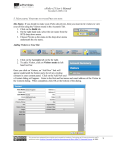
Figure 8 displays the Manage Access Keys screen.
Figure 8
Page 28 of 195
Manual 2.0