1
NTSYSpc
Numerical Taxonomy
and
Multivariate Analysis
System
Version 2.0
User Guide
F. James Rohlf
Department of Ecology and Evolution
State University of New York
Stony Brook, NY 11794-5245
EXETER SOFTWARE
47 Route 25A, Suite 2
Setauket, New York 11733-2870
Information in this document is subject to change. The software described in this
document is furnished under a license agreement (single-user or site license). The software
may be used or copied only in accordance with the terms of the agreement.
Copyright © 1998 by Applied Biostatistics Inc., 3 Heritage Lane, Setauket, New York
11733. All rights reserved worldwide.
ISBN: 0-925031-28-3
Current printing: July 8, 1998
Contents
1. Introduction .................................................................................................................................1
1.1 Areas of application .....................................................................................................................1
1.2 Program modules in NTSYSpc....................................................................................................3
1.3 How to get started using NTSYSpc.............................................................................................5
1.4 What’s new in version 2.0 ...........................................................................................................8
2. Modes of operation .....................................................................................................................9
2.1 Interactive mode ..........................................................................................................................9
2.2 Batch mode ................................................................................................................................11
2.3 Both interactive and command modes ........................................................................................13
3. Menus & related windows.......................................................................................................13
3.1 Main menu ................................................................................................................................13
3.2 Configuration window and file ..................................................................................................14
3.3 Output Listing Window ............................................................................................................15
4. Preparation of input data files.................................................................................................16
4.1 File formats................................................................................................................................16
4.2 Examples of data files.................................................................................................................18
4.3 Interface to other programs ........................................................................................................20
5. NTedit .........................................................................................................................................21
6. Graphics options & menu ........................................................................................................22
6.1 General plot options...................................................................................................................23
6.2 Other options.............................................................................................................................23
6.3 Plot menu ..................................................................................................................................23
7. Typical applications..................................................................................................................24
7.1 Cluster analysis .........................................................................................................................24
7.2 Ordination analyses and biplots.................................................................................................25
7.3 Principal components analysis...................................................................................................26
iv
7.4 Principal coordinates analysis, PCOORDA ..............................................................................27
7.5 Nonmetric multidimensional scaling .........................................................................................28
7.6 Burnaby's method for size adjustment .......................................................................................28
7.7 Comparison of matrices..............................................................................................................29
Bibliography.....................................................................................................................................30
INDEX ...............................................................................................................................................32
v
Preface
NTSYSpc was developed originally for use by students in a seminar course “Taxonomia
númerica em microcomputadores” held in September 1985 at the Estação Agronómica
Nacional, Oeiras, Portugal. Many of the programs were written on a portable computer as I
worked each evening on the balcony of a hotel in Estoril—trying to develop the programs
needed by the students for the next day's lab projects. The beautiful surroundings and
enthusiastic students seemed to have helped. Most of the design and many of the actual
programs were developed during the two-week course. It was quickly recognized that such a
program on a personal microcomputer was of general interest—both for use in student
laboratories and for research computations. The PC was easily able to handle most datasets.
NTSYSpc was developed originally as a mainframe system of programs (NTSYS). It was
written in FORTRAN for an IBM 360/50 computer at the University of Kansas in 1966. It was
developed with the help of Ron Bartcher who also converted it for use on a GE-635 computer
in 1968. In 1969 John Kishpaugh and David Kirk helped with the conversion of NTSYS from
the GE-635 back to an IBM 360/50 and then to the Univac 1100 computer system—both at the
State University of New York at Stony Brook. In addition, many others contributed to its
development over the years. But NTSYSpc is a new program. Fortunately, after all of the
previous experience with conversions, most of the computational routines in NTSYS were by
now quite system-independent and easy to convert to another language such as Pascal. At
present, NTSYSpc has moved beyond NTSYS and provides many operations not available in
the mainframe version of NTSYS.
NTSYSpc has gone through many revisions and has become much easier to use—
especially now that it is a Windows program. The help files have been improved and contain
much of the technical information that was once in the printed documentation. There is also
a special spreadsheet-like editing program (NTEDIT) for the preparation of data files.
Both the program and the documentation have greatly benefited over the years by the
help of many of the users (especially Drs. Richard Jensen and Leslie Marcus) who have
spotted many “glitches” in the program and the documentation. Dr. Dennis Slice has also
made a number of important contributions. Dean Adams and other graduate students have
also been very helpful. NTSYSpc will continue to be developed. New programs and features
are planned so that the system can evolve to better meet your needs. Your comments,
suggestions, and criticisms are appreciated.
Setauket, New York
F. James Rohlf
Introduction
1
1. Introduction
1.1
Areas of application
NTSYSpc is a system of programs that is used to find and display structure in multivariate
data. For example, one may wish to discover that a sample of data points suggests that the
samples may have come from two or more distinct populations. Of equal interest is the
discovery that some subsets of variables are highly inter-correlated. The program was
originally developed for use in biology in the context of the field of numerical taxonomy
(which explains why the name of the program is NTSYS—for Numerical Taxonomy SYStem).
But the programs have also been widely used in morphometrics, ecology and in many other
disciplines in the natural sciences, engineering, and the humanities. The terms mathematical
taxonomy and automatic classification have also been used to describe this field of
application. The techniques also represent a subset of multivariate data analysis and have
close ties to some methods in the field of pattern recognition.
Within the field of systematic biology, one can distinguish two different approaches to
classification. In phenetics one is concerned with the discovery and description of the
patterns of biological diversity and forming classification based on overall similarity
computed from multivariate data. These methods are commonly used in morphometric
studies. In cladistics one is interested in inferring the evolutionary history of the organisms
under study and using it as a basis for classification. Specialized methods have been
developed to take into account the assumption that the underlying model is of a branching
evolutionary tree. It is expected that the best biological explanation of the observed diversity
of a set of organisms will come in terms of their evolutionary history. The methods are
intended to make the best estimates of the evolutionary tree given a set of descriptive data on
a set of organisms. The most commonly used methods are justified on the basis of the
philosophical principle of parsimony (that the shortest tree that can be fitted to a set of data
should be the best estimate of the true tree) but statistically more powerful methods based on
the principle of maximum-likelihood are increasing in popularity.
The methods furnished in NTSYSpc are largely associated with the field of phenetics.
However, they are best interpreted as simply methods for multivariate data analysis. There
are programs by others that are specialized for phylogenetic methods. Some of the more well
known ones are PAUP1 and PHYLIP2. However, Saitou and Nei's (1987) neighbor-joining
method of phylogenetic tree estimation is included in NTSYSpc.
1 Written by David Swofford, currently distributed by the Illinois Natural History Survey.
2
Introduction
The principal journal devoted to the general theory behind many of these techniques is
the Journal of Classification. It is published for the Classification Society of North America by
Springer-Verlag. Theoretical papers are also published in many statistical journals.
Applications of these techniques are published in many scientific journals in the areas of
application. For example, Systematic Biology (was called Systematic Zoology) has published
many theoretical and applied papers with special emphasis to applications in biological
taxonomy.
Most users of these techniques begin with a data matrix that contains information about
the properties (features, characters, etc.) of a number objects (individuals, specimens,
quadrats, OTUs, etc.). NTSYSpc can then be used to compute various measures of similarity
or dissimilarity between all pairs of objects and then summarize this information either in
terms of nested sets of similar objects (cluster analysis) or in terms of a spatial arrangement
along one or more coordinate axes (ordination analysis or various types of multidimensional
scaling analysis). This User Guide assumes that the reader has some familiarity with the
methods. It does not contain much advice about which similarity coefficient or which
clustering method should be used. It does, however, give many hints about the use of the
methods. To keep the account general, the neutral terms "object" or "OTU" (for operational
taxonomic unit) are usually used to refer to the things (specimens) being analyzed and the
terms "variable" or "character" are used to refer to the properties used to describe the objects
under study.
Users may find the following general references helpful (the complete references are
given in the Bibliography).
•
Everitt and Dunn (1992) give a good concise introduction to both cluster analysis and
multidimensional scaling analysis. They furnish examples from biology.
•
Gnanadesikan (1977) describes many methods for detecting patterns in multidimensional
data. Applications are from many fields.
•
Hartigan (1975) describes a large number of different clustering methods. Examples (with
test data sets) are from a great many fields.
•
Jackson (1991) is an excellent mathematical text on multivariate analysis. It is much more
comprehensive than implied by its title ("A user's guide to principal components").
•
Massart et al. (1978) gives a discussion with applications in analytical chemistry.
•
Reyment (1991) gives an overview of the application of multivariate methods and features
discussions of many data sets. The supplement by Marcus gives SAS procedures for the
computations of many of the multivariate analyses discussed in that book.
•
Romesburg (1984) gives detailed descriptions of many clustering methods.
2 Written by Joe Felsenstein, University of Washington.
Introduction
3
•
Sneath and Sokal (1973) may be consulted for a general introduction to the field of
numerical taxonomy and for definitions of most of the jargon used in this manual. Most
examples are from biology but extensive references are given to applications in other fields.
The older version, Sokal and Sneath (1963) is still a useful reference as it gives more
complete listings of coefficients.
•
Weir (1989) gives a short overview for DNA sequence data.
1.2
Program modules in NTSYSpc
Listed below are short descriptions of the computational modules included in NTSYSpc. The
acronyms under which they are listed are the codes used in batch command files. Detailed
technical descriptions of the modules (including equations for the operations and the various
coefficients) are provided in the help file. NTSYSpc is not limited to just the analyses
mentioned below. The modules can be used in sequence to build many other types of
analyses (for example, Gower’s principal coordinates analysis can be carried out by using the
SIMINT, DCENTER, and EIGEN modules). Users experienced with earlier versions of
NTSYSpc may wish to skip to Section 1.4 to see a summary of the new features.
CANPLS
Performs canonical correlation and two-block partial least-squares analyses.
Used to study pattern of correlations between two sets of variables.
CONSENSUS Computes a consensus tree for two of two or more trees (such as multiple
tied trees from SAHN or between two different methods). Several consensus
indices are also computed to measure the degree of agreement between trees.
COPH
Produces a cophenetic value matrix (matrix of ultrametric values) from a tree matrix
(produced, e.g., by the SAHN program). This matrix can be used by the MXCOMP
program to measure the goodness of fit of a cluster analysis to the similarity or
dissimilarity matrix on which it was based.
CORRESP Correspondence analysis. This is a useful way to investigate the structure of
2-way contingency table.
CPCA
Common principal components analysis. Attempts to fit a single set of eigenvectors
to a series of variance-covariance matrices.
CVA
Performs a canonical vectors analysis (a generalization of discriminant function
analysis). It can also be interpreted as a single-classification multivariate analysis of
variance, MANOVA
DCENTER Performs a "double-centering" of a matrix of similarities or dissimilarities among
the objects. The resulting matrix can then be factored to perform a principal
coordinates analysis (a method for displaying relationships among objects in terms
of their positions along a set of axes based on a dissimilarity matrix).
EIGEN Computes eigenvector and eigenvalue matrices of a real symmetric similarity
matrix. This program can be used to perform a principal components or a principal
4
Introduction
coordinates analysis by extracting eigenvectors (factors) from a correlation or
variance-covariance matrix.
FOURIER Computes Fourier and elliptic Fourier transformations (for both 2D and 3D
curves).
MDSCALE Nonmetric and linear multidimensional scaling analysis. This can be used as an
alternative to principal components analysis.
MOD3D
Plots a 3-way scatter diagram as a 3-D perspective view of a model with t
"objects" at tops of wires attached to a base plane. The view can be rotated
interactively. This program is often used to view the results of a principal components or principal coordinates analysis.
MST
Computes a minimum-length spanning tree from a similarity or dissimilarity
matrix. This is useful for showing the nearest neighbors of objects based on their
positions in a multidimensional space.
MXCOMP Compares two symmetric matrices by computing their matrix correlation and
then plotting a scatter diagram. The statistics for a Mantel test are also computed. It
can be used to compute the goodness of fit of a cluster analysis to a dataset (by
comparing a cophenetic value matrix with a dissimilarity matrix).
MXPLOT
Plots 2-way scatter diagrams of rows or columns of a matrix.
NJOIN Computes Saitou and Nei's (1987) neighbor-joining method trees as estimated
phylogenetic trees.
OUTPUT Formats matrices into pages for printing. The files can also be read by most
word processors. This formatted output is also useful for checking to make sure
that an input file has been prepared in the correct format for NTSYSpc.
POOLVCV Computes a pooled within-groups variance-covariance matrix from two or more
data matrices. Can also perform a test for homogeneity.
PROJ
Projects a set of objects onto one or more vectors—or onto a space orthogonal to a
set of vectors. In principal components analysis one will project standardized data
onto the eigenvectors of the correlation matrix in order to see the best (in a
least-squares sense) low-dimensional view of a data set. The orthogonal projection
option can be used to implement Burnaby's (1966) method for size adjustment.
SAHN
Performs the sequential, agglomerative, hierarchical, and nested clustering methods
as defined by Sneath and Sokal (1973). These include such commonly used
clustering methods as UPGMA and single-link. The program can find alternative
trees when there are ties in the input matrix.
SIMGEND Computes matrices of genetic distance coefficients from gene-frequency and
DNA sequence data.
Introduction
5
SIMINT Computes various similarity or dissimilarity indices for interval measure
(continuous) data (e.g., correlation, distance, etc. coefficients).
SIMQUAL Computes various association coefficients for qualitative data— data with
unordered states (e.g., simple matching, Jaccard, phi, etc. coefficients).
STAND Performs a linear transformation of a data matrix so as to eliminate the effects of
different scales of measurement.
SVD
Computes a singular-value decomposition of a rectangular data matrix. It allows
you to compute principal axes and projections in a single step.
TPSWTS Computes projections of the 2D or 3D coordinates of objects onto the principal
warps of a thin-plate spline bending energy matrix. This is done to enable a
statistical analysis of the non-affine components of shape variation.
TRANSF Performs various linear and non-linear transformations of the rows or columns
of a matrix. Can also be used to delete rows or columns, read Lotus 1-2-3 files, and
alter the form of storage of some matrices matrix.
TREE
Displays a tree (e.g., from a cluster analysis) as a phenogram. Options are provided
for scaling and scrolling through a tree interactively.
1.3
How to get started using NTSYSpc
Installation of NTSYSpc is quite easy since a standard type of installation program is used.
Simply insert the disk and run its setup program. The only decision you will have to make
during installation is to select the name of the directory to be used. A program group will be
created on your startup menu. There will be icons for NTSYSpc, NTedit, help files, and the
readme.txt file. A convenient
program is also included to
allow you to un-install NTSYSpc
(e.g., in case you need to move
NTSYSpc to another computer).
When you run NTSYSpc the first
time you will be asked to
provide your name, institution
(optional), and a registration
number.
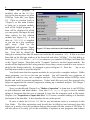
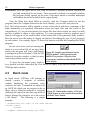
Figure 1.1. NTSYSpc main window
6
Introduction
Once
the
program
is
installed, click on the NTSYSpc
icon in the start menu to see what
NTSYSpc "looks like" (see Figure
1.1). Click on a button (such as
“Output”) on this main window
to bring up a program module,
such as the Output program. A
form will be displayed in which
you can specify the input file and
other options for the selected
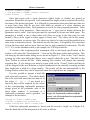
module (see Figure 1.2). A test
data set, TEST.NTS, is supplied
so you can try a few operations
right away. Click on the
highlighted cell opposite “Input Figure 1.2. Entry window for the Stand module.
file” to bring up a file open dialog
box. Note that by default the
dialog box assumes that data file names end with the file extension .NTS. If that is not true
then click on the file type window at the lower left and select “All files.” Use this dialog to
locate the TEST.NTS file in C:\NTSYS (or wherever you installed NTSYSpc) and then click
on the “Open” button. Then click on the “Compute” button to run the Output module. The
results will be displayed in the Listing window (every time you run a module a new section is
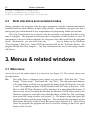
added to the listing notebook). An example is given in Figure 1.3. Press the 1 key or use
the Help menu items to open the help file.
You should note that the separate modules do not provide a complete analysis. Unlike
many programs, you do not just run one module. You will normally use a sequence of
modules in order to carry out a complete analysis. This structure makes NTSYSpc more
flexible and useful in research applications. Unless batch files are used, this approach also
helps one appreciate the various components making up a standard analysis. See Chaper 7
for a number of examples.
Next, you should read Chapter 2 on “Modes of operation” to learn how to use NTSYSpc
in both interactive and batch modes. Note that This Style of type is used to indicate
strings of characters that the user is expected to type into the computer, such as file names.
Chapter 4 on “Preparation of input data files” is, of course, essential reading as it describes
the format of the data files. It also describes the use of the special
Be sure to check the README.TXT file for any last-minute notes or corrections to this
User Guide. The blue registration card should also be filled-out and returned since this
allows us to notify you of any problems that are discovered with this version of NTSYSpc. It
will also allow us to notify you of the availability of updates as new programs and features
Introduction
7
are added to NTSYSpc. Your
comments, corrections, and
suggestions about the program are welcomed.
1.4
What’s new
in version 2.0
The entire user interface
is new! However, much of
the previous ways of using
the program were preserved.
One still selects a module,
fills in a form, and runs the
module. Some of the major
differences are listed below.
• The entry forms
have been simplified
and all of the listing
results are saved to a
Listing
notebook
window where you
can save, delete, or Figure 1.3. Listing window after running the Output module
even edit the results. on the TEST.NTS data file.
You
can
also
conveniently cut and paste them into other software such as word processors.
• Input file formats have not changed — except that there is no longer a length
restriction to the input lines. They were limited to just 255 characters (which seemed
quite adequate just a few years ago). Long file names are now recognized. Upper
and lower case letters are preserved as well as blank spaces within file names
(however, batch files do not yet permit blanks within file names). Long names
permits much more descriptive identifiers — often very important in more
complicated analyses involving many files.
• A new NTedit program replaces the previous NTEDITOR program. The new
program recognizes the various file formats and displays files in an appropriate
spreadsheet-like format.
• Graphics have been greatly improved. You can now call up the appropriate graphics
modules directly from many of the computational modules so that you can, for
example, immediately view a phenogram after using the SAHN module to perform a
cluster analysis. The entry forms for the graphics programs have also been simplified
8
Introduction
since the graphic options are now available from option dialog boxes brought up by
clicking on a plot with the right mouse button. You can now control the colors, fonts,
line widths, etc. of most aspects of the plots.
• Batch files have been changed to allow both longer lines and the ability to have
continuation lines for a command. To do this the program now requires that the start
of each command line begins with an asterisk.
• The information in the previous User Manual has been divided into this User Guide
and the very extensive help file. The help file contains the detailed technical
descriptions of each computational module. These sections can be printed from the
help file if you want the information in a printed form. This User Guide contains
only general information about how to use the program.
The changes to individual modules have been relatively minor since so much effort was
spent simply converting the DOS program to a Windows program. Future updates will
emphasize adding new computational methods and options.
2. Modes of operation
There are two modes in which NTSYSpc can be used: interactive and batch. In interactive
mode a module is selected from the main window by clicking on a button which causes a
window showing the various parameters and options for that module to be displayed. After
this form is filled in, click the Compute button to “run” the module and have the results
appear as a new section in the Listing window. You start batch mode by selecting the “Run
batch file…” item on the File menu or by using the convenient speed button on the toolbar.
The batch dialog box will let you select a file containing a sequence of NTSYSpc commands,
specify up to nine parameters, and run the batch file. The batch file contains commands that
call up various modules, supply parameters, and execute them automatically. Batch files are
convenient for the processing of large data sets or for processing a large number of data sets
(perhaps from a simulation).
2.1
Interactive mode
The main program window displays a “card file” with tabs labeled corresponding to sets
of programs (see Figure 1.1).
Modes of operation
9
Click on a tab to select a section. This displays buttons corresponding to the modules
available from that section. Notice that as the mouse passes over a button, additional
information is displayed in the status area at the bottom of the window. To select a module,
click on the corresponding button. The selected module will then display a parameter entry
window such as that for the STAND program shown in Figure 2.1. To run a program you
must enter the required information in the Entry Window (you need to at least specify the
name of an input file). To fill in the entry form, select the desired locations in the form using a
mouse and enter the appropriate information (the method of entering the information
depends on the type of field). The default choices, if there are any, will have already been
entered into the form.
Input or output matrix names: names are any valid Windows file names (including long
names). File names can, optionally, be preceded by a drive specification (e.g.,
a:test.nts) or a path specification (e.g., d:\data\test.nts). If the name
contains either a colon or a backslash character, then the name is used as is.
Otherwise the name will be appended to the current data directory. The program
will remember the drive and directory from previous runs so that you do not have
to enter it every time if all the files are in the same directory. It is easiest to simply
double click on the cell to bring up a file open dialog box where you can select the
file visually.
Numerical constants: Often numerical constants make sense only within certain limits.
NTSYSpc will not permit you to enter an out-of-range value. Decimal points should
not be typed when integer numbers are expected by the program.
Pick lists: Many of the programs require one to select one of several choices for a field (such
as a method of standardization or a clustering method). They are indicated by the
small
upside
down
triangle at the right end of
the field (there are two
examples in Figure 2.1).
Click on the field to
display a list of the
available choices. Move
the cursor or the mouse to
high-light the desired
option and then click with
the left mouse button.
Sometimes there is a blank
entry signifying that this
option is to be ignored.
The selected code will
then be entered into the Figure 2.1. Dialog window for the STAND module.
form.
10
Modes of operation
Checkboxes: Press the space bar or click with the mouse to alternate between checked (for
yes) and unchecked (for no) states. These are used to indicate, for example, whether
the program should operate on the rows of the input matrix or whether additional
information should be included in the output listing.
Once the fields have been filled--in correctly, click the Compute button to run the
program (since the Compute button has the focus initially, you can also just press the R
key). The Listing window will be opened to a new section and it will show a summary of the
input parameters you specified, information about the input files, and the results of the
computations. If you provided names for output files then these results are stored on disk
and are available as input to other modules. For some programs short-cut graphics speed
buttons will appear on the small toolbar at the bottom left of the parameter entry window.
Pass the mouse over the button to display the hint box describing the type of plot produced
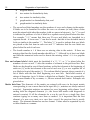
by each button. For example, Figure 2.2 shows the buttons available after running the EIGEN
program.
In case of an error (such as entering the
name of a non-existent file for an input data
matrix), the program will "beep" and display
a message in an Error Window. Click the OK
button to close this window so that you may
correct the problem and try again.
Figure 2.2. Graphic speed buttons for the
EIGEN module. The first button calls
MXPLOT to produce a 2D plot of the
eigenvectors and the second calls MOD3D
for a 3D plot.
To close the parameter entry window
for a module you may either click the Close button or simply select another module from the
NTSYSpc main window.
2.2
Batch mode
In batch mode NTSYSpc will attempt to
directly execute a sequence of modules
without displaying the parameter entry
windows for each. Commands are entered in
an ASCII file which can be prepared with an
editor such as Windows notepad or wordpad
(although the latter has the annoying habit of
always placing the extension .txt at the end of
a file name).
The following is a simple
example.
Figure 2.3. Batch mode window. Click the
"Load" button to select a batch file and then
click the "Run" button.
' standardize the rows of the data matrix
*stand o=data
r=sdata
' compute distances among the OTUs
Modes of operation
11
*simint o=sdata r=dist
' now perform a UPGMA cluster analysis
*sahn o=dist
r=tree
Lines that begin with a quote characters (either single or double) are treated as
comments. Blank lines are ignored. Each command line begins with an asterisk followed by
the name of the desired program. It is followed by parameter=value pairs that may take one
or more lines (lines that do not start with either an asterisk or a quote character are
considered continuation lines). Each parameter is a code for some program parameter. Value
gives the value of the parameter. There must be an "=" sign (and no blanks) between the
parameter and its value. Each such pair must be separated by at least one blank space. The
parameter is usually a one to three letter code (they are given in the help topic for each
module). They can be typed in either upper or lower case. The values can be file names,
numerical constants, or option codes. The values are identical to what would be specified in an
entry form in interactive mode. The defaults are also the same. For legibility it is convenient
to keep the lines short and use more than one line for each command if convenient. The file
TEST.NTB on the distribution disk is an example of a NTSYSpc batch file.
To execute a file containing batch commands, click on the batch speed button on the
toolbar or else select the “Run batch file…” item on the File menu of the main window. This
will bring up the batch mode dialog box as shown in Figure 2.3. Click on the “Load” button
to bring up a file open dialog that allows you to specify which file to use. The click on the
“Run” button to execute the file. While running, this window will display the currently
executing line. If you change your mind you may click on the “Cancel” button and the run
will be stopped at the next iteration or logical breakpoint in the currently executing module
(this might take a while for a large matrix). The results will be sent automatically to the
Listing window where they can be inspected when the computations are complete.
It is also possible to prepare a batch file
with replaceable parameters. This allows batch
files to be used with more than one data set. If
the codes %1, %2,…, %9 are found in a
batch file they will be replaced by the values
of the corresponding replaceable parameter
strings given in the parameter area of the
batch mode window. A maximum of 9
replaceable parameters can be specified. An
example is shown below.
*stand o=%1.nts r=sdata.nts
*simint o=sdata.nts r=dist.nts
*sahn o=dist.nts cm=%2 r=tree.nts
Figure 2.4. Batch mode window with the
test2.ntb file loaded and two replaceable
parameters provided.
If the first replaceable parameter is "mosq" and the second is "single" (as in Figure 2.4),
then this batch file will be interpreted as if it were as follows:
12
Modes of operation
*stand o=mosq.nts r=sdata.nts
*simint o=sdata.nts r=dist.nts
*sahn o=dist.nts cm=single r=tree.nts
2.3
Both interactive and command modes
During execution, the programs echo the input parameters and the comment information
furnished with the input matrices to the Listing window. In addition, a progress bar and a
status panel given an indication of how computations are progressing within each module.
Press the Cancel button if you need to stop the execution of programs that take a long
time to complete. The program should stop once it completes its next iteration or cycle of
computation (it does not check constantly for a keypress since that would slow the program
down). Alternatively, you can hold down the CAD keys to bring up the Windows
“Close Program” dialog box. Select NTSYSpc and then click on the “End task” button. The
program should then stop abruptly — but any information that was in the listing window
will be lost.
3. Menus & related windows
3.1 Main menu
Across the top of the main window is a menu bar (see Figure 1.1). The various choices are
described below.
File
This pulls down a submenu from which you can select “Edit data file,” “View
listing,” “Printer setup,” “Run batch file,” and “Exit.” The edit menu item displays
a file open dialog in which you can specify the name of the NTSYSpc file you wish
to edit. The separate program NTedit (included with NTSYSpc) is then run. If the
file is a valid NTSYSpc file then it will be displayed in a spreadsheet like format. If
there are any errors in reading the file then an alternative ASCII editor (such as the
Windows notepad or some other user selectable editor) will be run. The view listing
item opens the Listing window (see Section 3.3). The printer setup item opens the
standard Windows printer setup dialog box. The run batch file item brings up the
Batch mode dialog box so that a batch file can be run (see Section 2.2). The exit item
closes the program (the program can also be closed by clicking on the Close speed
button on the tool bar.
Menus & related windows
13
Options This pulls down a submenu from which you can select “Configuration” or “Restore
defaults.” The configuration item will display a parameter entry form for various
program configuration options.
The restore defaults item will reset the
configuration parameters back to their original states.
Help
This pulls down a submenu from which you can select “Contents,” “Topic search,”
or “About.” The contents item displays the table of contents for the help file. Topic
search brings up the Help topics dialog box in which you can search for various
terms. The about item displays the NTSYSpc about box showing copyright
information, version number, and the registration number.
3.2 Configuration window and file
There are a number of aspects of how NTSYSpc operates that can be modified by a user.
These are done from the Configuration Window (select “Configuration” under the Option
menu on the main window). This will display a window like those used for the various
computational modules. The entries here, however, are system parameters such as file
formats, directory names, and other options. The information you enter will be saved in the
ntsys.ini file in the Windows directory. The file also includes coded information about the
position and size of various windows used by NTSYSpc.
Configuration parameters
Batch code
FF
LF
LI
DD
OW
ED
Description
File format code.
Listing format code.
Listing indent when printing.
Data directory—the directory to use as the
current directory for data files.
File overwrite code. ?=ask, O=overwrite, and
A=append.
Editor to be called from the File|Edit menu.
The “File format” code is used to write results to disk so they can be used as input to
other modules. The default format of “e” ensures these values are saved with maximum
precision. This value should not be changed except possibly when working with very large
matrices and you are low on disk space. On the other hand, the “Listing format” code will
often be changed so that numerical information displayed in the Listing window has an
appropriate level of precision for a given data set. The default is “8.4f” which means that
floating point numbers should be displayed with four decimal places within a field eight
characters wide. You can also enter the code as “F8.4” as in FORTRAN but the NTSYSpc will
always store the code with the “f” at the end.
The “File overwrite code” is used to determine what should happen when the program
attempts to save a data file with the same name as an existing file. Ask means that a window
14
Menus & related windows
will pop-up asking what should be done, overwrite means that the existing file should be
deleted, and append means that the new file will be appended to the end of the existing file.
If you wish, another editor can be substituted for the NTedit program.
Note: the configuration parameters can also be changed through commands in a batch
file. Use CONFIG as if it were a module and use the "batch codes" given above to change the
values of the parameters. as the following:
config LF=9.6f
3.3 Output Listing Window
This window uses a notebook metaphor to display listing output from the computational
modules. Each time a module is run a new section is created with an index tab numbered in
sequence and labeled by the name of the module. An example is shown in Figure 3.1. A
section can be examined by clicking on a tab and then moving the scrollbars. Note that the
entire window can be resized.
The File menu provides a number of important operations. The entire “notebook” can
be reloaded from a previous run, saved to an ASCII file, cleared (i.e., deleted), or printed.
Alternatively, the currently
displayed section of the
notebook can be saved to an
ASCII file, deleted, or
printed.
The
Edit
menu
provides commands to
select all the text in the
current section, to cut
selected
text
to
the
Windows clipboard, to
copy selected text to the
clipboard, and to paste in
text from the clipboard.
These commands permit
you to copy results into
other software such as a
wordprocessor. They also
allow
you
to
delete
unwanted
information
before printing or saving to
a disk file. Keeping such
notebooks is a convenient
Figure 3.1. Example of the listing window after running the
commands in the test.ntb batch file.
Menus & related windows
15
way to verify which options were used to produce a certain result. The purpose of reloading
a notebook is to allow the appending of new results so that a record of all the computations
for a particular project can be kept together. The file format is simply an ASCII file with the
form feed character separating sections.
The Options menu allows you to change the font used both for the on-screen display and
for printing. The indent item controls the size of the left margin when printing.
The Help menu provides the standard contents, topic search, and about items.
4. Preparation of input data
files
NTSYSpc data files are ordinary ASCII files (txt files, not binary files). A file for a data matrix
may be prepared with an editor or any word processor that has a txt (non-document) mode.
If you try to use a document file there may be invisible binary codes that NTSYSpc will not
know how to interpret. Free-format is used for the entries in the data matrices. This means
that at least one blank space or a comma is required between numbers. The NTedit program
included with NTSYSpc can be used to prepare data files.
4.1 File formats
A matrix can contain 4 kinds of records. The comment and label lines are optional.
Comments These optional lines are used to include notes with the data. The first character in
each line must be some type of quote character " or '. The information on these
lines will be copied onto comment lines in any matrices based on this input matrix.
In addition, each subsequent program will add an additional comment line so that
the sequence of steps leading to a given matrix can be determined.
Matrix parameter line This line contains 4 integer numbers (The second and third may have a
suffix letter to indicate the presence and location of row and column labels) and
possibly a floating point number. They must be separated by at least one blank
space.
•
The first number is a code for the type of matrix.
1
rectangular data matrix,
2
symmetric dissimilarity matrix,
3
symmetric similarity matrix,
16
Preparation of input data files
4
diagonal matrix,
5
tree matrix for dissimilarity data,
6
tree matrix for similarity data,
7
graph matrix for dissimilarity data, and
8
graph matrix for similarity data.
•
The second and third numbers are the numbers of rows and columns in the matrix.
If labels are to be furnished for either the rows or columns (or both) then a letter
must be entered right after the number (with no spaces in between). An “L” is used
to indicate the presence of a list of labels in a separate record placed before the data.
For example, “25L” means that there are 25 rows and labels are furnished in a
separate record. A lower case "l" can also be used—but this is less desirable since it
looks so similar to the number "1". The letter “B” is used to indicate that row labels
are placed as the first item in each row and “E” indicates that the row labels are
placed after the end of each row.
•
The fourth number is 0 if there are no missing data in the matrix. If there are
missing data then the fourth number should be a "1" followed by at least one blank
and then the numerical code used to denote the missing values—999 is a popular
choice.
Row and column labels Labels must be furnished if a "B", "E", or "L" is placed after the
numbers of rows or and "L" after the number of columns in the previous line. Row
labels can be placed in one of three locations: as the first element at the beginning of
each row (B), as the last element at the end of each row (E), or as a separate list of
row labels in front of the matrix (L). The column labels if present always consist of a
list of labels with the first label beginning on a new line. Each label consists of
strings of characters (up to 16 letters or digits but no blanks). They are separated by
one or more blanks or by a comma, i.e., the are entered free format. Examples are
given below.
Matrix data lines The elements of the matrix are entered with rows in the input matrix
corresponding to one or more lines in the input file (i.e., matrices are always entered
rowwise). Symmetric matrices are entered as rows beginning with column 1 and
ending with the diagonal elements (i.e., the lower half matrix with diagonals is
entered rowwise). If all the elements for a row do not fit on a single line, then
continue typing on as many new lines as needed. It is important that the first
element of a new row starts on a new line—even if the previous line is mostly
empty. The elements themselves are free format. Values must be separated by one
or more blanks or a comma.
Preparation of input data files
17
The lines can be very long (the theoretical limit is 2 GB!)—but it will be easier to work
with them with most editors if you use shorter lines (80 characters or fewer). Blank lines are
ignored.
More than one matrix can be stored in a single file. The records for a second matrix
(starting with the optional comment lines) simply follow after those for the first. Most
program modules in NTSYSpc will perform the selected set of operations on each of the
matrices in an input file. The results for the second and subsequent matrices are simply
appended to the files produced by processing the first matrix. For some programs it is
necessary to put more than one matrix in a single file in order to perform a certain
computation. It is required by programs such as CPCA, CVA, and POOLVCV. It is also
necessary in order to compute the majority rule consensus tree for more than two trees.
Note: if you prepare the original data matrix so that the rows correspond to the
characters (variables) and the columns correspond to the objects being classified (OTUs, data
points, etc.), then you will find that default row/column direction options in most of the
modules will be correct.
Since there is always the chance that there will be an error in the preparation of a data
matrix, it is strongly suggested that you use the NTedit program and that you first try the
OUTPUT module to display your input data matrix. It can be printed out for convenience in
proofing.
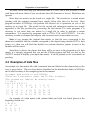
4.2 Examples of data files
An example of a data matrix file with 3 comment lines and labels for the columns but not the
rows is given below. This set of test data is furnished on the distribution disks for NTSYSpc
and is used for many of the examples given in this manual.
"A sample data matrix to test NTSYSpc
"There are 5 characters (rows) and 10 OTUs (columns)
"The columns are labeled. No missing values.
1 5 10L 0
A B C D E F G H I J
8
7
9 13
6 12
9
7 11 6
5
6
3
3
7
10 5
7
5 7
11 13 12
9
8 18 17 21 22 13
10 18 22
8
7 17 18 26 24 18
11
6 12 10 10 19 13 13 19 14
An example of a data matrix with column labels and with row labels placed at the
beginning of each row:
1 4B 3L
c1 c2
r1 1,
r2 3,
0
c3
3,
2,
4
1
18
r3
r4
Preparation of input data files
3,
2,
4,
1,
2
2
An example of a symmetrical correlation matrix file (note that elements past the
diagonal of a symmetric matrix must not be entered). Labels can only be placed in a list in
front of the data (i.e., only the “L” code is valid).
"A sample correlation matrix with labels
3 5L 5 0
A B C F E
1
0.4 1
0.3 0.4 1
0.6 0.3 0.4 1
0.7 0.3 0.4 0.5 1
In this case the “L” can be appended to either the number of rows, the number of
columns, or to both. But only one set of labels should be furnished. If a symmetric matrix is
the output of some other program it may be stored as a full square matrix. In that case you
should code it as a rectangular matrix and use the SYMD or SYMS options of the TRANSF
program to convert it to the lower half matrix form required by NTSYSpc.
Tree matrices (matrix types 5 and 6) are usually produced by programs rather than
entered by a user. The usual exception is when one wishes to enter an expected tree to
compare with the observed results (using the CONSEN program). There are two styles in
which a tree can be entered in NTSYSpc. The format used internally in NTSYSpc is described
at the end of the description of the SAHN program.
In addition, you can describe a tree using nested parentheses as in the NEXUS format
used, for example, in the program PAUP. This option is only available for tree matrices based
on dissimilarities (matrix type code = 5). While complete NEXUS files cannot be read, the
tree descriptions can be processed as long as the OTUs names are given as integer numbers
(corresponding to their position in a data matrix). This format is provided to enable trees
produced by other programs to be entered into NTSYSpc more easily. One can also enter
trees by hand using this notation -- but it becomes awkward for large trees since it is easy to
miscount parentheses.
In this format nesting is indicated by parentheses, branch lengths (which are optional)
are given in the format ":value" after each OTU name and right parenthesis, and the end of
the tree is indicated by a semicolon. If branch lengths are not provided then NTSYSpc will
generate arbitrary clustering levels consistent with the set relationships given in the tree.
Note that one must either provide branch lengths for all branches or else for none of them. A
mixture will produce unpredictable results.
Example of a NEXUS style tree not using branch lengths:
" NEXUS style input with OTU labels provided.
5 5L 2 0
Preparation of input data files
19
A B C D E
(((1,3),2),(4,5));
This implies a tree of the following topology:
1--.
3----.
2----L---.
4--.
|
5--L-----L--Example of an input file using branch lengths:
" Example using branch lengths but no OTU labels.
5 5 2 0
(((1:2.1,3:2.5):1.6,2:3.3):0.7,(4:0.5,5:0.3):0.9);
This tree has the same topology as in the previous example. It should be noted, as in the
above example, that the branch lengths may be inconsistent with the levels (heights) used to
describe an ultrametric tree. In the above example the branch length for OTU 1 is 2.1 but the
length for OTU 3 is 2.5. The program will use the average (2.4) of these values. An additional
problem is that the raw average of heights of each interior node may not increase as one goes
towards the root. In the above example the height at which the set {1,3,2} joins the root is 4.3
and the height at which {4,5} joins is 1.3. The average of these two values is 2.8 which is
smaller than the level at which {2} joined {1,3}. The program constrains the average heights to
be at least 0.0001 greater than the largest height within the sets being joined. This preserves
the topology indicated by the parentheses but shows the trees graphically as looking as if
there was a multifurcation.
4.3 Interface to other programs
Since the matrix files have a simple format (see the previous section), they should be usable
by other programs with very few changes needed. Results from other programs should also
be convertible into the format described above. The largest problems are apt to be due to
different conventions for furnishing labels and for reading symmetric matrices.
Provision is included in the NTedit program for the reading of rectangular matrices
from "worksheet" files compatible with Excel. These files must have an extension of “XLS.”
In order import these files the Excel program itself must be present since NTSYSpc uses
techniques called DDE and OLE to have Excel actually read the file and then pass the
information to NTSYSpc. NTSYSpc will search the spreadsheet for the matrix by starting
with cell A1. That cell and the 3 cells to its right are taken as the matrix parameter line. The
first cell is the matrix type (which must be a "1"). The two cells to the right (B1 and C1) must
be the number of rows and then the number of columns. Note: these must be integer
numbers. Do not try to append a code to indicate the presence of row or column labels. Cell
D1 contains the missing value code. Leave it blank if there are no missing values. The next
row contains column labels beginning with cell B2. If left blank, NTSYSpc will simply
20
Preparation of input data files
number the columns. The column beginning with cell A3 contains the row labels. If blank
then NTSYSpc will simply number the rows. Thus row and column labels are in their natural
position—not as records in front of the matrix as in as in the “L” option. The matrix itself
begins in cell B3. If empty cells or labels are found within the matrix, they are assumed to
correspond to missing values. Regions in the spreadsheet beyond the matrix are ignored and
can be used to store other information. Only one matrix can be read from each spreadsheet.
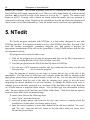
5. NTedit
The Ntedit program, included with NTSYSpc, is a data editor designed for use with
NTSYSpc data files. It recognizes (actually requires) valid NTSYSpc data files. For each of the
basic file formats (rectangular, symmetric, diagonal, tree, and graph) it displays an
appropriate arrangement of the cells in the spreadsheet. Using NTedit ensures that the files
are formatted correctly.
The program can be started in three ways.
1. Click on the program icon to start the program and then use the File|Open menu to
load an existing data file or File|New to begin a new file.
2. Load this program from the File|Edit data file menu of NTSYSpc.
3. You can use a DOS command window and type ntedit and the name of a file and
then press the R key to start the program.
Once the program is started you can enter or correct data in any of the cells of the
spreadsheet. You can insert or delete rows and columns within the table by clicking on the
appropriate menu choices or the speed buttons on the tool bar. You can also add or delete
rows and columns from the end of the table by entering new values in the edit boxes
displaying the current numbers of rows and columns. To change the labels for the rows or
columns (given in the first, protected, row or column of the data table) click on the RowLabs
or Col.Labs buttons to unprotect these entries. You can then type new information in these
cells. The new names should not have any blanks within them. Click these buttons again to
re-protect these labels from accidental change.
To create a new file use the following steps:
1. select “New” from the file menu,
2. select the proper matrix type from the list (you may receive a warning about the
possible loss of data when you change matrix types),
3. enter the correct numbers of rows and columns in the edit boxes labeled “No. rows”
and “No. cols.” (note that the new values do not take effect until your cursor leaves
the edit boxes), and then
Preparation of input data files
21
4. start entering your
data.
If there are missing
data
the
identifying
numerical code needs to be
entered in the edit box
labeled “Missing.” Click
on the “Comments” button
if you wish to add
comments to the matrix.
When you are done you
can use the “Check
matrix” item under the
Edit menu to check that all
data values are properly
formatted numbers. It also Figure 5.1. Example of NTedit with the test.nts file loaded.
will check to make sure
there are no empty cells. This same check is made when to attempt to save the matrix to a
disk file. You will be given a chance to replace all the empty cells with whatever code you
specified for missing data (if that field is blank then zeroes will be used).
NTedit can also be used to view and make changes in existing files. A limitation of the
program is that existing files must already be in a proper format. If you try to load a file that
is not formatted properly you will receive an error message and then an alternative editor
(the default is the Windows notepad program) will be called to display the file. The “Alt.
Editor” item under the Options menu allows you to select another editor. Note: you must
select an editor capable of producing plain ASCII (txt) files.
The NTedit help can be consulted for additional information.
6. Graphics options & menu
The various plots produced by NTSYSpc can be enhanced in many ways by taking advantage
of the many options available.
Begin by clicking on a plot with the right mouse button or by selecting the “Plot options”
item on the Options menu above the plot. The options available depend upon the type of
plot. All plots allow the user to specify a title and a subtitle and the fonts used to display
them. There is also always a button labeled “General” that opens another dialog box
described in the next section.
22
6.1
Graphics options & menu
General plot options
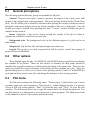
The following options (listed by group) are available for all plots.
General: “Preserve axis aspect” means to preserve the aspect of the x and y axes with
respect to the original units of measurements. This must be kept checked for the 3D and Tree
plots. For 2D scatter plots it should be checked when plotting the results of analyses such as
principal components analysis where the relative lengths of the axes is important. One will
usually not want it checked when plotting raw data. “Center” controls whether the plot is
centered in the window.
Frame: Optionally, a line can be drawn around the outside of the plot to frame it.
Options are available to control its size and color.
Background color: The background color in the different regions of a plot can be set
individually.
Margin size: Top, bottom, left, and right margin sizes can be set.
Legend: This group is not used at present but will be used to control how groups of
points or lines are identified.
6.2
Other options
These depend upon the plot. For MXPLOT and MOD3D there are pick lists for selecting
the variables to be plotted. There are also choices of whether the data points should be
identified by sequential numbers or labeled using the labels in the input data. There are also
options to control the various attributes of the points and lines making up a plot. There are
special dialog boxes to allow you to select colors, plotting symbols, fonts, etc. In MOD3D the
view options allow one to rotate, tilt, and change the distance of the viewing position.
6.3
Plot menu
The File menu contains the following items: “Printer setup” (which allows you to select
a printer, paper size, and orientation), “Print preview” (which changes the plot to a preview
of how it will look when printed), “Print” (to print the plot), and “Close” (to close the plot
window). The Edit menu allows one to copy the current plot to the Windows clipboard. You
can then paste it as a bitmap into a word processor or paint program. The Help menu leads
to the standard Contents, Topic search, and About items.
Typical applications
23
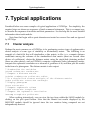
7. Typical applications
Furnished below are some examples of typical applications of NTSYSpc. For simplicity, the
required steps are shown as sequences of batch command statements. This is a compact way
to describe the sequence of modules and their parameters. See the help file for more detailed
information about each module.
Note lines that begin with a quote character are treated as comment lines and are ignored
by NTSYSpc.
7.1
Cluster analysis
Perhaps the most common use of NTSYSpc is for performing various types of agglomerative
cluster analysis of some type of similarity or dissimilarity matrix. The following is an
example of a batch file that will standardize a data matrix, in file data, compute distance
coefficients among the columns of the standardized data matrix (there are several other
choices of coefficients), cluster the distance matrix using the single-link clustering method
(there are other choices, such as UPGMA), compute a cophenetic-value (ultrametric) matrix,
compute the cophenetic correlation as a measure of goodness of fit, and then plot the results
in the form of a phenogram. The distance matrix is also output.
" Standardize the variables
*stand o=data.nts r=sdata.nts
" Compute a distance matrix
*simint o=sdata.nts r=dist.nts c=dist
" Do a single-link cluster analysis of the distance matrix
*sahn o=dist.nts r=tree.nts cm=single
" Display phenogram
*tree o=tree.nts
" Compute cophenetic values
*coph o=tree.nts r=coph.nts
" Compute the cophenetic correlation
*mxcomp x=coph.nts y=dist.nts
When working interactively, one can view the tree from within the SAHN module by
clicking on the plot speed button. Note that the Mantel test results displayed by the
MXCOMP module should be ignored since the two matrices being compared are not
independently derived.
24
7.2
Typical applications
Ordination analyses and biplots
In ordination analyses the goal is to position points along coordinate axes in a low
dimensional space (rather than to form sets of points as in cluster analysis). There are many
different methods depending upon the criteria used to define what is meant by the “best”
low-dimensional representation of the relationships among the points. Several programs in
NTSYSpc can be used to perform these analyses.
When an original data matrix is available it is possible, and usually desirable, to make
plots of both the variables and the points with respect to the same axes. This is called a
“biplot”. This allows one to not only see the patterns, trends, etc. among the points and of
relationships (usually correlation) among the variables, but also the relationships between the
points and the variables — at least to the extent that they can be summarized in a few
dimensions. Unfortunately, there seems to be no strong consensus about how to scale the
two ordinations relative to one another. Gabriel (1968, 1971, 1981) defines a biplot of an n×p
matrix Y as a simultaneous bivariate plot of the n points in each column of a matrix A and of
the p variables in each column of matrix B, where Y=ABt (it would be a bimodel if a 3dimensional plot were made). Matrices A and B can be expressed in terms of a singularvalue decomposition of matrix Y: Y=UΛ
Λ Vt. One could set A=UΛ
Λ and B=V (called a JK biplot
by Gabriel and Odoroff, 1986). In terms of principal components analysis, this corresponds to
computing normalized eigenvectors from the correlation or variance-covariance matrix for
the variables and then using the PROJ program to project the points onto these vectors. The
rows of A are plotted as points and the rows of B are plotted as vectors. Note that the matrix
Λ of singular values is the square root of the eigenvalue matrix obtained in a principal
components analysis. This type of decomposition of a data matrix is called preference scaling
or repertory grid analysis in psychology and sociology.
One can equally well set A=U and B=VΛ
Λ (GH biplot of Gabriel and Odoroff, 1986). One
could also multiply both U and V by L 0.5 (an SQ biplot). This latter choice would seem most
appropriate in correspondence analysis where both the rows and columns can be interpreted
as variables The matrix Λ could also be apportioned in any other way to U and V as long as
their product yields Y.
A problem with a JK biplot is that the vectors for the variables are of unit length and
thus are not in the same scale as the vectors for the points. Since the vectors for the variables
are dimensionless a plot of them does not indicate how well the variance of each variable is
explained by the number of dimensions used. For this reason one can deviate from a true
biplot and multiply both U and V by Λ. As a consequence, one cannot visually estimate an
element, say yij, of the original data matrix as simply the inner product of row i of A and row j
of B, one must compute the projection of row i of A onto row j of B. One compares the
relationships between the ordinations of the points and of the variables by examining the
angles between them. Jackson (1991) indicates that this alternative is popular “among French
practitioners.”
Typical applications
7.3
25
Principal components analysis
Principal components analysis, PCA, is one of the most important methods of ordination
analysis. It constructs a new set of orthogonal coordinate axes such that the projection of
points onto them have maximum variance in as few dimensions as possible. While defined in
terms of variances and covariances, PCA is usually applied to standardized data since the
results are sensitive to the choices of units of measurement and this is arbitrary in most
studies.
The following batch file will standardize a data matrix by rows, compute a matrix of
correlations among the variables (assumes rows), extract 3 eigenvectors from the correlation
matrix, project the standardized data onto these eigenvectors, and then make a 3-dimensional
plot of the objects. Various matrices are also output to files.
" Standardize variables (rows)
*stand o=data.nts r=sdata.nts
" Compute correlations among variables (rows)
*simint o=sdata.nts c=corr r=corr.nts d=row
" Output the correlation matrix
*output o=corr.nts
" Extract first 3 PCA axes from correlation matrix
*eigen o=corr.nts n=3 r=vect.nts val=val.nts
" Output principal component axes
*output o=vect.nts
" Project objects onto PCA axes
*proj o=sdata.nts d=col f=vect.nts r=proj.nts
" Output projections
*output o=proj.nts
" Display 3D plot of projection of objects
*mod3d o=proj.nts
" Display 3D plot of variables defining the PCA axes
*mod3d o=vect.nts d=col
data.
The last two plots together comprise a three-dimensional biplot (a “bimodel”) for these
An alternative procedure would be to not standardize the data and to use a variancecovariance matrix rather than a correlation matrix in the above steps. In such a case, the
largest weights are given to those variables with the largest variances. This implies that the
variables were measured in comparable units of measurement. This might be appropriate,
for example, for a matrix of log-transformed variables in a morphometric study (perhaps with
means subtracted following Darroch and Mosimann, 1985).
7.4
Principal coordinates analysis, PCOORDA
PCOORDA can be thought of as a computational alternative to PCA. The steps shown below
will give results identical to PCA. One important consideration is that when there are many
fewer points than variables computation time may be much less than for the usual PCA.
26
Typical applications
The batch file given below performs the following operations: the data matrix is
standardized by variables (rows), a matrix of distances between the objects is computed, the
distance matrix is double-centered, the double-centered matrix is then factored and a plot is
made showing the objects in a 3-dimensional space.
" standardize data if in different units
*stand o=data.nts r=sdata.nts
" Compute distances among objects
*simint o=sdata.nts r=dist.nts
" Double-center the distance matrix
*dcenter o=dist.nts r=dcent.nts
" eigenvectors correspond to projections of objects
*eigen o=dcent.nts n=3 r=proj.nts
*output o=proj.nts
" Display -- Note that direction is "col"
*mod3d o=proj.nts d=col
PCOORDA can also be viewed as a distinct ordination method since it can also be
applied to various types of similarity and dissimilarity matrices - or even to experimentally
determined proximity matrices where there is no original “data matrix.” The computational
steps would then be as follows:
" Double-center the matrix
*dcenter o=dist.nts r=dcent.nts
" Extract eigenvectors
*eigen o=dcent.nts n=3 r=proj.nts
" Output eigenvectors = projections
*output o=proj.nts
" Display -- Note that direction is "col"
*mod3d o=proj.nts d=col
Of course, an arbitrary dissimilarity matrix may not be very compatible with a Euclidean
metric. In such cases many of the eigenvalues may be negative. In performing such an
analysis one hopes that such negative eigenvalues are small and can be ignored.
7.5
Nonmetric multidimensional scaling
This method is similar to PCOORDA in that it can be used to represent the relationships
among a set of points in a low dimensional space. The difference is that in non-metric
multidimensional scaling analysis the distances among the points in the final configuration
need only have a monotone relationship to the distances implied by the original data matrix.
This relaxed constraint usually makes it possible to get a much better fit in fewer dimensions
than is possible in PCOORDA.
If possible, one begins with the results of a PCOORDA as an initial configuration since
this usually results in many fewer iterations being necessary in the MDSCALE module.
"
Use PCOORDA to obtain an initial configuration
Typical applications
27
*DCENTER O=dist.nts R=dcent.nts
*EIGEN O=dcent.nts N=2 R=init.nts
" non-metric MDSCALE using initial solution
*MDSCALE O=dist.nts N=2 I=init.nts R=final.nts
" rotate result for ease in viewing
*SIMINT O=final.nts C=varcov R=vcv.nts
*EIGEN O=vcv.nts N=2 R=vect.nts
*PROJ O=final.nts D=row F=vect.nts R=result.nts
" plot the final rotated configuration
*MXPLOT O=result.nts
When viewing the plot be sure to set the option “Preserve axes aspect.”
7.6
Burnaby's method for size adjustment
The following batch file shows an example of how the ORTH option of the PROJ program can
be used for Burnaby's method to remove the effect of a vector from a data set. The data are
projected onto the hyperplane orthogonal to the specified vector. In the example given below
the first principal component axis is used as "size". Other vectors such as the isometric vector
(1,1,...,1) could also be used.
" compute VCV matrix from a data matrix
*simint o=data.nts c=varcov r=vcv.nts d=row
" compute first principal component
*eigen o=vcv.nts n=1 r=pc1.nts
" project data onto hyperplane normal to PC1
*proj o=data.nts f=pc1.nts pt=orth r=bproj.nts
The resultant adjusted data matrix bproj.nts can then be used, for example, to compute
a distance matrix which is then clustered by SAHN. The clusters should then not be
influenced by variation in the original data set that was parallel to the first principal
component—which is often mostly due to size. The first principal component points in the
direction in which there is the most variation. If the organisms sampled happen to be about
the same size, then this vector is apt to represent sexual differences, polymorphisms, etc. In
many cases it may be safer to use an a priori defined isometric vector as a size vector (i.e., the
vector 1,1,1,1…,1) or to use the first principal component based only on a carefully selected
subset of variables.
The adjusted data matrix could also be used as input for a canonical variates analysis or
for the computation of size-free generalized distances (see the CVA module).
7.7
Comparison of matrices
Often one wishes to test whether one set of relationships among a set of objects is
independent of another. For example one may wish to test whether the degree of
morphological difference between samples is related to the geographical distances between
28
Typical applications
the sampled populations (see, for example, Sokal, 1979). A simple way to do this is by the use
of the Mantel test (Mantel, 1967). The test assumes that the two matrices have been obtained
independently—one cannot use it to test two matrices where one has been derived from the
other. The steps given below assume that one already has a matrix of geographical distance,
gdist.nts.
" Compute morphological dissimilarity matrix
*simint o=data.nts c=dist r=mdist.nts d=row
" Compare mdist with gdist, 250 random permutations
*mxcomp x=mdist.nts y=gdist.nts np=250
While less efficient than a specialized program, one can use the above steps to perform
spatial autocorrelation analyses. The only modification needed to the above steps is to
replace the geographical distance matrix in file gdist.nts with a series of matrices
corresponding to a desired geographical distance class. In each matrix an entry is 1 if objects
i and j are within the desired distance class and is 0 otherwise. To make a distance
correlogram one simply plots the matrix correlations as a function of geographical distance.
The Mantel test can be used to determine which coefficients are statistically different from
zero.
Bibliography
29
Bibliography
Burnaby, T. P. 1966. Growth-invariant
discriminant functions and generalized
distances. Biometrics, 22:96-110.
Darroch, J. N. and J. E. Mosimann. 1985.
Canonical and principal
components of shape. Biometrika,
72:241-252.
Everitt, B. S. and Dunn, G. 1992. Applied
multivariate data analysis. Oxford
Univ. Press: New York. 304 pp.
Gabriel, K. R. 1968. The biplot graphical
display of matrices with application
to principal component analysis.
Biometrika, 58:453-467.
Gabriel, K. R. 1971. The biplot graphical
display of matrices with applicatin
to principal componenet analysis.
Biometrika, 58:453-467.
Gabriel, K. 1981. Biplot display of
multivariate matrices for inspection
of data and diagnosis. P. 147-173 in
Barnett, V. (ed.) Interpreting
Multivariate Data. John Wiley and
Sons, New York.
Gabriel, K. and Odoroff, C. L. 1986.
Illustrations of model diagnosis by
means of three-dimensional biplots.
Pp. 257-274 in Wegman, E.J. and
DePriest, D.J. (eds.). Statistical
image processing and graphics,
Marcel Dekker, New York.
Gnanadesikan, R. 1977. Methods for
statistical data analysis of
multivariate observations. Wiley.
New York. 311 pp.
Hartigan, J. A. 1975. Clustering
algorithms. Wiley. New York. 351
pp.
Jackson, J. E. 1991. A user’s guide to
principal components. Wiley: New
York. 569 pp.
Mantel, N. A. 1967. The detection of
disease clustering and a
generalized regression approach.
Cancer Res., 27:209-220.
Reyment, R. A. 1991. Multidimensional
paleobiology. Pergamon Press:
New York, 377 pp.
Romesburg, H. C. 1984. Cluster analysis
for researchers. Lifetime Learning
Publications. Belmont, California.
334 pp.
Saitou, N. and M. Nei. 1987. The
neighbor-joining method: a new
method for reconstructing
phylogenetic trees. Mol. Biol. Evol.,
4:406-425.
Sneath, P. H. A. and R. R. Sokal. 1973.
Numerical Taxonomy. Freeman.
San Francisco. 573 pp.
30
Bibliography
Sokal, R. R. 1979. Testing statistical
significance of geographic variation
patterns. Systematic Zool.,
28:227-231.
Sokal, R. R. and P. H. A. Sneath. 1963.
Principles of Numerical Taxonomy.
Freeman. San Francisco. 359 pp.
Weir, B. S. 1989. Building trees with DNA
sequences. Biometric Bulletin,
6(4):21-23.
Index
31
INDEX
association coefficients, 5
axis aspect ratio, 23
Batch mode, 11
bimodel, 25
biplot, 25
Burnaby's method, 28
canonical correlation, 3
canonical vectors analysis, 4
cladistics, 1
Cluster analysis, 24
Common principal components analysis, 3
Configuration window, 14
consensus tree, 3
cophenetic value matrix, 3
Correspondence analysis, 3
elliptic Fourier analysis, 4
Excel, 20
File formats, 16
File overwrite code, 14
Fourier analysis, 4
homogeneity of covariance matrices, 5
Installation, 6
isometric vector, 29
line limit, 18
Mantel test, 4, 29
matrix comments, 22
minimum-length spanning tree, 4
missing data code, 17, 22
multidimensional scaling, 28
multidimensional scaling analysis, 4
neighbor-joining method, 4
NEXUS format, 19
Ordination analysis, 25
Output Listing Window, 15
PCA, 26
PCOORDA, 27
phenetics, 1
preference scaling, 25
Principal components analysis, 26
Principal coordinates analysis, 27
repertory grid analysis, 25
replaceable parameters, 12
single-link, 5
singular-value decomposition, 5
size
adjustment, 28
spatial autocorrelation analyses, 29
thin-plate spline, 5
tree matrix, 19
two-block partial least-squares, 3
ultrametric, 20
ultrametric values, 3
UPGMA, 5
XLS, 20