1
Troubleshooting
causes of head crashes). If the media is not HP approved, advise the customer to use HP
media and check to see whether the problem is now solved.
Banding at variable extreme environmental conditions
Since the Accuracy Calibration has been done at normal environmental conditions, printing in extreme
environmental conditions will cause banding because the advance of the Media Advance Roller does
not correspond to the same conditions that the calibration was done in. To solve the problem, try the
following:
Perform the Accuracy Calibration in the new environmental conditions (Refer to the User’s Guide).
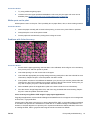
Worm marks on HP Coated media with light area fills
Light bands (S-shaped) in Paper axis direction where light area fills are printed, causing unacceptable
Image Quality defect.
●
Print the Service Configuration Print and check whether the humidity level is very low (below 30%).
Increasing humidity may help in reducing the severity of the problem.
NOTE: The media is causing the problem and not the printer. Do not attempt to try to replace printer
parts to solve this problem.
The Media Basket was damaged during printer setup
1.
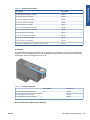
There are three plastic parts that could break during printer installation and need replacing.
2.
Check the parts table and graphics in Parts and Diagrams to identify what service parts you must
order. See Printer Support on page 153.
3.
Replace the component. See Bin Assembly on page 188.
Solving Paper-Handling Problems
Roll paper
The Front Panel indicates that paper is misaligned or incorrectly positioned
●
The roll may be loaded the wrong way. The paper should load over the roll toward you.
●
Check that the paper is correctly loaded onto the spindle.
●
The paper may be loaded at an angle. The right-hand edge must be aligned with the blue line on the
Print Platen.
●
Check that the Right Roll Support is properly attached and screwed to the printer.
The Rewinder, located on the Right Roll Support, should maintain proper back tension. If the Right Roll
Support is misaligned or not properly attached to the printer, the Rewinder will not function properly.
To further diagnose problems with the Rewinder, see Rewinder Test on page 107.
Sheet paper
●
It must be loaded with the right-hand edge against the white line on the upper roll cover.
●
The paper may be crumpled or warped or may have irregular edges.
●
If hand-cut paper is used, the edges may not form a right-angle or they may be rough. If possible, handcut paper should not be used. Only purchased sheet paper should be used in the printer.
●
If you have problems with paper jams, check that the Overdrive is not obstructed by bits of paper or
using the Turn Drive Roller Service Utility. See Turn Drive Roller on page 123.
Check that the Right Roll Support is properly attached and screwed to the printer.
ENWW
The Media Basket was damaged during printer setup
5