1
VDO TPMS Pro
User manual
36/2014 (1.0) - UK
REVISION OF THE ATEQ VDO TPMS PRO MANUAL
Due to continuing improvements, the information contained in this user manual, the features and design
of this device are subject to be changed without prior notice.
Edition/
Revision
First edition
Reference
Date
(week/year)
Chapters updated
UM-366EVB-U
39/2014
European VDO version
Table of contents
TABLE OF CONTENTS
User guide
2
VDO TPMS PRO TOOL .................................................................................................. 2
1. SPECIFICATIONS ...............................................................................................................................2
2. IMPORTANT SAFETY INSTRUCTIONS.............................................................................................3
3. CAUTION .............................................................................................................................................4
4. FUNCTION KEYS ................................................................................................................................5
5. POWER ON..........................................................................................................................................7
6. OPERATING INSTRUCTIONS ............................................................................................................8
VDO TPMS PRO USE..................................................................................................... 9
1. CHECK SENSOR ................................................................................................................................9
2. SERVICE TPMS.................................................................................................................................14
3. PROGRAM BLANK SENSOR...........................................................................................................19
4. HISTORY............................................................................................................................................24
5. SETTINGS..........................................................................................................................................26
6. ABOUT...............................................................................................................................................31
MISCELLANEOUS ....................................................................................................... 32
1. CHARGE ............................................................................................................................................32
2. PRINT SENSOR DETAILS ................................................................................................................33
3. TROUBLESHOOTING.......................................................................................................................34
4. TOOL UPDATE..................................................................................................................................34
5. FACTORY RESET FOR PROGRAMMABLE SENSOR CHANGE...................................................36
6. SAFETY BATTERY AND CHARGE INFORMATION .......................................................................37
7. RECYCLING ......................................................................................................................................38
Index
UM-366EVB-U
40
User manual VDO TPMS Pro 1/39
User manual VDO TPMS Pro
User guide
VDO TPMS PRO TOOL
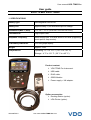
1. SPECIFICATIONS
Battery Type:
Rechargeable Lithium Ion
Battery Life:
Approximately 1,000 activations per full charge.
Dimensions (Max. L,W,D):
7.9" x 4.7" x 1.6" (20.0 cm x 12.0 cm x 4.0 cm).
Case Material:
High Impact ABS.
Response Frequency:
Main frequencies: 315 MHz and 433.92 MHz (supporting
most specific frequencies).
Low Battery Indication:
LCD bar graph display.
Weight:
Approx. 2 lbs.
Temperatures:
Operating: -4° F to 131° F (-20° C to +45° C).
Storage: -4° F to 131° F (-20° C to +45° C).
Product content:
¾ VDO TPMS Pro Instrument.
¾ USB cable.
¾ RJ45 cable.
¾ OBDII Module.
¾ Power supply + UK adapter.
Option accessories:
¾ Docking Station (option).
¾ IrDA Printer (option).
UM-366EVB-U
User manual VDO TPMS Pro 2/39
User manual VDO TPMS Pro
2. IMPORTANT SAFETY INSTRUCTIONS
Do not discard. Retain for future reference.
This device complies with Part 15 of the FCC Rules
Operation is subject to the following two conditions:
(1) This device will not cause harmful interference, and
(2) This device will accept any interference received, including interference that may
cause undesired or improper operation.
WARNING: This product emits electromagnetic and electronically
generated waves that may interfere with the safe operation of
pacemakers.
Individuals that have pacemakers should never use this product.
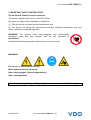
WARNING:
Do not use on live electrical circuits.
Must read instructions before use.
Wear safety goggles. (User and bystanders).
Risk of entanglement.
Read the Warranty, Safety and Recycling information at the end of this user guide.
UM-366EVB-U
User manual VDO TPMS Pro 3/39
User manual VDO TPMS Pro
3. CAUTION
READ THESE INSTRUCTIONS BEFORE USING
Your Tire Pressure Monitoring (TPM) tool has been designed to be durable, safe, and
reliable when properly used.
All VDO TPMS PRO TOOLS are intended to be used only by qualified and trained
automotive technicians or a in light industrial repair shop environment. Please read all
instructions below before using. Always follow these safety instructions. If you have any
questions pertaining to the safe or reliability use of this tool, please call your local dealer.
1. Read All Instructions
All warnings on the tool and in this manual should be adhered to. All operating instructions
should be followed.
2. Retain Instructions
The safety and operating instructions should be retained for future reference.
3. Heed Warnings
User and bystanders must wear safety goggles and must read instructions before use. Do
not use on live electrical circuits, risk of entanglement.
4. Cleaning
Clean with a soft dry cloth, or if necessary, a soft damp cloth. Do not use any harsh
chemical solvents such as acetone, thinner, brake cleaner, alcohol, etc as this may
damage the plastic surface.
5. Water & Moisture
Do not use this tool where contact or immersion in water is a possibility. Never spill liquid
of any kind onto the tool.
6. Storage
Do not use or store the tool in an area where it is exposed to direct sunlight or excessive
moisture.
7. Use
To reduce the risk of fire, do not operate the tool in the vicinity of open containers or
flammable liquids. Do not use if the potential for explosive gas or vapors exists. Keep the
tool away from heat generating sources. Do not operate the tool with the battery cover
removed.
UM-366EVB-U
User manual VDO TPMS Pro 4/39
User manual VDO TPMS Pro
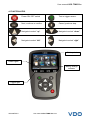
4. FUNCTION KEYS
Power ON /OFF switch
Test or trigger sensor.
Next, continue or confirm.
Cancel, previous step.
Navigate to select "up”.
Navigate to select “down”.
Navigate to select “left”.
Navigate to select “right”.
Battery status
Result lights
Battery charge
indicator
Trigger light
UM-366EVB-U
User manual VDO TPMS Pro 5/39
User manual VDO TPMS Pro
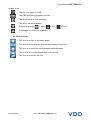
Header icons
The tool is plugged on USB.
The OBD module is plugged to the tool.
The Bluetooth is on (not available).
The Wifi is on (not available).
Wifi signal strength
= 100%;
= 66%;
= 33%.
A message is arrived (not available).
4.1. BOTTOM ICONS
This icon is to back to the home page.
This icon must be selected to send sensor data to the ECU.
This icon is to delete the current sensor data displayed.
This icon is to send the sensor data to the printer.
This icon is to edit the job info.
UM-366EVB-U
User manual VDO TPMS Pro 6/39
User manual VDO TPMS Pro
5. POWER ON
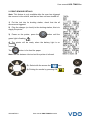
Press
key to turn on device, the VDO TPMS PRO TOOL.
The tool displays the start screen.
Wait a few seconds and the tool
displays the main menu.
The tool is ready to operate.
To power off the tool, press and hold (about 3 seconds) the
UM-366EVB-U
User manual VDO TPMS Pro 7/39
key.
User manual VDO TPMS Pro
6. OPERATING INSTRUCTIONS
6.1. VDO TPMS PRO TOOL OVERVIEW
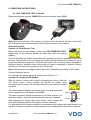
Read and diagnose sensors, OBDII ECU reset and transfer data to ECU.
Note: With some vehicles, if the vehicle is in “learn mode” the vehicle will also confirm that
the TPM sensor has communicated to the ECM with a series of horn beeps.
Service Procedure
Section 1.0: Read Sensor Test
Before servicing the tires/wheels, using your VDO TPMS PRO TOOL,
trigger each of the vehicle's sensors to make sure they are working
properly.
This will eliminate the liability associated with replacing previously damaged or defective
sensors. This procedure will not change the vehicle settings because the vehicle has yet to
be put into learn/retraining mode. This procedure allows you to quickly identify damaged or
defective sensors, because some vehicles do not report a damaged or defective sensor
condition on the instrument cluster for up to 20 minutes.
Note: If the sensors do not trigger, please refer to the Troubleshooting section of this Guide.
Perform tire/wheel service.
For vehicles that require retraining, please see to Section 2.0
Section 2.0: Learning TPM System
With the vehicle in learn mode, begin by triggering the driver's front left
(LF) wheel sensor. Some vehicles will provide an audible chirp
confirming that the sensor ID has been learned by the vehicle on board
computer.
The communication between the sensor and the on board computer
is also confirmed on LCD display of the TOOL.
The same procedure should be followed on all wheel sensors, in a
clockwise rotation, until all the vehicle sensors have been retrained.
After triggering the driver's rear wheel sensor, some vehicles will
chirp twice indicating that the TPM system has been retrained.
1 Start FL
FR 2
4 End RL
RR 3
Fig. 1
For vehicles that do not require retraining, we recommend you trigger each wheel sensor, one
final time, to make sure they are working correctly prior to releasing the vehicle to the customer.
UM-366EVB-U
User manual VDO TPMS Pro 8/39
User manual VDO TPMS Pro
VDO TPMS PRO USE
IMPORTANT:
Vehicle specific information in this manual is used as an example and may not
represent specific instructions each make and model may require. When performing
various functions with the tool, it is important to refer to the on-screen prompts
and/or repair manual information.
Warning! For best sensor triggering, hold the tool
against the tire sidewall right above the sensor.
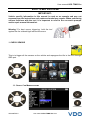
1. CHECK SENSOR
This is to trigger all the sensors on the vehicle and reprogram the id's in the ECU through
OBD port.
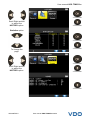
Continue
1.1. SELECT CAR MANUFACTURER
= Continue
= Previous
UM-366EVB-U
User manual VDO TPMS Pro 9/39
User manual VDO TPMS Pro
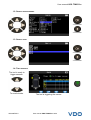
1.2. SELECT VEHICLE MODEL
= Continue
= Previous
1.3. SELECT YEAR
= Continue
= Previous
1.4. TEST SENSORS
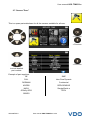
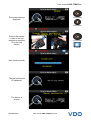
The tool is ready to
trigger sensors.
To scroll wheels.
UM-366EVB-U
The tool is triggering the sensor.
User manual VDO TPMS Pro 10/39
User manual VDO TPMS Pro
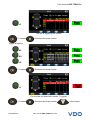
LF
The tool is triggering the sensor.
= Continue
= Previous and erase results
Trigger all wheels.
RF
RR
LR
= Continue
= Previous and erase results
LF
The tool has not detected a sensor. Try again.
= Continue
UM-366EVB-U
= Previous and erase results
User manual VDO TPMS Pro 11/39
= Next wheel.
User manual VDO TPMS Pro
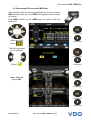
1.5. REPROGRAM ECU THROUGH OBDII PORT
After all sensor IDs are read and displayed on the tool, connect
OBD module to the tool. The OBDII icon appears on the header
to confirm.
Plug OBDII module to the OBDII port on vehicle, and turn
ignition on.
= Continue
Select the OBD
button
= Previous
.
The device prompts
you to continue.
= Continue
= Previous
Select
Note: Keep the
engine OFF.
= Continue
= Previous
= Continue
= Previous
UM-366EVB-U
User manual VDO TPMS Pro 12/39
User manual VDO TPMS Pro
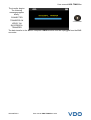
The transfer begins.
The following
messages appear
briefly.
CONNECTED
TRANSFER OK
= Previous
VERIFY OK
SUCCESSFUL
TRANSFER
The data transfer to the ECU is complete. OBDII module must be unplugged from the DLC
connector.
UM-366EVB-U
User manual VDO TPMS Pro 13/39
User manual VDO TPMS Pro
2. SERVICE TPMS
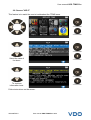
This is to service the sensors and more on the vehicle: Relearn procedure, RF detection,
Part lookup, Keyfob test, Help.
Continue
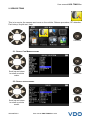
2.1. SELECT CAR MANUFACTURER
= Continue
Scroll up and down
to select a vehicle
make.
= Previous
2.2. SELECT VEHICLE MODEL
= Continue
Scroll up and down
to select a vehicle
model.
UM-366EVB-U
= Previous
User manual VDO TPMS Pro 14/39
User manual VDO TPMS Pro
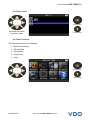
2.3. SELECT YEAR
= Continue
Scroll up and down
to select a year.
= Previous
2.4. SELECT SERVICE
The following services are available:
¾ Relearn procedure,
¾ RF detection,
¾ Part lookup,
¾ Keyfob test,
¾ Help.
= Continue
= Previous
UM-366EVB-U
User manual VDO TPMS Pro 15/39
User manual VDO TPMS Pro
2.5. SERVICE "RELEARN OBDII"
This service explains the procedure to relearn the sensor on the vehicle.
= Continue
= Previous
= Continue
Follow instructions.
= Previous
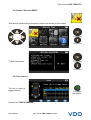
2.6. TEST SENSORS
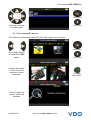
The tool is ready to
trigger sensors.
To trigger
the sensor.
Proceed as "CHECK SENSOR".
UM-366EVB-U
User manual VDO TPMS Pro 16/39
User manual VDO TPMS Pro
2.7. SERVICE "PART"
This is a spare parts data base for all the sensors available for all cars.
= Continue
= Previous
= Previous
to scroll dealer's
part number.
Example of part suppliers:
OE
SMP
DILL
John Dow Dynamic
DORMAN
Continental
MYERS
REDI SENSOR
NAPA
Simple/Qwick s
O'Reilly OE/S
TECH
SEARS
UM-366EVB-U
User manual VDO TPMS Pro 17/39
User manual VDO TPMS Pro
2.8. SERVICE "HELP"
This feature is to assist the user to troubleshoot the TPMS issue.
= Continue
= Previous
= Continue
Select the case of
the issue.
= Previous
= Continue
To continue
information texts.
= Previous
Follow instructions on the screen.
UM-366EVB-U
User manual VDO TPMS Pro 18/39
User manual VDO TPMS Pro
3. PROGRAM BLANK SENSOR
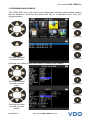
VDO TPMS PRO works with most known aftermarket universal programmable sensors
with the options to create the new sensor IDs and /or to duplicate sensor ID(s) from
original sensor(s).
= Continue
= Previous
= Continue
Scroll up and down
to select a brand.
= Previous
Following your options, some above brands in example may change.
= Continue
Scroll up and down
to select a vehicle
make.
= Previous
= Continue
= Previous
Scroll up and down
to select a vehicle
model.
UM-366EVB-U
User manual VDO TPMS Pro 19/39
User manual VDO TPMS Pro
= Continue
Scroll up and down
to select a year.
= Previous
3.1. "COPY SENSOR ID" SECTION
This section is to recover a sensor ID if the "old" sensor can be cloned.
= Continue
Scroll Right and left
to select the COPY
option.
= Previous
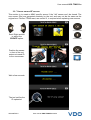
Position the sensor
in front of the tool
antenna to check
the sensor.
To trigger
the sensor.
The tool trigger the
sensor, wait a few
seconds.
UM-366EVB-U
User manual VDO TPMS Pro 20/39
User manual VDO TPMS Pro
The sensor data are
displayed.
= Continue
= Previous
Position the sensor
in front of the tool
antenna to send the
ID to the new
sensor.
= Continue
= Home
Wait a few seconds.
The tool verifies the
ID uploaded.
The sensor is
cloned.
UM-366EVB-U
User manual VDO TPMS Pro 21/39
User manual VDO TPMS Pro
3.2. "CREATE SENSOR ID" SECTION
This section is to create a MMY specific sensor if the "old" sensor can't be cloned. The
new sensor ID(s) are generated randomly by the tool, and may not be the same as the
original one. Perform TPMS reset, see section 2, is required when replacing new sensors.
= Continue
Scroll Right and left
to select the
CREATE option.
= Previous
Position the sensor
in front of the tool
antenna to send ID
to the new sensor.
= Continue
= Home
Wait a few seconds.
The tool verifies the
ID uploaded.
UM-366EVB-U
User manual VDO TPMS Pro 22/39
User manual VDO TPMS Pro
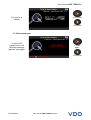
The sensor is
created.
= Continue
= Previous
3.3. REPROGRAM ISSUE
In case of ID
transfer issue, the
following message
appears, start again.
= Start
again
= Previous
UM-366EVB-U
User manual VDO TPMS Pro 23/39
User manual VDO TPMS Pro
4. HISTORY
This feature is to list the last device activity.
= Continue
= Continue
Scroll Right and left
to select the
HISTORY option.
= Previous
Recent option
= Continue
= Previous
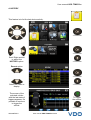
Select the make to
display.
The screen of the
selected vehicle
with the last state of
triggers appears. It's
possible to continue
to trigger the
vehicle.
To trigger
the sensor.
= Previous
UM-366EVB-U
User manual VDO TPMS Pro 24/39
User manual VDO TPMS Pro
= Continue
Scroll Right and left
to select the
HISTORY option.
= Previous
Statistics option
= Continue
= Previous
To change the
page.
= Continue
Scroll Right and left
to select the
HISTORY option.
= Previous
= Previous
UM-366EVB-U
User manual VDO TPMS Pro 25/39
User manual VDO TPMS Pro
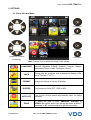
5. SETTINGS
5.1. ENTER SETTINGS MENU
= Continue
= Previous
= Continue
Select the function
or settings.
= Previous
Note: in each icon is written the state of the setting.
UM-366EVB-U
LANGUAGE
Select displayed language among Cestina, Dansk,
Deutsch, Engelska, English, Español, Français, Italiano,
Nederlands, Norsk, Polski, Portugues, Suomi.
UNITS
Change the air pressure and temperature display (kPa,
Bar or PSI with F° or C°).
FORMAT
Change the format of sensor ID display.
BUZZER
Turn buzzer to ON or OFF (YES or NO).
AUTO OFF
Time to turn off the device automatically after not being
operated.
ZONE
To select the area of work, AMERICA, EUROPE or
KOREA. Be careful, when you change the zone, a WebVT
download or SD card is required to get the zone data.
User manual VDO TPMS Pro 26/39
User manual VDO TPMS Pro
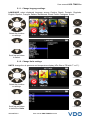
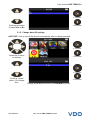
5.1.1. Change language settings
LANGUAGE: select displayed language among Cestina, Dansk, Deutsch, Engelska,
English, Español, Français, Italiano, Nederlands, Norsk, Polski, Portugues, Suomi.
= Continue
Select the function
or settings.
= Previous
= Confirm
Scroll up and down
to select.
= Previous
5.1.2. Change Units settings
UNITS: change the air pressure and temperature display (kPa, Bar or PSI with F° or C°).
= Continue
Select the function
or settings.
= Previous
= Confirm
Scroll up and down
to select the Units.
UM-366EVB-U
= Previous
User manual VDO TPMS Pro 27/39
User manual VDO TPMS Pro
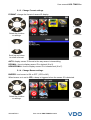
5.1.3. Change Format settings
FORMAT: change the format of sensor ID display.
= Confirm
Select the function
or settings.
= Previous
= Confirm
Scroll up and down
to select a format.
= Previous
AUTO: display sensor ID format in the way sensor is transmitting.
DECIMAL: force to display sensor ID in decimal (0 to 9).
HEXADECIMAL: force to display sensor ID in hexadecimal (0 to F).
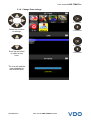
5.1.4. Change Buzzer settings
BUZZER: turn buzzer to ON or OFF. (YES or NO).
When buzzer on is set to YES, a beep is triggered when the sensor ID is detected.
= Confirm
Select the function
or settings.
UM-366EVB-U
= Previous
User manual VDO TPMS Pro 28/39
User manual VDO TPMS Pro
= Confirm
Scroll up and down
to select Yes or No.
= Previous
5.1.5. Change Auto Off settings
AUTO OFF: time to turn off the device automatically after not being operated.
= Confirm
Select the function
or settings.
= Previous
= Confirm
Scroll up (+)and
down (-) to change
time.
UM-366EVB-U
= Previous
Change by 60 min (maximum) to DISABLED (never).
User manual VDO TPMS Pro 29/39
User manual VDO TPMS Pro
5.1.6. Change Zone settings
= Confirm
Select the function
or settings.
= Previous
= Confirm
Scroll up and down
to select a new
zone.
= Previous
The tool will load the
new database for
the selected zone.
UM-366EVB-U
User manual VDO TPMS Pro 30/39
User manual VDO TPMS Pro
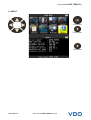
6. ABOUT
= Continue
= Previous
= Previous
UM-366EVB-U
User manual VDO TPMS Pro 31/39
User manual VDO TPMS Pro
MISCELLANEOUS
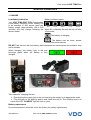
1. CHARGE
Battery indicator status:
Low Battery Indication
Your VDO TPMS PRO TOOL incorporates
a low battery detection circuit. Battery life
is an average of 800 sensor tests per
0%
25%
50%
75%
100%
battery charge (approximately 160 to 200
vehicles) this may change following the When 0% is flashing the tool will turn off after
10 seconds.
sensor model.
The battery is charging.
The battery has an issue, please
contact after sales service.
DO NOT use the tool with low battery status because the transmission and emission may
not be reliable.
When charging, the battery light is red and
becomes green when the battery is fully
charged.
Two means for charging the tool:
¾ Directly plug the supply jack to the tool and plug the supply in an appropriate outlet.
¾ Plug the jack to the docking station and install the tool in. The docking and in all
cases, the LED "CHARGE" light will turn on (red).
Battery replacement
It's recommended to return the tool to the factory for battery replacement.
UM-366EVB-U
User manual VDO TPMS Pro 32/39
User manual VDO TPMS Pro
2. PRINT SENSOR DETAILS
Note: This feature is only available after the user has triggered
the sensors in the vehicle, and the tool has not been turned off.
1) Put the tool into its docking station; check that the all
sensors are triggered.
2) Plug the charger (or check) to the docking station; this is to
supply the printer.
3) Power on the printer, press the
green light is flashing
button until the
.
4) The printer will be ready when the battery light is on
.
The
button is for feed the paper.
Note: the link between the tool and the printer is infrared.
5) Select with the arrows the
6) Printing the results by pressing OK
icon.
= Print
.
= Previous
UM-366EVB-U
User manual VDO TPMS Pro 33/39
User manual VDO TPMS Pro
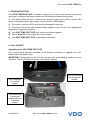
3. TROUBLESHOOTING
If the VDO TPMS PRO TOOL is unable to trigger one or more of the sensors, using either
electronic or magnetic activation, please use the following troubleshooting guide:
1) The vehicle does not have a sensor even though a metal valve stem is present. Be
aware of Schrader rubber style snap-in stems used on TPMS systems.
2) The sensor, module or ECU itself may be damaged or defective.
3) The sensor may be the type that periodically triggers on its own and is not designed to
respond to a triggering frequency.
4) Your VDO TPMS PRO TOOL may require a software upgrade.
5) Check “Auto Off” time settings for screen display.
6) Your VDO TPMS PRO TOOL is damaged or defective.
4. TOOL UPDATE
Upgrading Your VDO TPMS PRO TOOL
As a new protocol becomes available, it will become necessary to upgrade your tool.
Please follow the steps below:
IMPORTANT: Temporarily turn off all of the anti-virus and spam blocking software on your
computer. This is necessary to ensure a successful upgrade.
Slot for SD card
for non Internet
update.
USB connector
for Internet
update.
USB connector
for Internet
update with tool
in docking
station.
UM-366EVB-U
User manual VDO TPMS Pro 34/39
User manual VDO TPMS Pro
4.1. INSTALL WEBVT PC SUITE
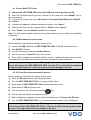
1) Connect the VDO TPMS PRO tool to the USB port and power the tool ON.
2) Insert the CD supplied with your tool, into the PC drive and click on the WebVT icon to
start the program.
3) A screen will appear that says “Welcome to the Install Shield Wizard for WebVT.”
Click “Next >”
4) A window will appear to choose destination location, click “Next >”
5) Follow instructions until the window with the “Finish” button appears.
6) Click “Finish” when the WebVT installation is complete.
Note: To order annual update software part number, please see your dealer for availability
and pricing.
4.2. USB INTERNET OPTION UPDATING
Before updating, ensure that the battery charge is full.
1) Connect the USB cable from the VDO TPMS PRO TOOL to the PC, turn the device on.
2) Start WebVT software.
3) A screen will appear indicating “Update Device”.
4) You can also print “Valve IDs” from here as well.
5) Press “Yes” to update to the latest software version. Update will take several minutes
to complete and the status bar will indicate the percentage of update completed.
Warning!
Do not disconnect the VDO TPMS PRO TOOL from the PC or turn off your computer
during the update process. This may result in serious damage to the tool.
4.3. SD CARD OPTION (NON INTERNET) UPDATING
Before updating, ensure that the battery charge is full.
1) Place the SD card into slot, pins facing upwards.
2) Turn the VDO TPMS PRO TOOL on and go to Main Menu.
3) Scroll down to VDO TPMS PRO TOOL Update and press enter.
4) Scroll down to YES and press enter.
5) You will now see File Selection, press the
key.
6) The tool will now update its software version.
7) When installation is complete, the tool will automatically turn off. Remove the SD card.
8) Turn the VDO TPMS PRO TOOL on. The latest software version will be displayed.
Warning!
Do not turn off the VDO TPMS PRO TOOL or extract the SD card during the update
process. This may result in serious damage to the tool.
UM-366EVB-U
User manual VDO TPMS Pro 35/39
User manual VDO TPMS Pro
5. FACTORY RESET FOR PROGRAMMABLE SENSOR CHANGE
Following the programmable sensors, it need to update the database or reset the device to factory
settings.
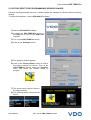
To realize this operation, use the VDO WebVT software.
1) Start the VDO WebVT software,
2) Connect the VDO TPMS Pro device to
the USB port of your PC with USB cable
supplied.
3) Turn on the VDO TPMS Pro device.
4) Click on the "Settings" button.
5) The opposite window appears:
6) Click on the "Factory Reset" button to reset to
the factory settings the device. Then in the
VDO TPMS Pro menus, select the "Program"
menu and select the sensors family to
program.
7) The sensor family choice is done in
the opposite menu:
8) The selected family is displayed as
below:
UM-366EVB-U
User manual VDO TPMS Pro 36/39
User manual VDO TPMS Pro
About the Battery
6. SAFETY BATTERY AND CHARGE
INFORMATION
You must read and understand these
safety instructions and warnings before
using or charging your lithium polymer
batteries.
Operating environment
Remember to follow any special current
regulations any area, and always switch off
your device when its use is prohibited or
when it may cause interference or danger.
Use the device only in its normal operating
positions.
Your device and its enhancements may
contain small part. Keep them out of the
reach of small children.
About Charging
Use only the charger supplied with your
device. Use of another type of charger will
result in malfunction and/or danger.
When the red LED turns off, the charge is
complete.
About the Charger
Do not use the charger in a high moisture
environment. Never touch the charger when
your hands or feet are wet.
Allow ventilation around the charger when
using it. Do not cover the charger with paper
or other objects that will reduce cooling. Do
not use the charger while it is inside a
carrying case.
Connect the charger to a proper power
source. The voltage requirements are found
on the product case and/or packaging.
Do not use the charger if the wires become
damaged. Do not attempt to service the unit.
There are no serviceable parts inside.
Replace the unit if it is damaged or exposed
to excess moisture.
This charger is not a toy and should not be
used by children or infirm persons without
proper training or supervision.
Do not use it as a power source.
Unplug it before attempting to service or
clean it.
UM-366EVB-U
CAUTION: This unit contains an internal
Lithium Polymer battery. The battery can
burst or explode, releasing hazardous
chemicals. To reduce the risk of fire or burns,
do not disassemble, crush, pierce or dispose
of the battery or the instrument in fire or
water, do not short circuit or short the
contacts with a metal object.
Use a specified charger approved by the
VDO manufacturer and supplied with the
device.
The tool must be returned to the factory for
battery replacement.
Opening the tool or tampering with the
seal placed on the tool, if broken will void
the warranty
Safety for Lithium Polymer battery use
NEVER leave the battery unattended during
the charging process. The device must
imperatively be placed on a non-flammable
surface during charging (ceramic platter or
metal box).
Charge the Lithium Polymer battery ONLY
with the charger provided.
NEVER use a Ni-MH (Nickel Metal Hydride)
type battery charger to charge a Lithium
Polymer battery.
If the battery begins to overheat more than
60°C (140° F), STOP IMMEDIATELY the
charge. The battery should NEVER exceed
60°C (140° F) during the charging process.
NEVER charge the battery immediately after
use and while still hot. Leave it cool down to
ambient temperature.
If you see some smoke or some liquid out of
the battery, stop the charge immediately.
Disconnect the charger and place the tool in
an isolated area for at least 15 minutes. DO
NOT USE THE BATTERY AGAIN, return the
device to your seller.
Keep a fire extinguisher for electrical fires
handy while charging the battery. In the
unlikely event that the Lithium Polymer
battery will ignite, DO NOT use water to
extinguish the fire, take some sand or fire
extinguisher described above.
It must neutralize the Lithium Polymer battery
elements unusable. The neutralization
User manual VDO TPMS Pro 37/39
User manual VDO TPMS Pro
process must be performed with very strict
security fit. It is recommended that you return
us the tool, we will collect the battery out of
use and gives to a specialized recycler.
If you don't use the battery for a long time,
you have to regularly charge the battery
(every 6 months) to be over the minimum
charge of 30%.
Do not dispose of Lithium
batteries to the dustbin.
If you don't follow these safety precautions,
you may cause serious personal injury and
damage to property; you may even cause a
fire!
Polymer
The Lithium Polymer battery is not suitable
for children under 14 years. Do not let a
Lithium Polymer battery reach of children
To prevent leakage or other hazards, do not
store batteries above 60°C (140°F). Never
leave the battery inside a car (for example)
where the temperature could be very high or
in a place where temperatures could exceed
60°C (140°F). Store the battery in a dry place
to avoid contact with liquid, whatever the
type. Store the battery only on a
nonflammable surface, heat resistant, non
conductive and away from all flammable
materials or sources. Always store the battery
out of reach of children.
The
VDO
Company
disclaims
any
responsibility for damage sustained in case of
non
compliance
with
these
safety
instructions.
Using a Lithium Polymer battery has a high
risk of fires and can cause serious damages
to property and persons, the user agrees to
accept the risk and responsibility.
The VDO Company couldn't control the
proper use of the battery for each customer
(charge, discharge, storage etc.); it can not
be held responsible for damage to persons
and property.
A Lithium Polymer battery should be stored
with a minimum charge of 30%. If you store
completely discharged, it will quickly become
unusable.
7. RECYCLING
Do not dispose of the rechargeable Lithium-Ion battery or the tool
and/or it accessories to the dustbin.
These components must be collected and recycled.
The crossed-out wheeled dustbin means that the product must be taken to separate
collection at the product end-of life. This applies to your tool but also to any
enhancements marked with this symbol. Do not dispose of these products as
unsorted municipal waste. For further information, please contact VDO.
UM-366EVB-U
User manual VDO TPMS Pro 38/39
Index
Index
A
About ..................................................31
Auto off ...............................................29
B
Battery ................................................37
Buzzer ................................................28
C
Caution ...........................................4, 37
Charge................................................32
Charger ..............................................37
Charging .............................................37
Check sensor........................................9
Copy sensor .......................................20
Create new sensor .............................22
D
Docking station ...................................32
E
ECU Reprograming ............................12
Environment .......................................37
F
Factory settings ...................................36
Format ................................................28
Function keys .......................................5
H
Help ....................................................18
History ................................................25
I
Icons.....................................................6
L
Language............................................26
M
Main Menu............................................9
Miscellaneous.....................................32
O
Operating instructions...........................8
Overview...............................................8
UM-366EVB-U
P
Part menu ...........................................17
Power on/off .........................................7
Power supply ......................................37
Printer .................................................33
Printing Results...................................33
Program blank sensor.........................19
Programmable sensor changes............36
R
Recycling ............................................38
Relearn OBDII ....................................16
S
Safety instructions ................................3
Safety precautions ..............................37
SD card option ....................................35
SD card slot ........................................34
Security...............................................37
Service TPMS.....................................14
Settings...............................................26
Slot SD ...............................................34
Software installation............................35
Software updating...............................35
Specifications........................................2
T
Tool update.........................................34
Troubleshooting ..................................34
U
Units ...................................................27
USB Internet Options..........................35
Use .......................................................9
Use Instructions ....................................4
W
Warning ................................................3
WebVT PC suite .................................35
Z
Zone ...................................................30
User manual VDO TPMS Pro 40/39
This document is the exclusive property of VDO.
It may not be communicated, reproduced or used without prior consent.