1
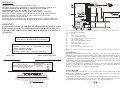
10 Installing the regulator
!
THE REGULATOR IS SUPPLIED BY 230V/50HZ .
ANY MOVES REGARDING INSTALLATION SHOULD BE MADE AT
THE DISCONNECTED MAINS.
!
THE REGULATOR HAS TO BE CONNECTED TO THE MAINS WITH THE
ZERO-PIN BY WAY OF USING A DIFFERENTIAL DEVISE OF SEPARATING
THE MAINSACC.TO THE BINDING LAW.
!
THE PRODUCER DOESN'T TAKE ANY RESPONSIBILITY FOR DAMAGES
CAUSED BYWRONG USAGE OFTHE CONTROLUNIT.
FUSE
MAINS
The mixer can operate in one of the modes: floor mode, radiator/heater mode and safety of the boiler
return temperature mode (”<60> ModeMIXER”):
o
? FLOOR mode - the mixer keeps up the preset temperature in the range of 20…40 C of the
floor system (<62p> „TempFLOOR”), additionally the alarm turns on and the pump turns off after
o
exceeding 40 C of the floor system (<61> „TempALARM-FLOOR”). Damage of the sensor of the
mixer causes the valve closed and the pump of the mixer switches off (P3). In SUMMER mode the
mixer is closed and its pump is off.
o
? HEATER mode - the mixer keeps up the preset temperature in the range of 20…90 C of the
heater/radiator system (<62> „TempMIXER”). In case of alarm caused by overheating the boiler, the
mixer opens up to receive excess heat. Damage of the sensor of the mixer causes the valve opened. In
SUMMER mode the mixer is closed and its pump is off.
? RETURN mode - the mixer controls the flow of the return water to the boiler in order to keep
up the minimal return temperature preset by the <62> „TempMIXER”.parameter.
Damage of the sensor of the mixer causes the valve opened. The SUMMER mode has no effect
on the operation of the mixer.
Independent of the selected mode the additional parameters (<64><65> and <66>) allow the
behavior of the mixer drive to be individually adjusted.
! The control unit realizes an after-season rundown of the pump and the drive of the mixer.
If they don’t operate for a week the pump switches on for a minute and after it turns off the drive runs
for a minute.
7. Cooperation with the room thermostat
Z6
Z5
Z3
Z4
Z2
The control unit has an input to connect the room thermostat of any kind, equipped with an
nonvoltage relay output. To the control unit you connect the terminals of the thermostat which shortcircuits if the room temperature is higher than the preset one. Until the room temperature is lower
than the preset value in the thermostat (terminals of the relay opened) the control unit operates
normally. If the room temperature exceeds the preset temperature in the thermostat (terminals of the
relay short-circuited), which is signalled by the icon on the display, the control unit modifies its
o
operation: the preset temperature of the boiler is lowered to 45 C („ <29> TempTHERMOSTAT”)
and the CH pump runs cyclically (see Ch4/page 3).
!
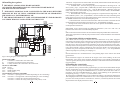
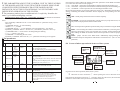
Fig.13 Wiring diagram of the control unit
MAINS 230V/50Hz:
L
2 terminals L connected in the control unit
2 terminals N connected in the control unit
N
2 safety terminals PE connected in the control unit
PE
OUTPUTS 230V/50Hz:
L-DM blower
L-P1
CH pump
L-P2
WAW loading pump
L-P3
mixer pump
VALVE DRIVE OUTPUT 230V/50Hz:
L-M+ valve drive - opening (brown or black depending on valve mounting)
L-M- valve drive - closing (black or brown depending on valve mounting)
valve drive - connect the common output (blue) to N
valve drive - connect the safety cable (green-and-yellow) to PE
16
If the thrmostat isn’t mounted then the corresponding input of the control unit should be left
unconnected.
! The thermostat ought to be located in the largest room of the building. In this room heater
thermostatic valves must not be mounted. The thermostat is to be placed at the height of approx.
1,5m over ground, far away from windows and heaters. In the other rooms heater thermostatic valves
may be mounted.
8. Handling the control unit
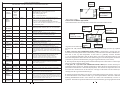
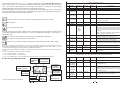
There are elements on the control panel (fig. 4).
The operation state is presented on the graphic display (2). The screens inform about the operation of
devices, temperature of sensors; they make it possible to change the parameters etc..The change of
screen is done by pressing the CHOOSE button (7). If this is the screen that is able to change a
parameter, press the CONFIRM button (6), which causes blinking of the parameter field to be
changed. By pressing “+” (4) or “-” (5) one can alter its value.
By clicking the CONFIRM button (6) one confirms the changes - the parameter field stops blinking.
The changed parameter not confirmed for 10 secs is not accepted by the control unit and it recalls a
previous value of the parameter. The functions of the F1 (3) and F2 (8) buttons are variable. They
depend on the icons displayed in their vicinity.
5