1
LEVEL OF PARAMETERS 3
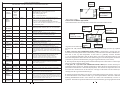
PARAMETERS CAN BE CHANGED AT UNLOCKED PASSWORD
No
NAME
RANGE
DEFAULT
90
1…4
1
91
OFF/
ON
0…9999
OFF
OFF/
ON
OFF
92
99
0000
FUNCTION
Number of parameters set = depends on a boiler producer
.
Setting to ON causes the reset of all the parameters to the default and
restart of the control unit
„0000” PASSWORD DISABLED
„----” PASSWORD ENABLED
The value ON causes adding diagnostics screen helpful to the service
Password
“CHOOSE”
“CONFIRM”
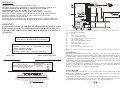
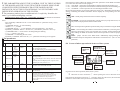
Fig.4 View of the control panel
1. Status LED diode of the control unit: ALARM (red), OPERATION (green)
2. Graphic display
3. Buton F1
4. Increase value button
5. Decrease value button
6. Confirmation button
7. Screen change button
8. Button F2
8.1 Alarm screens
Alarm screens is not seen till the following alarm situation takes place:
1. Damage of the temperature sensor of the boiler (T1), WAW (T2) or mixer (T3)
Alarm doesn’t start if the sensor T2 or T3 is not installed
2. Exceeding the limit temperature of the boiler
3. The STB safety thermostat switches on
4. Exceeding the acceptable temperature of the boiler set by the “<21> TempALARM_BOILER”
parameter.
5. Exceeding the acceptable temperature of the floor heating set by the” <61> TempALARMFLOOR” parameter
The alarm situation is stored in the memory of the control unit (even after powering off the control
unit as well), sound signal is generated and the red ALARM diode blinks. Pressing the F2 button
turns off the sound and the F1 button cancels alarm and if the cause of the alarm is eliminated
o
restores the normal operation ( the STB safety thermostat turns off after cooling to approx. 70 C).
Further blinking of the ALARM diode means the cause of the alarm has not been removed. During
ALARM the control unit lowers boiler temperature by switching off the blower and switching on
the CH pump.
6
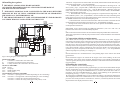
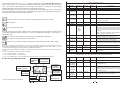
The changes of important parameters are possible only at unlocked password. To unlock the
password you need to input proper sequence of digits with the buttons “+/-“. With the CHOOSE
button to change the digits position and CONFIRM button to acknowledge all and finish the
procedure of changing the password. The unlocked password is set to “0000”. Once again entering
into the password change procedure causes a new password to be set.
! PASSWORD „9999” HAS CONSIDERABLE MEANING. IT CAUSES THE REACTIVATION OF THE
PREVIOUS PASSWORD IF PRESENT WITHOUT IT BEING DISCLOSED.
! PASSWORD OF PRODUCER'S SERVICE IS UNIQUE AND IS NOT DEPENDENT ON THE USER'S
PASSWORD- IT SHOUDN'T BE DISCLOSED TO THE USER. INSTEAD OF THAT THE SERVICE
CAN SET TO THE USER HIS OWN PASSWORD.
Examples of passwords:
1.The control unit is installed with the unlocked password. The user can enter his own password e.g. “1234”.
From this moment the important parameters cannot be altered without the password being unlocked (that is,
resetting the password “1234”). After changing essential parameters the user can leave the control unit
unlocked, set any new password or enter “9999”, which activates the password “1234”
2. Producer gives the control unit with the set password. The user cannot alter the important parameters. The
servic can change the settings with its own secret password. At the end a serviceman enters the secret password
or “9999”, the user still hasn't access to the important parameters.
3. Producer gives the control unit with the set password. The user cannot alter the important parameters. The
servic can change the settings with its own secret password. At the end a serviceman leaves the control unit
unlocked, the user now has access to the important parameters. He can enter his own password like in the
example No. 1.
4. Producer gives the control unit with the set password. The user cannot alter the important parameters. The
servic can change the settings with its own secret password. At the end a serviceman sets the password e.g.
“1234” and tells it to the user, the user has access to the important parameters but without knowing the password
the other persons cannot make the changes.
5. The user has the unlocked control unit or his own password. Serviceman decides, the user though oughtn't
have access to the important parameters. The serviceman locks the control unit with his secret password, which
removes the user's password and locks the control unit.
6. Serviceman doesn't have to know the user's password. Always he can use his own secret password and at the
end lock with the “9999”, which reactivates the user's password.
15