1
26
en | Bosch RAIDWatch Server Options
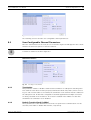
Fig. 4.5
Connect Commands
Fig. 4.6
Connect Commands
4.
Bosch RAIDWatch | User Manual
The Bosch RAIDWatch Server dialog box appears. Select to log in either as an Administrator or Guest. An administrator has the authority to change any Bosch RAIDWatch Server
settings, unlike a guest is allowed to view the settings only. (See Figure 4.7)
Fig. 4.7
5.
Access Rights Selection Box
When login as an administrator, enter "root" as the authentication code in the Password
dialog box at the first time login, and then click OK. (See Figure 4.8) The authentication
code can be changed later in the utility. Only an administrator who has the password can
access the notification settings.
6.
Password is not required when login as a guest. Click OK to login without entering any
password.
Fig. 4.8
7.
Password Dialog Box
Double-click the Admin Tool item on the Connection View window in the Bosch RAIDWatch Server User Interface. (See Figure 4.9)
F.01U.027.806 | V1 | 2006.05
Bosch Security Systems