1
11 55784x Ch07.qxd
3/29/04
4:15 PM
Page 99
Chapter 7: Passwords
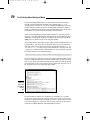
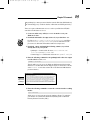
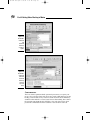
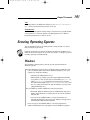
Figure 7-7:
An
EtherPeek
capture
of a POP3
password
packet.
Although you can benefit from using a commercial network analyzer such as
EtherPeek, you don’t need to buy one for your testing. An open-source program, Ethereal, runs on Windows and UNIX platforms. You can search for
password traffic on the network a million ways. For example, to capture POP3
password traffic, set up a trigger to search for the PASS command. When the
network analyzer sees the PASS command in the packet, it starts capturing
data until your specified time or number of packets.
Capture this data on a hub segment of your network, or plug your networkanalyzer system into a monitor port on a switch. Otherwise, you can’t see
anyone else’s data traversing the network — just yours. Check your switch’s
user’s guide for whether it has a monitor or mirror port and instructions on
how to configure it. You can connect your network analyzer to a hub on the
public side of your firewall. You’ll capture only those packets that are entering or leaving your network — not internal traffic.
Countermeasures
Here are some good defenses against network-analyzer attacks:
Use switches on your network, not hubs.
If you must use hubs on network segments, a program such as sniffdet,
cpm, and sentinel can detect network cards in promiscuous mode
(accepting all packets, whether destined for it or not). Network cards in
this mode are signs of a network analyzer running on the network.
Don’t let a hacker gain physical access to your switches or the network
connection on the public side of your firewall. With physical access, a
hacker can connect to a switch monitor port, or tap into the unswitched
network segment outside the firewall and capture packets.
Switches do not provide complete security because they are vulnerable to
ARP poisoning attacks, which I cover in Chapter 9.
Most computer BIOSs allow power-on passwords and/or setup passwords to
protect the computer’s hardware settings that are stored in the CMOS chip.
Here are some ways around these passwords:
99