1
3.9
Select the Stream of Monitored Channel .................................................................. 20
3.10 Enable/Disable the Sound of the Channel ................................................................ 20
3.11 Switch Multiple Screen to Single Screen Display ...................................................... 21
3.12 Hide the Camera List Section ................................................................................... 22
3.13 Screen Channel Display Mode ................................................................................. 23
CHAPTER 4
4.1
USE THE CMS SYSTEM .............................................. 24
Familiarizing Functions of Preview Mode ................................................................. 24
4.1.1
E-map Setting ............................................................................................... 27
4.1.2
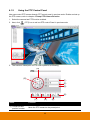
Using the PTZ Control Panel ........................................................................ 33
4.2
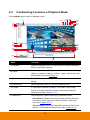
Familiarizing Functions of Playback Mode................................................................ 35
4.2.1
Using the Event Search ................................................................................ 40
4.2.2
Using the Visual Search................................................................................ 41
4.2.3
To Bookmark a Section of the Video ............................................................. 43
4.2.4
Backup the Playback Video .......................................................................... 45
4.2.4.1
Manual Backup ........................................................................................ 45
4.2.4.2
Schedule Backup ..................................................................................... 47
4.2.5
4.3
Using the QPlayer to Playback Backup File .................................................. 53
4.2.5.1
Familiarizing Functions of Qplayer ........................................................... 53
4.2.5.2
Bookmark a Section of the Video for Playback ......................................... 58
Compact Mode......................................................................................................... 60
4.3.1
Familiarizing Function in Preview Compact Mode ......................................... 61
4.3.2
Familiarizing Function in Playback Compact Mode ....................................... 63
4.4
Log Viewer ............................................................................................................... 66
4.4.1
Use the Event Log Viewer ............................................................................ 66