1
Quick start
Unit setting
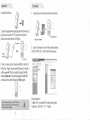
1. Connect the unit to your computer, and turn on the power .
1. Insert Micro SD card.
2. Insert the supplied power supply plug into the DC socket, and
place the power switch to "ON" to start the unit; the power
indicator and standby indicator will light up.
turn on the power
Connect the computer
Powei indicaloi
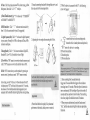
2. Open "My Computer" and you will find a mobile hard disk;
click the "DvXSet.exe", then follow the following setting:
turn on (he pc
3. Now you may use the remote controller to control it.
Or Press the "Trigger" button to start MD function, the standby
indicator goes out. When the recording is triggered, standby
indicator flashes once. Press the button again to disable MD
recording and the standby indicatqi^will light up again.
When using the remote control, press the "REC'button.the
standby indicator goes out. press the "STOP"button again,
the standby indicator will light up.
A
Setting instruction:
A. Date: Click "year/month/date"first,after turning in blue
background , then click "A"or "V" to adjust.