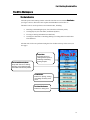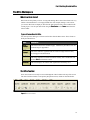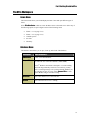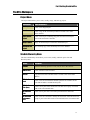
1
VPro User Guide By Will MacKenzie and Russell Klassen British Columbia Ministry of Forests Forest Science Program April 14, 2004 i Abstract VPro is a freeware database program designed for managing large bodies of ecological plot data as well as hierarchical classifications constructed from plot data.. VPro fills a niche between static data storage systems and community analysis packages by allowing you to perform data manipulations and summaries frequently used in the description and classification of vegetation communities.. With VPro you can: • Store very large sets and subsets of ecological data, • Manipulate and export data for analysis, • Generate summary and diagnostic table reports, as well as • Create and retain hierarchical classification structures. VPro runs within the commercial software package Microsoft Access . While designed specifically for collecting data using the standard methodologies outlined in “Field Manual for Describing Terrestrial Ecosystems” (Province of BC, 1998), VPro is also suitable for managing other types of plant community data sets. i Background Since the late 1970’s, the British Columbia Ministries of Forests and Environment, universities and various other agencies have collected over 30,000 ecological plots to build a Biogeoclimatic Ecosystem Classification (BEC) for British Columbia. Large amounts of data continue to be collected annually as part of forested classification updates, non-forested classification initiatives, Terrestrial Ecosystem Mapping projects, and other ecological studies. Computer programs initially designed in the 1970’s and 80’s to compile ecosystem information were not capable of effectively managing large data sets. In 1995, as part of a wetland classification initiative, the authors of VPro began to develop the relational database program to organize and manage ecological data and facilitate large-scale classification initiatives. Since it was first developed, VPro has undergone several iterations and continues to be upgraded in response to user needs. The program is now used by various agencies across the continent for archiving, analysing, and classifying large sets of data. ii Acknowledgements VPro was developed with funding and support from the following agencies: • Forest Renewal B.C., • The Ministry of Forests, Research Branch Several individuals have also provided valuable suggestions for the program during the course of its evolution including: Allen Banner, Ray Coupe, Dennis Lloyd, Karen McKeown, Del Meidinger, Mike Ryan, Jen Shaw, Elaine Wright, and Dave Yole. If you have any questions about this program, contact the primary author, Will MacKenzie, at the address below. About the Authors Program design and concept by Will MacKenzie and Russell Klassen Programming by Russell Klassen. Will MacKenzie Research Ecologist, B.C. Ministry of Forests, Research Branch 3333 Tatlow Rd, Bag 6000 Smithers, B.C. Canada V0J 2N0 Phone: (250) 847-6388 Fax: (250) 847-6353 E-mail: [email protected] Russell Klassen Consulting Programmer 1351 Moncton Rd., Smithers, B.C. Canada V0J 2N4 Phone: (250) 847-1764 E-mail: [email protected] iii Table of Contents VPro User Guide i Abstract i Background ii Acknowledgements iii About the Authors iii Table of Contents Introduction to this Guide iv 1 In this Section… 1 How This Guide Is Organized 1 Conventions Used In this Guide 1 Formatting Conventions Conventions Used In this Guide Icons Features of VPro 1 2 2 2 What’s New in VProXP from VPro97 2 Improvements to VPro 2 Features of VPro Overview of Key Features Features of VPro Part 1: Getting Started 3 3 4 5 In this Section 5 System and Software Requirements 5 How to Install VPro on Your Computer 6 Getting Started in VPro 7 Opening VPro Getting Started in VPro Closing VPro 7 8 8 iv Basic Terminology for Using VPro Getting Started in VPro Basic Terminology for Using VPro How Data is Stored and Organized in VPro Four Categories of Program Components in VPro How Data is Stored and Organized in VPro Diagram of VPro’s Data Management Structure How Data is Stored and Organized in VPro Data is organized into Projects 8 9 9 11 11 12 12 13 13 The VPro Workspace 14 The Data Centre 14 Figure 4. VPro Data Centre Form 14 The VPro Workspace 15 What is a Data Form? 15 The VPro Toolbar 15 The VPro Workspace 16 Forms Menu 16 Database Menu 16 The VPro Workspace 17 Project Menu 17 Site Unit/Hierarchy Menu 17 The VPro Toolbar 18 Site Unit/Hierarchy Menu Con’t 18 Data Menu 18 The VPro Workspace 19 Data Menu Con’t 19 The VPro Workspace 20 Reports Menu The VPro Workspace 20 21 Options Menu 21 Help Menu 21 Part 2: Working with Projects and Tables In this Section 22 22 v Data Management and Storage in VPro 22 Three Important Rules for Working with Data in VPro 22 Rule 1: Organise All Related Data within One Large Project Three Important Rules for Working with Data in VPro Rule 2: Use Site Unit Tables or Filters to Manage Smaller Sets of Data within a Project Three Important Rules for Working with Data in VPro Rule 3: Complete administrative fields Creating a Project 22 23 23 24 24 24 What is a Project? 24 Storing and Naming a Project 24 Creating a Project Creating a New Project Creating a Project 25 25 26 Creating a “Master “Project 26 Renaming Projects 26 Backing Up Projects 26 Working with Projects and Tables Merging Projects Working with Projects and Tables 26 26 27 Merging Projects 27 Creating a Splinter Project 28 Working with Projects and Tables Creating, Attaching, and Unattaching Tables in a Current Project Working with Projects and Tables Selecting a Table or Project as Current Working with Projects and Tables Renaming or Deleting a Project or Table Using the Right-click Menu Part 3: Using Forms to Enter, Import, and Verify Data 29 29 30 30 31 31 32 In this Section 32 Working with Data Forms 32 What is a Data Form? 32 Opening a Data Form 32 Working with Data Forms 33 vi What Does a Data Form Look Like? Working with Data Forms Navigating Data Forms and Changing Views Working with Data Forms A Closer Look at the Vegetation Form Working with Data Forms 33 34 34 35 35 36 Selecting Form Styles on the Vegetation Card 36 Adding, Checking and Editing Species Codes on the Vegetation Card 36 Displaying Data in a Table (or Spreadsheet) Format 36 Working with Data Forms Managing and Displaying Specific Subsets of Data in a Form Entering Data Directly Into a Form Important Points about Entering Data Entering Data Directly Into a Form 37 37 37 37 38 Using a Table (or Spreadsheet Format) to Enter and Edit Data 38 Switching from Form View to Table View 38 Entering Standard Codes Using Standard Code Tables in VPro Entering Standard Codes 38 38 39 Entering Standard Codes into Forms 39 Creating New Codes for Unknown Species 39 Removing a Code from the Species Code List 39 Importing Standard Data 40 What is VTAB? 40 Importing VTAB Data 40 Importing Standard Data 41 Checking VTAB Data for Errors or Formatting Bugs 41 Importing a VTAB Sorting Instruction into a Current Site Unit Table 41 Formatting VTAB Data 41 What is VENUS? 41 Importing Standard Data 42 Importing VENUS Data 42 Importing Data from Older Versions of VPro 42 Importing Non-standard Data 43 vii Verifying and Checking Data for Errors “As you enter” Code Validation Verifying and Checking Data for Errors Opening the Data Validation Form Verifying and Checking Data for Errors 43 43 44 44 45 Data Validation 45 Other Data Tests 45 Verifying and Checking Data for Errors 46 Repairing and Optimizing Vegetation Entries 46 Audit Trail 46 Using Access Functions to Aid in Data Error Correction Part 4: Working with Site Units Tables 47 48 In this section 48 Working with Site Unit Tables 48 What is a Site Unit Table (SU Table)? 48 What Type of Information Does a Site Unit Table Contain? 48 Working with Site Unit Tables How Does A SU Table Differ from a Filter? 49 49 Creating a Site Unit Table 49 Creating a Site Unit Table 50 Step 1: Creating a New Site Unit Table (SU Table) 50 Step 2: Adding Plots to the SU Table 50 Step 3: Adding Site Unit Names to the SU Table 50 Creating a Site Unit Table 51 Step 4: Place Plots Under Site Unit Names 51 Step 5: Write the Site Unit Assignment into the Environment Table 51 Using the Site Unit Form 52 What is the Site Unit Form? 52 How to Open the Site Unit Form 52 Editing Site Unit Tables 53 Adding Plots to a Site Unit Table 53 Editing a Site Unit Table from the Hierarchy Tree 53 Using the Hierarchy Tools Bar to Display or Edit Data in a Site Unit Table 53 viii Editing a Site Unit Table 54 Editing Site Unit Tables 55 Using the Right-click Menu to Edit a Site Unit Table Editing Site Unit Tables 55 56 Using Drag and Drop to Add Existing Site Unit Names to a SU Table 56 Adding or Removing Several Site Unit Names at Once 56 Editing Site Unit Tables 57 Adding or Removing Several Site Unit Names at Once 57 Using the Right-click Menu to Add Site Unit Names in a Site Unit Table 57 Editing Site Unit Tables 58 Using the Right-click Menu to Edit Site Unit Names 58 Understanding The Site Series List Attached to a Site Unit Table 58 Part 5: Filtering Data in VPro 59 In this section 59 What are Filters? 59 Using Access to Filter Data 59 Filter Queries 60 What is a Filter Query? 60 How to Run a Filter Query 60 What is a Form Filter? 60 Filter Queries 61 How to Run a Form Filter 61 How to Save a Form Filter as a Site Unit Table 61 Vegetation Profiling What is a Vegetation Profile? Vegetation Profiling How to Create a Vegetation Profile Table Vegetation Profiling How to Save Vegetation Profile Criteria Part 6: Plot Classifications 61 61 62 62 63 63 64 In this section 64 Editing a Plot Classification 64 ix Editing a Plot Classification 65 Viewing Plot Information 65 Grouping Plots in a Site Unit 65 Grouping Plots in a Site Unit Table Using the Environment Table 65 Editing a Plot Classification Assigning Plots Within a Group of Plots Using the Environmental Data Form Part 7: Working with Hierarchy Tables 66 66 67 In this Section 67 Creating a Classification Hierarchy in VPro 67 What is a Classification Hierarchy? Editing a Hierarchy 68 69 Placing Breakpoints in a Hierarchy 69 Editing a Hierarchy Tree Using the Right-click Menu 69 Adding Units to a Classification Hierarchy 69 Part 8: Exporting Data 70 In this Section 70 Exporting Vegetation Data 70 Exporting Vegetation Data to PC-ORD Exporting Vegetation Data 70 71 PC-ORD Export Vegetation Data Options 71 Vegetation Species Code Options 71 Guidelines for Using Breakpoints When Exporting Data 71 Exporting Environment Data Exporting Environment Data to PC-ORD Part 9: Creating Reports 72 72 73 In this section 73 Types of Reports 73 Generating Reports 74 Vegetation Reports 74 Types of Vegetation Reports Vegetation Reports Vegetation Reporting Options 74 75 75 x The Long Vegetation Report Vegetation Reports Long Vegetation Reporting Options Vegetation Reports 75 76 76 77 The Long Vegetation Summary Report 77 Calculating Average Mean in a Vegetation Report 77 Vegetation Reports 78 Creating Space Between Groups in a Vegetation Report 78 Vegetation Summary Report 78 Vegetation Reports Displaying Summary Statistics in a Vegetation Report Vegetation Reports Types of Site Unit Formats in a Vegetation Report Diagnostic Report 79 79 81 81 82 Excel Add-in Diagnostic.XLA functions 82 Similarity 82 Single level Diagnostic 82 Diagnostic 82 Combining Species Codes Grouping Several Species Under a Single Code for Reporting and Exporting Data Combining Species Codes 83 83 84 Creating a Combined Species Code File 84 COMBINED SPECIES CODE FORM – SAMPLE 1 84 Combining Species Codes 85 COMBINED SPECIES CODE FORM - SAMPLE 2 85 COMBINED SPECIES CODE FORM - SAMPLE 3 85 Environment Reports 86 Types of Environment Reports 86 Environment Plot Report 86 Environment Reports Environment Summary Report 87 87 Combined (“Combo”) Environment and Vegetation Report 88 Combined (“Combo”) Environment and Vegetation Report 89 Colour-coding Species or Species Groups 89 xi Combined (“Combo”) Environment and Vegetation Report Colour-coding Species or Species Groups Displaying Plot Photos Creating a Project from Scratch 90 90 91 92 In this Section 92 Starting the First Project 92 Step 1: Create a New Project 92 Step 2: Select a Project to Use for the Current Session 92 Starting the First Project Step 3: Attach and Unattach Already Existing Projects 93 93 Steps for Creating a Sample Wetlands Project 94 Steps for Creating a Sample Wetlands Project 95 Steps for Creating a Sample Wetlands Project 96 Appendices Report Codes Data Table Attributes 97 97 99 *_ENV Table 99 *_VEG Table 102 *_MINERAL Table 103 *_HUMUS Table 104 *_AUDIT Table 105 *_OTHER Table 105 xii Introduction to this Guide In this Section… In this section, you will learn… • How this guide is organized and what information it contains, • What new features and updates have been made to VPro, and • What sorts of things you can do with VPro. How This Guide Is Organized This guide gives an overview of the functions and features of VPro, an ecosystem data management program. This guide is organized by task and includes the following sections: • Part I: Getting Started • Part 2: Working with Projects and Tables to Organize Data • Part 3: Working with Forms to Enter, Import, and Verify Data • Part 4: Working with Site Unit Tables • Part 5: Filtering Data in VPro • Part 6: Plot Classifications • Part 7: Working with Hierarchy Tables • Part 8: Exporting Data • Part 9: Creating Reports Conventions Used In this Guide Formatting Conventions This guide uses Black Bold Text to identify features of VPro that you must click on or select to perform specific tasks. An arrow sign (>) is used to identify menu items that you must click on to perform a specific task. For example, “Select Forms>Site Unit” means you must click on the Forms menu and select Site Unit from the drop-down list. A plus sign (+) between two key names means that you must press both keys at the same time. For example, “Press Alt + Tab” means you must press the Alt key as you hold down the Tab key. 1 Part 1: Getting Started Conventions Used In this Guide Icons The following icons are used throughout this guide to highlight different types of information that may be helpful to you. Icon ! Label What It Indicates Note Extra information about a VPro feature, step, or a task. Tip A helpful hint for performing a step or task quickly or efficiently. Important Essential information for performing or completing a specific task correctly. Features of VPro What’s New in VProXP from VPro97 VPro now has several new features, which include the following: • Now runs in Office 2000 and Windows XP • New interface and toolbars to provide a more user-friendly work space • Additional field attributes for data conversion, including: Horizon depth, Latitude/Longitude, and Location accuracy • New form for managing Site Unit names Improvements to VPro Several improvements have been made to pre-existing features of VPro, including: • Additional reporting features (e.g. you can report vegetation summary values as Prominence or Goldstream as Classes or Values), • Additional vegetation layers for non-typical substrates and epiphytes integrated into data entry forms and vegetation reports, • Updated species list to match Illustrated Flora of B.C., • New functions for classifying and exporting data, including options to: Save and use unit constancy data in reports, Merge Hierarchy tables, Export a diagram of a Hierarchy table, and Export data to Juice in Turboveg format. 2 Part 1: Getting Started Features of VPro Overview of Key Features VPro has several features that allow you to import and manage ecosystem plot data and arrange plots into hierarchical classifications efficiently. These key features are briefly summarized below. Manage Large Sets of Data VPro is designed for acquiring and organizing large bodies of ecosystem plot data. Key features of the program allow you to: • Maintain a large relational database of ecosystem data. • Search, filter, and query data to temporarily reduce the plots viewed. • Create Site Unit tables to subset a larger “master” database for efficient reporting and data management. • Export distributable “splinter” projects based on Site Unit tables or vegetation and environment data. • Merge projects together with options to overwrite or preserve existing plots. Enter and Import Data VPro contains a number of time saving features for entering and importing data in various formats. Key features include: • Digital forms of standard ecological field cards (e.g. FS882 form) that can be saved and stored in large databases. • Access to environment and species codes that are linked to provincial standards and user-defined criteria. • Tools for importing and exporting data from VTAB and VENUS. Check and Validate Data VPro contains several features for validating data, including: • “As-you-enter” data code checking against provincial species and environment standards. • Automatic identification of and updates to species synonyms. • Post hoc procedures for error-checking vegetation and environment codes. • “Audit trail” records of changes made to existing data records. 3 Part 1: Getting Started Features of VPro Classify and Analyse Data You can use VPro to classify different types of data sets. Key features allow you to: • Treat layers or strata as "pseudo-species" • Combine species codes • Exclude species with low cover values • Store single-level classifications with Site Unit tables • Store multi-level classification hierarchies using Hierarchy tables • Produce Similarity Matrixes Export Data VPro has several features that allow you to export data sets to other programs for further analysis and classification. With VPro you can: • Export vegetation data to PC-ORD in compact data formats, including: Single plots Plots aggregated by Site Units and Hierarchy units • Export second matrix of environmental data to a PC-ORD spreadsheet. • Export vegetation and header data to JUICE in Turboveg export format. Create Reports Using VPro, you can format and produce several different types of reports in Excel , including: • Vegetation reports (Long, Summary, and Diagnostic reports) • Environment reports (Plot and Summary reports) • Diagnostic reports • Other specialized reports (e.g. Matrices of hierarchical units, Excel diagrams of Hierarchy tables, Site Unit plot tables) Link and View Plot Photos In VPro, you can link to and display scanned images of plot photos. 4 Part 1: Getting Started In this Section In this section, you will learn… • What type of system and software you need to run VPro, • How to download and install VPro on your computer, • How to open and close VPro, and • What key concepts and features of VPro are essential to understand before working with the program. System and Software Requirements To use VPro, you need to meet the following computer hardware and software requirements: Component Requirements Hard disk space 30Mb Minimum Hardware Processor Pentium II Memory (RAM) 64 Mb Screen Resolution 800 x 600 Recommended Hardware Access is a robust program than runs faster on computers with more memory and faster Pentium processors than those listed above. Processor Pentium 300MHz or better Memory (RAM) 128 Mb or greater Screen Resolution 1024 x 768 Operating System VPro 97 Windows 2000 95, 98, or NT 4 VPro XP Windows 2000 or XP Other Software VPro 97 Access 8.0 and Excel 5.0 or better VPro XP Access 2000 or XP and Excel 2000 or XP 5 Part 1: Getting Started in VPro How to Install VPro on Your Computer You can download VPro from the Internet or request a copy of the software on CD from the primary author (see page iii for contact information). To download VPro from the Internet and install it onto your computer, the steps are as follows: 1 Download VPro from the following web page: http://www.for.gov.bc.ca/hre/becweb/subsite-vpro/index.htm. (Files are distributed in ZIP format to reduce file size.) 2 3 Unzip the VPro files you downloaded on your computer. This procedure may vary depending on the version of your system. Activate the set up files. Double-click on the Setup.exe file, which should be located on your C drive inside the Program Files/VPro folder. Upon successful installation of VPro, you will find the program listed on your Start/All Programs menu. Note The above set up procedures install several new files onto your computer, including three core databases (library files) and specific tools for data analysis. As you make periodic updates to VPro, you do not need to reinstall the program or any associated files. You simply need to replace the old files with the latest update. 6 Part 1: Getting Started in VPro Getting Started in VPro Opening VPro To open VPro, you can do one of the following: • Select Start>All Programs>VPro, or • Double-click on a VPRO.MDB FILE. When you open VPro, the window shown in Figure 1 will appear on your screen. VPro Toolbar VPro Data Centre The main form for creating, attaching, and unattaching Projects and data tables. You can also use the Data Centre for opening and editing forms. Exit (Close VPro) Buttons You can select either one of these buttons to close VPro. Figure 1. Main Window (work space) in VPro You can create a short cut for opening VPro from your Windows desktop. Rightclick on your desktop, select New>Shortcut, and then follow the instructions. 7 Part 1: Getting Started in VPro Getting Started in VPro Closing VPro To close VPro, you can do either one of the following: • Click the Exit VPro button at the bottom of the Data Centre to close VPro and leave Access open. • Click the Exit Access button at the bottom of the Data Centre to close both VPro and Access at the same time. Note Saving Files is not required in VPro. VPro automatically saves any files (e.g. tables or Projects) you have open. For this reason, you do not need to save your files before closing VPro. Basic Terminology for Using VPro Before you begin working with VPro, you should become familiar with the following terms and concepts, which are used throughout this guide. VPRO.MDB Refers to the main VPro database. This database does not store any data except for the “Sample” data, which you can use to demonstrate VPro’s functions. You can open the VPro database from the Start>Programs menu (which will open VPro and Access at the same time) or directly from within Access by selecting File>Open. VPro only runs in conjunction with corresponding versions of Access (e.g. VPro 97 runs in Access 97, VPro XP runs in Access XP) Plot.mdb Refers to any Access database that you create to import, enter or manipulate date using VPro (e.g. “PrinceRupertBEC.MDB”). A plot.mdb can contain one or more Projects (data sets). Project Refers to a single data set that is comprised of six relational data tables stored in a Plot.mdb (an Access database that you have created for working with data using VPro). The term “Master Project” is often used to describe a large omnibus dataset. 8 Part 1: Getting Started in VPro Getting Started in VPro Basic Terminology for Using VPro Tables In Access, tables store and display data in a simple spreadsheet-like format. Tables are linked together given their predefined relationships through a key field (Plot Number) to make a relational database. In VPro, some tables are used individually such as the Site Unit table or the Hierarchy table. Others are always linked together. For example, a VPro Project is a set of five relationally linked data tables that contain all of the information about an ecosystem plot (e.g. site information table, vegetation table, soils horizon table, humus horizon table, and mensuration table). Site Unit Refers to a simple Access table that has two columns: Table A Plot Name/Number column, and A Site Unit or Classification Unit name column. A Site Unit table has two purposes: 1. It limits the range of plots within a current Project to those listed in the Site Unit table. 2. It identifies the classification unit of each plot. Attached/ Refers to external tables or Projects that you can link to from the VPro Unattached database. Session Refers to the workspace and files being used during a given work session. A session includes the current Project, Site Unit table, and Hierarchy table. Current Refers to any Projects, Site Unit tables or Hierarchy tables you select as current (attached and available for review and editing) during a session. To make a Project or table current, you must click on the file you want to work with from the drop-down list of attached files under the appropriate Data Centre field. Hierarchy Refers to any Access table that arranges Site Units into a classification Table hierarchy. 9 Part 1: Getting Started in VPro Filter or Refers to Access functions that allow you to temporarily limit the items Query displayed in a table to those that meet a specified set of user-defined criteria. A filter or query exists only for the current session and is lost once the session is closed. You can edit or turn a filter on or off at any time during a session. Filtered data sets can also be saved as Site Unit tables. 10 Part 1: Getting Started in VPro How Data is Stored and Organized in VPro To use VPro effectively, it is essential to have a thorough understanding of how data is stored and organized in VPro. Four Categories of Program Components in VPro VPro uses four main types of tools for storing and managing data. These tools are briefly described in the following table: Program Components Description Data Tables Blank data tables in the standardized format needed for VPro data. Forms Forms display data entry fields and tables in a user-friendly format. Modules Modules contain Visual Basic programming code that runs most VPro functions. Library Databases VPro includes independent databases that contain: Provincial code standards for species and environment data (VLISTS.MDA), and User preferences (VUSER.MDA). For a detailed description of these components, see Appendix 1. 11 Part 1: Getting Started in VPro How Data is Stored and Organized in VPro Diagram of VPro’s Data Management Structure The following diagram illustrates how data is stored and managed in VPro. ACCESS XP VPro runs in Microsoft Access O XP.m db VPR VPro contains independent library databases: VUser .mda VLists .mda provincial code standards for species and environment data VUSER.MDA stores user preferences Plot Da tabase Data is stored in userdesignated Access (Plot.mdb) databases. VPro is used to organize related sets of data called Projects. You can store several Projects in a database (Plot.mdb) at one time. Project1 data BEC data SBSdk SUlist SUListA Data that is stored in a Project is gathered and organized using forms and tables. VPro includes several standard types of forms and two main types of tables: AllBEC plots Only BEC plots that are listed in SBSdk SUList Veiw, Edit and Query VLISTS.MDA stores Site Unit tables, and Hierarchy tables Report Analyze and Classify Figure 2. VPro’s Data Management Structure 12 Part 1: Getting Started in VPro How Data is Stored and Organized in VPro Data is organized into Projects The main VPro database (VPRO.MDB) does not store data, but links to external databases (or digital libraries) that contain ecological data. The VPro data format in these external databases is a set of six relational tables, collectively known as a Project. The six related data tables in a Project serve to organize data by type. These tables include: • A site table (tables named *_ENV), • A vegetation table (*_VEG), • A mineral soil table (*_Mineral), • A humus table (*_Humus), • An Audit table (*_Audit), and • A miscellaneous table (*_Other). A Project’s Relational Data Table Structure Figure 3 shows a sample of a Project’s relational table structure. Refer to Appendix I for a detailed description of these tables. The plot number is a unique identifier that links all of the VPro data tables together. Figure 3. Relational tables for a Project named “Sample”. 13 Part 1: Getting Started in VPro The VPro Workspace The Data Centre VPro XP opens with a floating window at the left side of the screen called the Data Centre (see Figure 3 below). The Data Centre replaces the Main Menu used in VPro 97. The Data Centre is used to perform several common tasks, including: • Attaching or unattaching Projects, Site Unit tables or Hierarchy tables, • Creating Projects, Site Unit tables, and Hierarchy tables, • Viewing or entering information into data forms, • Creating new data tables or attaching (linking to) existing tables located in other VPro databases. All other tasks in VPro are performed using the VPro Toolbar at the top of the screen (see next page). Site Unit and Hierarchy Menus Drop-down menus for creating, attaching, and unattaching Site Unit tables and Hierarchy tables. Project Menu Drop-down menu for creating New Projects or Attaching/ Unattaching existing Projects. Forms Buttons Buttons for opening, viewing, and editing commonly used forms. Exit (Close VPro) Buttons Buttons for closing VPro Figure 4. VPro Data Centre Form 14 Part 1: Getting Started in VPro The VPro Workspace What is a Data Form? Data forms are the primary tools for viewing and entering data in VPro. Most forms look very similar to the standard two- or four-page FS882 form. For example, during a work session, you can use data forms to display or edit all of the plots listed in a Site Unit list within in the current project. You can open data forms using the Data Centre or the Forms menu from the VPro Toolbar. Types of Forms Used in VPro You can open four main types of forms used in VPro from the Data Centre. These forms are briefly described below. Forms Description FS882 (4-page) This form looks like the standard 4-page FS882 Ecosystem Plot Card . See scanned image in Appendix # FS882 (2-page) This form combines vegetation and site cards on a single form for easily reviewing plot card information. Site Unit This form contains several Site Unit tables and may take considerable time to load. Ctrl+0 will halt this routine. Hierarchy This form displays the contents and organization of hierarchy trees. The VPro Toolbar Some VPro functions can only be accessed through the VPro Toolbar at the top of the screen. The VPro Toolbar contains several primary drop-down menus, which are described below. Figure 5. The VPro Toolbar 15 Part 1: Getting Started in VPro The VPro Workspace Forms Menu The Forms menu allows you to hide/display the Data Centre and open different types of forms. Select VPro Data Centre to hide or restore the Data Centre to the main screen. Select any of the following options to open a digital version of the following forms: • FS882 – 6 x 4 (4-page view) • FS882 – 8 x 6 (2-page view) • Combine species • Site Unit • Hierarchy Database Menu The Database menu allows you to open, clean up, and exit the VPro database. Menu Options Select this option to… New Database Create a new blank database. Compact VPro To reduce the size of the VPro database (VPRO.MDB). Access databases accumulate “dead-space” over time making files much larger than they need to be. On occasion, you may receive a warning message to let you know that the database you are using has become very large. Select Compact VPro to clean up the database and get rid of the warning. Quit Access Close VPro and Access at the same time. Quit VPro Close VPro but leave Access running. 16 Part 1: Getting Started in VPro The VPro Workspace Project Menu The Project Menu allows you to create, modify, merge, and back up projects. Menu Options Select this option to… New Project Create a new empty Project. Save As… Create a copy of the current Project and save it under a new name and/or database. Export Splinter Project Create a new Project containing only plots from the current Project listed in the current Site Unit table. Merge Projects Merge an attached Project with another attached Project. Backup Current Project Save a backup copy of the current Project in a new database. Site Unit/Hierarchy Menu The Site Unit/Hierarchy menu allows you to create, modify, and back up Site Unit and Hierarchy tables. Options Description Site Unit Select the following options to create, edit, or save a Site Unit list. New SU Table Create a blank new Site Unit table. Save As… Copy the current Site Unit table and save it under a new name and/or database. SU Table From Break Create a new Site Unit table that includes plots that are members of Site Units that fall under a marked hierarchy unit. SU Table From Filter Query Create a list of plots in the current Site Unit table from a query of selected fields in the environmental table. SU From Form Filter Create a list of plots from a form filter performed in the data forms. SU Table From Environment Field Create a new Site Unit table or modify the current Site Unit table and create groups of plots in the table based on selected fields in the environment table. 17 Part 1: Getting Started in VPro The VPro Toolbar Site Unit/Hierarchy Menu Con’t Menu Options Description Hierarchy Select the following options to create, edit, or save a Hierarchy table. New Hierarchy Table Create a new empty Hierarchy table. Save As… Create a copy of the current Hierarchy table and save it under a new name and/or database. Save Hierarchy Under Break Create a new Hierarchy table that includes only branches of the current hierarchy marked by a breakmark (~). Merge Merge one attached Hierarchy with another attached Hierarchy. Backup Current Hierarchy Table Backup the current Hierarchy table in a new database. Data Menu The Data menu allows you to export and import specific types of data for your project. Menu Options Description Export Select these options to export data to another program or new database. PC-ORD Compact VEG From Export vegetation plot data for all plots listed in the current Site Unit table to in PC-ORD compact data format (two ASCII files). PC-ORD Environment Matrix Export user-selected environment plot data for plots listed in the current Site Unit table to an Excel table to be used as a second matrix in PCORD. Compact Vegetation Data Export two ASCII data files containing vegetation data for use by PCORD using data from the Current Project limited to the plots of the current Site Unit table. PC-ORD Environmental Export user-selected environment data to an Excel workbook in a format for a secondary matrix in PC-ORD. Exports only plots listed in the Site Unit table. VENUS 3.0 Beta 10 Export a VENUS database containing plots in the current Site Unit table. VTAB Vegetation Export a VTAB ASCII file of vegetation data for all plots in the Site Unit table. 18 Part 1: Getting Started in VPro The VPro Workspace Data Menu Con’t Menu Options Description Export Select these options to export data to another program or new database. VTAB Environment Export VTAB ASCII files in the format of the MOF82ENV.dat format file. Exports all plots listed in the Site Unit table. VTAB Sorting Instruction Export VTAB sorting instruction from the current Site Unit table. User Species List Export the User Species list to a new database. User Site Unit Export the User Unit table to a new database. Import Select these options to import a file or database into the current Project. VTAB Vegetation Import a VTAB ASCII file of vegetation data for all plots in the Site Unit table. VTAB Environment Import a VTAB.ENV VTAB Sorting Instruction Import a VTAB.VEG file VENUS 3.0 Import a VENUS 3.0 format database VENUS 4.0 Import a VENUS 4.0 format database VENUS 5.0 Import a VENUS 2.0 format database Check Data Select these options to check data for errors. Validate Opens the data error checking and validate form. Veg Code Error Check Produce an Access report that lists all species code occurrences that do not match the provincial list. Constancy Create, use, and store site unit summary values in reports rather than plot data Add VPro Data Adds VPro summary vegetation data to a constancy table. 19 Part 1: Getting Started in VPro The VPro Workspace Reports Menu The Reports menu allows you to open and generate various types of reports. Menu Options Description Vegetation Select the following options to generate vegetation reports. Long Vegetation Create an Excel workbook that displays a species list with cover values for each plot listed in the Site Unit table. Plots of each Site Unit are placed in separate worksheets unless otherwise indicated. Summary Vegetation Create a report in Excel workbook that is a summary of vegetation for each Site Unit listed in the current SU Table or hierarchy breakpoint. Environment Select the following options to generate environment reports. Long Environment Create an Excel workbook that displays environment attributes for each plot listed in the Site Unit table. Plots of each site unit are placed separate worksheets unless otherwise indicated. Summary Environment Create a report that summarizes the vegetation and environment data of each Site Unit in the Current SU Table. Combination Veg/Env Report Create an Excel workbook that is a combination of Long Veg and Environment reports. All units appear on a single sheet ordered by the Assigned Site Unit field. Other Select the following options to generate other types of reports. Table of SUs with Plots Generate an Access report that lists all Site Units in the current SU Table with the number of plots assigned to the unit and the unit long name. Plot numbers with corresponding unit are then listed. PC-ORD Break Report Generate an Access report showing the PC-ORD unit and related VPro unit name for the last PC-ORD vegetation file export using a breakpoint option. Matrix of Units Create an Excel workbook that shows a list of site series occurrences for an Association by BEC Subzone/variant. Hierarchy Diagram Create an Excel workbook that displays environmental information for each plot listed in the SU Table. 20 Part 1: Getting Started in VPro The VPro Workspace Options Menu The Options menu allows you to open select forms and modify user set up preferences. Menu Option Description Combined Species Codes Open and edit the combined species code form. Combined species codes are used to merge species codes and sum covers in vegetation reports or PC-ORD export. Colour-Theme Open and edit the colour-theme form. The colour-theme can be used in vegetation reporting functions to highlight specified species groups or high cover values. Form Colours Opens a form that allows you to change the colour of any of the data and option forms in VPro. User Set Up Open this form to set the user name in the audit tables. Help Menu The Help menu gives you access to online technical support, information about the version of VPro you are working with, and user preferences. Menu Options Description VPRO Help Open VPro’s online help using internet browser. About VPRO Display information about VPro version. Preferences Open a form that allows the user to select between a two or four data entry form view, chose an older version of Excel to use for reports, and specify a directory location for digital plot photos and type of digital plot image files. 21 Part 2: Working with Projects and Tables In this Section In this section, you will learn… • How data is managed and stored in VPro, • How to create Projects, and • How to create, attach and edit tables. This section primarily focuses on creating and managing Projects. Site Unit tables and Hierarchy tables are examined in greater detail in subsequent sections of this guide. Data Management and Storage in VPro VPro uses five main types of data management tools for managing and storing information. These include: Plot.mdb A digital library for storing, sorting, classifying, searching, and retrieving large sets of data. A Plot.mdb can contain many Projects. (Access Database) Project A master file (or unit of storage) for managing a single data set. A Project is comprised of six relational data tables. Site Unit Table A table that stores a list of plots and an assigned classification unit for each plot; a Project usually contains several Site Unit tables. Hierarchy Table A table used for classifying and reviewing data within a hierarchy structure; a Project usually contains one or more Hierarchy tables. Refer to the diagram on p.11 for a visual overview of this data management structure. 22 Part 2: Working with Projects and Tables Three Important Rules for Working with Data in VPro As you are working with data in VPro, it is important that you follow these three simple rules: 1 Compile all related data into one large “master” Project. 2 Use Site Unit tables or Filters to manage smaller sets of data within a Project. 3 Ensure that administrative fields are completed Rule 1: Organise All Related Data within One Large Project The easiest way to search, edit, and manage data is to store your data in one large Project rather than several small Projects. VPro allows you to maintain large data sets, such as a Regional database, in a single Project and then refer to or collect subsets of the data using Site Unit and Hierarchy tables. Why Creating One Large Project is Useful Creating one large Project in which to organize a related set of data is useful for several reasons. It allows you to: • Query information without having to look to several different sources, • Make global changes to data quickly, and • Track the most up-to-date sets of data easily and efficiently When it is Useful to Create Several Small Projects It is useful to create several Projects when: • You are working with unrelated sets of data, • You have concerns about data quality from an outside source, or • A small database size is required. New data should be entered into a new project in a new database. This allows the new information to be easily reviewed for errors and addition of administrative field information before it is merged into a larger master dataset. The original data entry project can then be archived for backup and reference. 22 Part 2: Working with Projects and Tables Three Important Rules for Working with Data in VPro Rule 2: Use Site Unit Tables or Filters to Manage Smaller Sets of Data within a Project Filters and Site Unit tables are useful tools for organizing smaller sets of data. These tools have two separate purposes: • Filters are useful when you want to temporarily view a small set of data that meets specific criteria. • Site Unit Tables are useful when you want to classify data or create a permanent Filter that can be used in future sessions. The Difference Between a Site Unit Table and a Filter A Site Unit table (SU Table) is a simple feature of VPro that allows you to use small “dynasets” or a larger Project. SU Tables are also the main vehicles for assigning plots to classification units. (For more information about Site Unit tables, see Part 4: Working with Site Unit Tables.) Filters are used to temporarily limit the data that appears in a form or table to a specified set of criteria. (For more information about filtering data, see Part 5: Filtering Data in VPro.) Figure 6. Sample Site Unit form, which is used to build and modify a Site Unit table. 23 Part 2: Working with Projects and Tables Three Important Rules for Working with Data in VPro Rule 3: Complete administrative fields Once plots are merged into a large dataset, administrative fields such as Project_ID, Plot Quality, Region, or Agency can be used to easily extract plots of interest. Since most plots from a field project usually have the same values for these fields, it is easiest to ensure that these fields are completed before data is merged into a larger database. Creating a Project What is a Project? A Project is a set of six relational tables in an Access database used to organize plot data . Storing and Naming a Project Projects are stored in external Microsoft Access databases. It may be useful to include “VPro” in the title name of any databases you create so you can easily identify these databases and the information they contain (e.g. Cariboo_BEC_VPro.mdb). 24 Part 2: Working with Projects and Tables Creating a Project Creating a New Project To create a new blank project, follow these steps: 1 Select New… from the Project drop-down menu on the Data Centre. A pop up window will appear and ask you to name the table. 2 Type a name for the new Project, and then click OK. Table names should not exceed 40 characters. A new pop-up window will appear to ask you which database you want to the Project in. 3 Select an existing database or enter a name for a new database in the File Name field and then click Save. Project names must start with a letter Project names should not have blanks or special characters 25 Part 2: Working with Projects and Tables Creating a Project Creating a “Master “Project The most efficient way of working with data sets is to maintain a Master Project for safely storing and retrieving all data. You can enter or import data from external files into a Project and then merge this Project into a Master Project. Any Projects you merge within a Master Project, you can backup or access for future reference. If you want to merge plots from a Project into a Master Project, it is useful to first ensure that the Project ID field is filled in with a connotative Project name so that these plots can be easily filtered or queried in the larger Master database. See Figure above. Renaming Projects To rename a Project in VPro, follow these steps: 1 Make the Project current. Select the Project you want to back up from the Project field of the Data Centre. 2 Right-click on the Project to display a pop-up menu. 3 Select Rename from the pop-up menu. A Rename box will appear on the screen. 4 Type in a new name for the Project, and then press the OK. Backing Up Projects To back up a Project in VPro, follow these steps: 1 Make the Project current. Select the Project you want to back up from the Project field of the Data Centre. 2 Select Projects>Projects>Backup Project from the VPro Toolbar. A box will appear asking you to specify which database you want to save the Project in. 3 Select the database in which you want to back up (save) the Project and click OK. Working with Projects and Tables Merging Projects In VPro, you can merge two Projects from the same or different databases. You can merge only two projects at one time and must first attach the Projects before you can merge them. To merge two Projects together, follow these steps: 26 Part 2: Working with Projects and Tables 1 Select Projects>Projects>Merge Projects from the VPro Toolbar. The Merge Projects window shown below will appear listing all of the possible Projects in a particular database. Highlight Project in list and click arrow to move Source Projects to this field. Refresh Project Table to view all attached Projects and select the Project you want. Highlight Project in list and click arrow to move Destination Projects to this field. Select the Merge option you want before you Combine Projects. Figure 8. Pop up window for Merging Projects in VPro 2 From the Project List field, select a Source Project, and then click the top Arrow button to the move the Project to the Source Project field. Note: When you merge two projects, the data in the Source Project will modify or overwrite the data in the Destination Project where plot numbers between the Source and Destination Projects are identical. You can specify which data you want to replace in the Destination Project by selecting an option from the Merge Options list. Working with Projects and Tables Merging Projects 3 From the Project List field, select the Destination Project, and then click the bottom Arrow button to move the Project to the Destination Project field. 4 Click Combine Projects to merge the two Projects. 27 Part 2: Working with Projects and Tables Creating a Splinter Project You can export data sets (e.g. plots listed in a current Site Unit table) from one project to another project by following these steps: 1 2 Select Project>Projects>Export Splinter Project from the VPro Toolbar. The Merging Projects Export Splinter Project window will appear. Type a new Project name and select a destination database. By selecting a new database, you will create a file that can be distributed to clients. 28 Part 2: Working with Projects and Tables Working with Projects and Tables Creating, Attaching, and Unattaching Tables in a Current Project In VPro, you will use the same steps to create, attach, or unattach Projects, Site Unit tables and Hierarchy tables. Under the appropriate drop down menu on the Data Centre, you will see the options New, Attach, and Unattach, followed by a list of currently attached tables. Review the following table to learn how to create, attach, or unattach a table in VPro. To do this… Select this… What happens next…? Create a new blank table. New… 1. A pop up window appears and asks you to name the table. Table names should not exceed 40 characters. 2. You have the option to save the table in an already existing database or to save the table in a new database. Link to a table in an external database. Attach… 1. A form is displayed that lists tables of the requested type that occur in that database. The form will not display tables already attached to VPro. 2. You can attach one table (by clicking on the desired table to highlight it) or several tables (using Shiftclick or Control-click), and then click Attach. 3. The table(s) you have selected to attach will appear in the list of tables in the Data Centre. Detach a table already attached to a project. Unattach… 1. A form displaying all of the attached tables (except for the current table) will appear with tick boxes beside them. 2. Select all of the tables you no longer want attached to the current Project. 3. Click the Unattach button at the bottom of the drop box. This will simply detach the table(s) from the current Project. It does not delete the table(s). 29 Part 2: Working with Projects and Tables Working with Projects and Tables Selecting a Table or Project as Current To work with an attached Project or table during a VPro session, you must make the Project or table current. This is a similar procedure to opening a file, in that a current Project or table gives you access to the data it contains. To make a Project or table current, follow these instructions: 1 2 3 From the appropriate field on the Data Centre, click on the Down Arrow button to display the drop-down menu. Select Attach to link to an existing or newly created Project or table. From the same drop-down menu, select (click on) the attached Project or table you want to work with. Any Project or table you select as current will appear in the table field. Changing the current Project always removes the current SU Table. Figure 9. In this example, the “Sample” Site Unit list has been selected as current. 30 Part 2: Working with Projects and Tables Working with Projects and Tables Renaming or Deleting a Project or Table Using the Right-click Menu You can select some features from VPro’s Data Centre by using the right-click menu (clicking the right-hand button on your mouse). If you Right-click on an attached Project or table listed in the Data Centre, you will open a pop-up menu with the following three options: Options What happens when you select it…? Link Info Displays the location of the highlighted table including database name and directory. Rename Allows you to rename the selected Project or table. To note, the Project or table must not be current. Delete Allows you to permanently delete the selected Project or table. To note, the Project or table must not be current. Figure 10. Displaying the right-click menu. 31 Part 3: Using Forms to Enter, Import, and Verify Data In this Section In this section, you will learn how to: • Open data forms, • Enter data directly into a form, • Import standardized and non-standardized data into a form, and • Validate or check data for errors. Working with Data Forms What is a Data Form? Data forms are the primary tools for viewing, entering, importing, and verifying data in VPro. Most of the data entry forms in VPro have a similar layout to the Ecosystem Classification Field Card (FS882). During a session, data forms will display all of the plots listed in the current Site Unit table (SU Table) of the current Project. If a SU Table is not selected as current, all of the plot records from the current Project will be displayed. Opening a Data Form To open a data form in VPro, you can do one of two things: • Select a form button located on the Data Centre, or • Select Data>Forms from the VPro Toolbar, and then choose the form you want. 32 Part 3: Using Forms to Enter, Import, and Verify Data Working with Data Forms What Does a Data Form Look Like? A data form typically contains four data entry cards (Site, Vegetation, Soil/Terrain, and Other) unless you select the two-card view from the Options>User Preferences menu. The example below shows the FS882 data form in four-card view with the Site card displayed. You can view different data entry cards by selecting the tabs across the top of the form. Tabs for selecting different data entry cards. Figure 11. A sample data entry form. A two-card view shows the Vegetation and Site cards together and the Soils and Mensuration cards together. 33 Part 3: Using Forms to Enter, Import, and Verify Data Working with Data Forms Navigating Data Forms and Changing Views When you open a data form, the Site card is displayed by default. To move to different fields or change views, follow the instructions below. Select this… To Do this… Tab key Move the cursor to the next field in the card. Shift+Tab keys Move the cursor to the previous field. Control+Tab keys Move the cursor to the next subform in the soils and vegetation cards. Shift+Control+Tab keys Move the cursor to the previous subform. ESC key Reset a field entry. Record Selector button Move between records. Record Selector + >* Enter additional plots into an existing Project (already containing data). Place cursor in the Plot field and select the Find Function in Access Find a specific plot. Close button Return to the main menu screen when you have finished entering data. 34 Part 3: Using Forms to Enter, Import, and Verify Data Working with Data Forms A Closer Look at the Vegetation Form The Vegetation card displays several different form buttons, which are highlighted in the diagram below and explained on the following page. Figure 12. Sample Vegetation card Form Styles Check & Edit Species Codes Display species codes Write site unit values from the current Site Unit table into the current Project's Environment table. Write AssignedSiteUnit field values of the current Project's _ENV table into the current Site Unit table. View Data in a Table (or spreadsheet) format Creates a new SU or modifies the current SU with plots from a form or veg profiling filter. Figure 12 shows a 4-page data entry form with the Vegetation card displayed. The table on the following page describes the function and purpose of different buttons you can select to edit information on the Vegetation card. 35 Part 3: Using Forms to Enter, Import, and Verify Data Working with Data Forms Selecting Form Styles on the Vegetation Card When you open a FS882 data form and display the Vegetation Card, you can choose from three different form styles, which are described in the following table. Form Styles What Happens when you select this… Cover only Data forms show only Species Cover. Cover, Ht., Extra Data forms show species cover, height, and extra fields. Cover, Dist, Vig Data forms show species cover, distribution, and vigour fields. Adding, Checking and Editing Species Codes on the Vegetation Card When you open a FS882 data form and display the Vegetation Card, you will notice several different options for adding, checking, and verifying species codes. These options are described in the following table. Options What happens when you select it… Add Species Opens User Species Code table and allows user to add a non-standard species code (e.g. Moss1). Check All Spp Begins a search and replace of all non-standard species codes in the current Project. Plot Spp Check Begins a search and replace of all non-standard species codes in the current plot. Veg Profiling Filters the current data set based on species codes and species covers. Displaying Data in a Table (or Spreadsheet) Format When you open a FS882 data form, you will see two buttons at the bottom left hand side of the form that allow you to view and edit data in a table format. The following table describes what happens when you select these buttons. Options What happens when you select this option… View Env Table Shows Site data in a table (spreadsheet) format. View Veg Table Shows species data in a table (spreadsheet) format. 36 Part 3: Using Forms to Enter, Import, and Verify Data Working with Data Forms Managing and Displaying Specific Subsets of Data in a Form At the bottom of the FS882 data forms, you will see a row of buttons for managing and displaying specific sets of data (see image below). These buttons are described in the following table. Options What happens when you select this option… Show Spp Tbl Displays the Provincial Species Code table. SU Into ENV Writes site unit values from the current Site Unit table into the AssignedSiteUnit field of the current Project's _ENV table. ENV Into SU Writes AssignedSiteUnit field values of the current Project's _ENV table into the current Site Unit table. SU from Filter Creates a new SU or modifies the current SU with plots from a form or veg profiling filter. Entering Data Directly Into a Form In VPro, you can either type information directly into the data entry fields on a form or use the drop-down lists of standardized codes. Important Points about Entering Data When you are entering data into a form or table, use the following points as a guideline: • Entering Plot Data: A plot name/number is a unique identifier that links all of the tables in a Project together. You must enter a plot name/number before you can enter other plot data. Plot names/numbers cannot exceed 8 characters. • Changing Plot Names/Numbers You can change the name/number of a given plot at any time. Any changes you make to a plot name/number will automatically change in the current Site Unit table (SU Table). To keep a SU Table up to date, the SU Table should be selected as current before changing the plot name/number. • Saving Data: Data is automatically saved in the current Project once a form is saved. For this reason, you do not have to save information before closing a file or closing VPro. 37 Part 3: Using Forms to Enter, Import, and Verify Data Entering Data Directly Into a Form Using a Table (or Spreadsheet Format) to Enter and Edit Data All of the information you enter and save in a form is stored in data tables within the current Project. You can view and edit the contents of a form in table view at any time during a session. Selecting a table view to enter or edit data is especially useful when you need to: • Make lots of changes to several fields, or • Enter repetitive values. Switching from Form View to Table View To view, copy, paste, or enter data in a table format, select the View Env Table or View Veg Table buttons at the bottom of the Vegetation and Environment forms (see Figure 14). Figure 13. Sample of environment data in a table format. Entering Standard Codes Using Standard Code Tables in VPro Data entry forms in VPro are tied to code tables stored in the library database, VLISTS.mda. These codes are based on the standards outlined in Describing Ecosystems in the Field (Province of BC, 1998) and the provincial species code list (Meidinger et al., 1998). Changes or updates made to the provincial codes standards are occasionally distributed through updated library databases. 38 Part 3: Using Forms to Enter, Import, and Verify Data Entering Standard Codes Entering Standard Codes into Forms You can access standardized codes lists from the drop-down menus on the data entry forms. If you enter a non-standard code, a small message box will pop up on the screen. The dropdown menus are indexed so that the closest entry in the code list is shown with each keystroke you enter into the field. For many fields, you may only need to enter the first few characters for the complete code to appear in the field. VPro recognizes common species synonyms and will present you with a message to use the currently accepted species codes when an old code is entered. See Figure 15 below. Figure 14. Message box for replacing species codes. Creating New Codes for Unknown Species Anytime you enter a non-standard code in VPro form or table, VPro will display a message to let you know that the code does not appear in either the provincial or user lists. You have the option to add the unknown species to the user list or ignore. If you select the option to add the unknown species to the user list, you can also add additional information about the new user species code. Any future entries of this code will be recognized as a valid species code. Removing a Code from the Species Code List There are three different ways you can remove a code from the Species Code list: 1 2 3 To remove a species code entry before the record is saved, press the ESC key twice. This will remove the entire code entry. To remove a species code after it has been saved, click the left column box once (an arrow will appear), and then press Delete. To remove a species and its cover, click the left column box twice, and then press Delete. 39 Part 4: Working with Site Unit Tables Importing Standard Data You can use VPro to import data from two other ecological data information systems that are used in British Columbia: • VTAB, and • VENUS. While working with similar data types, these two programs perform different functions. In VPro you can import data from other programs into the current Project and Site Unit table. It is a good idea to always import data from other sources into a new Project so that the data can be easily checked for errors. Thereafter, you can easily merge the new Project into the Master Project (see Merging Projects on page 27). What is VTAB? VTAB and WinVTAB are programs with a long history of use by the Ministries of Forests and Environment for entering and managing ecological data sets. VTAB is a stand-alone program that allows you to: • Enter data, • Produce summary tables and similarity matrixes, and • Export data to common analysis programs. The VTAB program is suitable for small data sets or specific vegetation studies, however lacks the data structure or functions suitable for organizing and querying large bodies of ecological data. Most functions of VTAB have been replicated in VPro. Importing VTAB Data In VPro, you can easily import several different types of VTAB data, including: • VTAB vegetation data, sorting instructions, and environment data in the format defined by the VTAB format file MOF82ENV.dat, and • VENUS 3x to 5x versions of data. VTAB stores data in three separate files: Environment, Vegetation, and Sorting. Before you can import VTAB environment data into VPro, you must save the environment files in the format of a MOF82ENV.DAT environment-heading file. Always import the environment file first followed by the corresponding vegetation file. VTAB sorting instructions are imported into the current Site Unit table (SU Table). To import VTAB data, select Data>Import from the VPro Toolbar, and then choose the type of VTAB data you want to import. 40 Part 4: Working with Site Unit Tables Importing Standard Data Checking VTAB Data for Errors or Formatting Bugs Some VTAB files may contain formatting bugs that lead to problems when importing data into VPro. Double-check any projects that contain VTAB data to ensure that the data has been correctly imported. Opening data in a form is the best view for showing obvious import errors. Other types of validation tools and procedures are described later in this section (see pages 43-46). When you are checking data for errors, also check plot names/numbers in the VTAB environment and vegetation files to ensure they correspond. Importing a VTAB Sorting Instruction into a Current Site Unit Table To import a VTAB sorting instruction into a current SU Table, select Data>Import>VTAB Sorting from the VPro Toolbar. VPro will use the first 16 characters of the VTAB name line as a short name and the last 64 as the long name. When the transfer is complete, run the Validate procedure to ensure that plot records exist for all those listed in the updated SU Table. You may have to correct and format unit names to match the provincial site series list. Formatting VTAB Data Once in VPro, your VTAB table should be formatted such that the first 16 characters of the name line contain the site unit short name and the next 64 characters contain the site unit long name. What is VENUS? VENUS is a stand-alone program of the Ministries of Forests and Environment developed to replace the data entry function of VTAB. This program was designed to: • Check codes against provincial standards during data entry, and • Produce several standard report formats. Contractors for Terrestrial Ecosystem Mapping projects primarily use VENUS. 41 Part 4: Working with Site Unit Tables Importing Standard Data Importing VENUS Data In VPro, you can import VENUS 3.x to 5.x data formats. To import VENUS data, follow these steps: 1 2 3 Select Data>Import from VPro Toolbar, and then select the appropriate version of VENUS to import. VPro will ask for the name of the VENUS database that contains the data you want to import. Select the desired database. VPro will now show a list of VENUS projects contained within the selected database. Select the Project you want to import. Imported VENUS data can contain duplicate plot numbers that may cause problems in VPro. To prevent such problems, it is highly recommended that you import any data you want from a VENUS database into a new VPro Project, check the data for errors, and then merge the new Project with the desired existing Project. Importing Data from Older Versions of VPro Data in VPro 97 format must be converted to XP format. The conversion changes some fields from text format to numerical format. To convert older versions of VPro to XP format, follow these steps: 1 2 3 Attach the VPro 97 Project. Test the Project. An Excel spreadsheet will be produced that shows codes that no longer fit the database standards (e.g. 30+). You will have to decide how these individual errors will be remedied. Convert the VPro 97 project into a new XP project. Figure 15. The Import VPro 97 Project Window. 42 Part 4: Working with Site Unit Tables Importing Non-standard Data You can bring non-standard data into VPro tables through Access update or append queries or simple cut-and-paste procedures. Here are a few things to consider when importing non-standard data using VPro: 1 Create a new blank Project in VPro to be the destination for imported data. 2 Link or import data containing DBF, XLS, or MDB files into VPro to perform queries. 3 A plot number must exist in the _ENV table for any data to be used in VPro (even if there is no other Site data!). 4 Field data must be in a compatible format (i.e. no text in numerical fields, no strings longer than that specified for the field). 5 Species or environment code files can be modified in the Library databases to meet standards outside of BC. Verifying and Checking Data for Errors VPro has several methods for checking data entry errors and cleaning up data imported from external sources. The main methods of error checking include: • “As-you-enter” code checking, • Data Validation Procedures, • Check Species Codes, and • Audit Trail. “As you enter” Code Validation Provincial code standards are stored in the library file, VLISTS.MDA. Vegetation codes are stored in the USYSAllspecs table. Site and soils codes are stored in the UsystableOftables table. The drop-down menus assigned to each data entry field in a form are tied to these tables. Data for some fields is restricted to the standard codes listed. However, in some cases, you are able to create a new code for an unknown species (see pg. 37, Creating a New Code for Unknown Species). As you enter (type) just a few characters of a code, VPro will automatically detect which code you are trying to enter and display the code for you. 43 Part 4: Working with Site Unit Tables Verifying and Checking Data for Errors Entering Codes that are not listed in the Provincial Species Code Table As you enter data into a field, VPro automatically checks the current entry against the Provincial Species Codes listed in the VLISTS.MDA library. When you enter a code that is not found in the Provincial Species Code list, one of two small pop-up boxes will appear on your screen: 1. The code you entered has been replaced with a new code. In this case, click Yes to select the current species code on file. Figure 16. Sample of replace old code message box. 2. Do you want to add code to your personal user list? Opening the Data Validation Form To open the Data Validation form, select Data>Validate from the VPro Toolbar. When the form opens, you will see the following three tabs: • Data Validation (default), • Other tests, and • Repair/Optimize Vegetation Code Checking. You can choose any of these tabs to perform different procedures for checking and repairing data errors. Figure 17. Data Validation form. 44 Part 4: Working with Site Unit Tables Verifying and Checking Data for Errors Data Validation When you select the Data Validation tab, you can check environment and soil codes against provincial standards. You can choose specific items you want to check or use the default, which checks all of the site data. Two things will happen when you select the Data Validation option to check data for errors: 1 2 VPro will check listed site and environment codes against the Provincial Code Standards in the USYStableoftables database. VPro will then produce an Excel spreadsheet, which lists any incorrect codes and the associated plot numbers. Other Data Tests VPro contains several other tests for checking inconsistencies in data tables. To perform other tests, select Data>Validate from the VPro Toolbar, and then click the Other Tests tab. The different tests you can perform are summarized in the following table. Test Options What Happens Short Names Without Long Names VPro checks for Site Units that don’t have associated long names in the Master or Site Unit tables. SU Plots Without Project Plots VPro checks for plots in the Site Unit table that don’t exist in the Project table. Project Plots Without Vegetation VPro tables plots that do not have vegetation records attached. Check One-ToManyRelationships VPro checks the relationship between the six main data tables to ensure referential integrity of the database. Vegetation Code Error Report VPro generates an Access report that lists vegetation coding errors by plot number. 45 Part 4: Working with Site Unit Tables Verifying and Checking Data for Errors Repairing and Optimizing Vegetation Entries When you select this tab, you will start by choosing an attached Project and a Site Unit list. You can then choose any of the following options to repair errors. Repair Options What Happens Fix One-To-ManyRelationship Errors VPro fixes any relationship errors between the six main data tables in a Project. You can check for these errors by selecting the Other Tests tab and run Check One-to-many Relationships. Optimize Vegetation VPro places all of the VTAB records into a single row. At times, data imported from VTAB may have repeated species entries for several different layers (e.g. Pinucon may have an entry and cover value for A3 and B1 layers). Vegetation Code Check VPro checks all of the vegetation codes listed in a Project against the current Provincial list of vegetation names. This procedure is very similar to performing a spell-check in MS Word . VPro will prompt you for each vegetation name that does not match the provincial list. VPro also recognizes synonyms, old code names that have been updated. You can change all occurrences of a code by selecting Change All. Audit Trail The audit trail is a function that keeps track of changes to plot records over time and indicates: • Initial codes, • Data of change, and • New codes. To perform an audit trail, you can do one of the following: • Select the Audit tab on the 4-page data entry form to display all of the changes made to a single plot, or • Select the Audit button on the 2-page data entry form to display a table with all audit records. 46 Part 4: Working with Site Unit Tables Using Access Functions to Aid in Data Error Correction You can use a number of Access functions to scan for and correct errors in VPro. The most commonly used functions are described in the following table: Access Options What Happens Sort in Table View Sort data in a field allows for quick visual scanning of the data tables for repeating coding problems. You can correct coding errors directly in the table view or search and replace. Search and Replace Search for identified incorrect codes and replace with userentered correct codes. This procedure is useful when there are many identical incorrect codes. Filters and Select Queries Use an Access filter to limits the dataset to only those plots that need to be corrected. Update Queries Access update queries can be used to perform large updates of VPro data from an external data source (e.g. database table, spreadsheet, etc) into another when particular criteria are met. This is an advanced function that can be particularly useful when information relevant to a particular field is available in another database or spreadsheet (e.g. a latitude/longitude in a spreadsheet or updating species codes from code library). 47 Part 4: Working with Site Units Tables In this section In this section, you will learn… • What Site Unit tables (SU Tables) are used for and why they are useful, • How to create a SU Table, • How to create classification units, assign plots to units, and update plot tables. • How to create data filters and save them as SU Tables. Working with Site Unit Tables What is a Site Unit Table (SU Table)? A Project is designed to hold a large set of data for quick and easy queries. However, often you only need to work with a specific subset of the data within a Project. A Site Unit table (SU Table) is a tool that allows you to do just this. By creating a SU Table, you can: • Review a small segment of data within a larger Project, • Edit and assign classifications to plots in the SU Table, and • Save this information for later use. What Type of Information Does a Site Unit Table Contain? A Site Unit table (SU Table) contains two columns of information: • A column with a list of plots, and • A column that lists the classification unit or group for each plot. Figure 18. A Site Unit table in a table view 48 Part 4: Working with Site Unit Tables Working with Site Unit Tables How Does A SU Table Differ from a Filter? The SU Table is similar to a data filter in that it allows you to reduce the number of plots of a Project that are to be viewed in a current session. However, a SU Table differs from a filter in two significant ways: • A SU Table is an actual table that is permanent but editable, while a filter is a ACCESS function that is temporarily applied during a current session • A SU Table can be used to limit plots used for reports or export, while a Filter only limits plots for viewing and edititing. When is a SU Table Useful? A SU Table is particularly useful when you want to: • View smaller subsets of data, • Generate reports, and • Export data from a Project. Creating a Site Unit Table Creating a Site Unit Table (SU Table), generally consists of five main steps (some may be combined into one function for some procedures): 1 Creating a new Site Unit from the main menu. 2 Adding Plots to the SU Table. 3 Adding new or existing Site Unit classifications to the SU Table. 4 Placing Plots under Site Unit names. 5 Optionally write the Site Unit assignment into the Environment table. These steps are explained in detail on the following pages. 49 Part 4: Working with Site Unit Tables Creating a Site Unit Table Step 1: Creating a New Site Unit Table (SU Table) You can create a new SU Table in any of the following ways: • Select Site Unit/Hierarchy>Site Unit>New Site Unit list from the VPro Toolbar. Creates an empty SU table • Click the Create SU from Form Filter button displayed on the Site Unit form. Creates a SU with plots that were listed in the filter • Select Projects>Site Unit>New SU from Hierarchy Breakpoints from the VPro Toolbar. Creats a SU table with plots that are children to any units under a hierarchy unit where the user has placed a breakpoint Step 2: Adding Plots to the SU Table You can add plots to a SU Table in any one of the following ways: • Use a Filter Query (see page 60) • Use a Form Filter (see page 61) • Import VTAB sorting instruction (see page 40) • Manually add plots to a SU Table (see page 55) • Add plots from hierarchy breakpoints. (See page 55) Step 3: Adding Site Unit Names to the SU Table You can add new or existing Site Unit names to a SU Table, in one of the follow ways: • Right-click on the left pane of the Site Unit (SU) form and manually add units (see page 57). • Display the User Site Units in the right pane of the SU form, and then drag and drop names from the list into the left pane (see page 56). • Import VTAB sorting instruction (see page 40). • Use SU groups from Environment Query. 50 Part 4: Working with Site Unit Tables Creating a Site Unit Table Step 4: Place Plots Under Site Unit Names You can place plots under Site Unit names in one of three ways: • Manually add plots to classification units in the SU form (see page 53) • Write existing classifications from the Assigned Site Unit field in the _ENV table of the Project. • Use SU groups from Environment query (see page 64). When importing sorting instructions or generating units from environment fields some steps may occur within one operation. Step 5: Write the Site Unit Assignment into the Environment Table The Site Unit Assignment is the classification unit assigned to a plot. Writing the Site Unit into the environment table is an important step because it allows you to: • Preserve classifications outside of the SU Table, • Update the plot list in a SU Table or create a new one, and • Organize plots within the project. To write the Site Unit into the environment table, do one of the following: • Click the SU into ENV button displayed on the data forms, or • Select Tools>Site Unit>SU into ENV from the VPro Toolbar. 51 Part 4: Working with Site Unit Tables Using the Site Unit Form What is the Site Unit Form? The Site Unit form displays the contents of the current Site Unit table (SU Table) in an expandable hierarchy tree similar to that of the file manager or Explorer in Microsoft Windows. The units displayed in the hierarchy tree are dynamically linked to plot data and site unit files. How to Open the Site Unit Form You can open the Site Unit form in one of two ways: • Click the Site Unit button on the Data Centre. • Select Forms>Site Unit from the VPro Toolbar. The following form will appear on the screen. Figure 19. Sample of an Assign Site Units form. The left pane displays plots (P) and units (U) that are part of the current SUTable. The right pane shows the plot data of the highlighted plot record. The blue headline bar displays the long name for a highlighted plot or unit. 52 Part 4: Working with Site Unit Tables Editing Site Unit Tables Adding Plots to a Site Unit Table You can add plots to a Site Unit Table in one of two ways: • By typing plot names/numbers in the Site Unit table, or • By copying and pasting plots names/numbers from a spreadsheet directly into the Site Unit table. Editing a Site Unit Table from the Hierarchy Tree The hierarchy tree, which is displayed in the left pane of a SU form, lists all of the plots and classification units in the current SU Table. Using the hierarchy tree, you can edit the current SU Table in several ways, including: • Creating classification units, • Assigning plots to units, and • Renaming classification units. Plots appear under the Site Unit to which they have been assigned and can be viewed by expanding the tree (clicking the + box). This same form is used for displaying the Hierarchy Tree described in the following section. Using the Hierarchy Tools Bar to Display or Edit Data in a Site Unit Table When you open the Site Unit form, a toolbar called Hierarchy Tools appears. This is a floating toolbar that you can move anywhere on the screen using your mouse. Figure 20. Hierarchy Toolbar 53 Part 4: Working with Site Unit Tables Editing a Site Unit Table The table below summarizes different tasks you can perform by selecting menu options from the Hierarchy Tools bar. Menu Option Select this option when you want to… Left Pane Display or edit information in the left pane of the Assign Site Units form. Site Unit Tree Display the site units and plots in the left pane. Hierarchy Tree Display the current hierarchy in the left pane. Hierarchy Tree w/Plots Display the current hierarchy with plots at the lowest nodes point. If the current number of plots is large this view will take a long time to load. SU Table View Display the current SU Table in a table view. Right Pane Display or edit information in the right pane. Plot Data with Vegetation Display site and vegetation information in the right pane. Plot Data w/o Vegetation Display full site information in the right pane. List of Current Units Display the current site units and associated long names. User Unit List Display the full list of site units in the User Unit list in the right pane. You can drag units from this right pane into the left pane. Master Unit List Display the full list of site units in the Master Unit list in the right pane. Units can be dragged from this screen into the left pane. Hierarchy Member Info When a hierarchy unit is highlighted, units directly under the unit and associated long names are shown in the right pane. Tools Edit information in the Assign Site Units form. Add/Remove Unit(s) from Table Open the Add/Remove Unit(s) form. Remove all Breakpoints Remove all of the breakpoints from the hierarchy. Insert Site Units into Env Table Insert classification information from the SU Table into the Assigned Site Unit field of the Environment table overwriting any information contained there. Insert Env Units into Site Unit Table Insert information from the Assigned Site Unit field in the Environment table into the current SU Table overwriting any information contained there. Save Save the Assign Site Units form. Save Current SU As… Save a copy of the current hierarchy as a new hierarchy table Save Current Hierarchy As… Save a copy of the current hierarchy as a new hierarchy table 54 Part 4: Working with Site Unit Tables Editing Site Unit Tables Using the Right-click Menu to Edit a Site Unit Table You can edit the contents of a Site Unit table by right-clicking on a unit in the left pane of the Site Unit form to open a pop-up menu. Using this menu, you can: Edit the attributes of a Unit, Add a new Node (Unit), or Delete a Node (a Unit that no longer contains any plots). Figure 21. Right-click pop-up menu. Menu Options Select this option when you want to… Edit Units Modify information associated with a unit short name. To change the short name, slowly double-click on the short name and edit it directly in the hierarchy tree. Changing the short name in this way leads to a cascade of changes to the current Site Unit and Hierarchy tables. Add Node Add an existing unit or new unit to the tree. When a new site unit name (e.g. site series) is added, a form that shows the units long name and other information will appear. If this is a new unit, the new unit is added the users SU Table stored in the VUSER.mda. Delete Node Remove a unit from the SU Table. You can only remove units with no associated plots. 55 Part 4: Working with Site Unit Tables Editing Site Unit Tables Using Drag and Drop to Add Existing Site Unit Names to a SU Table You can drag and drop Site Unit names that already exist in the User Site Unit list to a Site Unit or Hierarchy Tree by following these steps: 1 2 Select the right pane of the Site Unit form to view the User Site Units. Highlight (select) any unit you want to add to the tree, and then drag and drop it from the right pane into the left window. You can add only a single unit at a time in this manner. Figure 22. Adding Site Unit names to a Site Unit table Drag and drop the site unit name displayed in the right pane over to the left pane. Adding or Removing Several Site Unit Names at Once You can add or remove several units at one time to a current SU Table using the Add/Remove Units form. To open this form: 1 Select Forms>Site Unit from the VPro Toolbar. 2 Select Tools>Add/Remove Units From Tables in the Hierarchy Tools menu bar. Figure 23. Location of the add/remove units option on the Tools menu. 56 Part 4: Working with Site Unit Tables Editing Site Unit Tables Adding or Removing Several Site Unit Names at Once Figure 24. The add/remove form for selecting multiple master and user site units for use in the current SU list. Using the Right-click Menu to Add Site Unit Names in a Site Unit Table You can manually add new site units to a Site Unit table or Hierarchy Tree by following these steps: 1 2 3 Right-click your mouse in the left pane of Site Unit form, and then select Add Node from the drop-down menu. A small pop-up box will appear. Select an existing unit from the drop down list or type in a new name. Select whether you want to create a new Site Unit in which to save the new node. Figure 25. Adding new site units to a Site Unit table. If you enter a unit that does not exist in the unit lists, VPro will display a form for entering additional unit information. 57 Part 4: Working with Site Unit Tables Editing Site Unit Tables Using the Right-click Menu to Edit Site Unit Names To edit information about a Site Unit, Right-Click on the unit from the Hierarchy Tree, and then select Edit Unit from the pop-up menu. To edit short names in a Site Unit table directly from the Hierarchy Tree (i.e. Edit Site Units button), Slowly double-click on the highlighted short name. Any change you make to the name here will cascade to the current hierarchy table and the plot records. You can easily update the long name of a Site Unit by following these steps: 1 Right-click your mouse on a Site Unit (U) in the left pane. 2 Choose Edit Units from the pop-up menu (Figure 16). 3 Enter a new name. Understanding The Site Series List Attached to a Site Unit Table A SU Table stores the Site Unit short name assigned to each plot in the list. This short name is a unique identifier that is linked to a Master Provincial Site Series list and a User Site Unit list, both of which contain more information about this Site Unit (such as its long name, BEC location etc.) The MasterSiteUnitlist table in the VLISTS.mda file contains all of the Site Series names as of 1996. Short names of these existing site series are in the format ZZZZsssvp/##. The format is always defined as follows: z = Zone, s = Subzone, v = Variant, p = Phase, and ## = Site Series identifier. For example SBS_dk_1_/01, ESSFmvp3_/03, ICH_mc_1a/01, BG__xh_1_/02). To note, a zone is always four characters long, a subzone is always three characters (so that parkland designation can be made), a variant is always one character, and a phase is always one character. Spaces must be placed instead of letters. 58 Part 5: Filtering Data in VPro Part 5: Filtering Data in VPro In this section In this section, you will learn… • What Filters are, • How to Filter data using Access, • What a Filter Query is, and how to run one, • What a Form Filter is, and how to run one, • What a Vegetation Profile is, and how to create and edit one. What are Filters? Filters are used to temporarily limit the data that appears in a form or table to a specified set of criteria. You can edit or close a Filter at any time during a session. When you close a form that contains a Filter, the Filter will close and not reappear when you reopen the form. A Filter is an excellent method for reviewing and making changes to sets of similar data without having to go through the process of creating a Site Unit table. Using Access to Filter Data To filter data in VPro, you can use the designated icons on the Access toolbar (see Figure 26 below). The Sorting (AZ / ZA) Icons The Filter (Funnel) Icons Figure 26. Access Toolbar To sort data in one field, place your cursor inside the field of data you want to sort, and then click one of the AZ or ZA Icon. To sort data in multiple fields of a table, select all of the desired field columns at once, and then click the appropriate icon on the Access toolbar. You can save a filter as a SU Table by following the instructions on pg. 56, “How to Save a Form Filter as a Site Unit Table”. 59 Part 5: Filtering Data in VPro Filter Queries What is a Filter Query? A Filter Query is a VPro function that produces a list of unassigned plots that meet certain criteria. Plots in the current Project that meet the criteria will be placed in the current SU Table. Figure 27. Sample Filter Query How to Run a Filter Query To run a Filter Query for a SU Table, select Site Unit/Hierarchy>Site Unit>SU List From Filter Query from the VPro Toolbar. Whenever you recreate a SU Table using a Filter Query (to update a list of plots for a particular subzone for instance), all of the classification information is erased from the updated SU Table. Therefore, before performing the Filter Query, you should write the SU Table information into the Environment data table. When you generate a new SU Table, you can retrieve the classification information from the Environment table. What is a Form Filter? A Form Filter is an Access function that allows you to limit (filter) the data shown in an Environment table. 60 Part 5: Filtering Data in VPro Filter Queries How to Run a Form Filter To run a Form Function, follow these steps: 1 Click the Form Filter Icon on the Access Toolbar. A blank data form will open. 2 Enter the values or criteria in the appropriate field. All criteria entered on a single sheet must be met for a record to be part of the selected set. For "Or" criteria put these on a second sheet (see bottom tabs). 3 Click the Filter Icon to run. After running the Form Filter, only those plots meeting the specified criteria will be shown. How to Save a Form Filter as a Site Unit Table To save a Form Filter as a Site Unit table, do one of the following: • Click the SU From Filter button at the bottom of the data forms, or • Select Site Unit/Hierarchy>Site Unit>Site Unit From Form Filter from the VPro Toolbar. If you want, you can either edit the newly saved Site Unit table or create a new table. Vegetation Profiling What is a Vegetation Profile? A Vegetation Profile is a function in VPro that allows you to gather and organize selected vegetation data in a table. This feature allows you to filter vegetation data in two different ways: • By code (simple and fast), or • By a species combination with a threshold minimum cover (complex and slow). Like a Form Filter, a Vegetation Profile can be used as a filter or to generate a SU Table. 61 Part 5: Filtering Data in VPro Vegetation Profiling How to Create a Vegetation Profile Table The Vegetation Profile function can only be accessed from a FS882 form with the Vegetation card displayed. Figure 28. Sample Vegetation Card. To create a Vegetation Profile table, follow these steps: 1 2 Click the Veg Profiling button on the Vegetation card. Do one of the following: Enter any code in the provincial Species list and in the Cover field, or Enter a code from the Combined Spp List (Combined Species list). Figure 29. Vegetation Profiling window 62 Part 5: Filtering Data in VPro Vegetation Profiling How to Save Vegetation Profile Criteria You can save and reuse the criteria you selected for a Vegetation Profile by clicking the Save Vegetation Profile Table As… button and following the prompts. This saves the Vegetation Profile in a file that you can call up again for future analysis. How to Save a Vegetation Profile as a SU Table To save a Vegetation Profile as a SU Table, you must select Site Unit/Hierarchy>Site Unit>Create SU From Form Filter from the VPro Toolbar. 63 Part 6: Plot Classifications In this section In this section, you will learn… • What is involved in editing a plot classification • How to view information about a plot • How to group plots into a Site Unit • How to group plots in a Site Unit table using the environment table • How to assign plots using the Environmental Data Form Editing a Plot Classification The Site Unit form is dynamically linked to plot data and Site Units tables. You can place plots into units by simply dragging and dropping the plot number in the Site Unit form into the appropriate unit in the tree. Figure 30. A sample Site Unit Tree is displayed in the left pane of the Site Unit form. Highlighting a plot in the tree will show its data in the right pane. When you highlight (click on) a plot in the Site Tree, you can opt to view just environment data or environment data and vegetation data. 64 Part 6: Plot Classifications Editing a Plot Classification Viewing Plot Information To view information about a plot, highlight the plot (P) number in the left pane. Clicking on the plot number shows its data in the right pane (options). Clicking on the Unit name shows it corresponding Long Name at the bottom of the form below the tree. (See Figure 20 on page 45.) Grouping Plots in a Site Unit You can group plots in a Site Unit by following these steps: 1 2 3 Click the Site Unit form button on the Data Centre. The Site Unit form will appear on the screen. The Site Unit Tree in the left pane will show all of plots (P) assigned to each Site Unit (U). Click the small (+) symbol next to any Site Unit to show the plots assigned to it. Click the (-) symbol to hide the plots from view. You can move plots from one Site Unit to another by highlighting and dragging the plots to any Site Unit you desire. Grouping Plots in a Site Unit Table Using the Environment Table You can use various fields in the Environment table of the current Project to group plots within a SU Table. To group plots, follow these steps: 1 2 3 Select Site Unit/Hierarchy>Site Units>Create Site Units From Environmental Fields from the VPro Toolbar. Select whether you want to modify or create a new SU Table. A new pop-up window will appear (see Figure 30). From the Field List, select the environmental fields into which you want to group plots (e.g. subzone, zone). You can select as many fields as you like. Figure 31. VPro window for creating site units from fields in the environment table. 65 Part 6: Plot Classifications Editing a Plot Classification Assigning Plots Within a Group of Plots Using the Environmental Data Form You can assign plots within a group to a unique Site Unit using the Environmental data form. To write a Site Unit assignment from the SU Table into the Environment table, click on the SU Into ENV button located at the bottom of the FS882 form. This inserts the current assigned Site Unit directly into the environment table. The assigned site unit field that appears at the top of all data forms can be modified directly. Any changes in the environment form can be written back into the SU Table by using the ENV Into SU button. 66 Part 7: Working with Hierarchy Tables In this Section In this section, you will learn how to: • Create a classification hierarchy • Analyze data in hierarchy units • Reassign units based on analysis • Create Diagnostic Summaries Creating a Classification Hierarchy in VPro You can construct hierarchical classifications using Hierarchy tables from Site Units. Hierarchy tables are particularly useful when you want to generate reports and export data. Hierarchy tables allow you to organize previously created site units into a broader classification hierarchy. From this, related base units are all treated the same in data reporting, analysis, and output. For more information about Hierarchy tables, refer to Part 7: Working with Hierarchy Tables. Figure 7. Sample Hierarchy table. 67 What is a Classification Hierarchy? The Classification Hierarchy in VPro is very similar to the Hierarchy Tree displayed in the left pane of the Site Unit form, except for one important difference. A Classification Hierarchy displays only Site Unit names and allows you to arrange units into a multi-level hierarchy. A Hierarchy allows you to access a broader, more general, range of data than the Site Unit. For example, you can use a Hierarchy to: • Summarize and export vegetation data for analysis, or • Generate a diagnostic vegetation report. The left pane shows the Hierarchy Tree of units. Figure 32. The Hierarchy form. The right pane shows the hierarchy units that occur directly under a highlighted unit in the Hierarchy Tree. 68 Editing a Hierarchy Placing Breakpoints in a Hierarchy You can place breakpoints in a Hierarchy to do any of the following: • Export Plots assigned to units that fall under the breakpoints, • Generate a new Site Unit table based on breakpoints, or • Generate reports based on the breakpoint rather than the Site Unit. Editing a Hierarchy Tree Using the Right-click Menu To edit a Hierarchy Tree in VPro, right-click on the tree, and then select one of the following options from the pop-up menu: • Edit Units: Edit the contents of a unit. • Add Node: Add a unit. • Delete Node: Remove a unit. • Set/Remove Breakpoint: Add a breakpoint to the highlighted unit or removes a breakpoint if the highlighted unit is already flagged with a "~" • Set Breaks on All children: Add a breakpoint to all units occurring under the highlighted unit • Change/Set Level: Set a hierarchy level number for the unit. Figure 33. The Right-click menu Adding Units to a Classification Hierarchy As with a Site Unit table, you can add Units that exist in the Master Site Unit list or in the current Site Unit table to the current Hierarchy by right-clicking on the Hierarchy Tree and selecting Add Node from the drop-down menu (see Figure 33 above). 69 Part 8: Exporting Data In this Section In this section, you will learn… • How to export vegetation data to PC-ORD • How to export environment data to PC-ORD Exporting Vegetation Data Exporting Vegetation Data to PC-ORD You can export Vegetation data sets in a compact data format for use in PC-ORD version 3 or later by selecting Data>Export>… from the VPro Toolbar. The compact data format consists of two text files: • The plot cover file (.Dat file), and • The species names (.Spp).. Figure 34. Export PC-ORD vegetation form. 70 Part 8: Exporting Data Exporting Vegetation Data PC-ORD Export Vegetation Data Options You can send data as single plots or with a grouping variable that allows PC-ORD to analyse plots aggregated into Site Units. The current Site Unit table or breakpoints placed in the current Hierarchy table can be used as grouping variables. When you select a breakpoint option, VPro will generate a break report in Access that gives a numerical code for each classification units (PC-ORD uses only numerical variables). You can also place breakpoints in a hierarchy of nested levels so that lower levels can be compared to higher levels in the analysis. Vegetation Species Code Options VPro contains four species code options, which are described in the following table: Options What happens when you select it… Treat Strata As Unique Species Pseudo species are created for each strata occurrence of a species. (E.g. Pinus contorta in the A strata is exported as PinuconA, and Pinus contorta in the B strata is exported as PinuconB). Treat Layers As Unique Species Pseudo species are created for each layer occurrence of a species. (E.g. Pinus contorta in the A1 layer is exported as Pinucon1, and Pinus contorta in the A2 layer is exported as Pinucon2). Use Species Codes Only All subspecies and variants are automatically treated as species. Where more than one subspecies exists in a plot the cover values will be summed. (E.g. Pinucon1 and Pinucon2 are exported as Pinucon. Combined Species List Use a user-defined combined species code list (see section above). Guidelines for Using Breakpoints When Exporting Data Breakpoints should only be used when you want to export data with grouping variables. Use these three points as a guideline: • Use break-points placed in the current hierarchy table as grouping variables in the exported data set • Use Site Units in the current Site Unit table as breakpoints • Don't use breakpoints when you want to export only plot data with no grouping variable. 71 Part 8: Exporting Data Exporting Environment Data Exporting Environment Data to PC-ORD You can export data from any field in an environment table in VPro for use as a secondary matrix in PC-ORD. To export environment data to PC-ORD, follow these steps: 1 Select Data>Export>PC-ORD Environmental from the VPro Toolbar. The window shown in Figure 34 should appear on your screen. 2 From the Field drop-down list, select the environment fields you want to export. The field must be designated as: (C)ategorical, (Q)uantitative, or (M)ixed categorical/quantitative data. You can select environment fields from this drop down list. The Environment Data Export Table Click Add Field to send the displayed environment field to the Export Table. Figure 35. The PC-ORD Export Environmental Data form. 3 Select the Add Field button to add the displayed environment field to the export list in the right window as shown in FIGURE 21. You can add as many fields as you want to the Export Table. 4 Once you have selected all of the desired fields and moved them to the Export Table, click the Create Table button to export the data into an Excel spreadsheet. The file is now in the correct text format to be used by PC-ORD. However, VPro requires Lotus 1-2-3 (.WK1) formatted files and must be saved from Excel as a .WK* file. 72 Part 9: Creating Reports In this section In this section, you will learn how to create… • Vegetation reports • Environment reports, and • Diagnostic reports. Types of Reports You can produce six types of reports in VPro, which are briefly described in the following table: Report Description Long Vegetation Report Displays species and cover values for each plot. Summary Vegetation Report Displays summary vegetation values for each site unit. Environment Report Displays site information for each plot. Summary Environment Report Displays summarized site information for each site unit. "Combo" Environment and Vegetation Report Displays select site information, classification, and vegetation information for each plot. Diagnostic Report Displays diagnostic species for each hierarchy unit. 73 Part 9: Creating Reports Generating Reports VPro produces reports using Microsoft Excel (the version of Excel can be set by selecting Options>Preferences Report Production). VPro automatically opens an instance of Excel during the reporting and formats the table for printing. Reports can then be further manipulated in Excel . To generate a report, select Reports from the VPro Toolbar, and then select the type of report you want to create. Excel spreadsheets contain 256 columns. Reports that try to produce more than 250 columns will be truncated. For most report options this should not be limiting. Environment and Long Vegetation reports display plots by unit grouping on separate sheets of the workbook and so may have up to 250 plots per unit. Also, summary reports with less than 250 classification units irrespective of the number of plots will execute successfully. Vegetation Reports Types of Vegetation Reports Vegetation reports are formatted and produced in Excel . Reports include: • The Long Vegetation Report: This report displays species and cover values for individual plots grouped by site unit, environmental attribute, or all on a single worksheet • The Vegetation Summary Report: This report displays “average” species cover values for all plots by site unit. Units can be derived from Site Unit tables, Hierarchy tables, or user selected fields. Various summary calculations options provided. • The Diagnostic Vegetation Summary Report: This report is created from a summary report and indicates the diagnostic species for each unit using Braun-Blanquet inside/outside rules. 74 Part 9: Creating Reports Vegetation Reports Vegetation Reporting Options Various reporting options are available for vegetation tables, including the options to: • Combine species codes, • Treat subspecies or variants as species, • Summarize vegetation by layer, strata, or life form, • Show only species with high cover or presence, • Calculate average cover values using real mean or characteristic mean, and • Colour-theme indicator species or species groups (combo-report only), The Long Vegetation Report The Long Vegetation report lists species and cover values for each plot of the current Site Unit table. It also produces a mean cover and mean presence for each species by unit. Plots from each site unit are presented on a separate sheet of the workbook. Tabs for each sheet are named by the unit short name. Figure 36. A sample Long Vegetation report. Each site unit has its own sheet in the workbook. 75 Part 9: Creating Reports Vegetation Reports Long Vegetation Reporting Options The following table summarizes four different options you have in producing a Long Vegetation report. Options How Data is Displayed Group By Species are listed by groups on every page of the report. Cover values are summed where layers are combined. Layer (A1, A2, A3, B1, B2…) Strata (A, B, C, D) Lifeform (coniferous tree, deciduous tree, forb, etc.) None (no groupings) Order By Species are arranged within each group selected above (layer, strata, lifeform, or none) either by: Species (alphanumeric); or Highest to lowest prominence class within groups Unit Groups Plots from each unit group are placed on a separate worksheet in the report. Unit groups can be organized as follows: Show the units in the current Site Unit table; Show the units derived from values in one or more fields of the environment table; or Show no grouping so that all plots appear on a single worksheet Show the User Species scientific name alone or with either the common name or the 8 character scientific name. 76 Part 9: Creating Reports Vegetation Reports The Long Vegetation Summary Report The following graphic shows a sample of a Long Vegetation Summary report. Figure 37. Long vegetation summary report options form. Calculating Average Mean in a Vegetation Report Average Mean percent cover values can be calculated in four ways, which are outlined below. Options Description By “N” Plots You can calculate average cover value of the species based on all plots in the Unit group. “Characteristic” Cover You can calculate average cover value of species based only on those plots that have an occurrence of the species. Presence > x% You can define a threshold % presence necessary before a species is included in a Long Vegetation report Mean cover > x% You can define a threshold or minimum % cover before a species is included in the Long Vegetation report. 77 Part 9: Creating Reports Vegetation Reports Creating Space Between Groups in a Vegetation Report VPro gives you three options for creating space between groups. These options are described in the following table: Options What you can do… Report Summary You can add a single sheet to the report which outlines the: Files, Table, and Options selected for the report. Use Species Codes Only You can combine all of the subspecies and varieties into species codes. Combine SPP List You can define a threshold % presence necessary before a species is included in a Long Vegetation report. This option allows you to use the combined species codes outlined in the current table for generating the report. The drop down list shows only those Combined codes tables already attached. But additional tables can be attached or edited from this location. More detail on this function is found in the section on Combining Species Codes (see pages 83-85). Vegetation Summary Report The Short Vegetation report produces a single Excel workbook sheet summarizing species presence and cover values averaged for each site unit. Many report options are the same as those for the Long Vegetation report. Refer to the Long Vegetation report section for descriptions of the following options: • Group by, • Order by, • Average, and • Combined Spp List. Figure 38. Summary Vegetation Report with the presence class/mean cover option. 78 Part 9: Creating Reports Vegetation Reports Displaying Summary Statistics in a Vegetation Report Summary statistics for each species in each Site Unit can be displayed in four different ways. These are summarized in the following table: Display Value What is displayed… % Presence and % Cover The percent of plots within the unit that contain the species expressed as a percent cover and the % cover of the species calculated by the option selected in the Average option Presence Class and Significance Class The % presence as a 5-point class and mean % cover as a 9point class. Presence Classes as a percent of frequency: I = 1-20, II=21-40, III=41-60, IV=61-80, V=81-100. Significance classes as a percent cover: 1=1-1.0, 2=1.1-2.2, 3=2.3-5.0, 4=5.1-10, 5=10.1-20, 6=20.1-33, 7=33.1-50.0, 8=50.1-75.0, 9=75.1-100. Presence Class and % Cover As above but % cover shown instead of significance class. Prominence Class A single value of prominence as a function of presence and mean percent cover. Prominence values are calculated as the ( x % cover X % presence). Prominence classes as a prominence value: 1=5 -15, 2=16-50, 3=51-100, 4=101-200, 5=200+ 79 Part 9: Creating Reports Goldstream Class A single value of prominence as a function of presence and mean percent cover. Prominence values are calculated as the ( x % presence X % cover). Goldstream classes as a value range: 1=5-25, 2=26-75, 3=76-150, 4=150-300, 5=301-500 6=501+ 80 Part 9: Creating Reports Vegetation Reports Types of Site Unit Formats in a Vegetation Report Site Units can be presented in several different formats. These formats are summarized in the following table: Site Unit Format Description Current Site Unit Table (most common) Presents all of the units listed in the current Site Unit table. Breakpoints as Units Treats breakpoints placed in the hierarchy table as units. Note that the only plots from the current Site Unit are used. Breaks can be placed at more than one level in the hierarchy. SU’s Below Breaks Produces summary values for all Site Units (always the lowest level in the hierarchy) that fall below a hierarchy breakpoint. User-Selected Fields Creates units from user-selected fields from the environment table. Fields are selected from a form; the default is zone, subzone and site series but any variable can be selected. Diagnostic Report, Site Unit Produces a summary report for all of the units at and below breakpoints placed in the hierarchy table. The report is formatted so that a diagnostic report can be run through the Diagnostic.XLA add-in in Excel . Diagnostic Report, Lowest Breakpoint Produces a summary report for all of the units with a breakpoint in the hierarchy table. This report is formatted so that a diagnostic report can be run within Excel . 81 Part 9: Creating Reports Diagnostic Report Excel Add-in Diagnostic.XLA functions Similarity Runs on summary tables Single level Diagnostic Runs on a summary table Diagnostic • Runs on a specially formatted summary table • File location • Diagnostic criteria • Classes • Species Trace Is the information on this page complete/sufficient? 82 Part 9: Creating Reports Combining Species Codes Grouping Several Species Under a Single Code for Reporting and Exporting Data Several species can be grouped under a single code for data reporting and exporting using the Combine Species Codes function. A standard species code table comes with VPro that lumps all subspecies and variant codes into a single species code. You can edit this existing table or create a new table and specify species codes to add to existing or new user-defined species codes. Codes for lumping can be selected from a query list of the Provincial Species table based on any attribute listed in the provincial list including: • Family, • Species code, • Wetland indicator value, • Toxicity, • Climate affiliation, • Soil moisture, and • Nutrient affiliation, etc. The Combine Species Codes procedure does not modify actual data sets, but serves as a tool for converting data you want to export or report. 83 Part 9: Creating Reports Combining Species Codes Creating a Combined Species Code File To create a combined species code file, follow these steps: 1 Create a new blank table or make a copy of an existing table to modify: Go to the Combine Species code form. Click drop-down list beside the Spp Table in the bottom left of the form, and then select New. 2 3 4 5 6 Select the desired attached Combine Species table from the drop-down box. Note that the Lump table must be attached to appear in this list. In the right hand window, Right-click to add codes that will represent the combined species group. In the left hand window, toggle the view species list button and search the provincial species list for species codes, life forms, or habitat preferences that you wish to combine into one code. Note that a species code can only appear once in a lumping list table. Drag and drop the species codes into the combined code tree. Species can be permanently removed by right clicking on the name of the species and selecting the Delete Node or can be temporarily removed by taking the tick away in the Active box. COMBINED SPECIES CODE FORM – SAMPLE 1 Figure 39. Combine Species Code form. In this example, the combined spp.table "Example is current. A new code "Aquatics" has been added using the !Right-Click! menu and a list of aquatic species has been listed in the right pane by selecting a "1" from thee Wetland indicator field of the provincial species table. 84 Part 9: Creating Reports Combining Species Codes COMBINED SPECIES CODE FORM - SAMPLE 2 Not sure which graphic this is… Figure 40. Combine Species Code form. In this example a new code "Carexbig" has been created to combine codes for all large water sedges. The species code field is searched for all Carexes using the 4-letter genus code "CARE" plus a wildcard character'*". You make multiple selections by holding down the Control key while clicking with the mouse. COMBINED SPECIES CODE FORM - SAMPLE 3 Not sure which graphic this is… Figure 41. Combined Species Codes form with the View Code Details selected. Individual species codes of the highlighted combined code can be turned off for a session by clicking off the Active checkbox. 85 Part 9: Creating Reports Environment Reports Types of Environment Reports In VPro, you can create three types of Environment reports: • The Environment Plot Report: This report shows site data for individual plots grouped by site units. • The Environment Summary Report: This report shows range and means of values by site unit. • The Combo Report: This report shows the Long Vegetation Report with environment data. Environment Plot Report To produce an Environment Plot report, follow these steps: 1 Select Reports>Environment from the VPro Toolbar (Fig. 3) to produce an options screen (Figure 31). 2 Give the report a title and then click View Report. The Environment Report produces an Excel workbook that shows all of the fields (notes from data forms are excluded) for a given Project. Plots from each Site Unit table plot group will appear on a separate, self-named worksheet (Fig. 32) Figure 42. Example output for an Environment Plot Report 86 Part 9: Creating Reports Environment Reports Environment Summary Report This report summarizes environmental and vegetation information by unit. You have the option to use Site Unit tables, hierarchy break points, or user selected fields to summarize information. Click View Report. Figure 38 details the options available for the Detailed Site Unit Report and Figure 39 shows an example of a Detailed Site Unit Report for a given site unit. Will, I am not certain which figures display what. Could you please double-check to see that I have embedded and referred to the correct figures? Figure 43. An example partial page from an Environment Summary report. 87 Part 9: Creating Reports Combined (“Combo”) Environment and Vegetation Report You may wish to summarize Projects by viewing a report with both vegetation and environmental data. Selected pieces of both data types are summarized concurrently on one form. Figure 44. The Summary Vegetation Report Form 88 Part 9: Creating Reports Combined (“Combo”) Environment and Vegetation Report Is the information and graphics embedded for this section correct? Colour-coding Species or Species Groups The Combo report has the option to colour theme indicator species or species with high cover. This procedure works in a similar fashion to the Combine Species Codes, but rather than placing species codes into a combined code they are placed into a predefined colour theme code. You can use up to 10 colours. Under the Report Options form, you can adjust the shading (colour) of the species or species groups by selecting the Open Colour-Theme Editor button. This will display the Colour-theme assignment form (Figure 45). Figure 45. Colour-theme assignment form. 89 Part 9: Creating Reports Combined (“Combo”) Environment and Vegetation Report Colour-coding Species or Species Groups The summary reports give an Excel printout of the species and environmental fields selected, including the colour themed species of interest (Figure 46). Figure 46. Example output for a colour-themed combo report. Note, the plots will be ordered by the assigned Site Unit. 90 Part 9: Creating Reports Displaying Plot Photos VPro allows you to link from plot records to digital images (in JPG, GIF, and BMP format). To view plots, follow these steps: 1 Click the Plot Picture button at the bottom of the data entry forms. 2 Designate a default directory that contains all of your images in the Options toolbar under Preferences>Files. 3 Enter the drive and directory where the digital images are stored and select a file type. Are the above instructions accurate and presented in the correct order? I can’t find a graphic for this… Figure 47. Assigning a default image directory and image file type Photo files must be named using the following convention: [Plot name] + [-] & [label] (e.g. 9628764-1.jpg). VPro uses the minus symbol (-) to indicate that all characters to the left define the plot number. More than one image can be attached to a plot by changing the image number. Repeated clicking of the Plot Picture button scrolls though all the images for the plot. 91 Creating a Project from Scratch In this Section This section presents the steps you might take to create a classification for wetlands of the SBSdk from a new data set. Full descriptions of these procedures are referenced and found throughout the main body of this user guide. Starting the First Project To create a Project, follow the steps below. Step 1: Create a New Project To begin, you need to create a new Project in which hold data in a new or existing database. The basic steps for creating a new Project are as follows: 1 Select Project>New Project from the VPro Toolbar. A small pop-up box will appear on the screen asking you to enter a project name. 2 Enter a name new Project, and then click OK. A Project name cannot exceed 40 characters or contain any spaces or punctuation. 3 Select an existing database in which to store the new Project or create a new database. Step 2: Select a Project to Use for the Current Session To add data to a new Project, you must now make the Project available for the current session. To make a Project current, simply select it from the Project drop-down menu on the Data Centre. 92 Creating a Project from Scratch Starting the First Project Step 3: Attach and Unattach Already Existing Projects To attach an existing Project, follow these steps: 1 2 3 4 Under Project, click the down arrow to open the drop-down menu and then select Attach. Select and open the Database that contains the Project. A list of projects within the database, except those already attached, is displayed. Double-click on the Project you want to attach. The project will appear in the left pane. Double-click on the Project to make it current. To Unattach A Project: Click the Unattach button under the desired menu on the Data Centre, and then select the Project you want to detach. VPro will detach, but not delete, the table you select. To remove a single Project, right-click on the Project from the Projectmenu, and then select Unattach Project from the drop-down list. Is there a graphic for this? Figure 48. The Pick Attachment window of the table management form. The window tables projects occurring in the selected database that are not currently attached. You can Create, Attach, or Unattach Hierarchy and Site Unit tables using the same procedure described above once you select the appropriate Display Option button. 93 Creating a Project from Scratch Steps for Creating a Sample Wetlands Project The steps for creating a Project might be very similar to those presented below. 1 Create a data database (e.g. ECOdata.mdb) 2 Create a new Project in ECOdata.mdb (e.g. Wetlands) 3 Make wetlands the current Project. (Double-click on a Project in the Data Centre to make it current.) 4 Enter data or import data from a VTAB, VENUS, or other VPro databases. 5 Run a data validation procedure on the vegetation and environment data. 6 Make changes to vegetation codes using the Check SPP Codes button on the vegetation data forms. 7 In the Environment form, open up the Env table view and sort on fields to more easily view and correct records with incorrect codes. 8 Create a new blank Site Unit list (e.g. SBSdkWetlands) 9 Make SBSdkWetlands the current Site Unit table (SU Table). 10 Add plots to the SU Table. 11 Use a Filter Query where: BECzone = SBS, BECsubzone=dk, and SMR > 6. This will add all SBSdk plots with a SMR 7 or 8. 12 Open up the Site Unit assignment Form. Plots will be listed in the left pane. 13 Add tentative user-defined names. 94 Creating a Project from Scratch Steps for Creating a Sample Wetlands Project 14 15 16 17 Add existing wetland site series names to the table by opening up the Add/Remove Units form and selecting the SBSdk/09 and /10. Add additional tentative units by Right-clicking on the left pane and selecting New Node. Drag and Drop plots into tentative units. Highlighting plot numbers will show associated plot data in the right pane to assist with this ad hoc assignment. Write SU into ENV to store this classification in the Assigned Site Unit field of the environment table. 18 Export to PC-ORD vegetation compact data set. 19 Export to PC-ORD an environment spreadsheet to act as a secondary matrix. 20 Select the Assigned Site Unit as a categorical field. 21 In PC-ORD, run an ordination on the vegetation data and overlay with the second matrix. To note: With the Assigned Site Unit as an overlay, plots that do not associate well with their current Site Unit Assignment will become obvious. Plots can be reassigned in VPro and another secondary matrix created. Note that you will have to write SU into ENV to update the "Assigned Site Unit" field 22 23 24 Run Twinspan or Cluster analysis to create “objective” units. Adjust classification in the Site Unit form to reflect ordination, TWINSPAN, or Cluster analysis. Write SU into ENV again. In VPro, run vegetation reports. In Excel, do table sorting to finalise classification. To note: Long vegetation reports will show all plots by units (fast to run) A Combo plot report will place all plots on one sheet grouped by site units, highlight species with high cover (dominants) and colour-theme indicator species groups (slow to run) 25 Repeat analysis steps as necessary. 26 Generate a summary vegetation report of final classification. 95 Creating a Project from Scratch Steps for Creating a Sample Wetlands Project 27 Generate site characteristic summaries for final units. 28 Environment report will show basic plot information. Site Unit Detail report will show summary of environmental values (counts of occurrence for categorical fields, average and range for quantitative fields). 96 Appendices Report Codes Attribute Group Code Indicator Lifeform 1 Conifer trees 2 Broad-leaf trees 3 Evergreen shrubs 4 Deciduous shrubs 5 Ferns 6 Graminoids 7 Forbs 8 Parasitic or saprophytic 9 Mosses 10 Liverworts 11 Lichens 12 Dwarf Shrubs 1 (A1) Dominant Trees 2 (A2) Main Canopy Trees (default) 3 (A3) Subcanopy Trees 4 (B1) Tall shrub (2-10 m) 5 (B2) Low shrub (to 2 m) 6 (C) Herbs/Dwarf Shrubs 7 (Dh) Moss/Lichen on soil/humus 8 (Dw/Dr) Moss/Lichen on non-soil (wood/rock) 9 (E) Epiphytes I 1-20% COVER II 21-40, III 41-60, IV 61-80, V 81-100 1 1-1.0, 2 1.1-2.2, 3 2.3-5.0, 4 5.1-10, Layer Presence Class Significance Class 97 5 10.1-20, 6 20.1-33, 7 33.1-50.0, 8 50.1-75.0, 9 75.1-100. Prominence Class A single value of prominence as a function of presence and mean percent cover. Prominence values are calculated as the ( x % cover X % presence). Prominence classes as a prominence value: 1 5-15, 2 16-50, 3 51-100, 4 101-200, 5 200+ 98 Data Table Attributes *_ENV Table The site or environment table contains all site information that contains a single value for each plot record (i.e. one-to-one relationship with PlotNumber). This includes all fields from the site card of the FS882, administrative fields, vegetation layer total cover and veg notes from the vegetatation card, soil and terrain classification values from the soils card. Field Name Type Size PlotNumber Text 7 SiteNumber Text 50 ProjectName Text 20 Region Text 3 Agency Text 60 PlotQuality Text 15 Complete Text 3 AssignedSiteUnit Text 100 SiteUnitShortName Text 50 SiteUnitLongName Text 100 Date Date/Time 8 SiteSurveyor Text 30 PlotRepresenting Text 255 Location Text 255 Ecosection Text 3 NtsMapSheet50k Text 4 NtsMapSheet Text 6 LongitudeDegrees Single 4 LongitudeMinutes Single 4 LongitudeSeconds Single 4 LatitudeDegrees Single 4 LatitudeMinutes Single 4 LatitudeSeconds Single 4 UTMZone Text 2 UTMEasting Single 4 UTMNorthing Single 4 LocationAccuracy Text 1 AirPhotoNum Text 20 XCoord Single 4 Description 99 YCoord Single 4 Zone Text 4 SubZone Text 8 SiteSeries Text 5 TransDistrib Text 3 RealmClass Text 4 MapUnit Text 15 MoistureRegime Text 3 NutrientRegime Text 2 SuccessionalStatus Text 3 StructuralStage Text 6 StructuralStageMod Text 1 StandAge Integer 2 Elevation Integer 2 SlopeGradient Single 4 Aspect Integer 2 MesoSlopePosition Text 3 Position Text 30 SurfaceTopography Text 3 WaterSource Text 5 Exposure1 Text 2 Exposure2 Text 2 SiteDisturbance1 Text 8 SiteDisturbance2 Text 8 SubstrateDecWood Single 4 SubstrateBedRock Single 4 SubstrateRocks Single 4 SubstrateMineralSoil Single 4 SubstrateOrganicMatter Single 4 SubstrateWater Single 4 SurfaceTopographyType Text 3 SiteNotes Memo - SoilSurveyor Text 30 BedrockGeology Text 4 CoarseFragLith Text 12 TerrainVTAB Text 8 TerrainTextureSurf Text 3 SurficialMaterialSurf Text 6 SurfaceExpSurf Text 3 GeoMorProSurf Text 6 100 TerrainTextureSubSurf Text 3 SurficialMaterialSubSurf Text 6 SurfaceExpSubSurf Text 3 GeoMorProSubSurf Text 6 FloodingRegimeFreq Text 7 MoistureRegimeSub Text 3 FloodingRegimeDur Text 2 SurfaceTopographySize Text 2 SoilDrainage Text 5 SeepageDepth Integer 2 RootRestrictingType Text 1 RootRestrictingDepth Integer 2 RootZoneParticleSize Text 6 RootingDepth Integer 2 SoilClassSubGroup Text 4 SoilClassGroup Text 4 HumusForm Text 4 HumusFormPhase Text 50 HumusThickness Single 4 MineralpH Single 4 HumuspH Single 4 pHMethodCodeMineral Text 3 pHMethodCodeOrganic Text 3 Conductivity Single 4 SoilNotes Memo - VegSurveyor Text 30 StrataCoverTree Single 4 StrataCoverShrub Single 4 StrataCoverHerb Single 4 StrataCoverMoss Single 4 VegNotes Memo - PhotoRollNum Text 6 PhotoFrameNum Text 10 HydroGeoSystem Text 3 HydroGeoSubSystem Text 2 Flag Yes/No 1 101 *_VEG Table The vegetation table contains all species occurrence information.Each species occurrence in a plot is a single record however all layer occurrences of the species are part of this single record. Fields for species Cover, Distribution, Vigour, Height, and Extra fields for each layer are presented Name Type Size PlotNumber Text 7 Species Text 8 Layer Text 2 Cover1 Single 4 Dist1 Text 1 Vig1 Text 1 Height1 Single 4 Extra1 Text 50 Cover2 Single 4 Dist2 Text 1 Vig2 Text 1 Height2 Single 4 Extra2 Text 50 Cover3 Single 4 Dist3 Text 1 Vig3 Text 1 Height3 Single 4 Extra3 Text 50 Cover4 Single 4 Dist4 Text 1 Vig4 Text 1 Height4 Single 4 Extra4 Text 50 Cover5 Single 4 Dist5 Text 1 Vig5 Text 1 Height5 Single 4 Extra5 Text 50 Cover6 Single 4 Dist6 Text 1 Vig6 Text 1 Height6 Single 4 Description 102 Extra6 Text 50 Cover7 Single 4 Dist7 Text 1 Vig7 Text 1 Height7 Single 4 Extra7 Text 50 Cover8 Single 4 Dist8 Text 1 Vig8 Text 1 Height8 Single 4 Extra8 Text 50 Cover9 Single 4 Dist9 Text 1 Vig9 Text 1 Height9 Single 4 Extra9 Text 50 Cover10 Single 4 Dist10 Text 1 Vig10 Text 1 Height10 Single 4 Extra10 Text 50 TotalA Single 4 HeightA Single 4 ExtraA Text 255 TotalB Single 4 HeightB Single 4 ExtraB Text 255 Flag Yes/No 1 ID Long Integer 4 *_MINERAL Table Name Type Size PlotNumber Text 7 Horizon Text 8 UpperDepth Single 4 LowerDepth Single 4 Description 103 PitDepthLimit Text 1 Colour Text 14 ASP Integer 2 Texture Text 4 PercentCoarseFragsGrav el Integer 2 PercentCoarseFragsCob bles Integer 2 PercentCoarseFragsSton es Integer 2 PercentCoarseFragsTota l Integer 2 PercentCoarseFragsSha pe Text 1 RootsAbundance Text 3 RootsSize Text 3 MineralStructureClass Text 3 MineralStructureKind Text 7 MineralFormpH Single 4 MottlesAbundance Text 1 MottlesSize Text 1 MottlesContrast Text 1 ClayFilmsFreq Text 2 ClayFilmThickness Text 3 Effervescence Text 2 Porosity Text 1 Comments Memo - Flag Yes/No 1 ID Long Integer 4 *_HUMUS Table Name Type Size PlotNumber Text 7 Horizon Text 8 UpperDepth Single 4 LowerDepth Single 4 HumusStructureDegree Text 1 HumusStructureKind Text 5 Description 104 MycelAbundance Text 1 FecalAbundance Text 1 RootsAbundance Text 3 RootsSize Text 5 vonPost Integer 2 HumusFormpH Single 4 Consistence Text 2 Character Text 2 Fauna Text 4 Comment Memo - Flag Yes/No 1 ID Long Integer 4 *_AUDIT Table Name Type Size Project Text 100 User Text 100 PlotNumber Text 7 Table Text 50 EditField Text 100 EditWhen Date/Time 8 BeforeEdit Memo - AfterEdit Memo - Restore Yes/No 1 Flag Yes/No 1 ID Long Integer 4 Name Type Size PlotNumber Text 7 DataName Text 50 DataItem Text 255 UserItem1 Text 255 Description *_OTHER Table 105 UserItem2 Text 255 UserItem3 Text 255 UserFlag1 Yes/No 1 UserFlag2 Yes/No 1 UserFlag3 Yes/No 1 Flag Yes/No 1 ID Long Integer 4 106