1
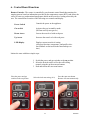
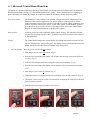
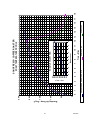
15. Hints and Tips Roast Profile: One way to further understand and monitor the roaster operation is by viewing the roast profile. The electronic control board is designed to control the rate at which the coffee temperature rises over time. The roast profile is basically a time versus temperature graph that determines when the gas is cycled on to heat the beans and then cycled off to prevent the beans form heating to quickly. The gas is cycled on and off through out the entire active roasting process. The roaster will continue along the roast profile until the temperature reaches the specified temperature associated with the roast level setting and then enters the cool down phase. The elapsed time and current roast temperature can be viewed during the active roast via the LED display and referenced to the roast profile graph on the following page. Real time data can be viewed using the Sonofresco ADR software, call for details. Time Measurement: The time measurement is the time from the beginning of the roasting process when the start roast button was pressed. During an active roast, push and release the start roast button to display the time. The roaster control board readout is a segmented single digit display, numbers are cycled to the display in series as follows: Example: The roaster is running for 1:30 (one minute and thirty seconds) from start when the roast button is pressed and released the display will scroll 1...-...3...0. (one...dash...three...zero.) This time should be noted; immediately proceed to read the temperature data. Temperature Measurement: The temperature measurement is the real time temperature of the roasting process at the moment it is viewed. During an active roast, simultaneously push and hold both the up and down arrows to display the temperature. Note: If the up and down arrow buttons are continuously held down during the entire roast process, the temperature can be viewed rising over the course of the active roast. The roaster control board readout is a segmented single digit display, numbers are cycled to the display in series as follows: Example: The bean temperature is currently 135°C (one hundred thirty five degrees Celsius); the display will scroll 1...3...5. This temperature should be noted and compared to the graph on the following page. Temperature Measurement: Graph Comparison: Simply find the time on the bottom edge of the graph and the temperature on the left side and intersect to find the current position on the roast profile. Although this data is not critical to the user when roasting coffee, you may be asked to perform this operation during a service call to help troubleshoot potential roaster issues. The Sonofresco roast profile is located on the following page. 27 4046080