1
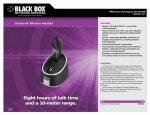
Compatibility Report GN 6210
Sits conveniently at the head, even for longer use
Acceptable
Acceptable
Acceptable
2.2 Features
Criteria
Remarks
Mono (single sided) available
Yes
Duo (double sided) available
No
Micro flexible boom available
No
Micro fixed boom available
No
Over-the-head-style available
No
Over the ear available
Yes
Around the ear available
No
Miscellaneous
Incl. Docking station
2.3 Restrictions
The GN6210 features a remote hook switch, that is, you can accept and disconnect
calls directly on the headset when not near to the telephone.
However, this
functions does not work with the IP200. To work around, you may use the GN1000
mechanical lifting device (see separate report).
3 Configuration
3.1 IP200
3.1.1 Connected directly to the IP200
The GN6210 can be connected to the headset port of the IP200 (despite what the
user manual recommends). When using standard IP200 settings (that is, no
tweaking of the analogue front end), we achieved best results when setting the
selector switch to F, and both the microphone volume dial and the volume match dial
to approx. 60%.
The headset detection does not work with the GN6210, so you have to enable the
headset manually in the IP200’s settings.
3.1.2 Used with the GN1000 lifting device
In that scenario, the GN6210 is to be tied in to the handset cord, as described in the
manual. We achieved best results when setting the selector switch to A, and both
the microphone volume dial and the volume match dial to approx. 60%.
You have to disable the headset manually in the IP200’s settings.
innovaphone AG,
GN 6210, Seite 2 von 4