1
Compatibility Report GN 6210
3.2 IP200A
3.2.1 Connected directly to the IP200A
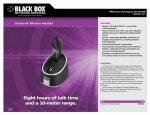
The GN6210 can be connected to the headset port of the IP200A (despite what the
user manual recommends). When using standard IP200A settings (that is, no
tweaking of the analogue front end), we achieved best results when setting the
selector switch to F, the microphone volume dial to approx. 15% and the volume
match dial to approx. 100%.
The headset detection does not work with the GN6210, so you have to enable the
headset manually in the IP200’s settings.
3.2.2 Used with the GN1000 lifting device
In that scenario, the GN6210 is to be tied in to the handset cord, as described in the
manual. We achieved best results when setting the selector switch to A, the
microphone volume dial to approx. 40% and the volume match dial to approx. 100%.
You have to disable the headset manually in the IP200A’s settings.
3.3 IP100
3.3.1 Connected directly to the IP100
The IP100 does not feature a headset port, so the GN6210 will be tied in to the
handset cord, as described in the manual. We achieved best results when setting the
selector switch to A, the microphone volume dial to approx. 40% and the volume
match dial to approx. 50%.
You have to switch off headset mode in the IP100’s user settings.
3.3.2 Used with the GN1000 lifting device
The GN6210 is connected to the IP100 as in 3.3.1.
3.4 SoftwarePhone
Not tested. A more cost efficient solution would be to use a headset-only Bluetooth
adapter (that is, without base station) in combination with a Bluetooth PC adapter.
We have tested neither of these combinations.
4 Sales Channel
TLK, NT -Plus
In Germany, contact
Hans-Werner Bormann
Fon: 040-30982542
Fax: 040-30982543
[email protected]
for details.
innovaphone AG,
GN 6210, Seite 3 von 4