1
Transferring Device Drivers Using Custom Software
If the COPY command on your computer cannot directly implement handshaking,
or if you wish to trap errors and abort or otherwise modify the transmission process,
you must use a program to handle the installation.
This procedure assumes that your computer has some means of looking at data
being echoed from the Command Module, and can check for a return character
without having to have a character returned. Since the actual operating system
program file bytes sent over the RS-232 interface are not echoed, the lack of ability
to do this would put the system into an infinite wait at the first byte that was not
echoed.
1. Set up the appropriate handshake mode and data format on your system, and
the matching handshake mode in the System Instrument.
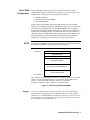
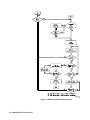
2. Transfer the device driver files over the RS-232 interface using a program
that follows the outline in Figure 5.
Installing SCPI Device Drivers 17