1
Meijer.com
SERVICE
PC IN
COMPONENT YPbPr
Installation
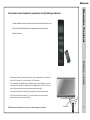
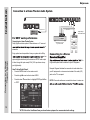
Connecting a Personal Computer with VGA to your television
Optional cables
Recommended computer display resolution:1,366 x 768 @ 60 HZ
How to Connect Audio sound
• Connect an optional 3.5mm audio cable from the computer’s mini
audio output jack to the audio input on the TV’s panel.
NOTE: If your PC uses a standard signal mode, the screen will adjust
automatically.
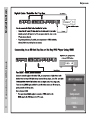
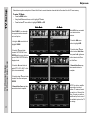
INPUT SOURCE
SOURCE
INPUT
TV
AV
Component
Connection to a
Personal Computer
How to Connect a PC
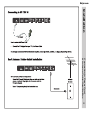
• Connect using an optional male to male VGA cable from your PC to
the VGA input on the TV’s panel.
HDMI 1
HDMI 2
VGA
14