1
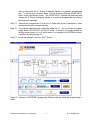
used to read back the R, M and A Register values of a previous programmed part. To do this, just complete Steps 7 and 8 and then click the “READ DATA” button in the right bottom corner. The “READ DATA” function will read back and display the R, M and A Register values of a previous programmed part without showing other message. Step 11: Remove the programmed IC from the IC holder with a pair of tweezers or other sucking device with insulated handles. Step 12: To program additional parts, repeat the steps 8 to 11. Do not recycle any power supply while a PE3341/2 IC is in the IC holder. If doing so, the transit created by turning power supply on or off could erase or re-program the EEPROM content. A solution is being working on. Step 13: To exit the program, click the “QUIT” button. Figure 3. Example of EEPROM Programming Software Screen when the programming is failed. Peregrine Semiconductor Corportation 13 Doc. 79/0089~00A