1
Sensitivity Selection
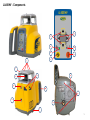
Select >>Sensitivity<< and press and release button E to open the Sensitivity menu.
The desired Sensitivity: Low, Middle (Default) and High) can be selected using the Up/Down buttons.
Press and release button E to confirm the selected Sensitivity.
Select Language
Select >>Language<< and press and release button E to open the Language menu.
Use Up/Down buttons to select the required local language (EN, DE, IT, FR, ES, PT,
NL, DA, NO, SV, FI, PL, TR, CZ).
Press and release button E to store the selected Language; unit falls back to the standard menu.
23