1
ACASYSSTUDIO
3.
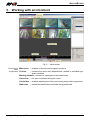
Working with environment
Fig. 3 - Initial screen
Environment Main menu – enables to access most program functions
main
– contains the icons with abbreviations, related to individual procomponents Tool bar
gram functions
Working window – window for viewing the video sequences
Cursor bar
– for quick movement along the video
Control bar – enables watching the video and moving along video sequences
Status bar
acasysstudio_ms_en_109
– shows the details about activities being performed
8/25