1
Encoder Firmware V4.10.07 User’s Manual
Encoder Firmware
A1D-310-V4.12.09-AC
User’s Manual
2012/06/25
1
www.acti.com
Encoder Firmware V4.12.09 User’s Manual
Table of Contents
1.
Recommended PC Specification
4
2.
Preparation before setup
5
Connect to device and setup IP ...................................................... 5
Sample screenshots to setup IP of your PC (Win XP) ...................... 7
3.
Configuring the IP device
11
Login ............................................................................................. 11
Live view ....................................................................................... 13
PTZ Control Panel ......................................................................... 15
Host .............................................................................................. 18
Date & Time .................................................................................. 19
Network ........................................................................................ 21
IP Address Filtering ...................................................................... 21
Port Mapping ................................................................................ 24
ToS ............................................................................................... 26
UPnPTM......................................................................................... 27
SNMP Setting .............................................................................. 28
RTP .............................................................................................. 29
Bonjour......................................................................................... 30
HTTPs .......................................................................................... 31
802.1x .......................................................................................... 37
Speed & Duplex ........................................................................... 38
IP Settings ..................................................................................... 39
Connection Type .......................................................................... 39
DNS ............................................................................................. 40
DDNS ........................................................................................... 41
Video & Audio .............................................................................. 42
Video ............................................................................................ 42
Audio ............................................................................................ 59
OSD/Privacy Mask ....................................................................... 60
Event ............................................................................................. 62
2
www.acti.com
Encoder Firmware V4.12.09 User’s Manual
Event Server ................................................................................ 62
Event Configuration...................................................................... 66
Event List ..................................................................................... 74
Manual Event ............................................................................... 77
Local Storage Management ......................................................... 78
Status ........................................................................................... 79
Utilities ......................................................................................... 80
Setup............................................................................................ 85
File Management ......................................................................... 86
Event Handler with Local Storage ................................................ 91
System........................................................................................... 97
User Account ............................................................................... 97
System Info .................................................................................. 99
Factory Default ........................................................................... 100
Firmware Upload........................................................................ 101
Profile Upload ............................................................................ 102
Save & Reboot ........................................................................... 103
Logout ........................................................................................ 103
3
www.acti.com
Encoder Firmware V4.12.09 User’s Manual
1. Recommended PC Specification
CPU
Core2Duo 2.13GHz and above
Memory
2 GB or above
Windows XP with SP2 or above. Windows Vista / Windows 2003 /
Operating System
Windows 7
Internet Explorer 6.0 SP2 / Internet Explorer 7.0 / Internet Explorer 8.0
Video Resolution
SVGA or XGA with 1024x768 resolution
4
www.acti.com
Encoder Firmware V4.12.09 User’s Manual
2. Preparation before setup
Connect to device and setup IP
Our IP device provides access through Internet Explorer. The IP address for your PC must be
within the same subnet as the IP device. You need to match the TCP/IP settings between PC
and IP device before you can access it via IE.
There are two ways to add devices to the network.
With DHCP server / router:
DHCP server assigns IP addresses to devices automatically. You can find them on the network
with our IP Utility. It is available on NVR CD and our website:
http://www.acti.com/IP_Utility
Run IP Utility to start auto device search. Click on the underlined IP links to access your IP
devices. You do not need to change IP.
Without DHCP server / router:
Please assign a static IP for each device and add them one by one. Connect to the first device
by following steps 1 to 5 below.
Before adding more devices into the network, you need to change the current device to a new
IP address so no two devices have IP conflict. (Steps 6 to 9).
For adding devices without DHCP, please see following steps.
1. Connect the PC to the Network Switch with the CAT5 cable, and change your PC’s IP to
192.168.0.99 / Subnet Mask 255.255.255.0 (101 is just a sample, it may be any number
from 1 to 254 except 100.)
2. Connect the device to your Network Switch. If it is a PoE enabled Switch, then the device is
powered on. If it is NOT a PoE enabled Switch, please also plug in the Power Adapter.
5
www.acti.com
Encoder Firmware V4.12.09 User’s Manual
3. Open Internet Explorer , and type in Default IP:
http://192.168.0.100
4. When you see the login window, please input default user and password:
Default Username: Admin
Password: 123456
5. After you log in, you will see the video from IP device. To go to the main menu, click the
“Setup” button on the top left.
6. Please go to IP settings -> Connection Type. Change the IP mode to Static and the IP
address to 192.168.0.101 or any other unused IP (Avoid 192.168.0.100, the IPs of your
PCs and other devices already in network.). Click “Apply” then click System -> Save &
Reboot.
7. Internet Explorer will close after a few seconds. This is normal.
8. Wait for 30 seconds and open IE again by typing in the new IP. (In this example,
192.168.0.101). For later device you add into the network, please choose an IP that does
not is not used by any existing device.
9. If you have more than one device, continue again from step 2. Assign different new IP to
each camera (for instance -> 192.168.0.102, 192.168.0.103 …). You do not need to unplug
the existing devices from the switch because there is no IP conflict.
6
www.acti.com
Encoder Firmware V4.12.09 User’s Manual
Sample screenshots to setup IP of your PC (Win XP)
The procedures below show how to setup your IP on Windows XP. If you use operating system
other than Windows XP, please refer to OS manuals for proper setup procedures.
STEP1
Start up your PC.
STEP2
Click the [Start] and select the "Control Panel"
7
www.acti.com
Encoder Firmware V4.12.09 User’s Manual
STEP3
Double-click the "Network and Internet connections" icon.
STEP4
Double-click the "Network connections" icon
8
www.acti.com
Encoder Firmware V4.12.09 User’s Manual
STEP5
Click “Local Area Connections”, and then click “Change settings of this connection” in the
Network Task menu.
STEP6
Click “Internet Protocol (TCP/IP)”, and then click [Properties]
9
www.acti.com
Encoder Firmware V4.12.09 User’s Manual
STEP7
Click the “Use the following IP address” radio button and enter the IP address and the subnet
mask.
Please set the settings as below.
IP address: 192.168. 0.xxx
Subnet mask: 255.255.255. 0
(NOTE: xxx should be a number
from 1 to 254 except 100, which is
used by the IP device. Please also
make sure that no two equipments
use the same IP address in the
same network.)
STEP8
Click the [OK] button and the window dialog box will close.
10
www.acti.com
Encoder Firmware V4.12.09 User’s Manual
3. Configuring the IP device
This section describes how to configure the IP device. The administrator has unlimited access
to all settings, while the normal user can only view live video. The IP device is configured under
a standard browser (Microsoft Internet Explorer 6.0 / 7.0 / 8.0).
Login
STEP1
Open Internet Explorer 6.0 / 7.0 / 8.0. You may download the latest version from:
http://www.microsoft.com/windows/ie/downloads/default.mspx
STEP2
Enter the IP address of the IP device and press enter to go to Login Page.
The default IP address is “192.168.0.100”
STEP3
Enter the Account name and the Password
(Default Account: Admin / Password: 123456).
STEP4
Select the language of the IP device user interface.
You can select between English, Traditional Chinese, Japanese, Spanish, Italian, German,
Portuguese, Greek, Russia, Turkey, Indonesia and Swedish. This user interface setting will
disappear once you log out, if you want to change the default user interface language, please
11
www.acti.com
Encoder Firmware V4.12.09 User’s Manual
go to [Host] in the ”Host” section under the setup tab.
STEP5
Click the
button to login or click the
button to re-enter
again. Once you’ve logged in, the “Live page” will be displayed as below.
12
www.acti.com
Encoder Firmware V4.12.09 User’s Manual
Live view
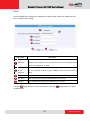
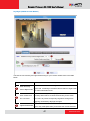
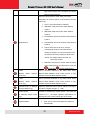
Click the
[Live] tab to show [Live page]. Refer to the table below for how to configure each
setting.
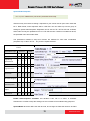
Function List
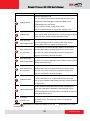
Function
Full Screen
Description
Click the icon
to stretch the preview to full screen. You can
click “Esc” button on the keyboard to return to previous display.
Snapshot
Click the icon “
” to take a snapshot. The snapshot picture
will be saved to the default folder
“C:\Users\”account name”\Picture”, in the format of
YYYYMMDD_HH_mm_ss.jpg.
13
www.acti.com
Encoder Firmware V4.12.09 User’s Manual
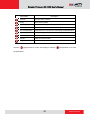
Audio out
Click the icon
to enable the audio out from PC to IP
camera or video server. When it is enabled, your voice will be
transferred to the audio out of the IP camera or video server.
NOTE: you will need to have a microphone connected to your PC to
do that.
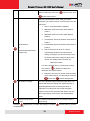
If dual stream mode is enabled, click
Media
to select which stream to
display (Media 1 or 2). The default is single stream only. To change
to dual stream mode, please refer to “Media 1” section under
“Setup” tab
Click
Encoder Type
to select the compression codec used in video
encoding. The Encoder type option includes MPEG-4, MJPEG and
H.264. Once selected, the video server/IP camera will start to send
video in new stream type.
Display size
Click
or
Audio in
Click the icon
of
to adjust
to mute or the icon
display screen size
to receive
audio in from the video server/IP camera. Drag the volume bar
to adjust the volume.
PTZ Panel
Click on the PTZ button to pop up the PTZ Control panel, and
enable Mouse PTZ at the same time.
*Note: This PTZ panel is only available for PTZ Speed Dome
model.
Network status
Indicates the network state. If the light on the right is green, it
means the network is ok. If the light is gray, it means the network is
broken.
The light on the left is not used
DO Setting
Click
to set DO output level to High. Click
to set DO output level to Low. If your device has more
than one DO available, each DO is controlled separately.
If you want to setup this IP camera/video server, please click the
[Setup] tab to switch to
“Setup Page”
14
www.acti.com
Encoder Firmware V4.12.09 User’s Manual
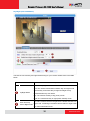
PTZ Control Panel
If you are using PTZ Speed Dome camera, this screen is available by clicking on PTZ button
in the live view screen.
There are three features on PTZ control panel, PTZ, Preset and Tour
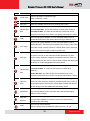
PTZ
Function
PTZ
Vendor/Protocol
PTZ Address
Description
The communication setting between PTZ module and Camera module.
The value has to be consistent with the hardware setting of PTZ Speed
Dome camera in the bottom.
(Please refer the hardware manual of Speed Dome.)
Pan Speed
Set the Pan/Tilt speed of the control pad
Tilt Speed
Control Pad
Click on this wheel to control PTZ movements.
Zoom In/Out
Click on this button to control zoom in or out
15
www.acti.com
Encoder Firmware V4.12.09 User’s Manual
Focus In/Out
Click on this button, this will shift the focus of the camera manually.
Please note that if you use manual controlled focus, then auto-focus
has to be disabled
Auto Focus
Enable auto focus function, camera will focus by itself via PTZ
movement.
Scan Speed
Set the speed of auto scan.
Auto Scan
Enable (ON)/Disable (OFF) the auto scan function.
You must first setup the preset point 1 and 2. The PTZ speed dome
will start to scan horizontally after enable this function.
Reset
Restart the video capturing module inside the IP camera.
Home
Back to the default position.
If you have preset point 1, it will be back to the preset point 1 while
press home button.
Preset Points
Go to a preset point. You must first setup the preset point in “Preset”
feature of this PTZ panel.
Preset
Function
Description
Name
Enter a name for the Preset point
Set
To setup a PTZ Preset point, move the camera to your desired view
angle (including pan, tilt and zoom) via the PTZ control panel. After
you’re satisfied with the view, please enter a name for the Preset
point and click this button to save the settings.
Goto
Click this button to go to the Preset point
Remove
Click this button to remove this Preset point.
16
www.acti.com
Encoder Firmware V4.12.09 User’s Manual
Tour
Preset Tour is a preconfigured PTZ sequence that directs the camera to cycle through multiple
preset PTZ views, including where to look and how long to look at each location. You may
configure the preset points to go to in the previous Preset section. Make sure you configure
PTZ and PTZ Preset sections correctly before setting up Preset Tours.
Function
Description
Touring Control
Select the tour you want to use. Choose “Stop” to stop this tour.
Edit Tour
Select the tour you want to edit.
Select a Preset
Selet the preset point you want to add in the tour. You may setup
Point
how long with the PTZ Speed Dome camera stay at each point by
settng the
[Dwell Time]. Then, click
[Add] button to add
the preset point in this tour
Preset Points
Sequence Control.
You may rearrange the preset point sequence here.
Click the buttons to move to top, move up, move down or move to
bottom of list.
Goto
Click this button to go to the preset point
Remove
Click this button to remove this Preset point in this modified tour
Click the
[Save] button to save the settings.
17
www.acti.com
Encoder Firmware V4.12.09 User’s Manual
Host
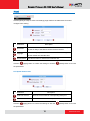
Click the [Host] in Setup to enter Host settings page. Refer to the table below for how to
configure each setting.
Parameters
Host name
Description
Enter a host name, and this host name will be shown when you
use the IP utility or the SDK to search for the IP device.
Select the language of default user-interface. Each user login will
Language
see the default user-interface first.
Camera name The camera name is reserved for customer use.
Click the
[Apply] button to confirm the settings or click the
[Reset] button to re-enter
the parameters.
PTZ Speed Dome model
Parameters
Serial Port Control
Description
Select the control value of corresponding serial port.
Serial Port Baud Rate Select the Baud Rate of serial port.
Click the
[Apply] button to confirm the settings or click the
[Reset] button to re-enter
the parameters
18
www.acti.com
Encoder Firmware V4.12.09 User’s Manual
Date & Time
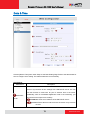
Click the [Date & Time] item under Setup to see Date Setting Page. Refer to the table below for
how to configure each setting. The default method is to set manually.
Date Setting
Parameters
Description
Click this to enable IP device’s SNTP/NTP function. This enables this IP
device to synchronize its time settings with a SNTP/NTP server. You can
use this function to make sure all your IP devices’ time is the same.
SNTP/NTP
server
Additionally, with our embedded digital-time-code in the streaming, you
can tell the event sequence accurately.
IP address: Enter the IP address of the SNTP/NTP server.
Sync time: Select the time interval for this IP device to synchronize
its time.
19
www.acti.com
Encoder Firmware V4.12.09 User’s Manual
Click this to manually setup the date & time.
Set manually
Date : Select the date
Time: Select the time
Time zone
Select the time zone offset for local settings
Select Type 1
Day Light
Saving
Click the
to specify daylight saving time by week number in a
month; select Type 2 to specify daylight saving time by date.
Start Time: Select the daylight savings start time.
End Time: Select the daylight savings end time.
[Apply] button to confirm the settings or click the
[Reset] button to
re-enter the parameters.
20
www.acti.com
Encoder Firmware V4.12.09 User’s Manual
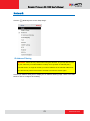
Network
Click the
[Network] item on the “Setup Page”.
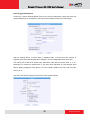
IP Address Filtering
WARNING: Please be very careful when using this function, as you may lose access
to your camera if you make mistakes in setup. You may either accidentally deny
yourself access, or forgot to include your own IP address in the allowed address list.
You will need to perform hard reset to be able to access the device again.
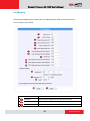
Click the [IP Address Filter] item to display the “IP Address Filtering Page”. Refer to the table
below for how to configure each setting.
21
www.acti.com
Encoder Firmware V4.12.09 User’s Manual
Parameters
Enable
Description
Check this box to enable IP Address Filtering.
The filter can be set in either “Allow” mode or “Block” mode.
1. “Allow” mode will refuse access to all IP addresses except the ones
Filter Method
listed below.
2. “Block” mode will accept all incoming access except the IP
addresses listed below.
Make sure you include the Netmask in your consideration.
22
www.acti.com
Encoder Firmware V4.12.09 User’s Manual
For each entry, you must check this box for it to be effective. For an entry
that you no longer need but does not wish to delete, you can uncheck it,
Enabled
and the system will remember it for future use. If a new entry that has
never been used before does not have Enable checked, then it will not be
stored in memory.
IP Address
The IP address you wish to allow or block. Please note that the actual
range is modified by the Netmask.
Using Netmask allows you to set filtering for a whole range of IP address
at once, without the need to enter all of them individually. If you are not
Netmask
sure about the function of netmask, then you should use
255.255.255.255, and it will affect only a single IP address per line of
entry, or use 255.255.255.0 to use the same setting for all IP addresses
starting with the same three numbers. .
Click this to use the current displayed info to do IP Address filtering. If you
setup correctly, it will change into a grayed out “Success” in a few
Apply
seconds.
Reset
Click the
Click this button to re-enter the parameters.
[Apply] button to confirm the settings or click the
[Reset] button to re-enter
the parameters.
23
www.acti.com
Encoder Firmware V4.12.09 User’s Manual
Port Mapping
Click the [Port Mapping] item to display the “Port Mapping Page”. Refer to the table below for
how to configure each setting.
Parameters
Description
HTTP port
Select the port assigned for HTTP protocol access
HTTPS
Select the port assigned for HTTPS protocol access
Search server port1
Select the first port used by server search applications to detect
24
www.acti.com
Encoder Firmware V4.12.09 User’s Manual
this IP device. (e.g. IP utlity)
Search server port2
Video control port
Video streaming port
(TCP Only)
Video Multicast Port
for Media1
Video Multicast Port
for Media2
this IP device. (e.g. IP utlity)
Select the port used to support video control function by
application programs. (e.g. NVR)
Select the port used by this IP device for Video Streaming.
Select the port for the multicast video of media1
Select the port for the multicast video of media2
RTSP port
Select the port assigned for RTSP protocol access
RTP Multicast Video
Select the port for the multicast video streaming of media1 via
Port for Media1
RTP protocol
RTP Multicast Audio
Select the port for the multicast audio streaming of media1 via
Port for Media1
RTP protocol
RTP Multicast Video
Select the port for the multicast video streaming of media2 via
Port for Media2
RTP protocol
Multicast IP
Select the multicast IP. Default settings is 228.5.6.1
Multicast TTL
Select the multicast TTL. Default setting is 255.
IGMP
Click the
Select the first port used by server search applications to detect
Select video type connected to the video-in of this IP device. If
you use an incorrect video type, some images might be lost.
[Apply] button to confirm the settings or click the
[Reset] button to re-enter the
parameters.
25
www.acti.com
Encoder Firmware V4.12.09 User’s Manual
ToS
Click the [ToS] (Type of Service) item to display the “ToS Page”. Refer to the table below for
how to configure each setting.
Parameters
TOS (type of
service)
Description
Select whether to add the TOS tag onto the streaming data.
Streaming data with a higher priority TOS tag will be transmitted
first when compared with other data.
Select the TOS tag’s priority to be added onto the streaming. You
can select between
TOS priority
1.Minimize-Delay
2.Maximize-throughout
3.Maximize-Reliability
4.Normal-Service
Click the
[Apply] button to confirm the settings or click the
[Reset] button to re-enter
the parameters.
26
www.acti.com
Encoder Firmware V4.12.09 User’s Manual
UPnPTM
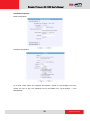
Click the [UPnPTM] item to display the “UPnPTM Setting Page”.
Click checkbox
to enable or disable the UPnPTM function. Edit the UPnP Friendly Name in
text field.
Click the [Apply] button
to confirm the settings or click the [Reset] button
to re-enter the
parameters.
27
www.acti.com
Encoder Firmware V4.12.09 User’s Manual
SNMP Setting
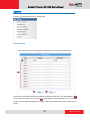
Click the SNMP Setting item to display the SNMP setting Page
Click
Select
to enable SNMP function.
to use SNMP V1/V2 or
Check the check box
to use SNMP V3
to enable traps
Enter the Destination IP address in
Enter the Trap Community used in
Select the Available trap in
Click the [Apply] button
to confirm the settings or click the [Reset] button
to
re-enter the parameters.
28
www.acti.com
Encoder Firmware V4.12.09 User’s Manual
RTP
Click RTP Item to configure RTP Settings
RTSP Authen Enable
RTP B2 Frame
Enable
Click the [Apply] button
Check box to enable RTP streaming’s Account/Password
authentication.
Check box to enable the B2 frame in RTP streaming
to confirm the settings or click the [Reset] button
to
re-enter the parameters.
29
www.acti.com
Encoder Firmware V4.12.09 User’s Manual
Bonjour
Parameters
Description
Enable Bonjour
Check the box to enable/disable Bonjour.
Friendly Name
Enter the Bonjour friendly name
Apply Button
Apply Button: Click apply to confirm the setting.
Reset Button
Click reset to re-enter the paramaters.
30
www.acti.com
Encoder Firmware V4.12.09 User’s Manual
HTTPs
By using HTTPs it is possible to create secure connection between the remote client and the
camera.
HTTPs solution has to be configured first, otherwise the HTTPs session would not start.
HTTPs Session Failure Due to Missing Configuration
This is the output on IE browser when attempting to access the camera by https://ip:port
without configuring HTTPs first.
31
www.acti.com
Encoder Firmware V4.12.09 User’s Manual
Configure HTTPs
You can change the HTTPS port on the device if you like. The default port is 443.
The Certificate is required to establish HTTPs session. Go to HTTPS page to create the
Certificate Signing Request (CSR) or Self-Signed certificate.
32
www.acti.com
Encoder Firmware V4.12.09 User’s Manual
The following example is based on Self-Signed certificate which is the easiest way.
Please open Web Configurator and click on HTTPs item. The press “Create Self-Signed
Certificate” button there.
When done, press “Create”.
33
www.acti.com
Encoder Firmware V4.12.09 User’s Manual
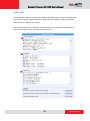
If you press “Properties”, you can see the device’s certificate.
Now you can run the IE browser again and connect to camera by https://ip:port
Press “Continue to this website”.
You will see Certificate Error and you can accept the error.
34
www.acti.com
Encoder Firmware V4.12.09 User’s Manual
Press “Install Certificate”.
35
www.acti.com
Encoder Firmware V4.12.09 User’s Manual
36
www.acti.com
Encoder Firmware V4.12.09 User’s Manual
802.1x
Please enable IEEE 802.1x and configure settings in the screen below. Note that the new
setting will only take effect after “Save & Reboot”.
37
www.acti.com
Encoder Firmware V4.12.09 User’s Manual
Speed & Duplex
Click the [Speed & Duplex] item in the network section to display the”Speed and Duplex” Page.
Refer to the table below for how to configure each setting.
Parameters
Description
This item lets you select the network transmission speed. You
can select from
Network
speed
1. Auto detect (default setting)
2. 100Mbps / Full duplex
3. 100Mbps / Half duplex
4. 10Mbps / Full duplex
5. 10Mbps / Half duplex
Click the
[Apply] button to confirm the settings or click the
[Reset] button to re-enter
the parameters.
38
www.acti.com
Encoder Firmware V4.12.09 User’s Manual
IP Settings
Connection Type
Click the [Connection Type] item to display the “Connection Type Page”. Refer to the table
below for how to configure each setting.
Parameters
Description
Click this to enable IP device’s DHCP function.
Dynamic IP
It will acquire its WAN port IP address from a DHCP server within the
address
same network. (You must have a DHCP server in order to enable this
function.)
Click this to manually enter the IP address.
Static IP
address
IP address: Enter the WAN port IP address.
Subnet mask: Enter the subnet mask of WAN port. If IP address
is changed, adjust the subnet mask accordingly.
ISP gateway: Enter the IP address of the gateway (the router).
Click this when you connect IP device directly to the xDSL modem.
User name: Enter the user name of your xDSL account.
PPPoE
Password: Enter the password of your xDSL account.
Note: You have to click the [Save Reboot] after you click the [Apply
button] to let this IP device start xDSL connections.
39
www.acti.com
Encoder Firmware V4.12.09 User’s Manual
Click the
[Apply] button to confirm the settings or click the
[Reset] button to re-enter
the parameters.
DNS
Click the [DNS] item to display the “DNS Server Settings Page”. Refer to the table below for
how to configure each setting.
Parameters
Primary DNS server
Secondary DNS server
Click the
Description
Defines the IP address of the primary DNS server. This is used for
identifying this computer by name instead of IP address.
The IP address of the secondary DNS server. It will be used once
the primary DNS server fails.
[Apply] button to confirm the settings or click the
[Reset] button to re-enter
the parameters.
40
www.acti.com
Encoder Firmware V4.12.09 User’s Manual
DDNS
Click the [DDNS] item to display the “DDNS Server Setting Page”. Refer to the table below for
how to configure each setting.
Parameters
Description
Click this to enable IP device’s DDNS function.
DDNS type
DDNS function enables user to connect to this IP device by domain name
even if its IP address is not static.
Protocol /
Click one of the DDNS service providers.
Service
You can visit their website to get a DDNS service account for this IP
Reference
device.
Host name
Enter the host name of your DDNS service account. (ex: xxxx.dyndns.org)
User name
Enter the user name to login your DDNS service account.
Password
Enter the password to login your DDNS service account.
Click the
[Apply] button to confirm the settings or click the
[Reset] button to re-enter
the parameters.
41
www.acti.com
Encoder Firmware V4.12.09 User’s Manual
Video & Audio
Click the
[Video & Audio] item on the “Setup Page”.
Please note that some elements may not appear on all models.
Video
Click the [Video] item to display the “Video Page”. The functions here are grouped under
different tabs. Starting from firmware version 4.07, there are two sets of all settings in the Video
section, one for day time and one for nighttime. The camera will automatically load different
profile based upon the current Day/Night status. This function allows for tailored configuration
so that the camera may perform optimally under all lighting conditions.
Image (CMOS Models)
This tab concerns the general video settings. Please refer to the table below for functions.
42
www.acti.com
Encoder Firmware V4.12.09 User’s Manual
Parameters
Description
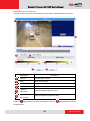
Live View
Live view of the camera
Activity
Motion activity status
Video Flipping
Check this box to flip the video up-down
Video Mirror
Check this box to mirror the video left-right
Lens Compensation
Check this box to use best pre-set settings for bundled lens
Brightness
Select the brightness value
Saturation
Select the saturation value
Contrast
Select the contrast value
Sharpness
Select the Sharpness value
Click the
[Apply] button to confirm the settings or click the
[Reset] button to re-enter
the parameters.
43
www.acti.com
Encoder Firmware V4.12.09 User’s Manual
Image (Megapixel CCD Models)
This tab concerns the general video settings. Please refer to the table below for functions.
Parameters
Description
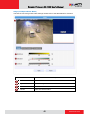
Live View
Live view of the camera
Activity
Motion activity status
Video Flipping
Check this box to flip the video up-down
Video Mirror
Check this box to mirror the video left-right
Brightness
(Day Profile)
Brightness
(Night Profile)
Click the
Select the daytime brightness value
Select the nighttime brightness value
[Apply] button to confirm the settings or click the
[Reset] button to re-enter
the parameters.
44
www.acti.com
Encoder Firmware V4.12.09 User’s Manual
Image (CCD D1 Models)
This tab concerns the general video settings. Please refer to the table below for functions.
Parameters
Description
Live View
Live view of the camera
Activity
Motion activity status
Video Mirror
Check this box to mirror the video left-right
Video Mirror
Check this box to mirror the video left-right
Lens Compensation
Check this box to use best pre-set settings for bundled lens
Brightness
Select the brightness value
Contrast
Select the contrast value
Click the
[Apply] button to confirm the settings or click the
[Reset] button to re-enter
the parameters.
45
www.acti.com
Encoder Firmware V4.12.09 User’s Manual
Image (PTZ Speed Dome Model)
This tab concerns the general video settings. Please refer to the table below for functions.
Parameters
Description
Live View
Live view of the camera
Brightness
Select the brightness value
Saturation
Select the saturation value
Contrast
Select the contrast value
46
www.acti.com
Encoder Firmware V4.12.09 User’s Manual
Day/Night (CMOS Non-D/N Models)
This tab concerns the day and night switch timing for your camera. Please refer to the table
below.
Parameters
Switch from Day
mode to Night mode
Description
This value controls the level of light where camera switches into
night mode. Increasing it will make camera switch to night mode
at a darker illumination level.
The camera will only switch day/night status if the illumination
Switch if lasts more
level stays either above or below the boundary for this much
than X seconds
time. This is to prevent a temporary brightness change from
triggering unnecessary day/night changes.
Brightness Meter Bar
This bar shows the illumination level at which cameras go to
night or day mode (Blue bars), and shows the current detected
47
www.acti.com
Encoder Firmware V4.12.09 User’s Manual
illumination level (Green bars). Use this bar to fine tune the
day/Night switch timing.
Get Current
Exposure Level
Click the
Clicking this button will refresh the illumination level reading from
the camera sensor. The larger the number, the darker the
environment.
[Apply] button to confirm the settings or click the
[Reset] button to
re-enter the parameters.
Day/Night (CMOS D/N Models)
48
www.acti.com
Encoder Firmware V4.12.09 User’s Manual
Parameters
Description
Select the day/night mode.
Auto: The camera would switch between day and night mode
Day/Night Mode
automatically. It will follow Day to Night and Night to Day
threshold defined by user below.
Day: The camera will stay in day (Color) mode.
Night: The camera will stay in night (black & white) mode.
Select the method used by Camera to determine illumination
Day/Night Type
level. It can be either CDS light sensor or through image analysis
by DSP. Not every model will allow selection for this.
Switch from Day
mode to Night mode
This value controls the level of light where camera switches from
Day mode into Night mode. Increasing it will make camera
switch to Night mode at a darker illumination level.
The camera will only switch day/night status if the illumination
Switch if lasts more
level stays either above or below the boundary for this much
than X seconds
time. This is to prevent a temporary brightness change from
triggering unnecessary day/night changes.
Switch from Night
mode into Day Mode
This value controls the level of light where camera switches into
Day mode. Increasing it will make camera switch to Day mode at
a darker illumination level.
The camera will only switch day/night status if the illumination
Switch if lasts more
level stays either above or below the boundary for this much
than X seconds
time. This is to prevent a temporary brightness change from
triggering unnecessary day/night changes.
IR LED may be configured as AUTO or Disabled here. If it is set
Day/Night IR LED
as AUTO, LED will turn on in night mode and turn off in day
mode. If set to Disabled, LED will stay off when camera switches
into night mode.
This bar shows the illumination level at which cameras go to
Brightness Meter Bar
night or day mode (Blue / Red bars), and shows the current
detected illumination level (Green bars). Use this bar to fine tune
the day/Night switch timing.
Get Current
Exposure Level
Click the
Clicking this button will refresh the illumination level reading from
the camera sensor. The larger the number, the darker the
environment.
[Apply] button to confirm the settings or click the
[Reset] button to re-enter
the parameters.
49
www.acti.com
Encoder Firmware V4.12.09 User’s Manual
Day/Night (CCD D/N Models)
This tab concerns the day and night switch timing for your camera. Please refer to the table
below.
Parameters
Description
Select the day/night mode.
Auto: The camera would switch between day and night mode
Day/Night Mode
automatically. It will follow Day to Night and Night to Day
threshold defined by user below.
Day: The camera will stay in day (Color) mode.
Night: The camera will stay in night (black & white) mode.
Switch from Day
mode to Night mode
This value controls the level of light where camera switches into
night mode. Increasing it will make camera switch to night mode
at a darker illumination level.
50
www.acti.com
Encoder Firmware V4.12.09 User’s Manual
Switch from Night
mode into Day Mode
This value controls the level of light where camera switches into
Day mode. Increasing it will make camera switch to Day mode at
a darker illumination level.
This bar shows the illumination level at which cameras go to
Brightness Meter Bar
night or day mode (Blue / Red bars), and shows the current
detected illumination level (Green bars). Use this bar to fine tune
the day/Night switch timing.
Get Current
Exposure Level
Click the
Clicking this button will refresh the illumination level reading from
the camera sensor. The larger the number, the darker the
environment.
[Apply] button to confirm the settings or click the
[Reset] button to
re-enter the parameters.
How it works
An important feature in this screen is that user may now customize the illumination level to
perform day/night mode switches.
On the horizontal brightness meter shown here, there are three colored bars. The bar
represents light amplifying levels 0 to 100, where 0 is Brightest and 100 is darkest. 0 means no
digital amplification of incoming light signals, which means that the environment is bright
enough for the camera to get good quality images.
When the environment gets darker, as when the sun is setting over the horizon, the
environmental gets darker. To maintain proper image brightness level, the camera will attempt
to digitally amplify the light signals received by the sensor. The Blue one is the level at which
camera will go into night mode, and remove Mechanical IR cut filter and open IR LED if
available. The red one indicates the illumination level at which the camera will consider bright
enough to go back to day (Color) mode.
The Red bar should always be to the left of the blue bar. As camera go from day to night mode,
more lights are allowed inside (the IR filter is removed), so the detected light signal level will
increase. If the night-to-day illumination level is too close to the day-to-night level, the camera
will immediately consider it bright enough to go back to day mode, which will result in
continuous day/night switching.
51
www.acti.com
Encoder Firmware V4.12.09 User’s Manual
Motion Detection
Adjust Column
Adjust Square
Click the
[Apply] button to confirm the settings or click the
[Reset] button to
re-enter the parameters.
Video Motion Detection:
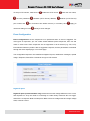
STEP1: Click the Plus sign
to expand the Motion Detection settings then Click the
Motion Enable checkbox to enable motion detection.
52
www.acti.com
Encoder Firmware V4.12.09 User’s Manual
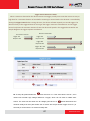
STEP2: Click the
checkbox to enable motion detection for each individual region.
STEP3: Click one region to start to edit its size and location. You can click the “Adjust Column”
to drag motion region to your desired location. You can click the “Adjust Square” and drag to
adjust motion region size. You can click the upper right button to cancel this motion region.
Repeat above procedure to adjust the motion region.
STEP4: Set the
sensitivity of motion detection region.
STEP5: Set the
interval time of motion detection. After a motion event is triggered, no
more events will be triggered within this time in the same region
STEP6: Set the
trigger threshold of motion detection region. The larger this value, the
larger the object size needed to trigger motion detection.
STEP7: In motion activity
window, the bar shows the motion activity status. You can also
see the trigger threshold (Red line). When the motion activity exceeds the trigger threshold, the
bar would become red to indicate that a motion event has been triggered.
While viewing the motion activity window, you can adjust the motion sensitivity (the higher, the
easier camera considers video change to be an activity) and the threshold (the higher, the
larger the activity needed to trigger a motion event). If the default settings are not satisfactory
for your scene, you may try our alternative recommendations of:
Sensitivity: 80, Threshold: 2~5 (for normal environment)
Sensitivity: 80, Threshold: 5~10 (for very noisy environment)
PIR (Passive Infra Red motion sensors) (Not available to all models)
PIR sensors are available for some models. For the models with PIR, there will be a PIR
Motion Sensor section below the video motion detection.
You may enable PIR sensors by the checkbox
and modify the sensitivity/ trigger interval.
When motion is detected via PIR sensor, a red border will show around the whole view area.
Please note that PIR sensors have a shorter range of detection than Video motion
detection.
53
www.acti.com
Encoder Firmware V4.12.09 User’s Manual
Compression
There are two streams output available for this network device. Click the [Stream 1] or [Stream
2] item to display the content page, Contents for both stream are identical. Refer to the table
below for how to configure each setting.
54
www.acti.com
Encoder Firmware V4.12.09 User’s Manual
Parameters
Encoder Type
Resolution
Frame rate
Description
Select the encoder’s compression type.
MPEG-4 / MJPEG / H.264
Select the video resolution of the IP device.
Select the available frame rate from the drop down menu.
Select the video bit rate mode.
Video Bit Rate
Constant Bit Rate: The bit rate remains constant at all conditions.
Mode
Variable Bit Rate: The video bit rate will vary based upon scene
complexity and amount of movement. The quality will remain the same.
Quality
When encoder type is MPEG4 or H.264, and video bitrate mode is
“Variable Bit Rate” Select the quality value from High / Medium / Low
When encoder type is MPEG4 or H.264. and video bitrate mode is
GOP Length
“Variable Bit Rate”. Select the Interval between two I-frames. This is also
called GOP Length. (Group of Picture) . Default value is one I frame per
second. The maximum length of GOP is limited to 60.
Select the available frame rate from the drop down menu.
This puts a hard cap on the maximum bit rate allowed in any given
Frame rate
second of video streaming. Assigning a limited bit rate may result in a
few dropped frames rate when the stream data overflows the allowed bit
rate. Doing so will also disable Bit Rate setting below.
Select the video bit rate mode.
Video Bit Rate
Mode
Constant Bit Rate: The video bit rate remains constant at all
conditions.
Variable Bit Rate: The video bit rate will vary based upon scene
complexity and amount of movement. The quality will remain the same.
This puts a hard cap on the maximum bit rate allowed in any given
Video Max
second of video streaming. Assigning a limited bit rate may result in a
Bitrate
few dropped frames rate when the stream data overflows the allowed
bit rate. Doing so will also disable Bit Rate setting below.
This is the target bitrate that the camera will attempt to provide when
Video Bitrate
using Constant Bitrate mode. The actual value will fluctuate slightly
based on scene changes.
Frame rate
(Stream2)
Quality
Select the frame rate for each profile by choosing from the drop down
list. Frame rates available for stream 2 may be less than stream 1,
depending upon the setting.
When encoder type is MJPEG:
Select the quality value of MJPEG encoder type from 1 to 100.
55
www.acti.com
Encoder Firmware V4.12.09 User’s Manual
Click the
[Apply] button to confirm the settings or click the
Reset] button to re-enter
the parameters.
Exposure / White balance
Line Frequency
Change settings between 60Hz or 50Hz, depending on
the AC power type of your region..
This determines if the WDR processing is turned on or
WDR Mode
off. Turn this on only when you have very large
brightness differences in a single scene. Otherwise
leave it off.
The strength of image modification by WDR algorithm.
WDR Level
Increasing this will increase the effect of WDR
processor.
Select exposure mode to auto or manual.
1. Auto: The IP camera will adjust the exposure
automatically.
Exposure Mode
2. Manual: Manually select the
Gain and
56
Exposure
Shutter Speed below.. Day and
www.acti.com
Encoder Firmware V4.12.09 User’s Manual
night mode change will not operate as normal
under manual Exposure.
Select the white balance mode. After you set the
parameter, you need to wait for 5~10seconds to see the
final result.
1. AUTO : Auto white balance (default)
2. INDOOR1: Select the indoor white balance
profile 1.
3. INDOOR2: Select the indoor white balance
profile 2.
4. OUTDOOR1: Select the outdoor white balance
profile 1.
5. OUTDOOR2: Select the outdoor white balance
White Balance
profile 2
6. HOLD: Select this to let the IP camera
automatically obtain a best white balance
setting according to current environment. The
IP camera will use this setting to adjust color.
NOTE: This setting will be lost after you
reboot the camera.
7. MANUAL: Select this to enable manual setting
of the white balance. You will need to enter the
R Gain and
R Gain
(Manual
B Gain setting below.
Add or decrease redness to the video when under
White
balance
Manual White Balance mode. (This function is only
mode only)
available in Manual White balance mode.)
B Gain
Add or decrease blueness to the video when under
(Manual
White
balance
Manual White Balance mode. (This function is only
mode only)
available in Manual White balance mode.)
Exposure Gain (In Manual
Select the exposure Gain of the IP camera. The higher
Exposure Mode only)
the value = brighter images. (1 ~ 255)
Shutter Speed
Increase or decrease the shutter speed. The closer the
(In manually shutter mode
number is to 1, the better nighttime performance is,
only)
although this also causes motion blur to the video.
Select exposure mode to auto or manual.
Exposure Mode
1. Auto: The IP camera will adjust the exposure
automatically.
57
www.acti.com
Encoder Firmware V4.12.09 User’s Manual
Manual: Manually select the
Exposure Gain and
Shutter Speed below..
Select the white balance mode. After you set the
parameter, you need to wait for 5~10seconds to see the
final result.
1. AUTO : Auto white balance (default)
2. INDOOR1: Select the indoor white balance
profile 1.
3. INDOOR2: Select the indoor white balance
profile 2.
4. OUTDOOR1: Select the outdoor white balance
profile 1.
White Balance
5. OUTDOOR2: Select the outdoor white balance
profile 2
(In
Indoor/Outdoor/Auto/Hold
6. HOLD: Select this to let the IP camera
automatically obtain a best white balance
profiles only)
setting according to current environment. The
IP camera will use this setting to adjust color.
NOTE: This setting will be lost after you
reboot the camera.
For all the settings above, you will need to setup
the value for
AE Reference Target and
Maximum auto shutter speed.
7. MANUAL: Select this to enable manual setting
of the white balance. You will need to enter the
R Gain and
AE Reference Target
B Gain setting below.
This is the desired image brightness output level. The
camera will attempt to change the exposure levels or
digital amplification levels to achieve this level of
brightness. Increasing this may provide a brighter
image, but if there are extremely dark areas, this may
also create slightly more noise in the underexposed
areas.
Maximum auto shutter
The maximum allowed time for the camera to take a
speed
single image.
Click the
[Apply] button to confirm the settings or click the
[Reset] button to re-enter
the parameters.
58
www.acti.com
Encoder Firmware V4.12.09 User’s Manual
Audio
Audio In
Select to enable or disable the audio in function.
Audio In sensitivity
Select the sensitivity of audio microphone.
Audio Out Volume
Adjust the Audio Out volume.
Click the
[Apply] button to confirm the settings or click the
[Reset] button to re-enter
the parameters.
59
www.acti.com
Encoder Firmware V4.12.09 User’s Manual
OSD/Privacy Mask
OSD (On Screen Display) and Privacy masks are configured in this section. There are four
regions available. Each may be used either as a Privacy mask or an OSD text.
Privacy Mask is not available in Dual Stream mode. Please disable Stream 2 if you wish to use
Privacy mask / OSD. Please go to Video & Audio -> Video -> Compression tab to configure
Stream 2.
60
www.acti.com
Encoder Firmware V4.12.09 User’s Manual
Parameters
Enable
Description
Check this box to enable each OSD / Privacy mask region
OSD / Privacy Each region can be in one of two types. OSD (On Screen Display) or
mask
Privacy mask
Color (Privacy This determines the color of the Privacy Mask Area. You may choose
mask)
between Black, Green, Red and Blue.
Click this checkbox to enable Privacy mask area setup. Click and drag
the adjust square at the lower right to change dimensions, click and
Setup
drag the adjust column at the top to move. (Similar to Motion Detection
Region)
Color(OSD)
This determines the color of the OSD Text. You may choose between
Black, Green, Red and Blue.
This number determines the level of transparency for this OSD Text. 1
Transparent
means that the background between the texts will not be visible, while
100 means the background will show through the OSD text.
Position
Select the location where the text will appear in the image.
This is where you enter the user defined string (%U) as described in the
String
next section. Total length cannot be more than 63 characters
This controls what is shown in the OSD text. You can click the Format
Format
Notice to the corner for a full list of available parameters. The OSD text
is primarily based upon this field.
Format Notice Click here to see the syntax list of how to configure the OSD text.
Click the
[Apply] button to confirm the settings or click the
[Reset] button to
re-enter the parameters.
61
www.acti.com
Encoder Firmware V4.12.09 User’s Manual
Event
This section describes how to setup the Event Handler, which deals with how the IP devices
respond to situations. Each IP device can have a maximum of 10 Event Rules. Each rule
includes one single trigger, and one or many responses. Several types of responses are
available. And there are multiple external servers for the device to interact with.
When setting up Event Handler, there are four types of settings. Event Server, Event
Configuration, Event Rules and Manual Event
Click the
[Event] item on the “Setup Page”.
Event Server
Event servers define whom the device may interact with. They can be other servers or devices
on the network, or even the camera itself. Event Configuration sets up a list of what to tell the
other party during interaction. Event list lays down the rules and conditions about when to
initiate which responses from which triggers. The options available for Event rules are
selected from the event servers and event configurations.
Event servers are classified as FTP servers, SMTP servers and HTTP servers
62
www.acti.com
Encoder Firmware V4.12.09 User’s Manual
FTP Server
FTP servers can receive snapshot or video uploads that are issued as part of the response
from event handlers. You may setup one FTP server.
To setup FTP servers, make sure to enter
port,
the User Name,
Password,
the network address,
the Network (FTP)
Connection mode (Passive or Active) and
Connection time before timeout(in milliseconds). Click
[Apply] to use these settings or click
[Reset] to clear changes.
SMTP Server
SMTP servers can send email upon request from the IP device. The email can be a simple
subject and text email, or attached with snapshot / video. You may setup two SMTP servers.
The device will first attempt to send the message via the Primary email SMTP server. If the first
attempt fails(after the Max connecting time), then the device will attempt to send via the
secondary SMTP server. If the device sends email successfully via the primary SMTP server,
then it will not use the secondary SMTP server.
63
www.acti.com
Encoder Firmware V4.12.09 User’s Manual
To setup SMTP servers, make sure to
enable the SMTP account and
choose the
proper Authentication type. There are many types available. The default is Login. We
recommend you to use Auto Detection. Available authentication types include: Auto Detection,
None, Login, Plain, Cram MD5, Digest MD5 and PoP Relay. Please also enter
Name,
Password,
user name),
and
the email address displayed as sender (can be different than the
Network (SMTP server) address,
Network (SMTP server) Port number
Max Connection time before timeout (in seconds). Click
settings or click
the User
[Apply] to use these
[Reset] to clear changes.
64
www.acti.com
Encoder Firmware V4.12.09 User’s Manual
HTTP Server
HTTP CGI servers are programs that run on web sites or many devices. They can be custom
programmed to perform a large variety of actions based upon the input. You can define which
CGI server to connect to here, and the user / password required to log into the target server.
The actual message / command is setup in the Notification messages / URL commands
section. You may define two separate CGI servers.
IP devices are also CGI servers. This means that IP devices can now issue commands to each
other, which creates endless possibilities for highly coordinated response. The IP device can
also give a loopback command to itself, in effect changing almost all possible settings
dynamically. For detail on the commands used to control the cameras, please contact your
customer representative.
An example will help you gain a better sense of how to utilize this unique function. Camera A is
a fixed camera that looks at a corridor leading to the main hall. It has a motion detection
window located near the point where the corridor arrives at the large hall. Camera B is a PTZ
camera located in the hall, which is usually left on auto-tour patrol. When motion activity in the
motion detection region triggers MD1 in Camera A, this then in turn activates an event rule in
Camera A that gives out a command to Camera B. Camera B would then swivel to the preset
point where the corridor leads into the entrance and switch to higher bit rate to temporarily
provide clearer image. After the event ends, Camera B will go back to its normal routine in
lower bit rate.
65
www.acti.com
Encoder Firmware V4.12.09 User’s Manual
To setup HTTP servers, make sure to
the user password,
port number and
enable the HTTP server,
Network (HTTP Server) address,
enter the user name,
Network (HTTP Server)
Max connection time before timeout ( in seconds). Click
use these settings or click
[Apply] to
[Reset] to clear changes.
Event Configuration
Event configurations are the responses to be performed when an event is triggered. For
most types of responses, you can create several different preset responses, then mix and
match in event rules. Some responses are not supported in all IP devices (e.g.: DO, PTZ).
Event Motion Detection profile is also a triggerable response, but the parameters are defined
through the Video Adjust page, not in Event page.
The configurable responses are classified as Digital I/O ports, Notification messages, Upload
Image / Snapshot, Send URL Commands and go to PTZ Presets.
Digital I/O ports
Digital I/O ports (selected models only) read and control the voltage difference in the circuit,
and respond to it. They are useful in connecting to a wide variety of devices. D/I is a trigger,
while D/O is a response. Both are setup here. Both have a low voltage state and a high voltage
state, noted as 0 and 1.
66
www.acti.com
Encoder Firmware V4.12.09 User’s Manual
Trigger Interval: How does it work?
When a motion is detected or the device receives a DI trigger, usually users want the camera to stay on
high alert for a minimum duration of time before returning to normal mode. This duration is controlled by
setting the trigger interval value. During this time, the device will NOT respond to a second trigger. The
device will stay in the triggered state for as long as the trigger continues to be effective. So the Trigger
interval only limits the minimum amount of time the device will spend in the triggered state. Below are
sample diagrams on trigger-response mechanism.
Minimum interval 60s
No minimum interval
Trigger: 20s
Trigger: 20s
Response: 20s
Response: 60s
Trigger: 80s
Response: 80s
Trigger: 20s + 20s
Response: 60s
DI: To setup DI, please define the
Active level as 0 or 1. If the active level is set as 1, then
camera will consider high voltage difference a trigger, which can be used to initiate other
events. The event will end when the DI voltage goes back to 0.
Interval determines the
minimum delay that must pass before the IP device will accept another trigger from DI ( in
seconds). 0 means there is no minimum delay limit.
67
www.acti.com
Encoder Firmware V4.12.09 User’s Manual
DO: To setup DI, please define the
Active level as 0 or 1. If the active level is set as 1, then
camera will change the output voltage to high when this response is activated by an event rule.
The voltage will go back to low when the event ends.
Interval determines the minimum
duration of each DO response( in seconds). DO will remain at the active level during this time,
and if another event triggers DO before the end of the first DO, the second trigger will no take
effect. 0 means there is no minimum duration.
Notification message
*Pre-requisites: SMTP server / HTTP CGI server setup.
*Pre-requisites: SMTP server / HTTP CGI server setup.
Notification messages may be sent to either an email or a HTTP CGI server. If sent to a CGI
server, it works the same as an URL command, but it does not allow a second message at end
of event. You may configure up to three preset massages. You can configure a message, but
disable it. This will allow you to keep the settings without using it, which will be useful in testing
and troubleshooting.
68
www.acti.com
Encoder Firmware V4.12.09 User’s Manual
To setup Notification Messages, make sure to
enable the message, then
determine
what type of message to send (HTTP CGI or email).
If you are sending to CGI server, you need to enter the CGI path
, and an optional message
If you are sending email
, and the body message
, the URL command itself
.
, please enter the recipient E-Mail address
. Click
, the email subject
[Apply] to use these settings or click
[Reset]
to clear changes.
69
www.acti.com
Encoder Firmware V4.12.09 User’s Manual
Upload Video/snapshot
*Pre-requisites: SMTP server / FTP server / HTTP CGI server setup.
IP devices may send video recording / snapshots to your chosen server upon event. Video will
be in .RAW format, while snapshots will be .JPG files. You can define up to three group of
settings to upload video/snapshot. Snapshots can be sent to FTP / HTTP CGI and via Email,
while video can only be uploaded to FTP or HTTP CGI servers. If Audio in is enabled in device,
the uploaded video will include audio.
The parameters needed to setup this function are different for each task combination
(snapshot / ftp or video / HTTP… etc), and are explained below:
UI
Enable
Upload Media Type
Upload Media to
Upload Period
Image during
Upload Period
Snapshot
Video
Email FTP CGI FTP CGI
Y
Y
Y
Y
Y
Y
Pre-Buffer Time
Y
Y
Y
Y
Image File Name
Y
Y
Y
Y
Y
Upload Path
*
Y
Y
Y
Y
CGI Path & Program
Y
E-Mail Recipients
Y
Subject
Y
Video Source
Y
Y
Y
Y
Y
Y
Enable Video/snapshot checkbox: this decides if this rule is in effect, or disabled.
Sometimes it is useful to keep the settings, but not to enable it for troubleshooting purposes.
Upload Media to: these define the task at hand, and change the field that needs to be filled
70
www.acti.com
Encoder Firmware V4.12.09 User’s Manual
out.
Upload Period: IP device will provide video/snapshots for the number of seconds here. It will
stop uploading video/snapshot at the end of this period. If you have video management
software recording from this camera at the same time, the normal recording through NVR will
not be affected, and goes on through out the event period and afterwards. But the special
upload session will end as the event ends.
Image during Upload Period: This is used only by snapshots. This tells the camera how
many snapshots it should attempt to capture during the Upload Time. If this value is set to 0,
then the IP device will attempt to capture as many snapshots as possible. Depending upon the
device loading, the number of snapshots taken may not reach the number you specified.
Pre-Buffer Time: This is only used by video. If this is set to more than 0, then the IP device will
start to buffer video in its internal memory. The maximum pre buffer is 3 seconds. When an
event requires video upload, the IP device will first upload the video taken right before the
event then keep uploading until it reaches the upload time.
Image File Name/ Upload Path: You will need to specify rule for file names and upload paths
(upload path is not needed for Email. Just put a slash “/” in the field). The rules contain flexible
parameters. A sample rule and corresponding filename will look like this:
Front_Door_%YYYY_%MM_%DD@%hh%mm%ss
[email protected]
Upload Path folders may also be named dynamically. For the IP device to create folders on
FTP and HTTP CGI servers properly, your FTP/CGI account will need to have permission to
create folders. For syntax on auto naming, please see online help or the inset box at the end of
this section.
The symbol “%” cannot be the first character in filename or upload path. Please use either an
alphabet or a number as the starting character. For Upload Path, be sure to start and end eith
a backslash“\”. An example will be : \Backgate%MM%DD\
CGI path & Program: Some CGI servers may require special info and settings. Please refer to
CGI server designer for this section. IP devices do not allow upload of Snapshots / Video into
their embedded CGI servers.
E-Mail Recipient / Subject: When uploading video/ snapshots via email, these information are
71
www.acti.com
Encoder Firmware V4.12.09 User’s Manual
required.
Video Source: Choosing the video source from video 1 or video 2.
Auto Naming Rules for Files and Folders:
To properly track images and videos, a well thought out naming rule is necessary. There are a number of
automatic variables available to design a proper naming system, which may be used both on files and folders.
Symbol
%YYYY
Description
Example
4 digits for year
2009 for year 2009
the last 2 digits of 4 digits year
09 for year 2009
%MM
two digits for month. 01~12
01 for January
%DD
two digits for date. 01~31
01 for the 1st day of a month
%hh
two digits for hour. 00~23
%mm
two digits for minute. 00~59
%ss
two digits for second. 00~59
%W
a space character. ' '
''
%N
camera name
camera-1
%YY
File serial counter. It starts from 1 in every
%Y
uploading task. The counter will be
1,2,3,4,5,...
increased by 1 for next uploading file.
Example
1. Entrance-%YYYY-%MM-%DD@%hh%mm%ss
for time 2009/06/05 22:50:30.
Send URL commands
The full name is Entrance-2009-06-05@225030
2. X_%w-%N_TEST%Y
for camera
is 'my-camera'
and three successive uploaded files.
*Pre-requisites:
HTTPname
CGI server
setup.
The full names of these three files are
*Pre-requisites:
SMTP server
HTTP CGI server setup.
X_ -my-camera_TEST1,
X_ -my-camera_TEST2,
X_ /-my-camera_TEST3
72
www.acti.com
Encoder Firmware V4.12.09 User’s Manual
URL commands can be sent to HTTP CGI servers upon event. This provides the possibility of
highly intelligent response upon event. IP devices and many other devices also have
embedded CGI servers that may be controlled.
When Event Handler sends an URL command, it will send one set of command when the
event is trigged, and another as the event becomes inactive. Depending on the CGi design, the
URL commands may be able to be stringed together, and multiple commands may be issued in
a single line.
An example would be when the access control device at the entrance detects an entry, this
device provides a DI signal to the PTZ camera, and triggers an event. This event then sends a
loopback command to the PTZ Camera itself (by setting its own IP as the HTTP CGI server).
The PTZ Camera then moves to a preset location, stays until the event is over, then move back
to another location. At the same time it moves to the preset location, it increases the bitrate
from 750k to 3M, and the frame rate from 4 fps to 8 fps. The bitrate / fps changes are reverted
at the end of event.
73
www.acti.com
Encoder Firmware V4.12.09 User’s Manual
Event List
You may define a maximum of 10 Event rules, which will be shown in abbreviated form in the
Event List panel. It will display under each Event ID, the days of the week it will be active, the
start time and duration of the active period, the type of the source of trigger, and the actions
used in the response. If the row is greyed out, this means the rule is currently not enabled and
stays inactive.
There are several parts to the Event rule:
When is it active?
You may choose to enable the rule or not
. The settings will be kept in internal memory even
if the event rule is disabled. Select the days in a weekly cycle
in which this rule and
schedule is active.
Determine the
start time and
duration of the active period. For example, a rule that lets
motion detection trigger snapshot uploads to FTP would only take place after 19:00 each day
for 12 hours. Outside of this time the rule will not be active.
74
www.acti.com
Encoder Firmware V4.12.09 User’s Manual
How is it triggered?
Events may be triggered by several sources:
You may also ask the event to be repeatedly triggered during this scheduled time. The interval
is determined in minutes. You may use this with email / FTP upload to take snapshots at
regular intervals.
DIs: For selected models only, the IP device may be triggered by Digital Input.
Motion: You may trigger the event if one or many Motion Detection regions encounter a motion
trigger. Trigger from any of them will initiate the event. The duration of event will be the same as
the MD trigger length, or the Trigger interval time, defined in the Motion Detection section on
Video Adjust page.
Video Loss: This is available for video servers only. When the analog video in is lost, the video
state will become “lost”, and return to “normal” only until device receives analog video signal. A
common scenario is for Video Server to send email to administrator when video is lost, and
activate DO signal to alarm that persists until the analog signal is restored.
Switch to Night mode: This is available to selected models only. When camera changes
between day and night modes, the embedded event handler will notice this change, and may
act upon this information.
Potential uses include changing the motion detection profile to another set of Event MD
parameters. By having two sets of parameters each optimized for day and night, this provide
better overall accuracy in both day and night conditions. Some night time only MD regions may
75
www.acti.com
Encoder Firmware V4.12.09 User’s Manual
also be activated this way. The event period will end when the camera returns to day mode,
which will then reset the camera to the original settings.
Ready for service: This will trigger the event responses once the device boots up. You can use
this to create a notification system that keeps record of when the device has been rebooted via
email.
Service is not available: This triggers the event response when the device is shut down via
web UI “Save and Reboot”. Use this to keep record of when was the device setting edited. Note
that this will not take effect when the device is unplugged, as this is not normal shutdown.
What responses will occur?
Digital Output (selected models only): This is an useful link to other devices. Click to include
this in the response for this rule.
Send notification Message: Select from the three pre-defined messages which you’ve setup
in the Event Configuration section. You may enable multiple messages at the same time. For
sending Email, please limit the recipient to one per event rule. If you need to send email to
more than one recipient, please use separate event rules triggered by the same trigger.
Upload video/snapshots: Select which of the event configurations to include in this response
set. If you are sending email via upload video and sending notification message at the same
time, the system will automatically merge the two emails into one. The subject and image will
be based upon the Upload snapshot Event configuration enabled, but the message in the body
text will be based upon the Notification messages.
In general, please stick to the “one email per event rule” limit for best performance.
Change Motion Detection profile: This will switch the profile of the selected Motion Detection
region from Runtime profile to Event profile. The profile will return to runtime settings at the end
76
www.acti.com
Encoder Firmware V4.12.09 User’s Manual
of this event. You may program one motion detection region to be disabled at runtime, but
enable it with event handler under some circumstances.
Send URL command: Select the URL command to include in the response set. Two different
commands will be sent at the time when the event is triggered and untriggered.
Change to Night Mode (Selected models only): For some models, you may force the Camera
into Night mode. The camera will return to its previous setting (whether auto or forced day/
night) upon the end of the event.
Go to a preset point: if the device is a PTZ camera, and the Go to Preset point Event
Configuration is setup, then you may include this in the response section of the event rule. The
camera will return to the position right before the event starts when the event is untriggered.
Be sure to do Save and Reboot after you’ve updated the event settings. Only then will
the settings be commited to physical memory. You may lose the settings to power loss
or other situations if you do not do this step.
Manual Event
You may select one event in the Manual Event area below the event list to be triggered via web
UI.
Once selected, the trigger button on the video display screen will show as clickable. Click to
trigger the selected event. This is useful during event rule testing.
77
www.acti.com
Encoder Firmware V4.12.09 User’s Manual
Local Storage Management
The TCM/TCD-Series devices that come with built-in local storage capability will have the
[Local Storage] item shown in the “Setup Page” when the mass storage has been inserted into
the storage drive slot of the device.
Under [Local Storage] item it is possible to manage the storage itself and the files that are
stored there. In order to define the schedule or event rules that initiate or stop the recording
process onto local storage, please refer to the chapter “Event Handler with Local Storage” on
page 91.
Click the
[Local Storage] item on the “Setup Page”. There will be the list of 4 items – Status,
Utilities, Setup and File Management. As long as the inserted mass storage has not been
formatted or mounted yet, the File Management item is grayed out and cannot be accessed.
78
www.acti.com
Encoder Firmware V4.12.09 User’s Manual
Status
When the mass storage has not been formatted or mounted yet, the camera would not know
the status of the storage, and the output would be as follows:
If the mass storage has been formatted or mounted already, the Status page will show the
details of the storage:
In case of IP cameras with MicroSDHC, the Storage Media Type will show “Micro SD”.
In case of video encoder with 2.5” SATA hard disk, the Storage Media Type would show “HDD”.
The capacity of the disk is shown in Gigabytes.
The file system is Linux based EXT3, which is different from Windows based PC file systems. If
you remove the storage from the camera and plug it directly to Windows based PC, it may not
be able to read its content. The chapter File Management explains the correct ways of
accessing files of the local storage.
79
www.acti.com
Encoder Firmware V4.12.09 User’s Manual
Utilities
The “Utilities” are responsible for managing the storage itself rather than the files on the
storage. There are three utilities – Mount, Format and Scan.
Mount
When the Mount storage media button shows “Mount” button then it means that the mass
storage has been inserted to the camera, but the connection between camera and the storage
has not been established yet. By pressing the “Mount” button, the storage becomes active. It is
then possible to check the Status of the disk, write or read data on the disk, remotely access
the storage by Web Configurator or FTP client, etc.
When pressing the “Mount” button, the mounting process will start.
Unmount
Once the drive has been mounted, it can later be unmounted by pressing “Unmount” button, if
necessary.
80
www.acti.com
Encoder Firmware V4.12.09 User’s Manual
That Unmount function is used when the camera is to be shut down for maintenance or when
the mass storage has to be physically removed for some reason. The purpose of unmounting
is to protect the currently processed data on mass storage at the moment of removal of the
storage. If the local storage is being used by camera and some videos or snapshots are being
recorded to the disk, then the sudden shutdown or removal of the disk without unmounting may
corrupt the file that currently being used by the camera. The rest of the files are not influenced
in any way. Please note that “Save&Reboot” function of the camera also does unmounting
automatically for the user.
Mount Failure
If the inserted disk’s file system is not EXT3, then the Mounting would fail, as follows.
81
www.acti.com
Encoder Firmware V4.12.09 User’s Manual
The common reason is that the disk may have previously been used in other file systems, such
as Windows based PC or photo camera. If the disk does not have the right file system, then
you will get the error message, such as above. In that case the disk has to be formatted first.
ACTi camera provides convenient formatting function within Web Configurator.
Format
When the disk is inserted to the camera for the first time, it is recommended to format it, to
make sure the file system of the disk would be compatible with camera.
82
www.acti.com
Encoder Firmware V4.12.09 User’s Manual
Format Failure
If the disk is damaged or it is not within the specifications of the camera, the formatting may fail.
When this happens, there is no way to continue using that disk, and it has to be replaced with
proper one.
Scan
To check the “health” of the disk, it is possible to use the “Scan” function.
83
www.acti.com
Encoder Firmware V4.12.09 User’s Manual
Scan Failure
The scanning would fail if the disk is not recognized by the camera. Make sure that the disk has
been properly formatted and mounted to the camera.
84
www.acti.com
Encoder Firmware V4.12.09 User’s Manual
Setup
The “Setup” function provides the option to manage the file writing behavior of the camera. By
default, the camera is set to “Remove old recordings when ran out of storage space
automatically”. By using this mode, the camera’s recording process will not be interrupted
when the disk becomes full – the oldest files will be overwritten by new recordings.
Please note that under this mode, there is a risk that important evidence may be deleted
automatically over a period of time. Therefore, as long as “recycling” mode is used, the user
should download the critical evidence files from the camera before they are erased by the
camera.
When the “Send a notification when the free storage space is lower than…” option is chosen,
then the existing files would not be overwritten by the camera and the recording process would
stop when the disk is full.
By this option, the possibility of sending notification e-mails automatically has been enabled.
The % refers to the remaining size of available storage at which the camera should send a
notification e-mail, in case such task has been listed in Event Handler of the camera. To
actually make the e-mail notification work, please go to Event Handler (See “Event Handler
with Local Storage” on page 91.) of the camera and set up the event rule where the selected
trigger type is “disk space is low”.
85
www.acti.com
Encoder Firmware V4.12.09 User’s Manual
File Management
The File Management function is available only when the disk has been properly mounted to
the camera. At first, the File Management page would be empty, because there are no files to
be shown:
When clicking on the “?” mark on the upper right corner, the useful help message would
appear:
In order to let the camera record files either by event or by schedule, please go to Event
Handler to set it up (“Event Handler with Local Storage” on page 91.). When the camera starts
to record either videos or snapshots, you will be able to manage the files under “File
Management” here.
86
www.acti.com
Encoder Firmware V4.12.09 User’s Manual
The largest possible recording file is approximately 30 minutes. You can see the length of each
file in the file list. In case of snapshots, the length is not available.
Under continuous recording mode, the camera will make sure that the file size would not
exceed 30-31 minutes – it would start writing a next file when the first file is full. There is also a
way to force the continuous recording files to be with shorter length. It is explained in the Event
Handler section on page 91.
The file that is currently being saved will show the status “Writing”.
Search Recordings by Time
If you are looking for the recordings of specific time period, then you may check the “Search
recordings by time”, and select the starting time of the searchable range as well as the length
of the time period.
With search settings above, only those files will be listed which were recorded between
87
www.acti.com
Encoder Firmware V4.12.09 User’s Manual
2012.6.22 7:00 and 2012.6.22 8:00.
Search Recordings by Triggered Events
Another convenient way of searching specific recording files is to define the events that were
either the triggers of the recordings or occurred during the scheduled recording. Check the
“Search recordings by triggered events” and choose one of the 4 event types – Dis, Motion,
Schedule or Ready for Service. All these events and can be managed under Event Handler
(“Event Handler with Local Storage” on page 91.).
Download Recordings
You can download the files manually to remote PC by clicking on the File Name.
Delete Recordings
You can manually delete the files by filling the checkboxes and then pressing the “Remove”
button.
88
www.acti.com
Encoder Firmware V4.12.09 User’s Manual
Search Snapshots
If the event rule of the Event Handler defines that there should be Snapshots stored on local
storage instead of Video, then the snapshots will appear in File Management’s file list. The
extension of snapshot file is “jpg”.
View and Download Snapshots
By clicking on the snapshot file name in file list it is possible to view the snapshot within Web
Configurator. To download the snapshot, right click on the picture and save it to the computer.
Deleting Snapshots
You can manually delete the snapshots by filling the checkboxes and then pressing the
“Remove” button.
Special Rule!
When the event triggered snapshot happens during the video recording process, then the
89
www.acti.com
Encoder Firmware V4.12.09 User’s Manual
camera will not save the snapshot to the local storage, to avoid redundant information and
waste of storage space, as the snapshot frame can be later extracted from video file instead.
Downloading Files by FTP Client
In addition to Web Configurator’s File Management, it is also possible to use any of the FTP
Clients to list and download the recordings from the local storage thanks to the built-in FTP
Server of the camera. Use the Error! Hyperlink reference not valid. followed by camera’s IP
and then type the camera’s account and password (default is Admin, 123456).
Notice! You may download files via FTP for your convenience, but do not delete any of the files
via FTP because it would cause inconsistency between camera’s file database and actual file
availability.
90
www.acti.com
Encoder Firmware V4.12.09 User’s Manual
Event Handler with Local Storage
In order to save video clips or snapshots on a local storage, there has to be a task created
under Event Handler system of the camera that defines what type of files and when are they to
be recorded on local storage.
Event Handler supports following Recording methods:
1. Event triggered video recording or snapshots (recommended solution)
2. Scheduled video recording (including non-stop recording) or snapshots
To set up the event handler rule, you have to configure both “Event
Configuration” and “Event List”.
Event Triggered Video Recording
Under “Event Configuration” you can define the type of media (video, snapshot) and its
properties.
Select “Upload video/snapshot and Audio” to adjust the parameters of media.
91
www.acti.com
Encoder Firmware V4.12.09 User’s Manual
Check the “Upload Video/Snapshot1”. Please note that later on scheduler page this item will
be referred to as “Image 1”. Let’s see the example of video format first – Upload Media Type
shall be Video.
Upload Media To shall be “Local Storage”.
The camera has the capability to buffer up to 3 seconds of video at any time, so that we can
include these 3 seconds of video to the file, to capture the moment right before the event
occurred. With the settings of
Pre-Buffer Time = 3;
Upload Period = 57
the length of the video clip will be 1 minute.
You can freely decide the name of the file. Whatever name you choose, the camera will
automatically append milliseconds in the end. It is recommended to include day code in file
name so that later when the files are downloaded to remote computer, it is easier to pick up the
right video.
For example, you may consider using following file name:
video_%YYYY-%MM-%DD-%hh-%mm-%ss
where %YYYY displays current year, %MM displays current month, %DD displays current day,
%hh displays current hour, %mm displays current minute and %ss displays current second.
Notice! Please note that the camera uses its own date and time settings to write the file
name, so please make sure the camera’s date and time are correct!
Upload Path can be simply “\”, which means that the files will be saved in root folder of the
storage.
The video source can be either “1” or “2”. If you want to have different video parameters for
remote NVR recording and Local Storage recording, then you may consider adjusting
camera’s media 1 and media 2 settings accordingly and then choose the right video source in
Event Handler page.
When done, just press “Apply” and move on to the “Event List”, and pick any of the empty spots
in the list of rules to create a new rule. In our example, we pick the rule 3 for setup.
92
www.acti.com
Encoder Firmware V4.12.09 User’s Manual
Make sure to have the rule “Enabled” by filling the checkbox.
By the example above, the camera will be 24/7 on guard to watch for motion events. When
motion detection region 1 detects intrusion, it will trigger the response of uploading “image 1”
according to the parameters defined under “Event Configuration” earlier. In other words,
whenever motion occurs, the camera will record 3 seconds of video before the moment of
motion detection, and 57 seconds after that. The video file can then be found under “Local
Storage” -> “File Management”.
93
www.acti.com
Encoder Firmware V4.12.09 User’s Manual
Scheduled Video Recording
Although it is not really recommended to have full-time recording for MicroSDHC due to it is not
physically as capable as hard disk, the firmware still allows it to be configured for full-time
recording mode.
Let’s use the same media parameters as in previous example. Since the time unit of event rule
is minute based, we should make sure that the media settings (in seconds) would add up as a
round number in minutes. In this case, 3+57 seconds is exactly 1 minute.
In the event rule page, choose Trigger by “Scheduler” and choose Once Every 1 Minute. The
rest of the items are the same as in previous example.
As a result, the camera will be continuously recording, having each video file with the length of
1 minute.
94
www.acti.com
Encoder Firmware V4.12.09 User’s Manual
Event Triggered Snapshots
Choose the “Upload video/snapshot” item in the “Event Configuration” page and check the
Upload Media Type as “Snapshot” if you want to save images to camera’s local storage.
With the settings above, it would create 1 snapshot within 1 second from the moment of
triggered event using following file name snapshot_%YYYY-%MM-%DD-%hh-%mm-%ss .
The naming rule of the file is similar to the video files. Video Source can be either “1” or “2”,
depending on customer’s requirements. If you want VGA snapshots on local storage while
NVR is getting megapixel video stream, you can configure Media 2 as VGA, and set Video
Source as “2”.
The event rule can be exactly the same as in case of video upload:
95
www.acti.com
Encoder Firmware V4.12.09 User’s Manual
Scheduled Snapshots
Media configuration:
Schedule configuration:
As a result, There will be one snapshot from Media 1 stored on local storage once every
minute, 24 hours a day. The snapshots can be accessible from “Local Storage” -> “File
Management”
96
www.acti.com
Encoder Firmware V4.12.09 User’s Manual
System
Click the
[System] item on the “Setup Page”.
User Account
Click the [User Account Setting] item to display the “User Account Setting Page”.
Setup the account names and their respective passwords. There are 1 root (administrator)
account and 10 common user accounts
. Administrator account allows the user to watch
the live view and setup everything; but common user account allows user only to watch the live
image.
97
www.acti.com
Encoder Firmware V4.12.09 User’s Manual
Click the
[Apply] button to confirm the settings or click the
[Reset] button to re-enter
the parameters.
98
www.acti.com
Encoder Firmware V4.12.09 User’s Manual
System Info
Click the [System Info] item to display the “System Information Page”. This shows details about
this IP device including system information, WAN status and system log. Refer to the table
below for how to configure each setting.
View the information at the 3 textboxes. This information is very useful to understand the IP
device status and to resolve any problem that might occur.
99
www.acti.com
Encoder Firmware V4.12.09 User’s Manual
Column
System info
WAN status
System log
Description
It shows the firmware version, MAC address, production ID, and factory
default type of IP device.
It shows the WAN port’s IP address, netmask, gateway, DNS server,
DDNS host and connection status.
It shows the system event. This column is very useful to as a diagnostic
tool.
Click
[Parameter List] where you may see all configurations of the IP device.
Click
[Server Report] to export related information of the IP device while reporting a
support to your support channel.
Factory Default
Click the [Factory Default] item to display the “Factory Default Page”.
If you want to keep network settings and restore other settings to factory default, please click
radio box
. If you click
instead, all the settings would be lost. You will have to use factory
default IP setting to connect to this camera. Please refer to previous login section.
If you want to reset all setting to default, click to select this radio box
.
Click the [Apply] button to show a warning dialog that reminds you again before restoring the
device to factory default.
100
www.acti.com
Encoder Firmware V4.12.09 User’s Manual
Firmware Upload
Click the [Firmware Upload] item to display the “Firmware Upgrade Page”. Upgrade the IP
device’s firmware through this page with the following instructions. You may upgrade firmware
for individual cameras with this function. To upgrade camera firmware in batches, please use
IP utility, which can be freely downloaded from website. The firmware file you download from
website will contain one .upg file, and one .md5 file. Uploading firmware through Web
Configurator uses only the .upg file. You will need both files if you are doing multiple upgrades
with IP Utility.
Click
Click the
[Apply] button. The ‘’Firmware Upgrade Page-2” will be displayed as below.
[Browse] to select the upgrade image file and click the [enter]. You can always get
the latest version at our website.
Click the
[Apply] button to start upgrading
The upgrade process window will show a progress bar indicating upgrade status.
101
www.acti.com
Encoder Firmware V4.12.09 User’s Manual
Once the process is finished, the progress bar will show the upgrading as OK, and reboot the
IP device system.
NOTE: If you cancel the firmware upgrade during upgrade process, the browser
window will be closed
Profile Upload
Profiles are sets of parameters that control how the image sensor behaves. Sometimes profiles
are fine-tuned again to suit a specific environment, or for generally better image. They are not
updated as frequently as firmware, and a good profile can stay in use for a very long time.
Occasionally, you may wish to load a new profile pack into your camera. This section tells you
how to upgrade IP Camera’s Profile Pack.
Click the [Profile Upload] item to display the “Profile Upload Page”.
STEP1: Click
STEP2: Click the
[Apply] button. The ‘’Profile Pack Page-2” will be displayed as below.
[Browse] to select the new profile pack and click [enter]. You can always
get the latest version at our website.
102
www.acti.com
Encoder Firmware V4.12.09 User’s Manual
STEP3: Click the
[Apply] button to start upgrading
STEP5: The upgrade process window shows a progress bar indicating upgrade status.
STEP6: The system will reboot after profile upload.
Save & Reboot
This section tells you how to save all the settings and reboot this IP device. This is critical
because some settings might not take effect before save and reboot. Click the [Save & Reboot]
item to display the “Reboot Page”.
The Action LED indicator will go dark to indicate that the IP device is rebooting. After around 30
seconds, the Action LED will light up again to indicate that the reboot is completed.
Logout
Clicking this item allows you to log out of the IP device. Be sure to logout this IP device once
your setting is completed.
103
www.acti.com