1
30th for $89.95), as well as the no-compromise approach Wave Arts takes in offering up to 10 bands of EQ, where
most channel strip providers provide 3 or 4 bands. Let's take a look.
The Basics
TrackPlug is a Windows (DirectX or VST) or Mac (VST) plug-in that provides an up to 10-band EQ, plus a
compressor and gate, all in a single plug-in interface. Since Cakewalknet.com is oriented at users of Cakewalk
products, such as SONAR 2, we will be focusing on the Windows version of the plug-in, and specifically on the
DirectX version since it is fully featured, and is the version most likely to be used by users of Cakewalk products. It
is worth noting, though, that the Windows version of the product includes both the DirectX and VST versions of the
plug-in.
A fully functional 30-day evaluation version of the product is available for anyone who would like to try it before
buying. I commend Wave Arts for providing the very generous 30 day evaluation period. To truly evaluate a plug-in
like this requires using it on at least one real project, and while I'm generally satisfied with anywhere from 10 days
on up as an evaluation period, sometimes unexpected scheduling conflicts can arise that make even a 2 week
evaluation period overly cramped. The longer period here may even allow potential customers to try TrackPlug on
more than one project, thus giving time to overcome any initial learning curve issues (not that I expect TrackPlug
should present any significant ones to most SONAR users).
TrackPlug includes an EQ, a gate, and a compressor. We will get into the features of the individual component
sections of TrackPlug below, but it is worth noting first that, in terms of audio signal flow, the EQ can be patched
either before or after the dynamics module section. Within the dynamics module section, if both modules are active,
the gate is always patched prior to the compressor, which is the logical order for most practical situations.
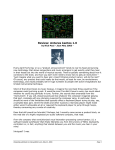
When you first bring up TrackPlug, you will notice it has a fairly large interface with two large graphs, four meters,
and a bunch of knobs and buttons. While the size of the module helps cut down on clutter somewhat, and, for
example, makes knobs relatively easy to grab for even those whose mouse coordination skills are somewhat lacking,
it also makes TrackPlug take up a lot of screen real estate. While I had no problem fitting TrackPlug on my
1024x768 screen, I could not fit two instances on that screen without obscuring at least one or two controls or meters
on one of the instances. This might make it challenging to use for trying to work with several tracks at once in cases
where being able to visually reference one track's settings while working with another track's settings is desirable.
Even when using one instance, I found myself having to move it around the screen a bit more frequently than I
would have liked in order to access areas of the SONAR Track View that TrackPlug was obscuring. However, to a
degree, this is unavoidable when combining the features and interfaces of three modules, and Waves' AudioTrack
only makes a small improvement over TrackPlug in this regard while presenting less information.
Global TrackPlug controls include an enable/disable button for the whole plug-in, a question mark button that brings
up product version information and further buttons for registering the plug-in or accessing the on-line user manual,
an output gain/cut control, and output meters with a numerical peak hold feature. The overall layout is slightly
confusing in that the output gain/cut control is grouped with the gate's controls, and section layout does not reflect
signal flow layout, even if you allow for the possibility of changing the position of the EQ to before or after the
dynamics module. In particular, the top to bottom layout of compressor and gate, respectively, would give the
impression the gate follows the compressor in the signal chain, while it is actually just the opposite. Also, the
dynamics module's input attenuator is on the righthand side of the gate's controls, which would suggest it is either
part of the gate's controls or comes after the gate in the audio signal flow, when, in fact, it comes before the gate in
the signal flow.
When you take any of the component modules off-line, the relevant graphs (i.e. the EQ curve and dynamics module
graph) do not reflect their being taken out of the signal flow. Thus, if you use the useful visual setting information
the graphs supply to help give an idea of how TrackPlug will affect your signal, you will need to pay close attention
the state of the individual module enable buttons, and take that state into account in mentally visualizing the effects
on the dynamics curve or EQ graph. It isn't a big deal with the EQ graph since that is either on or off, and the effect
of disabling an individual band does get reflected in the graph. Even there, though, I would prefer if I could see at a
Originally published on CakewalkNet.com, September 25, 2002.
Page 2