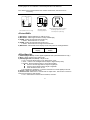
1
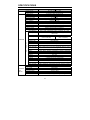
CAMERA CONNECTIONS
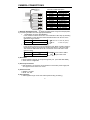
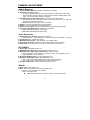
Connection Cable Description
COLOR
Description
RED
WHITE
ORANGE
BROWN
BLUE
GREEN
YELLOW
GRAY
BLACK&WHITE
BLACK
SKY BLUE
PINK
AC24V/DC12V
AC24V/DC12V
ADKEY
GND
RS485(-)
RS485(+)
ALARM OUT
DN EXT-IN
DN EXT-OUT
GND
UTP+(optional)
UTP- (optional)
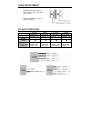
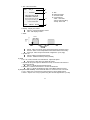
1) External Day/Night Control : To select Day/Night mode using external equipment,
by connecting control lines to the appropriate terminals.
¾
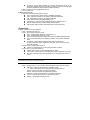
DAY&NIGHT OUTPUT (Black&White)
Is the camera function that can turn on an external IR LED Lamp by detecting
the sensitivity on the AGC level when the D&N mode is set "AUTO" on the
OSD menu of the camera
¾
Black&White
DAY&NIG
Black
GND
● 5V/10mA : IR LED ON (NIGHT)
● 0V
: IR LED OFF (DAY)
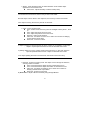
DAY&NIGHT EXTERNAL INPUT (Gray)
Is the camera function that can be switched to DAY Mode or NIGHT mode by
receiving the D&N on/off signal from external light sensor or IR LED LAMP.
This needs the D&N Mode to be set to "External" on the OSD menu of the
camera to work
Black
GND
●
Close contact : NIGHT
Gray
DAY&NIGHT INPUT
●
Open contact : DAY
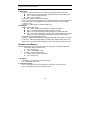
2) Alarm Out
¾ Motion detection signals are output through this port. (YELLOW AND GND)
¾ Active state is configurable.
3) Power Input Terminal
¾ RED & WHITE : DC Power is recommended to use the DC power supply that
can support inrush current over 0.75A
4) Camera Control
¾ GREEN : RS 485+
¾ BLUE : RS 4855) UTP (optional)
¾ Video signal through out the UTP Cable (SKY BLUE(+) & PINK(-) )
2