1
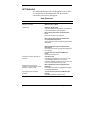
The PC card
cannot be
accessed.
Make sure the card is inserted correctly and
seated properly.
Connect the unit to AC power using the
adapter. Some cards do not operate
properly unless the AC adapter is
connected.
The touch
screen does not
respond.
Press Ctrl Alt = to calibrate the stylus input.
Follow the on-screen instructions to
complete the recalibration procedure.
Reset the unit.
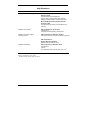
The soft reset
button does not
respond.
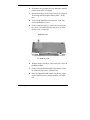
Remove the main battery. Reinstall the
battery and make sure it is seated properly.
Try resetting the unit again.
If the soft reset button on the bottom of the
system does not respond, you may have to
use the full reset button inside the battery
bay. Refer to the section, “Resetting the
MobilePro,” in Chapter 4 of the user’s guide.
This second procedure may result in the
loss of the memory contents including all
stored data, settings, and files.
Be sure to make regular backups.
For further assistance, call NECC Support Services at
1-800-632-4525
Note: If you purchased this computer outside of
the U.S. and Canada, please contact the local NECC
office or their dealers for service and support.
Troubleshooting A-3