1
a
For the power interface, SHARC EZ-KIT Lite™
development boards provide pins for both a 5V
and Ground, which can be connected to the Vdd
and Vss pins of the LCD module, respectively.
For the Vee connection, use a variable
potentiometer to control the contrast of the LCD,
or simply ground Vee for maximum contrast.
Software
The most important step in developing the
software for this LCD controller is to emulate the
hold times necessary to communicate via the
interface. This can be done using “NOP” loops or
the timer. This example uses “NOP” loops. The
entirety of the code to access the LCD as
described in this document is included, along
with a VisualDSP++® project file.
Since this device will handle characters and
strings, it is most useful to develop the code to
interface to the LCD module using the C
language. The code fragments contained in this
document are in C, and are compiled using the
VisualDSP++ development suite version 3.0
(service pack 1).
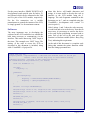
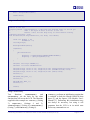
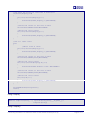
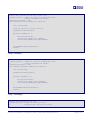
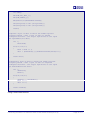
Code Listings 1 and 2 show the code necessary
to read from and write to the device. Note that in
most cases, it is necessary to wait for the device
to be ready before performing an actual read or
write. Part of the call to the read and write
function is a Boolean variable (bftest - Busy Flag
Test), indicating this requirement.
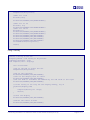
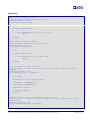
At the end of this document is a complete code
listing that contains the minor functions called
from the listings presented here.
//Read from the LCD
//Inputs passed - RegisterSelect = Indicates the desired state of the RS pin
//
bftest = wait for the busy flag to clear before writing
//Outputs returned - the byte of data read from the LCD
int readFromLCD(int RegisterSelect, int bftest)
{
const int ReadWrite = 1;
int data,
busyflag = 1;
if(bftest)
{
while(busyflag)
{
busyflag = readFromLCD(LCDNORS,NOWAITFORBF);
busyflag = ((busyflag&0x80)>>7);
}
}
asm("bit clr flags 0x5400AAAA;");
asm("r0=flags; r0=r0 or %0; flags=r0;"::"d" (RegisterSelect<<26):"r0");
asm("r0=flags; r0=r0 or %0; flags=r0;"::"d" (ReadWrite<<28):"r0");
nanosec(1);
SRU(HIGH,DAI_PB15_I);
nanosec(3);
asm("r0=flags; r1=0x5555; %0=r0 and r1;":"=d" (data)::"r0","r1");
SRU(LOW,DAI_PB15_I);
nanosec(1);
Connecting Character LCD Panels to ADSP-21262 SHARC® DSPs (EE-219)
Page 2 of 11