1
Charging the Battery
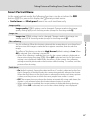
Charge the supplied Rechargeable Li-ion Battery EN-EL5 inserted into the camera,
by connecting the supplied Charging AC Adapter EH-69P to the camera via the
supplied USB Cable UC-E6, and then plugging the Charging AC Adapter into an
electrical outlet.
1
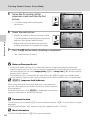
Prepare the Charging AC Adapter EH-69P.
First Steps
If a plug adapter* is included, attach the plug adapter to the plug on
the Charging AC Adapter. Push the plug adapter firmly until it is
securely held in place. Once the two are connected, attempting to
forcibly remove the plug adapter could damage the product.
* The shape of the plug adapter varies according to the country or
region in which the camera was purchased.
The Charging AC Adapter comes with the plug adapter attached
in Argentina and Korea.
2
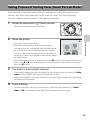
Insert the battery into the camera (A18).
Do not turn the camera on.
3
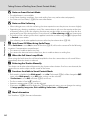
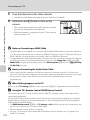
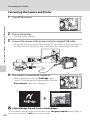
Use the supplied USB cable to connect the Charging AC Adapter to the
camera.
• Be sure that connectors are properly oriented. Do not attempt to insert connectors at
an angle, and do not use force when connecting or disconnecting the USB cable.
USB cable
20