1
nova230 for Danfoss
6
Generation of data for the AS
6.2
Macro control
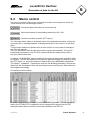
The various functions (macros) are controlled by buttons in the symbol bar (Danfoss).
These buttons have the following functions:Convert the data-point table into an Intel hex file.
Call up the window for downloading data into the EYL 230.
Create the novaPro text table (PZT import).
The 'Generate' button starts an automatic check of the generation operation. If there are
any faulty lines, a message appears, indicating the faulty line (the cursor is in the faulty
field).
This procedure should be repeated until all lines are free of errors (when a message to
this effect will appear).
Then, an Intel hex file with the data points will be created automatically. This hex file
presents the generation for the EYL 230, and should then be loaded into the AS by
using the 'Download' button.
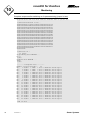
In addition, an 'MDBKONV' table is created; this contains a ready-made generation table
for novaPro. This can be imported into another full generation table for novaPro by using
the 'PZT import' (i.e. import the data-point table) button of the MDBKONV4 application.
The 'Station', 'Installation', 'Transmission channel' and 'Building automation' columns are
taken from the 'Parameters' table; the remaining lines are read from the 'Data' table and
are prepared accordingly.
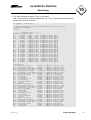
An example is shown below:-
This table now serves as the basis for a full MDBKONV generation. The tab-separated
export file (PZT3600.TXT) created from this is subsequently imported into the PZT
(data-point table) editor of novaPro and is then available in the PZT list.
7001044003 R1
Sauter Systems
21