1
FAQ
Q: RecoveRx doesn’
doesn’t detect my storage device.
A:
Q:
A partition on my drive is detected as “Unknown.”
Unknown.” Can
Can I still recover data
from it?
A:
Q:
Your device might not be connected correctly to your PC. Try
reconnecting the device to make sure it is securely connected to the
appropriate slot, port, or reader. If you are using a flash drive or are
connecting your device via a USB cable, try disconnecting it from the
USB port for a few moments and then plug it back in.
Partitions that are bootable or use file systems other than FAT16,
FAT32 or NTFS will show up as “Unknown” in the RecoveRx
interface. However, it is still possible to recover data from these
partitions.
RecoveRx has been
been running for a long time and still hasn’
hasn’t finished. How
long does the recovery process usually take?
A:
The duration of the recovery process varies depending on disk size
and the state of the data stored within the storage device. Try
waiting patiently a little longer for the process to complete. If
RecoveRx still does not complete the recovery process, feel free to
contact Transcend technical support for further assistance.
Q: RecoveRx doesn’
doesn’t run when I doubledouble-click its icon. What’
What’s wrong?
A:
Q:
You might not have Administrator privileges on the computer you are
using. To run RecoveRx in Windows 7 and Vista, click “Allow” when
prompted for Administrator privileges.
My device is listed as compatible with RecoveRx advanced recovery
options. Why are the options
options still inaccessible?
inaccessible?
A:
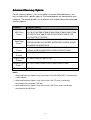
Make sure you’ve connected your compatible Transcend’s product
to your PC as described in the Advanced Recovery Options section
of this document. This problem can occur when:
A CF card is not connected to the computer’s IDE bus.
A CFast card is not connected to the computer’s SATA bus.
An IDE/SATA SSD is connected via an adapter.
18