1
3
Becoming Familiar with the SmartWire Installation
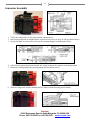
This manual is designed to provide guidance through the hardware installation of the SmartWire unit. Use of
this manual, along with the SmartWire Software/Programming manual, will provide complete installation and
programming instructions. Below is an overview of a typical installation and setup.
1.
2.
3.
4.
5.
6.
Utilizing the SmartWire Software/Programming manual, install the DatalinkII software on PC
Install only the main power and grounds on the SmartWire
Connect SmartWire to PC using supplied USB cable
Utilizing the SmartWire Programming Installation manual, open the configuration file on PC
Sync the configuration file with the SmartWire
Name, program, and send each of input (Hardwired direct inputs). Smart Panel/Smart Module and VNet items can be programmed at this time if connected. Or, each can be programmed at a later date.
7. Name, program, and send each of the outputs (ensure correct Amperage rating for each device)
8. Wire each of the inputs per programmed settings (see Hardware Installation Manual)
9. Wire each of the outputs per programmed settings (see Hardware Installation Manual)
10. Test each of the input and output settings. Insure each circuit operates as intended
Pre-Install notes:
It is recommended to initially install the Main Power and Ground wires first in order to program
each input and output. Once programmed, terminate and wire only the necessary connections. Do
not terminate every connection, unless a device will be connected.
The SmartWire can be installed and used as a standalone unit (i.e. not connected to a data
recorder) or is compatible with the following Racepak Data Recorders:
•
•
•
•
•
•
V300 (firmware version 41 or higher)
V300SD (firmware version 22 or higher)
V500 (firmware version 56 or higher)
IQ3 Logger Dash (firmware version 15 or higher)
IQ3 Display Only non-logger Dash (firmware version 17 or higher)
G2X Pro (firmware version 57 or higher)
If the PC does not meet the above firmware requirement, contact Racepak for update details.
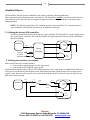
Portions of this manual will call out two installing/programming types; Standalone AND with a
Data Recorder. In Standalone mode, all programming is performed via USB cable between the
PC and the SmartWire unit.
When utilized with Racepak V-Net sensors or in conjunction with a Racepak data recorder,
programming is performed via serial connection between the PC and the data recorder unit.
Racepak
30402 Esperanza, Rancho Santa Margarita, CA 92688 USA
Phone: 949-709-5555 Fax: 949-709-5556 www.racepak.com