1
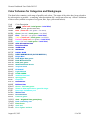
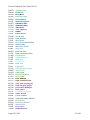
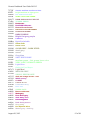
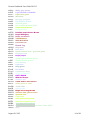
Genesis Gradebook User Guide 2012-13 Table of Contents I II III IV V VI VII VIII IX X XI XII XIII A Table of Procedures Introduction The GradebookHome Course List Screen The GradebookGradebook Spreadsheet Screen Other Features of the Spreadsheet Setup A. Setting Personal Preferences B. Merging Course Sections C. Setup Course Profiles D. Assign Profiles to your Courses E. Color Schemes Class Rosters A. Viewing your Roster B. Nicknames and Numbers C. Workgroups Getting to Work A. Add an Assignment B. Modify an Assignment C. Grade an Assignment D. Grading Types E. Grading with Workgroups F. Giving Extra Credit Managing Assignments A. The Assignment List Screen B. Mass Create Assignments C. Copy Assignments D. Delete Assignments E. Retrieve Assignments from the Trash Can F. Copy Last Year’s Assignments to this Year Student Screens A. A Student’s Assignments B. Birthdays & Icons C. Marking Period Average D. Notes E. Contacts F. Discipline G. Assessments H. Scratch Pad The Seating Chart Screen Taking Class Attendance Posting Grades: Gradebook to Report Card Assessments in the Genesis Gradebook Mass Emailing Student Contacts Standards in the Genesis Gradebook A. Standards on Assignments B. Student Progress vs Standards C. Coverage Reports Appendix A: Color Codes August 20, 2012 p. p. p. p. p. p. p. p. p. p. 3 4 5 6 7 10 11 11 14 31 p. 32 p. p. p. p. p. p. p. p. p. p. p. p. p. p. p. p. p. p. p. p. p. p. p. p. p. p. p. p. p. 35 35 36 42 46 47 48 49 49 50 52 55 56 58 59 59 61 62 64 65 68 69 71 73 76 78 80 81 87 p. 90 p. 91 2 of 98