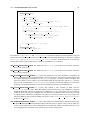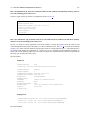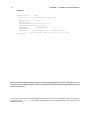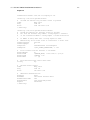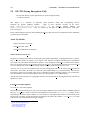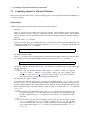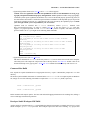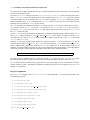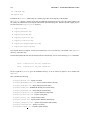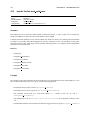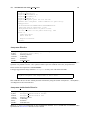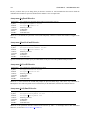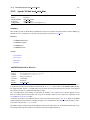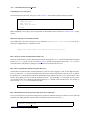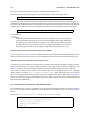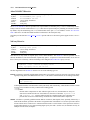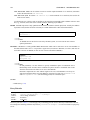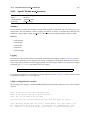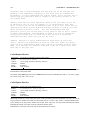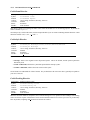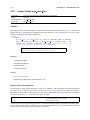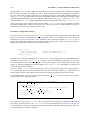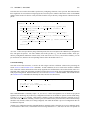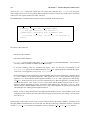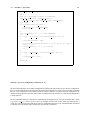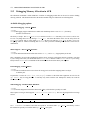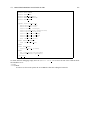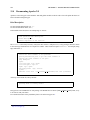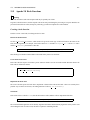
1
Apache HTTP Server Documentation Version 2.0 Apache Software Foundation June 30, 2003 ii About The PDF Documentation This is an early release of the PDF version of the Apache Documentation. It is converted from XML source files, and may contain some errors and inconsistencies. If you have difficulty reading a part of this file, please consult instead the HTML version of the documentation on the Apache HTTP Server website. Contents 1 2 3 Release Notes 1 1.1 Upgrading to 2.0 from 1.3 . . . . . . . . . . . . . . . . . . . . . . . . . . . . . . . . . . . . . . . . 2 1.2 Overview of new features in Apache 2.0 . . . . . . . . . . . . . . . . . . . . . . . . . . . . . . . . . 4 1.3 The Apache Software License, Version 1.1 . . . . . . . . . . . . . . . . . . . . . . . . . . . . . . . . 6 Using the Apache HTTP Server 7 2.1 Compiling and Installing . . . . . . . . . . . . . . . . . . . . . . . . . . . . . . . . . . . . . . . . . 8 2.2 Starting Apache . . . . . . . . . . . . . . . . . . . . . . . . . . . . . . . . . . . . . . . . . . . . . . 15 2.3 Stopping and Restarting . . . . . . . . . . . . . . . . . . . . . . . . . . . . . . . . . . . . . . . . . . 17 2.4 Configuration Files . . . . . . . . . . . . . . . . . . . . . . . . . . . . . . . . . . . . . . . . . . . . 20 2.5 Configuration Sections . . . . . . . . . . . . . . . . . . . . . . . . . . . . . . . . . . . . . . . . . . 22 2.6 Server-Wide Configuration . . . . . . . . . . . . . . . . . . . . . . . . . . . . . . . . . . . . . . . . 28 2.7 Log Files . . . . . . . . . . . . . . . . . . . . . . . . . . . . . . . . . . . . . . . . . . . . . . . . . 30 2.8 Mapping URLs to Filesystem Locations . . . . . . . . . . . . . . . . . . . . . . . . . . . . . . . . . 37 2.9 Security Tips . . . . . . . . . . . . . . . . . . . . . . . . . . . . . . . . . . . . . . . . . . . . . . . 41 2.10 Dynamic Shared Object (DSO) Support . . . . . . . . . . . . . . . . . . . . . . . . . . . . . . . . . 45 2.11 Content Negotiation . . . . . . . . . . . . . . . . . . . . . . . . . . . . . . . . . . . . . . . . . . . . 48 2.12 Custom Error Responses . . . . . . . . . . . . . . . . . . . . . . . . . . . . . . . . . . . . . . . . . 55 2.13 Binding . . . . . . . . . . . . . . . . . . . . . . . . . . . . . . . . . . . . . . . . . . . . . . . . . . 58 2.14 Multi-Processing Modules (MPMs) . . . . . . . . . . . . . . . . . . . . . . . . . . . . . . . . . . . 60 2.15 Environment Variables in Apache . . . . . . . . . . . . . . . . . . . . . . . . . . . . . . . . . . . . 61 2.16 Apache’s Handler Use . . . . . . . . . . . . . . . . . . . . . . . . . . . . . . . . . . . . . . . . . . 66 2.17 Filters . . . . . . . . . . . . . . . . . . . . . . . . . . . . . . . . . . . . . . . . . . . . . . . . . . . 68 2.18 suEXEC Support . . . . . . . . . . . . . . . . . . . . . . . . . . . . . . . . . . . . . . . . . . . . . 69 2.19 Apache Performance Tuning . . . . . . . . . . . . . . . . . . . . . . . . . . . . . . . . . . . . . . . 74 2.20 URL Rewriting Guide . . . . . . . . . . . . . . . . . . . . . . . . . . . . . . . . . . . . . . . . . . . 86 Apache Virtual Host documentation 3.1 113 Apache Virtual Host documentation . . . . . . . . . . . . . . . . . . . . . . . . . . . . . . . . . . . 114 iii iv 4 5 6 7 8 CONTENTS 3.2 Name-based Virtual Host Support . . . . . . . . . . . . . . . . . . . . . . . . . . . . . . . . . . . . 115 3.3 Apache IP-based Virtual Host Support . . . . . . . . . . . . . . . . . . . . . . . . . . . . . . . . . . 118 3.4 Dynamically configured mass virtual hosting . . . . . . . . . . . . . . . . . . . . . . . . . . . . . . 120 3.5 VirtualHost Examples . . . . . . . . . . . . . . . . . . . . . . . . . . . . . . . . . . . . . . . . . . . 125 3.6 An In-Depth Discussion of Virtual Host Matching . . . . . . . . . . . . . . . . . . . . . . . . . . . . 132 3.7 File Descriptor Limits . . . . . . . . . . . . . . . . . . . . . . . . . . . . . . . . . . . . . . . . . . . 137 3.8 Issues Regarding DNS and Apache . . . . . . . . . . . . . . . . . . . . . . . . . . . . . . . . . . . . 139 Apache Server Frequently Asked Questions 143 4.1 Frequently Asked Questions . . . . . . . . . . . . . . . . . . . . . . . . . . . . . . . . . . . . . . . 144 4.2 Support - Frequently Asked Questions . . . . . . . . . . . . . . . . . . . . . . . . . . . . . . . . . . 145 4.3 Error Messages - Frequently Asked Questions . . . . . . . . . . . . . . . . . . . . . . . . . . . . . . 147 Apache SSL/TLS Encryption 149 5.1 Apache SSL/TLS Encryption . . . . . . . . . . . . . . . . . . . . . . . . . . . . . . . . . . . . . . . 150 5.2 SSL/TLS Strong Encryption: An Introduction . . . . . . . . . . . . . . . . . . . . . . . . . . . . . . 151 5.3 SSL/TLS Strong Encryption: Compatibility . . . . . . . . . . . . . . . . . . . . . . . . . . . . . . . 159 5.4 SSL/TLS Strong Encryption: How-To . . . . . . . . . . . . . . . . . . . . . . . . . . . . . . . . . . 163 5.5 SSL/TLS Strong Encryption: FAQ . . . . . . . . . . . . . . . . . . . . . . . . . . . . . . . . . . . . 168 Guides, Tutorials, and HowTos 183 6.1 How-To / Tutorials . . . . . . . . . . . . . . . . . . . . . . . . . . . . . . . . . . . . . . . . . . . . 184 6.2 Authentication, Authorization and Access Control . . . . . . . . . . . . . . . . . . . . . . . . . . . . 185 6.3 Apache Tutorial: Dynamic Content with CGI . . . . . . . . . . . . . . . . . . . . . . . . . . . . . . 189 6.4 Apache Tutorial: Introduction to Server Side Includes . . . . . . . . . . . . . . . . . . . . . . . . . . 195 6.5 Apache Tutorial: .htaccess files . . . . . . . . . . . . . . . . . . . . . . . . . . . . . . . . . . . . . . 201 6.6 Per-user web directories . . . . . . . . . . . . . . . . . . . . . . . . . . . . . . . . . . . . . . . . . . 205 6.7 Apache Tutorials . . . . . . . . . . . . . . . . . . . . . . . . . . . . . . . . . . . . . . . . . . . . . 207 Platform-specific Notes 211 7.1 Platform Specific Notes . . . . . . . . . . . . . . . . . . . . . . . . . . . . . . . . . . . . . . . . . . 212 7.2 Using Apache with Microsoft Windows . . . . . . . . . . . . . . . . . . . . . . . . . . . . . . . . . 213 7.3 Compiling Apache for Microsoft Windows . . . . . . . . . . . . . . . . . . . . . . . . . . . . . . . 221 7.4 Using Apache With Novell NetWare . . . . . . . . . . . . . . . . . . . . . . . . . . . . . . . . . . . 226 7.5 Running a High-Performance Web Server on HPUX . . . . . . . . . . . . . . . . . . . . . . . . . . 232 7.6 The Apache EBCDIC Port . . . . . . . . . . . . . . . . . . . . . . . . . . . . . . . . . . . . . . . . 233 Apache HTTP Server and Supporting Programs 8.1 237 Server and Supporting Programs . . . . . . . . . . . . . . . . . . . . . . . . . . . . . . . . . . . . . 238 CONTENTS v 8.2 httpd - Apache Hypertext Transfer Protocol Server . . . . . . . . . . . . . . . . . . . . . . . . . . . 239 8.3 ab - Apache HTTP server benchmarking tool . . . . . . . . . . . . . . . . . . . . . . . . . . . . . . 241 8.4 apachectl - Apache HTTP Server Control Interface . . . . . . . . . . . . . . . . . . . . . . . . . . . 243 8.5 apxs - APache eXtenSion tool . . . . . . . . . . . . . . . . . . . . . . . . . . . . . . . . . . . . . . 245 8.6 dbmmanage - Manage user authentication files in DBM format . . . . . . . . . . . . . . . . . . . . . 249 8.7 htdigest - manage user files for digest authentication . . . . . . . . . . . . . . . . . . . . . . . . . . . 251 8.8 htpasswd - Manage user files for basic authentication . . . . . . . . . . . . . . . . . . . . . . . . . . 252 8.9 logresolve - Resolve IP-addresses to hostnames in Apache log files . . . . . . . . . . . . . . . . . . . 254 8.10 rotatelogs - Piped logging program to rotate Apache logs . . . . . . . . . . . . . . . . . . . . . . . . 255 8.11 suexec - Switch user before executing external programs . . . . . . . . . . . . . . . . . . . . . . . . 257 8.12 Other Programs . . . . . . . . . . . . . . . . . . . . . . . . . . . . . . . . . . . . . . . . . . . . . . 258 9 Apache Miscellaneous Documentation 259 9.1 Apache Miscellaneous Documentation . . . . . . . . . . . . . . . . . . . . . . . . . . . . . . . . . . 260 9.2 International Customized Server Error Messages . . . . . . . . . . . . . . . . . . . . . . . . . . . . 261 9.3 Connections in the FIN WAIT 2 state and Apache . . . . . . . . . . . . . . . . . . . . . . . . . . . . 268 9.4 Known Problems in Clients . . . . . . . . . . . . . . . . . . . . . . . . . . . . . . . . . . . . . . . . 273 9.5 Descriptors and Apache . . . . . . . . . . . . . . . . . . . . . . . . . . . . . . . . . . . . . . . . . . 278 9.6 PATH INFO Changes in the CGI Environment . . . . . . . . . . . . . . . . . . . . . . . . . . . . . . 281 10 Apache modules 283 10.1 Terms Used to Describe Modules . . . . . . . . . . . . . . . . . . . . . . . . . . . . . . . . . . . . . 284 10.2 Terms Used to Describe Directives . . . . . . . . . . . . . . . . . . . . . . . . . . . . . . . . . . . . 285 10.3 Apache Module core . . . . . . . . . . . . . . . . . . . . . . . . . . . . . . . . . . . . . . . . . . . 288 10.4 Apache Module mod access . . . . . . . . . . . . . . . . . . . . . . . . . . . . . . . . . . . . . . . 325 10.5 Apache Module mod actions . . . . . . . . . . . . . . . . . . . . . . . . . . . . . . . . . . . . . . . 329 10.6 Apache Module mod alias . . . . . . . . . . . . . . . . . . . . . . . . . . . . . . . . . . . . . . . . 331 10.7 Apache Module mod asis . . . . . . . . . . . . . . . . . . . . . . . . . . . . . . . . . . . . . . . . . 335 10.8 Apache Module mod auth . . . . . . . . . . . . . . . . . . . . . . . . . . . . . . . . . . . . . . . . 337 10.9 Apache Module mod auth anon . . . . . . . . . . . . . . . . . . . . . . . . . . . . . . . . . . . . . 340 10.10Apache Module mod auth dbm . . . . . . . . . . . . . . . . . . . . . . . . . . . . . . . . . . . . . . 343 10.11Apache Module mod auth digest . . . . . . . . . . . . . . . . . . . . . . . . . . . . . . . . . . . . . 346 10.12Apache Module mod auth ldap . . . . . . . . . . . . . . . . . . . . . . . . . . . . . . . . . . . . . . 351 10.13Apache Module mod autoindex . . . . . . . . . . . . . . . . . . . . . . . . . . . . . . . . . . . . . 361 10.14Apache Module mod cache . . . . . . . . . . . . . . . . . . . . . . . . . . . . . . . . . . . . . . . . 372 10.15Apache Module mod cern meta . . . . . . . . . . . . . . . . . . . . . . . . . . . . . . . . . . . . . 377 10.16Apache Module mod cgi . . . . . . . . . . . . . . . . . . . . . . . . . . . . . . . . . . . . . . . . . 379 10.17Apache Module mod cgid . . . . . . . . . . . . . . . . . . . . . . . . . . . . . . . . . . . . . . . . 382 vi CONTENTS 10.18Apache Module mod charset lite . . . . . . . . . . . . . . . . . . . . . . . . . . . . . . . . . . . . . 383 10.19Apache Module mod dav . . . . . . . . . . . . . . . . . . . . . . . . . . . . . . . . . . . . . . . . . 386 10.20Apache Module mod dav fs . . . . . . . . . . . . . . . . . . . . . . . . . . . . . . . . . . . . . . . 390 10.21Apache Module mod deflate . . . . . . . . . . . . . . . . . . . . . . . . . . . . . . . . . . . . . . . 391 10.22Apache Module mod dir . . . . . . . . . . . . . . . . . . . . . . . . . . . . . . . . . . . . . . . . . 396 10.23Apache Module mod disk cache . . . . . . . . . . . . . . . . . . . . . . . . . . . . . . . . . . . . . 397 10.24Apache Module mod echo . . . . . . . . . . . . . . . . . . . . . . . . . . . . . . . . . . . . . . . . 402 10.25Apache Module mod env . . . . . . . . . . . . . . . . . . . . . . . . . . . . . . . . . . . . . . . . . 403 10.26Apache Module mod example . . . . . . . . . . . . . . . . . . . . . . . . . . . . . . . . . . . . . . 405 10.27Apache Module mod expires . . . . . . . . . . . . . . . . . . . . . . . . . . . . . . . . . . . . . . . 407 10.28Apache Module mod ext filter . . . . . . . . . . . . . . . . . . . . . . . . . . . . . . . . . . . . . . 410 10.29Apache Module mod file cache . . . . . . . . . . . . . . . . . . . . . . . . . . . . . . . . . . . . . 416 10.30Apache Module mod headers . . . . . . . . . . . . . . . . . . . . . . . . . . . . . . . . . . . . . . . 419 10.31Apache Module mod imap . . . . . . . . . . . . . . . . . . . . . . . . . . . . . . . . . . . . . . . . 423 10.32Apache Module mod include . . . . . . . . . . . . . . . . . . . . . . . . . . . . . . . . . . . . . . . 427 10.33Apache Module mod info . . . . . . . . . . . . . . . . . . . . . . . . . . . . . . . . . . . . . . . . . 436 10.34Apache Module mod isapi . . . . . . . . . . . . . . . . . . . . . . . . . . . . . . . . . . . . . . . . 437 10.35Apache Module mod ldap . . . . . . . . . . . . . . . . . . . . . . . . . . . . . . . . . . . . . . . . 441 10.36Apache Module mod log config . . . . . . . . . . . . . . . . . . . . . . . . . . . . . . . . . . . . . 446 10.37Apache Module mod logio . . . . . . . . . . . . . . . . . . . . . . . . . . . . . . . . . . . . . . . . 451 10.38Apache Module mod mem cache . . . . . . . . . . . . . . . . . . . . . . . . . . . . . . . . . . . . . 452 10.39Apache Module mod mime . . . . . . . . . . . . . . . . . . . . . . . . . . . . . . . . . . . . . . . . 456 10.40Apache Module mod mime magic . . . . . . . . . . . . . . . . . . . . . . . . . . . . . . . . . . . . 468 10.41Apache Module mod negotiation . . . . . . . . . . . . . . . . . . . . . . . . . . . . . . . . . . . . . 472 10.42Apache Module mod nw ssl . . . . . . . . . . . . . . . . . . . . . . . . . . . . . . . . . . . . . . . 476 10.43Apache Module mod proxy . . . . . . . . . . . . . . . . . . . . . . . . . . . . . . . . . . . . . . . . 477 10.44Apache Module mod proxy connect . . . . . . . . . . . . . . . . . . . . . . . . . . . . . . . . . . . 490 10.45Apache Module mod proxy ftp . . . . . . . . . . . . . . . . . . . . . . . . . . . . . . . . . . . . . . 491 10.46Apache Module mod proxy http . . . . . . . . . . . . . . . . . . . . . . . . . . . . . . . . . . . . . 492 10.47Apache Module mod rewrite . . . . . . . . . . . . . . . . . . . . . . . . . . . . . . . . . . . . . . . 493 10.48Apache Module mod setenvif . . . . . . . . . . . . . . . . . . . . . . . . . . . . . . . . . . . . . . . 512 10.49Apache Module mod so . . . . . . . . . . . . . . . . . . . . . . . . . . . . . . . . . . . . . . . . . . 516 10.50Apache Module mod speling . . . . . . . . . . . . . . . . . . . . . . . . . . . . . . . . . . . . . . . 518 10.51Apache Module mod ssl . . . . . . . . . . . . . . . . . . . . . . . . . . . . . . . . . . . . . . . . . 520 10.52Apache Module mod status . . . . . . . . . . . . . . . . . . . . . . . . . . . . . . . . . . . . . . . . 542 10.53Apache Module mod suexec . . . . . . . . . . . . . . . . . . . . . . . . . . . . . . . . . . . . . . . 544 10.54Apache Module mod unique id . . . . . . . . . . . . . . . . . . . . . . . . . . . . . . . . . . . . . . 545 CONTENTS vii 10.55Apache Module mod userdir . . . . . . . . . . . . . . . . . . . . . . . . . . . . . . . . . . . . . . . 547 10.56Apache Module mod usertrack . . . . . . . . . . . . . . . . . . . . . . . . . . . . . . . . . . . . . . 549 10.57Apache Module mod vhost alias . . . . . . . . . . . . . . . . . . . . . . . . . . . . . . . . . . . . . 552 10.58Apache Module beos . . . . . . . . . . . . . . . . . . . . . . . . . . . . . . . . . . . . . . . . . . . 556 10.59Apache Module mpm common . . . . . . . . . . . . . . . . . . . . . . . . . . . . . . . . . . . . . . 558 10.60Apache Module leader . . . . . . . . . . . . . . . . . . . . . . . . . . . . . . . . . . . . . . . . . . 569 10.61Apache Module mpm netware . . . . . . . . . . . . . . . . . . . . . . . . . . . . . . . . . . . . . . 570 10.62Apache Module mpmt os2 . . . . . . . . . . . . . . . . . . . . . . . . . . . . . . . . . . . . . . . . 572 10.63Apache Module perchild . . . . . . . . . . . . . . . . . . . . . . . . . . . . . . . . . . . . . . . . . 573 10.64Apache Module prefork . . . . . . . . . . . . . . . . . . . . . . . . . . . . . . . . . . . . . . . . . . 577 10.65Apache Module threadpool . . . . . . . . . . . . . . . . . . . . . . . . . . . . . . . . . . . . . . . . 580 10.66Apache Module mpm winnt . . . . . . . . . . . . . . . . . . . . . . . . . . . . . . . . . . . . . . . 581 10.67Apache Module worker . . . . . . . . . . . . . . . . . . . . . . . . . . . . . . . . . . . . . . . . . . 582 11 Developer Documentation 585 11.1 Developer Documentation for Apache 2.0 . . . . . . . . . . . . . . . . . . . . . . . . . . . . . . . . 586 11.2 Apache 1.3 API notes . . . . . . . . . . . . . . . . . . . . . . . . . . . . . . . . . . . . . . . . . . . 587 11.3 Debugging Memory Allocation in APR . . . . . . . . . . . . . . . . . . . . . . . . . . . . . . . . . 603 11.4 Documenting Apache 2.0 . . . . . . . . . . . . . . . . . . . . . . . . . . . . . . . . . . . . . . . . . 606 11.5 Apache 2.0 Hook Functions . . . . . . . . . . . . . . . . . . . . . . . . . . . . . . . . . . . . . . . 607 11.6 Converting Modules from Apache 1.3 to Apache 2.0 . . . . . . . . . . . . . . . . . . . . . . . . . . 610 11.7 Request Processing in Apache 2.0 . . . . . . . . . . . . . . . . . . . . . . . . . . . . . . . . . . . . 614 11.8 How filters work in Apache 2.0 . . . . . . . . . . . . . . . . . . . . . . . . . . . . . . . . . . . . . . 618 12 Glossary and Index 621 12.1 Glossary . . . . . . . . . . . . . . . . . . . . . . . . . . . . . . . . . . . . . . . . . . . . . . . . . . 622 12.2 Module Index . . . . . . . . . . . . . . . . . . . . . . . . . . . . . . . . . . . . . . . . . . . . . . . 626 12.3 Directive Index . . . . . . . . . . . . . . . . . . . . . . . . . . . . . . . . . . . . . . . . . . . . . . 629 12.4 Directive Quick Reference . . . . . . . . . . . . . . . . . . . . . . . . . . . . . . . . . . . . . . . . 638 viii CONTENTS Chapter 1 Release Notes 1 2 CHAPTER 1. RELEASE NOTES 1.1 Upgrading to 2.0 from 1.3 In order to assist folks upgrading, we maintain a document describing information critical to existing Apache users. These are intended to be brief notes, and you should be able to find more information in either the New Features (p. 4) document, or in the src/CHANGES file. See also • Overview of new features in Apache 2.0 (p. 4) Compile-Time Configuration Changes • Apache now uses an autoconf and libtool system for configuring the build processes (p. 8) . Using this system is similar to, but not the same as, using the APACI system in Apache 1.3. • In addition to the usual selection of modules which you can choose to compile, Apache 2.0 has moved the main part of request processing into Multi-Processing Modules (p. 60) (MPMs). Run-Time Configuration Changes • Many directives that were in the core server in Apache 1.3 are now in the MPMs. If you wish the behavior of the server to be as similar as possible to the behavior of Apache 1.3, you should select the PREFORK MPM. Other MPMs will have different directives to control process creation and request processing. • The proxy module (p. 477) has been revamped to bring it up to HTTP/1.1. Among the important changes, proxy access control is now placed inside a <P ROXY> block rather than a <Directory proxy:> block. • The handling of PATH INFO (trailing path information after the true filename) has changed for some modules. Modules that were previously implemented as a handler but are now implemented as a filter may no longer accept requests with PATH INFO. Filters such as INCLUDES (p. 427) or PHP1 are implemented on top of the core handler, and therefore reject requests with PATH INFO. You can use the ACCEPT PATH I NFO directive to force the core handler to accept requests with PATH INFO and thereby restore the ability to use PATH INFO in server-side includes. • The C ACHE N EGOTIATED D OCS directive now takes the argument on or off. Existing instances of C ACHE N E GOTIATED D OCS should be replaced with CacheNegotiatedDocs on. • The E RROR D OCUMENT directive no longer uses a quote at the beginning of the argument to indicate a text message. Instead, you should enclose the message in double quotes. For example, existing instances of ErrorDocument 403 "Some Message should be replaced with ErrorDocument 403 "Some Message" As long as the second argument is not a valid URL or pathname, it will be treated as a text message. • The AccessConfig and ResourceConfig directives no longer exist. Existing instances of these directives can be replaced with the I NCLUDE directive which has equivalent functionality. If you were making use of the default values of these directives without including them in the configuration files, you may need to add Include conf/access.conf and Include conf/srm.conf to your httpd.conf. In order to assure that Apache reads the configuration files in the same order as was implied by the older directives, the I NCLUDE directives should be placed at the end of httpd.conf, with the one for srm.conf preceding the one for access.conf. 1 http://www.php.net/ 3 1.1. UPGRADING TO 2.0 FROM 1.3 • The BindAddress and Port directives no longer exist. Equivalent functionality is provided with the more flexible L ISTEN directive. • Another use of the Port directive in Apache-1.3 was setting the port number to be used in self-referential URL’s. The Apache-2.0 equivalent is the new S ERVER NAME syntax: it has been changed to allow specifying both the hostname and the port number for self-referential URL’s in one directive. • The ServerType directive no longer exists. The method used to serve requests is now determined by the selection of MPM. There is currently no MPM designed to be launched by inetd. • The mod log agent and mod log referer modules which provided the AgentLog, RefererLog and RefererIgnore directives have been removed. Agent and referer logs are still available using the C USTOM L OG directive of MOD LOG CONFIG. • The AddModule and ClearModuleList directives no longer exist. These directives were used to ensure that modules could be enabled in the correct order. The new Apache 2.0 API allows modules to explicitly specify their ordering, eliminating the need for these directives. • The FancyIndexing directive has been removed. The same functionality is available through the FancyIndexing option to the I NDEX O PTIONS directive. • The MultiViews content-negotiation technique provided by MOD NEGOTIATION has become more strict in its default file matching. It will select only from negotiable files. The old behavior can be restored using the M ULTIVIEWS M ATCH directive. Misc Changes • The module MOD AUTH DIGEST , which was experimental in Apache 1.3, is now a standard module. • The mod mmap static module, which was experimental in Apache 1.3, has been replaced with MOD FILE CACHE . • The distribution has been completely reorganized so that it no longer contains an independent src directory. Instead, the sources are logically organized under the main distribution directory, and installations of the compiled server should be directed to a separate directory. Third Party Modules Extensive changes were made to the server API in Apache 2.0. Existing modules designed for the Apache 1.3 API will not work in Apache 2.0 without modification. Details are provided in the developer documentation (p. 586) . 4 CHAPTER 1. RELEASE NOTES 1.2 Overview of new features in Apache 2.0 This document describes some of the major changes between the 1.3 and 2.0 versions of the Apache HTTP Server. See also • Upgrading to 2.0 from 1.3 (p. 2) Core Enhancements Unix Threading On Unix systems with POSIX threads support, Apache can now run in a hybrid multiprocess, multithreaded mode. This improves scalability for many, but not all configurations. New Build System The build system has been rewritten from scratch to be based on autoconf and libtool. This makes Apache’s configuration system more similar to that of other packages. Multiprotocol Support Apache now has some of the infrastructure in place to support serving multiple protocols. MOD ECHO has been written as an example. Better support for non-Unix platforms Apache 2.0 is faster and more stable on non-Unix platforms such as BeOS, OS/2, and Windows. With the introduction of platform-specific multi-processing modules (p. 60) (MPMs) and the Apache Portable Runtime (APR), these platforms are now implemented in their native API, avoiding the often buggy and poorly performing POSIX-emulation layers. New Apache API The API for modules has changed significantly for 2.0. Many of the module-ordering/-priority problems from 1.3 should be gone. 2.0 does much of this automatically, and module ordering is now done per-hook to allow more flexibility. Also, new calls have been added that provide additional module capabilities without patching the core Apache server. IPv6 Support On systems where IPv6 is supported by the underlying Apache Portable Runtime library, Apache gets IPv6 listening sockets by default. Additionally, the L ISTEN, NAME V IRTUAL H OST, and V IRTUAL H OST directives support IPv6 numeric address strings (e.g., "Listen [fe80::1]:8080"). Filtering Apache modules may now be written as filters which act on the stream of content as it is delivered to or from the server. This allows, for example, the output of CGI scripts to be parsed for Server Side Include directives using the INCLUDES filter in MOD INCLUDE. The module MOD EXT FILTER allows external programs to act as filters in much the same way that CGI programs can act as handlers. Multilanguage Error Responses Error response messages to the browser are now provided in several languages, using SSI documents. They may be customized by the administrator to achieve a consistent look and feel. Simplified configuration Many confusing directives have been simplified. The often confusing Port and BindAddress directives are gone; only the L ISTEN directive is used for IP address binding; the S ERVER NAME directive specifies the server name and port number only for redirection and vhost recognition. Native Windows NT Unicode Support Apache 2.0 on Windows NT now uses utf-8 for all filename encodings. These directly translate to the underlying Unicode file system, providing multilanguage support for all Windows NT-based installations, including Windows 2000 and Windows XP. This support does not extend to Windows 95, 98 or ME, which continue to use the machine’s local codepage for filesystem access. Regular Expression Library Updated Apache 2.0 includes the Perl Compatible Regular Expression Library2 (PCRE). All regular expression evaluation now uses the more powerful Perl 5 syntax. 2 http://www.pcre.org/ 1.2. OVERVIEW OF NEW FEATURES IN APACHE 2.0 5 Module Enhancements New module in Apache 2.0. This module is an interface to the SSL/TLS encryption protocols provided by OpenSSL. MOD SSL New module in Apache 2.0. This module implements the HTTP Distributed Authoring and Versioning (DAV) specification for posting and maintaining web content. MOD DAV New module in Apache 2.0. This module allows supporting browsers to request that content be compressed before delivery, saving network bandwidth. MOD DEFLATE New module in Apache 2.0.41. This module allows an LDAP database to be used to store credentials for HTTP Basic Authentication. A companion module, MOD LDAP provides connection pooling and results caching. MOD AUTH LDAP MOD AUTH DIGEST Includes additional support for session caching across processes using shared memory. MOD CHARSET LITE New module in Apache 2.0. This experimental module allows for character set translation or recoding. New module in Apache 2.0. This module includes the functionality of mod mmap static in Apache 1.3, plus adds further caching abilities. MOD FILE CACHE MOD HEADERS This module is much more flexible in Apache 2.0. It can now modify request headers used by and it can conditionally set response headers. MOD PROXY , The proxy module has been completely rewritten to take advantage of the new filter infrastructure and to implement a more reliable, HTTP/1.1 compliant proxy. In addition, new <P ROXY> configuration sections provide more readable (and internally faster) control of proxied sites; overloaded <Directory "proxy:..."> configuration are not supported. The module is now divided into specific protocol support modules including proxy connect, proxy ftp and proxy http. MOD PROXY A new F ORCE L ANGUAGE P RIORITY directive can be used to assure that the client receives a single document in all cases, rather than NOT ACCEPTABLE or MULTIPLE CHOICES responses. In addition, the negotiation and MultiViews algorithms have been cleaned up to provide more consistent results and a new form of type map that can include document content is provided. MOD NEGOTIATION Autoindex’ed directory listings can now be configured to use HTML tables for cleaner formatting, and allow finer-grained control of sorting, including version-sorting, and wildcard filtering of the directory listing. MOD AUTOINDEX New directives allow the default start and end tags for SSI elements to be changed and allow for error and time format configuration to take place in the main configuration file rather than in the SSI document. Results from regular expression parsing and grouping (now based on Perl’s regular expression syntax) can be retrieved using MOD INCLUDE’s variables $0 .. $9. MOD INCLUDE MOD AUTH DBM Now supports multiple types of DBM-like databases using the AUTH DBMT YPE directive. 6 CHAPTER 1. RELEASE NOTES 1.3 The Apache Software License, Version 1.1 Copyright (c) 2000-2003 The Apache Software Foundation. All rights reserved. Redistribution and use in source and binary forms, with or without modification, are permitted provided that the following conditions are met: 1. Redistributions of source code must retain the above copyright notice, this list of conditions and the following disclaimer. 2. Redistributions in binary form must reproduce the above copyright notice, this list of conditions and the following disclaimer in the documentation and/or other materials provided with the distribution. 3. The end-user documentation included with the redistribution, if any, must include the following acknowledgment: "This product includes software developed by the Apache Software Foundation (http://www.apache.org/)." Alternately, this acknowledgment may appear in the software itself, if and wherever such third-party acknowledgments normally appear. 4. The names "Apache" and "Apache Software Foundation" must not be used to endorse or promote products derived from this software without prior written permission. For written permission, please contact [email protected]. 5. Products derived from this software may not be called "Apache", nor may "Apache" appear in their name, without prior written permission of the Apache Software Foundation. =⇒THIS SOFTWARE IS PROVIDED “AS IS” AND ANY EXPRESSED OR IMPLIED WARRANTIES, INCLUDING, BUT NOT LIMITED TO, THE IMPLIED WARRANTIES OF MERCHANTABILITY AND FITNESS FOR A PARTICULAR PURPOSE ARE DISCLAIMED. IN NO EVENT SHALL THE APACHE SOFTWARE FOUNDATION OR ITS CONTRIBUTORS BE LIABLE FOR ANY DIRECT, INDIRECT, INCIDENTAL, SPECIAL, EXEMPLARY, OR CONSEQUENTIAL DAMAGES (INCLUDING, BUT NOT LIMITED TO, PROCUREMENT OF SUBSTITUTE GOODS OR SERVICES; LOSS OF USE, DATA, OR PROFITS; OR BUSINESS INTERRUPTION) HOWEVER CAUSED AND ON ANY THEORY OF LIABILITY, WHETHER IN CONTRACT, STRICT LIABILITY, OR TORT (INCLUDING NEGLIGENCE OR OTHERWISE) ARISING IN ANY WAY OUT OF THE USE OF THIS SOFTWARE, EVEN IF ADVISED OF THE POSSIBILITY OF SUCH DAMAGE. This software consists of voluntary contributions made by many individuals on behalf of the Apache Software Foundation. For more information on the Apache Software Foundation, please see <http://www.apache.org/>. Portions of this software are based upon public domain software originally written at the National Center for Supercomputing Applications, University of Illinois, Urbana-Champaign. Chapter 2 Using the Apache HTTP Server 7 8 CHAPTER 2. USING THE APACHE HTTP SERVER 2.1 Compiling and Installing This document covers compilation and installation of Apache on Unix and Unix-like systems only. For compiling and installation on Windows, see Using Apache with Microsoft Windows (p. 213) . For other platforms, see the platform (p. 212) documentation. Apache 2.0’s configuration and installation environment has changed completely from Apache 1.3. Apache 1.3 used a custom set of scripts to achieve easy installation. Apache 2.0 now uses libtool and autoconf to create an environment that looks like many other Open Source projects. See also • Starting Apache (p. 15) • Stopping and Restarting (p. 17) Overview for the impatient Download Extract Configure Compile Install Customize Test $ $ $ $ $ $ $ $ lynx http://www.apache.org/dist/httpd/httpd-2 0 NN.tar.gz gzip -d httpd-2 0 NN.tar.gz tar xvf httpd-2 0 NN.tar ./configure --prefix=PREFIX make make install vi PREFIX/conf/httpd.conf PREFIX/bin/apachectl start NN must be replaced with the current minor version number, and PREFIX must be replaced with the filesystem path under which the server should be installed. If PREFIX is not specified, it defaults to /usr/local/apache2. Each section of the compilation and installation process is described in more detail below, beginning with the requirements for compiling and installing Apache HTTPD. Requirements The following requirements exist for building Apache: Disk Space Make sure you have at least 50 MB of temporary free disk space available. After installation Apache occupies approximately 10 MB of disk space. The actual disk space requirements will vary considerably based on your chosen configuration options and any third-party modules. ANSI-C Compiler and Build System Make sure you have an ANSI-C compiler installed. The GNU C compiler (GCC)1 from the Free Software Foundation (FSF)2 is recommended (version 2.7.2 is fine). If you don’t have GCC then at least make sure your vendor’s compiler is ANSI compliant. In addition, your PATH must contain basic build tools such as make. Accurate time keeping Elements of the HTTP protocol are expressed as the time of day. So, it’s time to investigate setting some time synchronization facility on your system. Usually the ntpdate or xntpd programs are used for this purpose which are based on the Network Time Protocol (NTP). See the Usenet newsgroup comp.protocols.time.ntp3 and the NTP homepage4 for more details about NTP software and public time servers. 1 http://www.gnu.org/software/gcc/gcc.html 2 http://www.gnu.org/ 3 news:comp.protocols.time.ntp 4 http://www.eecis.udel.edu/˜ntp/ 2.1. COMPILING AND INSTALLING 9 Perl 55 [OPTIONAL] For some of the support scripts like apxs (p. 245) or dbmmanage (p. 249) (which are written in Perl) the Perl 5 interpreter is required (versions 5.003 or newer are sufficient). If no such interpreter is found by the ‘configure’ script there is no harm. Of course, you still can build and install Apache 2.0. Only those support scripts cannot be used. If you have multiple Perl interpreters installed (perhaps a Perl 4 from the vendor and a Perl 5 from your own), then it is recommended to use the --with-perl option (see below) to make sure the correct one is selected by ./configure. Download Apache can be downloaded from the Apache HTTP Server download site6 which lists several mirrors. You’ll find here the latest stable release. After downloading, especially if a mirror site is used, it is important to verify that you have a complete and unmodified version of the Apache HTTP Server. This can be accomplished by testing the downloaded tarball against the PGP signature. This, in turn, is a two step procedure. First, you must obtain the KEYS7 file from the Apache distribution site, too. (To assure that the KEYS file itself has not been modified, it may be a good idea to use a file from a previous distribution of Apache or import the keys from a public key server.) The keys are imported into your personal key ring using one of the following commands (depending on your pgp version): $ pgp < KEYS or $ gpg --import KEYS The next step is to test the tarball against the PGP signature, which should always be obtained from the main Apache website8 . A link to the signature file is placed behind the corresponding download link or may be found in the particular directory at the Apache distribution site9 . Its filename is identical to the source tarball with the addition of .asc. Then you can check the distribution with one of the following commands (again, depending on your pgp version): $ pgp httpd-2 0 NN.tar.gz.asc or $ gpg --verify httpd-2 0 NN.tar.gz.asc You should receive a message like Good signature from user "Martin Kraemer <[email protected]>". Depending on the trust relationships contained in your key ring, you may also receive a message saying that the relationship between the key and the signer of the key cannot be verified. This is not a problem if you trust the authenticity of the KEYS file. 6 http://httpd.apache.org/download.cgi 7 http://www.apache.org/dist/httpd/KEYS 8 http://httpd.apache.org/download.cgi 9 http://www.apache.org/dist/httpd/ 10 CHAPTER 2. USING THE APACHE HTTP SERVER Extract Extracting the source from the Apache HTTPD tarball is a simple matter of uncompressing, and then untarring: $ gzip -d httpd-2 0 NN.tar.gz $ tar xvf httpd-2 0 NN.tar This will create a new directory under the current directory containing the source code for the distribution. You should cd into that directory before proceeding with compiling the server. Configuring the source tree The next step is to configure the Apache source tree for your particular platform and personal requirements. This is done using the script configure included in the root directory of the distribution. (Developers downloading the CVS version of the Apache source tree will need to have autoconf and libtool installed and will need to run buildconf before proceeding with the next steps. This is not necessary for official releases.) To configure the source tree using all the default options, simply type ./configure. To change the default options, configure accepts a variety of variables and command line options. Environment variables are generally placed before the ./configure command, while other options are placed after. The most important option here is the location prefix where Apache is to be installed later, because Apache has to be configured for this location to work correctly. But there are a lot of other options available for your pleasure. For a short impression of what possibilities you have, here is a typical example which compiles Apache for the installation tree /sw/pkg/apache with a particular compiler and flags plus the two additional modules MOD REWRITE and MOD SPELING for later loading through the DSO mechanism: $ CC="pgcc" CFLAGS="-O2" \ ./configure --prefix=/sw/pkg/apache \ --enable-rewrite=shared \ --enable-speling=shared When configure is run it will take several minutes to test for the availability of features on your system and build Makefiles which will later be used to compile the server. The easiest way to find all of the configuration flags for Apache is to run ./configure --help. What follows is a brief description of most of the arguments and environment variables. Environment Variables The autoconf build process uses several environment variables to configure the build environment. In general, these variables change the method used to build Apache, but not the eventual features of the server. These variables can be placed in the environment before invoking configure, but it is usually easier to specify them on the configure command line as demonstrated in the example above. CC=... The name of the C compiler command. CPPFLAGS=... Miscellaneous C preprocessor and compiler options. CFLAGS=... Debugging and optimization options for the C compiler. LDFLAGS=... Miscellaneous options to be passed to the linker. 2.1. COMPILING AND INSTALLING 11 LIBS=... Library location information ("-L" and "-l" options) to pass to the linker. INCLUDES=... Header file search directories ("-Idir"). TARGET=... [Default: apache] Name of the executable which will be built. NOTEST CPPFLAGS=... NOTEST CFLAGS=... NOTEST LDFLAGS=... NOTEST LIBS=... These variables share the same function as their non-NOTEST namesakes. However, the variables are applied to the build process only after autoconf has performed its feature testing. This allows the inclusion of flags which will cause problems during feature testing, but must be used for the final compilation. SHLIB PATH=... Options which specify shared library paths for the compiler and linker. autoconf Output Options --help Prints the usage message including all available options, but does not actually configure anything. --quiet Prevents the printing of the usual "checking..." messages. --verbose Prints much more information during the configuration process, including the names of all the files examined. Pathnames There are currently two ways to configure the pathnames under which Apache will install its files. First, you can specify a directory and have Apache install itself under that directory in its default locations. --prefix=PREFIX [Default: /usr/local/apache2] Specifies the directory under which the Apache files will be installed. It is possible to specify that architecture-dependent files should be placed under a different directory. --exec-prefix=EPREFIX [Default: PREFIX] Specifies the directory under which architecture-dependent files will be placed. The second, and more flexible way to configure the install path locations for Apache is using the config.layout file. Using this method, it is possible to separately specify the location for each type of file within the Apache installation. The config.layout file contains several example configurations, and you can also create your own custom configuration following the examples. The different layouts in this file are grouped into <Layout FOO>...</Layout> sections and referred to by name as in FOO. --enable-layout=LAYOUT Use the named layout in the config.layout file to specify the installation paths. 12 CHAPTER 2. USING THE APACHE HTTP SERVER Modules Apache is a modular server. Only the most basic functionality is included in the core server. Extended features are available in various modules. During the configuration process, you must select which modules to compile for use with your server. You can view a list of modules (p. 626) included in the documentation. Those modules with a status (p. 284) of "Base" are included by default and must be specifically disabled if you do not want them (e.g. MOD USERDIR). Modules with any other status must be specifically enabled if you wish to use them (e.g. MOD EXPIRES ). There are two ways for a module to be compiled and used with Apache. Modules may be statically compiled, which means that they are permanently included in the Apache binary. Alternatively, if your operating system supports Dynamic Shared Objects (DSOs) and autoconf can detect that support, then modules may be dynamically compiled. DSO modules are stored separately from the Apache binary, and may be included or excluded from the server using the run-time configuration directives provided by MOD SO. The mod so is automatically included in the server if any dynamic modules are included in the compilation. If you would like to make your server capable of loading DSOs without actually compiling any dynamic modules, you can explicitly --enable-so. --enable-MODULE[=shared] Compile and include the module MODULE. The identifier MODULE is the Module Identifier (p. 284) from the module documentation without the " module" string. To compile the module as a DSO, add the option =shared. --disable-MODULE Remove the module MODULE which would otherwise be compiled and included. --enable-modules=MODULE-LIST Compile and include the modules listed in the space-separated MODULELIST. --enable-mods-shared=MODULE-LIST Compile and include the modules in the space-separated MODULELIST as dynamically loadable (DSO) modules. The MODULE-LIST in the --enable-modules and --enable-mods-shared options is usually a spaceseparated list of module identifiers. For example, to enable MOD DAV and MOD INFO, you can either use ./configure --enable-dav --enable-info or, equivalently, ./configure --enable-modules="dav info" In addition, the special keywords all or most can be used to add all or most of the modules in one step. You can then remove any modules that you do not want with the --disable-MODULE option. For example, to include all modules as DSOs with the exception of MOD INFO, you can use ./configure --enable-mods-shared=all --disable-info In addition to the standard set of modules, Apache 2.0 also includes a choice of Multi-Processing Modules (p. 60) (MPMs). One, and only one MPM must be included in the compilation process. The default MPMs for each platform are listed on the MPM documentation page (p. 60) , but can be overridden on the configure command line. --with-mpm=NAME Choose the mpm NAME. To activate an MPM called mpm name, you can use ./configure --with-mpm=mpm name 2.1. COMPILING AND INSTALLING 13 DBM Several Apache features, including MOD AUTH DBM and MOD REWRITE’s DBM R EWRITE M AP use simple key/value databases for quick lookups of information. Apache includes SDBM with its source-code, so this database is always available. If you would like to use other database types, the following configure options are available: --with-gdbm[=path] --with-ndbm[=path] --with-berkeley-db[=path] If no path is specified, Apache will search for the include files and libraries in the usual search paths. An explicit path will cause Apache to look in path/lib and path/include for the relevant files. Finally, the path may specify specific include and library paths separated by a colon. Suexec Apache includes a support program called suexec (p. 69) which can be used to isolate user CGI programs. However, if suexec is improperly configured, it can cause serious security problems. Therefore, you should carefully read and consider the suexec documentation (p. 69) before implementing this feature. Build Now you can build the various parts which form the Apache package by simply running the command: $ make Please be patient here, since a base configuration takes approximately 3 minutes to compile under a Pentium III/Linux 2.2 system, but this will vary widely depending on your hardware and the number of modules which you have enabled. Install Now its time to install the package under the configured installation PREFIX (see --prefix option above) by running: $ make install If you are upgrading, the installation will not overwrite your configuration files or documents. Customize Next, you can customize your Apache HTTP server by editing the configuration files (p. 20) under PREFIX/conf/. $ vi PREFIX/conf/httpd.conf Have a look at the Apache manual under docs/manual/ (p. ??) or consult http://httpd.apache.org/docs-2.0/ for the most recent version of this manual and a complete reference of available configuration directives (p. 629) . 14 CHAPTER 2. USING THE APACHE HTTP SERVER Test Now you can start (p. 15) your Apache HTTP server by immediately running: $ PREFIX/bin/apachectl start and then you should be able to request your first document via URL http://localhost/. The web page you see is located under the D OCUMENT ROOT which will usually be PREFIX/htdocs/. Then stop (p. 17) the server again by running: $ PREFIX/bin/apachectl stop 2.2. STARTING APACHE 2.2 15 Starting Apache On Windows, Apache is normally run as a service on Windows NT, 2000 and XP, or as a console application on Windows 9x and ME. For details, see Running Apache as a Service (p. 213) and Running Apache as a Console Application (p. 213) . On Unix, the httpd (p. 239) program is run as a daemon that executes continuously in the background to handle requests. This document describes how to invoke httpd. See also • Stopping and Restarting (p. 17) • httpd (p. 239) • apachectl (p. 243) How Apache Starts If the L ISTEN specified in the configuration file is default of 80 (or any other port below 1024), then it is necessary to have root privileges in order to start apache, so that it can bind to this privileged port. Once the server has started and performed a few preliminary activities such as opening its log files, it will launch several child processes which do the work of listening for and answering requests from clients. The main httpd process continues to run as the root user, but the child processes run as a less privileged user. This is controlled by the selected Multi-Processing Module (p. 60) . The recommended method of invoking the httpd executable is to use the apachectl (p. 243) control script. This script sets certain environment variables that are necessary for httpd to function correctly under some operating systems, and then invokes the httpd binary. apachectl will pass through any command line arguments, so any httpd options may also be used with apachectl. You may also directly edit the apachectl script by changing the HTTPD variable near the top to specify the correct location of the httpd binary and any command-line arguments that you wish to be always present. The first thing that httpd does when it is invoked is to locate and read the configuration file (p. 20) httpd.conf. The location of this file is set at compile-time, but it is possible to specify its location at run time using the -f command-line option as in /usr/local/apache2/bin/apachectl -f /usr/local/apache/conf/httpd.conf If all goes well during startup, the server will detach from the terminal and the command prompt will return almost immediately. This indicates that the server is up and running. You can then use your browser to connect to the server and view the test page in the D OCUMENT ROOT directory and the local copy of the documentation linked from that page. Errors During Start-up If Apache suffers a fatal problem during startup, it will write a message describing the problem either to the console or to the E RROR L OG before exiting. One of the most common error messages is "Unable to bind to Port ...". This message is usually caused by either: • Trying to start the server on a privileged port when not logged in as the root user; or • Trying to start the server when there is another instance of Apache or some other web server already bound to the same Port. For further trouble-shooting instructions, consult the Apache FAQ (p. 144) . 16 CHAPTER 2. USING THE APACHE HTTP SERVER Starting at Boot-Time If you want your server to continue running after a system reboot, you should add a call to apachectl to your system startup files (typically rc.local or a file in an rc.N directory). This will start Apache as root. Before doing this ensure that your server is properly configured for security and access restrictions. The apachectl script is designed to act like a standard SysV init script; it can take the arguments start, restart, and stop and translate them into the appropriate signals to httpd. So you can often simply link apachectl into the appropriate init directory. But be sure to check the exact requirements of your system. Additional Information Additional information about the command-line options of httpd (p. 239) and apachectl (p. 243) as well as other support programs included with the server is available on the Server and Supporting Programs (p. 238) page. There is also documentation on all the modules (p. 626) included with the Apache distribution and the directives (p. 629) that they provide. 2.3. STOPPING AND RESTARTING 2.3 17 Stopping and Restarting This document covers stopping and restarting Apache on Unix-like systems. Windows NT, 2000 and XP users should see Running Apache as a Service (p. 213) and Windows 9x and ME users should see Running Apache as a Console Application (p. 213) for information on how to control Apache on those platforms. See also • httpd (p. 239) • apachectl (p. 243) Introduction In order to stop or restart Apache, you must send a signal to the running httpd processes. There are two ways to send the signals. First, you can use the unix kill command to directly send signals to the processes. You will notice many httpd executables running on your system, but you should not send signals to any of them except the parent, whose pid is in the P ID F ILE. That is to say you shouldn’t ever need to send signals to any process except the parent. There are three signals that you can send the parent: TERM, HUP, and USR1, which will be described in a moment. To send a signal to the parent you should issue a command such as: kill -TERM ‘cat /usr/local/apache2/logs/httpd.pid‘ The second method of signaling the httpd processes is to use the -k command line options: stop, restart, and graceful, as described below. These are arguments to the httpd (p. 239) binary, but we recommend that you send them using the apachectl (p. 243) control script, which will pass them through to httpd. After you have signaled httpd, you can read about its progress by issuing: tail -f /usr/local/apache2/logs/error log Modify those examples to match your S ERVER ROOT and P ID F ILE settings. Stop Now Signal: TERM apachectl -k stop Sending the TERM or stop signal to the parent causes it to immediately attempt to kill off all of its children. It may take it several seconds to complete killing off its children. Then the parent itself exits. Any requests in progress are terminated, and no further requests are served. Graceful Restart Signal: USR1 apachectl -k graceful The USR1 or graceful signal causes the parent process to advise the children to exit after their current request (or to exit immediately if they’re not serving anything). The parent re-reads its configuration files and re-opens its log files. As each child dies off the parent replaces it with a child from the new generation of the configuration, which begins serving new requests immediately. 18 CHAPTER 2. USING THE APACHE HTTP SERVER =⇒signal On certain platforms that do not allow USR1 to be used for a graceful restart, an alternative may be used (such as WINCH). The command apachectl graceful will send the right signal for your platform. This code is designed to always respect the process control directive of the MPMs, so the number of processes and threads available to serve clients will be maintained at the appropriate values throughout the restart process. Furthermore, it respects S TART S ERVERS in the following manner: if after one second at least S TART S ERVERS new children have not been created, then create enough to pick up the slack. Hence the code tries to maintain both the number of children appropriate for the current load on the server, and respect your wishes with the S TART S ERVERS parameter. Users of the MOD STATUS will notice that the server statistics are not set to zero when a USR1 is sent. The code was written to both minimize the time in which the server is unable to serve new requests (they will be queued up by the operating system, so they’re not lost in any event) and to respect your tuning parameters. In order to do this it has to keep the scoreboard used to keep track of all children across generations. The status module will also use a G to indicate those children which are still serving requests started before the graceful restart was given. At present there is no way for a log rotation script using USR1 to know for certain that all children writing the prerestart log have finished. We suggest that you use a suitable delay after sending the USR1 signal before you do anything with the old log. For example if most of your hits take less than 10 minutes to complete for users on low bandwidth links then you could wait 15 minutes before doing anything with the old log. =⇒Ifrestart, your configuration file has errors in it when you issue a restart then your parent will not it will exit with an error. In the case of graceful restarts it will also leave children running when it exits. (These are the children which are "gracefully exiting" by handling their last request.) This will cause problems if you attempt to restart the server – it will not be able to bind to its listening ports. Before doing a restart, you can check the syntax of the configuration files with the -t command line argument (see httpd (p. 239) ). This still will not guarantee that the server will restart correctly. To check the semantics of the configuration files as well as the syntax, you can try starting httpd as a non-root user. If there are no errors it will attempt to open its sockets and logs and fail because it’s not root (or because the currently running httpd already has those ports bound). If it fails for any other reason then it’s probably a config file error and the error should be fixed before issuing the graceful restart. Restart Now Signal: HUP apachectl -k restart Sending the HUP or restart signal to the parent causes it to kill off its children like in TERM, but the parent doesn’t exit. It re-reads its configuration files, and re-opens any log files. Then it spawns a new set of children and continues serving hits. Users of MOD STATUS will notice that the server statistics are set to zero when a HUP is sent. =⇒Ifrestart, your configuration file has errors in it when you issue a restart then your parent will not it will exit with an error. See above for a method of avoiding this. Appendix: signals and race conditions Prior to Apache 1.2b9 there were several race conditions involving the restart and die signals (a simple description of race condition is: a time-sensitive problem, as in if something happens at just the wrong time it won’t behave as expected). For those architectures that have the "right" feature set we have eliminated as many as we can. But it should be noted that there still do exist race conditions on certain architectures. 2.3. STOPPING AND RESTARTING 19 Architectures that use an on disk S CORE B OARD F ILE have the potential to corrupt their scoreboards. This can result in the "bind: Address already in use" (after HUP) or "long lost child came home!" (after USR1). The former is a fatal error, while the latter just causes the server to lose a scoreboard slot. So it might be advisable to use graceful restarts, with an occasional hard restart. These problems are very difficult to work around, but fortunately most architectures do not require a scoreboard file. See the S CORE B OARD F ILE documentation for a architecture uses it. All architectures have a small race condition in each child involving the second and subsequent requests on a persistent HTTP connection (KeepAlive). It may exit after reading the request line but before reading any of the request headers. There is a fix that was discovered too late to make 1.2. In theory this isn’t an issue because the KeepAlive client has to expect these events because of network latencies and server timeouts. In practice it doesn’t seem to affect anything either – in a test case the server was restarted twenty times per second and clients successfully browsed the site without getting broken images or empty documents. 20 2.4 CHAPTER 2. USING THE APACHE HTTP SERVER Configuration Files This document describes the files used to configure the Apache HTTP server. Main Configuration Files Related Modules MOD MIME Related Directives <I F D EFINE> I NCLUDE T YPES C ONFIG Apache is configured by placing directives (p. 629) in plain text configuration files. The main configuration file is usually called httpd.conf. The location of this file is set at compile-time, but may be overridden with the -f command line flag. In addition, other configuration files may be added using the I NCLUDE directive, and wildcards can be used to include many configuration files. Any directive may be placed in any of these configuration files. Changes to the main configuration files are only recognized by Apache when it is started or restarted. The server also reads a file containing mime document types; the filename is set by the T YPES C ONFIG directive, and is mime.types by default. Syntax of the Configuration Files Apache configuration files contain one directive per line. The back-slash "\" may be used as the last character on a line to indicate that the directive continues onto the next line. There must be no other characters or white space between the back-slash and the end of the line. Directives in the configuration files are case-insensitive, but arguments to directives are often case sensitive. Lines that begin with the hash character "#" are considered comments, and are ignored. Comments may not be included on a line after a configuration directive. Blank lines and white space occurring before a directive are ignored, so you may indent directives for clarity. You can check your configuration files for syntax errors without starting the server by using apachectl configtest or the -t command line option. Modules Related Modules MOD SO Related Directives <I F M ODULE> L OAD M ODULE Apache is a modular server. This implies that only the most basic functionality is included in the core server. Extended features are available through modules (p. 626) which can be loaded into Apache. By default, a base (p. 284) set of modules is included in the server at compile-time. If the server is compiled to use dynamically loaded (p. 45) modules, then modules can be compiled separately and added at any time using the L OAD M ODULE directive. Otherwise, Apache must be recompiled to add or remove modules. Configuration directives may be included conditional on a presence of a particular module by enclosing them in an<I F M ODULE> block. To see which modules are currently compiled into the server, you can use the -l command line option. 21 2.4. CONFIGURATION FILES Scope of Directives Related Modules Related Directives <D IRECTORY> <D IRECTORY M ATCH> <F ILES> <F ILES M ATCH> <L OCATION> <L OCATION M ATCH> <V IRTUAL H OST> Directives placed in the main configuration files apply to the entire server. If you wish to change the configuration for only a part of the server, you can scope your directives by placing them in <D IRECTORY>, <D IRECTORY M ATCH>, <F ILES>, <F ILES M ATCH>, <L OCATION>, and <L OCATION M ATCH> sections. These sections limit the application of the directives which they enclose to particular filesystem locations or URLs. They can also be nested, allowing for very fine grained configuration. Apache has the capability to serve many different websites simultaneously. This is called Virtual Hosting (p. 114) . Directives can also be scoped by placing them inside <V IRTUAL H OST> sections, so that they will only apply to requests for a particular website. Although most directives can be placed in any of these sections, some directives do not make sense in some contexts. For example, directives controlling process creation can only be placed in the main server context. To find which directives can be placed in which sections, check the Context (p. 285) of the directive. For further information, we provide details on How Directory, Location and Files sections work (p. 22) . .htaccess Files Related Modules Related Directives ACCESS F ILE NAME A LLOW OVERRIDE Apache allows for decentralized management of configuration via special files placed inside the web tree. The special files are usually called .htaccess, but any name can be specified in the ACCESS F ILE NAME directive. Directives placed in .htaccess files apply to the directory where you place the file, and all sub-directories. The .htaccess files follow the same syntax as the main configuration files. Since .htaccess files are read on every request, changes made in these files take immediate effect. To find which directives can be placed in .htaccess files, check the Context (p. 285) of the directive. The server administrator further controls what directives may be placed in .htaccess files by configuring the A LLOW OVERRIDE directive in the main configuration files. For more information on .htaccess files, see the .htaccess tutorial (p. 201) . 22 2.5 CHAPTER 2. USING THE APACHE HTTP SERVER Configuration Sections Directives in the configuration files (p. 20) may apply to the entire server, or they may be restricted to apply only to particular directories, files, hosts, or URLs. This document describes how to use configuration section containers or .htaccess files to change the scope of other configuration directives. Types of Configuration Section Containers Related Modules CORE MOD PROXY Related Directives <D IRECTORY> <D IRECTORY M ATCH> <F ILES> <F ILES M ATCH> <I F D EFINE> <I F M ODULE> <L OCATION> <L OCATION M ATCH> <P ROXY> <P ROXY M ATCH> <V IRTUAL H OST> There are two basic types of containers. Most containers are evaluated for each request. The enclosed directives are applied only for those requests that match the containers. The <I F D EFINE> and <I F M ODULE> containers, on the other hand, are evaluated only at server startup and restart. If their conditions are true at startup, then the enclosed directives will apply to all requests. If the conditions are not true, the enclosed directives will be ignored. The <I F D EFINE> directive encloses directives that will only be applied if an appropriate parameter is defined on the httpd command line. For example, with the following configuration, all requests will be redirected to another site only if the server is started using httpd -DClosedForNow: <IfDefine ClosedForNow> Redirect / http://otherserver.example.com/ </IfDefine> The <I F M ODULE> directive is very similar, except it encloses directives that will only be applied if a particular module is available in the server. The module must either be statically compiled in the server, or it must be dynamically compiled and its L OAD M ODULE line must be earlier in the configuration file. This directive should only be used if you need your configuration file to work whether or not certain modules are installed. It should not be used to enclose directives that you want to work all the time, because it can suppress useful error messages about missing modules. In the following example, the M IME M AGIC F ILES directive will be applied only if MOD MIME MAGIC is available. <IfModule mod mime magic.c> MimeMagicFile conf/magic </IfModule> Both <I F D EFINE> and <I F M ODULE> can apply negative conditions by preceding their test with "!". Also, these sections can be nested to achieve more complex restrictions. 2.5. CONFIGURATION SECTIONS 23 Filesystem and Webspace The most commonly used configuration section containers are the ones that change the configuration of particular places in the filesystem or webspace. First, it is important to understand the difference between the two. The filesystem is the view of your disks as seen by your operating system. For example, in a default install, Apache resides at /usr/local/apache2 in the Unix filesystem or "c:/Program Files/Apache Group/Apache2" in the Windows filesystem. (Note that forward slashes should always be used as the path separator in Apache, even for Windows.) In contrast, the webspace is the view of your site as delivered by the web server and seen by the client. So the path /dir/ in the webspace corresponds to the path /usr/local/apache2/htdocs/dir/ in the filesystem of a default Apache install on Unix. The webspace need not map directly to the filesystem, since webpages may be generated dynamically from databases or other locations. Filesystem Containers The <D IRECTORY> and <F ILES> directives, along with their regex counterparts, apply directives to parts of the filesystem. Directives enclosed in a <D IRECTORY> section apply to the named filesystem directory and all subdirectories of that directory. The same effect can be obtained using .htaccess files (p. 201) . For example, in the following configuration, directory indexes will be enabled for the /var/web/dir1 directory and all subdirectories. <Directory /var/web/dir1> Options +Indexes </Directory> Directives enclosed in a <F ILES> section apply to any file with the specified name, regardless of what directory it lies in. So for example, the following configuration directives will, when placed in the main section of the configuration file, deny access to any file named private.html regardless of where it is found. <Files private.html> Order allow,deny Deny from all </Files> To address files found in a particular part of the filesystem, the <F ILES> and <D IRECTORY> sections can be combined. For example, the following configuration will deny access to /var/web/dir1/private.html, /var/web/dir1/subdir2/private.html, /var/web/dir1/subdir3/private.html, and any other instance of private.html found under the /var/web/dir1/ directory. <Directory /var/web/dir1> <Files private.html> Order allow,deny Deny from all </Files> </Directory> Webspace Containers The <L OCATION> directive and its regex counterpart, on the other hand, change the configuration for content in the webspace. For example, the following configuration prevents access to any URL-path that begins in /private. In particular, it will apply to requests for 24 CHAPTER 2. USING THE APACHE HTTP SERVER http://yoursite.example.com/private, http://yoursite.example.com/private123, and http://yoursite.example.com/private/dir/file.html as well as any other requests starting with the /private string. <Location /private> Order Allow,Deny Deny from all </Location> The <L OCATION> directive need not have anything to do with the filesystem. For example, the following example shows how to map a particular URL to an internal Apache handler provided by MOD STATUS. No file called server-status needs to exist in the filesystem. <Location /server-status> SetHandler server-status </Location> Wildcards and Regular Expressions The <D IRECTORY>, <F ILES>, and <L OCATION> directives can each use shell-style wildcard characters as in fnmatch from the C standard library. The character "*" matches any sequence of characters, "?" matches any single character, and "[seq]" matches any character in seq. The "/" character will not be matched by any wildcard; it must be specified explicitly. If even more flexible matching is required, each container has a regular-expression (regex) counterpart <D IRECTO RY M ATCH >, <F ILES M ATCH >, and <L OCATION M ATCH > that allow perl-compatible regular expressions (p. 622) to be used in choosing the matches. But see the section below on configuration merging to find out how using regex sections will change how directives are applied. A non-regex wildcard section that changes the configuration of all user directories could look as follows: <Directory /home/*/public html> Options Indexes </Directory> Using regex sections, we can deny access to many types of image files at once: <FilesMatch \.(?i:gif|jpe?g|png)$> Order allow,deny Deny from all </FilesMatch> What to use When Choosing between filesystem containers and webspace containers is actually quite easy. When applying directives to objects that reside in the filesystem always use <D IRECTORY> or <F ILES>. When applying directives to objects that do not reside in the filesystem (such as a webpage generated from a database), use <L OCATION>. It is important to never use <L OCATION> when trying to restrict access to objects in the filesystem. This is because many different webspace locations (URLs) could map to the same filesystem location, allowing your restrictions to be circumvented. For example, consider the following configuration: 2.5. CONFIGURATION SECTIONS 25 <Location /dir/> Order allow,deny Deny from all </Location> This works fine if the request is for http://yoursite.example.com/dir/. But what if you are on a case-insensitive filesystem? Then your restriction could be easily circumvented by requesting http://yoursite.example.com/DIR/. The <D IRECTORY> directive, in contrast, will apply to any content served from that location, regardless of how it is called. (An exception is filesystem links. The same directory can be placed in more than one part of the filesystem using symbolic links. The <D IRECTORY> directive will follow the symbolic link without resetting the pathname. Therefore, for the highest level of security, symbolic links should be disabled with the appropriate O PTIONS directive.) If you are, perhaps, thinking that none of this applies to you because you use a case-sensitive filesystem, remember that there are many other ways to map multiple webspace locations to the same filesystem location. Therefore you should always use the filesystem containers when you can. There is, however, one exception to this rule. Putting configuration restrictions in a <Location /> section is perfectly safe because this section will apply to all requests regardless of the specific URL. Virtual Hosts The <V IRTUAL H OST> container encloses directives that apply to specific hosts. This is useful when serving multiple hosts from the same machine with a different configuration for each. For more information, see the Virtual Host Documentation (p. 114) . Proxy The <P ROXY> and <P ROXY M ATCH> containers apply enclosed configuration directives only to sites accessed through MOD PROXY’s proxy server that match the specified URL. For example, the following configuration will prevent the proxy server from being used to access the cnn.com website. <Proxy http://cnn.com/*> Order allow,deny Deny from all </Proxy> What Directives are Allowed? To find out what directives are allowed in what types of configuration sections, check the Context (p. 285) of the directive. Everything that is allowed in <D IRECTORY> sections is also syntactically allowed in <D IRECTORY M ATCH>, <F ILES>, <F ILES M ATCH>, <L OCATION>, <L OCATION M ATCH>, <P ROXY>, and <P ROXY M ATCH> sections. There are some exceptions, however. • The A LLOW OVERRIDE directive works only in <D IRECTORY> sections. • The FollowSymLinks and SymLinksIfOwnerMatch O PTIONS work only in <D IRECTORY> sections or .htaccess files. • The O PTIONS directive cannot be used in <F ILES> and <F ILES M ATCH> sections. 26 CHAPTER 2. USING THE APACHE HTTP SERVER How the sections are merged The configuration sections are applied in a very particular order. Since this can have important effects on how configuration directives are interpreted, it is important to understand how this works. The order of merging is: 1. <D IRECTORY> (except regular expressions) and .htaccess done simultaneously (with .htaccess, if allowed, overriding <D IRECTORY>) 2. <D IRECTORY M ATCH> (and <Directory ˜>) 3. <F ILES> and <F ILES M ATCH> done simultaneously 4. <L OCATION> and <L OCATION M ATCH> done simultaneously Apart from <D IRECTORY>, each group is processed in the order that they appear in the configuration files. <D I RECTORY > (group 1 above) is processed in the order shortest directory component to longest. So for example, <Directory /var/web/dir> will be processed before <Directory /var/web/dir/subdir>. If multiple <D IRECTORY> sections apply to the same directory they are processed in the configuration file order. Configurations included via the I NCLUDE directive will be treated as if they were inside the including file at the location of the I NCLUDE directive. Sections inside <V IRTUAL H OST> sections are applied after the corresponding sections outside the virtual host definition. This allows virtual hosts to override the main server configuration. Later sections override earlier ones. =⇒Technical Note There is actually a <Location>/<LocationMatch> sequence performed just before the name translation phase (where Aliases and DocumentRoots are used to map URLs to filenames). The results of this sequence are completely thrown away after the translation has completed. Some Examples Below is an artificial example to show the order of merging. Assuming they all apply to the request, the directives in this example will be applied in the order A > B > C > D > E. <Location /> E </Location> <Files f.html> D </Files> <VirtualHost *> <Directory /a/b> B </Directory> </VirtualHost> <DirectoryMatch "ˆ.*b$"> C </DirectoryMatch> <Directory /a/b> A </Directory> 2.5. CONFIGURATION SECTIONS 27 For a more concrete example, consider the following. Regardless of any access restrictions placed in <D IRECTORY> sections, the <L OCATION> section will be evaluated last and will allow unrestricted access to the server. In other words, order of merging is important, so be careful! <Location /> Order deny,allow Allow from all </Location> # Woops! This <Directory> section will have no effect <Directory /> Order allow,deny Allow from all Deny from badguy.example.com </Directory> 28 2.6 CHAPTER 2. USING THE APACHE HTTP SERVER Server-Wide Configuration This document explains some of the directives provided by the operations of the server. CORE server which are used to configure the basic Server Identification Related Modules Related Directives S ERVER NAME S ERVER A DMIN S ERVER S IGNATURE S ERVERT OKENS U SE C ANONICAL NAME The S ERVER A DMIN and S ERVERT OKENS directives control what information about the server will be presented in server-generated documents such as error messages. The S ERVERT OKENS directive sets the value of the Server HTTP response header field. The S ERVER NAME and U SE C ANONICAL NAME directives are used by the server to determine how to construct selfreferential URLs. For example, when a client requests a directory, but does not include the trailing slash in the directory name, Apache must redirect the client to the full name including the trailing slash so that the client will correctly resolve relative references in the document. File Locations Related Modules Related Directives C ORE D UMP D IRECTORY D OCUMENT ROOT E RROR L OG L OCK F ILE P ID F ILE S CORE B OARD F ILE S ERVER ROOT These directives control the locations of the various files that Apache needs for proper operation. When the pathname used does not begin with a slash (/), the files are located relative to the S ERVER ROOT. Be careful about locating files in paths which are writable by non-root users. See the security tips (p. 41) documentation for more details. Limiting Resource Usage Related Modules Related Directives L IMIT R EQUEST B ODY L IMIT R EQUEST F IELDS L IMIT R EQUEST F IELDSIZE L IMIT R EQUEST L INE RL IMIT CPU RL IMIT MEM RL IMIT NPROC T HREAD S TACK S IZE 2.6. SERVER-WIDE CONFIGURATION 29 The L IMIT R EQUEST* directives are used to place limits on the amount of resources Apache will use in reading requests from clients. By limiting these values, some kinds of denial of service attacks can be mitigated. The RL IMIT* directives are used to limit the amount of resources which can be used by processes forked off from the Apache children. In particular, this will control resources used by CGI scripts and SSI exec commands. The T HREAD S TACK S IZE directive is used only on Netware to control the stack size. 30 2.7 CHAPTER 2. USING THE APACHE HTTP SERVER Log Files In order to effectively manage a web server, it is necessary to get feedback about the activity and performance of the server as well as any problems that may be occurring. The Apache HTTP Server provides very comprehensive and flexible logging capabilities. This document describes how to configure its logging capabilities, and how to understand what the logs contain. Security Warning Anyone who can write to the directory where Apache is writing a log file can almost certainly gain access to the uid that the server is started as, which is normally root. Do NOT give people write access to the directory the logs are stored in without being aware of the consequences; see the security tips (p. 41) document for details. In addition, log files may contain information supplied directly by the client, without escaping. Therefore, it is possible for malicious clients to insert control-characters in the log files, so care must be taken in dealing with raw logs. Error Log Related Modules Related Directives E RROR L OG L OG L EVEL The server error log, whose name and location is set by the E RROR L OG directive, is the most important log file. This is the place where Apache httpd will send diagnostic information and record any errors that it encounters in processing requests. It is the first place to look when a problem occurs with starting the server or with the operation of the server, since it will often contain details of what went wrong and how to fix it. The error log is usually written to a file (typically error log on unix systems and error.log on Windows and OS/2). On unix systems it is also possible to have the server send errors to syslog or pipe them to a program. The format of the error log is relatively free-form and descriptive. But there is certain information that is contained in most error log entries. For example, here is a typical message. [Wed Oct 11 14:32:52 2000] [error] [client 127.0.0.1] client denied by server configuration: /export/home/live/ap/htdocs/test The first item in the log entry is the date and time of the message. The second entry lists the severity of the error being reported. The L OG L EVEL directive is used to control the types of errors that are sent to the error log by restricting the severity level. The third entry gives the IP address of the client that generated the error. Beyond that is the message itself, which in this case indicates that the server has been configured to deny the client access. The server reports the file-system path (as opposed to the web path) of the requested document. A very wide variety of different messages can appear in the error log. Most look similar to the example above. The error log will also contain debugging output from CGI scripts. Any information written to stderr by a CGI script will be copied directly to the error log. It is not possible to customize the error log by adding or removing information. However, error log entries dealing with particular requests have corresponding entries in the access log. For example, the above example entry corresponds to an access log entry with status code 403. Since it is possible to customize the access log, you can obtain more information about error conditions using that log file. During testing, it is often useful to continuously monitor the error log for any problems. On unix systems, you can accomplish this using: 31 2.7. LOG FILES tail -f error log Access Log Related Modules Related Directives C USTOM L OG L OG F ORMAT S ET E NV I F MOD LOG CONFIG MOD SETENVIF The server access log records all requests processed by the server. The location and content of the access log are controlled by the C USTOM L OG directive. The L OG F ORMAT directive can be used to simplify the selection of the contents of the logs. This section describes how to configure the server to record information in the access log. Of course, storing the information in the access log is only the start of log management. The next step is to analyze this information to produce useful statistics. Log analysis in general is beyond the scope of this document, and not really part of the job of the web server itself. For more information about this topic, and for applications which perform log analysis, check the Open Directory10 or Yahoo11 . Various versions of Apache httpd have used other modules and directives to control access logging, including mod log referer, mod log agent, and the TransferLog directive. The C USTOM L OG directive now subsumes the functionality of all the older directives. The format of the access log is highly configurable. The format is specified using a format string that looks much like a C-style printf(1) format string. Some examples are presented in the next sections. For a complete list of the possible contents of the format string, see the MOD LOG CONFIG format strings (p. 446) . Common Log Format A typical configuration for the access log might look as follows. LogFormat "%h %l %u %t \"%r\" %>s %b" common CustomLog logs/access log common This defines the nickname common and associates it with a particular log format string. The format string consists of percent directives, each of which tell the server to log a particular piece of information. Literal characters may also be placed in the format string and will be copied directly into the log output. The quote character (") must be escaped by placing a back-slash before it to prevent it from being interpreted as the end of the format string. The format string may also contain the special control characters "\n" for new-line and "\t" for tab. The C USTOM L OG directive sets up a new log file using the defined nickname. The filename for the access log is relative to the S ERVER ROOT unless it begins with a slash. The above configuration will write log entries in a format known as the Common Log Format (CLF). This standard format can be produced by many different web servers and read by many log analysis programs. The log file entries produced in CLF will look something like this: 127.0.0.1 - frank [10/Oct/2000:13:55:36 -0700] "GET /apache pb.gif HTTP/1.0" 200 2326 10 http://dmoz.org/Computers/Software/Internet/Site 11 http://dir.yahoo.com/Computers Management/Log analysis/ and Internet/Software/Internet/World Wide Web/Servers/Log Analysis Tools/ 32 CHAPTER 2. USING THE APACHE HTTP SERVER Each part of this log entry is described below. 127.0.0.1 (%h) This is the IP address of the client (remote host) which made the request to the server. If H OSTNAME L OOKUPS is set to On, then the server will try to determine the hostname and log it in place of the IP address. However, this configuration is not recommended since it can significantly slow the server. Instead, it is best to use a log post-processor such as logresolve (p. 254) to determine the hostnames. The IP address reported here is not necessarily the address of the machine at which the user is sitting. If a proxy server exists between the user and the server, this address will be the address of the proxy, rather than the originating machine. - (%l) The "hyphen" in the output indicates that the requested piece of information is not available. In this case, the information that is not available is the RFC 1413 identity of the client determined by identd on the clients machine. This information is highly unreliable and should almost never be used except on tightly controlled internal networks. Apache httpd will not even attempt to determine this information unless I DENTITY C HECK is set to On. frank (%u) This is the userid of the person requesting the document as determined by HTTP authentication. The same value is typically provided to CGI scripts in the REMOTE USER environment variable. If the status code for the request (see below) is 401, then this value should not be trusted because the user is not yet authenticated. If the document is not password protected, this entry will be "-" just like the previous one. [10/Oct/2000:13:55:36 -0700] (%t) The time that the server finished processing the request. The format is: [day/month/year:hour:minute:second zone] day = 2*digit month = 3*letter year = 4*digit hour = 2*digit minute = 2*digit second = 2*digit zone = (‘+’ | ‘-’) 4*digit It is possible to have the time displayed in another format by specifying %{format}t in the log format string, where format is as in strftime(3) from the C standard library. "GET /apache pb.gif HTTP/1.0" (\"%r\") The request line from the client is given in double quotes. The request line contains a great deal of useful information. First, the method used by the client is GET. Second, the client requested the resource /apache pb.gif, and third, the client used the protocol HTTP/1.0. It is also possible to log one or more parts of the request line independently. For example, the format string "%m %U%q %H" will log the method, path, query-string, and protocol, resulting in exactly the same output as "%r". 200 (%>s) This is the status code that the server sends back to the client. This information is very valuable, because it reveals whether the request resulted in a successful response (codes beginning in 2), a redirection (codes beginning in 3), an error caused by the client (codes beginning in 4), or an error in the server (codes beginning in 5). The full list of possible status codes can be found in the HTTP specification12 (RFC2616 section 10). 2326 (%b) The last entry indicates the size of the object returned to the client, not including the response headers. If no content was returned to the client, this value will be "-". To log "0" for no content, use %B instead. Combined Log Format Another commonly used format string is called the Combined Log Format. It can be used as follows. 12 http://www.w3.org/Protocols/rfc2616/rfc2616.txt 33 2.7. LOG FILES LogFormat "%h %l %u %t \"%r\" %>s %b \"%{Referer}i\" \"%{User-agent}i\"" combined CustomLog log/access log combined This format is exactly the same as the Common Log Format, with the addition of two more fields. Each of the additional fields uses the percent-directive %{header}i, where header can be any HTTP request header. The access log under this format will look like: 127.0.0.1 - frank [10/Oct/2000:13:55:36 -0700] "GET /apache pb.gif HTTP/1.0" 200 2326 "http://www.example.com/start.html" "Mozilla/4.08 [en] (Win98; I ;Nav)" The additional fields are: "http://www.example.com/start.html" (\"%{Referer}i\") The "Referer" (sic) HTTP request header. This gives the site that the client reports having been referred from. (This should be the page that links to or includes /apache pb.gif). "Mozilla/4.08 [en] (Win98; I ;Nav)" (\"%{User-agent}i\") The User-Agent HTTP request header. This is the identifying information that the client browser reports about itself. Multiple Access Logs Multiple access logs can be created simply by specifying multiple C USTOM L OG directives in the configuration file. For example, the following directives will create three access logs. The first contains the basic CLF information, while the second and third contain referer and browser information. The last two C USTOM L OG lines show how to mimic the effects of the ReferLog and AgentLog directives. LogFormat CustomLog CustomLog CustomLog "%h %l %u %t \"%r\" %>s %b" common logs/access log common logs/referer log "%{Referer}i -> %U" logs/agent log "%{User-agent}i" This example also shows that it is not necessary to define a nickname with the L OG F ORMAT directive. Instead, the log format can be specified directly in the C USTOM L OG directive. Conditional Logs There are times when it is convenient to exclude certain entries from the access logs based on characteristics of the client request. This is easily accomplished with the help of environment variables (p. 61) . First, an environment variable must be set to indicate that the request meets certain conditions. This is usually accomplished with S ET E NV I F. Then the env= clause of the C USTOM L OG directive is used to include or exclude requests where the environment variable is set. Some examples: # Mark requests from the loop-back interface SetEnvIf Remote Addr "127\.0\.0\.1" dontlog # Mark requests for the robots.txt file SetEnvIf Request URI "ˆ/robots\.txt$" dontlog # Log what remains CustomLog logs/access log common env=!dontlog 34 CHAPTER 2. USING THE APACHE HTTP SERVER As another example, consider logging requests from english-speakers to one log file, and non-english speakers to a different log file. SetEnvIf Accept-Language "en" english CustomLog logs/english log common env=english CustomLog logs/non english log common env=!english Although we have just shown that conditional logging is very powerful and flexibly, it is not the only way to control the contents of the logs. Log files are more useful when they contain a complete record of server activity. It is often easier to simply post-process the log files to remove requests that you do not want to consider. Log Rotation On even a moderately busy server, the quantity of information stored in the log files is very large. The access log file typically grows 1 MB or more per 10,000 requests. It will consequently be necessary to periodically rotate the log files by moving or deleting the existing logs. This cannot be done while the server is running, because Apache will continue writing to the old log file as long as it holds the file open. Instead, the server must be restarted (p. 17) after the log files are moved or deleted so that it will open new log files. By using a graceful restart, the server can be instructed to open new log files without losing any existing or pending connections from clients. However, in order to accomplish this, the server must continue to write to the old log files while it finishes serving old requests. It is therefore necessary to wait for some time after the restart before doing any processing on the log files. A typical scenario that simply rotates the logs and compresses the old logs to save space is: mv access log access log.old mv error log error log.old apachectl graceful sleep 600 gzip access log.old error log.old Another way to perform log rotation is using piped logs as discussed in the next section. Piped Logs Apache httpd is capable of writing error and access log files through a pipe to another process, rather than directly to a file. This capability dramatically increases the flexibility of logging, without adding code to the main server. In order to write logs to a pipe, simply replace the filename with the pipe character "|", followed by the name of the executable which should accept log entries on its standard input. Apache will start the piped-log process when the server starts, and will restart it if it crashes while the server is running. (This last feature is why we can refer to this technique as "reliable piped logging".) Piped log processes are spawned by the parent Apache httpd process, and inherit the userid of that process. This means that piped log programs usually run as root. It is therefore very important to keep the programs simple and secure. One important use of piped logs is to allow log rotation without having to restart the server. The Apache HTTP Server includes a simple program called rotatelogs (p. 255) for this purpose. For example, to rotate the logs every 24 hours, you can use: CustomLog "|/usr/local/apache/bin/rotatelogs /var/log/access log 86400" common 35 2.7. LOG FILES Notice that quotes are used to enclose the entire command that will be called for the pipe. Although these examples are for the access log, the same technique can be used for the error log. A similar but much more flexible log rotation program called cronolog13 is available at an external site. As with conditional logging, piped logs are a very powerful tool, but they should not be used where a simpler solution like off-line post-processing is available. Virtual Hosts When running a server with many virtual hosts (p. 114) , there are several options for dealing with log files. First, it is possible to use logs exactly as in a single-host server. Simply by placing the logging directives outside the <V IRTUAL H OST> sections in the main server context, it is possible to log all requests in the same access log and error log. This technique does not allow for easy collection of statistics on individual virtual hosts. If C USTOM L OG or E RROR L OG directives are placed inside a <V IRTUAL H OST> section, all requests or errors for that virtual host will be logged only to the specified file. Any virtual host which does not have logging directives will still have its requests sent to the main server logs. This technique is very useful for a small number of virtual hosts, but if the number of hosts is very large, it can be complicated to manage. In addition, it can often create problems with insufficient file descriptors (p. 137) . For the access log, there is a very good compromise. By adding information on the virtual host to the log format string, it is possible to log all hosts to the same log, and later split the log into individual files. For example, consider the following directives. LogFormat "%v %l %u %t \"%r\" %>s %b" comonvhost CustomLog logs/access log comonvhost The %v is used to log the name of the virtual host that is serving the request. Then a program like split-logfile (p. 258) can be used to post-process the access log in order to split it into one file per virtual host. Other Log Files Related Modules MOD CGI MOD REWRITE Related Directives P ID F ILE R EWRITE L OG R EWRITE L OG L EVEL S CRIPT L OG S CRIPT L OG B UFFER S CRIPT L OG L ENGTH PID File On startup, Apache httpd saves the process id of the parent httpd process to the file logs/httpd.pid. This filename can be changed with the P ID F ILE directive. The process-id is for use by the administrator in restarting and terminating the daemon by sending signals to the parent process; on Windows, use the -k command line option instead. For more information see the Stopping and Restarting (p. 17) page. 13 http://www.cronolog.org/ 36 CHAPTER 2. USING THE APACHE HTTP SERVER Script Log In order to aid in debugging, the S CRIPT L OG directive allows you to record the input to and output from CGI scripts. This should only be used in testing - not for live servers. More information is available in the mod cgi (p. 379) documentation. Rewrite Log When using the powerful and complex features of mod rewrite (p. 493) , it is almost always necessary to use the R EWRITE L OG to help in debugging. This log file produces a detailed analysis of how the rewriting engine transforms requests. The level of detail is controlled by the R EWRITE L OG L EVEL directive. 37 2.8. MAPPING URLS TO FILESYSTEM LOCATIONS 2.8 Mapping URLs to Filesystem Locations This document explains how Apache uses the URL of a request to determine the filesystem location from which to serve a file. Related Modules and Directives Related Modules MOD ALIAS MOD PROXY MOD REWRITE MOD USERDIR MOD SPELING MOD VHOST ALIAS Related Directives A LIAS A LIAS M ATCH C HECK S PELLING D OCUMENT ROOT E RROR D OCUMENT O PTIONS P ROXY PASS P ROXY PASS R EVERSE R EDIRECT R EDIRECT M ATCH R EWRITE C OND R EWRITE M ATCH S CRIPTA LIAS S CRIPTA LIAS M ATCH U SER D IR DocumentRoot In deciding what file to serve for a given request, Apache’s default behavior is to take the URL-Path for the request (the part of the URL following the hostname and port) and add it to the end of the D OCUMENT ROOT specified in your configuration files. Therefore, the files and directories underneath the D OCUMENT ROOT make up the basic document tree which will be visible from the web. Apache is also capable of Virtual Hosting (p. 114) , where the server receives requests for more than one host. In this case, a different D OCUMENT ROOT can be specified for each virtual host, or alternatively, the directives provided by the module MOD VHOST ALIAS can be used to dynamically determine the appropriate place from which to serve content based on the requested IP address or hostname. Files Outside the DocumentRoot There are frequently circumstances where it is necessary to allow web access to parts of the filesystem that are not strictly underneath the D OCUMENT ROOT. Apache offers several different ways to accomplish this. On Unix systems, symbolic links can bring other parts of the filesystem under the D OCUMENT ROOT. For security reasons, Apache will follow symbolic links only if the O PTIONS setting for the relevant directory includes FollowSymLinks or SymLinksIfOwnerMatch. Alternatively, the A LIAS directive will map any part of the filesystem into the web space. For example, with Alias /docs /var/web the URL http://www.example.com/docs/dir/file.html will be served from /var/web/dir/file.html. The S CRIPTA LIAS directive works the same way, with the additional effect that all content located at the target path is treated as CGI scripts. 38 CHAPTER 2. USING THE APACHE HTTP SERVER For situations where you require additional flexibility, you can use the A LIAS M ATCH and S CRIPTA LIAS M ATCH directives to do powerful regular-expression based matching and substitution. For example, ScriptAliasMatch ˆ/˜([a-zA-Z0-9]*)/cgi-bin/(.*) /home/$1/cgi-bin/$2 will map a request to http://example.com/˜user/cgi-bin/script.cgi /home/user/cgi-bin/script.cgi and will treat the resulting file as a CGI script. to the path User Directories Traditionally on Unix systems, the home directory of a particular user can be referred to as ˜user/. The module MOD USERDIR extends this idea to the web by allowing files under each user’s home directory to be accessed using URLs such as the following. http://www.example.com/˜user/file.html For security reasons, it is inappropriate to give direct access to a user’s home directory from the web. Therefore, the U SER D IR directive specifies a directory underneath the user’s home directory where web files are located. Using the default setting of Userdir public html, the above URL maps to a file at a directory like /home/user/public html/file.html where /home/user/ is the user’s home directory as specified in /etc/passwd. There are also several other forms of the Userdir directive which you can use on systems where /etc/passwd does not contain the location of the home directory. Some people find the "˜" symbol (which is often encoded on the web as %7e) to be awkward and prefer to use an alternate string to represent user directories. This functionality is not supported by mod userdir. However, if users’ home directories are structured in a regular way, then it is possible to use the A LIAS M ATCH directive to achieve the desired effect. For example, to make http://www.example.com/upages/user/file.html map to /home/user/public html/file.html, use the following AliasMatch directive: AliasMatch ˆ/upages/([a-zA-Z0-9]*)/?(.*) /home/$1/public html/$2 URL Redirection The configuration directives discussed in the above sections tell Apache to get content from a specific place in the filesystem and return it to the client. Sometimes, it is desirable instead to inform the client that the requested content is located at a different URL, and instruct the client to make a new request with the new URL. This is called redirection and is implemented by the R EDIRECT directive. For example, if the contents of the directory /foo/ under the D OCUMENT ROOT are moved to the new directory /bar/, you can instruct clients to request the content at the new location as follows: Redirect permanent /foo/ http://www.example.com/bar/ This will redirect any URL-Path starting in /foo/ to the same URL path on the www.example.com server with /bar/ substituted for /foo/. You can redirect clients to any server, not only the origin server. Apache also provides a R EDIRECT M ATCH directive for more complicated rewriting problems. For example, to redirect requests for the site home page to a different site, but leave all other requests alone, use the following configuration: 2.8. MAPPING URLS TO FILESYSTEM LOCATIONS 39 RedirectMatch permanent ˆ/$ http://www.example.com/startpage.html Alternatively, to temporarily redirect all pages on one site to a particular page on another site, use the following: RedirectMatch temp .* http://othersite.example.com/startpage.html Reverse Proxy Apache also allows you to bring remote documents into the URL space of the local server. This technique is called reverse proxying because the web server acts like a proxy server by fetching the documents from a remote server and returning them to the client. It is different from normal proxying because, to the client, it appears the documents originate at the reverse proxy server. In the following example, when clients request documents under the /foo/ directory, the server fetches those documents from the /bar/ directory on internal.example.com and returns them to the client as if they were from the local server. ProxyPass /foo/ http://internal.example.com/bar/ ProxyPassReverse /foo/ http://internal.example.com/bar/ The P ROXY PASS configures the server to fetch the appropriate documents, while the P ROXY PASS R EVERSE directive rewrites redirects originating at internal.example.com so that they target the appropriate directory on the local server. It is important to note, however, that links inside the documents will not be rewritten. So any absolute links on internal.example.com will result in the client breaking out of the proxy server and requesting directly from internal.example.com. Rewriting Engine When even more powerful substitution is required, the rewriting engine provided by MOD REWRITE can be useful. The directives provided by this module use characteristics of the request such as browser type or source IP address in deciding from where to serve content. In addition, mod rewrite can use external database files or programs to determine how to handle a request. The rewriting engine is capable of performing all three types of mappings discussed above: internal redirects (aliases), external redirects, and proxying. Many practical examples employing mod rewrite are discussed in the URL Rewriting Guide (p. 86) . File Not Found Inevitably, URLs will be requested for which no matching file can be found in the filesystem. This can happen for several reasons. In some cases, it can be a result of moving documents from one location to another. In this case, it is best to use URL redirection to inform clients of the new location of the resource. In this way, you can assure that old bookmarks and links will continue to work, even though the resource is at a new location. Another common cause of "File Not Found" errors is accidental mistyping of URLs, either directly in the browser, or in HTML links. Apache provides the module MOD SPELING (sic) to help with this problem. When this module is activated, it will intercept "File Not Found" errors and look for a resource with a similar filename. If one such file is found, mod speling will send an HTTP redirect to the client informing it of the correct location. If several "close" files are found, a list of available alternatives will be presented to the client. An especially useful feature of mod speling, is that it will compare filenames without respect to case. This can help systems where users are unaware of the case-sensitive nature of URLs and the unix filesystem. But using mod speling 40 CHAPTER 2. USING THE APACHE HTTP SERVER for anything more than the occasional URL correction can place additional load on the server, since each "incorrect" request is followed by a URL redirection and a new request from the client. If all attempts to locate the content fail, Apache returns an error page with HTTP status code 404 (file not found). The appearance of this page is controlled with the E RROR D OCUMENT directive and can be customized in a flexible manner as discussed in the Custom error responses (p. 55) and International Server Error Responses (p. 261) documents. 2.9. SECURITY TIPS 2.9 41 Security Tips Some hints and tips on security issues in setting up a web server. Some of the suggestions will be general, others specific to Apache. Keep up to Date The Apache HTTP Server has a good record for security and a developer community highly concerned about security issues. But it is inevitable that some problems – small or large – will be discovered in software after it is released. For this reason, it is crucial to keep aware of updates to the software. If you have obtained your version of the HTTP Server directly from Apache, we highly recommend you subscribe to the Apache HTTP Server Announcements List14 where you can keep informed of new releases and security updates. Similar services are available from most third-party distributors of Apache software. Of course, most times that a web server is compromised, it is not because of problems in the HTTP Server code. Rather, it comes from problems in add-on code, CGI scripts, or the underlying Operating System. You must therefore stay aware of problems and updates with all the software on your system. Permissions on ServerRoot Directories In typical operation, Apache is started by the root user, and it switches to the user defined by the U SER directive to serve hits. As is the case with any command that root executes, you must take care that it is protected from modification by non-root users. Not only must the files themselves be writeable only by root, but so must the directories, and parents of all directories. For example, if you choose to place ServerRoot in /usr/local/apache then it is suggested that you create that directory as root, with commands like these: mkdir /usr/local/apache cd /usr/local/apache mkdir bin conf logs chown 0 . bin conf logs chgrp 0 . bin conf logs chmod 755 . bin conf logs It is assumed that /, /usr, and /usr/local are only modifiable by root. When you install the httpd executable, you should ensure that it is similarly protected: cp httpd /usr/local/apache/bin chown 0 /usr/local/apache/bin/httpd chgrp 0 /usr/local/apache/bin/httpd chmod 511 /usr/local/apache/bin/httpd You can create an htdocs subdirectory which is modifiable by other users – since root never executes any files out of there, and shouldn’t be creating files in there. If you allow non-root users to modify any files that root either executes or writes on then you open your system to root compromises. For example, someone could replace the httpd binary so that the next time you start it, it will execute some arbitrary code. If the logs directory is writeable (by a non-root user), someone could replace a log file with a symlink to some other system file, and then root might overwrite that file with arbitrary data. If the log files themselves are writeable (by a non-root user), then someone may be able to overwrite the log itself with bogus data. 14 http://httpd.apache.org/lists.html#http-announce 42 CHAPTER 2. USING THE APACHE HTTP SERVER Server Side Includes Server Side Includes (SSI) present a server administrator with several potential security risks. The first risk is the increased load on the server. All SSI-enabled files have to be parsed by Apache, whether or not there are any SSI directives included within the files. While this load increase is minor, in a shared server environment it can become significant. SSI files also pose the same risks that are associated with CGI scripts in general. Using the "exec cmd" element, SSI-enabled files can execute any CGI script or program under the permissions of the user and group Apache runs as, as configured in httpd.conf. There are ways to enhance the security of SSI files while still taking advantage of the benefits they provide. To isolate the damage a wayward SSI file can cause, a server administrator can enable suexec (p. 69) as described in the CGI in General section Enabling SSI for files with .html or .htm extensions can be dangerous. This is especially true in a shared, or high traffic, server environment. SSI-enabled files should have a separate extension, such as the conventional .shtml. This helps keep server load at a minimum and allows for easier management of risk. Another solution is to disable the ability to run scripts and programs from SSI pages. To do this replace Includes with IncludesNOEXEC in the O PTIONS directive. Note that users may still use <–#include virtual="..." –> to execute CGI scripts if these scripts are in directories desginated by a S CRIPTA LIAS directive. CGI in General First of all, you always have to remember that you must trust the writers of the CGI scripts/programs or your ability to spot potential security holes in CGI, whether they were deliberate or accidental. CGI scripts can run essentially arbitrary commands on your system with the permissions of the web server user and can therefore be extremely dangerous if they are not carefully checked. All the CGI scripts will run as the same user, so they have potential to conflict (accidentally or deliberately) with other scripts e.g. User A hates User B, so he writes a script to trash User B’s CGI database. One program which can be used to allow scripts to run as different users is suEXEC (p. 69) which is included with Apache as of 1.2 and is called from special hooks in the Apache server code. Another popular way of doing this is with CGIWrap15 . Non Script Aliased CGI Allowing users to execute CGI scripts in any directory should only be considered if: • You trust your users not to write scripts which will deliberately or accidentally expose your system to an attack. • You consider security at your site to be so feeble in other areas, as to make one more potential hole irrelevant. • You have no users, and nobody ever visits your server. Script Aliased CGI Limiting CGI to special directories gives the admin control over what goes into those directories. This is inevitably more secure than non script aliased CGI, but only if users with write access to the directories are trusted or the admin is willing to test each new CGI script/program for potential security holes. Most sites choose this option over the non script aliased CGI approach. 15 http://cgiwrap.unixtools.org/ 2.9. SECURITY TIPS 43 Other sources of dynamic content Embedded scripting options which run as part of the server itself, such as mod php, mod perl, mod tcl, and mod python, run under the identity of the server itself (see the U SER directive), and therefore scripts executed by these engines potentially can access anything the server user can. Some scripting engines may provide restrictions, but it is better to be safe and assume not. Protecting System Settings To run a really tight ship, you’ll want to stop users from setting up .htaccess files which can override security features you’ve configured. Here’s one way to do it. In the server configuration file, put <Directory /> AllowOverride None </Directory> This prevents the use of .htaccess files in all directories apart from those specifically enabled. Protect Server Files by Default One aspect of Apache which is occasionally misunderstood is the feature of default access. That is, unless you take steps to change it, if the server can find its way to a file through normal URL mapping rules, it can serve it to clients. For instance, consider the following example: # cd /; ln -s / public html Accessing http://localhost/˜root/ This would allow clients to walk through the entire filesystem. To work around this, add the following block to your server’s configuration: <Directory /> Order Deny,Allow Deny from all </Directory> This will forbid default access to filesystem locations. Add appropriate D IRECTORY blocks to allow access only in those areas you wish. For example, <Directory /usr/users/*/public html> Order Deny,Allow Allow from all </Directory> <Directory /usr/local/httpd> Order Deny,Allow Allow from all </Directory> 44 CHAPTER 2. USING THE APACHE HTTP SERVER Pay particular attention to the interactions of L OCATION and D IRECTORY directives; for instance, even if <Directory /> denies access, a <Location /> directive might overturn it Also be wary of playing games with the U SER D IR directive; setting it to something like "./" would have the same effect, for root, as the first example above. If you are using Apache 1.3 or above, we strongly recommend that you include the following line in your server configuration files: UserDir disabled root Watching Your Logs To keep up-to-date with what is actually going on against your server you have to check the Log Files (p. 30) . Even though the log files only reports what has already happend, they will give you some understanding of what attacks is thrown against the server and allows you to check if the necessary level of security is present. A couple of examples: grep -c "/jsp/source.jsp?/jsp/ /jsp/source.jsp??" access log grep "client denied" error log | tail -n 10 The first example will list the number of attacks trying to exploit the Apache Tomcat Source.JSP Malformed Request Information Disclosure Vulnerability16 , the second example will list the ten last denied clients, for example: [Thu Jul 11 17:18:39 2002] [error] [client foo.bar.com] client denied by server configuration: /usr/local/apache/htdocs/.htpasswd As you can see, the log files only report what already has happend, so if the client had been able to access the .htpasswd file you would have seen something similar to: foo.bar.com - - [12/Jul/2002:01:59:13 +0200] "GET /.htpasswd HTTP/1.1" in your Access Log (p. 30) . This means you probably commented out the following in your server configuration file: <Files ˜ "ˆ\.ht"> Order allow,deny Deny from all <Files> 16 http://online.securityfocus.com/bid/4876/info/ 45 2.10. DYNAMIC SHARED OBJECT (DSO) SUPPORT 2.10 Dynamic Shared Object (DSO) Support The Apache HTTP Server is a modular program where the administrator can choose the functionality to include in the server by selecting a set of modules. The modules can be statically compiled into the httpd binary when the server is built. Alternatively, modules can be compiled as Dynamic Shared Objects (DSOs) that exist separately from the main httpd binary file. DSO modules may be compiled at the time the server is built, or they may be compiled and added at a later time using the Apache Extension Tool (apxs (p. 245) ). This document describes how to use DSO modules as well as the theory behind their use. Implementation Related Modules MOD SO Related Directives L OAD M ODULE The DSO support for loading individual Apache modules is based on a module named MOD SO which must be statically compiled into the Apache core. It is the only module besides CORE which cannot be put into a DSO itself. Practically all other distributed Apache modules can then be placed into a DSO by individually enabling the DSO build for them via configure’s --enable-module=shared option as discussed in the install documentation (p. 8) . After a module is compiled into a DSO named mod foo.so you can use MOD SO’s L OAD M ODULE command in your httpd.conf file to load this module at server startup or restart. To simplify this creation of DSO files for Apache modules (especially for third-party modules) a new support program named apxs (p. 245) (APache eXtenSion) is available. It can be used to build DSO based modules outside of the Apache source tree. The idea is simple: When installing Apache the configure’s make install procedure installs the Apache C header files and puts the platform-dependent compiler and linker flags for building DSO files into the apxs program. This way the user can use apxs to compile his Apache module sources without the Apache distribution source tree and without having to fiddle with the platform-dependent compiler and linker flags for DSO support. Usage Summary To give you an overview of the DSO features of Apache 2.0, here is a short and concise summary: 1. Build and install a distributed Apache module, say mod foo.c, into its own DSO mod foo.so: $ ./configure --prefix=/path/to/install --enable-foo=shared $ make install 2. Build and install a third-party Apache module, say mod foo.c, into its own DSO mod foo.so: $ ./configure --add-module=module type:/path/to/3rdparty/mod foo.c --enable-foo=shared $ make install 3. Configure Apache for later installation of shared modules: $ ./configure --enable-so $ make install 46 CHAPTER 2. USING THE APACHE HTTP SERVER 4. Build and install a third-party Apache module, say mod foo.c, into its own DSO mod foo.so outside of the Apache source tree using apxs (p. 245) : $ cd /path/to/3rdparty $ apxs -c mod foo.c $ apxs -i -a -n foo mod foo.la In all cases, once the shared module is compiled, you must use a L OAD M ODULE directive in httpd.conf to tell Apache to activate the module. Background On modern Unix derivatives there exists a nifty mechanism usually called dynamic linking/loading of Dynamic Shared Objects (DSO) which provides a way to build a piece of program code in a special format for loading it at run-time into the address space of an executable program. This loading can usually be done in two ways: Automatically by a system program called ld.so when an executable program is started or manually from within the executing program via a programmatic system interface to the Unix loader through the system calls dlopen()/dlsym(). In the first way the DSO’s are usually called shared libraries or DSO libraries and named libfoo.so or libfoo.so.1.2. They reside in a system directory (usually /usr/lib) and the link to the executable program is established at build-time by specifying -lfoo to the linker command. This hard-codes library references into the executable program file so that at start-time the Unix loader is able to locate libfoo.so in /usr/lib, in paths hard-coded via linker-options like -R or in paths configured via the environment variable LD LIBRARY PATH. It then resolves any (yet unresolved) symbols in the executable program which are available in the DSO. Symbols in the executable program are usually not referenced by the DSO (because it’s a reusable library of general code) and hence no further resolving has to be done. The executable program has no need to do anything on its own to use the symbols from the DSO because the complete resolving is done by the Unix loader. (In fact, the code to invoke ld.so is part of the run-time startup code which is linked into every executable program which has been bound non-static). The advantage of dynamic loading of common library code is obvious: the library code needs to be stored only once, in a system library like libc.so, saving disk space for every program. In the second way the DSO’s are usually called shared objects or DSO files and can be named with an arbitrary extension (although the canonical name is foo.so). These files usually stay inside a program-specific directory and there is no automatically established link to the executable program where they are used. Instead the executable program manually loads the DSO at run-time into its address space via dlopen(). At this time no resolving of symbols from the DSO for the executable program is done. But instead the Unix loader automatically resolves any (yet unresolved) symbols in the DSO from the set of symbols exported by the executable program and its already loaded DSO libraries (especially all symbols from the ubiquitous libc.so). This way the DSO gets knowledge of the executable program’s symbol set as if it had been statically linked with it in the first place. Finally, to take advantage of the DSO’s API the executable program has to resolve particular symbols from the DSO via dlsym() for later use inside dispatch tables etc. In other words: The executable program has to manually resolve every symbol it needs to be able to use it. The advantage of such a mechanism is that optional program parts need not be loaded (and thus do not spend memory) until they are needed by the program in question. When required, these program parts can be loaded dynamically to extend the base program’s functionality. Although this DSO mechanism sounds straightforward there is at least one difficult step here: The resolving of symbols from the executable program for the DSO when using a DSO to extend a program (the second way). Why? Because "reverse resolving" DSO symbols from the executable program’s symbol set is against the library design (where the library has no knowledge about the programs it is used by) and is neither available under all platforms nor standardized. In practice the executable program’s global symbols are often not re-exported and thus not available for use in a DSO. 2.10. DYNAMIC SHARED OBJECT (DSO) SUPPORT 47 Finding a way to force the linker to export all global symbols is the main problem one has to solve when using DSO for extending a program at run-time. The shared library approach is the typical one, because it is what the DSO mechanism was designed for, hence it is used for nearly all types of libraries the operating system provides. On the other hand using shared objects for extending a program is not used by a lot of programs. As of 1998 there are only a few software packages available which use the DSO mechanism to actually extend their functionality at run-time: Perl 5 (via its XS mechanism and the DynaLoader module), Netscape Server, etc. Starting with version 1.3, Apache joined the crew, because Apache already uses a module concept to extend its functionality and internally uses a dispatch-list-based approach to link external modules into the Apache core functionality. So, Apache is really predestined for using DSO to load its modules at run-time. Advantages and Disadvantages The above DSO based features have the following advantages: • The server package is more flexible at run-time because the actual server process can be assembled at run-time via L OAD M ODULE httpd.conf configuration commands instead of configure options at build-time. For instance this way one is able to run different server instances (standard & SSL version, minimalistic & powered up version [mod perl, PHP3], etc.) with only one Apache installation. • The server package can be easily extended with third-party modules even after installation. This is at least a great benefit for vendor package maintainers who can create a Apache core package and additional packages containing extensions like PHP3, mod perl, mod fastcgi, etc. • Easier Apache module prototyping because with the DSO/apxs pair you can both work outside the Apache source tree and only need an apxs -i command followed by an apachectl restart to bring a new version of your currently developed module into the running Apache server. DSO has the following disadvantages: • The DSO mechanism cannot be used on every platform because not all operating systems support dynamic loading of code into the address space of a program. • The server is approximately 20% slower at startup time because of the symbol resolving overhead the Unix loader now has to do. • The server is approximately 5% slower at execution time under some platforms because position independent code (PIC) sometimes needs complicated assembler tricks for relative addressing which are not necessarily as fast as absolute addressing. • Because DSO modules cannot be linked against other DSO-based libraries (ld -lfoo) on all platforms (for instance a.out-based platforms usually don’t provide this functionality while ELF-based platforms do) you cannot use the DSO mechanism for all types of modules. Or in other words, modules compiled as DSO files are restricted to only use symbols from the Apache core, from the C library (libc) and all other dynamic or static libraries used by the Apache core, or from static library archives (libfoo.a) containing position independent code. The only chances to use other code is to either make sure the Apache core itself already contains a reference to it or loading the code yourself via dlopen(). 48 CHAPTER 2. USING THE APACHE HTTP SERVER 2.11 Content Negotiation Apache’s supports content negotiation as described in the HTTP/1.1 specification. It can choose the best representation of a resource based on the browser-supplied preferences for media type, languages, character set and encoding. It also implements a couple of features to give more intelligent handling of requests from browsers that send incomplete negotiation information. Content negotiation is provided by the MOD NEGOTIATION module. which is compiled in by default. About Content Negotiation A resource may be available in several different representations. For example, it might be available in different languages or different media types, or a combination. One way of selecting the most appropriate choice is to give the user an index page, and let them select. However it is often possible for the server to choose automatically. This works because browsers can send as part of each request information about what representations they prefer. For example, a browser could indicate that it would like to see information in French, if possible, else English will do. Browsers indicate their preferences by headers in the request. To request only French representations, the browser would send Accept-Language: fr Note that this preference will only be applied when there is a choice of representations and they vary by language. As an example of a more complex request, this browser has been configured to accept French and English, but prefer French, and to accept various media types, preferring HTML over plain text or other text types, and preferring GIF or JPEG over other media types, but also allowing any other media type as a last resort: Accept-Language: fr; q=1.0, en; q=0.5 Accept: text/html; q=1.0, text/*; q=0.8, image/gif; q=0.6, image/jpeg; q=0.6, image/*; q=0.5, */*; q=0.1 Apache supports ’server driven’ content negotiation, as defined in the HTTP/1.1 specification. It fully supports the Accept, Accept-Language, Accept-Charset and Accept-Encoding request headers. Apache also supports ’transparent’ content negotiation, which is an experimental negotiation protocol defined in RFC 2295 and RFC 2296. It does not offer support for ’feature negotiation’ as defined in these RFCs. A resource is a conceptual entity identified by a URI (RFC 2396). An HTTP server like Apache provides access to representations of the resource(s) within its namespace, with each representation in the form of a sequence of bytes with a defined media type, character set, encoding, etc. Each resource may be associated with zero, one, or more than one representation at any given time. If multiple representations are available, the resource is referred to as negotiable and each of its representations is termed a variant. The ways in which the variants for a negotiable resource vary are called the dimensions of negotiation. Negotiation in Apache In order to negotiate a resource, the server needs to be given information about each of the variants. This is done in one of two ways: • Using a type map (i.e., a *.var file) which names the files containing the variants explicitly, or • Using a ’MultiViews’ search, where the server does an implicit filename pattern match and chooses from among the results. 2.11. CONTENT NEGOTIATION 49 Using a type-map file A type map is a document which is associated with the handler named type-map (or, for backwards-compatibility with older Apache configurations, the mime type application/x-type-map). Note that to use this feature, you must have a handler set in the configuration that defines a file suffix as type-map; this is best done with a AddHandler type-map .var in the server configuration file. Type map files should have the same name as the resource which they are describing, and have an entry for each available variant; these entries consist of contiguous HTTP-format header lines. Entries for different variants are separated by blank lines. Blank lines are illegal within an entry. It is conventional to begin a map file with an entry for the combined entity as a whole (although this is not required, and if present will be ignored). An example map file is shown below. This file would be named foo.var, as it describes a resource named foo. URI: foo URI: foo.en.html Content-type: text/html Content-language: en URI: foo.fr.de.html Content-type: text/html;charset=iso-8859-2 Content-language: fr, de Note also that a typemap file will take precedence over the filename’s extension, even when Multiviews is on. If the variants have different source qualities, that may be indicated by the "qs" parameter to the media type, as in this picture (available as jpeg, gif, or ASCII-art): URI: foo URI: foo.jpeg Content-type: image/jpeg; qs=0.8 URI: foo.gif Content-type: image/gif; qs=0.5 URI: foo.txt Content-type: text/plain; qs=0.01 qs values can vary in the range 0.000 to 1.000. Note that any variant with a qs value of 0.000 will never be chosen. Variants with no ’qs’ parameter value are given a qs factor of 1.0. The qs parameter indicates the relative ’quality’ of this variant compared to the other available variants, independent of the client’s capabilities. For example, a jpeg file is usually of higher source quality than an ascii file if it is attempting to represent a photograph. However, if the resource being represented is an original ascii art, then an ascii representation would have a higher source quality than a jpeg representation. A qs value is therefore specific to a given variant depending on the nature of the resource it represents. The full list of headers recognized is available in the mod negotation typemap (p. 472) documentation. Multiviews MultiViews is a per-directory option, meaning it can be set with an O PTIONS directive within a <D IRECTORY>, <L OCATION> or <F ILES> section in httpd.conf, or (if A LLOW OVERRIDE is properly set) in .htaccess files. Note that Options All does not set MultiViews; you have to ask for it by name. 50 CHAPTER 2. USING THE APACHE HTTP SERVER The effect of MultiViews is as follows: if the server receives a request for /some/dir/foo, if /some/dir has MultiViews enabled, and /some/dir/foo does not exist, then the server reads the directory looking for files named foo.*, and effectively fakes up a type map which names all those files, assigning them the same media types and content-encodings it would have if the client had asked for one of them by name. It then chooses the best match to the client’s requirements. MultiViews may also apply to searches for the file named by the D IRECTORY I NDEX directive, if the server is trying to index a directory. If the configuration files specify DirectoryIndex index then the server will arbitrate between index.html and index.html3 if both are present. If neither are present, and index.cgi is there, the server will run it. If one of the files found when reading the directory does not have an extension recognized by mod mime to designate its Charset, Content-Type, Language, or Encoding, then the result depends on the setting of the M ULTI V IEWS M ATCH directive. This directive determines whether handlers, filters, and other extension types can participate in MultiViews negotiation. The Negotiation Methods After Apache has obtained a list of the variants for a given resource, either from a type-map file or from the filenames in the directory, it invokes one of two methods to decide on the ’best’ variant to return, if any. It is not necessary to know any of the details of how negotiation actually takes place in order to use Apache’s content negotiation features. However the rest of this document explains the methods used for those interested. There are two negotiation methods: 1. Server driven negotiation with the Apache algorithm is used in the normal case. The Apache algorithm is explained in more detail below. When this algorithm is used, Apache can sometimes ’fiddle’ the quality factor of a particular dimension to achieve a better result. The ways Apache can fiddle quality factors is explained in more detail below. 2. Transparent content negotiation is used when the browser specifically requests this through the mechanism defined in RFC 2295. This negotiation method gives the browser full control over deciding on the ’best’ variant, the result is therefore dependent on the specific algorithms used by the browser. As part of the transparent negotiation process, the browser can ask Apache to run the ’remote variant selection algorithm’ defined in RFC 2296. Dimensions of Negotiation Dimension Notes Media Type Browser indicates preferences with the Accept header field. Each item can have an associated quality factor. Variant description can also have a quality factor (the "qs" parameter). Browser indicates preferences with the Accept-Language header field. Each item can have a quality factor. Variants can be associated with none, one or more than one language. Browser indicates preference with the Accept-Encoding header field. Each item can have a quality factor. Browser indicates preference with the Accept-Charset header field. Each item can have a quality factor. Variants can indicate a charset as a parameter of the media type. Language Encoding Charset Apache Negotiation Algorithm Apache can use the following algorithm to select the ’best’ variant (if any) to return to the browser. This algorithm is not further configurable. It operates as follows: 2.11. CONTENT NEGOTIATION 51 1. First, for each dimension of the negotiation, check the appropriate Accept* header field and assign a quality to each variant. If the Accept* header for any dimension implies that this variant is not acceptable, eliminate it. If no variants remain, go to step 4. 2. Select the ’best’ variant by a process of elimination. Each of the following tests is applied in order. Any variants not selected at each test are eliminated. After each test, if only one variant remains, select it as the best match and proceed to step 3. If more than one variant remains, move on to the next test. (a) Multiply the quality factor from the Accept header with the quality-of-source factor for this variant’s media type, and select the variants with the highest value. (b) Select the variants with the highest language quality factor. (c) Select the variants with the best language match, using either the order of languages in the AcceptLanguage header (if present), or else the order of languages in the LanguagePriority directive (if present). (d) Select the variants with the highest ’level’ media parameter (used to give the version of text/html media types). (e) Select variants with the best charset media parameters, as given on the Accept-Charset header line. Charset ISO-8859-1 is acceptable unless explicitly excluded. Variants with a text/* media type but not explicitly associated with a particular charset are assumed to be in ISO-8859-1. (f) Select those variants which have associated charset media parameters that are not ISO-8859-1. If there are no such variants, select all variants instead. (g) Select the variants with the best encoding. If there are variants with an encoding that is acceptable to the user-agent, select only these variants. Otherwise if there is a mix of encoded and non-encoded variants, select only the unencoded variants. If either all variants are encoded or all variants are not encoded, select all variants. (h) Select the variants with the smallest content length. (i) Select the first variant of those remaining. This will be either the first listed in the type-map file, or when variants are read from the directory, the one whose file name comes first when sorted using ASCII code order. 3. The algorithm has now selected one ’best’ variant, so return it as the response. The HTTP response header Vary is set to indicate the dimensions of negotiation (browsers and caches can use this information when caching the resource). End. 4. To get here means no variant was selected (because none are acceptable to the browser). Return a 406 status (meaning "No acceptable representation") with a response body consisting of an HTML document listing the available variants. Also set the HTTP Vary header to indicate the dimensions of variance. Fiddling with Quality Values Apache sometimes changes the quality values from what would be expected by a strict interpretation of the Apache negotiation algorithm above. This is to get a better result from the algorithm for browsers which do not send full or accurate information. Some of the most popular browsers send Accept header information which would otherwise result in the selection of the wrong variant in many cases. If a browser sends full and correct information these fiddles will not be applied. Media Types and Wildcards The Accept: request header indicates preferences for media types. It can also include ’wildcard’ media types, such as "image/*" or "*/*" where the * matches any string. So a request including: 52 CHAPTER 2. USING THE APACHE HTTP SERVER Accept: image/*, */* would indicate that any type starting "image/" is acceptable, as is any other type. Some browsers routinely send wildcards in addition to explicit types they can handle. For example: Accept: text/html, text/plain, image/gif, image/jpeg, */* The intention of this is to indicate that the explicitly listed types are preferred, but if a different representation is available, that is ok too. Using explicit quality values, what the browser really wants is something like: Accept: text/html, text/plain, image/gif, image/jpeg, */*; q=0.01 The explicit types have no quality factor, so they default to a preference of 1.0 (the highest). The wildcard */* is given a low preference of 0.01, so other types will only be returned if no variant matches an explicitly listed type. If the Accept: header contains no q factors at all, Apache sets the q value of "*/*", if present, to 0.01 to emulate the desired behavior. It also sets the q value of wildcards of the format "type/*" to 0.02 (so these are preferred over matches against "*/*". If any media type on the Accept: header contains a q factor, these special values are not applied, so requests from browsers which send the explicit information to start with work as expected. Language Negotiation Exceptions New in Apache 2.0, some exceptions have been added to the negotiation algorithm to allow graceful fallback when language negotiation fails to find a match. When a client requests a page on your server, but the server cannot find a single page that matches the Accept-language sent by the browser, the server will return either a "No Acceptable Variant" or "Multiple Choices" response to the client. To avoid these error messages, it is possible to configure Apache to ignore the Accept-language in these cases and provide a document that does not explicitly match the client’s request. The F ORCE L ANGUAGE P RIORITY directive can be used to override one or both of these error messages and substitute the servers judgement in the form of the L ANGUAGE P RIORITY directive. The server will also attempt to match language-subsets when no other match can be found. For example, if a client requests documents with the language en-GB for British English, the server is not normally allowed by the HTTP/1.1 standard to match that against a document that is marked as simply en. (Note that it is almost surely a configuration error to include en-GB and not en in the Accept-Language header, since it is very unlikely that a reader understands British English, but doesn’t understand English in general. Unfortunately, many current clients have default configurations that resemble this.) However, if no other language match is possible and the server is about to return a "No Acceptable Variants" error or fallback to the L ANGUAGE P RIORITY, the server will ignore the subset specification and match en-GB against en documents. Implicitly, Apache will add the parent language to the client’s acceptable language list with a very low quality value. But note that if the client requests "en-GB; qs=0.9, fr; qs=0.8", and the server has documents designated "en" and "fr", then the "fr" document will be returned. This is necessary to maintain compliance with the HTTP/1.1 specification and to work effectively with properly configured clients. In order to support advanced techniques (such as Cookies or special URL-paths) to determine the user’s preferred language, since Apache 2.0.47 MOD NEGOTIATION recognizes the environment variable (p. 61) prefer-language. If it exists and contains an appropriate language tag, MOD NEGOTIATION will try to select a matching variant. If there’s no such variant, the normal negotiation process applies. Example SetEnvIf Cookie "language=en" prefer-language=en SetEnvIf Cookie "language=fr" prefer-language=fr 53 2.11. CONTENT NEGOTIATION Extensions to Transparent Content Negotiation Apache extends the transparent content negotiation protocol (RFC 2295) as follows. A new {encoding ..} element is used in variant lists to label variants which are available with a specific content-encoding only. The implementation of the RVSA/1.0 algorithm (RFC 2296) is extended to recognize encoded variants in the list, and to use them as candidate variants whenever their encodings are acceptable according to the Accept-Encoding request header. The RVSA/1.0 implementation does not round computed quality factors to 5 decimal places before choosing the best variant. Note on hyperlinks and naming conventions If you are using language negotiation you can choose between different naming conventions, because files can have more than one extension, and the order of the extensions is normally irrelevant (see the mod mime (p. 456) documentation for details). A typical file has a MIME-type extension (e.g., html), maybe an encoding extension (e.g., gz), and of course a language extension (e.g., en) when we have different language variants of this file. Examples: • foo.en.html • foo.html.en • foo.en.html.gz Here some more examples of filenames together with valid and invalid hyperlinks: Filename Valid hyperlink Invalid hyperlink foo.html.en foo foo.html foo foo foo.html foo - foo.en.html foo.html.en.gz foo.en.html.gz foo.gz.html.en foo.html.gz.en foo foo.gz foo.gz.html foo foo.html foo.html.gz foo.html foo.gz foo.html.gz foo.html foo.html.gz foo.gz foo.html foo.gz Looking at the table above, you will notice that it is always possible to use the name without any extensions in a hyperlink (e.g., foo). The advantage is that you can hide the actual type of a document rsp. file and can change it later, e.g., from html to shtml or cgi without changing any hyperlink references. If you want to continue to use a MIME-type in your hyperlinks (e.g. foo.html) the language extension (including an encoding extension if there is one) must be on the right hand side of the MIME-type extension (e.g., foo.html.en). Note on Caching When a cache stores a representation, it associates it with the request URL. The next time that URL is requested, the cache can use the stored representation. But, if the resource is negotiable at the server, this might result in only the first requested variant being cached and subsequent cache hits might return the wrong response. To prevent this, 54 CHAPTER 2. USING THE APACHE HTTP SERVER Apache normally marks all responses that are returned after content negotiation as non-cacheable by HTTP/1.0 clients. Apache also supports the HTTP/1.1 protocol features to allow caching of negotiated responses. For requests which come from a HTTP/1.0 compliant client (either a browser or a cache), the directive C ACHE N E GOTIATED D OCS can be used to allow caching of responses which were subject to negotiation. This directive can be given in the server config or virtual host, and takes no arguments. It has no effect on requests from HTTP/1.1 clients. More Information For more information about content negotiation, see Alan J. Flavell’s Language Negotiation Notes17 . But note that this document may not be updated to include changes in Apache 2.0. 17 http://ppewww.ph.gla.ac.uk/˜flavell/www/lang-neg.html 2.12. CUSTOM ERROR RESPONSES 2.12 55 Custom Error Responses Additional functionality allows webmasters to configure the response of Apache to some error or problem. Customizable responses can be defined to be activated in the event of a server detected error or problem. If a script crashes and produces a "500 Server Error" response, then this response can be replaced with either some friendlier text or by a redirection to another URL (local or external). Behavior Old Behavior NCSA httpd 1.3 would return some boring old error/problem message which would often be meaningless to the user, and would provide no means of logging the symptoms which caused it. New Behavior The server can be asked to: 1. Display some other text, instead of the NCSA hard coded messages, or 2. redirect to a local URL, or 3. redirect to an external URL. Redirecting to another URL can be useful, but only if some information can be passed which can then be used to explain and/or log the error/problem more clearly. To achieve this, Apache will define new CGI-like environment variables: REDIRECT HTTP ACCEPT=*/*, image/gif, image/x-xbitmap, image/jpeg REDIRECT HTTP USER AGENT=Mozilla/1.1b2 (X11; I; HP-UX A.09.05 9000/712) REDIRECT PATH=.:/bin:/usr/local/bin:/etc REDIRECT QUERY STRING= REDIRECT REMOTE ADDR=121.345.78.123 REDIRECT REMOTE HOST=ooh.ahhh.com REDIRECT SERVER NAME=crash.bang.edu REDIRECT SERVER PORT=80 REDIRECT SERVER SOFTWARE=Apache/0.8.15 REDIRECT URL=/cgi-bin/buggy.pl Note the REDIRECT prefix. At least REDIRECT URL and REDIRECT QUERY STRING will be passed to the new URL (assuming it’s a cgi-script or a cgi-include). The other variables will exist only if they existed prior to the error/problem. None of these will be set if your E RROR D OCUMENT is an external redirect (anything starting with a scheme name like http:, even if it refers to the same host as the server). 56 CHAPTER 2. USING THE APACHE HTTP SERVER Configuration Use of E RROR D OCUMENT is enabled for .htaccess files when the A LLOW OVERRIDE is set accordingly. Here are some examples... ErrorDocument ErrorDocument ErrorDocument ErrorDocument ErrorDocument 500 500 500 404 401 /cgi-bin/crash-recover "Sorry, our script crashed. Oh dear" http://xxx/ /Lame excuses/not found.html /Subscription/how to subscribe.html The syntax is, ErrorDocument <3-digit-code> <action> where the action can be, 1. Text to be displayed. Prefix the text with a quote ("). Whatever follows the quote is displayed. Note: the (") prefix isn’t displayed. 2. An external URL to redirect to. 3. A local URL to redirect to. Custom Error Responses and Redirects Apache’s behavior to redirected URLs has been modified so that additional environment variables are available to a script/server-include. Old behavior Standard CGI vars were made available to a script which has been redirected to. No indication of where the redirection came from was provided. New behavior A new batch of environment variables will be initialized for use by a script which has been redirected to. Each new variable will have the prefix REDIRECT . REDIRECT environment variables are created from the CGI environment variables which existed prior to the redirect, they are renamed with a REDIRECT prefix, i.e., HTTP USER AGENT becomes REDIRECT HTTP USER AGENT. In addition to these new variables, Apache will define REDIRECT URL and REDIRECT STATUS to help the script trace its origin. Both the original URL and the URL being redirected to can be logged in the access log. If the ErrorDocument specifies a local redirect to a CGI script, the script should include a "Status:" header field in its output in order to ensure the propagation all the way back to the client of the error condition that caused it to be invoked. For instance, a Perl ErrorDocument script might include the following: ... print "Content-type: text/html\n"; printf "Status: %s Condition Intercepted\n", $ENV{"REDIRECT STATUS"}; ... 2.12. CUSTOM ERROR RESPONSES 57 If the script is dedicated to handling a particular error condition, such as 404NotFound, it can use the specific code and error text instead. Note that the script must emit an appropriate Status: header (such as 302Found), if the response contains a Location: header (in order to issue a client side redirect). Otherwise the Location: header may have no effect. 58 CHAPTER 2. USING THE APACHE HTTP SERVER 2.13 Binding Configuring Apache to listen on specific addresses and ports. See also • Virtual Hosts (p. 114) • DNS Issues (p. 139) Overview Related Modules CORE MPM COMMON Related Directives <V IRTUAL H OST> L ISTEN When Apache starts, it binds to some port and address on the local machine and waits for incoming requests. By default, it listens to all addresses on the machine. However, it needs to be told to listen on specific ports, or to listen on only selected addresses, or a combination. This is often combined with the Virtual Host feature which determines how Apache responds to different IP addresses, hostnames and ports. The L ISTEN directive tells the server to accept incoming requests only on the specified port or address-and-port combinations. If only a port number is specified in the L ISTEN directive, the server listens to the given port on all interfaces. If an IP address is given as well as a port, the server will listen on the given port and interface. Multiple Listen directives may be used to specify a number of addresses and ports to listen on. The server will respond to requests from any of the listed addresses and ports. For example, to make the server accept connections on both port 80 and port 8000, use: Listen 80 Listen 8000 To make the server accept connections on two specified interfaces and port numbers, use Listen 192.170.2.1:80 Listen 192.170.2.5:8000 IPv6 addresses must be surrounded in square brackets, as in the following example: Listen [fe80::a00:20ff:fea7:ccea]:80 Special IPv6 Considerations A growing number of platforms implement IPv6, and APR supports IPv6 on most of these platforms, allowing Apache to allocate IPv6 sockets and handle requests which were sent over IPv6. One complicating factor for Apache administrators is whether or not an IPv6 socket can handle both IPv4 connections and IPv6 connections. Handling IPv4 connections with an IPv6 socket uses IPv4-mapped IPv6 addresses, which are allowed by default on most platforms but are disallowed by default on FreeBSD, NetBSD, and OpenBSD in order to match the system-wide policy on those platforms. But even on systems where it is disallowed by default, a special configure parameter can change this behavior for Apache. 2.13. BINDING 59 If you want Apache to handle IPv4 and IPv6 connections with a minimum of sockets, which requires using IPv4mapped IPv6 addresses, specify the --enable-v4-mapped configure option and use generic Listen directives like the following: Listen 80 With --enable-v4-mapped, the Listen directives in the default configuration file created by Apache will use this form. --enable-v4-mapped is the default on all platforms but FreeBSD, NetBSD, and OpenBSD, so this is probably how your Apache was built. If you want Apache to handle IPv4 connections only, regardless of what your platform and APR will support, specify an IPv4 address on all Listen directives, as in the following examples: Listen 0.0.0.0:80 Listen 192.170.2.1:80 If you want Apache to handle IPv4 and IPv6 connections on separate sockets (i.e., to disable IPv4-mapped addresses), specify the --disable-v4-mapped configure option and use specific Listen directives like the following: Listen [::]:80 Listen 0.0.0.0:80 With --disable-v4-mapped, the Listen directives in the default configuration file created by Apache will use this form. --disable-v4-mapped is the default on FreeBSD, NetBSD, and OpenBSD. How This Works With Virtual Hosts Listen does not implement Virtual Hosts. It only tells the main server what addresses and ports to listen to. If no <V IRTUAL H OST> directives are used, the server will behave the same for all accepted requests. However, <V IR TUAL H OST > can be used to specify a different behavior for one or more of the addresses and ports. To implement a VirtualHost, the server must first be told to listen to the address and port to be used. Then a <V IRTUAL H OST> section should be created for a specified address and port to set the behavior of this virtual host. Note that if the <V IRTUAL H OST> is set for an address and port that the server is not listening to, it cannot be accessed. 60 CHAPTER 2. USING THE APACHE HTTP SERVER 2.14 Multi-Processing Modules (MPMs) This document describes what a Multi-Processing Module is and how they are using by the Apache HTTP Server. Introduction The Apache HTTP Server is designed to be a powerful and flexible web server that can work on a very wide variety of platforms in a range of different environments. Different platforms and different environments often require different features, or may have different ways of implementing the same feature most efficiently. Apache has always accommodated a wide variety of environments through its modular design. This design allows the webmaster to choose which features will be included in the server by selecting which modules to load either at compile-time or at run-time. Apache 2.0 extends this modular design to the most basic functions of a web server. The server ships with a selection of Multi-Processing Modules (MPMs) which are responsible for binding to network ports on the machine, accepting requests, and dispatching children to handle the requests. Extending the modular design to this level of the server allows two important benefits: • Apache can more cleanly and efficiently support a wide variety of operating systems. In particular, the Windows version of Apache is now much more efficient, since MPM WINNT can use native networking features in place of the POSIX layer used in Apache 1.3. This benefit also extends to other operating systems that implement specialized MPMs. • The server can be better customized for the needs of the particular site. For example, sites that need a great deal of scalability can choose to use a threaded MPM like WORKER, while sites requiring stability or compatibility with older software can use a PREFORK. In addition, special features like serving different hosts under different userids (PERCHILD) can be provided. At the user level, MPMs appear much like other Apache modules. The main difference is that one and only one MPM must be loaded into the server at any time. The list of available MPMs appears on the module index page (p. 626) . Choosing an MPM MPMs must be chosen during configuration, and compiled into the server. Compilers are capable of optimizing a lot of functions if threads are used, but only if they know that threads are being used. Because some MPMs use threads on Unix and others don’t, Apache will always perform better if the MPM is chosen at configuration time and built into Apache. To actually choose the desired MPM, use the argument –with-mpm= NAME with the ./configure script. NAME is the name of the desired MPM. Once the server has been compiled, it is possible to determine which MPM was chosen by using ./httpd -l. This command will list every module that is compiled into the server, including the MPM. MPM Defaults The following table lists the default MPMs for various operating systems. This will be the MPM selected if you do not make another choice at compile-time. BeOS Netware OS/2 Unix Windows BEOS MPM NETWARE MPMT OS 2 PREFORK MPM WINNT 61 2.15. ENVIRONMENT VARIABLES IN APACHE 2.15 Environment Variables in Apache The Apache HTTP Server provides a mechanism for storing information in named variables that are called environment variables. This information can be used to control various operations such as logging or access control. The variables are also used as a mechanism to communicate with external programs such as CGI scripts. This document discusses different ways to manipulate and use these variables. Although these variables are referred to as environment variables, they are not the same as the environment variables controlled by the underlying operating system. Instead, these variables are stored and manipulated in an internal Apache structure. They only become actual operating system environment variables when they are provided to CGI scripts and Server Side Include scripts. If you wish to manipulate the operating system environment under which the server itself runs, you must use the standard environment manipulation mechanisms provided by your operating system shell. Setting Environment Variables Related Modules MOD ENV MOD REWRITE MOD SETENVIF MOD UNIQUE ID Related Directives B ROWSER M ATCH B ROWSER M ATCH N O C ASE PASS E NV R EWRITE RULE S ET E NV S ET E NV I F S ET E NV I F N O C ASE U NSET E NV Basic Environment Manipulation The most basic way to set an environment variable in Apache is using the unconditional S ET E NV directive. Variables may also be passed from the environment of the shell which started the server using the PASS E NV directive. Conditional Per-Request Settings For additional flexibility, the directives provided by mod setenvif allow environment variables to be set on a perrequest basis, conditional on characteristics of particular requests. For example, a variable could be set only when a specific browser (User-Agent) is making a request, or only when a specific Referer [sic] header is found. Even more flexibility is available through the mod rewrite’s R EWRITE RULE which uses the [E=...] option to set environment variables. Unique Identifiers Finally, mod unique id sets the environment variable UNIQUE ID for each request to a value which is guaranteed to be unique across "all" requests under very specific conditions. Standard CGI Variables In addition to all environment variables set within the Apache configuration and passed from the shell, CGI scripts and SSI pages are provided with a set of environment variables containing meta-information about the request as required 62 CHAPTER 2. USING THE APACHE HTTP SERVER by the CGI specification18 . Some Caveats • It is not possible to override or change the standard CGI variables using the environment manipulation directives. • When suexec (p. 69) is used to launch CGI scripts, the environment will be cleaned down to a set of safe variables before CGI scripts are launched. The list of safe variables is defined at compile-time in suexec.c. • For portability reasons, the names of environment variables may contain only letters, numbers, and the underscore character. In addition, the first character may not be a number. Characters which do not match this restriction will be replaced by an underscore when passed to CGI scripts and SSI pages. Using Environment Variables Related Modules MOD ACCESS MOD CGI MOD EXT FILTER MOD MOD MOD MOD HEADERS INCLUDE LOG CONFIG REWRITE Related Directives A LLOW C USTOM L OG D ENY E XT F ILTER D EFINE H EADER L OG F ORMAT R EWRITE C OND R EWRITE RULE CGI Scripts One of the primary uses of environment variables is to communicate information to CGI scripts. As discussed above, the environment passed to CGI scripts includes standard meta-information about the request in addition to any variables set within the Apache configuration. For more details, see the CGI tutorial (p. 189) . SSI Pages Server-parsed (SSI) documents processed by mod include’s INCLUDES filter can print environment variables using the echo element, and can use environment variables in flow control elements to makes parts of a page conditional on characteristics of a request. Apache also provides SSI pages with the standard CGI environment variables as discussed above. For more details, see the SSI tutorial (p. 195) . Access Control Access to the server can be controlled based on the value of environment variables using the allow from env= and deny from env= directives. In combination with S ET E NV I F, this allows for flexible control of access to the server based on characteristics of the client. For example, you can use these directives to deny access to a particular browser (User-Agent). 18 http://cgi-spec.golux.com/ 2.15. ENVIRONMENT VARIABLES IN APACHE 63 Conditional Logging Environment variables can be logged in the access log using the L OG F ORMAT option %e. In addition, the decision on whether or not to log requests can be made based on the status of environment variables using the conditional form of the C USTOM L OG directive. In combination with S ET E NV I F this allows for flexible control of which requests are logged. For example, you can choose not to log requests for filenames ending in gif, or you can choose to only log requests from clients which are outside your subnet. Conditional Response Headers The H EADER directive can use the presence or absence of an environment variable to determine whether or not a certain HTTP header will be placed in the response to the client. This allows, for example, a certain response header to be sent only if a corresponding header is received in the request from the client. External Filter Activation External filters configured by MOD EXT FILTER using the E XT F ILTER D EFINE directive can by activated conditional on an environment variable using the disableenv= and enableenv= options. URL Rewriting The %{ENV:...} form of TestString in the R EWRITE C OND allows mod rewrite’s rewrite engine to make decisions conditional on environment variables. Note that the variables accessible in mod rewrite without the ENV: prefix are not actually environment variables. Rather, they are variables special to mod rewrite which cannot be accessed from other modules. Special Purpose Environment Variables Interoperability problems have led to the introduction of mechanisms to modify the way Apache behaves when talking to particular clients. To make these mechanisms as flexible as possible, they are invoked by defining environment variables, typically with B ROWSER M ATCH, though S ET E NV and PASS E NV could also be used, for example. downgrade-1.0 This forces the request to be treated as a HTTP/1.0 request even if it was in a later dialect. force-no-vary This causes any Vary fields to be removed from the response header before it is sent back to the client. Some clients don’t interpret this field correctly (see the known client problems (p. 273) page); setting this variable can work around this problem. Setting this variable also implies force-response-1.0. force-response-1.0 This forces an HTTP/1.0 response to clients making an HTTP/1.0 request. It was originally implemented as a result of a problem with AOL’s proxies. Some HTTP/1.0 clients may not behave correctly when given an HTTP/1.1 response, and this can be used to interoperate with them. 64 CHAPTER 2. USING THE APACHE HTTP SERVER gzip-only-text/html When set to a value of "1", this variable disables the DEFLATE output filter provided by MOD types other than text/html. DEFLATE for content- no-gzip When set, the DEFLATE filter of MOD DEFLATE will be turned off. nokeepalive This disables K EEPA LIVE when set. prefer-language This influences MOD NEGOTIATION ’s behaviour. If it contains a MOD NEGOTIATION tries to deliver a variant with that language. If language tag (such as en, ja or x-klingon), there’s no such variant, the normal negotiation (p. 48) process applies. redirect-carefully This forces the server to be more careful when sending a redirect to the client. This is typically used when a client has a known problem handling redirects. This was originally implemented as a result of a problem with Microsoft’s WebFolders software which has a problem handling redirects on directory resources via DAV methods. suppress-error-charset Available in versions after 2.0.40 When Apache issues a redirect in response to a client request, the response includes some actual text to be displayed in case the client can’t (or doesn’t) automatically follow the redirection. Apache ordinarily labels this text according to the character set which it uses, which is ISO-8859-1. However, if the redirection is to a page that uses a different character set, some broken browser versions will try to use the character set from the redirection text rather than the actual page. This can result in Greek, for instance, being incorrectly rendered. Setting this environment variable causes Apache to omit the character set for the redirection text, and these broken browsers will then correctly use that of the destination page. Examples Changing protocol behavior with misbehaving clients We recommend that the following lines be included in httpd.conf to deal with known client problems. 2.15. ENVIRONMENT VARIABLES IN APACHE 65 # # The following directives modify normal HTTP response behavior. # The first directive disables keepalive for Netscape 2.x and browsers that # spoof it. There are known problems with these browser implementations. # The second directive is for Microsoft Internet Explorer 4.0b2 # which has a broken HTTP/1.1 implementation and does not properly # support keepalive when it is used on 301 or 302 (redirect) responses. # BrowserMatch "Mozilla/2" nokeepalive BrowserMatch "MSIE 4\.0b2;" nokeepalive downgrade-1.0 force-response-1.0 # # The following directive disables HTTP/1.1 responses to browsers which # are in violation of the HTTP/1.0 spec by not being able to grok a # basic 1.1 response. # BrowserMatch "RealPlayer 4\.0" force-response-1.0 BrowserMatch "Java/1\.0" force-response-1.0 BrowserMatch "JDK/1\.0" force-response-1.0 Do not log requests for images in the access log This example keeps requests for images from appearing in the access log. It can be easily modified to prevent logging of particular directories, or to prevent logging of requests coming from particular hosts. SetEnvIf Request_URI \.gif image-request SetEnvIf Request_URI \.jpg image-request SetEnvIf Request_URI \.png image-request CustomLog logs/access_log common env=!image-request Prevent "Image Theft" This example shows how to keep people not on your server from using images on your server as inline-images on their pages. This is not a recommended configuration, but it can work in limited circumstances. We assume that all your images are in a directory called /web/images. SetEnvIf Referer "ˆhttp://www.example.com/" local_referal # Allow browsers that do not send Referer info SetEnvIf Referer "ˆ$" local_referal <Directory /web/images> Order Deny,Allow Deny from all Allow from env=local_referal </Directory> For more information about this technique, see the ApacheToday tutorial " Keeping Your Images from Adorning Other Sites19 ". 19 http://apachetoday.com/news story.php3?ltsn=2000-06-14-002-01-PS 66 CHAPTER 2. USING THE APACHE HTTP SERVER 2.16 Apache’s Handler Use This document describes the use of Apache’s Handlers. What is a Handler Related Modules Related Directives ACTION A DD H ANDLER R EMOVE H ANDLER S ET H ANDLER MOD ACTIONS MOD ASIS MOD CGI MOD IMAP MOD INFO MOD MIME MOD NEGOTIATION MOD STATUS A "handler" is an internal Apache representation of the action to be performed when a file is called. Generally, files have implicit handlers, based on the file type. Normally, all files are simply served by the server, but certain file types are "handled" separately. Apache 1.1 adds the ability to use handlers explicitly. Based on either filename extensions or on location, handlers can be specified without relation to file type. This is advantageous both because it is a more elegant solution, and because it also allows for both a type and a handler to be associated with a file. (See also Files with Multiple Extensions (p. 456) .) Handlers can either be built into the server or included in a module, or they can be added with the ACTION directive. The built-in handlers in the standard distribution are as follows: • default-handler: Send the file using the default handler(), which is the handler used by default to handle static content. (core) • send-as-is: Send file with HTTP headers as is. (MOD • cgi-script: Treat the file as a CGI script. (MOD ASIS ) CGI ) • imap-file: Parse as an imagemap rule file. (MOD IMAP ) • server-info: Get the server’s configuration information. (MOD • server-status: Get the server’s status report. (MOD INFO ) STATUS ) • type-map: Parse as a type map file for content negotiation. (MOD NEGOTIATION ) Examples Modifying static content using a CGI script The following directives will cause requests for files with the html extension to trigger the launch of the footer.pl CGI script. Action add-footer /cgi-bin/footer.pl AddHandler add-footer .html Then the CGI script is responsible for sending the originally requested document (pointed to by the PATH TRANSLATED environment variable) and making whatever modifications or additions are desired. 2.16. APACHE’S HANDLER USE 67 Files with HTTP headers The following directives will enable the send-as-is handler, which is used for files which contain their own HTTP headers. All files in the /web/htdocs/asis/ directory will be processed by the send-as-is handler, regardless of their filename extensions. <Directory /web/htdocs/asis> SetHandler send-as-is </Directory> Programmer’s Note In order to implement the handler features, an addition has been made to the Apache API (p. 587) that you may wish to make use of. Specifically, a new record has been added to the request rec structure: char *handler If you wish to have your module engage a handler, you need only to set r->handler to the name of the handler at any time prior to the invoke handler stage of the request. Handlers are implemented as they were before, albeit using the handler name instead of a content type. While it is not necessary, the naming convention for handlers is to use a dash-separated word, with no slashes, so as to not invade the media type name-space. 68 2.17 CHAPTER 2. USING THE APACHE HTTP SERVER Filters This document describes the use of filters in Apache. Filters Related Modules Related Directives A DD I NPUT F ILTER A DD O UTPUT F ILTER R EMOVE I NPUT F ILTER R EMOVE O UTPUT F ILTER E XT F ILTER D EFINE E XT F ILTERO PTIONS S ET I NPUT F ILTER S ET O UTPUT F ILTER MOD DEFLATE MOD EXT FILTER MOD INCLUDE A filter is a process that is applied to data that is sent or received by the server. Data sent by clients to the server is processed by input filters while data sent by the server to the client is processed by output filters. Multiple filters can be applied to the data, and the order of the filters can be explicitly specified. Filters are used internally by Apache to perform functions such as chunking and byte-range request handling. In addition, modules can provide filters that are selectable using run-time configuration directives. The set of filters that apply to data can be manipulated with the S ET I NPUT F ILTER, S ET O UTPUT F ILTER, A DD I NPUT F ILTER, A DD O UTPUT F IL TER , R EMOVE I NPUT F ILTER , and R EMOVE O UTPUT F ILTER directives. The following user-selectable filters are currently provided with the Apache HTTP Server distribution. INCLUDES Server-Side Includes processing by MOD INCLUDE DEFLATE Compress output before sending it to the client using MOD In addition, the module MOD EXT FILTER DEFLATE allows for external programs to be defined as filters. 2.18. SUEXEC SUPPORT 2.18 69 suEXEC Support The suEXEC feature provides Apache users the ability to run CGI and SSI programs under user IDs different from the user ID of the calling web-server. Normally, when a CGI or SSI program executes, it runs as the same user who is running the web server. Used properly, this feature can reduce considerably the security risks involved with allowing users to develop and run private CGI or SSI programs. However, if suEXEC is improperly configured, it can cause any number of problems and possibly create new holes in your computer’s security. If you aren’t familiar with managing setuid root programs and the security issues they present, we highly recommend that you not consider using suEXEC. Before we begin Before jumping head-first into this document, you should be aware of the assumptions made on the part of the Apache Group and this document. First, it is assumed that you are using a UNIX derivative operating system that is capable of setuid and setgid operations. All command examples are given in this regard. Other platforms, if they are capable of supporting suEXEC, may differ in their configuration. Second, it is assumed you are familiar with some basic concepts of your computer’s security and its administration. This involves an understanding of setuid/setgid operations and the various effects they may have on your system and its level of security. Third, it is assumed that you are using an unmodified version of suEXEC code. All code for suEXEC has been carefully scrutinized and tested by the developers as well as numerous beta testers. Every precaution has been taken to ensure a simple yet solidly safe base of code. Altering this code can cause unexpected problems and new security risks. It is highly recommended you not alter the suEXEC code unless you are well versed in the particulars of security programming and are willing to share your work with the Apache Group for consideration. Fourth, and last, it has been the decision of the Apache Group to NOT make suEXEC part of the default installation of Apache. To this end, suEXEC configuration requires of the administrator careful attention to details. After due consideration has been given to the various settings for suEXEC, the administrator may install suEXEC through normal installation methods. The values for these settings need to be carefully determined and specified by the administrator to properly maintain system security during the use of suEXEC functionality. It is through this detailed process that the Apache Group hopes to limit suEXEC installation only to those who are careful and determined enough to use it. Still with us? Yes? Good. Let’s move on! suEXEC Security Model Before we begin configuring and installing suEXEC, we will first discuss the security model you are about to implement. By doing so, you may better understand what exactly is going on inside suEXEC and what precautions are taken to ensure your system’s security. suEXEC is based on a setuid "wrapper" program that is called by the main Apache web server. This wrapper is called when an HTTP request is made for a CGI or SSI program that the administrator has designated to run as a userid other than that of the main server. When such a request is made, Apache provides the suEXEC wrapper with the program’s name and the user and group IDs under which the program is to execute. The wrapper then employs the following process to determine success or failure – if any one of these conditions fail, the program logs the failure and exits with an error, otherwise it will continue: 1. Was the wrapper called with the proper number of arguments? 70 CHAPTER 2. USING THE APACHE HTTP SERVER The wrapper will only execute if it is given the proper number of arguments. The proper argument format is known to the Apache web server. If the wrapper is not receiving the proper number of arguments, it is either being hacked, or there is something wrong with the suEXEC portion of your Apache binary. 2. Is the user executing this wrapper a valid user of this system? This is to ensure that the user executing the wrapper is truly a user of the system. 3. Is this valid user allowed to run the wrapper? Is this user the user allowed to run this wrapper? Only one user (the Apache user) is allowed to execute this program. 4. Does the target program have an unsafe hierarchical reference? Does the target program contain a leading ’/’ or have a ’..’ backreference? These are not allowed; the target program must reside within the Apache webspace. 5. Is the target user name valid? Does the target user exist? 6. Is the target group name valid? Does the target group exist? 7. Is the target user NOT superuser? Presently, suEXEC does not allow ’root’ to execute CGI/SSI programs. 8. Is the target userid ABOVE the minimum ID number? The minimum user ID number is specified during configuration. This allows you to set the lowest possible userid that will be allowed to execute CGI/SSI programs. This is useful to block out "system" accounts. 9. Is the target group NOT the superuser group? Presently, suEXEC does not allow the ’root’ group to execute CGI/SSI programs. 10. Is the target groupid ABOVE the minimum ID number? The minimum group ID number is specified during configuration. This allows you to set the lowest possible groupid that will be allowed to execute CGI/SSI programs. This is useful to block out "system" groups. 11. Can the wrapper successfully become the target user and group? Here is where the program becomes the target user and group via setuid and setgid calls. The group access list is also initialized with all of the groups of which the user is a member. 12. Does the directory in which the program resides exist? If it doesn’t exist, it can’t very well contain files. 13. Is the directory within the Apache webspace? If the request is for a regular portion of the server, is the requested directory within the server’s document root? If the request is for a UserDir, is the requested directory within the user’s document root? 14. Is the directory NOT writable by anyone else? We don’t want to open up the directory to others; only the owner user may be able to alter this directories contents. 15. Does the target program exist? If it doesn’t exists, it can’t very well be executed. 2.18. SUEXEC SUPPORT 71 16. Is the target program NOT writable by anyone else? We don’t want to give anyone other than the owner the ability to change the program. 17. Is the target program NOT setuid or setgid? We do not want to execute programs that will then change our UID/GID again. 18. Is the target user/group the same as the program’s user/group? Is the user the owner of the file? 19. Can we successfully clean the process environment to ensure safe operations? suEXEC cleans the process’ environment by establishing a safe execution PATH (defined during configuration), as well as only passing through those variables whose names are listed in the safe environment list (also created during configuration). 20. Can we successfully become the target program and execute? Here is where suEXEC ends and the target program begins. This is the standard operation of the suEXEC wrapper’s security model. It is somewhat stringent and can impose new limitations and guidelines for CGI/SSI design, but it was developed carefully step-by-step with security in mind. For more information as to how this security model can limit your possibilities in regards to server configuration, as well as what security risks can be avoided with a proper suEXEC setup, see the "Beware the Jabberwock" section of this document. Configuring & Installing suEXEC Here’s where we begin the fun. suEXEC configuration options --enable-suexec This option enables the suEXEC feature which is never installed or activated by default. At least one –with-suexec-xxxxx option has to be provided together with the –enable-suexec option to let APACI accept your request for using the suEXEC feature. --with-suexec-bin=PATH The path to the suexec binary must be hard-coded in the server for security reasons. Use this option to override the default path. e.g. --with-suexec-bin=/usr/sbin/suexec --with-suexec-caller=UID The username (p. 558) under which Apache normally runs. This is the only user allowed to execute this program. --with-suexec-userdir=DIR Define to be the subdirectory under users’ home directories where suEXEC access should be allowed. All executables under this directory will be executable by suEXEC as the user so they should be "safe" programs. If you are using a "simple" UserDir directive (ie. one without a "*" in it) this should be set to the same value. suEXEC will not work properly in cases where the UserDir directive points to a location that is not the same as the user’s home directory as referenced in the passwd file. Default value is "public html". If you have virtual hosts with a different UserDir for each, you will need to define them to all reside in one parent directory; then name that parent directory here. If this is not defined properly, "˜userdir" cgi requests will not work! --with-suexec-docroot=DIR Define as the DocumentRoot set for Apache. This will be the only hierarchy (aside from UserDirs) that can be used for suEXEC behavior. The default directory is the –datadir value with the suffix "/htdocs", e.g. if you configure with "--datadir=/home/apache" the directory "/home/apache/htdocs" is used as document root for the suEXEC wrapper. 72 CHAPTER 2. USING THE APACHE HTTP SERVER --with-suexec-uidmin=UID Define this as the lowest UID allowed to be a target user for suEXEC. For most systems, 500 or 100 is common. Default value is 100. --with-suexec-gidmin=GID Define this as the lowest GID allowed to be a target group for suEXEC. For most systems, 100 is common and therefore used as default value. --with-suexec-logfile=FILE This defines the filename to which all suEXEC transactions and errors are logged (useful for auditing and debugging purposes). By default the logfile is named "suexec log" and located in your standard logfile directory (–logfiledir). --with-suexec-safepath=PATH Define a safe PATH environment to pass to CGI executables. Default value is "/usr/local/bin:/usr/bin:/bin". Checking your suEXEC setup Before you compile and install the suEXEC wrapper you can check the configuration with the –layout option. Example output: suEXEC setup: suexec binary: /usr/local/apache/sbin/suexec document root: /usr/local/apache/share/htdocs userdir suffix: public html logfile: /usr/local/apache/var/log/suexec log safe path: /usr/local/bin:/usr/bin:/bin caller ID: www minimum user ID: 100 minimum group ID: 100 Compiling and installing the suEXEC wrapper If you have enabled the suEXEC feature with the –enable-suexec option the suexec binary (together with Apache itself) is automatically built if you execute the command "make". After all components have been built you can execute the command "make install" to install them. The binary image "suexec" is installed in the directory defined by the –sbindir option. Default location is "/usr/local/apache/sbin/suexec". Please note that you need root privileges for the installation step. In order for the wrapper to set the user ID, it must be installed as owner root and must have the setuserid execution bit set for file modes. Enabling & Disabling suEXEC Upon startup of Apache, it looks for the file "suexec" in the "sbin" directory (default is "/usr/local/apache/sbin/suexec"). If Apache finds a properly configured suEXEC wrapper, it will print the following message to the error log: [notice] suEXEC mechanism enabled (wrapper: /path/to/suexec) If you don’t see this message at server startup, the server is most likely not finding the wrapper program where it expects it, or the executable is not installed setuid root. If you want to enable the suEXEC mechanism for the first time and an Apache server is already running you must kill and restart Apache. Restarting it with a simple HUP or USR1 signal will not be enough. If you want to disable suEXEC you should kill and restart Apache after you have removed the "suexec" file. 2.18. SUEXEC SUPPORT 73 Using suEXEC Virtual Hosts: One way to use the suEXEC wrapper is through the S UEXEC U SER G ROUP directive in V IRTUAL H OST definitions. By setting this directive to values different from the main server user ID, all requests for CGI resources will be executed as the User and Group defined for that <V IRTUAL H OST>. If this directive is not specified for a <V IRTUAL H OST> then the main server userid is assumed. User directories: The suEXEC wrapper can also be used to execute CGI programs as the user to which the request is being directed. This is accomplished by using the "˜" character prefixing the user ID for whom execution is desired. The only requirement needed for this feature to work is for CGI execution to be enabled for the user and that the script must meet the scrutiny of the security checks above. Debugging suEXEC The suEXEC wrapper will write log information to the file defined with the –with-suexec-logfile option as indicated above. If you feel you have configured and installed the wrapper properly, have a look at this log and the error log for the server to see where you may have gone astray. Beware the Jabberwock: Warnings & Examples NOTE! This section may not be complete. For the latest revision of this section of the documentation, see the Apache Group’s Online Documentation20 version. There are a few points of interest regarding the wrapper that can cause limitations on server setup. Please review these before submitting any "bugs" regarding suEXEC. • suEXEC Points Of Interest • Hierarchy limitations For security and efficiency reasons, all suexec requests must remain within either a top-level document root for virtual host requests, or one top-level personal document root for userdir requests. For example, if you have four VirtualHosts configured, you would need to structure all of your VHosts’ document roots off of one main Apache document hierarchy to take advantage of suEXEC for VirtualHosts. (Example forthcoming.) • suEXEC’s PATH environment variable This can be a dangerous thing to change. Make certain every path you include in this define is a trusted directory. You don’t want to open people up to having someone from across the world running a trojan horse on them. • Altering the suEXEC code Again, this can cause Big Trouble if you try this without knowing what you are doing. Stay away from it if at all possible. 20 http://httpd.apache.org/docs-2.0/suexec.html 74 CHAPTER 2. USING THE APACHE HTTP SERVER 2.19 ! Apache Performance Tuning Warning: This document has not been fully updated to take into account changes made in the 2.0 version of the Apache HTTP Server. Some of the information may still be relevant, but please use it with care. Orignally written by Dean Gaudet. Apache 2.0 is a general-purpose webserver, designed to provide a balance of flexibility, portability, and performance. Although it has not been designed specifically to set benchmark records, Apache 2.0 is capable of high performance in many real-world situations. Compared to Apache 1.3, release 2.0 contains many additional optimizations to increase throughput and scalability. Most of these improvements are enabled by default. However, there are compile-time and run-time configuration choices that can significantly affect performance. This document describes the options that a server administrator can configure to tune the performance of an Apache 2.0 installation. Some of these configuration options enable the httpd to better take advantage of the capabilities of the hardware and OS, while others allow the administrator to trade functionality for speed. Hardware and Operating System Issues The single biggest hardware issue affecting webserver performance is RAM. A webserver should never ever have to swap, as swapping increases the latency of each request beyond a point that users consider "fast enough". This causes users to hit stop and reload, further increasing the load. You can, and should, control the M AX C LIENTS setting so that your server does not spawn so many children it starts swapping. This procedure for doing this is simple: determine the size of your average Apache process, by looking at your process list via a tool such as top, and divide this into your total available memory, leaving some room for other processes. Beyond that the rest is mundane: get a fast enough CPU, a fast enough network card, and fast enough disks, where "fast enough" is something that needs to be determined by experimentation. Operating system choice is largely a matter of local concerns. But some guidelines that have proven generally useful are: • Run the latest stable release and patchlevel of the operating system that you choose. Many OS suppliers have introduced significant performance improvements to their TCP stacks and thread libraries in recent years. • If your OS supports a sendfile(2) system call, make sure you install the release and/or patches needed to enable it. (With Linux, for example, this means using Linux 2.4 or later. For early releases of Solaris 8, you may need to apply a patch.) On systems where it is available, sendfile enables Apache 2 to deliver static content faster and with lower CPU utilization. 75 2.19. APACHE PERFORMANCE TUNING Run-Time Configuration Issues Related Modules MOD DIR MPM COMMON MOD STATUS Related Directives A LLOW OVERRIDE D IRECTORY I NDEX H OSTNAME L OOKUPS E NABLE MMAP E NABLE S ENDFILE K EEPA LIVE T IMEOUT M AX S PARE S ERVERS M IN S PARE S ERVERS O PTIONS S TART S ERVERS HostnameLookups and other DNS considerations Prior to Apache 1.3, H OSTNAME L OOKUPS defaulted to On. This adds latency to every request because it requires a DNS lookup to complete before the request is finished. In Apache 1.3 this setting defaults to Off. If you need to have addresses in your log files resolved to hostnames, use the logresolve (p. 254) program that comes with Apache, on one of the numerous log reporting packages which are available. It is recommended that you do this sort of postprocessing of your log files on some machine other than the production web server machine, in order that this activity not adversely affect server performance. If you use any A L L O W from domain or D E N Y from domain directives (i.e., using a hostname, or a domain name, rather than an IP address) then you will pay for a double reverse DNS lookup (a reverse, followed by a forward to make sure that the reverse is not being spoofed). For best performence, therefore, use IP addresses, rather than names, when using these directives, if possible. Note that it’s possible to scope the directives, such as within a <Location /server-status> section. In this case the DNS lookups are only performed on requests matching the criteria. Here’s an example which disables lookups except for .html and .cgi files: HostnameLookups off <Files ˜ "\.(html|cgi)$"> HostnameLookups on </Files> But even still, if you just need DNS names in some CGIs you could consider doing the gethostbyname call in the specific CGIs that need it. FollowSymLinks and SymLinksIfOwnerMatch Wherever in your URL-space you do not have an Options FollowSymLinks, or you do have an Options SymLinksIfOwnerMatch Apache will have to issue extra system calls to check up on symlinks. One extra call per filename component. For example, if you had: DocumentRoot /www/htdocs <Directory /> Options SymLinksIfOwnerMatch </Directory> 76 CHAPTER 2. USING THE APACHE HTTP SERVER and a request is made for the URI /index.html. Then Apache will perform lstat(2) on /www, /www/htdocs, and /www/htdocs/index.html. The results of these lstats are never cached, so they will occur on every single request. If you really desire the symlinks security checking you can do something like this: DocumentRoot /www/htdocs <Directory /> Options FollowSymLinks </Directory> <Directory /www/htdocs> Options -FollowSymLinks +SymLinksIfOwnerMatch </Directory> This at least avoids the extra checks for the D OCUMENT ROOT path. Note that you’ll need to add similar sections if you have any A LIAS or R EWRITE RULE paths outside of your document root. For highest performance, and no symlink protection, set FollowSymLinks everywhere, and never set SymLinksIfOwnerMatch. AllowOverride Wherever in your URL-space you allow overrides (typically .htaccess files) Apache will attempt to open .htaccess for each filename component. For example, DocumentRoot /www/htdocs <Directory /> AllowOverride all </Directory> and a request is made for the URI /index.html. Then Apache will attempt to open /.htaccess, /www/.htaccess, and /www/htdocs/.htaccess. The solutions are similar to the previous case of Options FollowSymLinks. For highest performance use AllowOverride None everywhere in your filesystem. Negotiation If at all possible, avoid content-negotiation if you’re really interested in every last ounce of performance. In practice the benefits of negotiation outweigh the performance penalties. There’s one case where you can speed up the server. Instead of using a wildcard such as: DirectoryIndex index Use a complete list of options: DirectoryIndex index.cgi index.pl index.shtml index.html where you list the most common choice first. Also note that explicitly creating a type-map file provides better performance than using MultiViews, as the necessary information can be determined by reading this single file, rather than having to scan the directory for files. If your site needs content negotiation consider using type-map files, rather than the Options MultiViews directive to accomplish the negotiation. See the Content Negotiation (p. 48) documentation for a full discussion of the methods of negotiation, and instructions for creating type-map files. 2.19. APACHE PERFORMANCE TUNING 77 Memory-mapping In situations where Apache 2.0 needs to look at the contents of a file being delivered–for example, when doing serverside-include processing–it normally memory-maps the file if the OS supports some form of mmap(2). On some platforms, this memory-mapping improves performance. However, there are cases where memory-mapping can hurt the performance or even the stability of the httpd: • On some operating systems, mmap does not scale as well as read(2) when the number of CPUs increases. On multiprocessor Solaris servers, for example, Apache 2.0 sometimes delivers server-parsed files faster when mmap is disabled. • If you memory-map a file located on an NFS-mounted filesystem and a process on another NFS client machine deletes or truncates the file, your process may get a bus error the next time it tries to access the mapped file content. For installations where either of these factors applies, you should use EnableMMAP off to disable the memorymapping of delivered files. (Note: This directive can be overridden on a per-directory basis.) Sendfile In situations where Apache 2.0 can ignore the contents of the file to be delivered – for example, when serving static file content – it normally uses the kernel sendfile support the file if the OS supports the sendfile(2) operation. On most platforms, using sendfile improves performance by eliminating separate read and send mechanics. However, there are cases where using sendfile can harm the stability of the httpd: • Some platforms may have broken sendfile support that the build system did not detect, especially if the binaries were built on another box and moved to such a machine with broken sendfile support. • With an NFS-mounted files, the kernel may be unable to reliably serve the network file through it’s own cache. For installations where either of these factors applies, you should use EnableSendfile off to disable sendfile delivery of file contents. (Note: This directive can be overridden on a per-directory basis.) Process Creation Prior to Apache 1.3 the M IN S PARE S ERVERS, M AX S PARE S ERVERS, and S TART S ERVERS settings all had drastic effects on benchmark results. In particular, Apache required a "ramp-up" period in order to reach a number of children sufficient to serve the load being applied. After the initial spawning of S TART S ERVERS children, only one child per second would be created to satisfy the M IN S PARE S ERVERS setting. So a server being accessed by 100 simultaneous clients, using the default S TART S ERVERS of 5 would take on the order 95 seconds to spawn enough children to handle the load. This works fine in practice on real-life servers, because they aren’t restarted frequently. But does really poorly on benchmarks which might only run for ten minutes. The one-per-second rule was implemented in an effort to avoid swamping the machine with the startup of new children. If the machine is busy spawning children it can’t service requests. But it has such a drastic effect on the perceived performance of Apache that it had to be replaced. As of Apache 1.3, the code will relax the one-per-second rule. It will spawn one, wait a second, then spawn two, wait a second, then spawn four, and it will continue exponentially until it is spawning 32 children per second. It will stop whenever it satisfies the M IN S PARE S ERVERS setting. This appears to be responsive enough that it’s almost unnecessary to twiddle the M IN S PARE S ERVERS, M AX S PARE S ERVERS and S TART S ERVERS knobs. When more than 4 children are spawned per second, a message will be emitted to the E RROR L OG. If you see a lot of these errors then consider tuning these settings. Use the MOD STATUS output as a guide. 78 CHAPTER 2. USING THE APACHE HTTP SERVER Related to process creation is process death induced by the M AX R EQUESTS P ER C HILD setting. By default this is 0, which means that there is no limit to the number of requests handled per child. If your configuration currently has this set to some very low number, such as 30, you may want to bump this up significantly. If you are running SunOS or an old version of Solaris, limit this to 10000 or so because of memory leaks. When keep-alives are in use, children will be kept busy doing nothing waiting for more requests on the already open connection. The default K EEPA LIVE T IMEOUT of 15 seconds attempts to minimize this effect. The tradeoff here is between network bandwidth and server resources. In no event should you raise this above about 60 seconds, as most of the benefits are lost21 . Compile-Time Configuration Issues Choosing an MPM Apache 2.x supports pluggable concurrency models, called Multi-Processing Modules (p. 60) (MPMs). When building Apache, you must choose an MPM to use. There are platform-specific MPMs for some platforms: BEOS, MPM NETWARE , MPMT OS 2, and MPM WINNT . For general Unix-type systems, there are several MPMs from which to choose. The choice of MPM can affect the speed and scalability of the httpd: • The WORKER MPM uses multiple child processes with many threads each. Each thread handles one connection at a time. Worker generally is a good choice for high-traffic servers because it has a smaller memory footprint than the prefork MPM. • The PREFORK MPM uses multiple child processes with one thread each. Each process handles one connection at a time. On many systems, prefork is comparable in speed to worker, but it uses more memory. Prefork’s threadless design has advantages over worker in some situations: it can be used with non-thread-safe third-party modules, and it is easier to debug on platforms with poor thread debugging support. For more information on these and other MPMs, please see the MPM documentation (p. 60) . Modules Since memory usage is such an important consideration in performance, you should attempt to eliminate modules that youare not actually using. If you have built the modules as DSOs (p. 45) , eliminating modules is a simple matter of commenting out the associated L OAD M ODULE directive for that module. This allows you to experiment with removing modules, and seeing if your site still functions in their absense. If, on the other hand, you have modules statically linked into your Apache binary, you will need to recompile Apache in order to remove unwanted modules. An associated question that arises here is, of course, what modules you need, and which ones you don’t. The answer here will, of course, vary from one web site to another. However, the minimal list of modules which you can get by with tends to include MOD MIME, MOD DIR, and MOD LOG CONFIG. mod log config is, of course, optional, as you can run a web site without log files. This is, however, not recommended. Atomic Operations Some modules, such as MOD CACHE and recent development builds of the worker MPM, use APR’s atomic API. This API provides atomic operations that can be used for lightweight thread synchronization. By default, APR implements these operations using the most efficient mechanism available on each target OS/CPU platform. Many modern CPUs, for example, have an instruction that does an atomic compare-and-swap (CAS) operation in hardware. On some platforms, however, APR defaults to a slower, mutex-based implementation of the atomic 21 http://www.research.digital.com/wrl/techreports/abstracts/95.4.html 2.19. APACHE PERFORMANCE TUNING 79 API in order to ensure compatibility with older CPU models that lack such instructions. If you are building Apache for one of these platforms, and you plan to run only on newer CPUs, you can select a faster atomic implementation at build time by configuring Apache with the --enable-nonportable-atomics option: ./buildconf ./configure --with-mpm=worker --enable-nonportable-atomics=yes The --enable-nonportable-atomics option is relevant for the following platforms: • Solaris on SPARC By default, APR uses mutex-based atomics on Solaris/SPARC. If you configure with --enable-nonportable-atomics, however, APR generates code that uses a SPARC v8plus opcode for fast hardware compare-and-swap. If you configure Apache with this option, the atomic operations will be more efficient (allowing for lower CPU utilization and higher concurrency), but the resulting executable will run only on UltraSPARC chips. • Linux on x86 By default, APR uses mutex-based atomics on Linux. If you configure with --enable-nonportable-atomics, however, APR generates code that uses a 486 opcode for fast hardware compare-and-swap. This will result in more efficient atomic operations, but the resulting executable will run only on 486 and later chips (and not on 386). mod status and ExtendedStatus On If you include MOD STATUS and you also set ExtendedStatus On when building and running Apache, then on every request Apache will perform two calls to gettimeofday(2) (or times(2) depending on your operating system), and (pre-1.3) several extra calls to time(2). This is all done so that the status report contains timing indications. For highest performance, set ExtendedStatus off (which is the default). accept Serialization - multiple sockets This discusses a shortcoming in the Unix socket API. Suppose your web server uses multiple L ISTEN statements to listen on either multiple ports or multiple addresses. In order to test each socket to see if a connection is ready Apache uses select(2). select(2) indicates that a socket has zero or at least one connection waiting on it. Apache’s model includes multiple children, and all the idle ones test for new connections at the same time. A naive implementation looks something like this (these examples do not match the code, they’re contrived for pedagogical purposes): 80 CHAPTER 2. USING THE APACHE HTTP SERVER for (;;) { for (;;) { fd set accept fds; FD ZERO (&accept fds); for (i = first socket; i <= last socket; ++i) { FD SET (i, &accept fds); } rc = select (last socket+1, &accept fds, NULL, NULL, NULL); if (rc < 1) continue; new connection = -1; for (i = first socket; i <= last socket; ++i) { if (FD ISSET (i, &accept fds)) { new connection = accept (i, NULL, NULL); if (new connection != -1) break; } } if (new connection != -1) break; } process the new connection; } But this naive implementation has a serious starvation problem. Recall that multiple children execute this loop at the same time, and so multiple children will block at select when they are in between requests. All those blocked children will awaken and return from select when a single request appears on any socket (the number of children which awaken varies depending on the operating system and timing issues). They will all then fall down into the loop and try to accept the connection. But only one will succeed (assuming there’s still only one connection ready), the rest will be blocked in accept. This effectively locks those children into serving requests from that one socket and no other sockets, and they’ll be stuck there until enough new requests appear on that socket to wake them all up. This starvation problem was first documented in PR#46722 . There are at least two solutions. One solution is to make the sockets non-blocking. In this case the accept won’t block the children, and they will be allowed to continue immediately. But this wastes CPU time. Suppose you have ten idle children in select, and one connection arrives. Then nine of those children will wake up, try to accept the connection, fail, and loop back into select, accomplishing nothing. Meanwhile none of those children are servicing requests that occurred on other sockets until they get back up to the select again. Overall this solution does not seem very fruitful unless you have as many idle CPUs (in a multiprocessor box) as you have idle children, not a very likely situation. Another solution, the one used by Apache, is to serialize entry into the inner loop. The loop looks like this (differences highlighted): 22 http://bugs.apache.org/index/full/467 2.19. APACHE PERFORMANCE TUNING 81 for (;;) { accept mutex on (); for (;;) { fd set accept fds; FD ZERO (&accept fds); for (i = first socket; i <= last socket; ++i) { FD SET (i, &accept fds); } rc = select (last socket+1, &accept fds, NULL, NULL, NULL); if (rc < 1) continue; new connection = -1; for (i = first socket; i <= last socket; ++i) { if (FD ISSET (i, &accept fds)) { new connection = accept (i, NULL, NULL); if (new connection != -1) break; } } if (new connection != -1) break; } accept mutex off (); process the new connection; } The functions accept mutex on and accept mutex off implement a mutual exclusion semaphore. Only one child can have the mutex at any time. There are several choices for implementing these mutexes. The choice is defined in src/conf.h (pre-1.3) or src/include/ap config.h (1.3 or later). Some architectures do not have any locking choice made, on these architectures it is unsafe to use multiple L ISTEN directives. USE FLOCK SERIALIZED ACCEPT This method uses the flock(2) system call to lock a lock file (located by the L OCK F ILE directive). USE FCNTL SERIALIZED ACCEPT This method uses the fcntl(2) system call to lock a lock file (located by the L OCK F ILE directive). USE SYSVSEM SERIALIZED ACCEPT (1.3 or later) This method uses SysV-style semaphores to implement the mutex. Unfortunately SysV-style semaphores have some bad side-effects. One is that it’s possible Apache will die without cleaning up the semaphore (see the ipcs(8) man page). The other is that the semaphore API allows for a denial of service attack by any CGIs running under the same uid as the webserver (i.e., all CGIs, unless you use something like suexec or cgiwrapper). For these reasons this method is not used on any architecture except IRIX (where the previous two are prohibitively expensive on most IRIX boxes). USE USLOCK SERIALIZED ACCEPT (1.3 or later) This method is only available on IRIX, and uses usconfig(2) to create a mutex. While this method avoids the hassles of SysV-style semaphores, it is not the default for IRIX. This is because on single processor IRIX boxes (5.3 or 6.2) the uslock code is two orders of magnitude slower than the SysV-semaphore code. On multi-processor IRIX boxes the uslock code is an order of magnitude faster than the SysV-semaphore code. Kind of a messed up situation. So if you’re using a multiprocessor IRIX box then you should rebuild your webserver with -DUSE USLOCK SERIALIZED ACCEPT on the EXTRA CFLAGS. USE PTHREAD SERIALIZED ACCEPT (1.3 or later) This method uses POSIX mutexes and should work on any architecture implementing the full POSIX threads specification, however appears to only work on Solaris (2.5 or later), and even then only in certain configurations. If you experiment with this you should watch out for your server hanging and not responding. Static content only servers may work just fine. 82 CHAPTER 2. USING THE APACHE HTTP SERVER If your system has another method of serialization which isn’t in the above list then it may be worthwhile adding code for it (and submitting a patch back to Apache). Another solution that has been considered but never implemented is to partially serialize the loop – that is, let in a certain number of processes. This would only be of interest on multiprocessor boxes where it’s possible multiple children could run simultaneously, and the serialization actually doesn’t take advantage of the full bandwidth. This is a possible area of future investigation, but priority remains low because highly parallel web servers are not the norm. Ideally you should run servers without multiple L ISTEN statements if you want the highest performance. But read on. accept Serialization - single socket The above is fine and dandy for multiple socket servers, but what about single socket servers? In theory they shouldn’t experience any of these same problems because all children can just block in accept(2) until a connection arrives, and no starvation results. In practice this hides almost the same "spinning" behaviour discussed above in the nonblocking solution. The way that most TCP stacks are implemented, the kernel actually wakes up all processes blocked in accept when a single connection arrives. One of those processes gets the connection and returns to user-space, the rest spin in the kernel and go back to sleep when they discover there’s no connection for them. This spinning is hidden from the user-land code, but it’s there nonetheless. This can result in the same load-spiking wasteful behaviour that a non-blocking solution to the multiple sockets case can. For this reason we have found that many architectures behave more "nicely" if we serialize even the single socket case. So this is actually the default in almost all cases. Crude experiments under Linux (2.0.30 on a dual Pentium pro 166 w/128Mb RAM) have shown that the serialization of the single socket case causes less than a 3% decrease in requests per second over unserialized single-socket. But unserialized single-socket showed an extra 100ms latency on each request. This latency is probably a wash on long haul lines, and only an issue on LANs. If you want to override the single socket serialization you can define SINGLE LISTEN UNSERIALIZED ACCEPT and then single-socket servers will not serialize at all. Lingering Close As discussed in draft-ietf-http-connection-00.txt23 section 8, in order for an HTTP server to reliably implement the protocol it needs to shutdown each direction of the communication independently (recall that a TCP connection is bi-directional, each half is independent of the other). This fact is often overlooked by other servers, but is correctly implemented in Apache as of 1.2. When this feature was added to Apache it caused a flurry of problems on various versions of Unix because of a shortsightedness. The TCP specification does not state that the FIN WAIT 2 state has a timeout, but it doesn’t prohibit it. On systems without the timeout, Apache 1.2 induces many sockets stuck forever in the FIN WAIT 2 state. In many cases this can be avoided by simply upgrading to the latest TCP/IP patches supplied by the vendor. In cases where the vendor has never released patches (i.e., SunOS4 – although folks with a source license can patch it themselves) we have decided to disable this feature. There are two ways of accomplishing this. One is the socket option SO LINGER. But as fate would have it, this has never been implemented properly in most TCP/IP stacks. Even on those stacks with a proper implementation (i.e., Linux 2.0.31) this method proves to be more expensive (cputime) than the next solution. For the most part, Apache implements this in a function called lingering close (in http main.c). The function looks roughly like this: 23 http://www.ics.uci.edu/pub/ietf/http/draft-ietf-http-connection-00.txt 2.19. APACHE PERFORMANCE TUNING 83 void lingering close (int s) { char junk buffer[2048]; /* shutdown the sending side */ shutdown (s, 1); signal (SIGALRM, lingering death); alarm (30); for (;;) { select (s for reading, 2 second timeout); if (error) break; if (s is ready for reading) { if (read (s, junk buffer, sizeof (junk buffer)) <= 0) { break; } /* just toss away whatever is here */ } } close (s); } This naturally adds some expense at the end of a connection, but it is required for a reliable implementation. As HTTP/1.1 becomes more prevalent, and all connections are persistent, this expense will be amortized over more requests. If you want to play with fire and disable this feature you can define NO LINGCLOSE, but this is not recommended at all. In particular, as HTTP/1.1 pipelined persistent connections come into use lingering close is an absolute necessity (and pipelined connections are faster24 , so you want to support them). Scoreboard File Apache’s parent and children communicate with each other through something called the scoreboard. Ideally this should be implemented in shared memory. For those operating systems that we either have access to, or have been given detailed ports for, it typically is implemented using shared memory. The rest default to using an on-disk file. The on-disk file is not only slow, but it is unreliable (and less featured). Peruse the src/main/conf.h file for your architecture and look for either USE MMAP SCOREBOARD or USE SHMGET SCOREBOARD. Defining one of those two (as well as their companions HAVE MMAP and HAVE SHMGET respectively) enables the supplied shared memory code. If your system has another type of shared memory, edit the file src/main/http main.c and add the hooks necessary to use it in Apache. (Send us back a patch too please.) =⇒Historical note: The Linux port of Apache didn’t start to use shared memory until version 1.2 of Apache. This oversight resulted in really poor and unreliable behaviour of earlier versions of Apache on Linux. DYNAMIC MODULE LIMIT If you have no intention of using dynamically loaded modules (you probably don’t if you’re reading this and tuning your server for every last ounce of performance) then you should add -DDYNAMIC MODULE LIMIT=0 when building your server. This will save RAM that’s allocated only for supporting dynamically loaded modules. 24 http://www.w3.org/Protocols/HTTP/Performance/Pipeline.html 84 CHAPTER 2. USING THE APACHE HTTP SERVER Appendix: Detailed Analysis of a Trace Here is a system call trace of Apache 2.0.38 with the worker MPM on Solaris 8. This trace was collected using: truss -l -p httpd child pid. The -l option tells truss to log the ID of the LWP (lightweight process–Solaris’s form of kernel-level thread) that invokes each system call. Other systems may have different system call tracing utilities such as strace, ktrace, or par. They all produce similar output. In this trace, a client has requested a 10KB static file from the httpd. Traces of non-static requests or requests with content negotiation look wildly different (and quite ugly in some cases). /67: /67: accept(3, 0x00200BEC, 0x00200C0C, 1) (sleeping...) accept(3, 0x00200BEC, 0x00200C0C, 1) = 9 In this trace, the listener thread is running within LWP #67. =⇒anNoteunserialized the lack of accept(2) serialization. On this particular platform, the worker MPM uses accept by default unless it is listening on multiple ports. /65: /67: lwp_park(0x00000000, 0) lwp_unpark(65, 1) = 0 = 0 Upon accepting the connection, the listener thread wakes up a worker thread to do the request processing. In this trace, the worker thread that handles the request is mapped to LWP #65. /65: getsockname(9, 0x00200BA4, 0x00200BC4, 1) = 0 In order to implement virtual hosts, Apache needs to know the local socket address used to accept the connection. It is possible to eliminate this call in many situations (such as when there are no virtual hosts, or when L ISTEN directives are used which do not have wildcard addresses). But no effort has yet been made to do these optimizations. /65: /65: brk(0x002170E8) brk(0x002190E8) = 0 = 0 The brk(2) calls allocate memory from the heap. It is rare to see these in a system call trace, because the httpd uses custom memory allocators (apr pool and apr bucket alloc) for most request processing. In this trace, the httpd has just been started, so it must call malloc(3) to get the blocks of raw memory with which to create the custom memory allocators. /65: /65: /65: /65: /65: /65: /65: fcntl(9, F_GETFL, 0x00000000) = 2 fstat64(9, 0xFAF7B818) = 0 getsockopt(9, 65535, 8192, 0xFAF7B918, 0xFAF7B910, 2190656) = 0 fstat64(9, 0xFAF7B818) = 0 getsockopt(9, 65535, 8192, 0xFAF7B918, 0xFAF7B914, 2190656) = 0 setsockopt(9, 65535, 8192, 0xFAF7B918, 4, 2190656) = 0 fcntl(9, F_SETFL, 0x00000082) = 0 85 2.19. APACHE PERFORMANCE TUNING Next, the worker thread puts the connection to the client (file descriptor 9) in non-blocking mode. The setsockopt(2) and getsockopt(2) calls are a side-effect of how Solaris’s libc handles fcntl(2) on sockets. /65: read(9, " G E T / 1 0 k . h t m".., 8000) = 97 The worker thread reads the request from the client. /65: /65: stat("/var/httpd/apache/httpd-8999/htdocs/10k.html", 0xFAF7B978) = 0 open("/var/httpd/apache/httpd-8999/htdocs/10k.html", O_RDONLY) = 10 This httpd has been configured with Options FollowSymLinks and AllowOverride None. Thus it doesn’t need to lstat(2) each directory in the path leading up to the requested file, nor check for .htaccess files. It simply calls stat(2) to verify that the file: 1) exists, and 2) is a regular file, not a directory. /65: sendfilev(0, 9, 0x00200F90, 2, 0xFAF7B53C) = 10269 In this example, the httpd is able to send the HTTP response header and the requested file with a single sendfilev(2) system call. Sendfile semantics vary among operating systems. On some other systems, it is necessary to do a write(2) or writev(2) call to send the headers before calling sendfile(2). /65: write(4, " 1 2 7 . 0 . 0 . 1 - ".., 78) = 78 This write(2) call records the request in the access log. Note that one thing missing from this trace is a time(2) call. Unlike Apache 1.3, Apache 2.0 uses gettimeofday(3) to look up the time. On some operating systems, like Linux or Solaris, gettimeofday has an optimized implementation that doesn’t require as much overhead as a typical system call. /65: /65: /65: /65: shutdown(9, 1, 1) poll(0xFAF7B980, 1, 2000) read(9, 0xFAF7BC20, 512) close(9) = = = = 0 1 0 0 The worker thread does a lingering close of the connection. /65: /65: close(10) lwp_park(0x00000000, 0) = 0 (sleeping...) Finally the worker thread closes the file that it has just delivered and blocks until the listener assigns it another connection. /67: accept(3, 0x001FEB74, 0x001FEB94, 1) (sleeping...) Meanwhile, the listener thread is able to accept another connection as soon as it has dispatched this connection to a worker thread (subject to some flow-control logic in the worker MPM that throttles the listener if all the available workers are busy). Though it isn’t apparent from this trace, the next accept(2) can (and usually does, under high load conditions) occur in parallel with the worker thread’s handling of the just-accepted connection. 86 CHAPTER 2. USING THE APACHE HTTP SERVER 2.20 URL Rewriting Guide =⇒Originally written by Ralf S. Engelschall <[email protected]> December 1997 This document supplements the MOD REWRITE reference documentation (p. 493) . It describes how one can use Apache’s MOD REWRITE to solve typical URL-based problems webmasters are usually confronted with in practice. I give detailed descriptions on how to solve each problem by configuring URL rewriting rulesets. Introduction to mod rewrite The Apache module MOD REWRITE is a killer one, i.e. it is a really sophisticated module which provides a powerful way to do URL manipulations. With it you can nearly do all types of URL manipulations you ever dreamed about. The price you have to pay is to accept complexity, because MOD REWRITE’s major drawback is that it is not easy to understand and use for the beginner. And even Apache experts sometimes discover new aspects where MOD REWRITE can help. In other words: With MOD REWRITE you either shoot yourself in the foot the first time and never use it again or love it for the rest of your life because of its power. This paper tries to give you a few initial success events to avoid the first case by presenting already invented solutions to you. Practical Solutions Here come a lot of practical solutions I’ve either invented myself or collected from other peoples solutions in the past. Feel free to learn the black magic of URL rewriting from these examples. ! ATTENTION: Depending on your server-configuration it can be necessary to slightly change the examples for your situation, e.g. adding the [PT] flag when additionally using MOD ALIAS and MOD USERDIR , etc. Or rewriting a ruleset to fit in .htaccess context instead of per-server context. Always try to understand what a particular ruleset really does before you use it. It avoid problems. URL Layout Canonical URLs Description: On some webservers there are more than one URL for a resource. Usually there are canonical URLs (which should be actually used and distributed) and those which are just shortcuts, internal ones, etc. Independent of which URL the user supplied with the request he should finally see the canonical one only. Solution: We do an external HTTP redirect for all non-canonical URLs to fix them in the location view of the Browser and for all subsequent requests. In the example ruleset below we replace /˜user by the canonical /u/user and fix a missing trailing slash for /u/user. RewriteRule RewriteRule ˆ/˜([ˆ/]+)/?(.*) ˆ/([uge])/([ˆ/]+)$ /u/$1/$2 /$1/$2/ [R] [R] 87 2.20. URL REWRITING GUIDE Canonical Hostnames Description: ... RewriteCond RewriteCond Solution: RewriteCond RewriteRule RewriteCond RewriteCond RewriteRule %{HTTP_HOST} %{HTTP_HOST} %{SERVER_PORT} ˆ/(.*) %{HTTP_HOST} %{HTTP_HOST} ˆ/(.*) !ˆfully\.qualified\.domain\.name [NC] !ˆ$ !ˆ80$ http://fully.qualified.domain.name:%{SERVER_PORT}/$1 [L,R] !ˆfully\.qualified\.domain\.name [NC] !ˆ$ http://fully.qualified.domain.name/$1 [L,R] Moved DocumentRoot Description: Usually the D OCUMENT ROOT of the webserver directly relates to the URL "/". But often this data is not really of top-level priority, it is perhaps just one entity of a lot of data pools. For instance at our Intranet sites there are /e/www/ (the homepage for WWW), /e/sww/ (the homepage for the Intranet) etc. Now because the data of the D OCUMENT ROOT stays at /e/www/ we had to make sure that all inlined images and other stuff inside this data pool work for subsequent requests. Solution: We just redirect the URL / to /e/www/. While is seems trivial it is actually trivial with MOD REWRITE, only. Because the typical old mechanisms of URL Aliases (as provides by MOD ALIAS and friends) only used prefix matching. With this you cannot do such a redirection because the D OCUMENT ROOT is a prefix of all URLs. With MOD REWRITE it is really trivial: RewriteEngine on RewriteRule ˆ/$ /e/www/ [R] Trailing Slash Problem Description: Every webmaster can sing a song about the problem of the trailing slash on URLs referencing directories. If they are missing, the server dumps an error, because if you say /˜quux/foo instead of /˜quux/foo/ then the server searches for a file named foo. And because this file is a directory it complains. Actually it tries to fix it itself in most of the cases, but sometimes this mechanism need to be emulated by you. For instance after you have done a lot of complicated URL rewritings to CGI scripts etc. Solution: The solution to this subtle problem is to let the server add the trailing slash automatically. To do this correctly we have to use an external redirect, so the browser correctly requests subsequent images etc. If we only did a internal rewrite, this would only work for the directory page, but would go wrong when any images are included into this page with relative URLs, because the browser would request an in-lined object. For instance, a request for image.gif in /˜quux/foo/index.html would become /˜quux/image.gif without the external redirect! So, to do this trick we write: RewriteEngine RewriteBase RewriteRule on /˜quux/ ˆfoo$ foo/ [R] 88 CHAPTER 2. USING THE APACHE HTTP SERVER The crazy and lazy can even do the following in the top-level .htaccess file of their homedir. But notice that this creates some processing overhead. RewriteEngine RewriteBase RewriteCond RewriteRule on /˜quux/ %{REQUEST_FILENAME} ˆ(.+[ˆ/])$ -d $1/ [R] Webcluster through Homogeneous URL Layout Description: We want to create a homogeneous and consistent URL layout over all WWW servers on a Intranet webcluster, i.e. all URLs (per definition server local and thus server dependent!) become actually server independent! What we want is to give the WWW namespace a consistent server-independent layout: no URL should have to include any physically correct target server. The cluster itself should drive us automatically to the physical target host. Solution: First, the knowledge of the target servers come from (distributed) external maps which contain information where our users, groups and entities stay. The have the form user1 user2 : server_of_user1 server_of_user2 : We put them into files map.xxx-to-host. Second we need to instruct all servers to redirect URLs of the forms /u/user/anypath /g/group/anypath /e/entity/anypath to http://physical-host/u/user/anypath http://physical-host/g/group/anypath http://physical-host/e/entity/anypath when the URL is not locally valid to a server. The following ruleset does this for us by the help of the map files (assuming that server0 is a default server which will be used if a user has no entry in the map): 89 2.20. URL REWRITING GUIDE RewriteEngine on RewriteMap RewriteMap RewriteMap user-to-host group-to-host entity-to-host txt:/path/to/map.user-to-host txt:/path/to/map.group-to-host txt:/path/to/map.entity-to-host RewriteRule RewriteRule RewriteRule ˆ/u/([ˆ/]+)/?(.*) http://${user-to-host:$1|server0}/u/$1/$2 ˆ/g/([ˆ/]+)/?(.*) http://${group-to-host:$1|server0}/g/$1/$2 ˆ/e/([ˆ/]+)/?(.*) http://${entity-to-host:$1|server0}/e/$1/$2 RewriteRule RewriteRule ˆ/([uge])/([ˆ/]+)/?$ ˆ/([uge])/([ˆ/]+)/([ˆ.]+.+) /$1/$2/.www/ /$1/$2/.www/$3\ Move Homedirs to Different Webserver Description: Many webmasters have asked for a solution to the following situation: They wanted to redirect just all homedirs on a webserver to another webserver. They usually need such things when establishing a newer webserver which will replace the old one over time. Solution: The solution is trivial with MOD REWRITE. On the old webserver we just redirect all /˜user/anypath URLs to http://newserver/˜user/anypath. RewriteEngine on RewriteRule ˆ/˜(.+) http://newserver/˜$1 [R,L] Structured Homedirs Description: Some sites with thousands of users usually use a structured homedir layout, i.e. each homedir is in a subdirectory which begins for instance with the first character of the username. So, /˜foo/anypath is /home/f/foo/.www/anypath while /˜bar/anypath is /home/b/bar/.www/anypath. Solution: We use the following ruleset to expand the tilde URLs into exactly the above layout. RewriteEngine on RewriteRule ˆ/˜(([a-z])[a-z0-9]+)(.*) /home/$2/$1/.www$3 Filesystem Reorganization Description: This really is a hardcore example: a killer application which heavily uses per-directory RewriteRules to get a smooth look and feel on the Web while its data structure is never touched or adjusted. Background: net.sw is my archive of freely available Unix software packages, which I started to collect in 1992. It is both my hobby and job to to this, because while I’m studying computer science I have also worked for many years as a system and network administrator in my spare time. Every week I need some sort of software so I created a deep hierarchy of directories where I stored the packages: 90 CHAPTER 2. USING THE APACHE HTTP SERVER drwxrwxr-x drwxrwxr-x drwxrwxr-x drwxrwxr-x drwxrwxr-x drwxrwxr-x drwxrwxr-x drwxrwxr-x drwxrwxr-x drwxrwxr-x drwxrwxr-x drwxrwxr-x drwxrwxr-x drwxrwxr-x drwxrwxr-x drwxrwxr-x 2 2 12 5 4 10 5 8 3 3 9 2 7 7 12 10 netsw netsw netsw netsw netsw netsw netsw netsw netsw netsw netsw netsw netsw netsw netsw netsw users users users users users users users users users users users users users users users users 512 512 512 512 512 512 512 512 512 512 512 512 512 512 512 512 Aug 3 18:39 Audio/ Jul 9 14:37 Benchmark/ Jul 9 00:34 Crypto/ Jul 9 00:41 Database/ Jul 30 19:25 Dicts/ Jul 9 01:54 Graphic/ Jul 9 01:58 Hackers/ Jul 9 03:19 InfoSys/ Jul 9 03:21 Math/ Jul 9 03:24 Misc/ Aug 1 16:33 Network/ Jul 9 05:53 Office/ Jul 9 09:24 SoftEng/ Jul 9 12:17 System/ Aug 3 20:15 Typesetting/ Jul 9 14:08 X11/ In July 1996 I decided to make this archive public to the world via a nice Web interface. "Nice" means that I wanted to offer an interface where you can browse directly through the archive hierarchy. And "nice" means that I didn’t wanted to change anything inside this hierarchy - not even by putting some CGI scripts at the top of it. Why? Because the above structure should be later accessible via FTP as well, and I didn’t want any Web or CGI stuff to be there. Solution: The solution has two parts: The first is a set of CGI scripts which create all the pages at all directory levels on-the-fly. I put them under /e/netsw/.www/ as follows: -rw-r--r-drwxr-xr-x -rw-rw-rw-rw-r--r--rw-r--r--rwxr-xr-x -rwxr-xr-x -rwxr-xr-x drwxr-xr-x -rwxr-xr-x -rwxr-xr-x -rwxr-xr-x -rw-r--r-- 1 18 1 1 1 1 1 1 2 1 1 1 1 netsw netsw netsw netsw netsw netsw netsw netsw netsw netsw netsw netsw netsw users users users users users users users users users users users users users 1318 512 372982 659 5697 579 1532 2866 512 24050 1589 1885 234 Aug 1 Aug 5 Aug 5 Aug 4 Aug 1 Aug 2 Aug 1 Aug 5 Jul 8 Aug 5 Aug 3 Aug 1 Jul 30 18:10 15:51 16:35 09:27 18:01 10:33 17:35 14:49 23:47 15:49 18:43 17:41 16:35 .wwwacl DATA/ LOGFILE TODO netsw-about.html netsw-access.pl netsw-changes.cgi netsw-home.cgi netsw-img/ netsw-lsdir.cgi netsw-search.cgi netsw-tree.cgi netsw-unlimit.lst The DATA/ subdirectory holds the above directory structure, i.e. the real net.sw stuff and gets automatically updated via rdist from time to time. The second part of the problem remains: how to link these two structures together into one smooth-looking URL tree? We want to hide the DATA/ directory from the user while running the appropriate CGI scripts for the various URLs. Here is the solution: first I put the following into the perdirectory configuration file in the D OCUMENT ROOT of the server to rewrite the announced URL /net.sw/ to the internal path /e/netsw: RewriteRule RewriteRule ˆnet.sw$ ˆnet.sw/(.*)$ net.sw/ e/netsw/$1 [R] 91 2.20. URL REWRITING GUIDE The first rule is for requests which miss the trailing slash! The second rule does the real thing. And then comes the killer configuration which stays in the per-directory config file /e/netsw/.www/.wwwacl: Options ExecCGI FollowSymLinks Includes MultiViews RewriteEngine on # we are reached via /net.sw/ prefix RewriteBase /net.sw/ # first we rewrite the root dir to # the handling cgi script RewriteRule ˆ$ RewriteRule ˆindex\.html$ netsw-home.cgi netsw-home.cgi [L] [L] # strip out the subdirs when # the browser requests us from perdir pages RewriteRule ˆ.+/(netsw-[ˆ/]+/.+)$ $1 [L] # and now break the rewriting for local files RewriteRule ˆnetsw-home\.cgi.* RewriteRule ˆnetsw-changes\.cgi.* RewriteRule ˆnetsw-search\.cgi.* RewriteRule ˆnetsw-tree\.cgi$ RewriteRule ˆnetsw-about\.html$ RewriteRule ˆnetsw-img/.*$ - [L] [L] [L] [L] [L] [L] # anything else is a subdir which gets handled # by another cgi script RewriteRule !ˆnetsw-lsdir\.cgi.* [C] RewriteRule (.*) netsw-lsdir.cgi/$1 Some hints for interpretation: 1. Notice the L (last) flag and no substitution field (’-’) in the forth part 2. Notice the ! (not) character and the C (chain) flag at the first rule in the last part 3. Notice the catch-all pattern in the last rule NCSA imagemap to Apache mod imap Description: When switching from the NCSA webserver to the more modern Apache webserver a lot of people want a smooth transition. So they want pages which use their old NCSA imagemap program to work under Apache with the modern MOD IMAP. The problem is that there are a lot of hyperlinks around which reference the imagemap program via /cgi-bin/imagemap/path/to/page.map. Under Apache this has to read just /path/to/page.map. Solution: We use a global rule to remove the prefix on-the-fly for all requests: RewriteEngine RewriteRule on ˆ/cgi-bin/imagemap(.*) $1 [PT] 92 CHAPTER 2. USING THE APACHE HTTP SERVER Search pages in more than one directory Description: Sometimes it is necessary to let the webserver search for pages in more than one directory. Here MultiViews or other techniques cannot help. Solution: We program a explicit ruleset which searches for the files in the directories. RewriteEngine on # first try to find it in custom/... # ...and if found stop and be happy: RewriteCond /your/docroot/dir1/%{REQUEST_FILENAME} RewriteRule ˆ(.+) /your/docroot/dir1/$1 [L] # second try to find it in pub/... # ...and if found stop and be happy: RewriteCond /your/docroot/dir2/%{REQUEST_FILENAME} RewriteRule ˆ(.+) /your/docroot/dir2/$1 [L] -f -f # else go on for other Alias or ScriptAlias directives, # etc. RewriteRule ˆ(.+) - [PT] Set Environment Variables According To URL Parts Description: Perhaps you want to keep status information between requests and use the URL to encode it. But you don’t want to use a CGI wrapper for all pages just to strip out this information. Solution: We use a rewrite rule to strip out the status information and remember it via an environment variable which can be later dereferenced from within XSSI or CGI. This way a URL /foo/S=java/bar/ gets translated to /foo/bar/ and the environment variable named STATUS is set to the value "java". RewriteEngine on RewriteRule ˆ(.*)/S=([ˆ/]+)/(.*) $1/$3 [E=STATUS:$2] Virtual User Hosts Description: Assume that you want to provide www.username.host.domain.com for the homepage of username via just DNS A records to the same machine and without any virtualhosts on this machine. Solution: For HTTP/1.0 requests there is no solution, but for HTTP/1.1 requests which contain a Host: HTTP header we can use the following ruleset to rewrite http://www.username.host.com/anypath internally to /home/username/anypath: RewriteEngine RewriteCond RewriteRule RewriteRule on %{HTTP_HOST} ˆwww\.[ˆ.]+\.host\.com$ ˆ(.+) %{HTTP_HOST}$1 [C] ˆwww\.([ˆ.]+)\.host\.com(.*) /home/$1$2 93 2.20. URL REWRITING GUIDE Redirect Homedirs For Foreigners Description: We want to redirect homedir URLs to another webserver www.somewhere.com when the requesting user does not stay in the local domain ourdomain.com. This is sometimes used in virtual host contexts. Solution: Just a rewrite condition: RewriteEngine on RewriteCond %{REMOTE_HOST} RewriteRule ˆ(/˜.+) !ˆ.+\.ourdomain\.com$ http://www.somewhere.com/$1 [R,L] Redirect Failing URLs To Other Webserver Description: A typical FAQ about URL rewriting is how to redirect failing requests on webserver A to webserver B. Usually this is done via E RROR D OCUMENT CGI-scripts in Perl, but there is also a MOD REWRITE solution. But notice that this performs more poorly than using an E RROR D OCUMENT CGI-script! Solution: The first solution has the best performance but less flexibility, and is less error safe: RewriteEngine on RewriteCond /your/docroot/%{REQUEST_FILENAME} !-f RewriteRule ˆ(.+) http://webserverB.dom/$1 The problem here is that this will only work for pages inside the D OCUMENT ROOT. While you can add more Conditions (for instance to also handle homedirs, etc.) there is better variant: RewriteEngine on RewriteCond %{REQUEST_URI} !-U RewriteRule ˆ(.+) http://webserverB.dom/$1 This uses the URL look-ahead feature of MOD REWRITE. The result is that this will work for all types of URLs and is a safe way. But it does a performance impact on the webserver, because for every request there is one more internal subrequest. So, if your webserver runs on a powerful CPU, use this one. If it is a slow machine, use the first approach or better a E RROR D OCUMENT CGI-script. Extended Redirection Description: Sometimes we need more control (concerning the character escaping mechanism) of URLs on redirects. Usually the Apache kernels URL escape function also escapes anchors, i.e. URLs like "url#anchor". You cannot use this directly on redirects with MOD REWRITE because the uri escape() function of Apache would also escape the hash character. How can we redirect to such a URL? Solution: We have to use a kludge by the use of a NPH-CGI script which does the redirect itself. Because here no escaping is done (NPH=non-parseable headers). First we introduce a new URL scheme xredirect: by the following per-server config-line (should be one of the last rewrite rules): 94 CHAPTER 2. USING THE APACHE HTTP SERVER RewriteRule ˆxredirect:(.+) /path/to/nph-xredirect.cgi/$1 \ [T=application/x-httpd-cgi,L] This forces all URLs prefixed with xredirect: to be piped through the nph-xredirect.cgi program. And this program just looks like: #!/path/to/perl ## ## nph-xredirect.cgi -- NPH/CGI script for extended redirects ## Copyright (c) 1997 Ralf S. Engelschall, All Rights Reserved. ## $| = 1; $url = $ENV{’PATH_INFO’}; print print print print print print print print print print print print print print "HTTP/1.0 302 Moved Temporarily\n"; "Server: $ENV{’SERVER_SOFTWARE’}\n"; "Location: $url\n"; "Content-type: text/html\n"; "\n"; "<html>\n"; "<head>\n"; "<title>302 Moved Temporarily (EXTENDED)</title>\n"; "</head>\n"; "<body>\n"; "<h1>Moved Temporarily (EXTENDED)</h1>\n"; "The document has moved <a HREF=\"$url\">here</a>.<p>\n"; "</body>\n"; "</html>\n"; ##EOF## This provides you with the functionality to do redirects to all URL schemes, i.e. including the one which are not directly accepted by MOD REWRITE. For instance you can now also redirect to news:newsgroup via RewriteRule ˆanyurl xredirect:news:newsgroup =⇒Notice: You have not to put [R] or [R,L] to the above rule because the xredirect: need to be expanded later by our special "pipe through" rule above. Archive Access Multiplexer Description: Do you know the great CPAN (Comprehensive Perl Archive Network) under http://www.perl.com/CPAN? This does a redirect to one of several FTP servers around the world which carry a CPAN mirror and is approximately near the location of the requesting client. Actually this can be called an FTP access multiplexing service. While CPAN runs via CGI scripts, how can a similar approach implemented via MOD REWRITE? 95 2.20. URL REWRITING GUIDE Solution: First we notice that from version 3.0.0 MOD REWRITE can also use the "ftp:" scheme on redirects. And second, the location approximation can be done by a R EWRITE M AP over the top-level domain of the client. With a tricky chained ruleset we can use this top-level domain as a key to our multiplexing map. RewriteEngine RewriteMap RewriteRule RewriteRule ## ## ## on multiplex ˆ/CxAN/(.*) ˆ.+\.([a-zA-Z]+)::(.*)$ txt:/path/to/map.cxan %{REMOTE_HOST}::$1 ${multiplex:$1|ftp.default.dom}$2 [C] [R,L] map.cxan -- Multiplexing Map for CxAN de uk com : ##EOF## ftp://ftp.cxan.de/CxAN/ ftp://ftp.cxan.uk/CxAN/ ftp://ftp.cxan.com/CxAN/ Time-Dependent Rewriting Description: When tricks like time-dependent content should happen a lot of webmasters still use CGI scripts which do for instance redirects to specialized pages. How can it be done via MOD REWRITE? Solution: There are a lot of variables named TIME xxx for rewrite conditions. In conjunction with the special lexicographic comparison patterns <STRING, >STRING and =STRING we can do time-dependent redirects: RewriteEngine RewriteCond RewriteCond RewriteRule RewriteRule on %{TIME_HOUR}%{TIME_MIN} %{TIME_HOUR}%{TIME_MIN} ˆfoo\.html$ ˆfoo\.html$ >0700 <1900 foo.day.html foo.night.html This provides the content of foo.day.html under the URL foo.html from 07:00-19:00 and at the remaining time the contents of foo.night.html. Just a nice feature for a homepage... Backward Compatibility for YYYY to XXXX migration Description: How can we make URLs backward compatible (still existing virtually) after migrating document.YYYY to document.XXXX, e.g. after translating a bunch of .html files to .phtml? Solution: We just rewrite the name to its basename and test for existence of the new extension. If it exists, we take that name, else we rewrite the URL to its original state. 96 CHAPTER 2. USING THE APACHE HTTP SERVER # backward compatibility ruleset for # rewriting document.html to document.phtml # when and only when document.phtml exists # but no longer document.html RewriteEngine on RewriteBase /˜quux/ # parse out basename, but remember the fact RewriteRule ˆ(.*)\.html$ $1 # rewrite to document.phtml if exists RewriteCond %{REQUEST_FILENAME}.phtml -f RewriteRule ˆ(.*)$ $1.phtml # else reverse the previous basename cutout RewriteCond %{ENV:WasHTML} ˆyes$ RewriteRule ˆ(.*)$ $1.html [C,E=WasHTML:yes] [S=1] Content Handling From Old to New (intern) Description: Assume we have recently renamed the page foo.html to bar.html and now want to provide the old URL for backward compatibility. Actually we want that users of the old URL even not recognize that the pages was renamed. Solution: We rewrite the old URL to the new one internally via the following rule: RewriteEngine RewriteBase RewriteRule on /˜quux/ ˆfoo\.html$ bar.html From Old to New (extern) Description: Assume again that we have recently renamed the page foo.html to bar.html and now want to provide the old URL for backward compatibility. But this time we want that the users of the old URL get hinted to the new one, i.e. their browsers Location field should change, too. Solution: We force a HTTP redirect to the new URL which leads to a change of the browsers and thus the users view: RewriteEngine RewriteBase RewriteRule on /˜quux/ ˆfoo\.html$ bar.html [R] Browser Dependent Content Description: At least for important top-level pages it is sometimes necessary to provide the optimum of browser dependent content, i.e. one has to provide a maximum version for the latest Netscape variants, a minimum version for the Lynx browsers and a average feature version for all others. 97 2.20. URL REWRITING GUIDE Solution: We cannot use content negotiation because the browsers do not provide their type in that form. Instead we have to act on the HTTP header "User-Agent". The following condig does the following: If the HTTP header "User-Agent" begins with "Mozilla/3", the page foo.html is rewritten to foo.NS.html and and the rewriting stops. If the browser is "Lynx" or "Mozilla" of version 1 or 2 the URL becomes foo.20.html. All other browsers receive page foo.32.html. This is done by the following ruleset: RewriteCond %{HTTP_USER_AGENT} RewriteRule ˆfoo\.html$ ˆMozilla/3.* foo.NS.html RewriteCond %{HTTP_USER_AGENT} RewriteCond %{HTTP_USER_AGENT} RewriteRule ˆfoo\.html$ ˆLynx/.* ˆMozilla/[12].* foo.20.html RewriteRule ˆfoo\.html$ foo.32.html [L] [OR] [L] [L] Dynamic Mirror Description: Assume there are nice webpages on remote hosts we want to bring into our namespace. For FTP servers we would use the mirror program which actually maintains an explicit up-to-date copy of the remote data on the local machine. For a webserver we could use the program webcopy which acts similar via HTTP. But both techniques have one major drawback: The local copy is always just as up-to-date as often we run the program. It would be much better if the mirror is not a static one we have to establish explicitly. Instead we want a dynamic mirror with data which gets updated automatically when there is need (updated data on the remote host). Solution: To provide this feature we map the remote webpage or even the complete remote webarea to our namespace by the use of the Proxy Throughput feature (flag [P]): RewriteEngine RewriteBase RewriteRule on /˜quux/ ˆhotsheet/(.*)$ RewriteEngine RewriteBase RewriteRule on /˜quux/ ˆusa-news\.html$ http://www.tstimpreso.com/hotsheet/$1 [P] http://www.quux-corp.com/news/index.html Reverse Dynamic Mirror Description: ... Solution: RewriteEngine on RewriteCond RewriteRule /mirror/of/remotesite/$1 -U ˆhttp://www\.remotesite\.com/(.*)$ /mirror/of/remotesite/$1 [P] 98 CHAPTER 2. USING THE APACHE HTTP SERVER Retrieve Missing Data from Intranet Description: This is a tricky way of virtually running a corporate (external) Internet webserver (www.quux-corp.dom), while actually keeping and maintaining its data on a (internal) Intranet webserver (www2.quux-corp.dom) which is protected by a firewall. The trick is that on the external webserver we retrieve the requested data on-the-fly from the internal one. Solution: First, we have to make sure that our firewall still protects the internal webserver and that only the external webserver is allowed to retrieve data from it. For a packet-filtering firewall we could for instance configure a firewall ruleset like the following: ALLOW Host www.quux-corp.dom Port >1024 --> Host www2.quux-corp.dom Port 80 DENY Host * Port * --> Host www2.quux-corp.dom Port 80 Just adjust it to your actual configuration syntax. Now we can establish the MOD the missing data in the background through the proxy throughput feature: RewriteRule RewriteCond RewriteCond RewriteRule ˆ/˜([ˆ/]+)/?(.*) %{REQUEST_FILENAME} %{REQUEST_FILENAME} ˆ/home/([ˆ/]+)/.www/?(.*) REWRITE rules which request /home/$1/.www/$2 !-f !-d http://www2.quux-corp.dom/˜$1/pub/$2 [P] Load Balancing Description: Suppose we want to load balance the traffic to www.foo.com over www[0-5].foo.com (a total of 6 servers). How can this be done? Solution: There are a lot of possible solutions for this problem. We will discuss first a commonly known DNS-based variant and then the special one with MOD REWRITE: 1. DNS Round-Robin The simplest method for load-balancing is to use the DNS round-robin feature of BIND. Here you just configure www[0-9].foo.com as usual in your DNS with A(address) records, e.g. www0 www1 www2 www3 www4 www5 IN IN IN IN IN IN A A A A A A 1.2.3.1 1.2.3.2 1.2.3.3 1.2.3.4 1.2.3.5 1.2.3.6 Then you additionally add the following entry: www IN IN IN IN IN IN IN CNAME CNAME CNAME CNAME CNAME CNAME CNAME www0.foo.com. www1.foo.com. www2.foo.com. www3.foo.com. www4.foo.com. www5.foo.com. www6.foo.com. 99 2.20. URL REWRITING GUIDE Notice that this seems wrong, but is actually an intended feature of BIND and can be used in this way. However, now when www.foo.com gets resolved, BIND gives out www0-www6 - but in a slightly permutated/rotated order every time. This way the clients are spread over the various servers. But notice that this not a perfect load balancing scheme, because DNS resolve information gets cached by the other nameservers on the net, so once a client has resolved www.foo.com to a particular wwwN.foo.com, all subsequent requests also go to this particular name wwwN.foo.com. But the final result is ok, because the total sum of the requests are really spread over the various webservers. 2. DNS Load-Balancing A sophisticated DNS-based method for load-balancing is to use the program lbnamed which can be found at http://www.stanford.edu/˜schemers/docs/lbnamed/lbnamed.html25 . It is a Perl 5 program in conjunction with auxilliary tools which provides a real load-balancing for DNS. 3. Proxy Throughput Round-Robin In this variant we use MOD REWRITE and its proxy throughput feature. First we dedicate www0.foo.com to be actually www.foo.com by using a single www IN CNAME www0.foo.com. entry in the DNS. Then we convert www0.foo.com to a proxy-only server, i.e. we configure this machine so all arriving URLs are just pushed through the internal proxy to one of the 5 other servers (www1-www5). To accomplish this we first establish a ruleset which contacts a load balancing script lb.pl for all URLs. RewriteEngine on RewriteMap lb prg:/path/to/lb.pl RewriteRule ˆ/(.+)$ ${lb:$1} [P,L] Then we write lb.pl: #!/path/to/perl ## ## lb.pl -- load balancing script ## $| = 1; $name $first $last $domain = = = = "www"; 1; 5; "foo.dom"; # # # # the the the the hostname base first server (not 0 here, because 0 is myself) last server in the round-robin domainname $cnt = 0; while (<STDIN>) { $cnt = (($cnt+1) % ($last+1-$first)); $server = sprintf("%s%d.%s", $name, $cnt+$first, $domain); print "http://$server/$_"; } ##EOF## =⇒Ais last notice: Why is this useful? Seems like www0.foo.com still is overloaded? The answer yes, it is overloaded, but with plain proxy throughput requests, only! All SSI, CGI, ePerl, etc. processing is completely done on the other machines. This is the essential point. 25 http://www.stanford.edu/˜schemers/docs/lbnamed/lbnamed.html 100 CHAPTER 2. USING THE APACHE HTTP SERVER 4. Hardware/TCP Round-Robin There is a hardware solution available, too. Cisco has a beast called LocalDirector which does a load balancing at the TCP/IP level. Actually this is some sort of a circuit level gateway in front of a webcluster. If you have enough money and really need a solution with high performance, use this one. Reverse Proxy Description: ... 101 2.20. URL REWRITING GUIDE ## ## ## apache-rproxy.conf -- Apache configuration for Reverse Proxy Usage # server type ServerType Listen MinSpareServers StartServers MaxSpareServers MaxClients MaxRequestsPerChild standalone 8000 16 16 16 16 100 # server operation KeepAlive MaxKeepAliveRequests KeepAliveTimeout Timeout IdentityCheck HostnameLookups parameters on 100 15 400 off off # paths to runtime files PidFile /path/to/apache-rproxy.pid LockFile /path/to/apache-rproxy.lock ErrorLog /path/to/apache-rproxy.elog CustomLog /path/to/apache-rproxy.dlog "%{%v/%T}t %h -> %{SERVER}e URL: %U" # unused paths ServerRoot DocumentRoot CacheRoot RewriteLog TransferLog TypesConfig AccessConfig ResourceConfig /tmp /tmp /tmp /dev/null /dev/null /dev/null /dev/null /dev/null # speed up and secure processing <Directory /> Options -FollowSymLinks -SymLinksIfOwnerMatch Solution: AllowOverride None </Directory> # the status page for monitoring the reverse proxy <Location /apache-rproxy-status> SetHandler server-status </Location> # enable the URL rewriting engine RewriteEngine on RewriteLogLevel 0 # define a rewriting map with value-lists where # mod_rewrite randomly chooses a particular value RewriteMap server rnd:/path/to/apache-rproxy.conf-servers # make sure the status page is handled locally # and make sure no one uses our proxy except ourself RewriteRule ˆ/apache-rproxy-status.* - [L] RewriteRule ˆ(http|ftp)://.* - [F] # now choose the possible servers for particular URL types RewriteRule ˆ/(.*\.(cgi|shtml))$ to://${server:dynamic}/$1 [S=1] 102 CHAPTER 2. USING THE APACHE HTTP SERVER ## ## ## apache-rproxy.conf-servers -- Apache/mod_rewrite selection table # list of backend servers which serve static # pages (HTML files and Images, etc.) static www1.foo.dom|www2.foo.dom|www3.foo.dom|www4.foo.dom # list of backend servers which serve dynamically # generated page (CGI programs or mod_perl scripts) dynamic www5.foo.dom|www6.foo.dom New MIME-type, New Service Description: On the net there are a lot of nifty CGI programs. But their usage is usually boring, so a lot of webmaster don’t use them. Even Apache’s Action handler feature for MIME-types is only appropriate when the CGI programs don’t need special URLs (actually PATH INFO and QUERY STRINGS) as their input. First, let us configure a new file type with extension .scgi (for secure CGI) which will be processed by the popular cgiwrap program. The problem here is that for instance we use a Homogeneous URL Layout (see above) a file inside the user homedirs has the URL /u/user/foo/bar.scgi. But cgiwrap needs the URL in the form /˜user/foo/bar.scgi/. The following rule solves the problem: RewriteRule ˆ/[uge]/([ˆ/]+)/\.www/(.+)\.scgi(.*) ... ... /internal/cgi/user/cgiwrap/˜$1/$2.scgi$3 [NS,T=application/x-http-cgi] Or assume we have some more nifty programs: wwwlog (which displays the access.log for a URL subtree and wwwidx (which runs Glimpse on a URL subtree). We have to provide the URL area to these programs so they know on which area they have to act on. But usually this ugly, because they are all the times still requested from that areas, i.e. typically we would run the swwidx program from within /u/user/foo/ via hyperlink to /internal/cgi/user/swwidx?i=/u/user/foo/ which is ugly. Because we have to hard-code both the location of the area and the location of the CGI inside the hyperlink. When we have to reorganize the area, we spend a lot of time changing the various hyperlinks. Solution: The solution here is to provide a special new URL format which automatically leads to the proper CGI invocation. We configure the following: RewriteRule RewriteRule ˆ/([uge])/([ˆ/]+)(/?.*)/\* /internal/cgi/user/wwwidx?i=/$1/$2$3/ ˆ/([uge])/([ˆ/]+)(/?.*):log /internal/cgi/user/wwwlog?f=/$1/$2$3 Now the hyperlink to search at /u/user/foo/ reads only HREF="*" 103 2.20. URL REWRITING GUIDE which internally gets automatically transformed to /internal/cgi/user/wwwidx?i=/u/user/foo/ The same approach leads to an invocation for the access log CGI program when the hyperlink :log gets used. From Static to Dynamic Description: How can we transform a static page foo.html into a dynamic variant foo.cgi in a seamless way, i.e. without notice by the browser/user. Solution: We just rewrite the URL to the CGI-script and force the correct MIME-type so it gets really run as a CGIscript. This way a request to /˜quux/foo.html internally leads to the invocation of /˜quux/foo.cgi. RewriteEngine RewriteBase RewriteRule on /˜quux/ ˆfoo\.html$ foo.cgi [T=application/x-httpd-cgi] On-the-fly Content-Regeneration Description: Here comes a really esoteric feature: Dynamically generated but statically served pages, i.e. pages should be delivered as pure static pages (read from the filesystem and just passed through), but they have to be generated dynamically by the webserver if missing. This way you can have CGI-generated pages which are statically served unless one (or a cronjob) removes the static contents. Then the contents gets refreshed. Solution: This is done via the following ruleset: RewriteCond %{REQUEST_FILENAME} RewriteRule ˆpage\.html$ !-s page.cgi [T=application/x-httpd-cgi,L] Here a request to page.html leads to a internal run of a corresponding page.cgi if page.html is still missing or has filesize null. The trick here is that page.cgi is a usual CGI script which (additionally to its STDOUT) writes its output to the file page.html. Once it was run, the server sends out the data of page.html. When the webmaster wants to force a refresh the contents, he just removes page.html (usually done by a cronjob). Document With Autorefresh Description: Wouldn’t it be nice while creating a complex webpage if the webbrowser would automatically refresh the page every time we write a new version from within our editor? Impossible? Solution: No! We just combine the MIME multipart feature, the webserver NPH feature and the URL manipulation power of MOD REWRITE. First, we establish a new URL feature: Adding just :refresh to any URL causes this to be refreshed every time it gets updated on the filesystem. 104 CHAPTER 2. USING THE APACHE HTTP SERVER RewriteRule ˆ(/[uge]/[ˆ/]+/?.*):refresh /internal/cgi/apache/nph-refresh?f=$1 Now when we reference the URL /u/foo/bar/page.html:refresh this leads to the internal invocation of the URL /internal/cgi/apache/nph-refresh?f=/u/foo/bar/page.html The only missing part is the NPH-CGI script. Although one would usually say "left as an exercise to the reader" ;-) I will provide this, too. 2.20. URL REWRITING GUIDE #!/sw/bin/perl ## ## nph-refresh -- NPH/CGI script for auto refreshing pages ## Copyright (c) 1997 Ralf S. Engelschall, All Rights Reserved. ## $| = 1; # split the QUERY_STRING variable @pairs = split(/&/, $ENV{’QUERY_STRING’}); foreach $pair (@pairs) { ($name, $value) = split(/=/, $pair); $name =˜ tr/A-Z/a-z/; $name = ’QS_’ . $name; $value =˜ s/%([a-fA-F0-9][a-fA-F0-9])/pack("C", hex($1))/eg; eval "\$$name = \"$value\""; } $QS_s = 1 if ($QS_s eq ’’); $QS_n = 3600 if ($QS_n eq ’’); if ($QS_f eq ’’) { print "HTTP/1.0 200 OK\n"; print "Content-type: text/html\n\n"; print "<b>ERROR</b>: No file given\n"; exit(0); } if (! -f $QS_f) { print "HTTP/1.0 200 OK\n"; print "Content-type: text/html\n\n"; print "<b>ERROR</b>: File $QS_f not found\n"; exit(0); } sub print_http_headers_multipart_begin { print "HTTP/1.0 200 OK\n"; $bound = "ThisRandomString12345"; print "Content-type: multipart/x-mixed-replace;boundary=$bound\n"; &print_http_headers_multipart_next; } sub print_http_headers_multipart_next { print "\n--$bound\n"; } sub print_http_headers_multipart_end { print "\n--$bound--\n"; } sub displayhtml { local($buffer) = @_; $len = length($buffer); print "Content-type: text/html\n"; print "Content-length: $len\n\n"; print $buffer; } sub readfile { local($file) = @_; local(*FP, $size, $buffer, $bytes); ($x, $x, $x, $x, $x, $x, $x, $size) = stat($file); $size = sprintf("%d", $size); open(FP, "<$file"); $bytes = sysread(FP, $buffer, $size); close(FP); return $buffer; 105 106 CHAPTER 2. USING THE APACHE HTTP SERVER Mass Virtual Hosting Description: The <V IRTUAL H OST> feature of Apache is nice and works great when you just have a few dozens virtual hosts. But when you are an ISP and have hundreds of virtual hosts to provide this feature is not the best choice. Solution: To provide this feature we map the remote webpage or even the complete remote webarea to our namespace by the use of the Proxy Throughput feature (flag [P]): ## ## vhost.map ## www.vhost1.dom:80 www.vhost2.dom:80 : www.vhostN.dom:80 /path/to/docroot/vhost1 /path/to/docroot/vhost2 /path/to/docroot/vhostN 2.20. URL REWRITING GUIDE ## ## ## 107 httpd.conf : # use the canonical hostname on redirects, etc. UseCanonicalName on : # add the virtual host in front of the CLF-format CustomLog /path/to/access_log "%{VHOST}e %h %l %u %t \"%r\" %>s %b" : # enable the rewriting engine in the main server RewriteEngine on # define two maps: one for fixing the URL and one which defines # the available virtual hosts with their corresponding # DocumentRoot. RewriteMap lowercase int:tolower RewriteMap vhost txt:/path/to/vhost.map # Now do the actual virtual host mapping # via a huge and complicated single rule: # # 1. make sure we don’t map for common locations RewriteCond %{REQUEST_URL} !ˆ/commonurl1/.* RewriteCond %{REQUEST_URL} !ˆ/commonurl2/.* : RewriteCond %{REQUEST_URL} !ˆ/commonurlN/.* # # 2. make sure we have a Host header, because # currently our approach only supports # virtual hosting through this header RewriteCond %{HTTP_HOST} !ˆ$ # # 3. lowercase the hostname RewriteCond ${lowercase:%{HTTP_HOST}|NONE} ˆ(.+)$ # # 4. lookup this hostname in vhost.map and # remember it only when it is a path # (and not "NONE" from above) RewriteCond ${vhost:%1} ˆ(/.*)$ # # 5. finally we can map the URL to its docroot location # and remember the virtual host for logging puposes RewriteRule ˆ/(.*)$ %1/$1 [E=VHOST:${lowercase:%{HTTP_HOST}}] : Access Restriction Blocking of Robots Description: How can we block a really annoying robot from retrieving pages of a specific webarea? A /robots.txt file containing entries of the "Robot Exclusion Protocol" is typically not enough to get rid of such a robot. 108 CHAPTER 2. USING THE APACHE HTTP SERVER Solution: We use a ruleset which forbids the URLs of the webarea /˜quux/foo/arc/ (perhaps a very deep directory indexed area where the robot traversal would create big server load). We have to make sure that we forbid access only to the particular robot, i.e. just forbidding the host where the robot runs is not enough. This would block users from this host, too. We accomplish this by also matching the User-Agent HTTP header information. RewriteCond %{HTTP_USER_AGENT} RewriteCond %{REMOTE_ADDR} RewriteRule ˆ/˜quux/foo/arc/.+ ˆNameOfBadRobot.* ˆ123\.45\.67\.[8-9]$ [F] Blocked Inline-Images Description: Assume we have under http://www.quux-corp.de/˜quux/ some pages with inlined GIF graphics. These graphics are nice, so others directly incorporate them via hyperlinks to their pages. We don’t like this practice because it adds useless traffic to our server. Solution: While we cannot 100% protect the images from inclusion, we can at least restrict the cases where the browser sends a HTTP Referer header. RewriteCond %{HTTP_REFERER} !ˆ$ RewriteCond %{HTTP_REFERER} !ˆhttp://www.quux-corp.de/˜quux/.*$ [NC] RewriteRule .*\.gif$ [F] RewriteCond %{HTTP_REFERER} RewriteCond %{HTTP_REFERER} RewriteRule ˆinlined-in-foo\.gif$ !ˆ$ !.*/foo-with-gif\.html$ - [F] Host Deny Description: How can we forbid a list of externally configured hosts from using our server? Solution: For Apache >= 1.3b6: RewriteEngine RewriteMap RewriteCond RewriteCond RewriteRule For Apache <= 1.3b6: on hosts-deny txt:/path/to/hosts.deny ${hosts-deny:%{REMOTE_HOST}|NOT-FOUND} !=NOT-FOUND [OR] ${hosts-deny:%{REMOTE_ADDR}|NOT-FOUND} !=NOT-FOUND ˆ/.* - [F] 109 2.20. URL REWRITING GUIDE RewriteEngine RewriteMap RewriteRule RewriteRule RewriteRule RewriteRule RewriteRule ## ## ## ## ## ## ## on hosts-deny txt:/path/to/hosts.deny ˆ/(.*)$ ${hosts-deny:%{REMOTE_HOST}|NOT-FOUND}/$1 !ˆNOT-FOUND/.* - [F] ˆNOT-FOUND/(.*)$ ${hosts-deny:%{REMOTE_ADDR}|NOT-FOUND}/$1 !ˆNOT-FOUND/.* - [F] ˆNOT-FOUND/(.*)$ /$1 hosts.deny ATTENTION! This is a map, not a list, even when we treat it as such. mod_rewrite parses it for key/value pairs, so at least a dummy value "-" must be present for each entry. 193.102.180.41 bsdti1.sdm.de 192.76.162.40 - Proxy Deny Description: How can we forbid a certain host or even a user of a special host from using the Apache proxy? Solution: We first have to make sure MOD REWRITE is below(!) MOD PROXY in the Configuration file when compiling the Apache webserver. This way it gets called before MOD PROXY. Then we configure the following for a host-dependent deny... RewriteCond %{REMOTE_HOST} ˆbadhost\.mydomain\.com$ RewriteRule !ˆhttp://[ˆ/.]\.mydomain.com.* - [F] ...and this one for a user@host-dependent deny: RewriteCond %{REMOTE_IDENT}@%{REMOTE_HOST} RewriteRule !ˆhttp://[ˆ/.]\.mydomain.com.* ˆbadguy@badhost\.mydomain\.com$ - [F] Special Authentication Variant Description: Sometimes a very special authentication is needed, for instance a authentication which checks for a set of explicitly configured users. Only these should receive access and without explicit prompting (which would occur when using the Basic Auth via MOD AUTH). Solution: We use a list of rewrite conditions to exclude all except our friends: 110 CHAPTER 2. USING THE APACHE HTTP SERVER RewriteCond RewriteCond RewriteCond RewriteRule %{REMOTE_IDENT}@%{REMOTE_HOST} %{REMOTE_IDENT}@%{REMOTE_HOST} %{REMOTE_IDENT}@%{REMOTE_HOST} ˆ/˜quux/only-for-friends/ !ˆ[email protected]\.com$ !ˆ[email protected]\.com$ !ˆ[email protected]\.com$ [F] Referer-based Deflector Description: How can we program a flexible URL Deflector which acts on the "Referer" HTTP header and can be configured with as many referring pages as we like? Solution: Use the following really tricky ruleset... RewriteMap deflector txt:/path/to/deflector.map RewriteCond %{HTTP_REFERER} !="" RewriteCond ${deflector:%{HTTP_REFERER}} ˆ-$ RewriteRule ˆ.* %{HTTP_REFERER} [R,L] RewriteCond %{HTTP_REFERER} !="" RewriteCond ${deflector:%{HTTP_REFERER}|NOT-FOUND} !=NOT-FOUND RewriteRule ˆ.* ${deflector:%{HTTP_REFERER}} [R,L] ... in conjunction with a corresponding rewrite map: ## ## ## deflector.map http://www.badguys.com/bad/index.html http://www.badguys.com/bad/index2.html http://www.badguys.com/bad/index3.html http://somewhere.com/ This automatically redirects the request back to the referring page (when "-" is used as the value in the map) or to a specific URL (when an URL is specified in the map as the second argument). Other External Rewriting Engine Description: A FAQ: How can we solve the FOO/BAR/QUUX/etc. problem? There seems no solution by the use of MOD REWRITE... Solution: Use an external R EWRITE M AP, i.e. a program which acts like a R EWRITE M AP. It is run once on startup of Apache receives the requested URLs on STDIN and has to put the resulting (usually rewritten) URL on STDOUT (same order!). 111 2.20. URL REWRITING GUIDE RewriteEngine on RewriteMap quux-map RewriteRule ˆ/˜quux/(.*)$ prg:/path/to/map.quux.pl /˜quux/${quux-map:$1} #!/path/to/perl # disable buffered I/O which would lead # to deadloops for the Apache server $| = 1; # read URLs one per line from stdin and # generate substitution URL on stdout while (<>) { s|ˆfoo/|bar/|; print $_; } This is a demonstration-only example and just rewrites all URLs /˜quux/foo/... to /˜quux/bar/.... Actually you can program whatever you like. But notice that while such maps can be used also by an average user, only the system administrator can define it. 112 CHAPTER 2. USING THE APACHE HTTP SERVER Chapter 3 Apache Virtual Host documentation 113 114 3.1 CHAPTER 3. APACHE VIRTUAL HOST DOCUMENTATION Apache Virtual Host documentation The term Virtual Host refers to the practice of running more than one web site (such as www.company1.com and www.company2.com) on a single machine. Virtual hosts can be "IP-based (p. 118) ", meaning that you have a different IP address for every web site, or "name-based (p. 115) ", meaning that you have multiple names running on each IP address. The fact that they are running on the same physical server is not apparent to the end user. Apache was one of the first servers to support IP-based virtual hosts right out of the box. Versions 1.1 and later of Apache support both IP-based and name-based virtual hosts (vhosts). The latter variant of virtual hosts is sometimes also called host-based or non-IP virtual hosts. Below is a list of documentation pages which explain all details of virtual host support in Apache version 1.3 and later. See also • MOD VHOST ALIAS • Name-based virtual hosts (p. 115) • IP-based virtual hosts (p. 118) • Virtual host examples (p. 125) • File descriptor limits (p. 137) • Mass virtual hosting (p. 120) • Details of host matching (p. 132) Virtual Host Support • Name-based Virtual Hosts (p. 115) (More than one web site per IP address) • IP-based Virtual Hosts (p. 118) (An IP address for each web site) • Virtual Host examples for common setups (p. 125) • File Descriptor Limits (p. 137) (or, Too many log files) • Dynamically Configured Mass Virtual Hosting (p. 120) • In-Depth Discussion of Virtual Host Matching (p. 132) Configuration directives • <V IRTUAL H OST> • NAME V IRTUAL H OST • S ERVER NAME • S ERVER A LIAS • S ERVER PATH If you are trying to debug your virtual host configuration, you may find the Apache -S command line switch useful. That is, type the following command: /usr/local/apache2/bin/httpd -S This command will dump out a description of how Apache parsed the configuration file. Careful examination of the IP addresses and server names may help uncover configuration mistakes. (See the docs for the httpd program (p. 239) for other command line options) 115 3.2. NAME-BASED VIRTUAL HOST SUPPORT 3.2 Name-based Virtual Host Support This document describes when and how to use name-based virtual hosts. See also • IP-based Virtual Host Support (p. 118) • An In-Depth Discussion of Virtual Host Matching (p. 132) • Dynamically configured mass virtual hosting (p. 120) • Virtual Host examples for common setups (p. 125) • ServerPath configuration example (p. 125) Name-based vs. IP-based Virtual Hosts IP-based virtual hosts use the IP address of the connection to determine the correct virtual host to serve. Therefore you need to have a separate IP address for each host. With name-based virtual hosting, the server relies on the client to report the hostname as part of the HTTP headers. Using this technique, many different hosts can share the same IP address. Name-based virtual hosting is usually simpler, since you need only configure your DNS server to map each hostname to the correct IP address and then configure the Apache HTTP Server to recognize the different hostnames. Namebased virtual hosting also eases the demand for scarce IP addresses. Therefore you should use name-based virtual hosting unless there is a specific reason to choose IP-based virtual hosting. Some reasons why you might consider using IP-based virtual hosting: • Some ancient clients are not compatible with name-based virtual hosting. For name-based virtual hosting to work, the client must send the HTTP Host header. This is required by HTTP/1.1, and is implemented by all modern HTTP/1.0 browsers as an extension. If you need to support obsolete clients and still use name-based virtual hosting, a possible technique is discussed at the end of this document. • Name-based virtual hosting cannot be used with SSL secure servers because of the nature of the SSL protocol. • Some operating systems and network equipment implement bandwidth management techniques that cannot differentiate between hosts unless they are on separate IP addresses. Using Name-based Virtual Hosts Related Modules CORE Related Directives D OCUMENT ROOT NAME V IRTUAL H OST S ERVER A LIAS S ERVER NAME S ERVER PATH <V IRTUAL H OST> To use name-based virtual hosting, you must designate the IP address (and possibly port) on the server that will be accepting requests for the hosts. This is configured using the NAME V IRTUAL H OST directive. In the normal case where any and all IP addresses on the server should be used, you can use * as the argument to NAME V IRTUAL H OST. Note that mentioning an IP address in a NAME V IRTUAL H OST directive does not automatically make the server listen to that IP address. See Setting which addresses and ports Apache uses (p. 58) for more details. In addition, any IP address specified here must be associated with a network interface on the server. 116 CHAPTER 3. APACHE VIRTUAL HOST DOCUMENTATION The next step is to create a <V IRTUAL H OST> block for each different host that you would like to serve. The argument to the <V IRTUAL H OST> directive should be the same as the argument to the NAME V IRTUAL H OST directive (ie, an IP address, or * for all addresses). Inside each <V IRTUAL H OST> block, you will need at minimum a S ERVER NAME directive to designate which host is served and a D OCUMENT ROOT directive to show where in the filesystem the content for that host lives. =⇒Main host goes away If you are adding virtual hosts to an existing web server, you must also create a <V IRTUAL H OST> block for the existing host. The S ERVER NAME and D OCUMENT ROOT included in this virtual host should be the same as the global S ERVER NAME and D OCUMENT ROOT. List this virtual host first in the configuration file so that it will act as the default host. For example, suppose that you are serving the domain www.domain.tld and you wish to add the virtual host www.otherdomain.tld, which points at the same IP address. Then you simply add the following to httpd.conf: NameVirtualHost * <VirtualHost *> ServerName www.domain.tld ServerAlias domain.tld *.domain.tld DocumentRoot /www/domain </VirtualHost> <VirtualHost *> ServerName www.otherdomain.tld DocumentRoot /www/otherdomain </VirtualHost> You can alternatively specify an explicit IP address in place of the * in both the NAME V IRTUAL H OST and <V IRTU AL H OST > directives. For example, you might want to do this in order to run some name-based virtual hosts on one IP address, and either IP-based, or another set of name-based virtual hosts on another address. Many servers want to be accessible by more than one name. This is possible with the S ERVER A LIAS directive, placed inside the <V IRTUAL H OST> section. For example in the first <V IRTUAL H OST> block above, the S ERVER A LIAS directive indicates that the listed names are other names which people can use to see that same web site: ServerAlias domain.tld *.domain.tld then requests for all hosts in the domain.tld domain will be served by the www.domain.tld virtual host. The wildcard characters * and ? can be used to match names. Of course, you can’t just make up names and place them in S ERVER NAME or ServerAlias. You must first have your DNS server properly configured to map those names to an IP address associated with your server. Finally, you can fine-tune the configuration of the virtual hosts by placing other directives inside the <V IRTUAL H OST> containers. Most directives can be placed in these containers and will then change the configuration only of the relevant virtual host. To find out if a particular directive is allowed, check the Context (p. 285) of the directive. Configuration directives set in the main server context (outside any <V IRTUAL H OST> container) will be used only if they are not overridden by the virtual host settings. Now when a request arrives, the server will first check if it is using an IP address that matches the NAME V IRTUAL H OST. If it is, then it will look at each <V IRTUAL H OST> section with a matching IP address and try to find one where the S ERVER NAME or ServerAlias matches the requested hostname. If it finds one, then it uses the configuration for that server. If no matching virtual host is found, then the first listed virtual host that matches the IP address will be used. 3.2. NAME-BASED VIRTUAL HOST SUPPORT 117 As a consequence, the first listed virtual host is the default virtual host. The D OCUMENT ROOT from the main server will never be used when an IP address matches the NAME V IRTUAL H OST directive. If you would like to have a special configuration for requests that do not match any particular virtual host, simply put that configuration in a <V IRTUAL H OST> container and list it first in the configuration file. Compatibility with Older Browsers As mentioned earlier, there are some clients who do not send the required data for the name-based virtual hosts to work properly. These clients will always be sent the pages from the first virtual host listed for that IP address (the primary name-based virtual host). =⇒How much older? Please note that when we say older, we really do mean older. You are very unlikely to encounter one of these browsers in use today. All current versions of any browser send the Host header as required for name-based virtual hosts. There is a possible workaround with the S ERVER PATH directive, albeit a slightly cumbersome one: Example configuration: NameVirtualHost 111.22.33.44 <VirtualHost 111.22.33.44> ServerName www.domain.tld ServerPath /domain DocumentRoot /web/domain </VirtualHost> What does this mean? It means that a request for any URI beginning with "/domain" will be served from the virtual host www.domain.tld. This means that the pages can be accessed as http://www.domain.tld/domain/ for all clients, although clients sending a Host: header can also access it as http://www.domain.tld/. In order to make this work, put a link on your primary virtual host’s page to http://www.domain.tld/domain/. Then, in the virtual host’s pages, be sure to use either purely relative links (e.g., "file.html" or "../icons/image.gif") or links containing the prefacing /domain/ (e.g., "http://www.domain.tld/domain/misc/file.html" or "/domain/misc/file.html"). This requires a bit of discipline, but adherence to these guidelines will, for the most part, ensure that your pages will work with all browsers, new and old. 118 3.3 CHAPTER 3. APACHE VIRTUAL HOST DOCUMENTATION Apache IP-based Virtual Host Support See also • Name-based Virtual Hosts Support (p. 115) System requirements As the term IP-based indicates, the server must have a different IP address for each IP-based virtual host. This can be achieved by the machine having several physical network connections, or by use of virtual interfaces which are supported by most modern operating systems (see system documentation for details, these are frequently called "ip aliases", and the "ifconfig" command is most commonly used to set them up). How to set up Apache There are two ways of configuring apache to support multiple hosts. Either by running a separate httpd daemon for each hostname, or by running a single daemon which supports all the virtual hosts. Use multiple daemons when: • There are security partitioning issues, such as company1 does not want anyone at company2 to be able to read their data except via the web. In this case you would need two daemons, each running with different U SER, G ROUP, L ISTEN, and S ERVER ROOT settings. • You can afford the memory and file descriptor requirements (p. 278) of listening to every IP alias on the machine. It’s only possible to L ISTEN to the "wildcard" address, or to specific addresses. So if you have a need to listen to a specific address for whatever reason, then you will need to listen to all specific addresses. (Although one httpd could listen to N-1 of the addresses, and another could listen to the remaining address.) Use a single daemon when: • Sharing of the httpd configuration between virtual hosts is acceptable. • The machine services a large number of requests, and so the performance loss in running separate daemons may be significant. Setting up multiple daemons Create a separate httpd installation for each virtual host. For each installation, use the L ISTEN directive in the configuration file to select which IP address (or virtual host) that daemon services. e.g. Listen www.smallco.com:80 It is recommended that you use an IP address instead of a hostname (see DNS caveats (p. 139) ). Setting up a single daemon with virtual hosts For this case, a single httpd will service requests for the main server and all the virtual hosts. The V IRTUAL H OST directive in the configuration file is used to set the values of S ERVER A DMIN, S ERVER NAME, D OCUMENT ROOT, E RROR L OG and T RANSFER L OG or C USTOM L OG configuration directives to different values for each virtual host. e.g. 3.3. APACHE IP-BASED VIRTUAL HOST SUPPORT 119 <VirtualHost www.smallco.com> ServerAdmin [email protected] DocumentRoot /groups/smallco/www ServerName www.smallco.com ErrorLog /groups/smallco/logs/error log TransferLog /groups/smallco/logs/access log </VirtualHost> <VirtualHost www.baygroup.org> ServerAdmin [email protected] DocumentRoot /groups/baygroup/www ServerName www.baygroup.org ErrorLog /groups/baygroup/logs/error log TransferLog /groups/baygroup/logs/access log </VirtualHost> It is recommended that you use an IP address instead of a hostname (see DNS caveats (p. 139) ). Almost any configuration directive can be put in the VirtualHost directive, with the exception of directives that control process creation and a few other directives. To find out if a directive can be used in the VirtualHost directive, check the Context (p. 285) using the directive index (p. 629) . U SER and G ROUP may be used inside a VirtualHost directive if the suEXEC wrapper (p. 69) is used. SECURITY: When specifying where to write log files, be aware of some security risks which are present if anyone other than the user that starts Apache has write access to the directory where they are written. See the security tips (p. 41) document for details. 120 3.4 CHAPTER 3. APACHE VIRTUAL HOST DOCUMENTATION Dynamically configured mass virtual hosting This document describes how to efficiently serve an arbitrary number of virtual hosts with Apache 1.3. Motivation The techniques described here are of interest if your httpd.conf contains many <VirtualHost> sections that are substantially the same, for example: NameVirtualHost 111.22.33.44 <VirtualHost 111.22.33.44> ServerName www.customer-1.com DocumentRoot /www/hosts/www.customer-1.com/docs ScriptAlias /cgi-bin/ /www/hosts/www.customer-1.com/cgi-bin </VirtualHost> <VirtualHost 111.22.33.44> ServerName www.customer-2.com DocumentRoot /www/hosts/www.customer-2.com/docs ScriptAlias /cgi-bin/ /www/hosts/www.customer-2.com/cgi-bin </VirtualHost> # blah blah blah <VirtualHost 111.22.33.44> ServerName www.customer-N.com DocumentRoot /www/hosts/www.customer-N.com/docs ScriptAlias /cgi-bin/ /www/hosts/www.customer-N.com/cgi-bin </VirtualHost> The basic idea is to replace all of the static <VirtualHost> configuration with a mechanism that works it out dynamically. This has a number of advantages: 1. Your configuration file is smaller so Apache starts faster and uses less memory. 2. Adding virtual hosts is simply a matter of creating the appropriate directories in the filesystem and entries in the DNS - you don’t need to reconfigure or restart Apache. The main disadvantage is that you cannot have a different log file for each virtual host; however if you have very many virtual hosts then doing this is dubious anyway because it eats file descriptors. It is better to log to a pipe or a fifo and arrange for the process at the other end to distribute the logs to the customers (it can also accumulate statistics, etc.). Overview A virtual host is defined by two pieces of information: its IP address, and the contents of the Host: header in the HTTP request. The dynamic mass virtual hosting technique is based on automatically inserting this information into the pathname of the file that is used to satisfy the request. This is done most easily using MOD VHOST ALIAS, but if you are using a version of Apache up to 1.3.6 then you must use MOD REWRITE. Both of these modules are disabled by default; you must enable one of them when configuring and building Apache if you want to use this technique. A couple of things need to be ‘faked’ to make the dynamic virtual host look like a normal one. The most important is the server name which is used by Apache to generate self-referential URLs, etc. It is configured with the ServerName directive, and it is available to CGIs via the SERVER NAME environment variable. The actual value used at run time is controlled by the U SE C ANONICAL NAME setting. With UseCanonicalName Off the server 121 3.4. DYNAMICALLY CONFIGURED MASS VIRTUAL HOSTING name comes from the contents of the Host: header in the request. With UseCanonicalName DNS it comes from a reverse DNS lookup of the virtual host’s IP address. The former setting is used for name-based dynamic virtual hosting, and the latter is used for IP-based hosting. If Apache cannot work out the server name because there is no Host: header or the DNS lookup fails then the value configured with ServerName is used instead. The other thing to ‘fake’ is the document root (configured with DocumentRoot and available to CGIs via the DOCUMENT ROOT environment variable). In a normal configuration this setting is used by the core module when mapping URIs to filenames, but when the server is configured to do dynamic virtual hosting that job is taken over by another module (either mod vhost alias or mod rewrite) which has a different way of doing the mapping. Neither of these modules is responsible for setting the DOCUMENT ROOT environment variable so if any CGIs or SSI documents make use of it they will get a misleading value. Simple dynamic virtual hosts This extract from httpd.conf implements the virtual host arrangement outlined in the Motivation section above, but in a generic fashion using mod vhost alias. # get the server name from the Host: UseCanonicalName Off header # this log format can be split per-virtual-host based on the first field LogFormat "%V %h %l %u %t \"%r\" %s %b" vcommon CustomLog logs/access log vcommon # include the server name in the filenames used to satisfy requests VirtualDocumentRoot /www/hosts/%0/docs VirtualScriptAlias /www/hosts/%0/cgi-bin This configuration can be changed into an IP-based virtual hosting solution by just turning UseCanonicalName Off into UseCanonicalName DNS. The server name that is inserted into the filename is then derived from the IP address of the virtual host. A virtually hosted homepages system This is an adjustment of the above system tailored for an ISP’s homepages server. Using a slightly more complicated configuration we can select substrings of the server name to use in the filename so that e.g. the documents for www.user.isp.com are found in /home/user/. It uses a single cgi-bin directory instead of one per virtual host. # all the preliminary stuff is the same as above, then # include part of the server name in the filenames VirtualDocumentRoot /www/hosts/%2/docs # single cgi-bin directory ScriptAlias /cgi-bin/ /www/std-cgi/ There are examples of more complicated VirtualDocumentRoot settings in the tation. MOD VHOST ALIAS documen- Using more than one virtual hosting system on the same server With more complicated setups you can use Apache’s normal <VirtualHost> directives to control the scope of the various virtual hosting configurations. For example, you could have one IP address for homepages customers 122 CHAPTER 3. APACHE VIRTUAL HOST DOCUMENTATION and another for commercial customers with the following setup. This can of course be combined with conventional <VirtualHost> configuration sections. UseCanonicalName Off LogFormat "%V %h %l %u %t \"%r\" %s %b" vcommon <Directory /www/commercial> Options FollowSymLinks AllowOverride All </Directory> <Directory /www/homepages> Options FollowSymLinks AllowOverride None </Directory> <VirtualHost 111.22.33.44> ServerName www.commercial.isp.com CustomLog logs/access log.commercial vcommon VirtualDocumentRoot /www/commercial/%0/docs VirtualScriptAlias /www/commercial/%0/cgi-bin </VirtualHost> <VirtualHost 111.22.33.45> ServerName www.homepages.isp.com CustomLog logs/access log.homepages vcommon VirtualDocumentRoot /www/homepages/%0/docs ScriptAlias /cgi-bin/ /www/std-cgi/ </VirtualHost> More efficient IP-based virtual hosting After the first example I noted that it is easy to turn it into an IP-based virtual hosting setup. Unfortunately that configuration is not very efficient because it requires a DNS lookup for every request. This can be avoided by laying out the filesystem according to the IP addresses themselves rather than the corresponding names and changing the logging similarly. Apache will then usually not need to work out the server name and so incur a DNS lookup. # get the server name from the reverse DNS of the IP address UseCanonicalName DNS # include the IP address in the logs so they may be split LogFormat "%A %h %l %u %t \"%r\" %s %b" vcommon CustomLog logs/access log vcommon # include the IP address in the filenames VirtualDocumentRootIP /www/hosts/%0/docs VirtualScriptAliasIP /www/hosts/%0/cgi-bin Using older versions of Apache The examples above rely on mod vhost alias which appeared after version 1.3.6. If you are using a version of Apache without mod vhost alias then you can implement this technique with mod rewrite as illustrated below, but only for Host:-header-based virtual hosts. 3.4. DYNAMICALLY CONFIGURED MASS VIRTUAL HOSTING 123 In addition there are some things to beware of with logging. Apache 1.3.6 is the first version to include the %V log format directive; in versions 1.3.0 - 1.3.3 the %v option did what %V does; version 1.3.4 has no equivalent. In all these versions of Apache the UseCanonicalName directive can appear in .htaccess files which means that customers can cause the wrong thing to be logged. Therefore the best thing to do is use the %{Host}i directive which logs the Host: header directly; note that this may include :port on the end which is not the case for %V. Simple dynamic virtual hosts using mod rewrite This extract from httpd.conf does the same thing as the first example. The first half is very similar to the corresponding part above but with some changes for backward compatibility and to make the mod rewrite part work properly; the second half configures mod rewrite to do the actual work. There are a couple of especially tricky bits: By default, mod rewrite runs before the other URI translation modules (mod alias etc.) so if they are used then mod rewrite must be configured to accommodate them. Also, mome magic must be performed to do a per-dynamic-virtual-host equivalent of ScriptAlias. # get the server name from the Host: UseCanonicalName Off header # splittable logs LogFormat "%{Host}i %h %l %u %t \"%r\" %s %b" vcommon CustomLog logs/access log vcommon <Directory /www/hosts> # ExecCGI is needed here because we can’t force # CGI execution in the way that ScriptAlias does Options FollowSymLinks ExecCGI </Directory> # now for the hard bit RewriteEngine On # a ServerName derived from a Host: RewriteMap lowercase int:tolower header may be any case at all ## deal with normal documents first: # allow Alias /icons/ to work - repeat for other aliases RewriteCond %{REQUEST URI} !ˆ/icons/ # allow CGIs to work RewriteCond %{REQUEST URI} !ˆ/cgi-bin/ # do the magic RewriteRule ˆ/(.*)$ /www/hosts/${lowercase:%{SERVER NAME}}/docs/$1 ## and now deal with CGIs - we have to force a MIME type RewriteCond %{REQUEST URI} ˆ/cgi-bin/ RewriteRule ˆ/(.*)$ /www/hosts/${lowercase:%{SERVER NAME}}/cgi-bin/$1 [T=application/x-httpd-cgi] # that’s it! A homepages system using mod rewrite This does the same thing as the second example. 124 CHAPTER 3. APACHE VIRTUAL HOST DOCUMENTATION RewriteEngine on RewriteMap lowercase int:tolower # allow CGIs to work RewriteCond %{REQUEST URI} !ˆ/cgi-bin/ # check the hostname is right so that the RewriteRule works RewriteCond ${lowercase:%{SERVER NAME}} ˆwww\.[a-z-]+\.isp\.com$ # concatenate the virtual host name onto the start of the URI # the [C] means do the next rewrite on the result of this one RewriteRule ˆ(.+) ${lowercase:%{SERVER NAME}}$1 [C] # now create the real file name RewriteRule ˆwww\.([a-z-]+)\.isp\.com/(.*) /home/$1/$2 # define the global CGI directory ScriptAlias /cgi-bin/ /www/std-cgi/ Using a separate virtual host configuration file This arrangement uses more advanced mod rewrite features to get the translation from virtual host to document root from a separate configuration file. This provides more flexibility but requires more complicated configuration. The vhost.map file contains something like this: www.customer-1.com /www/customers/1 www.customer-2.com /www/customers/2 # ... www.customer-N.com /www/customers/N The http.conf contains this: RewriteEngine on RewriteMap lowercase int:tolower # define the map file RewriteMap vhost txt:/www/conf/vhost.map # deal with RewriteCond RewriteCond RewriteCond # this does RewriteCond RewriteRule aliases as above %{REQUEST URI} !ˆ/icons/ %{REQUEST URI} !ˆ/cgi-bin/ ${lowercase:%{SERVER NAME}} ˆ(.+)$ the file-based remap ${vhost:%1} ˆ(/.*)$ ˆ/(.*)$ %1/docs/$1 RewriteCond RewriteCond RewriteCond RewriteRule %{REQUEST URI} ˆ/cgi-bin/ ${lowercase:%{SERVER NAME}} ˆ(.+)$ ${vhost:%1} ˆ(/.*)$ ˆ/(.*)$ %1/cgi-bin/$1 3.5. VIRTUALHOST EXAMPLES 3.5 125 VirtualHost Examples This document attempts to answer the commonly-asked questions about setting up virtual hosts. These scenarios are those involving multiple web sites running on a single server, via name-based (p. 115) or IP-based (p. 118) virtual hosts. A document should be coming soon about running sites on several servers behind a single proxy server. Running several name-based web sites on a single IP address. Your server has a single IP address, and multiple aliases (CNAMES) point to this machine in DNS. You want to run a web server for www.example1.com and www.example2.org on this machine. =⇒Note Creating virtual host configurations on your Apache server does not magically cause DNS entries to be created for those host names. You must have the names in DNS, resolving to your IP address, or nobody else will be able to see your web site. You can put entries in your hosts file for local testing, but that will work only from the machine with those hosts entries. Server configuration # Ensure that Apache listens on port 80 Listen 80 # Listen for virtual host requests on all IP addresses NameVirtualHost * <VirtualHost *> DocumentRoot /www/example1 ServerName www.example1.com # Other directives here </VirtualHost> <VirtualHost *> DocumentRoot /www/example2 ServerName www.example2.org # Other directives here </VirtualHost> The asterisks match all addresses, so the main server serves no requests. Due to the fact that www.example1.com is first in the configuration file, it has the highest priority and can be seen as the default or primary server. That means that if a request is received that does not match one of the specified ServerName directives, it will be served by this first VirtualHost. =⇒Note You can, if you wish, replace * with the actual IP address of the system. In that case, the argument to VirtualHost must match the argument to NameVirtualHost: NameVirtualHost 172.20.30.40 <VirtualHost 172.20.30.40> # etc ... However, it is additionally useful to use * on systems where the IP address is not predictable - for example if you have a dynamic IP address with your ISP, and you are using some variety of dynamic DNS solution. Since * matches any IP address, this configuration would work without changes whenever your IP address changes. 126 CHAPTER 3. APACHE VIRTUAL HOST DOCUMENTATION The above configuration is what you will want to use in almost all name-based virtual hosting situations. The only think that this configuration will not work for, in fact, is when you are serving different content based on differing IP addresses or ports. Name-based hosts on more than one IP address. =⇒Note Any of the techniques discussed here can be extended to any number of IP addresses. The server has two IP addresses. On one (172.20.30.40), we will serve the "main" server, server.domain.com and on the other (172.20.30.50), we will serve two or more virtual hosts. Server configuration Listen 80 # This is the "main" server running on 172.20.30.40 ServerName server.domain.com DocumentRoot /www/mainserver # This is the other address NameVirtualHost 172.20.30.50 <VirtualHost 172.20.30.50> DocumentRoot /www/example1 ServerName www.example1.com # Other directives here ... </VirtualHost> <VirtualHost 172.20.30.50> DocumentRoot /www/example2 ServerName www.example2.org # Other directives here ... </VirtualHost> Any request to an address other than 172.20.30.50 will be served from the main server. A request to 172.20.30.50 with an unknown hostname, or no Host: header, will be served from www.example1.com. Serving the same content on different IP addresses (such as an internal and external address). The server machine has two IP addresses (192.168.1.1 and 172.20.30.40). The machine is sitting between an internal (intranet) network and an external (internet) network. Outside of the network, the name server.example.com resolves to the external address (172.20.30.40), but inside the network, that same name resolves to the internal address (192.168.1.1). The server can be made to respond to internal and external requests with the same content, with just one VirtualHost section. Server configuration NameVirtualHost 192.168.1.1 NameVirtualHost 172.20.30.40 <VirtualHost 192.168.1.1 172.20.30.40> DocumentRoot /www/server1 ServerName server.example.com ServerAlias server </VirtualHost> 3.5. VIRTUALHOST EXAMPLES 127 Now requests from both networks will be served from the same VirtualHost. =⇒Note: On the internal network, one can just use the name server rather than the fully qualified host name server.example.com. Note also that, in the above example, you can replace the list of IP addresses with *, which will cause the server to respond the same on all addresses. Running different sites on different ports. You have multiple domains going to the same IP and also want to serve multiple ports. By defining the ports in the "NameVirtualHost" tag, you can allow this to work. If you try using <VirtualHost name:port> without the NameVirtualHost name:port or you try to use the Listen directive, your configuration will not work. Server configuration Listen 80 Listen 8080 NameVirtualHost 172.20.30.40:80 NameVirtualHost 172.20.30.40:8080 <VirtualHost 172.20.30.40:80> ServerName www.example1.com DocumentRoot /www/domain-80 </VirtualHost> <VirtualHost 172.20.30.40:8080> ServerName www.example1.com DocumentRoot /www/domain-8080 </VirtualHost> <VirtualHost 172.20.30.40:80> ServerName www.example2.org DocumentRoot /www/otherdomain-80 </VirtualHost> <VirtualHost 172.20.30.40:8080> ServerName www.example2.org DocumentRoot /www/otherdomain-8080 </VirtualHost> IP-based virtual hosting The server has two IP addresses (172.20.30.40 and 172.20.30.50) which resolve to the names www.example1.com and www.example2.org respectively. 128 CHAPTER 3. APACHE VIRTUAL HOST DOCUMENTATION Server configuration Listen 80 <VirtualHost 172.20.30.40> DocumentRoot /www/example1 ServerName www.example1.com </VirtualHost> <VirtualHost 172.20.30.50> DocumentRoot /www/example2 ServerName www.example2.org </VirtualHost> Requests for any address not specified in one of the <VirtualHost> directives (such as localhost, for example) will go to the main server, if there is one. Mixed port-based and ip-based virtual hosts The server machine has two IP addresses (172.20.30.40 and 172.20.30.50) which resolve to the names www.example1.com and www.example2.org respectively. In each case, we want to run hosts on ports 80 and 8080. Server configuration Listen Listen Listen Listen 172.20.30.40:80 172.20.30.40:8080 172.20.30.50:80 172.20.30.50:8080 <VirtualHost 172.20.30.40:80> DocumentRoot /www/example1-80 ServerName www.example1.com </VirtualHost> <VirtualHost 172.20.30.40:8080> DocumentRoot /www/example1-8080 ServerName www.example1.com </VirtualHost> <VirtualHost 172.20.30.50:80> DocumentRoot /www/example2-80 ServerName www.example1.org </VirtualHost> <VirtualHost 172.20.30.50:8080> DocumentRoot /www/example2-8080 ServerName www.example2.org </VirtualHost> Mixed name-based and IP-based vhosts On some of my addresses, I want to do name-based virtual hosts, and on others, IP-based hosts. 3.5. VIRTUALHOST EXAMPLES 129 Server configuration Listen 80 NameVirtualHost 172.20.30.40 <VirtualHost 172.20.30.40> DocumentRoot /www/example1 ServerName www.example1.com </VirtualHost> <VirtualHost 172.20.30.40> DocumentRoot /www/example2 ServerName www.example2.org </VirtualHost> <VirtualHost 172.20.30.40> DocumentRoot /www/example3 ServerName www.example3.net </VirtualHost> # IP-based <VirtualHost 172.20.30.50> DocumentRoot /www/example4 ServerName www.example4.edu </VirtualHost> <VirtualHost 172.20.30.60> DocumentRoot /www/example5 ServerName www.example5.gov </VirtualHost> Using default vhosts default vhosts for all ports Catching every request to any unspecified IP address and port, i.e., an address/port combination that is not used for any other virtual host. Server configuration <VirtualHost default :*> DocumentRoot /www/default </VirtualHost> Using such a default vhost with a wildcard port effectively prevents any request going to the main server. A default vhost never serves a request that was sent to an address/port that is used for name-based vhosts. If the request contained an unknown or no Host: header it is always served from the primary name-based vhost (the vhost for that address/port appearing first in the configuration file). You can use A LIAS M ATCH or R EWRITE RULE to rewrite any request to a single information page (or script). default vhosts for different ports Same as setup 1, but the server listens on several ports and we want to use a second default vhost for port 80. 130 CHAPTER 3. APACHE VIRTUAL HOST DOCUMENTATION Server configuration <VirtualHost default :80> DocumentRoot /www/default80 # ... </VirtualHost> <VirtualHost default :*> DocumentRoot /www/default # ... </VirtualHost> The default vhost for port 80 (which must appear before any default vhost with a wildcard port) catches all requests that were sent to an unspecified IP address. The main server is never used to serve a request. default vhosts for one port We want to have a default vhost for port 80, but no other default vhosts. Server configuration <VirtualHost default :80> DocumentRoot /www/default ... </VirtualHost> A request to an unspecified address on port 80 is served from the default vhost any other request to an unspecified address and port is served from the main server. Migrating a name-based vhost to an IP-based vhost The name-based vhost with the hostname www.example2.org (from our name-based example, setup 2) should get its own IP address. To avoid problems with name servers or proxies who cached the old IP address for the name-based vhost we want to provide both variants during a migration phase. The solution is easy, because we can simply add the new IP address (172.20.30.50) to the VirtualHost directive. Server configuration Listen 80 ServerName www.example1.com DocumentRoot /www/example1 NameVirtualHost 172.20.30.40 <VirtualHost 172.20.30.40 172.20.30.50> DocumentRoot /www/example2 ServerName www.example2.org # ... </VirtualHost> <VirtualHost 172.20.30.40> DocumentRoot /www/example3 ServerName www.example3.net ServerAlias *.example3.net # ... </VirtualHost> 3.5. VIRTUALHOST EXAMPLES 131 The vhost can now be accessed through the new address (as an IP-based vhost) and through the old address (as a name-based vhost). Using the ServerPath directive We have a server with two name-based vhosts. In order to match the correct virtual host a client must send the correct Host: header. Old HTTP/1.0 clients do not send such a header and Apache has no clue what vhost the client tried to reach (and serves the request from the primary vhost). To provide as much backward compatibility as possible we create a primary vhost which returns a single page containing links with an URL prefix to the name-based virtual hosts. Server configuration NameVirtualHost 172.20.30.40 <VirtualHost 172.20.30.40> # primary vhost DocumentRoot /www/subdomain RewriteEngine On RewriteRule ˆ/.* /www/subdomain/index.html # ... </VirtualHost> <VirtualHost 172.20.30.40> DocumentRoot /www/subdomain/sub1 ServerName www.sub1.domain.tld ServerPath /sub1/ RewriteEngine On RewriteRule ˆ(/sub1/.*) /www/subdomain$1 # ... </VirtualHost> <VirtualHost 172.20.30.40> DocumentRoot /www/subdomain/sub2 ServerName www.sub2.domain.tld ServerPath /sub2/ RewriteEngine On RewriteRule ˆ(/sub2/.*) /www/subdomain$1 # ... </VirtualHost> Due to the S ERVER PATH directive a request to the URL http://www.sub1.domain.tld/sub1/ is always served from the sub1-vhost. A request to the URL http://www.sub1.domain.tld/ is only served from the sub1-vhost if the client sent a correct Host: header. If no Host: header is sent the client gets the information page from the primary host. Please note that there is one oddity: A request to http://www.sub2.domain.tld/sub1/ is also served from the sub1-vhost if the client sent no Host: header. The R EWRITE RULE directives are used to make sure that a client which sent a correct Host: header can use both URL variants, i.e., with or without URL prefix. 132 3.6 CHAPTER 3. APACHE VIRTUAL HOST DOCUMENTATION An In-Depth Discussion of Virtual Host Matching The virtual host code was completely rewritten in Apache 1.3. This document attempts to explain exactly what Apache does when deciding what virtual host to serve a hit from. With the help of the new NAME V IRTUAL H OST directive virtual host configuration should be a lot easier and safer than with versions prior to 1.3. If you just want to make it work without understanding how, here are some examples (p. 125) . Config File Parsing There is a main server which consists of all the definitions appearing outside of <VirtualHost> sections. There are virtual servers, called vhosts, which are defined by <V IRTUAL H OST> sections. The directives L ISTEN, S ERVER NAME, S ERVER PATH, and S ERVER A LIAS can appear anywhere within the definition of a server. However, each appearance overrides the previous appearance (within that server). The default value of the Listen field for main server is 80. The main server has no default ServerPath, or ServerAlias. The default ServerName is deduced from the servers IP address. The main server Listen directive has two functions. One function is to determine the default network port Apache will bind to. The second function is to specify the port number which is used in absolute URIs during redirects. Unlike the main server, vhost ports do not affect what ports Apache listens for connections on. Each address appearing in the VirtualHost directive can have an optional port. If the port is unspecified it defaults to the value of the main server’s most recent Listen statement. The special port * indicates a wildcard that matches any port. Collectively the entire set of addresses (including multiple A record results from DNS lookups) are called the vhost’s address set. Unless a NAME V IRTUAL H OST directive is used for a specific IP address the first vhost with that address is treated as an IP-based vhost. The IP address can also be the wildcard *. If name-based vhosts should be used a NameVirtualHost directive must appear with the IP address set to be used for the name-based vhosts. In other words, you must specify the IP address that holds the hostname aliases (CNAMEs) for your name-based vhosts via a NameVirtualHost directive in your configuration file. Multiple NameVirtualHost directives can be used each with a set of VirtualHost directives but only one NameVirtualHost directive should be used for each specific IP:port pair. The ordering of NameVirtualHost and VirtualHost directives is not important which makes the following two examples identical (only the order of the VirtualHost directives for one address set is important, see below): 3.6. AN IN-DEPTH DISCUSSION OF VIRTUAL HOST MATCHING NameVirtualHost 111.22.33.44 <VirtualHost 111.22.33.44> # server A ... </VirtualHost> <VirtualHost 111.22.33.44> # server B ... </VirtualHost> NameVirtualHost 111.22.33.55 <VirtualHost 111.22.33.55> # server C ... </VirtualHost> <VirtualHost 111.22.33.55> # server D ... </VirtualHost> 133 <VirtualHost 111.22.33.44> # server A </VirtualHost> <VirtualHost 111.22.33.55> # server C ... </VirtualHost> <VirtualHost 111.22.33.44> # server B ... </VirtualHost> <VirtualHost 111.22.33.55> # server D ... </VirtualHost> NameVirtualHost 111.22.33.44 NameVirtualHost 111.22.33.55 (To aid the readability of your configuration you should prefer the left variant.) After parsing the VirtualHost directive, the vhost server is given a default Listen equal to the port assigned to the first name in its VirtualHost directive. The complete list of names in the VirtualHost directive are treated just like a ServerAlias (but are not overridden by any ServerAlias statement) if all names resolve to the same address set. Note that subsequent Listen statements for this vhost will not affect the ports assigned in the address set. During initialization a list for each IP address is generated and inserted into an hash table. If the IP address is used in a NameVirtualHost directive the list contains all name-based vhosts for the given IP address. If there are no vhosts defined for that address the NameVirtualHost directive is ignored and an error is logged. For an IP-based vhost the list in the hash table is empty. Due to a fast hashing function the overhead of hashing an IP address during a request is minimal and almost not existent. Additionally the table is optimized for IP addresses which vary in the last octet. For every vhost various default values are set. In particular: 1. If a vhost has no S ERVER A DMIN, R ESOURCE C ONFIG, ACCESS C ONFIG, T IMEOUT, K EEPA LIVE T IMEOUT, K EEPA LIVE, M AX K EEPA LIVE R EQUESTS, or S END B UFFER S IZE directive then the respective value is inherited from the main server. (That is, inherited from whatever the final setting of that value is in the main server.) 2. The "lookup defaults" that define the default directory permissions for a vhost are merged with those of the main server. This includes any per-directory configuration information for any module. 3. The per-server configs for each module from the main server are merged into the vhost server. Essentially, the main server is treated as "defaults" or a "base" on which to build each vhost. But the positioning of these main server definitions in the config file is largely irrelevant – the entire config of the main server has been parsed when this final merging occurs. So even if a main server definition appears after a vhost definition it might affect the vhost definition. If the main server has no ServerName at this point, then the hostname of the machine that httpd is running on is used instead. We will call the main server address set those IP addresses returned by a DNS lookup on the ServerName of the main server. For any undefined ServerName fields, a name-based vhost defaults to the address given first in the VirtualHost statement defining the vhost. 134 CHAPTER 3. APACHE VIRTUAL HOST DOCUMENTATION Any vhost that includes the magic default wildcard is given the same ServerName as the main server. Virtual Host Matching The server determines which vhost to use for a request as follows: Hash table lookup When the connection is first made by a client, the IP address to which the client connected is looked up in the internal IP hash table. If the lookup fails (the IP address wasn’t found) the request is served from the default vhost if there is such a vhost for the port to which the client sent the request. If there is no matching default vhost the request is served from the main server. If the IP address is not found in the hash table then the match against the port number may also result in an entry corresponding to a NameVirtualHost *, which is subsequently handled like other name-based vhosts. If the lookup succeeded (a corresponding list for the IP address was found) the next step is to decide if we have to deal with an IP-based or a name-base vhost. IP-based vhost If the entry we found has an empty name list then we have found an IP-based vhost, no further actions are performed and the request is served from that vhost. Name-based vhost If the entry corresponds to a name-based vhost the name list contains one or more vhost structures. This list contains the vhosts in the same order as the VirtualHost directives appear in the config file. The first vhost on this list (the first vhost in the config file with the specified IP address) has the highest priority and catches any request to an unknown server name or a request without a Host: header field. If the client provided a Host: header field the list is searched for a matching vhost and the first hit on a ServerName or ServerAlias is taken and the request is served from that vhost. A Host: header field can contain a port number, but Apache always matches against the real port to which the client sent the request. If the client submitted a HTTP/1.0 request without Host: header field we don’t know to what server the client tried to connect and any existing ServerPath is matched against the URI from the request. The first matching path on the list is used and the request is served from that vhost. If no matching vhost could be found the request is served from the first vhost with a matching port number that is on the list for the IP to which the client connected (as already mentioned before). Persistent connections The IP lookup described above is only done once for a particular TCP/IP session while the name lookup is done on every request during a KeepAlive/persistent connection. In other words a client may request pages from different name-based vhosts during a single persistent connection. 3.6. AN IN-DEPTH DISCUSSION OF VIRTUAL HOST MATCHING 135 Absolute URI If the URI from the request is an absolute URI, and its hostname and port match the main server or one of the configured virtual hosts and match the address and port to which the client sent the request, then the scheme/hostname/port prefix is stripped off and the remaining relative URI is served by the corresponding main server or virtual host. If it does not match, then the URI remains untouched and the request is taken to be a proxy request. Observations • A name-based vhost can never interfere with an IP-base vhost and vice versa. IP-based vhosts can only be reached through an IP address of its own address set and never through any other address. The same applies to name-based vhosts, they can only be reached through an IP address of the corresponding address set which must be defined with a NameVirtualHost directive. • ServerAlias and ServerPath checks are never performed for an IP-based vhost. • The order of name-/IP-based, the default vhost and the NameVirtualHost directive within the config file is not important. Only the ordering of name-based vhosts for a specific address set is significant. The one name-based vhosts that comes first in the configuration file has the highest priority for its corresponding address set. • For security reasons the port number given in a Host: header field is never used during the matching process. Apache always uses the real port to which the client sent the request. • If a ServerPath directive exists which is a prefix of another ServerPath directive that appears later in the configuration file, then the former will always be matched and the latter will never be matched. (That is assuming that no Host: header field was available to disambiguate the two.) • If two IP-based vhosts have an address in common, the vhost appearing first in the config file is always matched. Such a thing might happen inadvertently. The server will give a warning in the error logfile when it detects this. • A default vhost catches a request only if there is no other vhost with a matching IP address and a matching port number for the request. The request is only caught if the port number to which the client sent the request matches the port number of your default vhost which is your standard Listen by default. A wildcard port can be specified (i.e., default :*) to catch requests to any available port. This also applies to NameVirtualHost * vhosts. • The main server is only used to serve a request if the IP address and port number to which the client connected is unspecified and does not match any other vhost (including a default vhost). In other words the main server only catches a request for an unspecified address/port combination (unless there is a default vhost which matches that port). • A default vhost or the main server is never matched for a request with an unknown or missing Host: header field if the client connected to an address (and port) which is used for name-based vhosts, e.g., in a NameVirtualHost directive. • You should never specify DNS names in VirtualHost directives because it will force your server to rely on DNS to boot. Furthermore it poses a security threat if you do not control the DNS for all the domains listed. There’s more information (p. 139) available on this and the next two topics. • ServerName should always be set for each vhost. Otherwise A DNS lookup is required for each vhost. Tips In addition to the tips on the DNS Issues (p. 139) page, here are some further tips: • Place all main server definitions before any VirtualHost definitions. (This is to aid the readability of the configuration – the post-config merging process makes it non-obvious that definitions mixed in around virtual hosts might affect all virtual hosts.) 136 CHAPTER 3. APACHE VIRTUAL HOST DOCUMENTATION • Group corresponding NameVirtualHost and VirtualHost definitions in your configuration to ensure better readability. • Avoid ServerPaths which are prefixes of other ServerPaths. If you cannot avoid this then you have to ensure that the longer (more specific) prefix vhost appears earlier in the configuration file than the shorter (less specific) prefix (i.e., "ServerPath /abc" should appear after "ServerPath /abc/def"). 3.7. FILE DESCRIPTOR LIMITS 3.7 137 File Descriptor Limits When using a large number of Virtual Hosts, Apache may run out of available file descriptors (sometimes called file handles) if each Virtual Host specifies different log files. The total number of file descriptors used by Apache is one for each distinct error log file, one for every other log file directive, plus 10-20 for internal use. Unix operating systems limit the number of file descriptors that may be used by a process; the limit is typically 64, and may usually be increased up to a large hard-limit. Although Apache attempts to increase the limit as required, this may not work if: 1. Your system does not provide the setrlimit() system call. 2. The setrlimit(RLIMIT NOFILE) call does not function on your system (such as Solaris 2.3) 3. The number of file descriptors required exceeds the hard limit. 4. Your system imposes other limits on file descriptors, such as a limit on stdio streams only using file descriptors below 256. (Solaris 2) In the event of problems you can: • Reduce the number of log files; don’t specify log files in the <V IRTUAL H OST> sections, but only log to the main log files. (See Splitting up your log files, below, for more information on doing this.) • If you system falls into 1 or 2 (above), then increase the file descriptor limit before starting Apache, using a script like #!/bin/sh ulimit -S -n 100 exec httpd Please see the Descriptors and Apache (p. 278) document containing further details about file descriptor problems and how they can be solved on your operating system. Splitting up your log files If you want to log multiple virtual hosts to the same log file, you may want to split up the log files afterwards in order to run statistical analysis of the various virtual hosts. This can be accomplished in the following manner. First, you will need to add the virtual host information to the log entries. This can be done using the L OG F ORMAT directive, and the %v variable. Add this to the beginning of your log format string: LogFormat "%v %h %l %u %t \"%r\" %>s %b" vhost CustomLog logs/multiple vhost log vhost This will create a log file in the common log format, but with the canonical virtual host (whatever appears in the S ERVER NAME directive) prepended to each line. (See C USTOM L OG F ORMATS for more about customizing your log files.) When you wish to split your log file into its component parts (one file per virtual host) you can use the program split-logfile (p. 258) to accomplish this. You’ll find this program in the support directory of the Apache distribution. Run this program with the command: 138 CHAPTER 3. APACHE VIRTUAL HOST DOCUMENTATION split-logfile < /logs/multiple vhost log This program, when run with the name of your vhost log file, will generate one file for each virtual host that appears in your log file. Each file will be called hostname.log. 3.8. ISSUES REGARDING DNS AND APACHE 3.8 139 Issues Regarding DNS and Apache This page could be summarized with the statement: don’t configure Apache in such a way that it relies on DNS resolution for parsing of the configuration files. If Apache requires DNS resolution to parse the configuration files then your server may be subject to reliability problems (ie. it might not boot), or denial and theft of service attacks (including users able to steal hits from other users). A Simple Example <VirtualHost www.abc.dom> ServerAdmin [email protected] DocumentRoot /www/abc </VirtualHost> In order for Apache to function properly, it absolutely needs to have two pieces of information about each virtual host: the S ERVER NAME and at least one IP address that the server will bind and respond to. The above example does not include the IP address, so Apache must use DNS to find the address of www.abc.dom. If for some reason DNS is not available at the time your server is parsing its config file, then this virtual host will not be configured. It won’t be able to respond to any hits to this virtual host (prior to Apache version 1.2 the server would not even boot). Suppose that www.abc.dom has address 10.0.0.1. Then consider this configuration snippet: <VirtualHost 10.0.0.1> ServerAdmin [email protected] DocumentRoot /www/abc </VirtualHost> This time Apache needs to use reverse DNS to find the ServerName for this virtualhost. If that reverse lookup fails then it will partially disable the virtualhost (prior to Apache version 1.2 the server would not even boot). If the virtual host is name-based then it will effectively be totally disabled, but if it is IP-based then it will mostly work. However, if Apache should ever have to generate a full URL for the server which includes the server name, then it will fail to generate a valid URL. Here is a snippet that avoids both of these problems: <VirtualHost 10.0.0.1> ServerName www.abc.dom ServerAdmin [email protected] DocumentRoot /www/abc </VirtualHost> Denial of Service There are (at least) two forms that denial of service can come in. If you are running a version of Apache prior to version 1.2 then your server will not even boot if one of the two DNS lookups mentioned above fails for any of your virtual hosts. In some cases this DNS lookup may not even be under your control; for example, if abc.dom is one of your customers and they control their own DNS, they can force your (pre-1.2) server to fail while booting simply by deleting the www.abc.dom record. Another form is far more insidious. Consider this configuration snippet: 140 CHAPTER 3. APACHE VIRTUAL HOST DOCUMENTATION <VirtualHost www.abc.dom> ServerAdmin [email protected] DocumentRoot /www/abc </VirtualHost> <VirtualHost www.def.dom> ServerAdmin [email protected] DocumentRoot /www/def </VirtualHost> Suppose that you’ve assigned 10.0.0.1 to www.abc.dom and 10.0.0.2 to www.def.dom. Furthermore, suppose that def.dom has control of their own DNS. With this config you have put def.dom into a position where they can steal all traffic destined to abc.dom. To do so, all they have to do is set www.def.dom to 10.0.0.1. Since they control their own DNS you can’t stop them from pointing the www.def.dom record wherever they wish. Requests coming in to 10.0.0.1 (including all those where users typed in URLs of the form http://www.abc.dom/whatever) will all be served by the def.dom virtual host. To better understand why this happens requires a more in-depth discussion of how Apache matches up incoming requests with the virtual host that will serve it. A rough document describing this is available (p. 132) . The "main server" Address The addition of name-based virtual host support (p. 115) in Apache 1.1 requires Apache to know the IP address(es) of the host that httpd is running on. To get this address it uses either the global S ERVER NAME (if present) or calls the C function gethostname (which should return the same as typing "hostname" at the command prompt). Then it performs a DNS lookup on this address. At present there is no way to avoid this lookup. If you fear that this lookup might fail because your DNS server is down then you can insert the hostname in /etc/hosts (where you probably already have it so that the machine can boot properly). Then ensure that your machine is configured to use /etc/hosts in the event that DNS fails. Depending on what OS you are using this might be accomplished by editing /etc/resolv.conf, or maybe /etc/nsswitch.conf. If your server doesn’t have to perform DNS for any other reason then you might be able to get away with running Apache with the HOSTRESORDER environment variable set to "local". This all depends on what OS and resolver libraries you are using. It also affects CGIs unless you use MOD ENV to control the environment. It’s best to consult the man pages or FAQs for your OS. Tips to Avoid These Problems • use IP addresses in V IRTUAL H OST • use IP addresses in L ISTEN • ensure all virtual hosts have an explicit S ERVER NAME • create a <VirtualHost default :*> server that has no pages to serve Appendix: Future Directions The situation regarding DNS is highly undesirable. For Apache 1.2 we’ve attempted to make the server at least continue booting in the event of failed DNS, but it might not be the best we can do. In any event, requiring the use of explicit IP addresses in configuration files is highly undesirable in today’s Internet where renumbering is a necessity. A possible work around to the theft of service attack described above would be to perform a reverse DNS lookup on the IP address returned by the forward lookup and compare the two names – in the event of a mismatch, the virtualhost 3.8. ISSUES REGARDING DNS AND APACHE 141 would be disabled. This would require reverse DNS to be configured properly (which is something that most admins are familiar with because of the common use of "double-reverse" DNS lookups by FTP servers and TCP wrappers). In any event, it doesn’t seem possible to reliably boot a virtual-hosted web server when DNS has failed unless IP addresses are used. Partial solutions such as disabling portions of the configuration might be worse than not booting at all depending on what the webserver is supposed to accomplish. As HTTP/1.1 is deployed and browsers and proxies start issuing the Host header it will become possible to avoid the use of IP-based virtual hosts entirely. In this case, a webserver has no requirement to do DNS lookups during configuration. But as of March 1997 these features have not been deployed widely enough to be put into use on critical webservers. 142 CHAPTER 3. APACHE VIRTUAL HOST DOCUMENTATION Chapter 4 Apache Server Frequently Asked Questions 143 144 4.1 CHAPTER 4. APACHE SERVER FREQUENTLY ASKED QUESTIONS Frequently Asked Questions The latest version of this FAQ is always available from the main Apache web site, at <http://httpd.apache.org/docs2.0/faq/>. In addition, you can view this FAQ all in one page (p. ??) for easy searching and printing. Since Apache 2.0 is quite new, we don’t yet know what the Frequently Asked Questions will be. While this section fills up, you should also consult the Apache 1.3 FAQ1 to see if your question is answered there. 1 http://httpd.apache.org/docs/misc/FAQ.html 145 4.2. SUPPORT - FREQUENTLY ASKED QUESTIONS 4.2 Support - Frequently Asked Questions Support • "Why can’t I ...? Why won’t ... work?" What to do in case of problems • Whom do I contact for support? "Why can’t I ...? Why won’t ... work?" What to do in case of problems If you are having trouble with your Apache server software, you should take the following steps: Check the errorlog! Apache tries to be helpful when it encounters a problem. details by writing one or messages to the server error log. Sometimes & fix the problem yourself (such as file permissions or the like). The /usr/local/apache2/logs/error log, but see the E RROR L OG location on your server. In many cases, it will provide some this is enough for you to diagnose default location of the error log is directive in your config files for the Check the FAQ2 ! The latest version of the Apache Frequently-Asked Questions list can always be found at the main Apache web site. Check the Apache bug database Most problems that get reported to The Apache Group are recorded in the bug database3 . Please check the existing reports, open and closed, before adding one. If you find that your issue has already been reported, please don’t add a "me, too" report. If the original report isn’t closed yet, we suggest that you check it periodically. You might also consider contacting the original submitter, because there may be an email exchange going on about the issue that isn’t getting recorded in the database. Ask in a user support forum Apache has an active community of users who are willing to share their knowledge. Participating in this community is usually the best and fastest way to get answers to your questions and problems. Users mailing list4 USENET newsgroups: • comp.infosystems.www.servers.unix [news5 ] [google6 ] • comp.infosystems.www.servers.ms-windows [news7 ] [google8 ] • comp.infosystems.www.authoring.cgi [news9 ] [google10 ] If all else fails, report the problem in the bug database If you’ve gone through those steps above that are appropriate and have obtained no relief, then please do let the httpd developers know about the problem by logging a bug report11 . If your problem involves the server crashing and generating a core dump, please include a backtrace (if possible). As an example, # cd ServerRoot # dbx httpd core (dbx) where 3 http://httpd.apache.org/bug report.html 4 http://httpd.apache.org/userslist.html 5 news:comp.infosystems.www.servers.unix 6 http://groups.google.com/groups?group=comp.infosystems.www.servers.unix 7 news:comp.infosystems.www.servers.ms-windows 8 http://groups.google.com/groups?group=comp.infosystems.www.servers.ms-windows 9 news:comp.infosystems.www.authoring.cgi 10 http://groups.google.com/groups?group=comp.infosystems.www.authoring.cgi 11 http://httpd.apache.org/bug report.html 146 CHAPTER 4. APACHE SERVER FREQUENTLY ASKED QUESTIONS (Substitute the appropriate locations for your ServerRoot and your httpd and core files. You may have to use gdb instead of dbx.) Whom do I contact for support? With several million users and fewer than forty volunteer developers, we cannot provide personal support for Apache. For free support, we suggest participating in a user forum. Professional, commercial support for Apache is available from a number of companies12 . 12 http://www.apache.org/info/support.cgi 4.3. ERROR MESSAGES - FREQUENTLY ASKED QUESTIONS 4.3 147 Error Messages - Frequently Asked Questions Error Messages • Invalid argument: core output filter: writing data to the network Invalid argument: core output filter: writing data to the network Apache uses the sendfile syscall on platforms where it is available in order to speed sending of responses. Unfortunately, on some systems, Apache will detect the presence of sendfile at compile-time, even when it does not work properly. This happens most frequently when using network or other non-standard file-system. Symptoms of this problem include the above message in the error log and zero-length responses to non-zero-sized files. The problem generally occurs only for static files, since dynamic content usually does not make use of sendfile. To fix this problem, simply use the E NABLE S ENDFILE directive to disable sendfile for all or part of your server. Also see the E NABLE MMAP, which can help with similar problems. 148 CHAPTER 4. APACHE SERVER FREQUENTLY ASKED QUESTIONS Chapter 5 Apache SSL/TLS Encryption 149 150 5.1 CHAPTER 5. APACHE SSL/TLS ENCRYPTION Apache SSL/TLS Encryption The Apache HTTP Server module MOD SSL provides an interface to the OpenSSL1 library, which provides Strong Encryption using the Secure Sockets Layer and Transport Layer Security protocols. The module and this documentation are based on Ralf S. Engelschall’s mod ssl project. Documentation • Introduction (p. 151) • Compatibility (p. 159) • How-To (p. 163) • Frequently Asked Questions (p. 168) • Glossary (p. 622) mod ssl Extensive documentation on the directives and environment variables provided by this module is provided in the mod ssl reference documentation (p. 520) . 1 http://www.openssl.org/ 5.2. SSL/TLS STRONG ENCRYPTION: AN INTRODUCTION 5.2 151 SSL/TLS Strong Encryption: An Introduction The nice thing about standards is that there are so many to choose from. And if you really don’t like all the standards you just have to wait another year until the one arises you are looking for. – A. Tanenbaum, "Introduction to Computer Networks" As an introduction this chapter is aimed at readers who are familiar with the Web, HTTP, and Apache, but are not security experts. It is not intended to be a definitive guide to the SSL protocol, nor does it discuss specific techniques for managing certificates in an organization, or the important legal issues of patents and import and export restrictions. Rather, it is intended to provide a common background to mod ssl users by pulling together various concepts, definitions, and examples as a starting point for further exploration. The presented content is mainly derived, with permission by the author, from the article Introducing SSL and Certificates using SSLeay2 from Frederick J. Hirsch3 , of The Open Group Research Institute, which was published in Web Security: A Matter of Trust4 , World Wide Web Journal, Volume 2, Issue 3, Summer 1997. Please send any positive feedback to Frederick Hirsch5 (the original article author) and all negative feedback to Ralf S. Engelschall6 (the MOD SSL author). Cryptographic Techniques Understanding SSL requires an understanding of cryptographic algorithms, message digest functions (aka. one-way or hash functions), and digital signatures. These techniques are the subject of entire books (see for instance [AC96]) and provide the basis for privacy, integrity, and authentication. Cryptographic Algorithms Suppose Alice wants to send a message to her bank to transfer some money. Alice would like the message to be private, since it will include information such as her account number and transfer amount. One solution is to use a cryptographic algorithm, a technique that would transform her message into an encrypted form, unreadable except by those it is intended for. Once in this form, the message may only be interpreted through the use of a secret key. Without the key the message is useless: good cryptographic algorithms make it so difficult for intruders to decode the original text that it isn’t worth their effort. There are two categories of cryptographic algorithms: conventional and public key. Conventional cryptography also known as symmetric cryptography, requires the sender and receiver to share a key: a secret piece of information that may be used to encrypt or decrypt a message. If this key is secret, then nobody other than the sender or receiver may read the message. If Alice and the bank know a secret key, then they may send each other private messages. The task of privately choosing a key before communicating, however, can be problematic. Public key cryptography also known as asymmetric cryptography, solves the key exchange problem by defining an algorithm which uses two keys, each of which may be used to encrypt a message. If one key is used to encrypt a message then the other must be used to decrypt it. This makes it possible to receive secure messages by simply publishing one key (the public key) and keeping the other secret (the private key). Anyone may encrypt a message using the public key, but only the owner of the private key will be able to read it. In this way, Alice may send private messages to the owner of a key-pair (the bank), by encrypting it using their public key. Only the bank will be able to decrypt it. 2 http://home.earthlink.net/˜fjhirsch/Papers/wwwj/article.html 3 http://home.earthlink.net/˜fjhirsch/ 4 http://www.ora.com/catalog/wjsum97/ 5 mailto:[email protected] 6 mailto:[email protected] 152 CHAPTER 5. APACHE SSL/TLS ENCRYPTION Message Digests Although Alice may encrypt her message to make it private, there is still a concern that someone might modify her original message or substitute it with a different one, in order to transfer the money to themselves, for instance. One way of guaranteeing the integrity of Alice’s message is to create a concise summary of her message and send this to the bank as well. Upon receipt of the message, the bank creates its own summary and compares it with the one Alice sent. If they agree then the message was received intact. A summary such as this is called a message digest, one-way function or hash function. Message digests are used to create short, fixed-length representations of longer, variable-length messages. Digest algorithms are designed to produce unique digests for different messages. Message digests are designed to make it too difficult to determine the message from the digest, and also impossible to find two different messages which create the same digest – thus eliminating the possibility of substituting one message for another while maintaining the same digest. Another challenge that Alice faces is finding a way to send the digest to the bank securely; when this is achieved, the integrity of the associated message is assured. One way to do this is to include the digest in a digital signature. Digital Signatures When Alice sends a message to the bank, the bank needs to ensure that the message is really from her, so an intruder does not request a transaction involving her account. A digital signature, created by Alice and included with the message, serves this purpose. Digital signatures are created by encrypting a digest of the message, and other information (such as a sequence number) with the sender’s private key. Though anyone may decrypt the signature using the public key, only the signer knows the private key. This means that only they may have signed it. Including the digest in the signature means the signature is only good for that message; it also ensures the integrity of the message since no one can change the digest and still sign it. To guard against interception and reuse of the signature by an intruder at a later date, the signature contains a unique sequence number. This protects the bank from a fraudulent claim from Alice that she did not send the message – only she could have signed it (non-repudiation). Certificates Although Alice could have sent a private message to the bank, signed it, and ensured the integrity of the message, she still needs to be sure that she is really communicating with the bank. This means that she needs to be sure that the public key she is using corresponds to the bank’s private key. Similarly, the bank also needs to verify that the message signature really corresponds to Alice’s signature. If each party has a certificate which validates the other’s identity, confirms the public key, and is signed by a trusted agency, then they both will be assured that they are communicating with whom they think they are. Such a trusted agency is called a Certificate Authority, and certificates are used for authentication. Certificate Contents A certificate associates a public key with the real identity of an individual, server, or other entity, known as the subject. As shown in Table 1, information about the subject includes identifying information (the distinguished name), and the public key. It also includes the identification and signature of the Certificate Authority that issued the certificate, and the period of time during which the certificate is valid. It may have additional information (or extensions) as well as administrative information for the Certificate Authority’s use, such as a serial number. 153 5.2. SSL/TLS STRONG ENCRYPTION: AN INTRODUCTION Table 1: Certificate Information Subject Issuer Period of Validity Administrative Information Extended Information Distinguished Name, Public Key Distinguished Name, Signature Not Before Date, Not After Date Version, Serial Number Basic Constraints, Netscape Flags, etc. A distinguished name is used to provide an identity in a specific context – for instance, an individual might have a personal certificate as well as one for their identity as an employee. Distinguished names are defined by the X.509 standard [X509], which defines the fields, field names, and abbreviations used to refer to the fields (see Table 2). Table 2: Distinguished Name Information DN Field Abbrev. Description Example Common Name Organization or Company CN O CN=Joe Average O=Snake Oil, Ltd. Organizational Unit OU City/Locality State/Province Country L ST C Name being certified Name is associated with this organization Name is associated with this organization unit, such as a department Name is located in this City Name is located in this State/Province Name is located in this Country (ISO code) OU=Research Institute L=Snake City ST=Desert C=XZ A Certificate Authority may define a policy specifying which distinguished field names are optional, and which are required. It may also place requirements upon the field contents, as may users of certificates. As an example, a Netscape browser requires that the Common Name for a certificate representing a server has a name which matches a wildcard pattern for the domain name of that server, such as *.snakeoil.com. The binary format of a certificate is defined using the ASN.1 notation [X208] [PKCS]. This notation defines how to specify the contents, and encoding rules define how this information is translated into binary form. The binary encoding of the certificate is defined using Distinguished Encoding Rules (DER), which are based on the more general Basic Encoding Rules (BER). For those transmissions which cannot handle binary, the binary form may be translated into an ASCII form by using Base64 encoding [MIME]. This encoded version is called PEM encoded (the name comes from "Privacy Enhanced Mail"), when placed between begin and end delimiter lines as illustrated in the following example. 154 CHAPTER 5. APACHE SSL/TLS ENCRYPTION Example of a PEM-encoded certificate (snakeoil.crt) -----BEGIN CERTIFICATE----MIIC7jCCAlegAwIBAgIBATANBgkqhkiG9w0BAQQFADCBqTELMAkGA1UEBhMCWFkx FTATBgNVBAgTDFNuYWtlIERlc2VydDETMBEGA1UEBxMKU25ha2UgVG93bjEXMBUG A1UEChMOU25ha2UgT2lsLCBMdGQxHjAcBgNVBAsTFUNlcnRpZmljYXRlIEF1dGhv cml0eTEVMBMGA1UEAxMMU25ha2UgT2lsIENBMR4wHAYJKoZIhvcNAQkBFg9jYUBz bmFrZW9pbC5kb20wHhcNOTgxMDIxMDg1ODM2WhcNOTkxMDIxMDg1ODM2WjCBpzEL MAkGA1UEBhMCWFkxFTATBgNVBAgTDFNuYWtlIERlc2VydDETMBEGA1UEBxMKU25h a2UgVG93bjEXMBUGA1UEChMOU25ha2UgT2lsLCBMdGQxFzAVBgNVBAsTDldlYnNl cnZlciBUZWFtMRkwFwYDVQQDExB3d3cuc25ha2VvaWwuZG9tMR8wHQYJKoZIhvcN AQkBFhB3d3dAc25ha2VvaWwuZG9tMIGfMA0GCSqGSIb3DQEBAQUAA4GNADCBiQKB gQDH9Ge/s2zcH+da+rPTx/DPRp3xGjHZ4GG6pCmvADIEtBtKBFAcZ64n+Dy7Np8b vKR+yy5DGQiijsH1D/j8HlGE+q4TZ8OFk7BNBFazHxFbYI4OKMiCxdKzdif1yfaa lWoANFlAzlSdbxeGVHoT0K+gT5w3UxwZKv2DLbCTzLZyPwIDAQABoyYwJDAPBgNV HRMECDAGAQH/AgEAMBEGCWCGSAGG+EIBAQQEAwIAQDANBgkqhkiG9w0BAQQFAAOB gQAZUIHAL4D09oE6Lv2k56Gp38OBDuILvwLg1v1KL8mQR+KFjghCrtpqaztZqcDt 2q2QoyulCgSzHbEGmi0EsdkPfg6mp0penssIFePYNI+/8u9HT4LuKMJX15hxBam7 dUHzICxBVC1lnHyYGjDuAMhe396lYAn8bCld1/L4NMGBCQ== -----END CERTIFICATE----- Certificate Authorities By first verifying the information in a certificate request before granting the certificate, the Certificate Authority assures the identity of the private key owner of a key-pair. For instance, if Alice requests a personal certificate, the Certificate Authority must first make sure that Alice really is the person the certificate request claims. Certificate Chains A Certificate Authority may also issue a certificate for another Certificate Authority. When examining a certificate, Alice may need to examine the certificate of the issuer, for each parent Certificate Authority, until reaching one which she has confidence in. She may decide to trust only certificates with a limited chain of issuers, to reduce her risk of a "bad" certificate in the chain. Creating a Root-Level CA As noted earlier, each certificate requires an issuer to assert the validity of the identity of the certificate subject, up to the top-level Certificate Authority (CA). This presents a problem: Since this is who vouches for the certificate of the top-level authority, which has no issuer? In this unique case, the certificate is "self-signed", so the issuer of the certificate is the same as the subject. As a result, one must exercise extra care in trusting a self-signed certificate. The wide publication of a public key by the root authority reduces the risk in trusting this key – it would be obvious if someone else publicized a key claiming to be the authority. Browsers are preconfigured to trust well-known certificate authorities. A number of companies, such as Thawte7 and VeriSign8 have established themselves as Certificate Authorities. These companies provide the following services: • Verifying certificate requests • Processing certificate requests • Issuing and managing certificates 7 http://www.thawte.com/ 8 http://www.verisign.com/ 155 5.2. SSL/TLS STRONG ENCRYPTION: AN INTRODUCTION It is also possible to create your own Certificate Authority. Although risky in the Internet environment, it may be useful within an Intranet where the organization can easily verify the identities of individuals and servers. Certificate Management Establishing a Certificate Authority is a responsibility which requires a solid administrative, technical, and management framework. Certificate Authorities not only issue certificates, they also manage them – that is, they determine how long certificates are valid, they renew them, and they keep lists of certificates that have already been issued but are no longer valid (Certificate Revocation Lists, or CRLs). Say Alice is entitled to a certificate as an employee of a company. Say too, that the certificate needs to be revoked when Alice leaves the company. Since certificates are objects that get passed around, it is impossible to tell from the certificate alone that it has been revoked. When examining certificates for validity, therefore, it is necessary to contact the issuing Certificate Authority to check CRLs – this is not usually an automated part of the process. =⇒Note If you use a Certificate Authority that is not configured into browsers by default, it is necessary to load the Certificate Authority certificate into the browser, enabling the browser to validate server certificates signed by that Certificate Authority. Doing so may be dangerous, since once loaded, the browser will accept all certificates signed by that Certificate Authority. Secure Sockets Layer (SSL) The Secure Sockets Layer protocol is a protocol layer which may be placed between a reliable connection-oriented network layer protocol (e.g. TCP/IP) and the application protocol layer (e.g. HTTP). SSL provides for secure communication between client and server by allowing mutual authentication, the use of digital signatures for integrity, and encryption for privacy. The protocol is designed to support a range of choices for specific algorithms used for cryptography, digests, and signatures. This allows algorithm selection for specific servers to be made based on legal, export or other concerns, and also enables the protocol to take advantage of new algorithms. Choices are negotiated between client and server at the start of establishing a protocol session. Table 4: Versions of the SSL protocol Version Source Description Browser Support SSL v2.0 Vendor Standard (from Netscape Corp.) [SSL2] First SSL protocol for which implementations exists SSL v3.0 Expired Internet Draft (from Netscape Corp.) [SSL3] Proposed Internet Standard (from IETF) [TLS1] Revisions to prevent specific security attacks, add non-RSA ciphers, and support for certificate chains Revision of SSL 3.0 to update the MAC layer to HMAC, add block padding for block ciphers, message order standardization and more alert messages. - NS Navigator 1.x/2.x - MS IE 3.x - Lynx/2.8+OpenSSL - NS Navigator 2.x/3.x/4.x - MS IE 3.x/4.x - Lynx/2.8+OpenSSL - Lynx/2.8+OpenSSL TLS v1.0 There are a number of versions of the SSL protocol, as shown in Table 4. As noted there, one of the benefits in SSL 3.0 is that it adds support of certificate chain loading. This feature allows a server to pass a server certificate along with issuer certificates to the browser. Chain loading also permits the browser to validate the server certificate, even if Certificate Authority certificates are not installed for the intermediate issuers, since they are included in the certificate chain. SSL 3.0 is the basis for the Transport Layer Security [TLS] protocol standard, currently in development by the Internet Engineering Task Force (IETF). 156 CHAPTER 5. APACHE SSL/TLS ENCRYPTION Session Establishment The SSL session is established by following a handshake sequence between client and server, as shown in Figure 1. This sequence may vary, depending on whether the server is configured to provide a server certificate or request a client certificate. Though cases exist where additional handshake steps are required for management of cipher information, this article summarizes one common scenario: see the SSL specification for the full range of possibilities. =⇒Note Once an SSL session has been established it may be reused, thus avoiding the performance penalty of repeating the many steps needed to start a session. For this the server assigns each SSL session a unique session identifier which is cached in the server and which the client can use on forthcoming connections to reduce the handshake (until the session identifer expires in the cache of the server). [Image not coverted] Figure 1: Simplified SSL Handshake Sequence The elements of the handshake sequence, as used by the client and server, are listed below: 1. Negotiate the Cipher Suite to be used during data transfer 2. Establish and share a session key between client and server 3. Optionally authenticate the server to the client 4. Optionally authenticate the client to the server The first step, Cipher Suite Negotiation, allows the client and server to choose a Cipher Suite supportable by both of them. The SSL3.0 protocol specification defines 31 Cipher Suites. A Cipher Suite is defined by the following components: • Key Exchange Method • Cipher for Data Transfer • Message Digest for creating the Message Authentication Code (MAC) These three elements are described in the sections that follow. Key Exchange Method The key exchange method defines how the shared secret symmetric cryptography key used for application data transfer will be agreed upon by client and server. SSL 2.0 uses RSA key exchange only, while SSL 3.0 supports a choice of key exchange algorithms including the RSA key exchange when certificates are used, and Diffie-Hellman key exchange for exchanging keys without certificates and without prior communication between client and server. One variable in the choice of key exchange methods is digital signatures – whether or not to use them, and if so, what kind of signatures to use. Signing with a private key provides assurance against a man-in-the-middle-attack during the information exchange used in generating the shared key [AC96, p516]. Cipher for Data Transfer SSL uses the conventional cryptography algorithm (symmetric cryptography) described earlier for encrypting messages in a session. There are nine choices, including the choice to perform no encryption: • No encryption 5.2. SSL/TLS STRONG ENCRYPTION: AN INTRODUCTION 157 • Stream Ciphers – RC4 with 40-bit keys – RC4 with 128-bit keys • CBC Block Ciphers – – – – – – RC2 with 40 bit key DES with 40 bit key DES with 56 bit key Triple-DES with 168 bit key Idea (128 bit key) Fortezza (96 bit key) Here "CBC" refers to Cipher Block Chaining, which means that a portion of the previously encrypted cipher text is used in the encryption of the current block. "DES" refers to the Data Encryption Standard [AC96, ch12], which has a number of variants (including DES40 and 3DES EDE). "Idea" is one of the best and cryptographically strongest available algorithms, and "RC2" is a proprietary algorithm from RSA DSI [AC96, ch13]. Digest Function The choice of digest function determines how a digest is created from a record unit. SSL supports the following: • No digest (Null choice) • MD5, a 128-bit hash • Secure Hash Algorithm (SHA-1), a 160-bit hash The message digest is used to create a Message Authentication Code (MAC) which is encrypted with the message to provide integrity and to prevent against replay attacks. Handshake Sequence Protocol The handshake sequence uses three protocols: • The SSL Handshake Protocol for performing the client and server SSL session establishment. • The SSL Change Cipher Spec Protocol for actually establishing agreement on the Cipher Suite for the session. • The SSL Alert Protocol for conveying SSL error messages between client and server. These protocols, as well as application protocol data, are encapsulated in the SSL Record Protocol, as shown in Figure 2. An encapsulated protocol is transferred as data by the lower layer protocol, which does not examine the data. The encapsulated protocol has no knowledge of the underlying protocol. [Image not coverted] Figure 2: SSL Protocol Stack The encapsulation of SSL control protocols by the record protocol means that if an active session is renegotiated the control protocols will be transmitted securely. If there were no session before, then the Null cipher suite is used, which means there is no encryption and messages have no integrity digests until the session has been established. 158 CHAPTER 5. APACHE SSL/TLS ENCRYPTION Data Transfer The SSL Record Protocol, shown in Figure 3, is used to transfer application and SSL Control data between the client and server, possibly fragmenting this data into smaller units, or combining multiple higher level protocol data messages into single units. It may compress, attach digest signatures, and encrypt these units before transmitting them using the underlying reliable transport protocol (Note: currently all major SSL implementations lack support for compression). [Image not coverted] Figure 3: SSL Record Protocol Securing HTTP Communication One common use of SSL is to secure Web HTTP communication between a browser and a webserver. This case does not preclude the use of non-secured HTTP. The secure version is mainly plain HTTP over SSL (named HTTPS), but with one major difference: it uses the URL scheme https rather than http and a different server port (by default 443). This mainly is what MOD SSL provides to you for the Apache webserver... References [AC96] Bruce Schneier, Applied Cryptography, 2nd Edition, Wiley, 1996. See http://www.counterpane.com/ for various other materials by Bruce Schneier. [X208] ITU-T Recommendation X.208, Specification of Abstract Syntax Notation One (ASN.1), 1988. See for instance http://www.itu.int/rec/recommendation.asp?type=items&lang=e&parent=T-REC-X.208-198811-I. [X509] ITU-T Recommendation X.509, The Directory - Authentication Framework. http://www.itu.int/rec/recommendation.asp?type=folders&lang=e&parent=T-REC-X.509. [PKCS] Public Key Cryptography Standards http://www.rsasecurity.com/rsalabs/pkcs/. (PKCS), RSA Laboratories See for instance Technical Notes, See [MIME] N. Freed, N. Borenstein, Multipurpose Internet Mail Extensions (MIME) Part One: Format of Internet Message Bodies, RFC2045. See for instance http://ietf.org/rfc/rfc2045.txt. [SSL2] Kipp E.B. Hickman, The SSL Protocol, 1995. See http://www.netscape.com/eng/security/SSL 2.html. [SSL3] Alan O. Freier, Philip Karlton, Paul C. Kocher, The SSL Protocol Version 3.0, 1996. http://www.netscape.com/eng/ssl3/draft302.txt. [TLS1] Tim Dierks, Christopher Allen, The TLS Protocol Version 1.0, 1999. See http://ietf.org/rfc/rfc2246.txt. See 159 5.3. SSL/TLS STRONG ENCRYPTION: COMPATIBILITY 5.3 SSL/TLS Strong Encryption: Compatibility All PCs are compatible. But some of them are more compatible than others. – Unknown Here we talk about backward compatibility to other SSL solutions. As you perhaps know, mod ssl is not the only existing SSL solution for Apache. Actually there are four additional major products available on the market: Ben Laurie’s freely available Apache-SSL9 (from where mod ssl were originally derived in 1998), Red Hat’s commercial Secure Web Server10 (which is based on mod ssl), Covalent’s commercial Raven SSL Module11 (also based on mod ssl) and finally C2Net’s commercial product Stronghold12 (based on a different evolution branch named Sioux up to Stronghold 2.x and based on mod ssl since Stronghold 3.x). The idea in mod ssl is mainly the following: because mod ssl provides mostly a superset of the functionality of all other solutions we can easily provide backward compatibility for most of the cases. Actually there are three compatibility areas we currently address: configuration directives, environment variables and custom log functions. Configuration Directives For backward compatibility to the configuration directives of other SSL solutions we do an on-the-fly mapping: directives which have a direct counterpart in mod ssl are mapped silently while other directives lead to a warning message in the logfiles. The currently implemented directive mapping is listed in Table 1. Currently full backward compatibility is provided only for Apache-SSL 1.x and mod ssl 2.0.x. Compatibility to Sioux 1.x and Stronghold 2.x is only partial because of special functionality in these interfaces which mod ssl (still) doesn’t provide. Table 1: Configuration Directive Mapping Old Directive Apache-SSL 1.x & mod ssl 2.0.x compatibility: mod ssl Directive Comment SSLEnable SSLDisable SSLLogFile file SSLRequiredCiphers spec SSLRequireCipher c1 ... SSLEngine on SSLEngine off SSLLog file SSLCipherSuite spec SSLRequire %{SSL CIPHER} in {"c1", ...} SSLRequire not (%{SSL CIPHER} in {"c1", ...}) SSLOptions +FakeBasicAuth - compactified compactified compactified renamed generalized SSLBanCipher c1 ... SSLFakeBasicAuth SSLCacheServerPath dir SSLCacheServerPort integer generalized merged functionality removed functionality removed Apache-SSL 1.x compatibility: SSLExportClientCertificates SSLCacheServerRunDir dir SSLOptions +ExportCertData - merged functionality not supported SSLCertificateFile file SSLCertificateKeyFile file SSLCipherSuite arg renamed renamed renamed Sioux 1.x compatibility: SSL CertFile file SSL KeyFile file SSL CipherSuite arg 9 http://www.apache-ssl.org/ 10 http://www.redhat.com/products/product-details.phtml?id=rhsa 11 http://raven.covalent.net/ 12 http://www.c2.net/products/stronghold/ 160 SSL SSL SSL SSL SSL SSL CHAPTER 5. APACHE SSL/TLS ENCRYPTION X509VerifyDir arg Log file Connect flag ClientAuth arg X509VerifyDepth arg FetchKeyPhraseFrom arg SSL SessionDir dir SSL SSL SSL SSL SSL Require expr CertFileType arg KeyFileType arg X509VerifyPolicy arg LogX509Attributes arg SSLCACertificatePath arg SSLLogFile file SSLEngine flag SSLVerifyClient arg SSLVerifyDepth arg - - renamed renamed renamed renamed renamed not directly mappable; use SSLPassPhraseDialog not directly mappable; use SSLSessionCache not directly mappable; use SSLRequire functionality not supported functionality not supported functionality not supported functionality not supported SSLEngine flag SSLMutex file SSLCipherSuite spec SSLRequireSSL - functionality not supported functionality not supported functionality not supported renamed renamed renamed renamed functionality not supported functionality not supported functionality not supported functionality not supported functionality not supported functionality not supported functionality not supported functionality not supported functionality not supported functionality not supported functionality not supported - Stronghold 2.x compatibility: StrongholdAccelerator dir StrongholdKey dir StrongholdLicenseFile dir SSLFlag flag SSLSessionLockFile file SSLCipherList spec RequireSSL SSLErrorFile file SSLRoot dir SSL CertificateLogDir dir AuthCertDir dir SSL Group name SSLProxyMachineCertPath dir SSLProxyMachineCertFile file SSLProxyCACertificatePath dir SSLProxyCACertificateFile file SSLProxyVerifyDepth number SSLProxyCipherList spec Environment Variables When you use “SSLOptions +CompatEnvVars” additional environment variables are generated. They all correspond to existing official mod ssl variables. The currently implemented variable derivation is listed in Table 2. Table 2: Environment Variable Derivation Old Variable mod ssl Variable Comment SSL PROTOCOL VERSION SSLEAY VERSION HTTPS SECRETKEYSIZE HTTPS KEYSIZE HTTPS CIPHER HTTPS EXPORT SSL SERVER KEY SIZE SSL SERVER CERTIFICATE SSL SERVER CERT START SSL SERVER CERT END SSL SSL SSL SSL SSL SSL SSL SSL SSL SSL renamed renamed renamed renamed renamed renamed renamed renamed renamed renamed PROTOCOL VERSION LIBRARY CIPHER USEKEYSIZE CIPHER ALGKEYSIZE CIPHER CIPHER EXPORT CIPHER ALGKEYSIZE SERVER CERT SERVER V START SERVER V END 5.3. SSL/TLS STRONG ENCRYPTION: COMPATIBILITY SSL SSL SSL SSL SSL SSL SSL SSL SSL SSL SSL SSL SSL SSL SSL SSL SSL SSL SSL SSL SSL SSL SSL SSL SSL SSL SSL SSL SSL SSL SSL SSL SSL SSL SSL SSL SSL SSL SSL SSL SSL SSL SSL SSL SSL SSL SSL SSL SSL SSL SSL SSL SSL SERVER CERT SERIAL SERVER SIGNATURE ALGORITHM SERVER DN SERVER CN SERVER EMAIL SERVER O SERVER OU SERVER C SERVER SP SERVER L SERVER IDN SERVER ICN SERVER IEMAIL SERVER IO SERVER IOU SERVER IC SERVER ISP SERVER IL CLIENT CERTIFICATE CLIENT CERT START CLIENT CERT END CLIENT CERT SERIAL CLIENT SIGNATURE ALGORITHM CLIENT DN CLIENT CN CLIENT EMAIL CLIENT O CLIENT OU CLIENT C CLIENT SP CLIENT L CLIENT IDN CLIENT ICN CLIENT IEMAIL CLIENT IO CLIENT IOU CLIENT IC CLIENT ISP CLIENT IL EXPORT KEYSIZE SECKEYSIZE SSLEAY VERSION STRONG CRYPTO SERVER KEY EXP SERVER KEY ALGORITHM SERVER KEY SIZE SERVER SESSIONDIR SERVER CERTIFICATELOGDIR SERVER CERTFILE SERVER KEYFILE SERVER KEYFILETYPE CLIENT KEY EXP SSL SSL SSL SSL SSL SSL SSL SSL SSL SSL SSL SSL SSL SSL SSL SSL SSL SSL SSL SSL SSL SSL SSL SSL SSL SSL SSL SSL SSL SSL SSL SSL SSL SSL SSL SSL SSL SSL SSL SSL SSL SSL SSL - SERVER M SERIAL SERVER A SIG SERVER S DN SERVER S DN CN SERVER S DN Email SERVER S DN O SERVER S DN OU SERVER S DN C SERVER S DN SP SERVER S DN L SERVER I DN SERVER I DN CN SERVER I DN Email SERVER I DN O SERVER I DN OU SERVER I DN C SERVER I DN SP SERVER I DN L CLIENT CERT CLIENT V START CLIENT V END CLIENT M SERIAL CLIENT A SIG CLIENT S DN CLIENT S DN CN CLIENT S DN Email CLIENT S DN O CLIENT S DN OU CLIENT S DN C CLIENT S DN SP CLIENT S DN L CLIENT I DN CLIENT I DN CN CLIENT I DN Email CLIENT I DN O CLIENT I DN OU CLIENT I DN C CLIENT I DN SP CLIENT I DN L CIPHER EXPORT CIPHER ALGKEYSIZE CIPHER USEKEYSIZE VERSION LIBRARY 161 renamed renamed renamed renamed renamed renamed renamed renamed renamed renamed renamed renamed renamed renamed renamed renamed renamed renamed renamed renamed renamed renamed renamed renamed renamed renamed renamed renamed renamed renamed renamed renamed renamed renamed renamed renamed renamed renamed renamed renamed renamed renamed renamed Not supported by mod Not supported by mod Not supported by mod Not supported by mod Not supported by mod Not supported by mod Not supported by mod Not supported by mod Not supported by mod Not supported by mod ssl ssl ssl ssl ssl ssl ssl ssl ssl ssl 162 CHAPTER 5. APACHE SSL/TLS ENCRYPTION SSL CLIENT KEY ALGORITHM SSL CLIENT KEY SIZE - Not supported by mod ssl Not supported by mod ssl Custom Log Functions When mod ssl is built into Apache or at least loaded (under DSO situation) additional functions exist for the Custom Log Format (p. 446) of MOD LOG CONFIG as documented in the Reference Chapter. Beside the “%{varname}x” eXtension format function which can be used to expand any variables provided by any module, an additional Cryptography “%{name}c” cryptography format function exists for backward compatibility. The currently implemented function calls are listed in Table 3. Table 3: Custom Log Cryptography Function Function Call Description %...{version}c %...{cipher}c %...{subjectdn}c %...{issuerdn}c %...{errcode}c %...{errstr}c SSL protocol version SSL cipher Client Certificate Subject Distinguished Name Client Certificate Issuer Distinguished Name Certificate Verification Error (numerical) Certificate Verification Error (string) 5.4. SSL/TLS STRONG ENCRYPTION: HOW-TO 5.4 163 SSL/TLS Strong Encryption: How-To The solution of this problem is trivial and is left as an exercise for the reader. – Standard textbook cookie How to solve particular security constraints for an SSL-aware webserver is not always obvious because of the coherences between SSL, HTTP and Apache’s way of processing requests. This chapter gives instructions on how to solve such typical situations. Treat is as a first step to find out the final solution, but always try to understand the stuff before you use it. Nothing is worse than using a security solution without knowing its restrictions and coherences. Cipher Suites and Enforced Strong Security • SSLv2 only server • strong encryption only server • server gated cryptography • stronger per-directory requirements How can I create a real SSLv2-only server? The following creates an SSL server which speaks only the SSLv2 protocol and its ciphers. httpd.conf SSLProtocol -all +SSLv2 SSLCipherSuite SSLv2:+HIGH:+MEDIUM:+LOW:+EXP How can I create an SSL server which accepts strong encryption only? The following enables only the seven strongest ciphers: httpd.conf SSLProtocol all SSLCipherSuite HIGH:MEDIUM How can I create an SSL server which accepts strong encryption only, but allows export browsers to upgrade to stronger encryption? This facility is called Server Gated Cryptography (SGC) and details you can find in the README.GlobalID document in the mod ssl distribution. In short: The server has a Global ID server certificate, signed by a special CA certificate from Verisign which enables strong encryption in export browsers. This works as following: The browser connects with an export cipher, the server sends its Global ID certificate, the browser verifies it and subsequently upgrades the cipher suite before any HTTP communication takes place. The question now is: How can we allow this upgrade, but enforce strong encryption. Or in other words: Browser either have to initially connect with strong encryption or have to upgrade to strong encryption, but are not allowed to keep the export ciphers. The following does the trick: 164 CHAPTER 5. APACHE SSL/TLS ENCRYPTION httpd.conf # allow all ciphers for the initial handshake, # so export browsers can upgrade via SGC facility SSLCipherSuite ALL:!ADH:RC4+RSA:+HIGH:+MEDIUM:+LOW:+SSLv2:+EXP:+eNULL <Directory /usr/local/apache2/htdocs> # but finally deny all browsers which haven’t upgraded SSLRequire %{SSL CIPHER USEKEYSIZE} >= 128 </Directory> How can I create an SSL server which accepts all types of ciphers in general, but requires a strong ciphers for access to a particular URL? Obviously you cannot just use a server-wide SSLC IPHER S UITE which restricts the ciphers to the strong variants. But mod ssl allows you to reconfigure the cipher suite in per-directory context and automatically forces a renegotiation of the SSL parameters to meet the new configuration. So, the solution is: # be liberal in general SSLCipherSuite ALL:!ADH:RC4+RSA:+HIGH:+MEDIUM:+LOW:+SSLv2:+EXP:+eNULL <Location /strong/area> # but https://hostname/strong/area/ and below # requires strong ciphers SSLCipherSuite HIGH:MEDIUM </Location> Client Authentication and Access Control • simple certificate-based client authentication • selective certificate-based client authentication • particular certificate-based client authentication • intranet vs. internet authentication How can I authenticate clients based on certificates when I know all my clients? When you know your user community (i.e. a closed user group situation), as it’s the case for instance in an Intranet, you can use plain certificate authentication. All you have to do is to create client certificates signed by your own CA certificate ca.crt and then verify the clients against this certificate. httpd.conf # require a client certificate which has to be directly # signed by our CA certificate in ca.crt SSLVerifyClient require SSLVerifyDepth 1 SSLCACertificateFile conf/ssl.crt/ca.crt 165 5.4. SSL/TLS STRONG ENCRYPTION: HOW-TO How can I authenticate my clients for a particular URL based on certificates but still allow arbitrary clients to access the remaining parts of the server? For this we again use the per-directory reconfiguration feature of MOD SSL : httpd.conf SSLVerifyClient none SSLCACertificateFile conf/ssl.crt/ca.crt <Location /secure/area> SSLVerifyClient require SSLVerifyDepth 1 </Location> How can I authenticate only particular clients for a some URLs based on certificates but still allow arbitrary clients to access the remaining parts of the server? The key is to check for various ingredients of the client certificate. Usually this means to check the whole or part of the Distinguished Name (DN) of the Subject. For this two methods exists: The MOD AUTH based variant and the SSLR EQUIRE variant. The first method is good when the clients are of totally different type, i.e. when their DNs have no common fields (usually the organisation, etc.). In this case you’ve to establish a password database containing all clients. The second method is better when your clients are all part of a common hierarchy which is encoded into the DN. Then you can match them more easily. The first method: httpd.conf SSLVerifyClient none <Directory /usr/local/apache2/htdocs/secure/area> SSLVerifyClient SSLVerifyDepth SSLCACertificateFile SSLCACertificatePath SSLOptions SSLRequireSSL AuthName AuthType AuthBasicProvider AuthUserFile require </Directory> require 5 conf/ssl.crt/ca.crt conf/ssl.crt +FakeBasicAuth "Snake Oil Authentication" Basic file /usr/local/apache2/conf/httpd.passwd valid-user httpd.passwd /C=DE/L=Munich/O=Snake Oil, Ltd./OU=Staff/CN=Foo:xxj31ZMTZzkVA /C=US/L=S.F./O=Snake Oil, Ltd./OU=CA/CN=Bar:xxj31ZMTZzkVA /C=US/L=L.A./O=Snake Oil, Ltd./OU=Dev/CN=Quux:xxj31ZMTZzkVA The second method: 166 CHAPTER 5. APACHE SSL/TLS ENCRYPTION httpd.conf SSLVerifyClient none <Directory /usr/local/apache2/htdocs/secure/area> SSLVerifyClient require SSLVerifyDepth 5 SSLCACertificateFile conf/ssl.crt/ca.crt SSLCACertificatePath conf/ssl.crt SSLOptions +FakeBasicAuth SSLRequireSSL SSLRequire %{SSL_CLIENT_S_DN_O} eq "Snake Oil, Ltd." \ and %{SSL_CLIENT_S_DN_OU} in {"Staff", "CA", "Dev"} </Directory> How can I require HTTPS with strong ciphers and either basic authentication or client certificates for access to a subarea on the Intranet website for clients coming from the Internet but still allow plain HTTP access for clients on the Intranet? Let us assume the Intranet can be distinguished through the IP network 192.160.1.0/24 and the subarea on the Intranet website has the URL /subarea. Then configure the following outside your HTTPS virtual host (so it applies to both HTTPS and HTTP): 5.4. SSL/TLS STRONG ENCRYPTION: HOW-TO httpd.conf SSLCACertificateFile conf/ssl.crt/company-ca.crt <Directory /usr/local/apache2/htdocs> # Outside the subarea only Intranet access is granted Order deny,allow Deny from all Allow from 192.168.1.0/24 </Directory> <Directory /usr/local/apache2/htdocs/subarea> # Inside the subarea any Intranet access is allowed # but from the Internet only HTTPS + Strong-Cipher + Password # or the alternative HTTPS + Strong-Cipher + Client-Certificate # If HTTPS is used, make sure a strong cipher is used. # Additionally allow client certs as alternative to basic auth. SSLVerifyClient optional SSLVerifyDepth 1 SSLOptions +FakeBasicAuth +StrictRequire SSLRequire %{SSL_CIPHER_USEKEYSIZE} >= 128 # Force clients from the Internet to use HTTPS RewriteEngine on RewriteCond %{REMOTE_ADDR} !ˆ192\.168\.1\.[0-9]+$ RewriteCond %{HTTPS} !=on RewriteRule .* - [F] # Allow Network Access and/or Basic Auth Satisfy any # Network Access Control Order deny,allow Deny from all Allow 192.168.1.0/24 # HTTP Basic Authentication AuthType basic AuthName "Protected Intranet Area" AuthBasicProvider file AuthUserFile conf/protected.passwd Require valid-user </Directory> 167 168 5.5 CHAPTER 5. APACHE SSL/TLS ENCRYPTION SSL/TLS Strong Encryption: FAQ The wise man doesn’t give the right answers, he poses the right questions. – Claude Levi-Strauss This chapter is a collection of frequently asked questions (FAQ) and corresponding answers following the popular USENET tradition. Most of these questions occurred on the Newsgroup comp.infosystems.www.servers.unix13 or the mod ssl Support Mailing List [email protected] . They are collected at this place to avoid answering the same questions over and over. Please read this chapter at least once when installing mod ssl or at least search for your problem here before submitting a problem report to the author. About The Module • What is the history of mod ssl? • mod ssl and Year 2000? • mod ssl and Wassenaar Arrangement? What is the history of mod ssl? The mod ssl v1 package was initially created in April 1998 by Ralf S. Engelschall15 via porting Ben Laurie16 ’s ApacheSSL17 1.17 source patches for Apache 1.2.6 to Apache 1.3b6. Because of conflicts with Ben Laurie’s development cycle it then was re-assembled from scratch for Apache 1.3.0 by merging the old mod ssl 1.x with the newer ApacheSSL 1.18. From this point on mod ssl lived its own life as mod ssl v2. The first publicly released version was mod ssl 2.0.0 from August 10th, 1998. As of this writing (August 1999) the current mod ssl version is 2.4.0. After one year of very active development with over 1000 working hours and over 40 releases mod ssl reached its current state. The result is an already very clean source base implementing a very rich functionality. The code size increased by a factor of 4 to currently a total of over 10.000 lines of ANSI C consisting of approx. 70% code and 30% code documentation. From the original Apache-SSL code currently approx. 5% is remaining only. After the US export restrictions for cryptographic software were opened, mod ssl was integrated into the code base of Apache V2 in 2001. Is mod ssl Year 2000 compliant? Yes, mod ssl is Year 2000 compliant. Because first mod ssl internally never stores years as two digits. Instead it always uses the ANSI C & POSIX numerical data type time t type, which on almost all Unix platforms at the moment is a signed long (usually 32-bits) representing seconds since epoch of January 1st, 1970, 00:00 UTC. This signed value overflows in early January 2038 and not in the year 2000. Second, date and time presentations (for instance the variable “%{TIME YEAR}”) are done with full year value instead of abbreviating to two digits. 13 news:comp.infosystems.www.servers.unix 14 mailto:[email protected] 15 mailto:[email protected] 16 mailto:[email protected] 17 http://www.apache-ssl.org/ 5.5. SSL/TLS STRONG ENCRYPTION: FAQ 169 Additionally according to a Year 2000 statement18 from the Apache Group, the Apache webserver is Year 2000 compliant, too. But whether OpenSSL or the underlying Operating System (either a Unix or Win32 platform) is Year 2000 compliant is a different question which cannot be answered here. What about mod ssl and the Wassenaar Arrangement? First, let us explain what Wassenaar and its Arrangement on Export Controls for Conventional Arms and Dual-Use Goods and Technologies is: This is a international regime, established 1995, to control trade in conventional arms and dual-use goods and technology. It replaced the previous CoCom regime. 33 countries are signatories: Argentina, Australia, Austria, Belgium, Bulgaria, Canada, Czech Republic, Denmark, Finland, France, Germany, Greece, Hungary, Ireland, Italy, Japan, Luxembourg, the Netherlands, New Zealand, Norway, Poland, Portugal, Republic of Korea, Romania, Russian Federation, Slovak Republic, Spain, Sweden, Switzerland, Turkey, Ukraine, the United Kingdom and the United States. For more details look at http://www.wassenaar.org/. In short: The aim of the Wassenaar Arrangement is to prevent the build up of military capabilities that threaten regional and international security and stability. The Wassenaar Arrangement controls the export of cryptography as a dual-use good, i.e., one that has both military and civilian applications. However, the Wassenaar Arrangement also provides an exemption from export controls for mass-market software and free software. In the current Wassenaar List of Dual Use Goods and Technologies And Munitions, under GENERAL SOFTWARE NOTE (GSN) it says The Lists do not control "software" which is either: 1. [...] 2. "in the public domain". And under DEFINITIONS OF TERMS USED IN THESE LISTS one can find the definition: In the public domain": This means "technology" or "software" which has been made available without restrictions upon its further dissemination. N.B. Copyright restrictions do not remove "technology" or "software" from being "in the public domain". So, both mod ssl and OpenSSL are in the public domain for the purposes of the Wassenaar Agreement and its List of Dual Use Goods and Technologies And Munitions List. So, mod ssl and OpenSSL are not affected by the Wassenaar Agreement. About Installation • Core dumps for HTTPS requests? • Permission problem on SSLMutex • Shared memory and process size? • PRNG and not enough entropy? When I access my website the first time via HTTPS I get a core dump? There can be a lot of reasons why a core dump can occur, of course. Ranging from buggy third-party modules, over buggy vendor libraries up to a buggy mod ssl version. But the above situation is often caused by old or broken vendor DBM libraries. To solve it either build mod ssl with the built-in SDBM library (specify --enable-rule=SSL SDBM at the APACI command line) or switch from SSLSessionCache dbm: to the newer SSLSessionCache shm:” variant (after you have rebuilt Apache with MM, of course). When I startup Apache I get permission errors related to SSLMutex? When you receive entries like “mod ssl: Child could not open SSLMutex lockfile /opt/apache/logs/ssl mutex.18332 (System error follows) [...] System: Permission denied (errno: 13)” this is usually caused by to restrictive permissions on the parent 18 http://www.apache.org/docs/misc/FAQ.html#year2000 170 CHAPTER 5. APACHE SSL/TLS ENCRYPTION directories. Make sure that all parent directories (here /opt, /opt/apache and /opt/apache/logs) have the x-bit set at least for the UID under which Apache’s children are running (see the U SER directive of Apache). When I use the MM library and the shared memory cache each process grows 1.5MB according to ‘top’ although I specified 512000 as the cache size? The additional 1MB are caused by the global shared memory pool Apache allocates for all modules and which is not used by mod ssl for various reasons. So the actually allocated shared memory is always 1MB more than what you specify on SSLS ESSION C ACHE. But don’t be confused by the display of ‘top’: although is indicates that each process grow, this is not reality, of course. Instead the additional memory consumption is shared by all processes, i.e. the 1.5MB are allocated only once per Apache instance and not once per Apache server process. When I fire up the server, mod ssl stops with the error "Failed to generate temporary 512 bit RSA private key", why? Cryptographic software needs a source of unpredictable data to work correctly. Many open source operating systems provide a "randomness device" that serves this purpose (usually named /dev/random). On other systems, applications have to seed the OpenSSL Pseudo Random Number Generator (PRNG) manually with appropriate data before generating keys or performing public key encryption. As of version 0.9.5, the OpenSSL functions that need randomness report an error if the PRNG has not been seeded with at least 128 bits of randomness. So mod ssl has to provide enough entropy to the PRNG to work correctly. For this one has to use the SSLRandomSeed directives. About Configuration • HTTP and HTTPS with a single server? • Where is the HTTPS port? • How to test HTTPS manually? • Why does my connection hang? • Why do I get connection refused? • Why are the SSL XXX variables missing? • How to switch with relative hyperlinks? Is it possible to provide HTTP and HTTPS with a single server? Yes, HTTP and HTTPS use different server ports, so there is no direct conflict between them. Either run two separate server instances (one binds to port 80, the other to port 443) or even use Apache’s elegant virtual hosting facility where you can easily create two virtual servers which Apache dispatches: one responding to port 80 and speaking HTTP and one responding to port 443 speaking HTTPS. I know that HTTP is on port 80, but where is HTTPS? You can run HTTPS on any port, but the standards specify port 443, which is where any HTTPS compliant browser will look by default. You can force your browser to look on a different port by specifying it in the URL like this (for port 666): https://secure.server.dom:666/ 5.5. SSL/TLS STRONG ENCRYPTION: FAQ 171 How can I speak HTTPS manually for testing purposes? While you usually just use $ telnet localhost 80 GET / HTTP/1.0 for simple testing the HTTP protocol of Apache, it’s not so easy for HTTPS because of the SSL protocol between TCP and HTTP. But with the help of OpenSSL’s s client command you can do a similar check even for HTTPS: $ openssl s client -connect localhost:443 -state -debug GET / HTTP/1.0 Before the actual HTTP response you receive detailed information about the SSL handshake. For a more general command line client which directly understands both the HTTP and HTTPS scheme, can perform GET and POST methods, can use a proxy, supports byte ranges, etc. you should have a look at nifty cURL19 tool. With it you can directly check if your Apache is running fine on Port 80 and 443 as following: $ curl http://localhost/ $ curl https://localhost/ Why does the connection hang when I connect to my SSL-aware Apache server? Because you connected with HTTP to the HTTPS port, i.e. you used an URL of the form “http://” instead of “https://”. This also happens the other way round when you connect via HTTPS to a HTTP port, i.e. when you try to use “https://” on a server that doesn’t support SSL (on this port). Make sure you are connecting to a virtual server that supports SSL, which is probably the IP associated with your hostname, not localhost (127.0.0.1). Why do I get “Connection Refused” messages when trying to access my freshly installed Apache+mod ssl server via HTTPS? There can be various reasons. Some of the common mistakes is that people start Apache with just “apachectl start” (or “httpd”) instead of “apachectl startssl” (or “httpd -DSSL”. Or you’re configuration is not correct. At least make sure that your L ISTEN directives match your <V IRTUAL H OST> directives. And if all fails, please do yourself a favor and start over with the default configuration mod ssl provides you. In my CGI programs and SSI scripts the various documented SSL XXX variables do not exist. Why? Just make sure you have “SSLOptions +StdEnvVars” enabled for the context of your CGI/SSI requests. How can I use relative hyperlinks to switch between HTTP and HTTPS? Usually you have to use fully-qualified hyperlinks because you have to change the URL scheme. But with the help of some URL manipulations through mod rewrite you can achieve the same effect while you still can use relative URLs: 19 http://curl.haxx.se/ 172 CHAPTER 5. APACHE SSL/TLS ENCRYPTION RewriteEngine on RewriteRule ˆ/(.*):SSL$ https://%{SERVER NAME}/$1 [R,L] RewriteRule ˆ/(.*):NOSSL$ http://%{SERVER NAME}/$1 [R,L] This rewrite ruleset lets you use hyperlinks of the form <a href="document.html:SSL"> About Certificates • What are Keys, CSRs and Certs? • Difference on startup? • How to create a real cert? • How to create my own CA? • How to change a pass phrase? • How to remove a pass phrase? • How to verify a key/cert pair? • Bad Certificate Error? • Why does a 2048-bit key not work? • Why is client auth broken? • How to convert from PEM to DER? • Verisign and the magic getca program? • Global IDs or SGC? • Global IDs and Cert Chain? What are RSA Private Keys, CSRs and Certificates? The RSA private key file is a digital file that you can use to decrypt messages sent to you. It has a public component which you distribute (via your Certificate file) which allows people to encrypt those messages to you. A Certificate Signing Request (CSR) is a digital file which contains your public key and your name. You send the CSR to a Certifying Authority (CA) to be converted into a real Certificate. A Certificate contains your RSA public key, your name, the name of the CA, and is digitally signed by your CA. Browsers that know the CA can verify the signature on that Certificate, thereby obtaining your RSA public key. That enables them to send messages which only you can decrypt. See the Introduction (p. 151) chapter for a general description of the SSL protocol. Seems like there is a difference on startup between the original Apache and an SSL-aware Apache? Yes, in general, starting Apache with a built-in mod ssl is just like starting an unencumbered Apache, except for the fact that when you have a pass phrase on your SSL private key file. Then a startup dialog pops up asking you to enter the pass phrase. To type in the pass phrase manually when starting the server can be problematic, for instance when starting the server from the system boot scripts. As an alternative to this situation you can follow the steps below under “How can I get rid of the pass-phrase dialog at Apache startup time?”. 5.5. SSL/TLS STRONG ENCRYPTION: FAQ 173 Ok, I’ve got my server installed and want to create a real SSL server Certificate for it. How do I do it? Here is a step-by-step description: 1. Make sure OpenSSL is really installed and in your PATH. But some commands even work ok when you just run the “openssl” program from within the OpenSSL source tree as “./apps/openssl”. 2. Create a RSA private key for your Apache server (will be Triple-DES encrypted and PEM formatted): $ openssl genrsa -des3 -out server.key 1024 Please backup this server.key file and remember the pass-phrase you had to enter at a secure location. You can see the details of this RSA private key via the command: $ openssl rsa -noout -text -in server.key And you could create a decrypted PEM version (not recommended) of this RSA private key via: $ openssl rsa -in server.key -out server.key.unsecure 3. Create a Certificate Signing Request (CSR) with the server RSA private key (output will be PEM formatted): $ openssl req -new -key server.key -out server.csr Make sure you enter the FQDN ("Fully Qualified Domain Name") of the server when OpenSSL prompts you for the "CommonName", i.e. when you generate a CSR for a website which will be later accessed via https://www.foo.dom/, enter "www.foo.dom" here. You can see the details of this CSR via the command $ openssl req -noout -text -in server.csr 4. You now have to send this Certificate Signing Request (CSR) to a Certifying Authority (CA) for signing. The result is then a real Certificate which can be used for Apache. Here you have two options: First you can let the CSR sign by a commercial CA like Verisign or Thawte. Then you usually have to post the CSR into a web form, pay for the signing and await the signed Certificate you then can store into a server.crt file. For more information about commercial CAs have a look at the following locations: (a) Verisign http://digitalid.verisign.com/server/apacheNotice.htm 20 (b) Thawte Consulting http://www.thawte.com/certs/server/request.html 21 (c) CertiSign Certificadora Digital Ltda. http://www.certisign.com.br 22 (d) IKS GmbH http://www.iks-jena.de/produkte/ca/ 23 20 http://digitalid.verisign.com/server/apacheNotice.htm 21 http://www.thawte.com/certs/server/request.html 22 http://www.certisign.com.br 23 http://www.iks-jena.de/produkte/ca/ 174 CHAPTER 5. APACHE SSL/TLS ENCRYPTION (e) Uptime Commerce Ltd. http://www.uptimecommerce.com 24 (f) BelSign NV/SA http://www.belsign.be 25 Second you can use your own CA and now have to sign the CSR yourself by this CA. Read the next answer in this FAQ on how to sign a CSR with your CA yourself. You can see the details of the received Certificate via the command: $ openssl x509 -noout -text -in server.crt 5. Now you have two files: server.key and server.crt. These now can be used as following inside your Apache’s httpd.conf file: SSLCertificateFile /path/to/this/server.crt SSLCertificateKeyFile /path/to/this/server.key The server.csr file is no longer needed. How can I create and use my own Certificate Authority (CA)? The short answer is to use the CA.sh or CA.pl script provided by OpenSSL. The long and manual answer is this: 1. Create a RSA private key for your CA (will be Triple-DES encrypted and PEM formatted): $ openssl genrsa -des3 -out ca.key 1024 Please backup this ca.key file and remember the pass-phrase you currently entered at a secure location. You can see the details of this RSA private key via the command $ openssl rsa -noout -text -in ca.key And you can create a decrypted PEM version (not recommended) of this private key via: $ openssl rsa -in ca.key -out ca.key.unsecure 2. Create a self-signed CA Certificate (X509 structure) with the RSA key of the CA (output will be PEM formatted): $ openssl req -new -x509 -days 365 -key ca.key -out ca.crt You can see the details of this Certificate via the command: $ openssl x509 -noout -text -in ca.crt 3. Prepare a script for signing which is needed because the “openssl ca” command has some strange requirements and the default OpenSSL config doesn’t allow one easily to use “openssl ca” directly. So a script named sign.sh is distributed with the mod ssl distribution (subdir pkg.contrib/). Use this script for signing. 24 http://www.uptimecommerce.com 25 http://www.belsign.be 5.5. SSL/TLS STRONG ENCRYPTION: FAQ 175 4. Now you can use this CA to sign server CSR’s in order to create real SSL Certificates for use inside an Apache webserver (assuming you already have a server.csr at hand): $ ./sign.sh server.csr This signs the server CSR and results in a server.crt file. How can I change the pass-phrase on my private key file? You simply have to read it with the old pass-phrase and write it again by specifying the new pass-phrase. You can accomplish this with the following commands: $ openssl rsa -des3 -in server.key -out server.key.new $ mv server.key.new server.key Here you’re asked two times for a PEM pass-phrase. At the first prompt enter the old pass-phrase and at the second prompt enter the new pass-phrase. How can I get rid of the pass-phrase dialog at Apache startup time? The reason why this dialog pops up at startup and every re-start is that the RSA private key inside your server.key file is stored in encrypted format for security reasons. The pass-phrase is needed to be able to read and parse this file. When you can be sure that your server is secure enough you perform two steps: 1. Remove the encryption from the RSA private key (while preserving the original file): $ cp server.key server.key.org $ openssl rsa -in server.key.org -out server.key 2. Make sure the server.key file is now only readable by root: $ chmod 400 server.key Now server.key will contain an unencrypted copy of the key. If you point your server at this file it will not prompt you for a pass-phrase. HOWEVER, if anyone gets this key they will be able to impersonate you on the net. PLEASE make sure that the permissions on that file are really such that only root or the web server user can read it (preferably get your web server to start as root but run as another server, and have the key readable only by root). As an alternative approach you can use the “SSLPassPhraseDialog exec:/path/to/program” facility. But keep in mind that this is neither more nor less secure, of course. How do I verify that a private key matches its Certificate? The private key contains a series of numbers. Two of those numbers form the "public key", the others are part of your "private key". The "public key" bits are also embedded in your Certificate (we get them from your CSR). To check that the public key in your cert matches the public portion of your private key, you need to view the cert and the key and compare the numbers. To view the Certificate and the key run the commands: $ openssl x509 -noout -text -in server.crt $ openssl rsa -noout -text -in server.key The ‘modulus’ and the ‘public exponent’ portions in the key and the Certificate must match. But since the public exponent is usually 65537 and it’s bothering comparing long modulus you can use the following approach: $ openssl x509 -noout -modulus -in server.crt | openssl md5 $ openssl rsa -noout -modulus -in server.key | openssl md5 176 CHAPTER 5. APACHE SSL/TLS ENCRYPTION And then compare these really shorter numbers. With overwhelming probability they will differ if the keys are different. BTW, if I want to check to which key or certificate a particular CSR belongs you can compute $ openssl req -noout -modulus -in server.csr | openssl md5 What does it mean when my connections fail with an "alert bad certificate" error? Usually when you see errors like OpenSSL: error:14094412: SSL routines:SSL3 READ BYTES:sslv3 alert bad certificate in the SSL logfile, this means that the browser was unable to handle the server certificate/private-key which perhaps contain a RSA-key not equal to 1024 bits. For instance Netscape Navigator 3.x is one of those browsers. Why does my 2048-bit private key not work? The private key sizes for SSL must be either 512 or 1024 for compatibility with certain web browsers. A keysize of 1024 bits is recommended because keys larger than 1024 bits are incompatible with some versions of Netscape Navigator and Microsoft Internet Explorer, and with other browsers that use RSA’s BSAFE cryptography toolkit. Why is client authentication broken after upgrading from SSLeay version 0.8 to 0.9? The CA certificates under the path you configured with SSLCACertificatePath are found by SSLeay through hash symlinks. These hash values are generated by the ‘openssl x509 -noout -hash’ command. But the algorithm used to calculate the hash for a certificate has changed between SSLeay 0.8 and 0.9. So you have to remove all old hash symlinks and re-create new ones after upgrading. Use the Makefile mod ssl placed into this directory. How can I convert a certificate from PEM to DER format? The default certificate format for SSLeay/OpenSSL is PEM, which actually is Base64 encoded DER with header and footer lines. For some applications (e.g. Microsoft Internet Explorer) you need the certificate in plain DER format. You can convert a PEM file cert.pem into the corresponding DER file cert.der with the following command: $ openssl x509 -in cert.pem -out cert.der -outform DER I try to install a Verisign certificate. Why can’t I find neither the getca nor getverisign programs Verisign mentions? This is because Verisign has never provided specific instructions for Apache+mod ssl. Rather they tell you what you should do if you were using C2Net’s Stronghold (a commercial Apache based server with SSL support). The only thing you have to do is to save the certificate into a file and give the name of that file to the SSLCertificateFile directive. Remember that you need to give the key file in as well (see SSLCertificateKeyFile directive). For a better CA-related overview on SSL certificate fiddling you can look at Thawte’s mod ssl instructions26 . Can I use the Server Gated Cryptography (SGC) facility (aka Verisign Global ID) also with mod ssl? Yes, mod ssl since version 2.1 supports the SGC facility. You don’t have to configure anything special for this, just use a Global ID as your server certificate. The step up of the clients are then automatically handled by mod ssl under run-time. For details please read the README.GlobalID document in the mod ssl distribution. 26 http://www.thawte.com/html/SUPPORT/server/softwaredocs/modssl.html 5.5. SSL/TLS STRONG ENCRYPTION: FAQ 177 After I have installed my new Verisign Global ID server certificate, the browsers complain that they cannot verify the server certificate? That is because Verisign uses an intermediate CA certificate between the root CA certificate (which is installed in the browsers) and the server certificate (which you installed in the server). You should have received this additional CA certificate from Verisign. If not, complain to them. Then configure this certificate with the SSLCertificateChainFile directive in the server. This makes sure the intermediate CA certificate is send to the browser and this way fills the gap in the certificate chain. About SSL Protocol • Random SSL errors under heavy load? • Why has the server a higher load? • Why are connections horribly slow? • Which ciphers are supported? • How to use Anonymous-DH ciphers • Why do I get ’no shared ciphers’? • HTTPS and name-based vhosts • Why is it not possible to use Name-Based Virtual Hosting to identify different SSL virtual hosts? • The lock icon in Netscape locks very late • Why do I get I/O errors with MSIE clients? • Why do I get I/O errors with NS clients? Why do I get lots of random SSL protocol errors under heavy server load? There can be a number of reasons for this, but the main one is problems with the SSL session Cache specified by the SSLS ESSION C ACHE directive. The DBM session cache is most likely the source of the problem, so trying the SHM session cache or no cache at all may help. Why has my webserver a higher load now that I run SSL there? Because SSL uses strong cryptographic encryption and this needs a lot of number crunching. And because when you request a webpage via HTTPS even the images are transferred encrypted. So, when you have a lot of HTTPS traffic the load increases. Often HTTPS connections to my server require up to 30 seconds for establishing the connection, although sometimes it works faster? Usually this is caused by using a /dev/random device for SSLRandomSeed which is blocking in read(2) calls if not enough entropy is available. Read more about this problem in the reference chapter under SSLRandomSeed. What SSL Ciphers are supported by mod ssl? Usually just all SSL ciphers which are supported by the version of OpenSSL in use (can depend on the way you built OpenSSL). Typically this at least includes the following: 1. RC4 with MD5 178 CHAPTER 5. APACHE SSL/TLS ENCRYPTION 2. RC4 with MD5 (export version restricted to 40-bit key) 3. RC2 with MD5 4. RC2 with MD5 (export version restricted to 40-bit key) 5. IDEA with MD5 6. DES with MD5 7. Triple-DES with MD5 To determine the actual list of supported ciphers you can run the following command: $ openssl ciphers -v I want to use Anonymous Diffie-Hellman (ADH) ciphers, but I always get “no shared cipher” errors? In order to use Anonymous Diffie-Hellman (ADH) ciphers, it is not enough to just put “ADH” into your SSLCipherSuite. Additionally you have to build OpenSSL with “-DSSL ALLOW ADH”. Because per default OpenSSL does not allow ADH ciphers for security reasons. So if you are actually enabling these ciphers make sure you are informed about the side-effects. I always just get a ’no shared ciphers’ error if I try to connect to my freshly installed server? Either you have messed up your SSLCipherSuite directive (compare it with the pre-configured example in httpd.conf-dist) or you have chosen the DSA/DH algorithms instead of RSA when you generated your private key and ignored or overlooked the warnings. If you have chosen DSA/DH, then your server no longer speaks RSA-based SSL ciphers (at least not until you also configure an additional RSA-based certificate/key pair). But current browsers like NS or IE only speak RSA ciphers. The result is the "no shared ciphers" error. To fix this, regenerate your server certificate/key pair and this time choose the RSA algorithm. Why can’t I use SSL with name-based/non-IP-based virtual hosts? The reason is very technical. Actually it’s some sort of a chicken and egg problem: The SSL protocol layer stays below the HTTP protocol layer and encapsulates HTTP. When an SSL connection (HTTPS) is established Apache/mod ssl has to negotiate the SSL protocol parameters with the client. For this mod ssl has to consult the configuration of the virtual server (for instance it has to look for the cipher suite, the server certificate, etc.). But in order to dispatch to the correct virtual server Apache has to know the Host HTTP header field. For this the HTTP request header has to be read. This cannot be done before the SSL handshake is finished. But the information is already needed at the SSL handshake phase. Bingo! Why is it not possible to use Name-Based Virtual Hosting to identify different SSL virtual hosts? Name-Based Virtual Hosting is a very popular method of identifying different virtual hosts. It allows you to use the same IP address and the same port number for many different sites. When people move on to SSL, it seems natural to assume that the same method can be used to have lots of different SSL virtual hosts on the same server. It comes as rather a shock to learn that it is impossible. The reason is that the SSL protocol is a separate layer which encapsulates the HTTP protocol. So the problem is that the SSL session is a separate transaction that takes place before the HTTP session even starts. Therefore all the server 5.5. SSL/TLS STRONG ENCRYPTION: FAQ 179 receives is an SSL request on IP address X and port Y (usually 443). Since the SSL request does not contain any Host: field, the server has no way to decide which SSL virtual host to use. Usually, it will just use the first one it finds that matches the port and IP address. You can, of course, use Name-Based Virtual Hosting to identify many non-SSL virtual hosts (all on port 80, for example) and then you can have no more than 1 SSL virtual host (on port 443). But if you do this, you must make sure to put the non-SSL port number on the NameVirtualHost directive, e.g. NameVirtualHost 192.168.1.1:80 Other workaround solutions are: Use separate IP addresses for different SSL hosts. Use different port numbers for different SSL hosts. When I use Basic Authentication over HTTPS the lock icon in Netscape browsers still shows the unlocked state when the dialog pops up. Does this mean the username/password is still transmitted unencrypted? No, the username/password is already transmitted encrypted. The icon in Netscape browsers is just not really synchronized with the SSL/TLS layer (it toggles to the locked state when the first part of the actual webpage data is transferred which is not quite correct) and this way confuses people. The Basic Authentication facility is part of the HTTP layer and this layer is above the SSL/TLS layer in HTTPS. And before any HTTP data communication takes place in HTTPS the SSL/TLS layer has already done the handshake phase and switched to encrypted communication. So, don’t get confused by this icon. When I connect via HTTPS to an Apache+mod ssl+OpenSSL server with Microsoft Internet Explorer (MSIE) I get various I/O errors. What is the reason? The first reason is that the SSL implementation in some MSIE versions has some subtle bugs related to the HTTP keep-alive facility and the SSL close notify alerts on socket connection close. Additionally the interaction between SSL and HTTP/1.1 features are problematic with some MSIE versions, too. You’ve to work-around these problems by forcing Apache+mod ssl+OpenSSL to not use HTTP/1.1, keep-alive connections or sending the SSL close notify messages to MSIE clients. This can be done by using the following directive in your SSL-aware virtual host section: SetEnvIf User-Agent ".*MSIE.*" \ nokeepalive ssl-unclean-shutdown \ downgrade-1.0 force-response-1.0 Additionally it is known some MSIE versions have also problems with particular ciphers. Unfortunately one cannot workaround these bugs only for those MSIE particular clients, because the ciphers are already used in the SSL handshake phase. So a MSIE-specific S ET E NV I F doesn’t work to solve these problems. Instead one has to do more drastic adjustments to the global parameters. But before you decide to do this, make sure your clients really have problems. If not, do not do this, because it affects all(!) your clients, i.e., also your non-MSIE clients. The next problem is that 56bit export versions of MSIE 5.x browsers have a broken SSLv3 implementation which badly interacts with OpenSSL versions greater than 0.9.4. You can either accept this and force your clients to upgrade their browsers, or you downgrade to OpenSSL 0.9.4 (hmmm), or you can decide to workaround it by accepting the drawback that your workaround will horribly affect also other browsers: SSLProtocol all -SSLv3 This completely disables the SSLv3 protocol and lets those browsers work. But usually this is an even less acceptable workaround. A more reasonable workaround is to address the problem more closely and disable only the ciphers which cause trouble. 180 CHAPTER 5. APACHE SSL/TLS ENCRYPTION SSLCipherSuite ALL:!ADH:!EXPORT56:RC4+RSA:+HIGH:+MEDIUM:+LOW:+SSLv2:+EXP This also lets the broken MSIE versions work, but only removes the newer 56bit TLS ciphers. Another problem with MSIE 5.x clients is that they refuse to connect to URLs of the form https://12.34.56.78/ (IP-addresses are used instead of the hostname), if the server is using the Server Gated Cryptography (SGC) facility. This can only be avoided by using the fully qualified domain name (FQDN) of the website in hyperlinks instead, because MSIE 5.x has an error in the way it handles the SGC negotiation. And finally there are versions of MSIE which seem to require that an SSL session can be reused (a totally non standardconforming behaviour, of course). Connection with those MSIE versions only work if a SSL session cache is used. So, as a work-around, make sure you are using a session cache (see SSLS ESSION C ACHE directive). When I connect via HTTPS to an Apache+mod ssl server with Netscape Navigator I get I/O errors and the message "Netscape has encountered bad data from the server" What’s the reason? The problem usually is that you had created a new server certificate with the same DN, but you had told your browser to accept forever the old server certificate. Once you clear the entry in your browser for the old certificate, everything usually will work fine. Netscape’s SSL implementation is correct, so when you encounter I/O errors with Netscape Navigator it is most of the time caused by the configured certificates. About Support • Resources in case of problems? • Support in case of problems? • How to write a problem report? • I got a core dump, can you help me? • How to get a backtrace? What information resources are available in case of mod ssl problems? The following information resources are available. In case of problems you should search here first. Answers in the User Manual’s F.A.Q. List (this) http://httpd.apache.org/docs-2.0/ssl/ssl faq.html27 First look inside the F.A.Q. (this text), perhaps your problem is such popular that it was already answered a lot of times in the past. Postings from the modssl-users Support Mailing List http://www.modssl.org/support/28 Second search for your problem in one of the existing archives of the modssl-users mailing list. Perhaps your problem popped up at least once for another user, too. Problem Reports in the Bug Database http://www.modssl.org/support/bugdb/29 Third look inside the mod ssl Bug Database. Perhaps someone else already has reported the problem. 27 http://httpd.apache.org/docs-2.0/ssl/ssl faq.html 5.5. SSL/TLS STRONG ENCRYPTION: FAQ 181 What support contacts are available in case of mod ssl problems? The following lists all support possibilities for mod ssl, in order of preference, i.e. start in this order and do not pick the support possibility you just like most, please. 1. Write a Problem Report into the Bug Database http://www.modssl.org/support/bugdb/30 This is the preferred way of submitting your problem report, because this way it gets filed into the bug database (it cannot be lost) and send to the modssl-users mailing list (others see the current problems and learn from answers). 2. Write a Problem Report to the modssl-users Support Mailing List [email protected] This is the second way of submitting your problem report. You have to subscribe to the list first, but then you can easily discuss your problem with both the author and the whole mod ssl user community. What information and details should I provide when writing a bug report? You have to at least always provide the following information: Apache and OpenSSL version information The Apache version can be determined by running “httpd -v”. The OpenSSL version can be determined by running “openssl version”. Alternatively when you have Lynx installed you can run the command “lynx -mime header http://localhost/ | grep Server” to determine all information in a single step. The details on how you built and installed Apache+mod ssl+OpenSSL For this you can provide a logfile of your terminal session which shows the configuration and install steps. Alternatively you can at least provide the configure command line you used. In case of core dumps please include a Backtrace In case your Apache+mod ssl+OpenSSL should really dump core please attach a stack-frame “backtrace” (see the next question on how to get it). Without this information the reason for your core dump cannot be found. So you have to provide the backtrace, please. A detailed description of your problem Don’t laugh, I’m totally serious. I already got a lot of problem reports where the people not really said what’s the actual problem is. So, in your own interest (you want the problem be solved, don’t you?) include as much details as possible, please. But start with the essentials first, of course. I got a core dump, can you help me? In general no, at least not unless you provide more details about the code location where Apache dumped core. What is usually always required in order to help you is a backtrace (see next question). Without this information it is mostly impossible to find the problem and help you in fixing it. Ok, I got a core dump but how do I get a backtrace to find out the reason for it? Follow the following steps: 30 http://www.modssl.org/support/bugdb/ 31 mailto:[email protected] 182 CHAPTER 5. APACHE SSL/TLS ENCRYPTION 1. Make sure you have debugging symbols available in at least Apache. On platforms where you use GCC/GDB you have to build Apache+mod ssl with “OPTIM="-g -ggdb3"” to achieve this. On other platforms at least “OPTIM="-g"” is needed. 2. Startup the server and try to produce the core-dump. For this you perhaps want to use a directive like “CoreDumpDirectory /tmp” to make sure that the core-dump file can be written. You then should get a /tmp/core or /tmp/httpd.core file. When you don’t get this, try to run your server under an UID != 0 (root), because most "current" kernels do not allow a process to dump core after it has done a setuid() (unless it does an exec()) for security reasons (there can be privileged information left over in memory). Additionally you can run “/path/to/httpd -X” manually to force Apache to not fork. 3. Analyze the core-dump. For this run gdb /path/to/httpd /tmp/httpd.core or a similar command has to run. In GDB you then just have to enter the bt command and, voila, you get the backtrace. For other debuggers consult your local debugger manual. Send this backtrace to the author. Chapter 6 Guides, Tutorials, and HowTos 183 184 6.1 CHAPTER 6. GUIDES, TUTORIALS, AND HOWTOS How-To / Tutorials How-To / Tutorials Authentication Authentication is any process by which you verify that someone is who they claim they are. Authorization is any process by which someone is allowed to be where they want to go, or to have information that they want to have. See: Authentication, Authorization, and Access Control (p. 185) Dynamic Content with CGI The CGI (Common Gateway Interface) defines a way for a web server to interact with external content-generating programs, which are often referred to as CGI programs or CGI scripts. It is the simplest, and most common, way to put dynamic content on your web site. This document will be an introduction to setting up CGI on your Apache web server, and getting started writing CGI programs. See: CGI: Dynamic Content (p. 189) .htaccess files .htaccess files provide a way to make configuration changes on a per-directory basis. A file, containing one or more configuration directives, is placed in a particular document directory, and the directives apply to that directory, and all subdirectories thereof. See: .htaccess files (p. 201) Introduction to Server Side Includes SSI (Server Side Includes) are directives that are placed in HTML pages, and evaluated on the server while the pages are being served. They let you add dynamically generated content to an existing HTML page, without having to serve the entire page via a CGI program, or other dynamic technology. See: Server Side Includes (SSI) (p. 195) Per-user web directories On systems with multiple users, each user can be permitted to have a web site in their home directory using the U SER D IR directive. Visitors to a URL http://example.com/˜username/ will get content out of the home directory of the user "username", out of the subdirectory specified by the U SER D IR directive. See: User web directories (public html) (p. 205) 6.2. AUTHENTICATION, AUTHORIZATION AND ACCESS CONTROL 6.2 185 Authentication, Authorization and Access Control Authentication is any process by which you verify that someone is who they claim they are. Authorization is any process by which someone is allowed to be where they want to go, or to have information that they want to have. Related Modules and Directives Related Modules MOD AUTH MOD ACCESS Related Directives A LLOW AUTH G ROUP F ILE AUTH NAME AUTH T YPE AUTH U SER F ILE D ENY O PTIONS R EQUIRE Introduction If you have information on your web site that is sensitive or intended for only a small group of people, the techniques in this article will help you make sure that the people that see those pages are the people that you wanted to see them. This article covers the "standard" way of protecting parts of your web site that most of you are going to use. The Prerequisites The directives discussed in this article will need to go either in your main server configuration file (typically in a <D IRECTORY> section), or in per-directory configuration files (.htaccess files). If you plan to use .htaccess files, you will need to have a server configuration that permits putting authentication directives in these files. This is done with the A LLOW OVERRIDE directive, which specifies which directives, if any, may be put in per-directory configuration files. Since we’re talking here about authentication, you will need an A LLOW OVERRIDE directive like the following: AllowOverride AuthConfig Or, if you are just going to put the directives directly in your main server configuration file, you will of course need to have write permission to that file. And you’ll need to know a little bit about the directory structure of your server, in order to know where some files are kept. This should not be terribly difficult, and I’ll try to make this clear when we come to that point. Getting it working Here’s the basics of password protecting a directory on your server. You’ll need to create a password file. This file should be placed somewhere not accessible from the web. This is so that folks cannot download the password file. For example, if your documents are served out of /usr/local/apache/htdocs you might want to put the password file(s) in /usr/local/apache/passwd. 186 CHAPTER 6. GUIDES, TUTORIALS, AND HOWTOS To create the file, use the htpasswd (p. 252) utility that came with Apache. This be located in the bin directory of wherever you installed Apache. To create the file, type: htpasswd -c /usr/local/apache/passwd/passwords rbowen htpasswd will ask you for the password, and then ask you to type it again to confirm it: # htpasswd -c /usr/local/apache/passwd/passwords rbowen New password: mypassword Re-type new password: mypassword Adding password for user rbowen If htpasswd is not in your path, of course you’ll have to type the full path to the file to get it to run. On my server, it’s located at /usr/local/apache/bin/htpasswd Next, you’ll need to configure the server to request a password and tell the server which users are allowed access. You can do this either by editing the httpd.conf file or using an .htaccess file. For example, if you wish to protect the directory /usr/local/apache/htdocs/secret, you can use the following directives, either placed in the file /usr/local/apache/htdocs/secret/.htaccess, or placed in httpd.conf inside a <Directory /usr/local/apache/apache/htdocs/secret> section. AuthType Basic AuthName "Restricted Files" AuthUserFile /usr/local/apache/passwd/passwords Require user rbowen Let’s examine each of those directives individually. The AUTH T YPE directive selects that method that is used to authenticate the user. The most common method is Basic, and this is the method implemented by MOD AUTH. It is important to be aware, however, that Basic authentication sends the password from the client to the browser unencrypted. This method should therefore not be used for highly sensitive data. Apache supports one other authentication method: AuthType Digest. This method is implemented by MOD AUTH DIGEST and is much more secure. Only the most recent versions of clients are known to support Digest authentication. The AUTH NAME directive sets the Realm to be used in the authentication. The realm serves two major functions. First, the client often presents this information to the user as part of the password dialog box. Second, it is used by the client to determine what password to send for a given authenticated area. So, for example, once a client has authenticated in the "Restricted Files" area, it will automatically retry the same password for any area on the same server that is marked with the "Restricted Files" Realm. Therefore, you can prevent a user from being prompted more than once for a password by letting multiple restricted areas share the same realm. Of course, for security reasons, the client will always need to ask again for the password whenever the hostname of the server changes. The AUTH U SER F ILE directive sets the path to the password file that we just created with htpasswd. If you have a large number of users, it can be quite slow to search through a plain text file to authenticate the user on each request. Apache also has the ability to store user information in fast database files. The MOD AUTH DBM module provides the AUTH DBMU SER F ILE directive. These files can be created and manipulated with the dbmmanage (p. 249) program. Many other types of authentication options are available from third party modules in the Apache Modules Database1 . Finally, the R EQUIRE directive provides the authorization part of the process by setting the user that is allowed to access this region of the server. In the next section, we discuss various ways to use the R EQUIRE directive. 1 http://modules.apache.org/ 6.2. AUTHENTICATION, AUTHORIZATION AND ACCESS CONTROL 187 Letting more than one person in The directives above only let one person (specifically someone with a username of rbowen) into the directory. In most cases, you’ll want to let more than one person in. This is where the AUTH G ROUP F ILE comes in. If you want to let more than one person in, you’ll need to create a group file that associates group names with a list of users in that group. The format of this file is pretty simple, and you can create it with your favorite editor. The contents of the file will look like this: GroupName: rbowen dpitts sungo rshersey That’s just a list of the members of the group in a long line separated by spaces. To add a user to your already existing password file, type: htpasswd /usr/local/apache/passwd/password dpitts You’ll get the same response as before, but it will be appended to the existing file, rather than creating a new file. (It’s the -c that makes it create a new password file). Now, you need to modify your .htaccess file to look like the following: AuthType Basic AuthName "By Invitation Only" AuthUserFile /usr/local/apache/passwd/passwords AuthGroupFile /usr/local/apache/passwd/groups Require group GroupName Now, anyone that is listed in the group GroupName, and has an entry in the password file, will be let in, if they type the correct password. There’s another way to let multiple users in that is less specific. Rather than creating a group file, you can just use the following directive: Require valid-user Using that rather than the Require user rbowen line will allow anyone in that is listed in the password file, and who correctly enters their password. You can even emulate the group behavior here, by just keeping a separate password file for each group. The advantage of this approach is that Apache only has to check one file, rather than two. The disadvantage is that you have to maintain a bunch of password files, and remember to reference the right one in the AUTH U SER F ILE directive. Possible problems Because of the way that Basic authentication is specified, your username and password must be verified every time you request a document from the server. This is even if you’re reloading the same page, and for every image on the page (if they come from a protected directory). As you can imagine, this slows things down a little. The amount that it slows things down is proportional to the size of the password file, because it has to open up that file, and go down the list of users until it gets to your name. And it has to do this every time a page is loaded. A consequence of this is that there’s a practical limit to how many users you can put in one password file. This limit will vary depending on the performance of your particular server machine, but you can expect to see slowdowns once you get above a few hundred entries, and may wish to consider a different authentication method at that time. 188 CHAPTER 6. GUIDES, TUTORIALS, AND HOWTOS What other neat stuff can I do? Authentication by username and password is only part of the story. Frequently you want to let people in based on something other than who they are. Something such as where they are coming from. The A LLOW and D ENY directives let you allow and deny access based on the host name, or host address, of the machine requesting a document. The O RDER directive goes hand-in-hand with these two, and tells Apache in which order to apply the filters. The usage of these directives is: Allow from address where address is an IP address (or a partial IP address) or a fully qualified domain name (or a partial domain name); you may provide multiple addresses or domain names, if desired. For example, if you have someone spamming your message board, and you want to keep them out, you could do the following: Deny from 205.252.46.165 Visitors coming from that address will not be able to see the content covered by this directive. If, instead, you have a machine name, rather than an IP address, you can use that. Deny from host.example.com And, if you’d like to block access from an entire domain, you can specify just part of an address or domain name: Deny from 192.101.205 Deny from cyberthugs.com moreidiots.com Deny from ke Using O RDER will let you be sure that you are actually restricting things to the group that you want to let in, by combining a D ENY and an A LLOW directive: Order deny,allow Deny from all Allow from dev.example.com Listing just the A LLOW directive would not do what you want, because it will let folks from that host in, in addition to letting everyone in. What you want is to let only those folks in. More information You should also read the documentation for about how this all works. MOD AUTH and MOD ACCESS which contain some more information 6.3. APACHE TUTORIAL: DYNAMIC CONTENT WITH CGI 6.3 189 Apache Tutorial: Dynamic Content with CGI Introduction Related Modules MOD ALIAS MOD CGI Related Directives A DD H ANDLER O PTIONS S CRIPTA LIAS The CGI (Common Gateway Interface) defines a way for a web server to interact with external content-generating programs, which are often referred to as CGI programs or CGI scripts. It is the simplest, and most common, way to put dynamic content on your web site. This document will be an introduction to setting up CGI on your Apache web server, and getting started writing CGI programs. Configuring Apache to permit CGI In order to get your CGI programs to work properly, you’ll need to have Apache configured to permit CGI execution. There are several ways to do this. ScriptAlias The S CRIPTA LIAS directive tells Apache that a particular directory is set aside for CGI programs. Apache will assume that every file in this directory is a CGI program, and will attempt to execute it, when that particular resource is requested by a client. The S CRIPTA LIAS directive looks like: ScriptAlias /cgi-bin/ /usr/local/apache/cgi-bin/ The example shown is from your default httpd.conf configuration file, if you installed Apache in the default location. The S CRIPTA LIAS directive is much like the A LIAS directive, which defines a URL prefix that is to mapped to a particular directory. A LIAS and S CRIPTA LIAS are usually used for directories that are outside of the D OCUMENT ROOT directory. The difference between A LIAS and S CRIPTA LIAS is that S CRIPTA LIAS has the added meaning that everything under that URL prefix will be considered a CGI program. So, the example above tells Apache that any request for a resource beginning with /cgi-bin/ should be served from the directory /usr/local/apache/cgi-bin/, and should be treated as a CGI program. For example, if the URL http://www.example.com/cgi-bin/test.pl is requested, Apache will attempt to execute the file /usr/local/apache/cgi-bin/test.pl and return the output. Of course, the file will have to exist, and be executable, and return output in a particular way, or Apache will return an error message. CGI outside of ScriptAlias directories CGI programs are often restricted to S CRIPTA LIAS’ed directories for security reasons. In this way, administrators can tightly control who is allowed to use CGI programs. However, if the proper security precautions are taken, there is no reason why CGI programs cannot be run from arbitrary directories. For example, you may wish to let users have web content in their home directories with the U SER D IR directive. If they want to have their own CGI programs, but don’t have access to the main cgi-bin directory, they will need to be able to run CGI programs elsewhere. 190 CHAPTER 6. GUIDES, TUTORIALS, AND HOWTOS Explicitly using Options to permit CGI execution You could explicitly use the O PTIONS directive, inside your main server configuration file, to specify that CGI execution was permitted in a particular directory: <Directory /usr/local/apache/htdocs/somedir> Options +ExecCGI </Directory> The above directive tells Apache to permit the execution of CGI files. You will also need to tell the server what files are CGI files. The following A DD H ANDLER directive tells the server to treat all files with the cgi or pl extension as CGI programs: AddHandler cgi-script cgi pl .htaccess files A .htaccess file (p. 201) is a way to set configuration directives on a per-directory basis. When Apache serves a resource, it looks in the directory from which it is serving a file for a file called .htaccess, and, if it finds it, it will apply directives found therein. .htaccess files can be permitted with the A LLOW OVERRIDE directive, which specifies what types of directives can appear in these files, or if they are not allowed at all. To permit the directive we will need for this purpose, the following configuration will be needed in your main server configuration: AllowOverride Options In the .htaccess file, you’ll need the following directive: Options +ExecCGI which tells Apache that execution of CGI programs is permitted in this directory. Writing a CGI program There are two main differences between “regular” programming, and CGI programming. First, all output from your CGI program must be preceded by a MIME-type header. This is HTTP header that tells the client what sort of content it is receiving. Most of the time, this will look like: Content-type: text/html Secondly, your output needs to be in HTML, or some other format that a browser will be able to display. Most of the time, this will be HTML, but occasionally you might write a CGI program that outputs a gif image, or other non-HTML content. Apart from those two things, writing a CGI program will look a lot like any other program that you might write. 6.3. APACHE TUTORIAL: DYNAMIC CONTENT WITH CGI 191 Your first CGI program The following is an example CGI program that prints one line to your browser. Type in the following, save it to a file called first.pl, and put it in your cgi-bin directory. #!/usr/bin/perl print "Content-type: text/html\n\n"; print "Hello, World."; Even if you are not familiar with Perl, you should be able to see what is happening here. The first line tells Apache (or whatever shell you happen to be running under) that this program can be executed by feeding the file to the interpreter found at the location /usr/bin/perl. The second line prints the content-type declaration we talked about, followed by two carriage-return newline pairs. This puts a blank line after the header, to indicate the end of the HTTP headers, and the beginning of the body. The third line prints the string "Hello, World.". And that’s the end of it. If you open your favorite browser and tell it to get the address http://www.example.com/cgi-bin/first.pl or wherever you put your file, you will see the one line Hello, World. appear in your browser window. It’s not very exciting, but once you get that working, you’ll have a good chance of getting just about anything working. But it’s still not working! There are four basic things that you may see in your browser when you try to access your CGI program from the web: The output of your CGI program Great! That means everything worked fine. The source code of your CGI program or a "POST Method Not Allowed" message That means that you have not properly configured Apache to process your CGI program. Reread the section on configuring Apache and try to find what you missed. A message starting with "Forbidden" That means that there is a permissions problem. Check the Apache error log and the section below on file permissions. A message saying "Internal Server Error" If you check the Apache error log, you will probably find that it says "Premature end of script headers", possibly along with an error message generated by your CGI program. In this case, you will want to check each of the below sections to see what might be preventing your CGI program from emitting the proper HTTP headers. File permissions Remember that the server does not run as you. That is, when the server starts up, it is running with the permissions of an unprivileged user - usually nobody, or www - and so it will need extra permissions to execute files that are owned by you. Usually, the way to give a file sufficient permissions to be executed by nobody is to give everyone execute permission on the file: chmod a+x first.pl 192 CHAPTER 6. GUIDES, TUTORIALS, AND HOWTOS Also, if your program reads from, or writes to, any other files, those files will need to have the correct permissions to permit this. The exception to this is when the server is configured to use suexec (p. 69) . This program allows CGI programs to be run under different user permissions, depending on which virtual host or user home directory they are located in. Suexec has very strict permission checking, and any failure in that checking will result in your CGI programs failing with an "Internal Server Error". In this case, you will need to check the suexec log file to see what specific security check is failing. Path information When you run a program from your command line, you have certain information that is passed to the shell without you thinking about it. For example, you have a path, which tells the shell where it can look for files that you reference. When a program runs through the web server as a CGI program, it does not have that path. Any programs that you invoke in your CGI program (like ’sendmail’, for example) will need to be specified by a full path, so that the shell can find them when it attempts to execute your CGI program. A common manifestation of this is the path to the script interpreter (often perl) indicated in the first line of your CGI program, which will look something like: #!/usr/bin/perl Make sure that this is in fact the path to the interpreter. Syntax errors Most of the time when a CGI program fails, it’s because of a problem with the program itself. This is particularly true once you get the hang of this CGI stuff, and no longer make the above two mistakes. Always attempt to run your program from the command line before you test if via a browser. This will eliminate most of your problems. Error logs The error logs are your friend. Anything that goes wrong generates message in the error log. You should always look there first. If the place where you are hosting your web site does not permit you access to the error log, you should probably host your site somewhere else. Learn to read the error logs, and you’ll find that almost all of your problems are quickly identified, and quickly solved. What’s going on behind the scenes? As you become more advanced in CGI programming, it will become useful to understand more about what’s happening behind the scenes. Specifically, how the browser and server communicate with one another. Because although it’s all very well to write a program that prints "Hello, World.", it’s not particularly useful. Environment variables Environment variables are values that float around you as you use your computer. They are useful things like your path (where the computer searches for a the actual file implementing a command when you type it), your username, your terminal type, and so on. For a full list of your normal, every day environment variables, type env at a command prompt. 6.3. APACHE TUTORIAL: DYNAMIC CONTENT WITH CGI 193 During the CGI transaction, the server and the browser also set environment variables, so that they can communicate with one another. These are things like the browser type (Netscape, IE, Lynx), the server type (Apache, IIS, WebSite), the name of the CGI program that is being run, and so on. These variables are available to the CGI programmer, and are half of the story of the client-server communication. The complete list of required variables is at http://hoohoo.ncsa.uiuc.edu/cgi/env.html. This simple Perl CGI program will display all of the environment variables that are being passed around. Two similar programs are included in the cgi-bin directory of the Apache distribution. Note that some variables are required, while others are optional, so you may see some variables listed that were not in the official list. In addition, Apache provides many different ways for you to add your own environment variables (p. 61) to the basic ones provided by default. #!/usr/bin/perl print "Content-type: text/html\n\n"; foreach $key (keys %ENV) { print "$key --> $ENV{$key}<br>"; } STDIN and STDOUT Other communication between the server and the client happens over standard input (STDIN) and standard output (STDOUT). In normal everyday context, STDIN means the keyboard, or a file that a program is given to act on, and STDOUT usually means the console or screen. When you POST a web form to a CGI program, the data in that form is bundled up into a special format and gets delivered to your CGI program over STDIN. The program then can process that data as though it was coming in from the keyboard, or from a file The "special format" is very simple. A field name and its value are joined together with an equals (=) sign, and pairs of values are joined together with an ampersand (&). Inconvenient characters like spaces, ampersands, and equals signs, are converted into their hex equivalent so that they don’t gum up the works. The whole data string might look something like: name=Rich%20Bowen&city=Lexington&state=KY&sidekick=Squirrel%20Monkey You’ll sometimes also see this type of string appended to the a URL. When that is done, the server puts that string into the environment variable called QUERY STRING. That’s called a GET request. Your HTML form specifies whether a GET or a POST is used to deliver the data, by setting the METHOD attribute in the FORM tag. Your program is then responsible for splitting that string up into useful information. Fortunately, there are libraries and modules available to help you process this data, as well as handle other of the aspects of your CGI program. CGI modules/libraries When you write CGI programs, you should consider using a code library, or module, to do most of the grunt work for you. This leads to fewer errors, and faster development. If you’re writing CGI programs in Perl, modules are available on CPAN2 . The most popular module for this purpose is CGI.pm. You might also consider CGI::Lite, which implements a minimal set of functionality, which is all you need in most programs. 2 http://www.cpan.org/ 194 CHAPTER 6. GUIDES, TUTORIALS, AND HOWTOS If you’re writing CGI programs in C, there are a variety of options. One of these is the CGIC library, from http://www.boutell.com/cgic/. For more information There are a large number of CGI resources on the web. You can discuss CGI problems with other users on the Usenet group comp.infosystems.www.authoring.cgi3 . And the -servers mailing list from the HTML Writers Guild is a great source of answers to your questions. You can find out more at http://www.hwg.org/lists/hwg-servers/. And, of course, you should probably read the CGI specification, which has all the details on the operation of CGI programs. You can find the original version at the NCSA4 and there is an updated draft at the Common Gateway Interface RFC project5 . When you post a question about a CGI problem that you’re having, whether to a mailing list, or to a newsgroup, make sure you provide enough information about what happened, what you expected to happen, and how what actually happened was different, what server you’re running, what language your CGI program was in, and, if possible, the offending code. This will make finding your problem much simpler. Note that questions about CGI problems should never be posted to the Apache bug database unless you are sure you have found a problem in the Apache source code. 3 news:comp.infosystems.www.authoring.cgi 4 http://hoohoo.ncsa.uiuc.edu/cgi/interface.html 5 http://web.golux.com/coar/cgi/ 6.4. APACHE TUTORIAL: INTRODUCTION TO SERVER SIDE INCLUDES 6.4 195 Apache Tutorial: Introduction to Server Side Includes Server-side includes provide a means to add dynamic content to existing HTML documents. Introduction Related Modules MOD INCLUDE MOD CGI MOD EXPIRES Related Directives O PTIONS XB IT H ACK A DD T YPE S ET O UTPUT F ILTER B ROWSER M ATCH N O C ASE This article deals with Server Side Includes, usually called simply SSI. In this article, I’ll talk about configuring your server to permit SSI, and introduce some basic SSI techniques for adding dynamic content to your existing HTML pages. In the latter part of the article, we’ll talk about some of the somewhat more advanced things that can be done with SSI, such as conditional statements in your SSI directives. What are SSI? SSI (Server Side Includes) are directives that are placed in HTML pages, and evaluated on the server while the pages are being served. They let you add dynamically generated content to an existing HTML page, without having to serve the entire page via a CGI program, or other dynamic technology. The decision of when to use SSI, and when to have your page entirely generated by some program, is usually a matter of how much of the page is static, and how much needs to be recalculated every time the page is served. SSI is a great way to add small pieces of information, such as the current time. But if a majority of your page is being generated at the time that it is served, you need to look for some other solution. Configuring your server to permit SSI To permit SSI on your server, you must have the following directive either in your httpd.conf file, or in a .htaccess file: Options +Includes This tells Apache that you want to permit files to be parsed for SSI directives. Note that most configurations contain multiple O PTIONS directives that can override each other. You will probably need to apply the Options to the specific directory where you want SSI enabled in order to assure that it gets evaluated last. Not just any file is parsed for SSI directives. You have to tell Apache which files should be parsed. There are two ways to do this. You can tell Apache to parse any file with a particular file extension, such as .shtml, with the following directives: AddType text/html .shtml AddOutputFilter INCLUDES .shtml 196 CHAPTER 6. GUIDES, TUTORIALS, AND HOWTOS One disadvantage to this approach is that if you wanted to add SSI directives to an existing page, you would have to change the name of that page, and all links to that page, in order to give it a .shtml extension, so that those directives would be executed. The other method is to use the XB IT H ACK directive: XBitHack on XB IT H ACK tells Apache to parse files for SSI directives if they have the execute bit set. So, to add SSI directives to an existing page, rather than having to change the file name, you would just need to make the file executable using chmod. chmod +x pagename.html A brief comment about what not to do. You’ll occasionally see people recommending that you just tell Apache to parse all .html files for SSI, so that you don’t have to mess with .shtml file names. These folks have perhaps not heard about XB IT H ACK. The thing to keep in mind is that, by doing this, you’re requiring that Apache read through every single file that it sends out to clients, even if they don’t contain any SSI directives. This can slow things down quite a bit, and is not a good idea. Of course, on Windows, there is no such thing as an execute bit to set, so that limits your options a little. In its default configuration, Apache does not send the last modified date or content length HTTP headers on SSI pages, because these values are difficult to calculate for dynamic content. This can prevent your document from being cached, and result in slower perceived client performance. There are two ways to solve this: 1. Use the XBitHack Full configuration. This tells Apache to determine the last modified date by looking only at the date of the originally requested file, ignoring the modification date of any included files. 2. Use the directives provided by MOD EXPIRES to set an explicit expiration time on your files, thereby letting browsers and proxies know that it is acceptable to cache them. Basic SSI directives SSI directives have the following syntax: <!--#element attribute=value attribute=value ... --> It is formatted like an HTML comment, so if you don’t have SSI correctly enabled, the browser will ignore it, but it will still be visible in the HTML source. If you have SSI correctly configured, the directive will be replaced with its results. The element can be one of a number of things, and we’ll talk some more about most of these in the next installment of this series. For now, here are some examples of what you can do with SSI Today’s date <!--#echo var="DATE LOCAL" --> 6.4. APACHE TUTORIAL: INTRODUCTION TO SERVER SIDE INCLUDES 197 The echo element just spits out the value of a variable. There are a number of standard variables, which include the whole set of environment variables that are available to CGI programs. Also, you can define your own variables with the set element. If you don’t like the format in which the date gets printed, you can use the config element, with a timefmt attribute, to modify that formatting. <!--#config timefmt="%A %B %d, %Y" --> Today is <!--#echo var="DATE LOCAL" --> Modification date of the file This document last modified <!--#flastmod file="index.html" --> This element is also subject to timefmt format configurations. Including the results of a CGI program This is one of the more common uses of SSI - to output the results of a CGI program, such as everybody’s favorite, a “hit counter.” <!--#include virtual="/cgi-bin/counter.pl" --> Additional examples Following are some specific examples of things you can do in your HTML documents with SSI. When was this document modified? Earlier, we mentioned that you could use SSI to inform the user when the document was most recently modified. However, the actual method for doing that was left somewhat in question. The following code, placed in your HTML document, will put such a time stamp on your page. Of course, you will have to have SSI correctly enabled, as discussed above. <!--#config timefmt="%A %B %d, %Y" --> This file last modified <!--#flastmod file="ssi.shtml" --> Of course, you will need to replace the ssi.shtml with the actual name of the file that you’re referring to. This can be inconvenient if you’re just looking for a generic piece of code that you can paste into any file, so you probably want to use the LAST MODIFIED variable instead: <!--#config timefmt="%D" --> This file last modified <!--#echo var="LAST MODIFIED" --> For more details on the timefmt format, go to your favorite search site and look for strftime. The syntax is the same. 198 CHAPTER 6. GUIDES, TUTORIALS, AND HOWTOS Including a standard footer If you are managing any site that is more than a few pages, you may find that making changes to all those pages can be a real pain, particularly if you are trying to maintain some kind of standard look across all those pages. Using an include file for a header and/or a footer can reduce the burden of these updates. You just have to make one footer file, and then include it into each page with the include SSI command. The include element can determine what file to include with either the file attribute, or the virtual attribute. The file attribute is a file path, relative to the current directory. That means that it cannot be an absolute file path (starting with /), nor can it contain ../ as part of that path. The virtual attribute is probably more useful, and should specify a URL relative to the document being served. It can start with a /, but must be on the same server as the file being served. <!--#include virtual="/footer.html" --> I’ll frequently combine the last two things, putting a LAST MODIFIED directive inside a footer file to be included. SSI directives can be contained in the included file, and includes can be nested - that is, the included file can include another file, and so on. What else can I config? In addition to being able to config the time format, you can also config two other things. Usually, when something goes wrong with your SSI directive, you get the message [an error occurred while processing this directive] If you want to change that message to something else, you can do so with the errmsg attribute to the config element: <!--#config errmsg="[It appears that you don’t know how to use SSI]" --> Hopefully, end users will never see this message, because you will have resolved all the problems with your SSI directives before your site goes live. (Right?) And you can config the format in which file sizes are returned with the sizefmt attribute. You can specify bytes for a full count in bytes, or abbrev for an abbreviated number in Kb or Mb, as appropriate. Executing commands I expect that I’ll have an article some time in the coming months about using SSI with small CGI programs. For now, here’s something else that you can do with the exec element. You can actually have SSI execute a command using the shell (/bin/sh, to be precise - or the DOS shell, if you’re on Win32). The following, for example, will give you a directory listing. <pre> <!--#exec cmd="ls" --> </pre> or, on Windows 6.4. APACHE TUTORIAL: INTRODUCTION TO SERVER SIDE INCLUDES 199 <pre> <!--#exec cmd="dir" --> </pre> You might notice some strange formatting with this directive on Windows, because the output from dir contains the string “<dir>” in it, which confuses browsers. Note that this feature is exceedingly dangerous, as it will execute whatever code happens to be embedded in the exec tag. If you have any situation where users can edit content on your web pages, such as with a “guestbook”, for example, make sure that you have this feature disabled. You can allow SSI, but not the exec feature, with the IncludesNOEXEC argument to the Options directive. Advanced SSI techniques In addition to spitting out content, Apache SSI gives you the option of setting variables, and using those variables in comparisons and conditionals. Caveat Most of the features discussed in this article are only available to you if you are running Apache 1.2 or later. Of course, if you are not running Apache 1.2 or later, you need to upgrade immediately, if not sooner. Go on. Do it now. We’ll wait. Setting variables Using the set directive, you can set variables for later use. We’ll need this later in the discussion, so we’ll talk about it here. The syntax of this is as follows: <!--#set var="name" value="Rich" --> In addition to merely setting values literally like that, you can use any other variable, including, for example, environment variables, or some of the variables we discussed in the last article (like LAST MODIFIED, for example) to give values to your variables. You will specify that something is a variable, rather than a literal string, by using the dollar sign ($) before the name of the variable. <!--#set var="modified" value="$LAST MODIFIED" --> To put a literal dollar sign into the value of your variable, you need to escape the dollar sign with a backslash. <!--#set var="cost" value="\$100" --> Finally, if you want to put a variable in the midst of a longer string, and there’s a chance that the name of the variable will run up against some other characters, and thus be confused with those characters, you can place the name of the variable in braces, to remove this confusion. (It’s hard to come up with a really good example of this, but hopefully you’ll get the point.) <!--#set var="date" value="${DATE LOCAL} ${DATE GMT}" --> 200 CHAPTER 6. GUIDES, TUTORIALS, AND HOWTOS Conditional expressions Now that we have variables, and are able to set and compare their values, we can use them to express conditionals. This lets SSI be a tiny programming language of sorts. MOD INCLUDE provides an if, elif, else, endif structure for building conditional statements. This allows you to effectively generate multiple logical pages out of one actual page. The structure of this conditional construct is: <!--#if expr="test condition" --> <!--#elif expr="test condition" --> <!--#else --> <!--#endif --> A test condition can be any sort of logical comparison - either comparing values to one another, or testing the “truth” of a particular value. (A given string is true if it is nonempty.) For a full list of the comparison operators available to you, see the MOD INCLUDE documentation. Here are some examples of how one might use this construct. In your configuration file, you could put the following line: BrowserMatchNoCase macintosh Mac BrowserMatchNoCase MSIE InternetExplorer This will set environment variables “Mac” and “InternetExplorer” to true, if the client is running Internet Explorer on a Macintosh. Then, in your SSI-enabled document, you might do the following: <!--#if expr="${Mac} && ${InternetExplorer}" --> Apologetic text goes here <!--#else --> Cool JavaScript code goes here <!--#endif --> Not that I have anything against IE on Macs - I just struggled for a few hours last week trying to get some JavaScript working on IE on a Mac, when it was working everywhere else. The above was the interim workaround. Any other variable (either ones that you define, or normal environment variables) can be used in conditional statements. With Apache’s ability to set environment variables with the SetEnvIf directives, and other related directives, this functionality can let you do some pretty involved dynamic stuff without ever resorting to CGI. Conclusion SSI is certainly not a replacement for CGI, or other technologies used for generating dynamic web pages. But it is a great way to add small amounts of dynamic content to pages, without doing a lot of extra work. 201 6.5. APACHE TUTORIAL: .HTACCESS FILES 6.5 Apache Tutorial: .htaccess files .htaccess files provide a way to make configuration changes on a per-directory basis. .htaccess files Related Modules Related Directives ACCESS F ILE NAME A LLOW OVERRIDE O PTIONS A DD H ANDLER S ET H ANDLER AUTH T YPE AUTH NAME AUTH U SER F ILE AUTH G ROUP F ILE R EQUIRE CORE MOD AUTH MOD CGI MOD INCLUDE MOD MIME What they are/How to use them .htaccess files (or "distributed configuration files") provide a way to make configuration changes on a perdirectory basis. A file, containing one or more configuration directives, is placed in a particular document directory, and the directives apply to that directory, and all subdirectories thereof. =⇒Note: If you want to call your .htaccess file something else, you can change the name of the file using the ACCESS F ILE NAME directive. For example, if you would rather call the file .config then you can put the following in your server configuration file: AccessFileName .config What you can put in these files is determined by the A LLOW OVERRIDE directive. This directive specifies, in categories, what directives will be honored if they are found in a .htaccess file. If a directive is permitted in a .htaccess file, the documentation for that directive will contain an Override section, specifying what value must be in A LLOW OVERRIDE in order for that directive to be permitted. For example, if you look at the documentation for the A DD D EFAULT C HARSET directive, you will find that it is permitted in .htaccess files. (See the Context line in the directive summary.) The Override (p. 285) line reads FileInfo. Thus, you must have at least AllowOverride FileInfo in order for this directive to be honored in .htaccess files. Example: Context: Override: (p. 285) (p. 285) server config, virtual host, directory, .htaccess FileInfo If you are unsure whether a particular directive is permitted in a .htaccess file, look at the documentation for that directive, and check the Context line for ".htaccess". 202 CHAPTER 6. GUIDES, TUTORIALS, AND HOWTOS When (not) to use .htaccess files In general, you should never use .htaccess files unless you don’t have access to the main server configuration file. There is, for example, a prevailing misconception that user authentication should always be done in .htaccess files. This is simply not the case. You can put user authentication configurations in the main server configuration, and this is, in fact, the preferred way to do things. .htaccess files should be used in a case where the content providers need to make configuration changes to the server on a per-directory basis, but do not have root access on the server system. In the event that the server administrator is not willing to make frequent configuration changes, it might be desirable to permit individual users to make these changes in .htaccess files for themselves. This is particularly true, for example, in cases where ISPs are hosting multiple user sites on a single machine, and want their users to be able to alter their configuration. However, in general, use of .htaccess files should be avoided when possible. Any configuration that you would consider putting in a .htaccess file, can just as effectively be made in a <D IRECTORY> section in your main server configuration file. There are two main reasons to avoid the use of .htaccess files. The first of these is performance. When A LLOW OVERRIDE is set to allow the use of .htaccess files, Apache will look in every directory for .htaccess files. Thus, permitting .htaccess files causes a performance hit, whether or not you actually even use them! Also, the .htaccess file is loaded every time a document is requested. Further note that Apache must look for .htaccess files in all higher-level directories, in order to have a full complement of directives that it must apply. (See section on how directives are applied.) Thus, if a file is requested out of a directory /www/htdocs/example, Apache must look for the following files: /.htaccess /www/.htaccess /www/htdocs/.htaccess /www/htdocs/example/.htaccess And so, for each file access out of that directory, there are 4 additional file-system accesses, even if none of those files are present. (Note that this would only be the case if .htaccess files were enabled for /, which is not usually the case.) The second consideration is one of security. You are permitting users to modify server configuration, which may result in changes over which you have no control. Carefully consider whether you want to give your users this privilege. Note also that giving users less privileges than they need will lead to additional technical support requests. Make sure you clearly tell your users what level of privileges you have given them. Specifying exactly what you have set A LLOW OVERRIDE to, and pointing them to the relevant documentation, will save yourself a lot of confusion later. Note that it is completely equivalent to put a .htaccess file in a directory /www/htdocs/example containing a directive, and to put that same directive in a Directory section <Directory /www/htdocs/example> in your main server configuration: .htaccess file in /www/htdocs/example: Contents of .htaccess file in /www/htdocs/example AddType text/example .exm Section from your httpd.conf file <Directory /www/htdocs/example> AddType text/example .exm </Directory> 6.5. APACHE TUTORIAL: .HTACCESS FILES 203 However, putting this configuration in your server configuration file will result in less of a performance hit, as the configuration is loaded once when Apache starts, rather than every time a file is requested. The use of .htaccess files can be disabled completely by setting the A LLOW OVERRIDE directive to none: AllowOverride None How directives are applied The configuration directives found in a .htaccess file are applied to the directory in which the .htaccess file is found, and to all subdirectories thereof. However, it is important to also remember that there may have been .htaccess files in directories higher up. Directives are applied in the order that they are found. Therefore, a .htaccess file in a particular directory may override directives found in .htaccess files found higher up in the directory tree. And those, in turn, may have overridden directives found yet higher up, or in the main server configuration file itself. Example: In the directory /www/htdocs/example1 we have a .htaccess file containing the following: Options +ExecCGI (Note: you must have "AllowOverride Options" in effect to permit the use of the "O PTIONS" directive in .htaccess files.) In the directory /www/htdocs/example1/example2 we have a .htaccess file containing: Options Includes Because of this second .htaccess file, in the directory /www/htdocs/example1/example2, CGI execution is not permitted, as only Options Includes is in effect, which completely overrides any earlier setting that may have been in place. Authentication example If you jumped directly to this part of the document to find out how to do authentication, it is important to note one thing. There is a common misconception that you are required to use .htaccess files in order to implement password authentication. This is not the case. Putting authentication directives in a <D IRECTORY> section, in your main server configuration file, is the preferred way to implement this, and .htaccess files should be used only if you don’t have access to the main server configuration file. See above for a discussion of when you should and should not use .htaccess files. Having said that, if you still think you need to use a .htaccess file, you may find that a configuration such as what follows may work for you. You must have "AllowOverride AuthConfig" in effect for these directives to be honored. .htaccess file contents: AuthType Basic AuthName "Password Required" AuthUserFile /www/passwords/password.file AuthGroupFile /www/passwords/group.file Require Group admins 204 CHAPTER 6. GUIDES, TUTORIALS, AND HOWTOS Note that AllowOverride AuthConfig must be in effect for these directives to have any effect. Please see the authentication tutorial (p. 185) for a more complete discussion of authentication and authorization. Server Side Includes example Another common use of .htaccess files is to enable Server Side Includes for a particular directory. This may be done with the following configuration directives, placed in a .htaccess file in the desired directory: Options +Includes AddType text/html shtml AddHandler server-parsed shtml Note that AllowOverride Options and AllowOverride FileInfo must both be in effect for these directives to have any effect. Please see the SSI tutorial (p. 195) for a more complete discussion of server-side includes. CGI example Finally, you may wish to use a .htaccess file to permit the execution of CGI programs in a particular directory. This may be implemented with the following configuration: Options +ExecCGI AddHandler cgi-script cgi pl Alternately, if you wish to have all files in the given directory be considered to be CGI programs, this may be done with the following configuration: Options +ExecCGI SetHandler cgi-script Note that AllowOverride Options and AllowOverride FileInfo must both be in effect for these directives to have any effect. Please see the CGI tutorial (p. 189) for a more complete discussion of CGI programming and configuration. Troubleshooting When you put configuration directives in a .htaccess file, and you don’t get the desired effect, there are a number of things that may be going wrong. Most commonly, the problem is that A LLOW OVERRIDE is not set such that your configuration directives are being honored. Make sure that you don’t have a AllowOverride None in effect for the file scope in question. A good test for this is to put garbage in your .htaccess file and reload. If a server error is not generated, then you almost certainly have AllowOverride None in effect. If, on the other hand, you are getting server errors when trying to access documents, check your Apache error log. It will likely tell you that the directive used in your .htaccess file is not permitted. Alternately, it may tell you that you had a syntax error, which you will then need to fix. 205 6.6. PER-USER WEB DIRECTORIES 6.6 Per-user web directories On systems with multiple users, each user can be permitted to have a web site in their home directory using the U SER D IR directive. Visitors to a URL http://example.com/˜username/ will get content out of the home directory of the user "username", out of the subdirectory specified by the U SER D IR directive. See also • Mapping URLs to the Filesystem (p. 37) Per-user web directories Related Modules MOD USERDIR Related Directives U SER D IR D IRECTORY M ATCH A LLOW OVERRIDE Setting the file path with UserDir The U SER D IR directive specifies a directory out of which per-user content is loaded. This directive may take several different forms. If a path is given which does not start with a leading slash, it is assumed to be a directory path relative to the home directory of the specified user. Given this configuration: UserDir public html the URL http://example.com/˜rbowen/file.html /home/rbowen/public html/file.html will be translated to the file path If a path is given starting with a slash, a directory path will be constructed using that path, plus the username specified. Given this configuration: UserDir /var/html the URL http://example.com/˜rbowen/file.html /var/html/rbowen/file.html will be translated to the file path If a path is provided which contains an asterisk (*), a path is used in which the asterisk is replaced with the username. Given this configuration: UserDir /var/www/*/docs the URL http://example.com/˜rbowen/file.html /var/www/rbowen/docs/file.html will be translated to the file path 206 CHAPTER 6. GUIDES, TUTORIALS, AND HOWTOS Restricting what users are permitted to use this feature Using the syntax show in the UserDir documentation, you can restrict what users are permitted to use this functionality: UserDir enabled UserDir disabled root jro fish The configuration above will enable the feature for all users except for those listed in the disabled statement. You can, likewise, disable the feature for all but a few users by using a configuration like the following: UserDir disabled UserDir enabled rbowen krietz See U SER D IR documentation for additional examples. Enabling a cgi directory for each user In order to give each user their own cgi-bin directory, you can use a <D IRECTORY> directive to make a particular subdirectory of a user’s home directory cgi-enabled. <Directory /home/*/cgi-bin/> Options ExecCGI SetHandler cgi-script </Directory> Allowing users to alter configuration If you want to allows users to modify the server configuration in their web space, they will need to use .htaccess files to make these changed. Ensure that you have set A LLOW OVERRIDE to a value sufficient for the directives that you want to permit the users to modify. See the .htaccess tutorial (p. 201) for additional details on how this works. 6.7. APACHE TUTORIALS 6.7 ! 207 Apache Tutorials Warning: This document has not been fully updated to take into account changes made in the 2.0 version of the Apache HTTP Server. Some of the information may still be relevant, but please use it with care. The following documents give you step-by-step instructions on how to accomplish common tasks with the Apache HTTP server. Many of these documents are located at external sites and are not the work of the Apache Software Foundation. Copyright to documents on external sites is owned by the authors or their assignees. Please consult the official Apache Server documentation (p. ??) to verify what you read on external sites. Installation & Getting Started • Getting Started with Apache 1.36 (ApacheToday) • Configuring Your Apache Server Installation7 (ApacheToday) • Getting, Installing, and Running Apache (on Unix)8 (O’Reilly Network Apache DevCenter) • Maximum Apache: Getting Started9 (CNET Builder.com) • How to Build the Apache of Your Dreams10 (Developer Shed) Basic Configuration • An Amble Through Apache Configuration11 (O’Reilly Network Apache DevCenter) • Using .htaccess Files with Apache12 (ApacheToday) • Setting Up Virtual Hosts13 (ApacheToday) • Maximum Apache: Configure Apache14 (CNET Builder.com) • Getting More Out of Apache15 (Developer Shed) Security • Security and Apache: An Essential Primer16 (LinuxPlanet) • Using User Authentication17 (Apacheweek) • DBM User Authentication18 (Apacheweek) • An Introduction to Securing Apache19 (Linux.com) • Securing Apache - Access Control20 (Linux.com) 6 http://apachetoday.com/news story.php3?ltsn=2000-06-1-001-01-NW-DP-LF story.php3?ltsn=2000-07-10-001-01-NW-LF-SW 8 http://www.onlamp.com/pub/a/apache/2000/02/24/installing apache.html 9 http://www.builder.com/Servers/Apache/ss01.html 10 http://www.devshed.com/Server Side/Administration/APACHE/ 11 http://www.onlamp.com/pub/a/apache/2000/03/02/configuring apache.html 12 http://apachetoday.com/news story.php3?ltsn=2000-07-19-002-01-NW-LF-SW 13 http://apachetoday.com/news story.php3?ltsn=2000-07-17-001-01-PS 14 http://www.builder.com/Servers/Apache/ss02.html 15 http://www.devshed.com/Server Side/Administration/MoreApache/ 16 http://www.linuxplanet.com/linuxplanet/tutorials/1527/1/ 17 http://www.apacheweek.com/features/userauth 18 http://www.apacheweek.com/features/dbmauth 19 http://linux.com/security/newsitem.phtml?sid=12&aid=3549 20 http://linux.com/security/newsitem.phtml?sid=12&aid=3667 7 http://apachetoday.com/news 208 CHAPTER 6. GUIDES, TUTORIALS, AND HOWTOS • Apache Authentication Part 121 - Part 222 - Part 323 - Part 424 (ApacheToday) • mod access: Restricting Access by Host25 (ApacheToday) Logging • Log Rhythms26 (O’Reilly Network Apache DevCenter) • Gathering Visitor Information: Customising Your Logfiles27 (Apacheweek) • Apache Guide: Logging Part 128 - Part 229 - Part 330 - Part 431 - Part 532 (ApacheToday) CGI and SSI • Dynamic Content with CGI33 (ApacheToday) • The Idiot’s Guide to Solving Perl CGI Problems34 (CPAN) • Executing CGI Scripts as Other Users35 (LinuxPlanet) • CGI Programming FAQ36 (Web Design Group) • Introduction to Server Side Includes Part 137 - Part 238 (ApacheToday) • Advanced SSI Techniques39 (ApacheToday) • Setting up CGI and SSI with Apache40 (CNET Builder.com) Other Features • Content Negotiation Explained41 (Apacheweek) • Using Apache Imagemaps42 (Apacheweek) • Keeping Your Images from Adorning Other Sites43 (ApacheToday) • Language Negotiation Notes44 (Alan J. Flavell) 21 http://apachetoday.com/news story.php3?ltsn=2000-07-24-002-01-NW-LF-SW story.php3?ltsn=2000-07-31-001-01-NW-DP-LF 23 http://apachetoday.com/news story.php3?ltsn=2000-08-07-001-01-NW-LF-SW 24 http://apachetoday.com/news story.php3?ltsn=2000-08-14-001-01-NW-LF-SW 25 http://apachetoday.com/news story.php3?ltsn=2000-11-13-003-01-SC-LF-SW 26 http://www.onlamp.com/pub/a/apache/2000/03/10/log rhythms.html 27 http://www.apacheweek.com/features/logfiles 28 http://apachetoday.com/news story.php3?ltsn=2000-08-21-003-01-NW-LF-SW 29 http://apachetoday.com/news story.php3?ltsn=2000-08-28-001-01-NW-LF-SW 30 http://apachetoday.com/news story.php3?ltsn=2000-09-05-001-01-NW-LF-SW 31 http://apachetoday.com/news story.php3?ltsn=2000-09-18-003-01-NW-LF-SW 32 http://apachetoday.com/news story.php3?ltsn=2000-09-25-001-01-NW-LF-SW 33 http://apachetoday.com/news story.php3?ltsn=2000-06-05-001-10-NW-LF-SW 34 http://www.cpan.org/doc/FAQs/cgi/idiots-guide.html 35 http://www.linuxplanet.com/linuxplanet/tutorials/1445/1/ 36 http://www.htmlhelp.org/faq/cgifaq.html 37 http://apachetoday.com/news story.php3?ltsn=2000-06-12-001-01-PS 38 http://apachetoday.com/news story.php3?ltsn=2000-06-19-002-01-NW-LF-SW 39 http://apachetoday.com/news story.php3?ltsn=2000-06-26-001-01-NW-LF-SW 40 http://www.builder.com/Servers/ApacheFiles/082400/ 41 http://www.apacheweek.com/features/negotiation 42 http://www.apacheweek.com/features/imagemaps 43 http://apachetoday.com/news story.php3?ltsn=2000-06-14-002-01-PS 44 http://ppewww.ph.gla.ac.uk/˜flavell/www/lang-neg.html 22 http://apachetoday.com/news 6.7. APACHE TUTORIALS 209 If you have a pointer to an accurate and well-written tutorial not included here, please let us know by submitting it to the Apache Bug Database45 . 45 http://bugs.apache.org/ 210 CHAPTER 6. GUIDES, TUTORIALS, AND HOWTOS Chapter 7 Platform-specific Notes 211 212 7.1 CHAPTER 7. PLATFORM-SPECIFIC NOTES Platform Specific Notes Microsoft Windows Using Apache This document explains how to install, configure and run Apache 2.0 under Microsoft Windows. See: Using Apache with Microsoft Windows (p. 213) Compiling Apache There are many important points before you begin compiling Apache. This document explain them. See: Compiling Apache for Microsoft Windows (p. 221) Other Platforms Novell NetWare This document explains how to install, configure and run Apache 2.0 under Novell NetWare 5.1 and above. See: Using Apache With Novell NetWare (p. 226) EBCDIC Version 1.3 of the Apache HTTP Server is the first version which includes a port to a (non-ASCII) mainframe machine which uses the EBCDIC character set as its native codeset. ! Warning: This document has not been updated to take into account changes made in the 2.0 version of the Apache HTTP Server. Some of the information may still be relevant, but please use it with care. See: The Apache EBCDIC Port (p. 233) 213 7.2. USING APACHE WITH MICROSOFT WINDOWS 7.2 Using Apache with Microsoft Windows This document explains how to install, configure and run Apache 2.0 under Microsoft Windows. If you find any bugs, or wish to contribute in other ways, please use our bug reporting page1 . This document assumes that you are installing a binary distribution of Apache. If you want to compile Apache yourself (possibly to help with development or tracking down bugs), see Compiling Apache for Microsoft Windows (p. 221) . Because of the current versioning policies on Microsoft Windows operating system families, this document assumes the following: • Windows NT: This means all versions of Windows that are based on the Windows NT kernel. Includes Windows NT, Windows 2000, Windows XP and Windows .Net Server 2003. • Windows 9x: This means older, consumer-oriented versions of Windows. Includes Windows 95 (also OSR2), Windows 98 and Windows ME. Operating System Requirements The primary Windows platform for running Apache 2.0 is Windows NT. The binary installer only works with the x86 family of processors, such as Intel and AMD processors. Running Apache on Windows 9x is not thoroughly tested, and it is never recommended on production systems. On all operating systems, TCP/IP networking must be installed and working. If running on Windows 95, the Winsock 2 upgrade must be installed. Winsock 2 for Windows 95 can be downloaded from here2 . On Windows NT 4.0, installing Service Pack 6 is strongly recommended, as Service Pack 4 created known issues with TCP/IP and Winsock integrity that were resolved in later Service Packs. Downloading Apache for Windows Information on the latest versions of Apache can be found on the web site of the Apache web server at http://httpd.apache.org/download.cgi. There you will find the current release, as well as more recent alpha or beta test versions, and a list of HTTP and FTP mirrors from which you can download the Apache web server. Please use a mirror near to you for a fast and reliable download. For Windows installations you should download the version of Apache for Windows with the .msi extension. This is a single Microsoft Installer file, which contains a ready-to-run version of Apache. There is a separate .zip file, which contains only the source code. You can compile Apache yourself with the Microsoft Visual C++ (Visual Studio) tools. Installing Apache for Windows You need Microsoft Installer 1.2 or above for the installation to work. On Windows 9x you can update your Microsoft Installer to version 2.0 here3 and on Windows NT 4.0 and 2000 the version 2.0 update can be found here4 . Windows XP does not need this update. Note that you cannot install two versions of Apache 2.0 on the same computer with the binary installer. You can, however, install a version of the 1.3 series and a version of the 2.0 series on the same computer without problems. If you need to have two different 2.0 versions on the same computer, you have to compile and install Apache from the source (p. 221) . Run the Apache .msi file you downloaded above. The installation will ask you for these things: 1 http://httpd.apache.org/bug report.html 2 http://www.microsoft.com/windows95/downloads/contents/WUAdminTools/S 3 http://www.microsoft.com/downloads/release.asp?ReleaseID=32831 4 http://www.microsoft.com/downloads/release.asp?ReleaseID=32832 WUNetworkingTools/W95Sockets2/Default.asp 214 CHAPTER 7. PLATFORM-SPECIFIC NOTES 1. Network Domain. Enter the DNS domain in which your server is or will be registered in. For example, if your server’s full DNS name is server.mydomain.net, you would type mydomain.net here. 2. Server Name. Your server’s full DNS name. server.mydomain.net here. From the example above, you would type 3. Administrator’s Email Address. Enter the server administrator’s or webmaster’s email address here. This address will be displayed along with error messages to the client by default. 4. For whom to install Apache Select for All Users, on Port 80, as a Service Recommended if you’d like your new Apache to listen at port 80 for incoming traffic. It will run as a service (that is, Apache will run even if no one is logged in on the server at the moment) Select only for the Current User, on Port 8080, when started Manually if you’d like to install Apache for your personal experimenting or if you already have another WWW server running on port 80. 5. The installation type. Select Typical for everything except the source code and libraries for module development. With Custom you can specify what to install. A full install will require about 13 megabytes of free disk space. This does not include the size of your web site(s). 6. Where to install. The default path is C:\Program Files\Apache Group under which a directory called Apache2 will be created by default. During the installation, Apache will configure the files in the conf subdirectory to reflect the chosen installation directory. However, if any of the configuration files in this directory already exist, they will not be overwritten. Instead, the new copy of the corresponding file will be left with the extension .default. So, for example, if conf\httpd.conf already exists, it will be renamed as conf\httpd.conf.default. After the installation you should manually check to see what new settings are in the .default file, and if necessary, update your existing configuration file. Also, if you already have a file called htdocs\index.html, it will not be overwritten (and no index.html.default will be installed either). This means it should be safe to install Apache over an existing installation, although you would have to stop the existing running server before doing the installation, and then start the new one after the installation is finished. After installing Apache, you must edit the configuration files in the conf subdirectory as required. These files will be configured during the installation so that Apache is ready to be run from the directory it was installed into, with the documents server from the subdirectory htdocs. There are lots of other options which you should set before you really start using Apache. However, to get started quickly, the files should work as installed. Customizing Apache for Windows Apache is configured by the files in the conf subdirectory. These are the same files used to configure the Unix version, but there are a few different directives for Apache on Windows. See the directive index (p. 629) for all the available directives. The main differences in Apache for Windows are: • Because Apache for Windows is multithreaded, it does not use a separate process for each request, as Apache does on Unix. Instead there are usually only two Apache processes running: a parent process, and a child which handles the requests. Within the child process each request is handled by a separate thread. The process management directives are also different: M AX R EQUESTS P ER C HILD: Like the Unix directive, this controls how many requests a single child process will serve before exiting. However, unlike on Unix, a single process serves all the requests at once, not just one. If this is set, it is recommended that a very high number is used. The recommended default, MaxRequestsPerChild 0, causes the child process to never exit. 7.2. USING APACHE WITH MICROSOFT WINDOWS ! 215 Warning: The server configuration file is reread when a new child process is started. If you have modified httpd.conf, the new child may not start or you may receive unexpected results. T HREADS P ER C HILD: This directive is new. It tells the server how many threads it should use. This is the maximum number of connections the server can handle at once, so be sure to set this number high enough for your site if you get a lot of hits. The recommended default is ThreadsPerChild 50. • The directives that accept filenames as arguments must use Windows filenames instead of Unix ones. However, because Apache uses Unix-style names internally, you must use forward slashes, not backslashes. Drive letters can be used; if omitted, the drive with the Apache executable will be assumed. • Apache for Windows contains the ability to load modules at runtime, without recompiling the server. If Apache is compiled normally, it will install a number of optional modules in the \Apache2\modules directory. To activate these or other modules, the new L OAD M ODULE directive must be used. For example, to activate the status module, use the following (in addition to the status-activating directives in access.conf): LoadModule status module modules/mod status.so Information on creating loadable modules (p. 516) is also available. • Apache can also load ISAPI (Internet Server Application Programming Interface) extensions (i.e. internet server applications), such as those used by Microsoft IIS and other Windows servers. More information is available (p. 437) . Note that Apache cannot load ISAPI Filters. • When running CGI scripts, the method Apache uses to find the interpreter for the script is configurable using the S CRIPT I NTERPRETER S OURCE directive. • Since it is often difficult to manage files with names like .htaccess in Windows, you may find it useful to change the name of this per-directory configuration file using the ACCESS F ILENAME directive. • Any errors during Apache startup are logged into the Windows event log when running on Windows NT. This mechanism acts as a backup for those situations where Apache cannot even access the normally used error.log file. You can view the Windows event log by using the Event Viewer application on Windows NT 4.0, and the Event Viewer MMC snap-in on newer versions of Windows. =⇒Note that there is no startup error logging on Windows 9x because no Windows event log exists on those operating systems. Running Apache as a Service Apache can be run as a service on Windows NT. There is some highly experimental support for similar behavior on Windows 9x. You can install Apache as a service automatically during the installation. If you chose to install for all users, the installation will create an Apache service for you. If you specify to install for yourself only, you can manually register Apache as a service after the installation. You have to be a member of the Administrators group for the service installation to succeed. Apache comes with a utility called the Apache Service Monitor. With it you can see and manage the state of all installed Apache services on any machine on your network. To be able to manage an Apache service with the monitor, you have to first install the service (either automatically via the installation or manually). You can install Apache as a Windows NT service as follows from the command prompt at the Apache bin subdirectory: apache -k install 216 CHAPTER 7. PLATFORM-SPECIFIC NOTES If you need to specify the name of the service you want to install, use the following command. You have to do this if you have several different service installations of Apache on your computer. apache -k install -n "MyServiceName" If you need to have specifically named configuration files for different services, you must use this: apache -k install -n "MyServiceName" -f "c:\files\my.conf" If you use the first command without any special parameters except -k install, the service will be called Apache2 and the configuration will be assumed to be conf\httpd.conf. Removing an Apache service is easy. Just use: apache -k uninstall The specific Apache service to be uninstalled can be specified by using: apache -k uninstall -n "MyServiceName" Normal starting, restarting and shutting down of an Apache service is usually done via the Apache Service Monitor, by using commands like NET START Apache2 and NET STOP Apache2 or via normal Windows service management. Before starting Apache as a service by any means, you should test the service’s configuration file by using: apache -n "MyServiceName" -t You can control an Apache service by its command line switches, too. To start an installed Apache service you’ll use this: apache -k start To stop an Apache service via the command line switches, use this: apache -k stop or apache -k shutdown You can also restart a running service and force it to reread its configuration file by using: apache -k restart 7.2. USING APACHE WITH MICROSOFT WINDOWS 217 By default, all Apache services are registered to run as the system user (the LocalSystem account). The LocalSystem account has no privileges to your network via any Windows-secured mechanism, including the file system, named pipes, DCOM, or secure RPC. It has, however, wide privileges locally. ! Never grant any network privileges to the LocalSystem account! If you need Apache to be able to access network resources, create a separate account for Apache as noted below. You may want to create a separate account for running Apache service(s). Especially, if you have to access network resources via Apache, this is strongly recommended. 1. Create a normal domain user account, and be sure to memorize its password. 2. Grant the newly-created user a privilege of Log on as a service and Act as part of the operating system. On Windows NT 4.0 these privileges are granted via User Manager for Domains, but on Windows 2000 and XP you probably want to use Group Policy for propagating these settings. You can also manually set these via the Local Security Policy MMC snap-in. 3. Confirm that the created account is a member of the Users group. 4. Grant the account read and execute (RX) rights to all document and script folders (htdocs and cgi-bin for example). 5. Grant the account change (RWXD) rights to the Apache logs directory. 6. Grant the account read and execute (RX) rights to the Apache.exe binary executable. =⇒Itaccess is usually a good practice to grant the user the Apache service runs as read and execute (RX) to the whole Apache2 directory, except the logs subdirectory, where the user has to have at least change (RWXD) rights. If you allow the account to log in as a user and as a service, then you can log on with that account and test that the account has the privileges to execute the scripts, read the web pages, and that you can start Apache in a console window. If this works, and you have followed the steps above, Apache should execute as a service with no problems. =⇒Error code 2186 is a good indication that you need to review the "Log On As" configuration for the service, since Apache cannot access a required network resource. Also, pay close attention to the privileges of the user Apache is configured to run as. When starting Apache as a service you may encounter an error message from the Windows Service Control Manager. For example, if you try to start Apache by using the Services applet in the Windows Control Panel, you may get the following message: Could not start the Apache2 service on \\COMPUTER Error 1067; The process terminated unexpectedly. You will get this generic error if there is any problem with starting the Apache service. In order to see what is really causing the problem you should follow the instructions for Running Apache for Windows from the Command Prompt. There is some support for Apache on Windows 9x to behave in a similar manner as a service on Windows NT. It is highly experimental. It is not of production-class reliability, and its future is not guaranteed. It can be mostly regarded as a risky thing to play with - proceed with caution! There are some differences between the two kinds of services you should be aware of: • Apache will attempt to start and if successful it will run in the background. If you run the command 218 CHAPTER 7. PLATFORM-SPECIFIC NOTES apache -n "MyServiceName" -k start via a shortcut on your desktop, for example, then if the service starts successfully, a console window will flash up but it immediately disappears. If Apache detects any errors on startup such as incorrect entries in the httpd.conf configuration file, the console window will remain visible. This will display an error message which will be useful in tracking down the cause of the problem. • Windows 9x does not support NET START or NET STOP commands. You must control the Apache service on the command prompt via the -k switches. • Apache and Windows 9x offer no support for running Apache as a specific user with network privileges. In fact, Windows 9x offers no security on the local machine, either. This is the simple reason because of which the Apache Software Foundation never endorses use of a Windows 9x -based system as a public Apache server. The primitive support for Windows 9x exists only to assist the user in developing web content and learning the Apache server, and perhaps as an intranet server on a secured, private network. Once you have confirmed that Apache runs correctly as a console application you can install, control and uninstall the pseudo-service with the same commands as on Windows NT. You can also use the Apache Service Monitor to manage Windows 9x pseudo-services. Running Apache as a Console Application Running Apache as a service is usually the recommended way to use it, but it is sometimes easier to work from the command line (on Windows 9x running Apache from the command line is the recommended way due to the lack of reliable service support.) To run Apache from the command line as a console application, use the following command: apache Apache will execute, and will remain running until it is stopped by pressing Control-C. You can also run Apache via the shortcut Start Apache in Console placed to Start Menu --> Programs --> Apache HTTP Server 2.0.xx --> Control Apache Server during the installation. This will open a console window and start Apache inside it. If you don’t have Apache installed as a service, the window will remain visible until you stop Apache by pressing Control-C in the console window where Apache is running in. The server will exit in a few seconds. However, if you do have Apache installed as a service, the shortcut starts the service. If the Apache service is running already, the shortcut doesn’t do anything. You can tell a running Apache to stop by opening another console window and entering: apache -k shutdown This should be preferred over pressing Control-C because this lets Apache end any current operations and clean up gracefully. You can also tell Apache to restart. This forces it to reread the configuration file. Any operations in progress are allowed to complete without interruption. To restart Apache, use: apache -k restart 7.2. USING APACHE WITH MICROSOFT WINDOWS 219 =⇒Note for people familiar with the Unix version of Apache: these commands provide a Windows equivalent to kill -TERM pid and kill -USR1 pid. The command line option used, -k, was chosen as a reminder of the kill command used on Unix. If the Apache console window closes immediately or unexpectedly after startup, open the Command Prompt from the Start Menu –> Programs. Change to the folder to which you installed Apache, type the command apache, and read the error message. Then change to the logs folder, and review the error.log file for configuration mistakes. If you accepted the defaults when you installed Apache, the commands would be: c: cd "\Program Files\Apache Group\Apache2\bin" apache Then wait for Apache to stop, or press Control-C. Then enter the following: cd ..\logs more < error.log When working with Apache it is important to know how it will find the configuration file. You can specify a configuration file on the command line in two ways: • -f specifies an absolute or relative path to a particular configuration file: apache -f "c:\my server files\anotherconfig.conf" or apache -f files\anotherconfig.conf • -n specifies the installed Apache service whose configuration file is to be used: apache -n "MyServiceName" In both of these cases, the proper S ERVER ROOT should be set in the configuration file. If you don’t specify a configuration file with -f or -n, Apache will use the file name compiled into the server, such as conf\httpd.conf. This built-in path is relative to the installation directory. You can verify the compiled file name from a value labelled as SERVER CONFIG FILE when invoking Apache with the -V switch, like this: apache -V Apache will then try to determine its S ERVER ROOT by trying the following, in this order: 1. A S ERVER ROOT directive via the -C command line switch. 2. The -d switch on the command line. 3. Current working directory. 4. A registry entry which was created if you did a binary installation. 220 CHAPTER 7. PLATFORM-SPECIFIC NOTES 5. The server root compiled into the server. This is /apache by default, you can verify it by using apache -V and looking for a value labelled as HTTPD ROOT. During the installation, a version-specific registry key is created in the Windows registry. The location of this key depends on the type of the installation. If you chose to install Apache for all users, the key is located under the HKEY LOCAL MACHINE hive, like this (the version numbers will of course vary between different versions of Apache: HKEY LOCAL MACHINE\SOFTWARE\Apache Group\Apache\2.0.43 Correspondingly, if you chose to install Apache for the current user only, the key is located under the HKEY CURRENT USER hive, the contents of which are dependent of the user currently logged on: HKEY CURRENT USER\SOFTWARE\Apache Group\Apache\2.0.43 This key is compiled into the server and can enable you to test new versions without affecting the current version. Of course, you must take care not to install the new version in the same directory as another version. If you did not do a binary install, Apache will in some scenarios complain about the missing registry key. This warning can be ignored if the server was otherwise able to find its configuration file. The value of this key is the S ERVER ROOT directory which contains the conf subdirectory. When Apache starts it reads the httpd.conf file from that directory. If this file contains a S ERVER ROOT directive which contains a different directory from the one obtained from the registry key above, Apache will forget the registry key and use the directory from the configuration file. If you copy the Apache directory or configuration files to a new location it is vital that you update the S ERVER ROOT directive in the httpd.conf file to reflect the new location. Testing the Installation After starting Apache (either in a console window or as a service) it will be listening on port 80 (unless you changed the L ISTEN directive in the configuration files or installed Apache only for the current user). To connect to the server and access the default page, launch a browser and enter this URL: http://localhost/ Apache should respond with a welcome page and a link to the Apache manual. If nothing happens or you get an error, look in the error.log file in the logs subdirectory. If your host is not connected to the net, or if you have serious problems with your DNS (Domain Name Service) configuration, you may have to use this URL: http://127.0.0.1/ Once your basic installation is working, you should configure it properly by editing the files in the conf subdirectory. Again, if you change the configuration of the Windows NT service for Apache, first attempt to start it from the command line to make sure that the service starts with no errors. Because Apache cannot share the same port with another TCP/IP application, you may need to stop, uninstall or reconfigure certain other services before running Apache. These conflicting services include other WWW servers and some firewall implementations. 221 7.3. COMPILING APACHE FOR MICROSOFT WINDOWS 7.3 Compiling Apache for Microsoft Windows There are many important points before you begin compiling Apache. See Using Apache with Microsoft Windows (p. 213) before you begin. Requirements Compiling Apache requires the following environment to be properly installed: • Disk Space Make sure you have at least 50 MB of free disk space available. After installation Apache requires approximately 10 MB of disk space, plus space for log and cache files, which can grow rapidly. The actual disk space requirements will vary considerably based on your chosen configuration and any third-party modules or libraries. • Microsoft Visual C++ 5.0 or higher. Apache can be built using the command line tools, or from within the Visual Studio IDE Workbench. The command line build requires the environment to reflect the PATH, INCLUDE, LIB and other variables that can be configured with the vcvars32 batch file: "c:\Program Files\DevStudio\VC\Bin\vcvars32.bat" • The Windows Platform SDK. Visual C++ 5.0 builds require an updated Microsoft Windows Platform SDK to enable some Apache features. For command line builds, the Platform SDK environment is prepared by the setenv batch file: "c:\Program Files\Platform SDK\setenv.bat" The Platform SDK files distributed with Visual C++ 6.0 and later are sufficient, so users of later version may skip this requirement. =⇒Note that thefeatures. Windows Platform SDK update is required to enable all supported Without a recent update, Apache will issue warnings under MOD ISAPI MSVC++ 5.0 that some MOD ISAPI features will be disabled. http://msdn.microsoft.com/downloads/sdks/platform/platform.asp. Look for the update at • The awk utility (awk, gawk or similar). To install Apache within the build system, several files are modified using the awk.exe utility. awk was chosen since it is a very small download (compared with Perl or WSH/VB) and accomplishes the task of generating files. Brian Kernighan’s http://cm.bell-labs.com/cm/cs/who/bwk/ site has a compiled native Win32 binary, http://cm.bell-labs.com/cm/cs/who/bwk/awk95.exe which you must save with the name awk.exe rather than awk95.exe. =⇒rectories Note that Developer Studio IDE will only find awk.exe from the Tools menu Options... Ditab (the Projects - VC++ Directories pane in Developer Studio 7.0) listing Executable file paths. Add the path for awk.exe to this list, and your system PATH environment variable, as needed. =⇒Also note that if you are using Cygwin (http://www.cygwin.com/) the awk utility is named gawk.exe and that the file awk.exe is really a symlink to the gawk.exe file. The Windows command shell does not recognize symlinks, and because of that building InstallBin will fail. A workaround is to delete awk.exe from the cygwin installation and rename gawk.exe to awk.exe. 222 CHAPTER 7. PLATFORM-SPECIFIC NOTES • [Optional] OpenSSL libraries (for MOD SSL and ab.exe with ssl support) Caution: there are significant restrictions and prohibitions on the use and distribution of strong cryptography and patented intellectual property throughout the world. OpenSSL includes strong cryptography controlled by both export regulations and domestic law, as well as intellectual property protected by patent, in the United States and elsewhere. Neither the Apache Software Foundation nor the OpenSSL project can provide legal advise regarding possession, use, or distribution of the code provided by the OpenSSL project. Consult your own legal counsel, you are responsible for your own actions. OpenSSL must be installed into a srclib subdirectory named openssl, obtained from http://www.openssl.org/source/, in order to compile MOD SSL or the abs project (ab.exe with SSL support.) To prepare OpenSSL for both release and debug builds of Apache, and disable the patent protected features in 0.9.7, you might use the following build commands: perl Configure VC-WIN32 perl util\mkfiles.pl >MINFO perl util\mk1mf.pl dll no-asm no-mdc2 no-rc5 no-idea VC-WIN32 >makefile perl util\mk1mf.pl dll debug no-asm no-mdc2 no-rc5 no-idea VC-WIN32 >makefile.dbg perl util\mkdef.pl 32 libeay no-asm no-mdc2 no-rc5 no-idea >ms\libeay32.def perl util\mkdef.pl 32 ssleay no-asm no-mdc2 no-rc5 no-idea >ms\ssleay32.def nmake nmake -f makefile.dbg • [Optional] zlib sources (for MOD DEFLATE ) Zlib must be installed into a srclib subdirectory named zlib, however those sources need not be compiled. The build system will compile the compression sources directly into the MOD DEFLATE module. Zlib can be obtained from http://www.gzip.org/zlib/ – MOD DEFLATE is confirmed to build correctly with version 1.1.4. Command-Line Build First, unpack the Apache distribution into an appropriate directory. Open a command-line prompt and cd to that directory. The master Apache makefile instructions are contained in the Makefile.win file. To compile Apache on Windows NT, simply use one of the following commands to compiled the release or debug build, respectively: nmake /f Makefile.win _apacher nmake /f Makefile.win _apached Either command will compile Apache. The latter will include debugging information in the resulting files, making it easier to find bugs and track down problems. Developer Studio Workspace IDE Build Apache can also be compiled using VC++’s Visual Studio development environment. To simplify this process, a Visual Studio workspace, Apache.dsw, is provided. This workspace exposes the entire list of working .dsp projects that 7.3. COMPILING APACHE FOR MICROSOFT WINDOWS 223 are required for the complete Apache binary release. It includes dependencies between the projects to assure that they are built in the appropriate order. Open the Apache.dsw workspace, and select InstallBin (Release or Debug build, as desired) as the Active Project. InstallBin causes all related project to be built, and then invokes Makefile.win to move the compiled executables and dlls. You may personalize the INSTDIR= choice by changing InstallBin’s Settings, General tab, Build command line entry. INSTDIR defaults to the /Apache2 directory. If you only want a test compile (without installing) you may build the BuildBin project instead. The .dsp project files are distributed in Visual C++ 6.0 format. Visual C++ 5.0 (97) will recognize them. Visual C++ 7.0 (.net) must convert Apache.dsw plus the .dsp files into an Apache.sln plus .msproj files, be sure you reconvert the .msproj file if any of the source .dsp files change! This is really trivial, just open Apache.dsw in the VC++ 7.0 IDE once again. Visual C++ 7.0 (.net) users should also use the Build menu, Configuration Manager dialog to uncheck both the Debug and Release Solution modules abs, MOD SSL and MOD DEFLATE. These modules are built by invoking nmake or the IDE directly with the BinBuild target to build those modules explicitly, only if the srclib directories openssl and/or zlib exist. Exported .mak files pose a greater hassle, but they are required for Visual C++ 5.0 users to build MOD SSL, abs (ab with SSL support) and/or MOD DEFLATE. VC++ 7.0 (.net) users also benefit, nmake builds are faster than binenv builds. Build the entire project from within the VC++ 5.0 or 6.0 IDE, then use the Project Menu Export for all makefiles. You must build the projects first in order to create all dynamic auto-generated targets, so that dependencies can be parsed correctly. Run the following command to fix the paths so they will build anywhere: perl srclib\apr\build\fixwin32mak.pl You must type this command from the top level directory of the httpd source tree. Every .mak and .dep project file within the current directory and below will be corrected, and the timestamps adjusted to reflect the .dsp. If you contribute back a patch that revises project files, we must commit project files in Visual Studio 6.0 format. Changes should be simple, with minimal compilation and linkage flags that will be recognized by all VC++ 5.0 through 7.0 environments. Project Components The Apache.dsw workspace and makefile.win nmake script both build the .dsp projects of the Apache server in the following sequence: 1. srclib\apr\apr.dsp 2. srclib\apr\libapr.dsp 3. srclib\apr-util\uri\gen uri delims.dsp 4. srclib\apr-util\xml\expat\lib\xml.dsp 5. srclib\apr-util\aprutil.dsp 6. srclib\apr-util\libaprutil.dsp 7. srclib\pcre\dftables.dsp 8. srclib\pcre\pcre.dsp 9. srclib\pcre\pcreposix.dsp 10. server\gen test char.dsp 224 CHAPTER 7. PLATFORM-SPECIFIC NOTES 11. libhttpd.dsp 12. Apache.dsp In addition, the modules\ subdirectory tree contains project files for the majority of the modules. The support\ directory contains project files for additional programs that are not part of the Apache runtime, but are used by the administrator to test Apache and maintain password and log files. Windows-specific support projects are broken out in the support\win32\ directory. 1. support\ab.dsp 2. support\htdigest.dsp 3. support\htpasswd.dsp 4. support\logresolve.dsp 5. support\rotatelogs.dsp 6. support\win32\ApacheMonitor.dsp 7. support\win32\wintty.dsp Once Apache has been compiled, it needs to be installed in its server root directory. The default is the \Apache2 directory, of the same drive. To build and install all the files into the desired folder dir automatically, use one of the following nmake commands: nmake /f Makefile.win installr INSTDIR=dir nmake /f Makefile.win installd INSTDIR=dir The dir argument to INSTDIR gives the installation directory; it can be omitted if Apache is to be installed into \Apache2. This will install the following: • dir\bin\Apache.exe - Apache executable • dir\bin\ApacheMonitor.exe - Service monitor taskbar icon utility • dir\bin\htdigest.exe - Digest auth password file utility • dir\bin\htdbm.exe - SDBM auth database password file utility • dir\bin\htpasswd.exe - Basic auth password file utility • dir\bin\logresolve.exe - Log file dns name lookup utility • dir\bin\rotatelogs.exe - Log file cycling utility • dir\bin\wintty.exe - Console window utility • dir\bin\libapr.dll - Apache Portable Runtime shared library • dir\bin\libaprutil.dll - Apache Utility Runtime shared library • dir\bin\libhttpd.dll - Apache Core library • dir\modules\mod *.so - Loadable Apache modules 7.3. COMPILING APACHE FOR MICROSOFT WINDOWS 225 • dir\conf - Configuration directory • dir\logs - Empty logging directory • dir\include - C language header files • dir\lib - Link library files Warning about building Apache from the development tree =⇒Note only the .dsp files are maintained between release builds. The .mak files are NOT regenerated, due to the tremendous waste of reviewer’s time. Therefore, you cannot rely on the NMAKE commands above to build revised .dsp project files unless you then export all .mak files yourself from the project. This is unnecessary if you build from within the Microsoft Developer Studio environment. =⇒Also note it is very worthwhile to build the BuildBin target project (or the command line apacher or apached target) prior to exporting the make files. Many files are autogenerated in the build process. Only a full build provides all of the dependent files required to build proper dependency trees for correct build behavior. In order to create distribution .mak files, always review the generated .mak (or .dep) dependencies for Platform SDK or other garbage includes. The DevStudio\SharedIDE\bin\ (VC5) or DevStudio\Common\MSDev98\bin\ (VC6) directory contains the sysincl.dat file, which must list all exceptions. Update this file (including both forward and backslashed paths, such as both sys/time.h and sys\time.h) to include such dependencies. Including local-install paths in a distributed .mak file will cause the build to fail completely. And don’t forget to run srclib/apr/build/fixwin32mak.pl in order to fix absolute paths within the .mak files. 226 7.4 CHAPTER 7. PLATFORM-SPECIFIC NOTES Using Apache With Novell NetWare This document explains how to install, configure and run Apache 2.0 under Novell NetWare 6.0 and above. If you find any bugs, or wish to contribute in other ways, please use our bug reporting page.5 The bug reporting page and dev-httpd mailing list are not provided to answer questions about configuration or running Apache. Before you submit a bug report or request, first consult this document, the Frequently Asked Questions (p. 144) page and the other relevant documentation topics. If you still have a question or problem, post it to the novell.devsup.webserver6 newsgroup, where many Apache users are more than willing to answer new and obscure questions about using Apache on NetWare. Most of this document assumes that you are installing Apache from a binary distribution. If you want to compile Apache yourself (possibly to help with development, or to track down bugs), see the section on Compiling Apache for NetWare below. Requirements Apache 2.0 is designed to run on NetWare 6.0 service pack 3 and above. If you are running a service pack less than SP3, you must install the latest NetWare Libraries for C (LibC)7 . NetWare service packs are available here8 . Apache 2.0 for NetWare can also be run in a NetWare 5.1 environment as long as the latest service pack or the latest version of the NetWare Libraries for C (LibC)9 has been installed . WARNING: Apache 2.0 for NetWare has not been targeted for or tested in this environment. Downloading Apache for NetWare Information on the latest version of Apache can be found on the Apache web server at http://www.apache.org/. This will list the current release, any more recent alpha or beta-test releases, together with details of mirror web and anonymous ftp sites. Binary builds of the latest releases of Apache 2.0 for NetWare can be downloaded from here10 . Installing Apache for NetWare There is no Apache install program for NetWare currently. If you are building Apache 2.0 for NetWare from source, you will need to copy the files over to the server manually. Follow these steps to install Apache on NetWare from the binary download (assuming you will install to sys:/apache2): • Unzip the binary download file to the root of the SYS: volume (may be installed to any volume) • Edit the httpd.conf file setting S ERVER ROOT and S ERVER NAME along with any file path values to reflect your correct server settings • Add SYS:/APACHE2 to the search path, for example: SEARCH ADD SYS:\APACHE2 5 http://httpd.apache.org/bug report.html 6 news://developer-forums.novell.com/novell.devsup.webserver 7 http://developer.novell.com/ndk/libc.htm 8 http://support.novell.com/misc/patlst.htm#nw 9 http://developer.novell.com/ndk/libc.htm 10 http://www.apache.org/dist/httpd/binaries/netware 227 7.4. USING APACHE WITH NOVELL NETWARE Follow these steps to install Apache on NetWare manually from your own build source (assuming you will install to sys:/apache2): • Create a directory called Apache2 on a NetWare volume • Copy APACHE2.NLM, APRLIB.NLM to SYS:/APACHE2 • Create a directory under SYS:/APACHE2 called BIN • Copy HTDIGEST.NLM, SYS:/APACHE2/BIN HTPASSWD.NLM, HTDBM.NLM, LOGRES.NLM, ROTLOGS.NLM to • Create a directory under SYS:/APACHE2 called CONF • Copy the HTTPD-STD.CONF file to the SYS:/APACHE2/CONF directory and rename to HTTPD.CONF • Copy the MIME.TYPES, CHARSET.CONV and MAGIC files to SYS:/APACHE2/CONF directory • Copy all files and subdirectories in \HTTPD-2.0\DOCS\ICONS to SYS:/APACHE2/ICONS • Copy all files and subdirectories in \HTTPD-2.0\DOCS\MANUAL to SYS:/APACHE2/MANUAL • Copy all files and subdirectories in \HTTPD-2.0\DOCS\ERROR to SYS:/APACHE2/ERROR • Copy all files and subdirectories in \HTTPD-2.0\DOCS\DOCROOT to SYS:/APACHE2/HTDOCS • Create the directory SYS:/APACHE2/LOGS on the server • Create the directory SYS:/APACHE2/CGI-BIN on the server • Create the directory SYS:/APACHE2/MODULES and copy all nlm modules into the modules directory • Edit the HTTPD.CONF file searching for all @@Value@@ markers and replacing them with the appropriate setting • Add SYS:/APACHE2 to the search path, for example: SEARCH ADD SYS:\APACHE2 Apache may be installed to other volumes besides the default SYS volume. During the build process, adding the keyword "install" to the makefile command line will automatically produce a complete distribution package under the subdirectory DIST. Install Apache by simply copying the distribution that was produced by the makfiles to the root of a NetWare volume (see: Compiling Apache for NetWare below). Running Apache for NetWare To start Apache just type apache at the console. This will load apache in the OS address space. If you prefer to load Apache in a protected address space you may specify the address space with the load statement as follows: load address space = apache2 apache2 This will load Apache into an address space called apache2. Running multiple instances of Apache concurrently on NetWare is possible by loading each instance into its own protected address space. After starting Apache, it will be listening to port 80 (unless you changed the L ISTEN directive in the configuration files). To connect to the server and access the default page, launch a browser and enter the server’s name or address. This should respond with a welcome page, and a link to the Apache manual. If nothing happens or you get an error, look in the error log file in the logs directory. Once your basic installation is working, you should configure it properly by editing the files in the conf directory. To unload Apache running in the OS address space just type the following at the console: 228 CHAPTER 7. PLATFORM-SPECIFIC NOTES unload apache2 or apache2 shutdown If apache is running in a protected address space specify the address space in the unload statement: unload address space = apache2 apache2 When working with Apache it is important to know how it will find the configuration files. You can specify a configuration file on the command line in two ways: • -f specifies a path to a particular configuration file apache2 -f "vol:/my server/conf/my.conf" apache -f test/test.conf In these cases, the proper S ERVER ROOT should be set in the configuration file. If you don’t specify a configuration file name with -f, Apache will use the file name compiled into the server, usually conf/httpd.conf. Invoking Apache with the -V switch will display this value labeled as SERVER CONFIG FILE. Apache will then determine its S ERVER ROOT by trying the following, in this order: • A ServerRoot directive via a -C switch. • The -d switch on the command line. • Current working directory • The server root compiled into the server. The server root compiled into the server is usually sys:/apache2. invoking apache with the -V switch will display this value labeled as HTTPD ROOT. Apache 2.0 for NetWare includes a set of command line directives that can be used to modify or display information about the running instance of the web server. These directives are only available while Apache is running. Each of these directives must be preceded by the keyword APACHE2. RESTART Instructs Apache to terminate all running worker threads as they become idle, reread the configuration file and restart each worker thread based on the new configuration. VERSION Displays version information about the currently running instance of Apache. MODULES Displays a list of loaded modules both built-in and external. DIRECTIVES Displays a list of all available directives. SETTINGS Enables or disables the thread status display on the console. When enabled, the state of each running threads is displayed on the Apache console screen. SHUTDOWN Terminates the running instance of the Apache web server. HELP Describes each of the runtime directives. By default these directives are issued against the instance of Apache running in the OS address space. To issue a directive against a specific instance running in a protected address space, include the -p parameter along with the name of the address space. For more information type "apache2 Help" on the command line. 7.4. USING APACHE WITH NOVELL NETWARE 229 Configuring Apache for NetWare Apache is configured by reading configuration files usually stored in the conf directory. These are the same as files used to configure the Unix version, but there are a few different directives for Apache on NetWare. See the Apache documentation (p. ??) for all the available directives. The main differences in Apache for NetWare are: • Because Apache for NetWare is multithreaded, it does not use a separate process for each request, as Apache does on some Unix implementations. Instead there are only threads running: a parent thread, and multiple child or worker threads which handle the requests. Therefore the "process"-management directives are different: M AX R EQUESTS P ER C HILD - Like the Unix directive, this controls how many requests a worker thread will serve before exiting. The recommended default, MaxRequestsPerChild 0, causes the thread to continue servicing request indefinitely. It is recommended on NetWare, unless there is some specific reason, that this directive always remain set to 0. S TART T HREADS - This directive tells the server how many threads it should start initially. The recommended default is StartThreads 50. M IN S PARE T HREADS - This directive instructs the server to spawn additional worker threads if the number of idle threads ever falls below this value. The recommended default is MinSpareThreads 10. M AX S PARE T HREADS - This directive instructs the server to begin terminating worker threads if the number of idle threads ever exceeds this value. The recommended default is MaxSpareThreads 100. M AX T HREADS - This directive limits the total number of work threads to a maximum value. The recommended default is ThreadsPerChild 250. T HREAD S TACK S IZE - This directive tells the server what size of stack to use for the individual worker thread. The recommended default is ThreadStackSize 65536. • The directives that accept filenames as arguments must use NetWare filenames instead of Unix names. However, because Apache uses Unix-style names internally, forward slashes must be used rather than backslashes. It is recommended that all rooted file paths begin with a volume name. If omitted, Apache will assume the SYS: volume which may not be correct. • Apache for NetWare has the ability to load modules at runtime, without recompiling the server. If Apache is compiled normally, it will install a number of optional modules in the \Apache2\modules directory. To activate these, or other modules, the L OAD M ODULE directive must be used. For example, to active the status module, use the following: LoadModule status module modules/status.nlm Information on creating loadable modules (p. 516) is also available. Additional NetWare specific directives: • CGIM AP E XTENSION - This directive maps a CGI file extension to a script interpreter. • S ECURE L ISTEN - Enables SSL encryption for a specified port. • NWSSLT RUSTED C ERTS - Adds trusted certificates that are used to create secure connections to proxied servers. 230 CHAPTER 7. PLATFORM-SPECIFIC NOTES Compiling Apache for NetWare Compiling Apache requires MetroWerks CodeWarrior 6.x or higher. Once Apache has been built, it can be installed to the root of any NetWare volume. The default is the sys:/Apache2 directory. Before running the server you must fill out the conf directory. Copy the file HTTPD-STD.CONF from the distribution conf directory and rename it to HTTPD.CONF. Edit the HTTPD.CONF file searching for all @@Value@@ markers and replacing them with the appropriate setting. Copy over the conf/magic and conf/mime.types files as well. Alternatively, a complete distribution can be built by including the keyword install when invoking the makefiles. Requirements: The following development tools are required to build Apache 2.0 for NetWare: • Metrowerks CodeWarrior 6.0 or higher with the NetWare PDK 3.011 or higher. • NetWare Libraries for C (LibC)12 • LDAP Libraries for C13 • ZLIB Compression Library source code14 • AWK utility (awk, gawk or similar). AWK can be downloaded from http://developer.novell.com/ndk/apache.htm. The utility must be found in your windows path and must be named awk.exe. • To build using the makefiles, you will need GNU make version 3.78.1 (GMake) available at http://developer.novell.com/ndk/apache.htm. Building Apache using the NetWare makefiles: • Set the environment variable NOVELLLIBC to the location of the NetWare Libraries for C SDK, for example: Set NOVELLLIBC=c:\novell\ndk\libc • Set the environment variable METROWERKS to the location where you installed the Metrowerks CodeWarrior compiler, for example: Set METROWERKS=C:\Program Files\Metrowerks\CodeWarrior If you installed to the default location C:\Program Files\Metrowerks\CodeWarrior, you don’t need to set this. • Set the environment variable LDAPSDK to the location where you installed the LDAP Libraries for C, for example: Set LDAPSDK=c:\Novell\NDK\cldapsdk\NetWare\libc • Set the environment variable ZLIBSDK to the location where you installed the source code for the ZLib Library, for example: 11 http://developer.novell.com/ndk/cwpdk.htm 12 http://developer.novell.com/ndk/libc.htm 13 http://developer.novell.com/ndk/cldap.htm 14 http://www.gzip.org/zlib/ 231 7.4. USING APACHE WITH NOVELL NETWARE Set ZLIBSDK=D:\NOVELL\zlib • Set the environment variable AP WORK to the full path of the \httpd-2.0 directory. • Set the environment variable APR WORK to the full path of the \httpd-2.0\srclib\apr directory. • Make sure that the path to the AWK utility and the GNU make utility (gmake.exe) have been included in the system’s PATH environment variable. • Download the source code and unzip to an appropriate directory on your workstation. • Change directory to \httpd-2.0\srclib\apr-util\uri and build GENURI.nlm by running "gmake -f nwgnumakefile". • Copy the file GENURI.nlm to the SYS: volume of a NetWare server and run using the following command: SYS:\genuri > sys:\uri delims.h • Copy the file uri delims.h to the directory \httpd-2.0\srclib\apr-util\uri on the build machine. • Change directory to nwgnumakefile" \httpd-2.0\srclib\apr and build APR by running "gmake -f • Change directory to \httpd-2.0\srclib\pcre and build DFTABLES.nlm by running "gmake -f nwgnumakefile" • Change directory to \httpd-2.0\server and build GENCHARS.nlm by running "gmake -f nwgnumakefile" • Copy the files GENCHARS.nlm and DFTABLES.nlm from their respective directories to the SYS: volume of a NetWare server and run them using the following commands: SYS:\genchars > sys:\test char.h SYS:\dftables > sys:\chartables.c • Copy the files test char.h and chartables.c to the directory \httpd-2.0\os\netware on the build machine. • Change directory to \httpd-2.0 and build Apache by running "gmake -f nwgnumakefile". You can create a distribution directory by adding an install parameter to the command, for example: gmake -f nwgnumakefile install Additional make options • gmake -f nwgnumakefileBuilds release versions of all of the binaries and copies them to a \release destination directory. • gmake -f nwgnumakefile DEBUG=1Builds debug versions of all of the binaries and copies them to a \debug destination directory. • gmake -f nwgnumakefile installCreates a complete Apache distribution with binaries, docs and additional support files in a \dist\Apache2 directory. • gmake -f nwgnumakefile installdevSame as install but also creates a \lib and \include directory in the destination directory and copies headers and import files. • gmake -f nwgnumakefile cleanCleans all object files and binaries from the \release or \debug build areas depending on whether DEBUG has been defined. • gmake -f nwgnumakefile clobber allSame as clean and also deletes the distribution directory if it exists. 232 7.5 CHAPTER 7. PLATFORM-SPECIFIC NOTES Running a High-Performance Web Server on HPUX Date: Wed, 05 Nov 1997 16:59:34 -0800 From: Rick Jones <[email protected]> Reply-To: [email protected] Organization: Network Performance Subject: HP-UX tuning tips Here are some tuning tips for HP-UX to add to the tuning page. For HP-UX 9.X: Upgrade to 10.20 For HP-UX 10.[00—01—10]: Upgrade to 10.20 For HP-UX 10.20: Install the latest cumulative ARPA Transport Patch. This will allow you to configure the size of the TCP connection lookup hash table. The default is 256 buckets and must be set to a power of two. This is accomplished with adb against the *disc* image of the kernel. The variable name is tcp hash size. Notice that it’s critically important that you use "W" to write a 32 bit quantity, not "w" to write a 16 bit value when patching the disc image because the tcp hash size variable is a 32 bit quantity. How to pick the value? Examine the output of ftp://ftp.cup.hp.com/dist/networking/tools/connhist (p. ??) and see how many total TCP connections exist on the system. You probably want that number divided by the hash table size to be reasonably small, say less than 10. Folks can look at HP’s SPECweb96 disclosures for some common settings. These can be found at http://www.specbench.org/. If an HP-UX system was performing at 1000 SPECweb96 connections per second, the TIME WAIT time of 60 seconds would mean 60,000 TCP "connections" being tracked. Folks can check their listen queue depths with ftp://ftp.cup.hp.com/dist/networking/misc/listenq (p. ??) . If folks are running Apache on a PA-8000 based system, they should consider "chatr’ing" the Apache executable to have a large page size. This would be "chatr +pi L <BINARY>". The GID of the running executable must have MLOCK privileges. Setprivgrp(1m) should be consulted for assigning MLOCK. The change can be validated by running Glance and examining the memory regions of the server(s) to make sure that they show a non-trivial fraction of the text segment being locked. If folks are running Apache on MP systems, they might consider writing a small program that uses mpctl() to bind processes to processors. A simple pid % numcpu algorithm is probably sufficient. This might even go into the source code. If folks are concerned about the number of FIN WAIT 2 connections, they can use nettune to shrink the value of tcp keepstart. However, they should be careful there - certainly do not make it less than oh two to four minutes. If tcp hash size has been set well, it is probably OK to let the FIN WAIT 2’s take longer to timeout (perhaps even the default two hours) - they will not on average have a big impact on performance. There are other things that could go into the code base, but that might be left for another email. Feel free to drop me a message if you or others are interested. sincerely, rick jones http://www.cup.hp.com/netperf/NetperfPage.html 233 7.6. THE APACHE EBCDIC PORT 7.6 ! The Apache EBCDIC Port Warning: This document has not been updated to take into account changes made in the 2.0 version of the Apache HTTP Server. Some of the information may still be relevant, but please use it with care. Overview of the Apache EBCDIC Port Version 1.3 of the Apache HTTP Server is the first version which includes a port to a (non-ASCII) mainframe machine which uses the EBCDIC character set as its native codeset. (It is the SIEMENS family of mainframes running the BS2000/OSD operating system15 . This mainframe OS nowadays features a SVR4-derived POSIX subsystem). The port was started initially to • prove the feasibility of porting the Apache HTTP server16 to this platform • find a "worthy and capable" successor for the venerable CERN-3.017 daemon (which was ported a couple of years ago), and to • prove that Apache’s preforking process model can on this platform easily outperform the accept-fork-serve model used by CERN by a factor of 5 or more. This document serves as a rationale to describe some of the design decisions of the port to this machine. Design Goals One objective of the EBCDIC port was to maintain enough backwards compatibility with the (EBCDIC) CERN server to make the transition to the new server attractive and easy. This required the addition of a configurable method to define whether a HTML document was stored in ASCII (the only format accepted by the old server) or in EBCDIC (the native document format in the POSIX subsystem, and therefore the only realistic format in which the other POSIX tools like grep or sed could operate on the documents). The current solution to this is a "pseudo-MIME-format" which is intercepted and interpreted by the Apache server (see below). Future versions might solve the problem by defining an "ebcdic-handler" for all documents which must be converted. Technical Solution Since all Apache input and output is based upon the BUFF data type and its methods, the easiest solution was to add the conversion to the BUFF handling routines. The conversion must be settable at any time, so a BUFF flag was added which defines whether a BUFF object has currently enabled conversion or not. This flag is modified at several points in the HTTP protocol: • set before a request is received (because the request and the request header lines are always in ASCII format) • set/unset when the request body is received - depending on the content type of the request body (because the request body may contain ASCII text or a binary file) • set before a reply header is sent (because the response header lines are always in ASCII format) • set/unset when the response body is sent - depending on the content type of the response body (because the response body may contain text or a binary file) 15 http://www.siemens.de/servers/bs2osd/osdbc 16 http://dev.apache.org/ 17 http://www.w3.org/Daemon/ us.htm 234 CHAPTER 7. PLATFORM-SPECIFIC NOTES Porting Notes 1. The relevant changes in the source are #ifdef’ed into two categories: #ifdef CHARSET EBCDIC Code which is needed for any EBCDIC based machine. This includes character translations, differences in contiguity of the two character sets, flags which indicate which part of the HTTP protocol has to be converted and which part doesn’t etc. #ifdef OSD POSIX Code which is needed for the SIEMENS BS2000/OSD mainframe platform only. This deals with include file differences and socket implementation topics which are only required on the BS2000/OSD platform. 2. The possibility to translate between ASCII and EBCDIC at the socket level (on BS2000 POSIX, there is a socket option which supports this) was intentionally not chosen, because the byte stream at the HTTP protocol level consists of a mixture of protocol related strings and non-protocol related raw file data. HTTP protocol strings are always encoded in ASCII (the GET request, any Header: lines, the chunking information etc.) whereas the file transfer parts (i.e., GIF images, CGI output etc.) should usually be just "passed through" by the server. This separation between "protocol string" and "raw data" is reflected in the server code by functions like bgets() or rvputs() for strings, and functions like bwrite() for binary data. A global translation of everything would therefore be inadequate. (In the case of text files of course, provisions must be made so that EBCDIC documents are always served in ASCII) 3. This port therefore features a built-in protocol level conversion for the server-internal strings (which the compiler translated to EBCDIC strings) and thus for all server-generated documents. The hard coded ASCII escapes \012 and \015 which are ubiquitous in the server code are an exception: they are already the binary encoding of the ASCII \n and \r and must not be converted to ASCII a second time. This exception is only relevant for servergenerated strings; and external EBCDIC documents are not expected to contain ASCII newline characters. 4. By examining the call hierarchy for the BUFF management routines, I added an "ebcdic/ascii conversion layer" which would be crossed on every puts/write/get/gets, and a conversion flag which allowed enabling/disabling the conversions on-the-fly. Usually, a document crosses this layer twice from its origin source (a file or CGI output) to its destination (the requesting client): file -> Apache, and Apache -> client. The server can now read the header lines of a CGI-script output in EBCDIC format, and then find out that the remainder of the script’s output is in ASCII (like in the case of the output of a WWW Counter program: the document body contains a GIF image). All header processing is done in the native EBCDIC format; the server then determines, based on the type of document being served, whether the document body (except for the chunking information, of course) is in ASCII already or must be converted from EBCDIC. 5. For Text documents (MIME types text/plain, text/html etc.), an implicit translation to ASCII can be used, or (if the users prefer to store some documents in raw ASCII form for faster serving, or because the files reside on a NFS-mounted directory tree) can be served without conversion. Example: to serve files with the suffix .ahtml as a raw ASCII text/html document without implicit conversion (and suffix .ascii as ASCII text/plain), use the directives: AddType text/x-ascii-html .ahtml AddType text/x-ascii-plain .ascii Similarly, any text/foo MIME type can be served as "raw ASCII" by configuring a MIME type "text/x-ascii-foo" for it using AddType. 6. Non-text documents are always served "binary" without conversion. This seems to be the most sensible choice for, .e.g., GIF/ZIP/AU file types. This of course requires the user to copy them to the mainframe host using the "rcp -b" binary switch. 235 7.6. THE APACHE EBCDIC PORT 7. Server parsed files are always assumed to be in native (i.e., EBCDIC) format as used on the machine, and are converted after processing. 8. For CGI output, the CGI script determines whether a conversion is needed or not: by setting the appropriate Content-Type, text files can be converted, or GIF output can be passed through unmodified. An example for the latter case is the wwwcount program which we ported as well. Document Storage Notes Binary Files All files with a Content-Type: which does not start with text/ are regarded as binary files by the server and are not subject to any conversion. Examples for binary files are GIF images, gzip-compressed files and the like. When exchanging binary files between the mainframe host and a Unix machine or Windows PC, be sure to use the ftp "binary" (TYPE I) command, or use the rcp -b command from the mainframe host (the -b switch is not supported in unix rcp’s). Text Documents The default assumption of the server is that Text Files (i.e., all files whose Content-Type: starts with text/) are stored in the native character set of the host, EBCDIC. Server Side Included Documents SSI documents must currently be stored in EBCDIC only. No provision is made to convert it from ASCII before processing. Apache Modules’ Status Module Status CORE + + + + + + + ? + ? + + + + + + + MOD ACCESS MOD ACTIONS MOD ALIAS MOD ASIS MOD AUTH MOD AUTH ANON MOD AUTH DBM MOD AUTOINDEX MOD CERN META MOD CGI mod digest MOD DIR MOD SO MOD ENV MOD EXAMPLE MOD EXPIRES MOD HEADERS MOD IMAP Notes with own libdb.a no shared libs (test bed only) 236 CHAPTER 7. PLATFORM-SPECIFIC NOTES MOD INCLUDE MOD INFO mod log agent MOD LOG CONFIG mod log referer MOD MIME MOD MIME MAGIC MOD NEGOTIATION MOD PROXY MOD REWRITE MOD SETENVIF MOD SPELING MOD STATUS MOD UNIQUE ID MOD USERDIR MOD USERTRACK + + + + + + ? + + + + + + + + ? not ported yet untested untested Third Party Modules’ Status Module Status Notes mod jserva - JAVA still being ported. + mod php3 runs fine, with LDAP and GD and FreeType libraries. ? untested - untested a http://java.apache.org/ mod php3a a http://www.php.net/ mod puta a http://hpwww.ec- lyon.fr/˜vincent/apache/mod put.html mod session (p. ??) Chapter 8 Apache HTTP Server and Supporting Programs 237 238 8.1 CHAPTER 8. APACHE HTTP SERVER AND SUPPORTING PROGRAMS Server and Supporting Programs This page documents all the executable programs included with the Apache HTTP Server. Index httpd (p. 239) Apache hypertext transfer protocol server apachectl (p. 243) Apache HTTP server control interface ab (p. 241) Apache HTTP server benchmarking tool apxs (p. 245) APache eXtenSion tool dbmmanage (p. 249) Create and update user authentication files in DBM format for basic authentication htdigest (p. 251) Create and update user authentication files for digest authentication htpasswd (p. 252) Create and update user authentication files for basic authentication logresolve (p. 254) Resolve hostnames for IP-addresses in Apache logfiles rotatelogs (p. 255) Rotate Apache logs without having to kill the server suexec (p. 257) Switch User For Exec Other Programs (p. 258) Support tools with no own manual page. 8.2. HTTPD - APACHE HYPERTEXT TRANSFER PROTOCOL SERVER 8.2 239 httpd - Apache Hypertext Transfer Protocol Server httpd is the Apache HyperText Transfer Protocol (HTTP) server program. It is designed to be run as a standalone daemon process. When used like this it will create a pool of child processes or threads to handle requests. In general, httpd should not be invoked directly, but rather should be invoked via apachectl (p. 243) on Unix-based systems or as a service on Windows NT, 2000 and XP (p. 213) and as a console application on Windows 9x and ME (p. 213) . See also • Starting Apache (p. 15) • Stopping Apache (p. 17) • Configuration Files (p. 20) • Platform-specific Documentation (p. 212) • apachectl (p. 243) Synopsis httpd [ -d serverroot ] [ -f config ] [ -C directive ] [ -c directive ] [ -D parameter ] [ -e level ] [ -E file ] [ -k start|restart|graceful|stop ] [ -R directory ] [ -h ] [ -l ] [ -L ] [ -S ] [ -t ] [ -v ] [ -V ] [ -X ] On Windows systems (p. 213) , the following additional arguments are available: httpd [ -k install|config|uninstall ] [ -n name ] [ -w ] Options -d serverroot Set the initial value for the S ERVER ROOT directive to serverroot. This can be overridden by the ServerRoot directive in the configuration file. The default is /usr/local/apache2. -f config Uses the directives in the file config on startup. If config does not begin with a /, then it is taken to be a path relative to the S ERVER ROOT. The default is conf/httpd.conf. -k start|restart|graceful|stop Signals httpd to start, restart, or stop. See Stopping Apache (p. 17) for more information. -C directive Process the configuration directive before reading config files. -c directive Process the configuration directive after reading config files. -D parameter Sets a configuration parameter which can be used with <I F D EFINE> sections in the configuration files to conditionally skip or process commands at server startup and restart. -e level Sets the L OG L EVEL to level during server startup. This is useful for temporarily increasing the verbosity of the error messages to find problems during startup. -E file Send error messages during server startup to file. -R directory When the server is compiled using the SHARED CORE rule, this specifies the directory for the shared object files. -h Output a short summary of available command line options. 240 CHAPTER 8. APACHE HTTP SERVER AND SUPPORTING PROGRAMS -l Output a list of modules compiled into the server. This will not list dynamically loaded modules included using the L OAD M ODULE directive. -L Output a list of directives together with expected arguments and places where the directive is valid. -S Show the settings as parsed from the config file (currently only shows the virtualhost settings). -t Run syntax tests for configuration files only. The program immediately exits after these syntax parsing with either a return code of 0 (Syntax OK) or return code not equal to 0 (Syntax Error). If -D DUMP VHOSTS is also set, details of the virtual host configuration will be printed. -v Print the version of httpd, and then exit. -V Print the version and build parameters of httpd, and then exit. -X Run httpd in debug mode. Only one worker will be started and the server will not detach from the console. The following arguments are available only on the Windows platform (p. 213) : -k install|config|uninstall Install Apache as a Windows NT service; change startup options for the Apache service; and uninstall the Apache service. -n name The name of the Apache service to signal. -w Keep the console window open on error so that the error message can be read. 8.3. AB - APACHE HTTP SERVER BENCHMARKING TOOL 8.3 241 ab - Apache HTTP server benchmarking tool ab is a tool for benchmarking your Apache Hypertext Transfer Protocol (HTTP) server. It is designed to give you an impression of how your current Apache installation performs. This especially shows you how many requests per second your Apache installation is capable of serving. See also • httpd (p. 239) Synopsis ab [ -A auth-username:password ] [ -c concurrency ] [ -C cookie-name=value ] [ -d ] [ -e csv-file ] [ -g gnuplot-file ] [ -h ] [ -H custom-header ] [ -i ] [ -k ] [ -n requests ] [ -p POST-file ] [ -P proxy-auth-username:password ] [ -q ] [ -s ] [ -S ] [ -t timelimit ] [ -T content-type ] [ -v verbosity] [ -V ] [ -w ] [ -x <table>-attributes ] [ -X proxy[:port] ] [ -y <tr>-attributes ] [ -z <td>-attributes ] [http://]hostname[:port]/path Options -A auth-username:password Supply BASIC Authentication credentials to the server. The username and password are separated by a single : and sent on the wire base64 encoded. The string is sent regardless of whether the server needs it (i.e., has sent an 401 authentication needed). -c concurrency Number of multiple requests to perform at a time. Default is one request at a time. -C cookie-name=value Add a Cookie: line to the request. The argument is typically in the form of a name=value pair. This field is repeatable. -d Do not display the "percentage served within XX [ms] table". (legacy support). -e csv-file Write a Comma separated value (CSV) file which contains for each percentage (from 1% to 100%) the time (in milli seconds) it took to serve that percentage of the requests. This is usually more useful than the ’gnuplot’ file; as the results are already ’binned’. -g gnuplot-file Write all measured values out as a ’gnuplot’ or TSV (Tab separate values) file. This file can easily be imported into packages like Gnuplot, IDL, Mathematica, Igor or even Excell. The labels are on the first line of the file. -h Display usage information. -H custom-header Append extra headers to the request. The argument is typically in the form of a valid header line, containing a colon-separated field-value pair (i.e., "Accept-Encoding: zip/zop;8bit"). -i Do HEAD requests instead of GET. -k Enable the HTTP KeepAlive feature, i.e., perform multiple requests within one HTTP session. Default is no KeepAlive. -n requests Number of requests to perform for the benchmarking session. The default is to just perform a single request which usually leads to non-representative benchmarking results. -p POST-file File containing data to POST. 242 CHAPTER 8. APACHE HTTP SERVER AND SUPPORTING PROGRAMS -P proxy-auth-username:password Supply BASIC Authentication credentials to a proxy en-route. The username and password are separated by a single : and sent on the wire base64 encoded. The string is sent regardless of whether the proxy needs it (i.e., has sent an 407 proxy authentication needed). -q When processing more than 150 requests, ab outputs a progress count on stderr every 10% or 100 requests or so. The -q flag will suppress these messages. -s When compiled in (ab -h will show you) use the SSL protected https rather than the http protocol. This feature is experimental and very rudimentary. You probably do not want to use it. -S Do not display the median and standard deviation values, nor display the warning/error messages when the average and median are more than one or two times the standard deviation apart. And default to the min/avg/max values. (legacy support). -t timelimit Maximum number of seconds to spend for benchmarking. This implies a -n 50000 internally. Use this to benchmark the server within a fixed total amount of time. Per default there is no timelimit. -T content-type Content-type header to use for POST data. -v verbosity Set verbosity level - 4 and above prints information on headers, 3 and above prints response codes (404, 200, etc.), 2 and above prints warnings and info. -V Display version number and exit. -w Print out results in HTML tables. Default table is two columns wide, with a white background. -x <table>-attributes String to use as attributes for <table>. Attributes are inserted <table here >. -X proxy[:port] Use a proxy server for the requests. -y <tr>-attributes String to use as attributes for <tr>. -z <td>-attributes String to use as attributes for <td>. Bugs There are various statically declared buffers of fixed length. Combined with the lazy parsing of the command line arguments, the response headers from the server and other external inputs, this might bite you. It does not implement HTTP/1.x fully; only accepts some ’expected’ forms of responses. The rather heavy use of strstr(3) shows up top in profile, which might indicate a performance problem; i.e., you would measure the ab performance rather than the server’s. 8.4. APACHECTL - APACHE HTTP SERVER CONTROL INTERFACE 8.4 243 apachectl - Apache HTTP Server Control Interface apachectl is a front end to the Apache HyperText Transfer Protocol (HTTP) server. It is designed to help the administrator control the functioning of the Apache httpd (p. 239) daemon. The apachectl script can operate in two modes. First, it can act as a simple front-end to the httpd command that simply sets any necessary environment variables and then invokes httpd, passing through any command line arguments. Second, apachectl can act as a SysV init script, taking simple one-word arguments like start, restart, and stop, and translating them into appropriate signals to httpd. If your Apache installation uses non-standard paths, you will need to edit the apachectl script to set the appropriate paths to the httpd binary. You can also specify any necessary httpd command line arguments. See the comments in the script for details. The apachectl script returns a 0 exit value on success, and >0 if an error occurs. For more details, view the comments in the script. See also • Starting Apache (p. 15) • Stopping Apache (p. 17) • Configuration Files (p. 20) • Platform Docs (p. 212) • httpd (p. 239) Synopsis When acting in pass-through mode, apachectl can take all the arguments available for the httpd (p. 239) binary. apachectl [ httpd-argument ] When acting in SysV init mode, apachectl takes simple, one-word commands, defined below. apachectl command Options Only the SysV init-style options are defined here. Other arguments are defined on the httpd (p. 239) manual page. start Start the Apache httpd daemon. Gives an error if it is already running. This is equivalent to apachectl -k start. stop Stops the Apache httpd daemon. This is equivalent to apachectl -k stop. restart Restarts the Apache httpd daemon. If the daemon is not running, it is started. This command automatically checks the configuration files as in configtest before initiating the restart to make sure the daemon doesn’t die. This is equivalent to apachectl -k restart. fullstatus Displays a full status report from MOD STATUS. For this to work, you need to have MOD STATUS enabled on your server and a text-based browser such as lynx available on your system. The URL used to access the status report can be set by editing the STATUSURL variable in the script. status Displays a brief status report. Similar to the fullstatus option, except that the list of requests currently being served is omitted. 244 CHAPTER 8. APACHE HTTP SERVER AND SUPPORTING PROGRAMS graceful Gracefully restarts the Apache httpd daemon. If the daemon is not running, it is started. This differs from a normal restart in that currently open connections are not aborted. A side effect is that old log files will not be closed immediately. This means that if used in a log rotation script, a substantial delay may be necessary to ensure that the old log files are closed before processing them. This command automatically checks the configuration files as in configtest before initiating the restart to make sure Apache doesn’t die. This is equivalent to apachectl -k graceful. configtest Run a configuration file syntax test. It parses the configuration files and either reports Syntax Ok or detailed information about the particular syntax error. This is equivalent to apachectl -t. The following additional option is available, but deprecated. startssl This is equivalent to apachectl -k start -DSSL. We recommend that you use that command explicitly, or you adjust your httpd.conf to remove the <I F D EFINE> section so that SSL will always be available. 245 8.5. APXS - APACHE EXTENSION TOOL 8.5 apxs - APache eXtenSion tool apxs is a tool for building and installing extension modules for the Apache HyperText Transfer Protocol (HTTP) server. This is achieved by building a dynamic shared object (DSO) from one or more source or object files which then can be loaded into the Apache server under runtime via the L OAD M ODULE directive from MOD SO. So to use this extension mechanism your platform has to support the DSO feature and your Apache httpd binary has to be built with the MOD SO module. The apxs tool automatically complains if this is not the case. You can check this yourself by manually running the command $ httpd -l The module MOD SO should be part of the displayed list. If these requirements are fulfilled you can easily extend your Apache server’s functionality by installing your own modules with the DSO mechanism by the help of this apxs tool: $ apxs -i -a -c mod foo.c gcc -fpic -DSHARED MODULE -I/path/to/apache/include -c mod foo.c ld -Bshareable -o mod foo.so mod foo.o cp mod foo.so /path/to/apache/modules/mod foo.so chmod 755 /path/to/apache/modules/mod foo.so [activating module ‘foo’ in /path/to/apache/etc/httpd.conf] $ apachectl restart /path/to/apache/sbin/apachectl restart: httpd not running, trying to start [Tue Mar 31 11:27:55 1998] [debug] mod so.c(303): loaded module foo module /path/to/apache/sbin/apachectl restart: httpd started $ The arguments files can be any C source file (.c), a object file (.o) or even a library archive (.a). The apxs tool automatically recognizes these extensions and automatically used the C source files for compilation while just using the object and archive files for the linking phase. But when using such pre-compiled objects make sure they are compiled for position independent code (PIC) to be able to use them for a dynamically loaded shared object. For instance with GCC you always just have to use -fpic. For other C compilers consult its manual page or at watch for the flags apxs uses to compile the object files. For more details about DSO support in Apache read the documentation of src/modules/standard/mod so.c source file. MOD SO or perhaps even read the See also • apachectl (p. 243) • httpd (p. 239) Synopsis apxs -g [ -S name=value ] -n modname apxs -q [ -S name=value ] query ... apxs -c [ -S name=value ] [ -o dsofile ] [ -I incdir ] [ -D name=value ] [ -L libdir ] [ -l libname ] [ -Wc,compiler-flags ] [ -Wl,linker-flags ] files ... apxs -i [ -S name=value ] [ -n modname ] [ -a ] [ -A ] dso-file ... apxs -e [ -S name=value ] [ -n modname ] [ -a ] [ -A ] dso-file ... 246 CHAPTER 8. APACHE HTTP SERVER AND SUPPORTING PROGRAMS Options Common Options -n modname This explicitly sets the module name for the -i (install) and -g (template generation) option. Use this to explicitly specify the module name. For option -g this is required, for option -i the apxs tool tries to determine the name from the source or (as a fallback) at least by guessing it from the filename. Query Options -q Performs a query for apxs’s knowledge about certain settings. The query parameters can be one or more of the following strings: CC, CFLAGS, CFLAGS SHLIB, INCLUDEDIR, LD SHLIB, LDFLAGS SHLIB, LIBEXECDIR, LIBS SHLIB, SBINDIR, SYSCONFDIR, TARGET. Use this for manually determining settings. For instance use INC=-I‘apxs -q INCLUDEDIR‘ inside your own Makefiles if you need manual access to Apache’s C header files. Configuration Options -S name=value This option changes the apxs settings described above. Template Generation Options -g This generates a subdirectory name (see option -n) and there two files: A sample module source file named mod name.c which can be used as a template for creating your own modules or as a quick start for playing with the apxs mechanism. And a corresponding Makefile for even easier build and installing of this module. DSO Compilation Options -c This indicates the compilation operation. It first compiles the C source files (.c) of files into corresponding object files (.o) and then builds a dynamically shared object in dsofile by linking these object files plus the remaining object files (.o and .a) of files. If no -o option is specified the output file is guessed from the first filename in files and thus usually defaults to mod name.so. -o dsofile Explicitly specifies the filename of the created dynamically shared object. If not specified and the name cannot be guessed from the files list, the fallback name mod unknown.so is used. -D name=value This option is directly passed through to the compilation command(s). Use this to add your own defines to the build process. -I incdir This option is directly passed through to the compilation command(s). Use this to add your own include directories to search to the build process. -L libdir This option is directly passed through to the linker command. Use this to add your own library directories to search to the build process. -l libname This option is directly passed through to the linker command. Use this to add your own libraries to search to the build process. 8.5. APXS - APACHE EXTENSION TOOL 247 -Wc,compiler-flags This option passes compiler-flags as additional flags to the compiler command. Use this to add local compiler-specific options. -Wl,linker-flags This option passes linker-flags as additional flags to the linker command. Use this to add local linker-specific options. DSO Installation and Configuration Options -i This indicates the installation operation and installs one or more dynamically shared objects into the server’s modules directory. -a This activates the module by automatically adding a corresponding L OAD M ODULE line to Apache’s httpd.conf configuration file, or by enabling it if it already exists. -A Same as option -a but the created L OAD M ODULE directive is prefixed with a hash sign (#), i.e., the module is just prepared for later activation but initially disabled. -e This indicates the editing operation, which can be used with the -a and -A options similarly to the -i operation to edit Apache’s httpd.conf configuration file without attempting to install the module. Examples Assume you have an Apache module named mod foo.c available which should extend Apache’s server functionality. To accomplish this you first have to compile the C source into a shared object suitable for loading into the Apache server under runtime via the following command: $ apxs -c mod foo.c gcc -fpic -DSHARED MODULE -I/path/to/apache/include -c mod foo.c ld -Bshareable -o mod foo.so mod foo.o $ Then you have to update the Apache configuration by making sure a L OAD M ODULE directive is present to load this shared object. To simplify this step apxs provides an automatic way to install the shared object in its "modules" directory and updating the httpd.conf file accordingly. This can be achieved by running: $ apxs -i -a mod foo.c cp mod foo.so /path/to/apache/modules/mod foo.so chmod 755 /path/to/apache/modules/mod foo.so [activating module ‘foo’ in /path/to/apache/etc/httpd.conf] $ This way a line named LoadModule foo module modules/mod foo.so is added to the configuration file if still not present. If you want to have this disabled per default use the -A option, i.e. $ apxs -i -A mod foo.c For a quick test of the apxs mechanism you can create a sample Apache module template plus a corresponding Makefile via: 248 CHAPTER 8. APACHE HTTP SERVER AND SUPPORTING PROGRAMS $ apxs -g -n foo Creating [DIR] foo Creating [FILE] foo/Makefile Creating [FILE] foo/mod foo.c $ Then you can immediately compile this sample module into a shared object and load it into the Apache server: $ cd foo $ make all reload apxs -c mod foo.c gcc -fpic -DSHARED MODULE -I/path/to/apache/include -c mod foo.c ld -Bshareable -o mod foo.so mod foo.o apxs -i -a -n "foo" mod foo.so cp mod foo.so /path/to/apache/modules/mod foo.so chmod 755 /path/to/apache/modules/mod foo.so [activating module ‘foo’ in /path/to/apache/etc/httpd.conf] apachectl restart /path/to/apache/sbin/apachectl restart: httpd not running, trying to start [Tue Mar 31 11:27:55 1998] [debug] mod so.c(303): loaded module foo module /path/to/apache/sbin/apachectl restart: httpd started $ You can even use apxs to compile complex modules outside the Apache source tree, like PHP3: $ cd php3 $ ./configure --with-shared-apache=../apache-1.3 $ apxs -c -o libphp3.so mod php3.c libmodphp3-so.a gcc -fpic -DSHARED MODULE -I/tmp/apache/include -c mod php3.c ld -Bshareable -o libphp3.so mod php3.o libmodphp3-so.a $ because apxs automatically recognized C source files and object files. Only C source files are compiled while remaining object files are used for the linking phase. 8.6. DBMMANAGE - MANAGE USER AUTHENTICATION FILES IN DBM FORMAT 8.6 249 dbmmanage - Manage user authentication files in DBM format dbmmanage is used to create and update the DBM format files used to store usernames and password for basic authentication of HTTP users. Resources available from the Apache HTTP server can be restricted to just the users listed in the files created by dbmmanage. This program can only be used when the usernames are stored in a DBM file. To use a flat-file database see htpasswd (p. 252) . This manual page only lists the command line arguments. For details of the directives necessary to configure user authentication in httpd (p. 239) see the httpd manual, which is part of the Apache distribution or can be found at http://httpd.apache.org/. See also • httpd (p. 239) • MOD AUTH DBM Synopsis dbmmanage [ encoding ] filename add|adduser|check|delete|update username [ encpasswd [ group[,group...] [ comment ] ] ] dbmmanage filename view [ username ] dbmmanage filename import Options filename The filename of the DBM format file. Usually without the extension .db, .pag, or .dir. username The user for which the operations are performed. The username may not contain a colon (:). encpasswd This is the already encrypted password to use for the update and add commands. You may use a hyphen (-) if you want to get prompted for the password, but fill in the fields afterwards. Additionally when using the update command, a period (.) keeps the original password untouched. group A group, which the user is member of. A groupname may not contain a colon (:). You may use a hyphen (-) if you don’t want to assign the user to a group, but fill in the comment field. Additionally when using the update command, a period (.) keeps the original groups untouched. comment This is the place for your opaque comments about the user, like realname, mailaddress or such things. The server will ignore this field. Encodings -d crypt encryption (default, except on Win32, Netware) -m MD5 encryption (default on Win32, Netware) -s SHA1 encryption -p plaintext (not recommended) 250 CHAPTER 8. APACHE HTTP SERVER AND SUPPORTING PROGRAMS Commands add Adds an entry for username to filename using the encrypted password encpasswd. adduser Asks for a password and then adds an entry for username to filename. check Asks for a password and then checks if username is in filename and if it’s password matches the specified one. delete Deletes the username entry from filename. import Reads username:password entries (one per line) from STDIN and adds them to filename. The passwords already have to be crypted. update Same as the adduser command, except that it makes sure username already exists in filename. view Just displays the contents of the DBM file. If you specify a username, it displays the particular record only. Bugs One should be aware that there are a number of different DBM file formats in existence, and with all likelihood, libraries for more than one format may exist on your system. The three primary examples are SDBM, NDBM, the GNU project’s GDBM, and Berkeley DB 2. Unfortunately, all these libraries use different file formats, and you must make sure that the file format used by filename is the same format that dbmmanage expects to see. dbmmanage currently has no way of determining what type of DBM file it is looking at. If used against the wrong format, will simply return nothing, or may create a different DBM file with a different name, or at worst, it may corrupt the DBM file if you were attempting to write to it. dbmmanage has a list of DBM format preferences, defined by the @AnyDBM::ISA array near the beginning of the program. Since we prefer the Berkeley DB 2 file format, the order in which dbmmanage will look for system libraries is Berkeley DB 2, then NDBM, then GDBM and then SDBM. The first library found will be the library dbmmanage will attempt to use for all DBM file transactions. This ordering is slightly different than the standard @AnyDBM::ISA ordering in perl, as well as the ordering used by the simple dbmopen() call in Perl, so if you use any other utilities to manage your DBM files, they must also follow this preference ordering. Similar care must be taken if using programs in other languages, like C, to access these files. One can usually use the file program supplied with most Unix systems to see what format a DBM file is in. 8.7. HTDIGEST - MANAGE USER FILES FOR DIGEST AUTHENTICATION 8.7 251 htdigest - manage user files for digest authentication htdigest is used to create and update the flat-files used to store usernames, realm and password for digest authentication of HTTP users. Resources available from the Apache HTTP server can be restricted to just the users listed in the files created by htdigest. This manual page only lists the command line arguments. For details of the directives necessary to configure digest authentication in httpd (p. 239) see the Apache manual, which is part of the Apache distribution or can be found at http://httpd.apache.org/. See also • httpd (p. 239) • MOD AUTH DIGEST Synopsis htdigest [ -c ] passwdfile realm username Options -c Create the passwdfile. If passwdfile already exists, it is deleted first. passwdfile Name of the file to contain the username, realm and password. If -c is given, this file is created if it does not already exist, or deleted and recreated if it does exist. realm The realm name to which the user name belongs. username The user name to create or update in passwdfile. If username does not exist is this file, an entry is added. If it does exist, the password is changed. 252 8.8 CHAPTER 8. APACHE HTTP SERVER AND SUPPORTING PROGRAMS htpasswd - Manage user files for basic authentication htpasswd is used to create and update the flat-files used to store usernames and password for basic authentication of HTTP users. If htpasswd cannot access a file, such as not being able to write to the output file or not being able to read the file in order to update it, it returns an error status and makes no changes. Resources available from the Apache HTTP server can be restricted to just the users listed in the files created by htpasswd. This program can only manage usernames and passwords stored in a flat-file. It can encrypt and display password information for use in other types of data stores, though. To use a DBM database see dbmmanage (p. 249) . htpasswd encrypts passwords using either a version of MD5 modified for Apache, or the system’s crypt() routine. Files managed by htpasswd may contain both types of passwords; some user records may have MD5-encrypted passwords while others in the same file may have passwords encrypted with crypt(). This manual page only lists the command line arguments. For details of the directives necessary to configure user authentication in httpd (p. 239) see the Apache manual, which is part of the Apache distribution or can be found at http://httpd.apache.org/1 . See also • httpd (p. 239) • The scripts in support/SHA1 which come with the distribution. Synopsis htpasswd [ -c ] [ -m ] [ -D ] passwdfile username htpasswd -b [ -c ] [ -m | -d | -p | -s ] [ -D ] passwdfile username password htpasswd -n [ -m | -d | -s | -p ] username htpasswd -nb [ -m | -d | -s | -p ] username password Options -b Use batch mode; i.e., get the password from the command line rather than prompting for it. This option should be used with extreme care, since the password is clearly visible on the command line. -c Create the passwdfile. If passwdfile already exists, it is rewritten and truncated. This option cannot be combined with the -n option. -n Display the results on standard output rather than updating a file. This is useful for generating password records acceptable to Apache for inclusion in non-text data stores. This option changes the syntax of the command line, since the passwdfile argument (usually the first one) is omitted. It cannot be combined with the -c option. -m Use MD5 encryption for passwords. On Windows, Netware and TPF, this is the default. -d Use crypt() encryption for passwords. The default on all platforms but Windows, Netware and TPF. Though possibly supported by htpasswd on all platforms, it is not supported by the httpd (p. 239) server on Windows, Netware and TPF. -s Use SHA encryption for passwords. Facilitates migration from/to Netscape servers using the LDAP Directory Interchange Format (ldif). -p Use plaintext passwords. Though htpasswd will support creation on all platforms, the httpd (p. 239) daemon will only accept plain text passwords on Windows, Netware and TPF. 1 http://httpd.apache.org 8.8. HTPASSWD - MANAGE USER FILES FOR BASIC AUTHENTICATION 253 -D Delete user. If the username exists in the specified htpasswd file, it will be deleted. passwdfile Name of the file to contain the user name and password. If -c is given, this file is created if it does not already exist, or rewritten and truncated if it does exist. username The username to create or update in passwdfile. If username does not exist in this file, an entry is added. If it does exist, the password is changed. password The plaintext password to be encrypted and stored in the file. Only used with the -b flag. Exit Status htpasswd returns a zero status ("true") if the username and password have been successfully added or updated in the passwdfile. htpasswd returns 1 if it encounters some problem accessing files, 2 if there was a syntax problem with the command line, 3 if the password was entered interactively and the verification entry didn’t match, 4 if its operation was interrupted, 5 if a value is too long (username, filename, password, or final computed record), 6 if the username contains illegal characters (see the Restrictions section), and 7 if the file is not a valid password file. Examples htpasswd /usr/local/etc/apache/.htpasswd-users jsmith Adds or modifies the password for user jsmith. The user is prompted for the password. If executed on a Windows system, the password will be encrypted using the modified Apache MD5 algorithm; otherwise, the system’s crypt() routine will be used. If the file does not exist, htpasswd will do nothing except return an error. htpasswd -c /home/doe/public html/.htpasswd jane Creates a new file and stores a record in it for user jane. The user is prompted for the password. If the file exists and cannot be read, or cannot be written, it is not altered and htpasswd will display a message and return an error status. htpasswd -mb /usr/web/.htpasswd-all jones Pwd4Steve Encrypts the password from the command line (Pwd4Steve) using the MD5 algorithm, and stores it in the specified file. Security Considerations Web password files such as those managed by htpasswd should not be within the Web server’s URI space – that is, they should not be fetchable with a browser. The use of the -b option is discouraged, since when it is used the unencrypted password appears on the command line. Restrictions On the Windows and MPE platforms, passwords encrypted with htpasswd are limited to no more than 255 characters in length. Longer passwords will be truncated to 255 characters. The MD5 algorithm used by htpasswd is specific to the Apache software; passwords encrypted using it will not be usable with other Web servers. Usernames are limited to 255 bytes and may not include the character :. 254 8.9 CHAPTER 8. APACHE HTTP SERVER AND SUPPORTING PROGRAMS logresolve - Resolve IP-addresses to hostnames in Apache log files logresolve is a post-processing program to resolve IP-addresses in Apache’s access logfiles. To minimize impact on your nameserver, logresolve has its very own internal hash-table cache. This means that each IP number will only be looked up the first time it is found in the log file. Takes an Apache log file on standard input. The IP addresses must be the first thing on each line and must be seperated from the remainder of the line by a space. Synopsis logresolve [ -s filename ] [ -c ] < access log > access log.new Options -s filename Specifies a filename to record statistics. -c This causes logresolve to apply some DNS checks: after finding the hostname from the IP address, it looks up the IP addresses for the hostname and checks that one of these matches the original address. 8.10. ROTATELOGS - PIPED LOGGING PROGRAM TO ROTATE APACHE LOGS 8.10 255 rotatelogs - Piped logging program to rotate Apache logs rotatelogs is a simple program for use in conjunction with Apache’s piped logfile feature. For example: CustomLog "|bin/rotatelogs /var/logs/logfile 86400" common This creates the files /var/logs/logfile.nnnn where nnnn is the system time at which the log nominally starts (this time will always be a multiple of the rotation time, so you can synchronize cron scripts with it). At the end of each rotation time (here after 24 hours) a new log is started. CustomLog "|bin/rotatelogs /var/logs/logfile 5M" common This configuration will rotate the logfile whenever it reaches a size of 5 megabytes. Synopsis rotatelogs logfile [ rotationtime [ offset ]] | [ filesizeM ] Options logfile The path plus basename of the logfile. If logfile includes any ’%’ characters, it is treated as a format string for strftime(3). Otherwise, the suffix .nnnnnnnnnn is automatically added and is the time in seconds. Both formats compute the start time from the beginning of the current period. rotationtime The time between log file rotations in seconds. offset The number of minutes offset from UTC. If omitted, zero is assumed and UTC is used. For example, to use local time in the zone UTC -5 hours, specify a value of -300 for this argument. filesizeM The maximum file size in megabytes followed by the letter M to specify size rather than time. Use this parameter in place of both rotationtime and offset. Portability The following logfile format string substitutions should be supported by all strftime(3) implementations, see the strftime(3) man page for library-specific extensions. %A %a %B %b %c %d %H %I %j %M %m %p full weekday name (localized) 3-character weekday name (localized) full month name (localized) 3-character month name (localized) date and time (localized) 2-digit day of month 2-digit hour (24 hour clock) 2-digit hour (12 hour clock) 3-digit day of year 2-digit minute 2-digit month am/pm of 12 hour clock (localized) 256 %S %U %W %w %X %x %Y %y %Z %% CHAPTER 8. APACHE HTTP SERVER AND SUPPORTING PROGRAMS 2-digit second 2-digit week of year (Sunday first day of week) 2-digit week of year (Monday first day of week) 1-digit weekday (Sunday first day of week) time (localized) date (localized) 4-digit year 2-digit year time zone name literal ‘%’ 8.11. SUEXEC - SWITCH USER BEFORE EXECUTING EXTERNAL PROGRAMS 8.11 257 suexec - Switch user before executing external programs suexec is used by the Apache HTTP Server to switch to another user before executing CGI programs. In order to achieve this, it must run as root. Since the HTTP daemon normally doesn’t run as root, the suexec executable needs the setuid bit set and must be owned by root. It should never be writable for any other person than root. For further information about the concepts and and the security model of suexec please refer to the suexec documentation (http://httpd.apache.org/docs-2.0/suexec.html). Synopsis suexec -V Options -V If you are root, this option displays the compile options of suexec. For security reasons all configuration options are changable only at compile time. 258 8.12 CHAPTER 8. APACHE HTTP SERVER AND SUPPORTING PROGRAMS Other Programs The following programs are simple support programs included with the Apache HTTP Server which do not have their own manual pages. They are not installed automatically. You can find them after the configuration process in the support/ directory. log server status This perl script is designed to be run at a frequent interval by something like cron. It connects to the server and downloads the status information. It reformats the information to a single line and logs it to a file. Adjust the variables at the top of the script to specify the location of the resulting logfile. split-logfile This perl script will take a combined Web server access log file and break its contents into separate files. It assumes that the first field of each line is the virtual host identity (put there by "%v"), and that the logfiles should be named that + ".log" in the current directory. The combined log file is read from stdin. Records read will be appended to any existing log files. Chapter 9 Apache Miscellaneous Documentation 259 260 9.1 CHAPTER 9. APACHE MISCELLANEOUS DOCUMENTATION Apache Miscellaneous Documentation Below is a list of additional documentation pages that apply to the Apache web server development project. ! Warning Some of the documents below have not been fully updated to take into account changes made in the 2.0 version of the Apache HTTP Server. Some of the information may still be relevant, but please use it with care. How to use XSSI and Negotiation for custom ErrorDocuments (p. 261) Describes a solution which uses XSSI and negotiation to custom-tailor the Apache ErrorDocuments to taste, adding the advantage of returning internationalized versions of the error messages depending on the client’s language preferences. File Descriptor use in Apache (p. 278) Describes how Apache uses file descriptors and talks about various limits imposed on the number of descriptors available by various operating systems. FIN WAIT 2 (p. 268) A description of the causes of Apache processes going into the FIN WAIT 2 state, and what you can do about it. Known Client Problems (p. 273) A list of problems in HTTP clients which can be mitigated by Apache. Performance Notes - Apache Tuning (p. 74) Notes about how to (run-time and compile-time) configure Apache for highest performance. Notes explaining why Apache does some things, and why it doesn’t do other things (which make it slower/faster). Security Tips (p. 41) Some "do"s - and "don’t"s - for keeping your Apache web site secure. URL Rewriting Guide (p. 86) This document supplements the MOD REWRITE reference documentation (p. 493) . It describes how one can use Apache’s MOD REWRITE to solve typical URL-based problems webmasters are usually confronted with in practice. Apache Tutorials (p. 207) A list of external resources which help to accomplish common tasks with the Apache HTTP server. 9.2. INTERNATIONAL CUSTOMIZED SERVER ERROR MESSAGES 9.2 ! 261 International Customized Server Error Messages Warning: This document has not been fully updated to take into account changes made in the 2.0 version of the Apache HTTP Server. Some of the information may still be relevant, but please use it with care. This document describes an easy way to provide your Apache HTTP Server with a set of customized error messages which take advantage of Content Negotiation (p. 48) and MOD INCLUDE to return error messages generated by the server in the client’s native language. Introduction By using SSI, all E RROR D OCUMENT messages can share a homogenous and consistent style and layout, and maintenance work (changing images, changing links) is kept to a minimum because all layout information can be kept in a single file. Error documents can be shared across different servers, or even hosts, because all varying information is inserted at the time the error document is returned on behalf of a failed request. Content Negotiation then selects the appropriate language version of a particular error message text, honoring the language preferences passed in the client’s request. (Users usually select their favorite languages in the preferences options menu of today’s browsers). When an error document in the client’s primary language version is unavailable, the secondary languages are tried or a default (fallback) version is used. You have full flexibility in designing your error documents to your personal taste (or your company’s conventions). For demonstration purposes, we present a simple generic error document scheme. For this hypothetic server, we assume that all error messages... • possibly are served by different virtual hosts (different host name, different IP address, or different port) on the server machine, • show a predefined company logo in the right top of the message (selectable by virtual host), • print the error title first, followed by an explanatory text and (depending on the error context) help on how to resolve the error, • have some kind of standardized background image, • display an apache logo and a feedback email address at the bottom of the error message. An example of a "document not found" message for a german client might look like this: [Image not coverted] All links in the document as well as links to the server’s administrator mail address, and even the name and port of the serving virtual host are inserted in the error document at "run-time", i.e., when the error actually occurs. Creating an ErrorDocument directory For this concept to work as easily as possible, we must take advantage of as much server support as we can get: 1. By defining the MultiViews O PTIONS, we enable the language selection of the most appropriate language alternative (content negotiation). 2. By setting the L ANGUAGE P RIORITY directive we define a set of default fallback languages in the situation where the client’s browser did not express any preference at all. 262 CHAPTER 9. APACHE MISCELLANEOUS DOCUMENTATION 3. By enabling MOD INCLUDE (and disallowing execution of cgi scripts for security reasons), we allow the server to include building blocks of the error message, and to substitute the value of certain environment variables into the generated document (dynamic HTML) or even to conditionally include or omit parts of the text. 4. The A DD H ANDLER and A DD T YPE directives are useful for automatically SSI-expanding all files with a .shtml suffix to text/html. 5. By using the A LIAS directive, we keep the error document directory outside of the document tree because it can be regarded more as a server part than part of the document tree. 6. The <D IRECTORY> block restricts these "special" settings to the error document directory and avoids an impact on any of the settings for the regular document tree. 7. For each of the error codes to be handled (see RFC2068 for an exact description of each error code, or look at src/main/http protocol.c if you wish to see apache’s standard messages), an E RROR D OCUMENT in the aliased /errordocs directory is defined. Note that we only define the basename of the document here because the MultiViews option will select the best candidate based on the language suffixes and the client’s preferences. Any error situation with an error code not handled by a custom document will be dealt with by the server in the standard way (i.e., a plain error message in english). 8. Finally, the A LLOW OVERRIDE directive tells apache that it is not necessary to look for a .htaccess file in the /errordocs directory: a minor speed optimization. The resulting httpd.conf configuration would then look similar to this: =⇒Note Note that you can define your own error messages using this method for only part of the document tree, e.g., a /˜user/ subtree. In this case, the configuration could as well be put into the .htaccess file at the root of the subtree, and the <Directory> and </Directory> directives -but not the contained directives- must be omitted. LanguagePriority en fr de Alias /errordocs /usr/local/apache/errordocs <Directory /usr/local/apache/errordocs> AllowOverride none Options MultiViews IncludesNoExec FollowSymLinks AddType text/html .shtml <FilesMatch "\.shtml[.$]"> SetOutputFilter INCLUDES </FilesMatch> </Directory> # "400 Bad Request", ErrorDocument 400 /errordocs/400 # "401 Authorization Required", ErrorDocument 401 /errordocs/401 # "403 Forbidden", ErrorDocument 403 /errordocs/403 # "404 Not Found", ErrorDocument 404 /errordocs/404 # "500 Internal Server Error", ErrorDocument 500 /errordocs/500 The directory for the error messages (here: /usr/local/apache/errordocs/) must then be created with the appropriate permissions (readable and executable by the server uid or gid, only writable for the administrator). 9.2. INTERNATIONAL CUSTOMIZED SERVER ERROR MESSAGES 263 Naming the Individual Error Document files By defining the MultiViews option, the server was told to automatically scan the directory for matching variants (looking at language and content type suffixes) when a requested document was not found. In the configuration, we defined the names for the error documents to be just their error number (without any suffix). The names of the individual error documents are now determined like this (I’m using 403 as an example, think of it as a placeholder for any of the configured error documents): • No file errordocs/403 should exist. Otherwise, it would be found and served (with the DefaultType, usually text/plain), all negotiation would be bypassed. • For each language for which we have an internationalized version (note that this need not be the same set of languages for each error code - you can get by with a single language version until you actually have translated versions), a document errordocs/403.shtml.lang is created and filled with the error text in that language (see below). • One fallback document called errordocs/403.shtml is created, usually by creating a symlink to the default language variant (see below). The Common Header and Footer Files By putting as much layout information in two special "include files", the error documents can be reduced to a bare minimum. One of these layout files defines the HTML document header and a configurable list of paths to the icons to be shown in the resulting error document. These paths are exported as a set of SSI environment variables and are later evaluated by the "footer" special file. The title of the current error (which is put into the TITLE tag and an H1 header) is simply passed in from the main error document in a variable called title. By changing this file, the layout of all generated error messages can be changed in a second. (By exploiting the features of SSI, you can easily define different layouts based on the current virtual host, or even based on the client’s domain name). The second layout file describes the footer to be displayed at the bottom of every error message. In this example, it shows an apache logo, the current server time, the server version string and adds a mail reference to the site’s webmaster. For simplicity, the header file is simply called head.shtml because it contains server-parsed content but no language specific information. The footer file exists once for each language translation, plus a symlink for the default language. for English, French and German versions (default english) foot.shtml.en, foot.shtml.fr, foot.shtml.de, foot.shtml symlink to foot.shtml.en Both files are included into the error document by using the directives <!--#include virtual="head" --> and <!--#include virtual="foot" --> respectively: the rest of the magic occurs in mod negotiation and in mod include. See the listings below to see an actual HTML implementation of the discussed example. 264 CHAPTER 9. APACHE MISCELLANEOUS DOCUMENTATION Creating ErrorDocuments in Different Languages After all this preparation work, little remains to be said about the actual documents. They all share a simple common structure: <!--#set var="title" value="error description title" --> <!--#include virtual="head" --> explanatory error text <!--#include virtual="foot" --> In the listings section, you can see an example of a [400 Bad Request] error document. Documents as simple as that certainly cause no problems to translate or expand. The Fallback Language Do we need a special handling for languages other than those we have translations for? We did set the LanguagePriority, didn’t we?! Well, the LanguagePriority directive is for the case where the client does not express any language priority at all. But what happens in the situation where the client wants one of the languages we do not have, and none of those we do have? Without doing anything, the Apache server will usually return a [406 no acceptable variant] error, listing the choices from which the client may select. But we’re in an error message already, and important error information might get lost when the client had to choose a language representation first. So, in this situation it appears to be easier to define a fallback language (by copying or linking, e.g., the english version to a language-less version). Because the negotiation algorithm prefers "more specialized" variants over "more generic" variants, these generic alternatives will only be chosen when the normal negotiation did not succeed. A simple shell script to do it (execute within the errordocs/ dir): for f in *.shtml.en do ln -s $f ‘basename $f .en‘ done Customizing Proxy Error Messages As of Apache-1.3, it is possible to use the ErrorDocument mechanism for proxy error messages as well (previous versions always returned fixed predefined error messages). Most proxy errors return an error code of [500 Internal Server Error]. To find out whether a particular error document was invoked on behalf of a proxy error or because of some other server error, and what the reason for the failure was, you can check the contents of the new ERROR NOTES CGI environment variable: if invoked for a proxy error, this variable will contain the actual proxy error message text in HTML form. The following excerpt demonstrates how to exploit the ERROR NOTES variable within an error document: 9.2. INTERNATIONAL CUSTOMIZED SERVER ERROR MESSAGES 265 <!--#if expr="$REDIRECT ERROR NOTES = ’’" --> <p> The server encountered an unexpected condition which prevented it from fulfilling the request. </p> <p> <a href="mailto:<!--#echo var="SERVER ADMIN" -->" SUBJECT="Error message [<!--#echo var="REDIRECT STATUS" -->] <!--#echo var="title" --> for <!--#echo var="REQUEST URI" -->"> Please forward this error screen to <!--#echo var="SERVER NAME" -->’s WebMaster</a>; it includes useful debugging information about the Request which caused the error. <pre><!--#printenv --></pre> </p> <!--#else --> <!--#echo var="REDIRECT ERROR NOTES" --> <!--#endif --> HTML Listing of the Discussed Example So, to summarize our example, here’s the complete listing of the 400.shtml.en document. You will notice that it contains almost nothing but the error text (with conditional additions). Starting with this example, you will find it easy to add more error documents, or to translate the error documents to different languages. <!--#set var="title" value="Bad Request"--> <!--#include virtual="head" --> <p> Your browser sent a request that this server could not understand: <blockquote> <strong><!--#echo var="REQUEST URI" --></strong> </blockquote> The request could not be understood by the server due to malformed syntax. The client should not repeat the request without modifications. </p> <p> <!--#if expr="$HTTP REFERER != ’’" --> Please inform the owner of <a href="<!--#echo var="HTTP REFERER" -->">the referring page</a> about the malformed link. <!--#else --> Please check your request for typing errors and retry. <!--#endif --> </p> <!--#include virtual="foot" --> 266 CHAPTER 9. APACHE MISCELLANEOUS DOCUMENTATION Here is the complete head.shtml.en file (the funny line breaks avoid empty lines in the document after SSI processing). Note the configuration section at top. That’s where you configure the images and logos as well as the apache documentation directory. Look how this file displays two different logos depending on the content of the virtual host name ($SERVER NAME), and that an animated apache logo is shown if the browser appears to support it (the latter requires server configuration lines of the form BrowserMatch "ˆMozilla/[2-4]" anigif for browser types which support animated GIFs). <!--#if expr="$SERVER NAME = /.*\.mycompany\.com/" --> <!--#set var="IMG CorpLogo" value="http://$SERVER NAME:$SERVER PORT/errordocs/CorpLogo.gif" --> <!--#set var="ALT CorpLogo" value="Powered by Linux!" --> <!--#else --> <!--#set var="IMG CorpLogo" value="http://$SERVER NAME:$SERVER PORT/errordocs/PrivLogo.gif" --> <!--#set var="ALT CorpLogo" value="Powered by Linux!" --> <!--#endif--> <!--#set var="IMG BgImage" value="http://$SERVER NAME:$SERVER PORT/errordocs/BgImage.gif" --> <!--#set var="DOC Apache" value="http://$SERVER NAME:$SERVER PORT/Apache/" --> <!--#if expr="$anigif" --> <!--#set var="IMG Apache" value="http://$SERVER NAME:$SERVER PORT/icons/apache anim.gif" --> <!--#else--> <!--#set var="IMG Apache" value="http://$SERVER NAME:$SERVER PORT/icons/apache pb.gif" --> <!--#endif--> <!DOCTYPE HTML PUBLIC "-//IETF//DTD HTML//EN"> <html> <head> <title> [<!--#echo var="REDIRECT STATUS" -->] <!--#echo var="title" --> </title> </head> <body bgcolor="white" background="<!--#echo var="IMG BgImage" -->"> <h1 align="center"> [<!--#echo var="REDIRECT STATUS" -->] <!--#echo var="title" --> <img src="<!--#echo var="IMG CorpLogo" -->" alt="<!--#echo var="ALT CorpLogo" -->" align="right"> </h1> <hr /> <!-======================================================== --> <div> and this is the foot.shtml.en file: 9.2. INTERNATIONAL CUSTOMIZED SERVER ERROR MESSAGES </div> <hr /> <div align="right"> <small>Local Server time: --></small> <!--#echo var="DATE LOCAL" </div> <div align="center"> <a href="<!--#echo var="DOC Apache" -->"> <img src="<!--#echo var="IMG Apache" -->" border="0" align="bottom" alt="Powered by <!--#echo var="SERVER SOFTWARE" -->"></a> <br /> <small><!--#set var="var" value="Powered by $SERVER SOFTWARE -File last modified on $LAST MODIFIED" --> <!--#echo var="var" --></small> </div> <p>If the indicated error looks like a misconfiguration, please inform <a href="mailto:<!--#echo var="SERVER ADMIN" -->" subject="Feedback about Error message [<!--#echo var="REDIRECT STATUS" -->] <!--#echo var="title" -->, req=<!--#echo var="REQUEST URI" -->"> <!--#echo var="SERVER NAME" -->’s WebMaster</a>. </p> </body> </html> If you have tips to contribute, send mail to [email protected] 1 mailto:[email protected] 267 268 9.3 ! CHAPTER 9. APACHE MISCELLANEOUS DOCUMENTATION Connections in the FIN WAIT 2 state and Apache Warning: This document has not been fully updated to take into account changes made in the 2.0 version of the Apache HTTP Server. Some of the information may still be relevant, but please use it with care. Starting with the Apache 1.2 betas, people are reporting many more connections in the FIN WAIT 2 state (as reported by netstat) than they saw using older versions. When the server closes a TCP connection, it sends a packet with the FIN bit set to the client, which then responds with a packet with the ACK bit set. The client then sends a packet with the FIN bit set to the server, which responds with an ACK and the connection is closed. The state that the connection is in during the period between when the server gets the ACK from the client and the server gets the FIN from the client is known as FIN WAIT 2. See the TCP RFC (p. ??) for the technical details of the state transitions. The FIN WAIT 2 state is somewhat unusual in that there is no timeout defined in the standard for it. This means that on many operating systems, a connection in the FIN WAIT 2 state will stay around until the system is rebooted. If the system does not have a timeout and too many FIN WAIT 2 connections build up, it can fill up the space allocated for storing information about the connections and crash the kernel. The connections in FIN WAIT 2 do not tie up an httpd process. Why Does It Happen? There are numerous reasons for it happening, some of them may not yet be fully clear. What is known follows. Buggy Clients and Persistent Connections Several clients have a bug which pops up when dealing with persistent connections (aka keepalives). When the connection is idle and the server closes the connection (based on the K EEPA LIVE T IMEOUT), the client is programmed so that the client does not send back a FIN and ACK to the server. This means that the connection stays in the FIN WAIT 2 state until one of the following happens: • The client opens a new connection to the same or a different site, which causes it to fully close the older connection on that socket. • The user exits the client, which on some (most?) clients causes the OS to fully shutdown the connection. • The FIN WAIT 2 times out, on servers that have a timeout for this state. If you are lucky, this means that the buggy client will fully close the connection and release the resources on your server. However, there are some cases where the socket is never fully closed, such as a dialup client disconnecting from their provider before closing the client. In addition, a client might sit idle for days without making another connection, and thus may hold its end of the socket open for days even though it has no further use for it. This is a bug in the browser or in its operating system’s TCP implementation. The clients on which this problem has been verified to exist: • Mozilla/3.01 (X11; I; FreeBSD 2.1.5-RELEASE i386) • Mozilla/2.02 (X11; I; FreeBSD 2.1.5-RELEASE i386) • Mozilla/3.01Gold (X11; I; SunOS 5.5 sun4m) • MSIE 3.01 on the Macintosh • MSIE 3.01 on Windows 95 9.3. CONNECTIONS IN THE FIN WAIT 2 STATE AND APACHE 269 This does not appear to be a problem on: • Mozilla/3.01 (Win95; I) It is expected that many other clients have the same problem. What a client should do is periodically check its open socket(s) to see if they have been closed by the server, and close their side of the connection if the server has closed. This check need only occur once every few seconds, and may even be detected by a OS signal on some systems (e.g., Win95 and NT clients have this capability, but they seem to be ignoring it). Apache cannot avoid these FIN WAIT 2 states unless it disables persistent connections for the buggy clients, just like we recommend doing for Navigator 2.x clients due to other bugs. However, non-persistent connections increase the total number of connections needed per client and slow retrieval of an image-laden web page. Since non-persistent connections have their own resource consumptions and a short waiting period after each closure, a busy server may need persistence in order to best serve its clients. As far as we know, the client-caused FIN WAIT 2 problem is present for all servers that support persistent connections, including Apache 1.1.x and 1.2. A necessary bit of code introduced in 1.2 While the above bug is a problem, it is not the whole problem. Some users have observed no FIN WAIT 2 problems with Apache 1.1.x, but with 1.2b enough connections build up in the FIN WAIT 2 state to crash their server. The most likely source for additional FIN WAIT 2 states is a function called lingering close() which was added between 1.1 and 1.2. This function is necessary for the proper handling of persistent connections and any request which includes content in the message body (e.g., PUTs and POSTs). What it does is read any data sent by the client for a certain time after the server closes the connection. The exact reasons for doing this are somewhat complicated, but involve what happens if the client is making a request at the same time the server sends a response and closes the connection. Without lingering, the client might be forced to reset its TCP input buffer before it has a chance to read the server’s response, and thus understand why the connection has closed. See the appendix for more details. The code in lingering close() appears to cause problems for a number of factors, including the change in traffic patterns that it causes. The code has been thoroughly reviewed and we are not aware of any bugs in it. It is possible that there is some problem in the BSD TCP stack, aside from the lack of a timeout for the FIN WAIT 2 state, exposed by the lingering close code that causes the observed problems. What Can I Do About it? There are several possible workarounds to the problem, some of which work better than others. Add a timeout for FIN WAIT 2 The obvious workaround is to simply have a timeout for the FIN WAIT 2 state. This is not specified by the RFC, and could be claimed to be a violation of the RFC, but it is widely recognized as being necessary. The following systems are known to have a timeout: • FreeBSD2 versions starting at 2.0 or possibly earlier. • NetBSD3 version 1.2(?) • OpenBSD4 all versions(?) 2 http://www.freebsd.org/ 3 http://www.netbsd.org/ 4 http://www.openbsd.org/ 270 CHAPTER 9. APACHE MISCELLANEOUS DOCUMENTATION • BSD/OS5 2.1, with the K210-027 (p. ??) patch installed. • Solaris6 as of around version 2.2. The timeout can be tuned by using ndd to modify tcp fin wait 2 flush interval, but the default should be appropriate for most servers and improper tuning can have negative impacts. • Linux7 2.0.x and earlier(?) • HP-UX8 10.x defaults to terminating connections in the FIN WAIT 2 state after the normal keepalive timeouts. This does not refer to the persistent connection or HTTP keepalive timeouts, but the SO LINGER socket option which is enabled by Apache. This parameter can be adjusted by using nettune to modify parameters such as tcp keepstart and tcp keepstop. In later revisions, there is an explicit timer for connections in FIN WAIT 2 that can be modified; contact HP support for details. • SGI IRIX9 can be patched to support a timeout. For IRIX 5.3, 6.2, and 6.3, use patches 1654, 1703 and 1778 respectively. If you have trouble locating these patches, please contact your SGI support channel for help. • NCR’s MP RAS Unix10 2.xx and 3.xx both have FIN WAIT 2 timeouts. In 2.xx it is non-tunable at 600 seconds, while in 3.xx it defaults to 600 seconds and is calculated based on the tunable "max keep alive probes" (default of 8) multiplied by the "keep alive interval" (default 75 seconds). • Sequent’s ptx/TCP/IP for DYNIX/ptx11 has had a FIN WAIT 2 timeout since around release 4.1 in mid-1994. The following systems are known to not have a timeout: • SunOS 4.x12 does not and almost certainly never will have one because it as at the very end of its development cycle for Sun. If you have kernel source should be easy to patch. There is a patch available13 for adding a timeout to the FIN WAIT 2 state; it was originally intended for BSD/OS, but should be adaptable to most systems using BSD networking code. You need kernel source code to be able to use it. Compile without using lingering close() It is possible to compile Apache 1.2 without using the lingering close() function. This will result in that section of code being similar to that which was in 1.1. If you do this, be aware that it can cause problems with PUTs, POSTs and persistent connections, especially if the client uses pipelining. That said, it is no worse than on 1.1, and we understand that keeping your server running is quite important. To compile without the lingering close() function, add -DNO LINGCLOSE to the end of the EXTRA CFLAGS line in your Configuration file, rerun Configure and rebuild the server. Use SO LINGER as an alternative to lingering close() On most systems, there is an option called SO LINGER that can be set with setsockopt(2). It does something very similar to lingering close(), except that it is broken on many systems so that it causes far more problems than lingering close. On some systems, it could possibly work better so it may be worth a try if you have no other alternatives. 5 http://www.bsdi.com/ 6 http://www.sun.com/ 7 http://www.linux.org/ 8 http://www.hp.com/ 9 http://www.sgi.com/ 10 http://www.ncr.com/ 11 http://www.sequent.com 12 http://www.sun.com/ 13 http://www.apache.org/dist/httpd/contrib/patches/1.2/fin wait 2.patch 9.3. CONNECTIONS IN THE FIN WAIT 2 STATE AND APACHE 271 To try it, add -DUSE SO LINGER -DNO LINGCLOSE to the end of the EXTRA CFLAGS line in your Configuration file, rerun Configure and rebuild the server. =⇒NOTE Attempting to use SO LINGER and lingering close() at the same time is very likely to do very bad things, so don’t. Increase the amount of memory used for storing connection state BSD based networking code: BSD stores network data, such as connection states, in something called an mbuf. When you get so many connections that the kernel does not have enough mbufs to put them all in, your kernel will likely crash. You can reduce the effects of the problem by increasing the number of mbufs that are available; this will not prevent the problem, it will just make the server go longer before crashing. The exact way to increase them may depend on your OS; look for some reference to the number of "mbufs" or "mbuf clusters". On many systems, this can be done by adding the line NMBCLUSTERS="n", where n is the number of mbuf clusters you want to your kernel config file and rebuilding your kernel. Disable KeepAlive If you are unable to do any of the above then you should, as a last resort, disable KeepAlive. Edit your httpd.conf and change "KeepAlive On" to "KeepAlive Off". Appendix Below is a message from Roy Fielding, one of the authors of HTTP/1.1. Why the lingering close functionality is necessary with HTTP The need for a server to linger on a socket after a close is noted a couple times in the HTTP specs, but not explained. This explanation is based on discussions between myself, Henrik Frystyk, Robert S. Thau, Dave Raggett, and John C. Mallery in the hallways of MIT while I was at W3C. If a server closes the input side of the connection while the client is sending data (or is planning to send data), then the server’s TCP stack will signal an RST (reset) back to the client. Upon receipt of the RST, the client will flush its own incoming TCP buffer back to the un-ACKed packet indicated by the RST packet argument. If the server has sent a message, usually an error response, to the client just before the close, and the client receives the RST packet before its application code has read the error message from its incoming TCP buffer and before the server has received the ACK sent by the client upon receipt of that buffer, then the RST will flush the error message before the client application has a chance to see it. The result is that the client is left thinking that the connection failed for no apparent reason. There are two conditions under which this is likely to occur: 1. sending POST or PUT data without proper authorization 2. sending multiple requests before each response (pipelining) and one of the middle requests resulting in an error or other break-the-connection result. The solution in all cases is to send the response, close only the write half of the connection (what shutdown is supposed to do), and continue reading on the socket until it is either closed by the client (signifying it has finally read the response) or a timeout occurs. That is what the kernel is supposed to do if SO LINGER is set. Unfortunately, SO LINGER has no effect on some systems; on some other systems, it does not have its own timeout and thus the TCP memory segments just pile-up until the next reboot (planned or not). 272 CHAPTER 9. APACHE MISCELLANEOUS DOCUMENTATION Please note that simply removing the linger code will not solve the problem – it only moves it to a different and much harder one to detect. 9.4. KNOWN PROBLEMS IN CLIENTS 9.4 ! 273 Known Problems in Clients Warning: This document has not been fully updated to take into account changes made in the 2.0 version of the Apache HTTP Server. Some of the information may still be relevant, but please use it with care. Over time the Apache Group has discovered or been notified of problems with various clients which we have had to work around, or explain. This document describes these problems and the workarounds available. It’s not arranged in any particular order. Some familiarity with the standards is assumed, but not necessary. For brevity, Navigator will refer to Netscape’s Navigator product (which in later versions was renamed "Communicator" and various other names), and MSIE will refer to Microsoft’s Internet Explorer product. All trademarks and copyrights belong to their respective companies. We welcome input from the various client authors to correct inconsistencies in this paper, or to provide us with exact version numbers where things are broken/fixed. For reference, RFC1945 (p. ??) defines HTTP/1.0, and RFC2068 (p. ??) defines HTTP/1.1. Apache as of version 1.2 is an HTTP/1.1 server (with an optional HTTP/1.0 proxy). Various of these workarounds are triggered by environment variables. The admin typically controls which are set, and for which clients, by using mod browser. Unless otherwise noted all of these workarounds exist in versions 1.2 and later. Trailing CRLF on POSTs This is a legacy issue. The CERN webserver required POST data to have an extra CRLF following it. Thus many clients send an extra CRLF that is not included in the Content-Length of the request. Apache works around this problem by eating any empty lines which appear before a request. Broken KeepAlive Various clients have had broken implementations of keepalive (persistent connections). In particular the Windows versions of Navigator 2.0 get very confused when the server times out an idle connection. The workaround is present in the default config files: BrowserMatch Mozilla/2 nokeepalive Note that this matches some earlier versions of MSIE, which began the practice of calling themselves Mozilla in their user-agent strings just like Navigator. MSIE 4.0b2, which claims to support HTTP/1.1, does not properly support keepalive when it is used on 301 or 302 (redirect) responses. Unfortunately Apache’s nokeepalive code prior to 1.2.2 would not work with HTTP/1.1 clients. You must apply this patch14 to version 1.2.1. Then add this to your config: BrowserMatch "MSIE 4\.0b2;" nokeepalive 14 http://www.apache.org/dist/httpd/patches/apply to 1.2.1/msie 4 0b2 fixes.patch 274 CHAPTER 9. APACHE MISCELLANEOUS DOCUMENTATION Incorrect interpretation of HTTP/1.1 in response To quote from section 3.1 of RFC1945: =⇒HTTP uses a "<MAJOR>.<MINOR>" numbering scheme to indicate versions of the protocol. The protocol versioning policy is intended to allow the sender to indicate the format of a message and its capacity for understanding further HTTP communication, rather than the features obtained via that communication. Since Apache is an HTTP/1.1 server, it indicates so as part of its response. Many client authors mistakenly treat this part of the response as an indication of the protocol that the response is in, and then refuse to accept the response. The first major indication of this problem was with AOL’s proxy servers. When Apache 1.2 went into beta it was the first wide-spread HTTP/1.1 server. After some discussion, AOL fixed their proxies. In anticipation of similar problems, the force-response-1.0 environment variable was added to Apache. When present Apache will indicate "HTTP/1.0" in response to an HTTP/1.0 client, but will not in any other way change the response. The pre-1.1 Java Development Kit (JDK) that is used in many clients (including Navigator 3.x and MSIE 3.x) exhibits this problem. As do some of the early pre-releases of the 1.1 JDK. We think it is fixed in the 1.1 JDK release. In any event the workaround: BrowserMatch Java/1.0 force-response-1.0 BrowserMatch JDK/1.0 force-response-1.0 RealPlayer 4.0 from Progressive Networks also exhibits this problem. However they have fixed it in version 4.01 of the player, but version 4.01 uses the same User-Agent as version 4.0. The workaround is still: BrowserMatch "RealPlayer 4.0" force-response-1.0 Requests use HTTP/1.1 but responses must be in HTTP/1.0 MSIE 4.0b2 has this problem. Its Java VM makes requests in HTTP/1.1 format but the responses must be in HTTP/1.0 format (in particular, it does not understand chunked responses). The workaround is to fool Apache into believing the request came in HTTP/1.0 format. BrowserMatch "MSIE 4\.0b2;" downgrade-1.0 force-response-1.0 This workaround is available in 1.2.2, and in a patch15 against 1.2.1. Boundary problems with header parsing All versions of Navigator from 2.0 through 4.0b2 (and possibly later) have a problem if the trailing CRLF of the response header starts at offset 256, 257 or 258 of the response. A BrowserMatch for this would match on nearly every hit, so the workaround is enabled automatically on all responses. The workaround implemented detects when this condition would occur in a response and adds extra padding to the header to push the trailing CRLF past offset 258 of the response. 15 http://www.apache.org/dist/httpd/patches/apply to 1.2.1/msie 4 0b2 fixes.patch 9.4. KNOWN PROBLEMS IN CLIENTS 275 Multipart responses and Quoted Boundary Strings On multipart responses some clients will not accept quotes (") around the boundary string. The MIME standard recommends that such quotes be used. But the clients were probably written based on one of the examples in RFC2068, which does not include quotes. Apache does not include quotes on its boundary strings to workaround this problem. Byterange Requests A byterange request is used when the client wishes to retrieve a portion of an object, not necessarily the entire object. There was a very old draft which included these byteranges in the URL. Old clients such as Navigator 2.0b1 and MSIE 3.0 for the MAC exhibit this behaviour, and it will appear in the servers’ access logs as (failed) attempts to retrieve a URL with a trailing ";xxx-yyy". Apache does not attempt to implement this at all. A subsequent draft of this standard defines a header Request-Range, and a response type multipart/x-byteranges. The HTTP/1.1 standard includes this draft with a few fixes, and it defines the header Range and type multipart/byteranges. Navigator (versions 2 and 3) sends both Range and Request-Range headers (with the same value), but does not accept a multipart/byteranges response. The response must be multipart/x-byteranges. As a workaround, if Apache receives a Request-Range header it considers it "higher priority" than a Range header and in response uses multipart/x-byteranges. The Adobe Acrobat Reader plugin makes extensive use of byteranges and prior to version 3.01 supports only the multipart/x-byterange response. Unfortunately there is no clue that it is the plugin making the request. If the plugin is used with Navigator, the above workaround works fine. But if the plugin is used with MSIE 3 (on Windows) the workaround won’t work because MSIE 3 doesn’t give the Range-Request clue that Navigator does. To workaround this, Apache special cases "MSIE 3" in the User-Agent and serves multipart/x-byteranges. Note that the necessity for this with MSIE 3 is actually due to the Acrobat plugin, not due to the browser. Netscape Communicator appears to not issue the non-standard Request-Range header. When an Acrobat plugin prior to version 3.01 is used with it, it will not properly understand byteranges. The user must upgrade their Acrobat reader to 3.01. Set-Cookie header is unmergeable The HTTP specifications say that it is legal to merge headers with duplicate names into one (separated by commas). Some browsers that support Cookies don’t like merged headers and prefer that each Set-Cookie header is sent separately. When parsing the headers returned by a CGI, Apache will explicitly avoid merging any Set-Cookie headers. Expires headers and GIF89A animations Navigator versions 2 through 4 will erroneously re-request GIF89A animations on each loop of the animation if the first response included an Expires header. This happens regardless of how far in the future the expiry time is set. There is no workaround supplied with Apache, however there are hacks for 1.216 and for 1.317 . POST without Content-Length In certain situations Navigator 3.01 through 3.03 appear to incorrectly issue a POST without the request body. There is no known workaround. It has been fixed in Navigator 3.04, Netscapes provides some information18 . There’s also 16 http://www.arctic.org/˜dgaudet/patches/apache-1.2-gif89-expires-hack.patch 17 http://www.arctic.org/˜dgaudet/patches/apache-1.3-gif89-expires-hack.patch 18 http://help.netscape.com/kb/client/971014-42.html 276 CHAPTER 9. APACHE MISCELLANEOUS DOCUMENTATION some information19 about the actual problem. JDK 1.2 betas lose parts of responses. The http client in the JDK1.2beta2 and beta3 will throw away the first part of the response body when both the headers and the first part of the body are sent in the same network packet AND keep-alive’s are being used. If either condition is not met then it works fine. See also Bug-ID’s 4124329 and 4125538 at the java developer connection. If you are seeing this bug yourself, you can add the following BrowserMatch directive to work around it: BrowserMatch "Java1\.2beta[23]" nokeepalive We don’t advocate this though since bending over backwards for beta software is usually not a good idea; ideally it gets fixed, new betas or a final release comes out, and no one uses the broken old software anymore. In theory. Content-Type change is not noticed after reload Navigator (all versions?) will cache the content-type for an object "forever". Using reload or shift-reload will not cause Navigator to notice a content-type change. The only work-around is for the user to flush their caches (memory and disk). By way of an example, some folks may be using an old mime.types file which does not map .htm to text/html, in this case Apache will default to sending text/plain. If the user requests the page and it is served as text/plain. After the admin fixes the server, the user will have to flush their caches before the object will be shown with the correct text/html type. MSIE Cookie problem with expiry date in the year 2000 MSIE versions 3.00 and 3.02 (without the Y2K patch) do not handle cookie expiry dates in the year 2000 properly. Years after 2000 and before 2000 work fine. This is fixed in IE4.01 service pack 1, and in the Y2K patch for IE3.02. Users should avoid using expiry dates in the year 2000. Lynx incorrectly asking for transparent content negotiation The Lynx browser versions 2.7 and 2.8 send a "negotiate: trans" header in their requests, which is an indication the browser supports transparent content negotiation (TCN). However the browser does not support TCN. As of version 1.3.4, Apache supports TCN, and this causes problems with these versions of Lynx. As a workaround future versions of Apache will ignore this header when sent by the Lynx client. MSIE 4.0 mishandles Vary response header MSIE 4.0 does not handle a Vary header properly. The Vary header is generated by mod rewrite in apache 1.3. The result is an error from MSIE saying it cannot download the requested file. There are more details in PR#411820 . A workaround is to add the following to your server’s configuration files: BrowserMatch "MSIE 4\.0" force-no-vary 19 http://www.arctic.org/˜dgaudet/apache/no-content-length/ 20 http://bugs.apache.org/index/full/4118 9.4. KNOWN PROBLEMS IN CLIENTS (This workaround is only available with releases after 1.3.6 of the Apache Web server.) 277 278 CHAPTER 9. APACHE MISCELLANEOUS DOCUMENTATION 9.5 ! Descriptors and Apache Warning: This document has not been fully updated to take into account changes made in the 2.0 version of the Apache HTTP Server. Some of the information may still be relevant, but please use it with care. A descriptor, also commonly called a file handle is an object that a program uses to read or write an open file, or open network socket, or a variety of other devices. It is represented by an integer, and you may be familiar with stdin, stdout, and stderr which are descriptors 0, 1, and 2 respectively. Apache needs a descriptor for each log file, plus one for each network socket that it listens on, plus a handful of others. Libraries that Apache uses may also require descriptors. Normal programs don’t open up many descriptors at all, and so there are some latent problems that you may experience should you start running Apache with many descriptors (i.e., with many virtual hosts). The operating system enforces a limit on the number of descriptors that a program can have open at a time. There are typically three limits involved here. One is a kernel limitation, depending on your operating system you will either be able to tune the number of descriptors available to higher numbers (this is frequently called FD SETSIZE). Or you may be stuck with a (relatively) low amount. The second limit is called the hard resource limit, and it is sometimes set by root in an obscure operating system file, but frequently is the same as the kernel limit. The third limit is called the soft resource limit. The soft limit is always less than or equal to the hard limit. For example, the hard limit may be 1024, but the soft limit only 64. Any user can raise their soft limit up to the hard limit. Root can raise the hard limit up to the system maximum limit. The soft limit is the actual limit that is used when enforcing the maximum number of files a process can have open. To summarize: #open files <= soft limit <= hard limit <= kernel limit You control the hard and soft limits using the limit (csh) or ulimit (sh) directives. See the respective man pages for more information. For example you can probably use ulimit -n unlimited to raise your soft limit up to the hard limit. You should include this command in a shell script which starts your webserver. Unfortunately, it’s not always this simple. As mentioned above, you will probably run into some system limitations that will need to be worked around somehow. Work was done in version 1.2.1 to improve the situation somewhat. Here is a partial list of systems and workarounds (assuming you are using 1.2.1 or later). BSDI 2.0 Under BSDI 2.0 you can build Apache to support more descriptors by adding -DFD SETSIZE=nnn to EXTRA CFLAGS (where nnn is the number of descriptors you wish to support, keep it less than the hard limit). But it will run into trouble if more than approximately 240 Listen directives are used. This may be cured by rebuilding your kernel with a higher FD SETSIZE. FreeBSD 2.2, BSDI 2.1+ Similar to the BSDI 2.0 case, you should define FD SETSIZE and rebuild. But the extra Listen limitation doesn’t exist. Linux By default Linux has a kernel maximum of 256 open descriptors per process. There are several patches available for the 2.0.x series which raise this to 1024 and beyond, and you can find them in the "unofficial patches" section of the 9.5. DESCRIPTORS AND APACHE 279 Linux Information HQ21 . None of these patches are perfect, and an entirely different approach is likely to be taken during the 2.1.x development. Applying these patches will raise the FD SETSIZE used to compile all programs, and unless you rebuild all your libraries you should avoid running any other program with a soft descriptor limit above 256. As of this writing the patches available for increasing the number of descriptors do not take this into account. On a dedicated webserver you probably won’t run into trouble. Solaris through 2.5.1 Solaris has a kernel hard limit of 1024 (may be lower in earlier versions). But it has a limitation that files using the stdio library cannot have a descriptor above 255. Apache uses the stdio library for the ErrorLog directive. When you have more than approximately 110 virtual hosts (with an error log and an access log each) you will need to build Apache with -DHIGH SLACK LINE=256 added to EXTRA CFLAGS. You will be limited to approximately 240 error logs if you do this. AIX AIX version 3.2?? appears to have a hard limit of 128 descriptors. End of story. Version 4.1.5 has a hard limit of 2000. SCO OpenServer Edit the /etc/conf/cf.d/stune file or use /etc/conf/cf.d/configure choice 7 (User and Group configuration) and modify the NOFILES kernel parameter to a suitably higher value. SCO recommends a number between 60 and 11000, the default is 110. Relink and reboot, and the new number of descriptors will be available. Compaq Tru64 UNIX/Digital UNIX/OSF 1. Raise open max soft and open max hard to 4096 in the proc subsystem. Do a man on sysconfig, sysconfigdb, and sysconfigtab. 2. Raise max-vnodes to a large number which is greater than the number of apache processes * 4096 (Setting it to 250,000 should be good for most people). Do a man on sysconfig, sysconfigdb, and sysconfigtab. 3. If you are using Tru64 5.0, 5.0A, or 5.1, define NO SLACK to work around a bug in the OS. CFLAGS="-DNO SLACK" ./configure Others If you have details on another operating system, please submit it through our Bug Report Page22 . In addition to the problems described above there are problems with many libraries that Apache uses. The most common example is the bind DNS resolver library that is used by pretty much every unix, which fails if it ends up with a descriptor above 256. We suspect there are other libraries that similar limitations. So the code as of 1.2.1 takes a defensive stance and tries to save descriptors less than 16 for use while processing each request. This is called the low slack line. Note that this shouldn’t waste descriptors. If you really are pushing the limits and Apache can’t get a descriptor above 16 when it wants it, it will settle for one below 16. In extreme situations you may want to lower the low slack line, but you shouldn’t ever need to. For example, lowering it can increase the limits 240 described above under Solaris and BSDI 2.0. But you’ll play a delicate balancing game 21 http://www.linuxhq.com/ 22 http://httpd.apache.org/bug report.html 280 CHAPTER 9. APACHE MISCELLANEOUS DOCUMENTATION with the descriptors needed to serve a request. Should you want to play this game, the compile time parameter is LOW SLACK LINE and there’s a tiny bit of documentation in the header file httpd.h. Finally, if you suspect that all this slack stuff is causing you problems, you can disable it. Add -DNO SLACK to EXTRA CFLAGS and rebuild. But please report it to our Bug Report Page23 so that we can investigate. 23 http://httpd.apache.org/bug report.html 9.6. PATH INFO CHANGES IN THE CGI ENVIRONMENT 9.6 281 PATH INFO Changes in the CGI Environment As implemented in Apache 1.1.1 and earlier versions, the method Apache used to create PATH INFO in the CGI environment was counterintuitive, and could result in crashes in certain cases. In Apache 1.2 and beyond, this behavior has changed. Although this results in some compatibility problems with certain legacy CGI applications, the Apache 1.2 behavior is still compatible with the CGI/1.1 specification, and CGI scripts can be easily modified (see below). The Problem Apache 1.1.1 and earlier implemented the PATH INFO and SCRIPT NAME environment variables by looking at the filename, not the URL. While this resulted in the correct values in many cases, when the filesystem path was overloaded to contain path information, it could result in errant behavior. For example, if the following appeared in a config file: Alias /cgi-ralph /usr/local/httpd/cgi-bin/user.cgi/ralph In this case, user.cgi is the CGI script, the "/ralph" is information to be passed onto the CGI. If this configuration was in place, and a request came for "/cgi-ralph/script/", the code would set PATH INFO to "/ralph/script", and SCRIPT NAME to "/cgi-". Obviously, the latter is incorrect. In certain cases, this could even cause the server to crash. The Solution Apache 1.2 and later now determine SCRIPT NAME and PATH INFO by looking directly at the URL, and determining how much of the URL is client-modifiable, and setting PATH INFO to it. To use the above example, PATH INFO would be set to "/script", and SCRIPT NAME to "/cgi-ralph". This makes sense and results in no server behavior problems. It also permits the script to be guaranteed that "http://$SERVER NAME:$SERVER PORT$SCRIPT NAME$PATH INFO" will always be an accessible URL that points to the current script, something which was not necessarily true with previous versions of Apache. However, the "/ralph" information from the Alias directive is lost. This is unfortunate, but we feel that using the filesystem to pass along this sort of information is not a recommended method, and a script making use of it "deserves" not to work. Apache 1.2b3 and later, however, do provide a workaround. Compatibility with Previous Servers It may be necessary for a script that was designed for earlier versions of Apache or other servers to need the information that the old PATH INFO variable provided. For this purpose, Apache 1.2 (1.2b3 and later) sets an additional variable, FILEPATH INFO. This environment variable contains the value that PATH INFO would have had with Apache 1.1.1. A script that wishes to work with both Apache 1.2 and earlier versions can simply test for the existence of FILEPATH INFO, and use it if available. Otherwise, it can use PATH INFO. For example, in Perl, one might use: $path info = $ENV{’FILEPATH INFO’} || $ENV{’PATH INFO’}; By doing this, a script can work with all servers supporting the CGI/1.1 specification, including all versions of Apache. 282 CHAPTER 9. APACHE MISCELLANEOUS DOCUMENTATION Chapter 10 Apache modules 283 284 10.1 CHAPTER 10. APACHE MODULES Terms Used to Describe Modules This document describes the terms that are used to describe each Apache module (p. ??) . Description A brief description of the purpose of the module. Status This indicates how tightly bound into the Apache Web server the module is; in other words, you may need to recompile the server in order to gain access to the module and its functionality. Possible values for this attribute are: MPM A module with status "MPM" is a Multi-Processing Module (p. 60) . Unlike the other types of modules, Apache must have one and only one MPM in use at any time. This type of module is responsible for basic request handling and dispatching. Base A module labeled as having "Base" status is compiled and loaded into the server by default, and is therefore normally available unless you have taken steps to remove the module from your configuration. Extension A module with "Extension" status is not normally compiled and loaded into the server. To enable the module and its functionality, you may need to change the server build configuration files and re-compile Apache. Experimental "Experimental" status indicates that the module is available as part of the Apache kit, but you are on your own if you try to use it. The module is being documented for completeness, and is not necessarily supported. External Modules which are not included with the base Apache distribution ("third-party modules") may use the "External" status. We are not responsible for, nor do we support such modules. Source File This quite simply lists the name of the source file which contains the code for the module. This is also the name used by the <I F M ODULE> directive. Module Identifier This is a string which identifies the module for use in the L OAD M ODULE directive when dynamically loading modules. In particular, it is the name of the external variable of type module in the source file. Compatibility If the module was not part of the original Apache version 2 distribution, the version in which it was introduced should be listed here. In addition, if the module is limited to particular platforms, the details will be listed here. 10.2. TERMS USED TO DESCRIBE DIRECTIVES 10.2 285 Terms Used to Describe Directives This document describes the terms that are used to describe each Apache configuration directive (p. 629) . See also • Configuration files (p. 20) Description A brief description of the purpose of the directive. Syntax This indicates the format of the directive as it would appear in a configuration file. This syntax is extremely directivespecific, and is described in detail in the directive’s definition. Generally, the directive name is followed by a series of one or more space-separated arguments. If an argument contains a space, the argument must be enclosed in double quotes. Optional arguments are enclosed in square brackets. Where an argument can take on more than one possible value, the possible values are separated by vertical bars "—". Literal text is presented in the default font, while argument-types for which substitution is necessary are emphasized. Directives which can take a variable number of arguments will end in "..." indicating that the last argument is repeated. Directives use a great number of different argument types. A few common ones are defined below. URL A complete Uniform Resource Locator including a scheme, hostname, and optional pathname as in http://www.example.com/path/to/file.html URL-path The part of a url which follows the scheme and hostname as in /path/to/file.html. The url-path represents a web-view of a resource, as opposed to a file-system view. file-path The path to a file in the local file-system beginning with the root directory as in /usr/local/apache/htdocs/path/to/file.html. Unless otherwise specified, a file-path which does not begin with a slash will be treated as relative to the ServerRoot (p. 288) . directory-path The path to a directory in the local file-system beginning with the root directory as in /usr/local/apache/htdocs/path/to/. filename The name of a file with no accompanying path information as in file.html. regex A regular expression, which is a way of describing a pattern to match in text. The directive definition will specify what the regex is matching against. extension In general, this is the part of the filename which follows the last dot. However, Apache recognizes multiple filename extensions, so if a filename contains more than one dot, each dot-separated part of the filename following the first dot is an extension. For example, the filename file.html.en contains two extensions: .html and .en. For Apache directives, you may specify extensions with or without the leading dot. In addition, extensions are not case sensitive. MIME-type A method of describing the format of a file which consists of a major format type and a minor format type, separated by a slash as in text/html. env-variable The name of an environment variable (p. 61) defined in the Apache configuration process. Note this is not necessarily the same as an operating system environment variable. See the environment variable documentation (p. 61) for more details. 286 CHAPTER 10. APACHE MODULES Default If the directive has a default value (i.e., if you omit it from your configuration entirely, the Apache Web server will behave as though you set it to a particular value), it is described here. If there is no default value, this section should say "None". Note that the default listed here is not necessarily the same as the value the directive takes in the default httpd.conf distributed with the server. Context This indicates where in the server’s configuration files the directive is legal. It’s a comma-separated list of one or more of the following values: server config This means that the directive may be used in the server configuration files (e.g., httpd.conf), but not within any <V IRTUAL H OST> or <D IRECTORY> containers. It is not allowed in .htaccess files at all. virtual host This context means that the directive may appear inside <V IRTUAL H OST> containers in the server configuration files. directory A directive marked as being valid in this context may be used inside <D IRECTORY>, <L OCATION>, and <F ILES> containers in the server configuration files, subject to the restrictions outlined in How Directory, Location and Files sections work (p. 22) . .htaccess If a directive is valid in this context, it means that it can appear inside per-directory .htaccess files. It may not be processed, though depending upon the overrides currently active. The directive is only allowed within the designated context; if you try to use it elsewhere, you’ll get a configuration error that will either prevent the server from handling requests in that context correctly, or will keep the server from operating at all – i.e., the server won’t even start. The valid locations for the directive are actually the result of a Boolean OR of all of the listed contexts. In other words, a directive that is marked as being valid in "server config, .htaccess" can be used in the httpd.conf file and in .htaccess files, but not within any <D IRECTORY> or <V IRTUAL H OST> containers. Override This directive attribute indicates which configuration override must be active in order for the directive to be processed when it appears in a .htaccess file. If the directive’s context doesn’t permit it to appear in .htaccess files, then no context will be listed. Overrides are activated by the A LLOW OVERRIDE directive, and apply to a particular scope (such as a directory) and all descendants, unless further modified by other A LLOW OVERRIDE directives at lower levels. The documentation for that directive also lists the possible override names available. Status This indicates how tightly bound into the Apache Web server the directive is; in other words, you may need to recompile the server with an enhanced set of modules in order to gain access to the directive and its functionality. Possible values for this attribute are: Core If a directive is listed as having "Core" status, that means it is part of the innermost portions of the Apache Web server, and is always available. 10.2. TERMS USED TO DESCRIBE DIRECTIVES 287 MPM A directive labeled as having "MPM" status is provided by a Multi-Processing Module (p. 60) . This type of directive will be available if and only if you are using one of the MPMs listed on the Module line of the directive definition. Base A directive labeled as having "Base" status is supported by one of the standard Apache modules which is compiled into the server by default, and is therefore normally available unless you’ve taken steps to remove the module from your configuration. Extension A directive with "Extension" status is provided by one of the modules included with the Apache server kit, but the module isn’t normally compiled into the server. To enable the directive and its functionality, you will need to change the server build configuration files and re-compile Apache. Experimental "Experimental" status indicates that the directive is available as part of the Apache kit, but you’re on your own if you try to use it. The directive is being documented for completeness, and is not necessarily supported. The module which provides the directive may or may not be compiled in by default; check the top of the page which describes the directive and its module to see if it remarks on the availability. Module This quite simply lists the name of the source module which defines the directive. Compatibility If the directive wasn’t part of the original Apache version 2 distribution, the version in which it was introduced should be listed here. In addition, if the directive is available only on certain platforms, it will be noted here. 288 10.3 CHAPTER 10. APACHE MODULES Apache Module core Description: Status: Core Apache HTTP Server features that are always available Core Directives • AcceptPathInfo • AccessFileName • AddDefaultCharset • AddOutputFilterByType • AllowEncodedSlashes • AllowOverride • AuthName • AuthType • CGIMapExtension • ContentDigest • DefaultType • <Directory> • <DirectoryMatch> • DocumentRoot • EnableMMAP • EnableSendfile • ErrorDocument • ErrorLog • FileETag • <Files> • <FilesMatch> • ForceType • HostnameLookups • IdentityCheck • <IfDefine> • <IfModule> • Include • KeepAlive • KeepAliveTimeout • <Limit> • <LimitExcept> • LimitRequestBody • LimitRequestFields • LimitRequestFieldSize • LimitRequestLine 10.3. APACHE MODULE CORE 289 • LimitXMLRequestBody • <Location> • <LocationMatch> • LogLevel • MaxKeepAliveRequests • NameVirtualHost • Options • Require • RLimitCPU • RLimitMEM • RLimitNPROC • Satisfy • ScriptInterpreterSource • ServerAdmin • ServerAlias • ServerName • ServerPath • ServerRoot • ServerSignature • ServerTokens • SetHandler • SetInputFilter • SetOutputFilter • TimeOut • UseCanonicalName • <VirtualHost> AcceptPathInfo Directive Description: Syntax: Default: Context: Override: Status: Module: Compatibility: Resources accept trailing pathname information AcceptPathInfo On|Off|Default AcceptPathInfo Default server config, virtual host, directory, .htaccess FileInfo Core core Available in Apache 2.0.30 and later This directive controls whether requests that contain trailing pathname information that follows an actual filename (or non-existent file in an existing directory) will be accepted or rejected. The trailing pathname information can be made available to scripts in the PATH INFO environment variable. For example, assume the location /test/ points to a directory that contains only the single file here.html. Then requests for /test/here.html/more and /test/nothere.html/more both collect /more as PATH INFO. The three possible arguments for the ACCEPT PATH I NFO directive are: 290 CHAPTER 10. APACHE MODULES Off A request will only be accepted if it maps to a literal path that exists. Therefore a request with trailing pathname information after the true filename such as /test/here.html/more in the above example will return a 404 NOT FOUND error. On A request will be accepted if a leading path component maps to a file that exists. The above example /test/here.html/more will be accepted if /test/here.html maps to a valid file. Default The treatment of requests with trailing pathname information is determined by the handler (p. 66) responsible for the request. The core handler for normal files defaults to rejecting PATH INFO requests. Handlers that serve scripts, such as cgi-script (p. 379) and isapi-isa (p. 437) , generally accept PATH INFO by default. The primary purpose of the AcceptPathInfo directive is to allow you to override the handler’s choice of accepting or rejecting PATH INFO. This override is required, for example, when you use a filter (p. 68) , such as INCLUDES (p. 427) , to generate content based on PATH INFO. The core handler would usually reject the request, so you can use the following configuration to enable such a script: <Files "mypaths.shtml"> Options +Includes SetOutputFilter INCLUDES AcceptPathInfo On </Files> AccessFileName Directive Description: Syntax: Default: Context: Status: Module: Name of the distributed configuration file AccessFileName filename [filename] ... AccessFileName .htaccess server config, virtual host Core core While processing a request the server looks for the first existing configuration file from this list of names in every directory of the path to the document, if distributed configuration files are enabled for that directory. For example: AccessFileName .acl before returning the document /usr/local/web/index.html, the server will read /.acl, /usr/.acl, /usr/local/.acl and /usr/local/web/.acl for directives, unless they have been disabled with <Directory /> AllowOverride None </Directory> See also • A LLOW OVERRIDE • Configuration Files (p. 20) • .htaccess Files (p. 201) 291 10.3. APACHE MODULE CORE AddDefaultCharset Directive Description: Syntax: Default: Context: Override: Status: Module: Default character set to be added for a response without an explicit character set AddDefaultCharset On|Off|charset AddDefaultCharset Off server config, virtual host, directory, .htaccess FileInfo Core core This directive specifies the name of the character set that will be added to any response that does not have any parameter on the content type in the HTTP headers. This will override any character set specified in the body of the document via a META tag. A setting of AddDefaultCharset Off disables this functionality. AddDefaultCharset On enables Apache’s internal default charset of iso-8859-1 as required by the directive. You can also specify an alternate charset to be used. For example: AddDefaultCharset utf-8 AddOutputFilterByType Directive Description: Syntax: Context: Override: Status: Module: Compatibility: assigns an output filter to a particular MIME-type AddOutputFilterByType filter[;filter...] [MIME-type] ... server config, virtual host, directory, .htaccess FileInfo Core core Available in Apache 2.0.33 and later MIME-type This directive activates a particular output filter (p. 68) for a request depending on the response MIME-type. The following example uses the DEFLATE filter, which is provided by MOD DEFLATE. It will compress all output (either static or dynamic) which is labeled as text/html or text/plain before it is sent to the client. AddOutputFilterByType DEFLATE text/html text/plain If you want the content to be processed by more than one filter, their names have to be separated by semicolons. It’s also possible to use one A DD O UTPUT F ILTER B Y T YPE directive for each of these filters. The configuration below causes all script output labeled as text/html to be processed at first by the INCLUDES filter and then by the DEFLATE filter. <Location /cgi-bin/> Options Includes AddOutputFilterByType INCLUDES;DEFLATE text/html </Location> 292 ! CHAPTER 10. APACHE MODULES Note Enabling filters with A DD O UTPUT F ILTER B Y T YPE may fail partially or completely in some cases. For expample, no filters are applied if the MIME-type could not be determined and falls back to the D EFAULT T YPE setting, even if the D EFAULT T YPE is the same. However, if you want to make sure, that the filters will be applied, assign the content type to a resource explicitely, for example with A DD T YPE or F ORCE T YPE. Setting the content type within a (non-nph) CGI script is also safe. The by-type output filters are never applied on proxy requests. See also • A DD O UTPUT F ILTER • S ET O UTPUT F ILTER • filters (p. 68) AllowEncodedSlashes Directive Description: Syntax: Default: Context: Status: Module: Compatibility: Determines whether encoded path separators in URLs are allowed to be passed through AllowEncodedSlashes On|Off AllowEncodedSlashes Off server config, virtual host Core core Available in Apache 2.0.46 and later The A LLOW E NCODED S LASHES directive allows URLs which contain encoded path separators (%2F for / and additionally %5C for \ on according systems) to be used. Normally such URLs are refused with a 404 (Not found) error. Turning A LLOW E NCODED S LASHES On is mostly useful when used in conjunction with PATH INFO. =⇒Note Allowing encoded slashes does not imply decoding. Occurences of %2F or %5C (only on according systems) will be left as such in the otherwise decoded URL string. See also • ACCEPT PATH I NFO AllowOverride Directive Description: Syntax: Default: Context: Status: Module: Types of directives that are allowed in .htaccess files AllowOverride All|None|directive-type [directive-type] ... AllowOverride All directory Core core When the server finds an .htaccess file (as specified by ACCESS F ILE NAME) it needs to know which directives declared in that file can override earlier configuration directives. =⇒Only available in <Directory> sections A O is valid only in <D LLOW VERRIDE <F ILES> sections. IRECTORY > sections, not in <L OCATION> or 10.3. APACHE MODULE CORE 293 When this directive is set to None, then .htaccess files are completely ignored. In this case, the server will not even attempt to read .htaccess files in the filesystem. When this directive is set to All, then any directive which has the .htaccess Context (p. 285) is allowed in .htaccess files. The directive-type can be one of the following groupings of directives. AuthConfig Allow use of the authorization directives (AUTH DBMG ROUP F ILE, AUTH DBMU SER F ILE, AUTH G ROUP F ILE, AUTH NAME, AUTH T YPE, AUTH U SER F ILE, R EQUIRE, etc.). FileInfo Allow use of the directives controlling document types (D EFAULT T YPE, E RROR D OCUMENT, F ORCE T YPE, L ANGUAGE P RIORITY, S ET H ANDLER, S ET I NPUT F ILTER, S ET O UTPUT F ILTER, and MOD MIME Add* and Remove* directives, etc.). Indexes Allow use of the directives controlling directory indexing (A DD D ESCRIPTION, A DD I CON, A DD I CON B Y E NCODING, A DD I CON B Y T YPE, D EFAULT I CON, D IRECTORY I NDEX, FANCY I NDEXING, H EADER NAME, I NDEX I GNORE, I NDEX O PTIONS, R EADME NAME, etc.). Limit Allow use of the directives controlling host access (A LLOW, D ENY and O RDER). Options Allow use of the directives controlling specific directory features (O PTIONS and XB IT H ACK). Example: AllowOverride AuthConfig Indexes See also • ACCESS F ILE NAME • Configuration Files (p. 20) • .htaccess Files (p. 201) AuthName Directive Description: Syntax: Context: Override: Status: Module: Authorization realm for use in HTTP authentication AuthName auth-domain directory, .htaccess AuthConfig Core core This directive sets the name of the authorization realm for a directory. This realm is given to the client so that the user knows which username and password to send. AUTH NAME takes a single argument; if the realm name contains spaces, it must be enclosed in quotation marks. It must be accompanied by AUTH T YPE and R EQUIRE directives, and directives such as AUTH U SER F ILE and AUTH G ROUP F ILE to work. For example: AuthName "Top Secret" The string provided for the AuthName is what will appear in the password dialog provided by most browsers. See also • Authentication, Authorization, and Access Control (p. 185) 294 CHAPTER 10. APACHE MODULES AuthType Directive Description: Syntax: Context: Override: Status: Module: Type of user authentication AuthType Basic|Digest directory, .htaccess AuthConfig Core core This directive selects the type of user authentication for a directory. Only Basic and Digest are currently implemented. It must be accompanied by AUTH NAME and R EQUIRE directives, and directives such as AUTH U SER F ILE and AU TH G ROUP F ILE to work. See also • Authentication, Authorization, and Access Control (p. 185) CGIMapExtension Directive Description: Syntax: Context: Override: Status: Module: Compatibility: Technique for locating the interpreter for CGI scripts CGIMapExtension cgi-path .extension directory, .htaccess FileInfo Core core NetWare only This directive is used to control how Apache finds the interpreter used to run CGI scripts. For example, setting CGIMapExtension sys:\foo.nlm .foo will cause all CGI script files with a .foo extension to be passed to the FOO interpreter. ContentDigest Directive Description: Syntax: Default: Context: Override: Status: Module: Enables the generation of Content-MD5 HTTP Response headers ContentDigest On|Off ContentDigest Off server config, virtual host, directory, .htaccess Options Core core This directive enables the generation of Content-MD5 headers as defined in RFC1864 respectively RFC2068. MD5 is an algorithm for computing a "message digest" (sometimes called "fingerprint") of arbitrary-length data, with a high degree of confidence that any alterations in the data will be reflected in alterations in the message digest. The Content-MD5 header provides an end-to-end message integrity check (MIC) of the entity-body. A proxy or client may check this header for detecting accidental modification of the entity-body in transit. Example header: Content-MD5: AuLb7Dp1rqtRtxz2m9kRpA== Note that this can cause performance problems on your server since the message digest is computed on every request (the values are not cached). 10.3. APACHE MODULE CORE 295 Content-MD5 is only sent for documents served by the CORE, and not by any module. For example, SSI documents, output from CGI scripts, and byte range responses do not have this header. DefaultType Directive Description: Syntax: Default: Context: Override: Status: Module: MIME content-type that will be sent if the server cannot determine a type in any other way DefaultType MIME-type DefaultType text/plain server config, virtual host, directory, .htaccess FileInfo Core core There will be times when the server is asked to provide a document whose type cannot be determined by its MIME types mappings. The server must inform the client of the content-type of the document, so in the event of an unknown type it uses the DefaultType. For example: DefaultType image/gif would be appropriate for a directory which contained many GIF images with filenames missing the .gif extension. Note that unlike F ORCE T YPE, this directive only provides the default mime-type. All other mime-type definitions, including filename extensions, that might identify the media type will override this default. Directory Directive Description: Syntax: Context: Status: Module: Enclose a group of directives that apply only to the named file-system directory and subdirectories <Directory directory-path> ... </Directory> server config, virtual host Core core <D IRECTORY> and </Directory> are used to enclose a group of directives that will apply only to the named directory and sub-directories of that directory. Any directive that is allowed in a directory context may be used. Directory-path is either the full path to a directory, or a wild-card string using Unix shell-style matching. In a wildcard string, ? matches any single character, and * matches any sequences of characters. You may also use [] character ranges. None of the wildcards match a ‘/’ character, so <Directory /*/public html> will not match /home/user/public html, but <Directory /home/*/public html> will match. Example: <Directory /usr/local/httpd/htdocs> Options Indexes FollowSymLinks </Directory> =⇒Bewhichcareful with the directory-path arguments: They have to literally match the filesystem path Apache uses to access the files. Directives applied to a particular <Directory> will not apply to files accessed from that same directory via a different path, such as via different symbolic links. Extended regular expressions can also be used, with the addition of the ˜ character. For example: 296 CHAPTER 10. APACHE MODULES <Directory ˜ "ˆ/www/.*/[0-9]{3}"> would match directories in /www/ that consisted of three numbers. If multiple (non-regular expression) <D IRECTORY> sections match the directory (or one of its parents) containing a document, then the directives are applied in the order of shortest match first, interspersed with the directives from the .htaccess files. For example, with <Directory /> AllowOverride None </Directory> <Directory /home/> AllowOverride FileInfo </Directory> for access to the document /home/web/dir/doc.html the steps are: • Apply directive AllowOverride None (disabling .htaccess files). • Apply directive AllowOverride FileInfo (for directory /home). • Apply any FileInfo directives in /home/.htaccess, /home/web/dir/.htaccess in that order. /home/web/.htaccess and Regular expressions are not considered until after all of the normal sections have been applied. Then all of the regular expressions are tested in the order they appeared in the configuration file. For example, with <Directory ˜ abc$> # ... directives here ... </Directory> the regular expression section won’t be considered until after all normal <D IRECTORY>s and .htaccess files have been applied. Then the regular expression will match on /home/abc/public html/abc and the corresponding <D IRECTORY> will be applied. Note that the default Apache access for <Directory /> is Allow from All. This means that Apache will serve any file mapped from an URL. It is recommended that you change this with a block such as <Directory /> Order Deny,Allow Deny from All </Directory> and then override this for directories you want accessible. See the Security Tips (p. 41) page for more details. The directory sections occur in the httpd.conf file. <D IRECTORY> directives cannot nest, and cannot appear in a <L IMIT> or <L IMIT E XCEPT> section. See also • How <Directory>, <Location> and <Files> sections work (p. 22) for an explanation of how these different sections are combined when a request is received 10.3. APACHE MODULE CORE 297 DirectoryMatch Directive Description: Syntax: Context: Status: Module: Enclose directives that apply to file-system directories matching a regular expression and their subdirectories <DirectoryMatch regex> ... </DirectoryMatch> server config, virtual host Core core <D IRECTORY M ATCH> and </DirectoryMatch> are used to enclose a group of directives which will apply only to the named directory and sub-directories of that directory, the same as <D IRECTORY>. However, it takes as an argument a regular expression. For example: <DirectoryMatch "ˆ/www/.*/[0-9]{3}"> would match directories in /www/ that consisted of three numbers. See also • <D IRECTORY> for a description of how regular expressions are mixed in with normal <D IRECTORY>s • How <Directory>, <Location> and <Files> sections work (p. 22) for an explanation of how these different sections are combined when a request is received DocumentRoot Directive Description: Syntax: Default: Context: Status: Module: Directory that forms the main document tree visible from the web DocumentRoot directory-path DocumentRoot /usr/local/apache/htdocs server config, virtual host Core core This directive sets the directory from which httpd will serve files. Unless matched by a directive like A LIAS, the server appends the path from the requested URL to the document root to make the path to the document. Example: DocumentRoot /usr/web then an access to http://www.my.host.com/index.html refers to /usr/web/index.html. The D OCUMENT ROOT should be specified without a trailing slash. See also • Mapping URLs to Filesystem Location (p. 37) EnableMMAP Directive Description: Syntax: Default: Context: Override: Status: Module: Use memory-mapping to read files during delivery EnableMMAP On|Off EnableMMAP On server config, virtual host, directory, .htaccess FileInfo Core core 298 CHAPTER 10. APACHE MODULES This directive controls whether the httpd may use memory-mapping if it needs to read the contents of a file during delivery. By default, when the handling of a request requires access to the data within a file – for example, when delivering a server-parsed file using MOD INCLUDE – Apache memory-maps the file if the OS supports it. This memory-mapping sometimes yields a performance improvement. But in some environments, it is better to disable the memory-mapping to prevent operational problems: • On some multiprocessor systems, memory-mapping can reduce the performance of the httpd. • With an NFS-mounted D OCUMENT ROOT, the httpd may crash due to a segmentation fault if a file is deleted or truncated while the httpd has it memory-mapped. For server configurations that are vulnerable to these problems, you should disable memory-mapping of delivered files by specifying: EnableMMAP Off For NFS mounted files, this feature may be disabled explicitly for the offending files by specifying: <Directory "/path-to-nfs-files"> EnableMMAP Off </Directory> EnableSendfile Directive Description: Syntax: Default: Context: Override: Status: Module: Compatibility: Use the kernel sendfile support to deliver files to the client EnableSendfile On|Off EnableSendfile On server config, virtual host, directory, .htaccess FileInfo Core core Available in version 2.0.44 and later This directive controls whether httpd may use the sendfile support from the kernel to transmit file contents to the client. By default, when the handling of a request requires no access to the data within a file – for example, when delivering a static file – Apache uses sendfile to deliver the file contents without ever reading the file if the OS supports it. This sendfile mechanism avoids seperate read and send operations, and buffer allocations. But on some platforms or within some filesystems, it is better to disable this feature to avoid operational problems: • Some platforms may have broken sendfile support that the build system did not detect, especially if the binaries were built on another box and moved to such a machine with broken sendfile support. • With a network-mounted D OCUMENT ROOT (e.g., NFS or SMB), the kernel may be unable to serve the network file through its own cache. For server configurations that are vulnerable to these problems, you should disable this feature by specifying: EnableSendfile Off 299 10.3. APACHE MODULE CORE For NFS or SMB mounted files, this feature may be disabled explicitly for the offending files by specifying: <Directory "/path-to-nfs-files"> EnableSendfile Off </Directory> ErrorDocument Directive Description: Syntax: Context: Override: Status: Module: Compatibility: What the server will return to the client in case of an error ErrorDocument error-code document server config, virtual host, directory, .htaccess FileInfo Core core Quoting syntax for text messages is different in Apache 2.0 In the event of a problem or error, Apache can be configured to do one of four things, 1. output a simple hardcoded error message 2. output a customized message 3. redirect to a local URL-path to handle the problem/error 4. redirect to an external URL to handle the problem/error The first option is the default, while options 2-4 are configured using the E RROR D OCUMENT directive, which is followed by the HTTP response code and a URL or a message. Apache will sometimes offer additional information regarding the problem/error. URLs can begin with a slash (/) for local URLs, or be a full URL which the client can resolve. Alternatively, a message can be provided to be displayed by the browser. Examples: ErrorDocument ErrorDocument ErrorDocument ErrorDocument 500 404 401 403 http://foo.example.com/cgi-bin/tester /cgi-bin/bad urls.pl /subscription info.html "Sorry can’t allow you access today" Note that when you specify an E RROR D OCUMENT that points to a remote URL (ie. anything with a method such as http in front of it), Apache will send a redirect to the client to tell it where to find the document, even if the document ends up being on the same server. This has several implications, the most important being that the client will not receive the original error status code, but instead will receive a redirect status code. This in turn can confuse web robots and other clients which try to determine if a URL is valid using the status code. In addition, if you use a remote URL in an ErrorDocument 401, the client will not know to prompt the user for a password since it will not receive the 401 status code. Therefore, if you use an ErrorDocument 401 directive then it must refer to a local document. Microsoft Internet Explorer (MSIE) will by default ignore server-generated error messages when they are "too small" and substitute its own "friendly" error messages. The size threshold varies depending on the type of error, but in general, if you make your error document greater than 512 bytes, then MSIE will show the server-generated error rather than masking it. More information is available in Microsoft Knowledgebase article Q2948071 . Prior to version 2.0, messages were indicated by prefixing them with a single unmatched double quote character. See also 1 http://support.microsoft.com/default.aspx?scid=kb;en-us;Q294807 300 CHAPTER 10. APACHE MODULES • documentation of customizable responses (p. 55) ErrorLog Directive Description: Syntax: Default: Context: Status: Module: Location where the server will log errors ErrorLog file-path|syslog[:facility] ErrorLog logs/error log (Unix) ErrorLog logs/error.log (Windows and OS/2) server config, virtual host Core core The E RROR L OG directive sets the name of the file to which the server will log any errors it encounters. If the file-path is not absolute (in general: does not begin with a slash (/)) then it is assumed to be relative to the S ERVER ROOT. Example ErrorLog /var/log/httpd/error log If the file-path begins with a pipe (—) then it is assumed to be a command to spawn to handle the error log. Example ErrorLog "|/usr/local/bin/httpd errors" Using syslog instead of a filename enables logging via syslogd(8) if the system supports it. The default is to use syslog facility local7, but you can override this by using the syslog:facility syntax where facility can be one of the names usually documented in syslog(1). Example ErrorLog syslog:user SECURITY: See the security tips (p. 41) document for details on why your security could be compromised if the directory where logfiles are stored is writable by anyone other than the user that starts the server. ! Note When entering a file path on non-Unix platforms, care should be taken to make sure that only forward slashed are used even though the platform may allow the use of back slashes. In general it is a good idea to always use forward slashes throughout the configuration files. See also • L OG L EVEL • Apache Log Files (p. 30) FileETag Directive Description: Syntax: Default: Context: Override: Status: Module: File attributes used to create the ETag HTTP response header FileETag component ... FileETag INode MTime Size server config, virtual host, directory, .htaccess FileInfo Core core 10.3. APACHE MODULE CORE 301 The F ILE ETAG directive configures the file attributes that are used to create the ETag (entity tag) response header field when the document is based on a file. (The ETag value is used in cache management to save network bandwidth.) In Apache 1.3.22 and earlier, the ETag value was always formed from the file’s inode, size, and last-modified time (mtime). The F ILE ETAG directive allows you to choose which of these – if any – should be used. The recognized keywords are: INode The file’s i-node number will be included in the calculation MTime The date and time the file was last modified will be included Size The number of bytes in the file will be included All All available fields will be used. This is equivalent to: FileETag INode MTime Size None If a document is file-based, no ETag field will be included in the response The INode, MTime, and Size keywords may be prefixed with either + or -, which allow changes to be made to the default setting inherited from a broader scope. Any keyword appearing without such a prefix immediately and completely cancels the inherited setting. If a directory’s configuration includes FileETagINodeMTimeSize, and a subdirectory’s includes FileETag-INode, the setting for that subdirectory (which will be inherited by any sub-subdirectories that don’t override it) will be equivalent to FileETagMTimeSize. Files Directive Description: Syntax: Context: Override: Status: Module: Contains directives that apply to matched filenames <Files filename> ... </Files> server config, virtual host, directory, .htaccess All Core core The <F ILES> directive limits the scope of the enclosed directives by filename. It is comparable to the <D IREC TORY > and <L OCATION > directives. It should be matched with a </Files> directive. The directives given within this section will be applied to any object with a basename (last component of filename) matching the specified filename. <F ILES> sections are processed in the order they appear in the configuration file, after the <D IRECTORY> sections and .htaccess files are read, but before <L OCATION> sections. Note that <F ILES> can be nested inside <D IRECTORY> sections to restrict the portion of the filesystem they apply to. The filename argument should include a filename, or a wild-card string, where ? matches any single character, and * matches any sequences of characters. Extended regular expressions can also be used, with the addition of the ˜ character. For example: <Files ˜ "\.(gif|jpe?g|png)$"> would match most common Internet graphics formats. <F ILES M ATCH> is preferred, however. Note that unlike <D IRECTORY> and <L OCATION> sections, <F ILES> sections can be used inside .htaccess files. This allows users to control access to their own files, at a file-by-file level. See also • How <Directory>, <Location> and <Files> sections work (p. 22) for an explanation of how these different sections are combined when a request is received 302 CHAPTER 10. APACHE MODULES FilesMatch Directive Description: Syntax: Context: Override: Status: Module: Contains directives that apply to regular-expression matched filenames <FilesMatch regex> ... </FilesMatch> server config, virtual host, directory, .htaccess All Core core The <F ILES M ATCH> directive limits the scope of the enclosed directives by filename, just as the <F ILES> directive does. However, it accepts a regular expression. For example: <FilesMatch "\.(gif|jpe?g|png)$"> would match most common Internet graphics formats. See also • How <Directory>, <Location> and <Files> sections work (p. 22) for an explanation of how these different sections are combined when a request is received ForceType Directive Description: Syntax: Context: Override: Status: Module: Compatibility: Forces all matching files to be served with the specified MIME content-type ForceType MIME-type|None directory, .htaccess FileInfo Core core Moved to the core in Apache 2.0 When placed into an .htaccess file or a <D IRECTORY>, or <L OCATION> or <F ILES> section, this directive forces all matching files to be served with the content type identification given by MIME-type. For example, if you had a directory full of GIF files, but did not want to label them all with .gif, you might want to use: ForceType image/gif Note that unlike D EFAULT T YPE, this directive overrides all mime-type associations, including filename extensions, that might identify the media type. You can override any F ORCE T YPE setting by using the value of None: # force all files to be image/gif: <Location /images> ForceType image/gif </Location> # but normal mime-type associations here: <Location /images/mixed> ForceType None </Location> 10.3. APACHE MODULE CORE 303 HostnameLookups Directive Description: Syntax: Default: Context: Status: Module: Enables DNS lookups on client IP addresses HostnameLookups On|Off|Double HostnameLookups Off server config, virtual host, directory Core core This directive enables DNS lookups so that host names can be logged (and passed to CGIs/SSIs in REMOTE HOST). The value Double refers to doing double-reverse DNS lookup. That is, after a reverse lookup is performed, a forward lookup is then performed on that result. At least one of the ip addresses in the forward lookup must match the original address. (In "tcpwrappers" terminology this is called PARANOID.) Regardless of the setting, when MOD ACCESS is used for controlling access by hostname, a double reverse lookup will be performed. This is necessary for security. Note that the result of this double-reverse isn’t generally available unless you set HostnameLookups Double. For example, if only HostnameLookups On and a request is made to an object that is protected by hostname restrictions, regardless of whether the double-reverse fails or not, CGIs will still be passed the single-reverse result in REMOTE HOST. The default is Off in order to save the network traffic for those sites that don’t truly need the reverse lookups done. It is also better for the end users because they don’t have to suffer the extra latency that a lookup entails. Heavily loaded sites should leave this directive Off, since DNS lookups can take considerable amounts of time. The utility logresolve (p. 254) , compiled by default to the bin subdirectory of your installation directory, can be used to look up host names from logged IP addresses offline. IdentityCheck Directive Description: Syntax: Default: Context: Status: Module: Enables logging of the RFC1413 identity of the remote user IdentityCheck On|Off IdentityCheck Off server config, virtual host, directory Core core This directive enables RFC1413-compliant logging of the remote user name for each connection, where the client machine runs identd or something similar. This information is logged in the access log. The information should not be trusted in any way except for rudimentary usage tracking. Note that this can cause serious latency problems accessing your server since every request requires one of these lookups to be performed. When firewalls are involved each lookup might possibly fail and add 30 seconds of latency to each hit. So in general this is not very useful on public servers accessible from the Internet. IfDefine Directive Description: Syntax: Context: Override: Status: Module: Encloses directives that will be processed only if a test is true at startup <IfDefine [!]parameter-name> ... </IfDefine> server config, virtual host, directory, .htaccess All Core core The <IfDefine test>...</IfDefine> section is used to mark directives that are conditional. The directives within an <I F D EFINE> section are only processed if the test is true. If test is false, everything between the start and end markers is ignored. 304 CHAPTER 10. APACHE MODULES The test in the <I F D EFINE> section directive can be one of two forms: • parameter-name • !parameter-name In the former case, the directives between the start and end markers are only processed if the parameter named parameter-name is defined. The second format reverses the test, and only processes the directives if parameter-name is not defined. The parameter-name argument is a define as given on the httpd command line via -Dparameter- , at the time the server was started. <I F D EFINE> sections are nest-able, which can be used to implement simple multiple-parameter tests. Example: httpd -DReverseProxy ... # httpd.conf <IfDefine ReverseProxy> LoadModule rewrite module modules/mod rewrite.so LoadModule proxy module modules/libproxy.so </IfDefine> IfModule Directive Description: Syntax: Context: Override: Status: Module: Encloses directives that are processed conditional on the presence or absence of a specific module <IfModule [!]module-name> ... </IfModule> server config, virtual host, directory, .htaccess All Core core The <IfModule test>...</IfModule> section is used to mark directives that are conditional on the presence of a specific module. The directives within an <I F M ODULE> section are only processed if the test is true. If test is false, everything between the start and end markers is ignored. The test in the <I F M ODULE> section directive can be one of two forms: • module name • !module name In the former case, the directives between the start and end markers are only processed if the module named module name is included in Apache – either compiled in or dynamically loaded using L OAD M ODULE. The second format reverses the test, and only processes the directives if module name is not included. The module name argument is the file name of the module, at the time it was compiled. For example, mod rewrite.c. If a module consists of several source files, use the name of the file containing the string STANDARD20 MODULE STUFF. <I F M ODULE> sections are nest-able, which can be used to implement simple multiple-module tests. =⇒This section should only be used if you need to have one configuration file that works whether or not a specific module is available. In normal operation, directives need not be placed in <I F M ODULE> sections. 10.3. APACHE MODULE CORE 305 Include Directive Description: Syntax: Context: Status: Module: Compatibility: Includes other configuration files from within the server configuration files Include file-path|directory-path server config, virtual host, directory Core core Wildcard matching available in 2.0.41 and later This directive allows inclusion of other configuration files from within the server configuration files. Shell-style (fnmatch()) wildcard characters can be used to include several files at once, in alphabetical order. In addition, if I NCLUDE points to a directory, rather than a file, Apache will read all files in that directory and any subdirectory. But including entire directories is not recommended, because it is easy to accidentally leave temporary files in a directory that can cause httpd to fail. The file path specified may be an absolute path (i.e. starting with a slash), or may be relative to the S ERVER ROOT directory. Examples: Include /usr/local/apache2/conf/ssl.conf Include /usr/local/apache2/conf/vhosts/*.conf Or, providing paths relative to your S ERVER ROOT directory: Include conf/ssl.conf Include conf/vhosts/*.conf Running apachectl configtest will give you a list of the files that are being processed during the configuration check: root@host# Processing Processing Processing Syntax OK apachectl configtest config file: /usr/local/apache2/conf/ssl.conf config file: /usr/local/apache2/conf/vhosts/vhost1.conf config file: /usr/local/apache2/conf/vhosts/vhost2.conf See also • apachectl (p. 243) KeepAlive Directive Description: Syntax: Default: Context: Status: Module: Enables HTTP persistent connections KeepAlive On|Off KeepAlive On server config, virtual host Core core The Keep-Alive extension to HTTP/1.0 and the persistent connection feature of HTTP/1.1 provide long-lived HTTP sessions which allow multiple requests to be sent over the same TCP connection. In some cases this has been shown 306 CHAPTER 10. APACHE MODULES to result in an almost 50% speedup in latency times for HTML documents with many images. To enable Keep-Alive connections, set KeepAlive On. For HTTP/1.0 clients, Keep-Alive connections will only be used if they are specifically requested by a client. In addition, a Keep-Alive connection with an HTTP/1.0 client can only be used when the length of the content is known in advance. This implies that dynamic content such as CGI output, SSI pages, and server-generated directory listings will generally not use Keep-Alive connections to HTTP/1.0 clients. For HTTP/1.1 clients, persistent connections are the default unless otherwise specified. If the client requests it, chunked encoding will be used in order to send content of unknown length over persistent connections. See also • M AX K EEPA LIVE R EQUESTS KeepAliveTimeout Directive Description: Syntax: Default: Context: Status: Module: Amount of time the server will wait for subsequent requests on a persistent connection KeepAliveTimeout seconds KeepAliveTimeout 15 server config, virtual host Core core The number of seconds Apache will wait for a subsequent request before closing the connection. Once a request has been received, the timeout value specified by the T IMEOUT directive applies. Setting K EEPA LIVE T IMEOUT to a high value may cause performance problems in heavily loaded servers. The higher the timeout, the more server processes will be kept occupied waiting on connections with idle clients. Limit Directive Description: Syntax: Context: Override: Status: Module: Restrict enclosed access controls to only certain HTTP methods <Limit method [method] ... > ... </Limit> server config, virtual host, directory, .htaccess All Core core Access controls are normally effective for all access methods, and this is the usual desired behavior. In the general case, access control directives should not be placed within a <L IMIT> section. The purpose of the <L IMIT> directive is to restrict the effect of the access controls to the nominated HTTP methods. For all other methods, the access restrictions that are enclosed in the <L IMIT> bracket will have no effect. The following example applies the access control only to the methods POST, PUT, and DELETE, leaving all other methods unprotected: <Limit POST PUT DELETE> Require valid-user </Limit> The method names listed can be one or more of: GET, POST, PUT, DELETE, CONNECT, OPTIONS, PATCH, PROPFIND, PROPPATCH, MKCOL, COPY, MOVE, LOCK, and UNLOCK. The method name is case-sensitive. If GET is used it will also restrict HEAD requests. The TRACE method cannot be limited. 10.3. APACHE MODULE CORE 307 LimitExcept Directive Description: Syntax: Context: Override: Status: Module: Restrict access controls to all HTTP methods except the named ones <LimitExcept method [method] ... > ... </LimitExcept> server config, virtual host, directory, .htaccess All Core core <L IMIT E XCEPT> and </LimitExcept> are used to enclose a group of access control directives which will then apply to any HTTP access method not listed in the arguments; i.e., it is the opposite of a <L IMIT> section and can be used to control both standard and nonstandard/unrecognized methods. See the documentation for <L IMIT> for more details. For example: <LimitExcept POST GET> Require valid-user <LimitExcept> LimitRequestBody Directive Description: Syntax: Default: Context: Override: Status: Module: Restricts the total size of the HTTP request body sent from the client LimitRequestBody bytes LimitRequestBody 0 server config, virtual host, directory, .htaccess All Core core This directive specifies the number of bytes from 0 (meaning unlimited) to 2147483647 (2GB) that are allowed in a request body. The default value is defined by the compile-time constant DEFAULT LIMIT REQUEST BODY (0 as distributed). The L IMIT R EQUEST B ODY directive allows the user to set a limit on the allowed size of an HTTP request message body within the context in which the directive is given (server, per-directory, per-file or per-location). If the client request exceeds that limit, the server will return an error response instead of servicing the request. The size of a normal request message body will vary greatly depending on the nature of the resource and the methods allowed on that resource. CGI scripts typically use the message body for retrieving form information. Implementations of the PUT method will require a value at least as large as any representation that the server wishes to accept for that resource. This directive gives the server administrator greater control over abnormal client request behavior, which may be useful for avoiding some forms of denial-of-service attacks. If, for example, you are permitting file upload to a particular location, and wish to limit the size of the uploaded file to 100K, you might use the following directive: LimitRequestBody 102400 308 CHAPTER 10. APACHE MODULES LimitRequestFields Directive Description: Syntax: Default: Context: Status: Module: Limits the number of HTTP request header fields that will be accepted from the client LimitRequestFields number LimitRequestFields 100 server config Core core Number is an integer from 0 (meaning unlimited) to 32767. The default value is defined by the compile-time constant DEFAULT LIMIT REQUEST FIELDS (100 as distributed). The L IMIT R EQUEST F IELDS directive allows the server administrator to modify the limit on the number of request header fields allowed in an HTTP request. A server needs this value to be larger than the number of fields that a normal client request might include. The number of request header fields used by a client rarely exceeds 20, but this may vary among different client implementations, often depending upon the extent to which a user has configured their browser to support detailed content negotiation. Optional HTTP extensions are often expressed using request header fields. This directive gives the server administrator greater control over abnormal client request behavior, which may be useful for avoiding some forms of denial-of-service attacks. The value should be increased if normal clients see an error response from the server that indicates too many fields were sent in the request. For example: LimitRequestFields 50 LimitRequestFieldSize Directive Description: Syntax: Default: Context: Status: Module: Limits the size of the HTTP request header allowed from the client LimitRequestFieldsize bytes LimitRequestFieldsize 8190 server config Core core This directive specifies the number of bytes from 0 to the value of the compile-time constant DEFAULT LIMIT REQUEST FIELDSIZE (8190 as distributed) that will be allowed in an HTTP request header. The L IMIT R EQUEST F IELD S IZE directive allows the server administrator to reduce the limit on the allowed size of an HTTP request header field below the normal input buffer size compiled with the server. A server needs this value to be large enough to hold any one header field from a normal client request. The size of a normal request header field will vary greatly among different client implementations, often depending upon the extent to which a user has configured their browser to support detailed content negotiation. This directive gives the server administrator greater control over abnormal client request behavior, which may be useful for avoiding some forms of denial-of-service attacks. For example: LimitRequestFieldSize 4094 =⇒Under normal conditions, the value should not be changed from the default. 10.3. APACHE MODULE CORE 309 LimitRequestLine Directive Description: Syntax: Default: Context: Status: Module: Limit the size of the HTTP request line that will be accepted from the client LimitRequestLine bytes LimitRequestLine 8190 server config Core core This directive sets the number of bytes from 0 to the value of the compile-time DEFAULT LIMIT REQUEST LINE (8190 as distributed) that will be allowed on the HTTP request-line. constant The L IMIT R EQUEST L INE directive allows the server administrator to reduce the limit on the allowed size of a client’s HTTP request-line below the normal input buffer size compiled with the server. Since the request-line consists of the HTTP method, URI, and protocol version, the L IMIT R EQUEST L INE directive places a restriction on the length of a request-URI allowed for a request on the server. A server needs this value to be large enough to hold any of its resource names, including any information that might be passed in the query part of a GET request. This directive gives the server administrator greater control over abnormal client request behavior, which may be useful for avoiding some forms of denial-of-service attacks. For example: LimitRequestLine 4094 =⇒Under normal conditions, the value should not be changed from the default. LimitXMLRequestBody Directive Description: Syntax: Default: Context: Override: Status: Module: Limits the size of an XML-based request body LimitXMLRequestBody bytes LimitXMLRequestBody 1000000 server config, virtual host, directory, .htaccess All Core core Limit (in bytes) on maximum size of an XML-based request body. A value of 0 will disable any checking. Example: LimitXMLRequestBody 0 Location Directive Description: Syntax: Context: Status: Module: Applies the enclosed directives only to matching URLs <Location URL-path|URL> ... </Location> server config, virtual host Core core The <L OCATION> directive limits the scope of the enclosed directives by URL. It is similar to the <D IRECTORY> directive, and starts a subsection which is terminated with a </Location> directive. <L OCATION> sections are 310 CHAPTER 10. APACHE MODULES processed in the order they appear in the configuration file, after the <D IRECTORY> sections and .htaccess files are read, and after the <F ILES> sections. <L OCATION> sections operate completely outside the filesystem. This has several consequences. Most importantly, <L OCATION> directives should not be used to control access to filesystem locations. Since several different URLs may map to the same filesystem location, such access controls may by circumvented. =⇒When to use <L OCATION > Use <L OCATION> to apply directives to content that lives outside the filesystem. For content that lives in the filesystem, use <D IRECTORY> and <F ILES>. An exception is <Location />, which is an easy way to apply a configuration to the entire server. For all origin (non-proxy) requests, the URL to be matched is a URL-path of the form /path/. No scheme, hostname, port, or query string may be included. For proxy requests, the URL to be matched is of the form scheme://servername/path, and you must include the prefix. The URL may use wildcards. In a wild-card string, ? matches any single character, and * matches any sequences of characters. Extended regular expressions can also be used, with the addition of the ˜ character. For example: <Location ˜ "/(extra|special)/data"> would match URLs that contained the substring /extra/data or /special/data. The directive <L OCATION M ATCH> behaves identical to the regex version of <L OCATION>. The <L OCATION> functionality is especially useful when combined with the S ET H ANDLER directive. For example, to enable status requests, but allow them only from browsers at foo.com, you might use: <Location /status> SetHandler server-status Order Deny,Allow Deny from all Allow from .foo.com </Location> =⇒Note about / (slash) The slash character has special meaning depending on where in a URL it appears. People may be used to its behavior in the filesystem where multiple adjacent slashes are frequently collapsed to a single slash (i.e., /home///foo is the same as /home/foo). In URL-space this is not necessarily true. The <L OCATION M ATCH> directive and the regex version of <L OCATION> require you to explicitly specify multiple slashes if that is your intention. For example, <LocationMatch ˆ/abc> would match the request URL /abc but not the request URL //abc. The (non-regex) <L OCATION> directive behaves similarly when used for proxy requests. But when (non-regex) <L OCATION> is used for non-proxy requests it will implicitly match multiple slashes with a single slash. For example, if you specify <Location /abc/def> and the request is to /abc//def then it will match. See also • How <Directory>, <Location> and <Files> sections work (p. 22) for an explanation of how these different sections are combined when a request is received 311 10.3. APACHE MODULE CORE LocationMatch Directive Description: Syntax: Context: Status: Module: Applies the enclosed directives only to regular-expression matching URLs <LocationMatch regex> ... </LocationMatch> server config, virtual host Core core The <L OCATION M ATCH> directive limits the scope of the enclosed directives by URL, in an identical manner to <L OCATION>. However, it takes a regular expression as an argument instead of a simple string. For example: <LocationMatch "/(extra|special)/data"> would match URLs that contained the substring /extra/data or /special/data. See also • How <Directory>, <Location> and <Files> sections work (p. 22) for an explanation of how these different sections are combined when a request is received LogLevel Directive Description: Syntax: Default: Context: Status: Module: Controls the verbosity of the ErrorLog LogLevel level LogLevel warn server config, virtual host Core core L OG L EVEL adjusts the verbosity of the messages recorded in the error logs (see E RROR L OG directive). The following levels are available, in order of decreasing significance: Level Description Example emerg alert Emergencies - system is unusable. Action must be taken immediately. crit Critical Conditions. error warn Error conditions. Warning conditions. notice Normal but significant condition. info Informational. debug Debug-level messages "Child cannot open lock file. Exiting" "getpwuid: couldn’t determine user name from uid" "socket: Failed to get a socket, exiting child" "Premature end of script headers" "child process 1234 did not exit, sending another SIGHUP" "httpd: caught SIGBUS, attempting to dump core in ..." "Server seems busy, (you may need to increase StartServers, or Min/MaxSpareServers)..." "Opening config file ..." When a particular level is specified, messages from all other levels of higher significance will be reported as well. E.g., when LogLevel info is specified, then messages with log levels of notice and warn will also be posted. Using a level of at least crit is recommended. For example: LogLevel notice 312 CHAPTER 10. APACHE MODULES MaxKeepAliveRequests Directive Description: Syntax: Default: Context: Status: Module: Number of requests allowed on a persistent connection MaxKeepAliveRequests number MaxKeepAliveRequests 100 server config, virtual host Core core The M AX K EEPA LIVE R EQUESTS directive limits the number of requests allowed per connection when K EEPA LIVE is on. If it is set to 0, unlimited requests will be allowed. We recommend that this setting be kept to a high value for maximum server performance. For example: MaxKeepAliveRequests 500 NameVirtualHost Directive Description: Syntax: Context: Status: Module: Designates an IP address for name-virtual hosting NameVirtualHost addr[:port] server config Core core The NAME V IRTUAL H OST directive is a required directive if you want to configure name-based virtual hosts (p. 114) . Although addr can be hostname it is recommended that you always use an IP address, e.g. NameVirtualHost 111.22.33.44 With the NAME V IRTUAL H OST directive you specify the IP address on which the server will receive requests for the name-based virtual hosts. This will usually be the address to which your name-based virtual host names resolve. In cases where a firewall or other proxy receives the requests and forwards them on a different IP address to the server, you must specify the IP address of the physical interface on the machine which will be servicing the requests. If you have multiple name-based hosts on multiple addresses, repeat the directive for each address. =⇒Note Note, that the "main server" and any default servers will never be served for a request to a NAME V IRTUAL H OST IP Address (unless for some reason you specify NAME V IRTUAL H OST but then don’t define any V IRTUAL H OSTs for that address). Optionally you can specify a port number on which the name-based virtual hosts should be used, e.g. NameVirtualHost 111.22.33.44:8080 IPv6 addresses must be enclosed in square brackets, as shown in the following example: NameVirtualHost [fe80::a00:20ff:fea7:ccea]:8080 To receive requests on all interfaces, you can use an argument of * 313 10.3. APACHE MODULE CORE NameVirtualHost * =⇒Argument to <V H > directive Note that the argument to the <V H IRTUAL OST OST > IRTUAL directive must exactly match the argument to the NAME V IRTUAL H OST directive. NameVirtualHost 1.2.3.4 <VirtualHost 1.2.3.4> # ... </VirtualHost> See also • Virtual Hosts documentation (p. 114) Options Directive Description: Syntax: Default: Context: Override: Status: Module: Configures what features are available in a particular directory Options [+|-]option [[+|-]option] ... Options All server config, virtual host, directory, .htaccess Options Core core The O PTIONS directive controls which server features are available in a particular directory. option can be set to None, in which case none of the extra features are enabled, or one or more of the following: All All options except for MultiViews. This is the default setting. ExecCGI Execution of CGI scripts using MOD CGI is permitted. FollowSymLinks The server will follow symbolic links in this directory. =⇒against Even though the server follows the symlink it does not change the pathname used to match <D > sections. IRECTORY Note also, that this option gets ignored if set inside a <L OCATION> section. Includes Server-side includes provided by MOD INCLUDE are permitted. IncludesNOEXEC Server-side includes are permitted, but the #exec cmd and #exec cgi are disabled. It is still possible to #include virtual CGI scripts from S CRIPTA LIASed directories. Indexes If a URL which maps to a directory is requested, and there is no D IRECTORY I NDEX (e.g., index.html) in that directory, then MOD AUTOINDEX will return a formatted listing of the directory. MultiViews Content negotiated (p. 48) "MultiViews" are allowed using MOD NEGOTIATION . SymLinksIfOwnerMatch The server will only follow symbolic links for which the target file or directory is owned by the same user id as the link. =⇒Note This option gets ignored if set inside a <L OCATION > section. 314 CHAPTER 10. APACHE MODULES Normally, if multiple O PTIONS could apply to a directory, then the most specific one is used and others are ignored; the options are not merged. (See how sections are merged (p. 22) .) However if all the options on the O PTIONS directive are preceded by a + or - symbol, the options are merged. Any options preceded by a + are added to the options currently in force, and any options preceded by a - are removed from the options currently in force. For example, without any + and - symbols: <Directory /web/docs> Options Indexes FollowSymLinks </Directory> <Directory /web/docs/spec> Options Includes </Directory> then only Includes will be set for the /web/docs/spec directory. However if the second O PTIONS directive uses the + and - symbols: <Directory /web/docs> Options Indexes FollowSymLinks </Directory> <Directory /web/docs/spec> Options +Includes -Indexes </Directory> then the options FollowSymLinks and Includes are set for the /web/docs/spec directory. =⇒Note Using -IncludesNOEXEC or -Includes disables server-side includes completely regardless of the previous setting. The default in the absence of any other settings is All. Require Directive Description: Syntax: Context: Override: Status: Module: Selects which authenticated users can access a resource Require entity-name [entity-name] ... directory, .htaccess AuthConfig Core core This directive selects which authenticated users can access a directory. The allowed syntaxes are: Require user userid [userid] ... Only the named users can access the resource. Require group group-name [group-name] ... Only users in the named groups can access the resource. Require valid-user All valid users can access the resource. R EQUIRE must be accompanied by AUTH NAME and AUTH T YPE directives, and directives such as AUTH U SER F ILE and AUTH G ROUP F ILE (to define users and groups) in order to work correctly. Example: 10.3. APACHE MODULE CORE 315 AuthType Basic AuthName "Restricted Directory" AuthUserFile /web/users AuthGroupFile /web/groups Require group admin Access controls which are applied in this way are effective for all methods. This is what is normally desired. If you wish to apply access controls only to specific methods, while leaving other methods unprotected, then place the R EQUIRE statement into a <L IMIT> section. See also • S ATISFY • MOD ACCESS RLimitCPU Directive Description: Syntax: Default: Context: Override: Status: Module: Limits the CPU consumption of processes launched by Apache children RLimitCPU seconds|max [seconds|max] Unset; uses operating system defaults server config, virtual host, directory, .htaccess All Core core Takes 1 or 2 parameters. The first parameter sets the soft resource limit for all processes and the second parameter sets the maximum resource limit. Either parameter can be a number, or max to indicate to the server that the limit should be set to the maximum allowed by the operating system configuration. Raising the maximum resource limit requires that the server is running as root, or in the initial startup phase. This applies to processes forked off from Apache children servicing requests, not the Apache children themselves. This includes CGI scripts and SSI exec commands, but not any processes forked off from the Apache parent such as piped logs. CPU resource limits are expressed in seconds per process. See also • RL IMIT MEM • RL IMIT NPROC RLimitMEM Directive Description: Syntax: Default: Context: Override: Status: Module: Limits the memory consumption of processes launched by Apache children RLimitMEM bytes|max [bytes|max] Unset; uses operating system defaults server config, virtual host, directory, .htaccess All Core core Takes 1 or 2 parameters. The first parameter sets the soft resource limit for all processes and the second parameter sets the maximum resource limit. Either parameter can be a number, or max to indicate to the server that the limit should be set to the maximum allowed by the operating system configuration. Raising the maximum resource limit requires that the server is running as root, or in the initial startup phase. 316 CHAPTER 10. APACHE MODULES This applies to processes forked off from Apache children servicing requests, not the Apache children themselves. This includes CGI scripts and SSI exec commands, but not any processes forked off from the Apache parent such as piped logs. Memory resource limits are expressed in bytes per process. See also • RL IMIT CPU • RL IMIT NPROC RLimitNPROC Directive Description: Syntax: Default: Context: Override: Status: Module: Limits the number of processes that can be launched by processes launched by Apache children RLimitNPROC number|max [number|max] Unset; uses operating system defaults server config, virtual host, directory, .htaccess All Core core Takes 1 or 2 parameters. The first parameter sets the soft resource limit for all processes and the second parameter sets the maximum resource limit. Either parameter can be a number, or max to indicate to the server that the limit should be set to the maximum allowed by the operating system configuration. Raising the maximum resource limit requires that the server is running as root, or in the initial startup phase. This applies to processes forked off from Apache children servicing requests, not the Apache children themselves. This includes CGI scripts and SSI exec commands, but not any processes forked off from the Apache parent such as piped logs. Process limits control the number of processes per user. =⇒Note If CGI processes are not running under userids other than the web server userid, this directive will limit the number of processes that the server itself can create. Evidence of this situation will be indicated by cannot fork messages in the error log. See also • RL IMIT MEM • RL IMIT CPU Satisfy Directive Description: Syntax: Default: Context: Override: Status: Module: Interaction between host-level access control and user authentication Satisfy Any|All Satisfy All directory, .htaccess AuthConfig Core core Access policy if both A LLOW and R EQUIRE used. The parameter can be either All or Any. This directive is only useful if access to a particular area is being restricted by both username/password and client host address. In this case the default behavior (All) is to require that the client passes the address access restriction and enters a valid username 10.3. APACHE MODULE CORE 317 and password. With the Any option the client will be granted access if they either pass the host restriction or enter a valid username and password. This can be used to password restrict an area, but to let clients from particular addresses in without prompting for a password. For example, if you wanted to let people on your network have unrestricted access to a portion of your website, but require that people outside of your network provide a password, you could use a configuration similar to the following: Require valid-user Allow from 192.168.1 Satisfy Any See also • A LLOW • R EQUIRE ScriptInterpreterSource Directive Description: Syntax: Default: Context: Override: Status: Module: Compatibility: Technique for locating the interpreter for CGI scripts ScriptInterpreterSource Registry|Registry-Strict|Script ScriptInterpreterSource Script server config, virtual host, directory, .htaccess FileInfo Core core Win32 only; option Registry-Strict is available in Apache 2.0 and later This directive is used to control how Apache finds the interpreter used to run CGI scripts. The default setting is Script. This causes Apache to use the interpreter pointed to by the shebang line (first line, starting with #!) in the script. On Win32 systems this line usually looks like: #!C:/Perl/bin/perl.exe or, if perl is in the PATH, simply: #!perl Setting ScriptInterpreterSource Registry will cause the Windows Registry tree HKEY CLASSES ROOT to be searched using the script file extension (e.g., .pl) as a search key. The command defined by the registry subkey Shell\ExecCGI\Command or, if it does not exist, by the subkey Shell\Open\Command is used to open the script file. If the registry keys cannot be found, Apache falls back to the behavior of the Script option. ! Security Be careful when using ScriptInterpreterSource Registry with S CRIPTA LIAS’ed directories, because Apache will try to execute every file within this directory. The Registry setting may cause undesired program calls on files which are typically not executed. For example, the default open command on .htm files on most Windows systems will execute Microsoft Internet Explorer, so any HTTP request for an .htm file existing within the script directory would start the browser in the background on the server. This is a good way to crash your system within a minute or so. The option Registry-Strict which is new in Apache 2.0 does the same thing as Registry but uses only the subkey Shell\ExecCGI\Command. The ExecCGI key is not a common one. It must be configured manually in the windows registry and hence prevents accidental program calls on your system. 318 CHAPTER 10. APACHE MODULES ServerAdmin Directive Description: Syntax: Context: Status: Module: Email address that the server includes in error messages sent to the client ServerAdmin email-address server config, virtual host Core core The S ERVER A DMIN sets the e-mail address that the server includes in any error messages it returns to the client. It may be worth setting up a dedicated address for this, e.g. ServerAdmin [email protected] as users do not always mention that they are talking about the server! ServerAlias Directive Description: Syntax: Context: Status: Module: Alternate names for a host used when matching requests to name-virtual hosts ServerAlias hostname [hostname] ... virtual host Core core The S ERVER A LIAS directive sets the alternate names for a host, for use with name-based virtual hosts (p. 115) . <VirtualHost *> ServerName server.domain.com ServerAlias server server2.domain.com server2 # ... </VirtualHost> See also • Apache Virtual Host documentation (p. 114) ServerName Directive Description: Syntax: Context: Status: Module: Compatibility: Hostname and port that the server uses to identify itself ServerName fully-qualified-domain-name[:port] server config, virtual host Core core In version 2.0, this directive supersedes the functionality of the P ORT directive from version 1.3. The S ERVER NAME directive sets the hostname and port that the server uses to identify itself. This is used when creating redirection URLs. For example, if the name of the machine hosting the webserver is simple.example.com, but the machine also has the DNS alias www.example.com and you wish the webserver to be so identified, the following directive should be used: ServerName www.example.com:80 10.3. APACHE MODULE CORE 319 If no S ERVER NAME is specified, then the server attempts to deduce the hostname by performing a reverse lookup on the IP address. If no port is specified in the servername, then the server will use the port from the incoming request. For optimal reliability and predictability, you should specify an explicit hostname and port using the S ERVER NAME directive. If you are using name-based virtual hosts (p. 115) , the S ERVER NAME inside a <V IRTUAL H OST> section specifies what hostname must appear in the request’s Host: header to match this virtual host. See the description of the U SE C ANONICAL NAME directive for settings which determine whether self-referential URL’s (e.g., by the MOD DIR module) will refer to the specified port, or to the port number given in the client’s request. See also • Issues Regarding DNS and Apache (p. 139) • Apache virtual host documentation (p. 114) • U SE C ANONICAL NAME • NAME V IRTUAL H OST • S ERVER A LIAS ServerPath Directive Description: Syntax: Context: Status: Module: Legacy URL pathname for a name-based virtual host that is accessed by an incompatible browser ServerPath URL-path virtual host Core core The S ERVER PATH directive sets the legacy URL pathname for a host, for use with name-based virtual hosts (p. 114) . See also • Apache Virtual Host documentation (p. 114) ServerRoot Directive Description: Syntax: Default: Context: Status: Module: Base directory for the server installation ServerRoot directory-path ServerRoot /usr/local/apache server config Core core The S ERVER ROOT directive sets the directory in which the server lives. Typically it will contain the subdirectories conf/ and logs/. Relative paths for other configuration files are taken as relative to this directory. Example ServerRoot /home/httpd See also • the -d option to httpd (p. 15) • the security tips (p. 41) for information on how to properly set permissions on the S ERVER ROOT 320 CHAPTER 10. APACHE MODULES ServerSignature Directive Description: Syntax: Default: Context: Override: Status: Module: Configures the footer on server-generated documents ServerSignature On|Off|EMail ServerSignature Off server config, virtual host, directory, .htaccess All Core core The S ERVER S IGNATURE directive allows the configuration of a trailing footer line under server-generated documents (error messages, MOD PROXY ftp directory listings, MOD INFO output, ...). The reason why you would want to enable such a footer line is that in a chain of proxies, the user often has no possibility to tell which of the chained servers actually produced a returned error message. The Off setting, which is the default, suppresses the footer line (and is therefore compatible with the behavior of Apache-1.2 and below). The On setting simply adds a line with the server version number and S ERVER NAME of the serving virtual host, and the EMail setting additionally creates a "mailto:" reference to the S ERVER A DMIN of the referenced document. After version 2.0.44, the details of the server version number presented are controlled by the S ERVERT OKENS directive. See also • S ERVERT OKENS ServerTokens Directive Description: Syntax: Default: Context: Status: Module: Configures the Server HTTP response header ServerTokens Major|Minor|Min[imal]|Prod[uctOnly]|OS|Full ServerTokens Full server config Core core This directive controls whether Server response header field which is sent back to clients includes a description of the generic OS-type of the server as well as information about compiled-in modules. ServerTokens Prod[uctOnly] Server sends (e.g.): Server: Apache ServerTokens Major Server sends (e.g.): Server: Apache/2 ServerTokens Minor Server sends (e.g.): Server: Apache/2.0 ServerTokens Min[imal] Server sends (e.g.): Server: ServerTokens OS Server sends (e.g.): Server: ServerTokens Full (or not specified) Server PHP/4.2.2 MyMod/1.2 Apache/2.0.41 Apache/2.0.41 (Unix) sends (e.g.): Server: Apache/2.0.41 (Unix) This setting applies to the entire server, and cannot be enabled or disabled on a virtualhost-by-virtualhost basis. After version 2.0.44, this directive also controls the information presented by the S ERVER S IGNATURE directive. See also • S ERVER S IGNATURE 10.3. APACHE MODULE CORE 321 SetHandler Directive Description: Syntax: Context: Override: Status: Module: Compatibility: Forces all matching files to be processed by a handler SetHandler handler-name|None server config, virtual host, directory, .htaccess FileInfo Core core Moved into the core in Apache 2.0 When placed into an .htaccess file or a <D IRECTORY> or <L OCATION> section, this directive forces all matching files to be parsed through the handler (p. 66) given by handler-name. For example, if you had a directory you wanted to be parsed entirely as imagemap rule files, regardless of extension, you might put the following into an .htaccess file in that directory: SetHandler imap-file Another example: if you wanted to have the server display a status report whenever a URL of http://servername/status was called, you might put the following into httpd.conf: <Location /status> SetHandler server-status </Location> You can override an earlier defined S ET H ANDLER directive by using the value None. See also • A DD H ANDLER SetInputFilter Directive Description: Syntax: Context: Override: Status: Module: Sets the filters that will process client requests and POST input SetInputFilter filter[;filter...] server config, virtual host, directory, .htaccess FileInfo Core core The S ET I NPUT F ILTER directive sets the filter or filters which will process client requests and POST input when they are received by the server. This is in addition to any filters defined elsewhere, including the A DD I NPUT F ILTER directive. If more than one filter is specified, they must be separated by semicolons in the order in which they should process the content. See also • Filters (p. 68) documentation 322 CHAPTER 10. APACHE MODULES SetOutputFilter Directive Description: Syntax: Context: Override: Status: Module: Sets the filters that will process responses from the server SetOutputFilter filter[;filter...] server config, virtual host, directory, .htaccess FileInfo Core core The S ET O UTPUT F ILTER directive sets the filters which will process responses from the server before they are sent to the client. This is in addition to any filters defined elsewhere, including the A DD O UTPUT F ILTER directive. For example, the following configuration will process all files in the /www/data/ directory for server-side includes. <Directory /www/data/> SetOutputFilter INCLUDES </Directory> If more than one filter is specified, they must be separated by semicolons in the order in which they should process the content. See also • Filters (p. 68) documentation TimeOut Directive Description: Syntax: Default: Context: Status: Module: Amount of time the server will wait for certain events before failing a request TimeOut seconds TimeOut 300 server config Core core The T IME O UT directive currently defines the amount of time Apache will wait for three things: 1. The total amount of time it takes to receive a GET request. 2. The amount of time between receipt of TCP packets on a POST or PUT request. 3. The amount of time between ACKs on transmissions of TCP packets in responses. We plan on making these separately configurable at some point down the road. The timer used to default to 1200 before 1.2, but has been lowered to 300 which is still far more than necessary in most situations. It is not set any lower by default because there may still be odd places in the code where the timer is not reset when a packet is sent. UseCanonicalName Directive Description: Syntax: Default: Context: Status: Module: Configures how the server determines its own name and port UseCanonicalName On|Off|DNS UseCanonicalName On server config, virtual host, directory Core core 10.3. APACHE MODULE CORE 323 In many situations Apache must construct a self-referential URL – that is, a URL that refers back to the same server. With UseCanonicalName On Apache will use the hostname and port specified in the S ERVER NAME directive to construct the canonical name for the server. This name is used in all self-referential URLs, and for the values of SERVER NAME and SERVER PORT in CGIs. With UseCanonicalName Off Apache will form self-referential URLs using the hostname and port supplied by the client if any are supplied (otherwise it will use the canonical name, as defined above). These values are the same that are used to implement name based virtual hosts (p. 115) , and are available with the same clients. The CGI variables SERVER NAME and SERVER PORT will be constructed from the client supplied values as well. An example where this may be useful is on an intranet server where you have users connecting to the machine using short names such as www. You’ll notice that if the users type a shortname, and a URL which is a directory, such as http://www/splat, without the trailing slash then Apache will redirect them to http://www.domain.com/splat/. If you have authentication enabled, this will cause the user to have to authenticate twice (once for www and once again for www.domain.com – see the FAQ on this subject for more information2 ). But if U SE C ANONICAL NAME is set Off, then Apache will redirect to http://www/splat/. There is a third option, UseCanonicalName DNS, which is intended for use with mass IP-based virtual hosting to support ancient clients that do not provide a Host: header. With this option Apache does a reverse DNS lookup on the server IP address that the client connected to in order to work out self-referential URLs. ! Warning If CGIs make assumptions about the values of SERVER NAME they may be broken by this option. The client is essentially free to give whatever value they want as a hostname. But if the CGI is only using SERVER NAME to construct self-referential URLs then it should be just fine. See also • S ERVER NAME • L ISTEN VirtualHost Directive Description: Syntax: Context: Status: Module: Contains directives that apply only to a specific hostname or IP address <VirtualHost addr[:port] [addr[:port]] ...> ... </VirtualHost> server config Core core <V IRTUAL H OST> and </VirtualHost> are used to enclose a group of directives that will apply only to a particular virtual host. Any directive that is allowed in a virtual host context may be used. When the server receives a request for a document on a particular virtual host, it uses the configuration directives enclosed in the <V IRTUAL H OST> section. Addr can be: • The IP address of the virtual host; • A fully qualified domain name for the IP address of the virtual host; • The character *, which is used only in combination with NameVirtualHost * to match all IP addresses; or • The string default , which is used only with IP virtual hosting to catch unmatched IP addresses. 2 http://httpd.apache.org/docs/misc/FAQ.html#prompted-twice 324 CHAPTER 10. APACHE MODULES Example <VirtualHost 10.1.2.3> ServerAdmin [email protected] DocumentRoot /www/docs/host.foo.com ServerName host.foo.com ErrorLog logs/host.foo.com-error log TransferLog logs/host.foo.com-access log </VirtualHost> IPv6 addresses must be specified in square brackets because the optional port number could not be determined otherwise. An IPv6 example is shown below: <VirtualHost [fe80::a00:20ff:fea7:ccea]> ServerAdmin [email protected] DocumentRoot /www/docs/host.example.com ServerName host.example.com ErrorLog logs/host.example.com-error log TransferLog logs/host.example.com-access log </VirtualHost> Each Virtual Host must correspond to a different IP address, different port number or a different host name for the server, in the former case the server machine must be configured to accept IP packets for multiple addresses. (If the machine does not have multiple network interfaces, then this can be accomplished with the ifconfig alias command – if your OS supports it). =⇒Note The use of <V IRTUAL H OST > does not affect what addresses Apache listens on. You may need to ensure that Apache is listening on the correct addresses using L ISTEN. When using IP-based virtual hosting, the special name default can be specified in which case this virtual host will match any IP address that is not explicitly listed in another virtual host. In the absence of any default virtual host the "main" server config, consisting of all those definitions outside any VirtualHost section, is used when no IP-match occurs. (But note that any IP address that matches a NAME V IRTUAL H OST directive will use neither the "main" server config nor the default virtual host. See the name-based virtual hosting (p. 115) documentation for further details.) You can specify a :port to change the port that is matched. If unspecified then it defaults to the same port as the most recent L ISTEN statement of the main server. You may also specify :* to match all ports on that address. (This is recommended when used with default .) ! Security See the security tips (p. 41) document for details on why your security could be compromised if the directory where logfiles are stored is writable by anyone other than the user that starts the server. See also • Apache Virtual Host documentation (p. 114) • Issues Regarding DNS and Apache (p. 139) • Setting which addresses and ports Apache uses (p. 58) • How <Directory>, <Location> and <Files> sections work (p. 22) for an explanation of how these different sections are combined when a request is received 10.4. APACHE MODULE MOD ACCESS 10.4 325 Apache Module mod access Description: Status: ModuleIdentifier: SourceFile: Compatibility: Provides access control based on client hostname, IP address, or other characteristics of the client request. Base access module mod access.c Available only in versions prior to 2.1 Summary The directives provided by MOD ACCESS are used in <D IRECTORY>, <F ILES>, and <L OCATION> sections as well as .htaccess (p. 288) files to control access to particular parts of the server. Access can be controlled based on the client hostname, IP address, or other characteristics of the client request, as captured in environment variables (p. 61) . The A LLOW and D ENY directives are used to specify which clients are or are not allowed access to the server, while the O RDER directive sets the default access state, and configures how the A LLOW and D ENY directives interact with each other. Both host-based access restrictions and password-based authentication may be implemented simultaneously. In that case, the S ATISFY directive is used to determine how the two sets of restrictions interact. In general, access restriction directives apply to all access methods (GET, PUT, POST, etc). This is the desired behavior in most cases. However, it is possible to restrict some methods, while leaving other methods unrestricted, by enclosing the directives in a <L IMIT> section. Directives • Allow • Deny • Order See also • S ATISFY • R EQUIRE Allow Directive Description: Syntax: Context: Override: Status: Module: Controls which hosts can access an area of the server Allow from all|host|env=env-variable [host|env=env-variable] ... directory, .htaccess Limit Base mod access The A LLOW directive affects which hosts can access an area of the server. Access can be controlled by hostname, IP Address, IP Address range, or by other characteristics of the client request captured in environment variables. The first argument to this directive is always from. The subsequent arguments can take three different forms. If Allow from all is specified, then all hosts are allowed access, subject to the configuration of the D ENY and O RDER directives as discussed below. To allow only particular hosts or groups of hosts to access the server, the host can be specified in any of the following formats: 326 CHAPTER 10. APACHE MODULES A (partial) domain-name Example: Allow from apache.org Hosts whose names match, or end in, this string are allowed access. Only complete components are matched, so the above example will match foo.apache.org but it will not match fooapache.org. This configuration will cause the server to perform a reverse DNS lookup on the client IP address, regardless of the setting of the H OSTNAME L OOKUPS directive. A full IP address Example: Allow from 10.1.2.3 An IP address of a host allowed access A partial IP address Example: Allow from 10.1 The first 1 to 3 bytes of an IP address, for subnet restriction. A network/netmask pair Example: Allow from 10.1.0.0/255.255.0.0 A network a.b.c.d, and a netmask w.x.y.z. For more fine-grained subnet restriction. A network/nnn CIDR specification Example: Allow from 10.1.0.0/16 Similar to the previous case, except the netmask consists of nnn high-order 1 bits. Note that the last three examples above match exactly the same set of hosts. IPv6 addresses and IPv6 subnets can be specified as shown below: Allow from fe80::a00:20ff:fea7:ccea Allow from fe80::a00:20ff:fea7:ccea/10 The third format of the arguments to the A LLOW directive allows access to the server to be controlled based on the existence of an environment variable (p. 61) . When Allow from env=env-variable is specified, then the request is allowed access if the environment variable env-variable exists. The server provides the ability to set environment variables in a flexible way based on characteristics of the client request using the directives provided by MOD SETENVIF. Therefore, this directive can be used to allow access based on such factors as the clients User-Agent (browser type), Referer, or other HTTP request header fields. Example: SetEnvIf User-Agent ˆKnockKnock/2.0 let me in <Directory /docroot> Order Deny,Allow Deny from all Allow from env=let me in </Directory> In this case, browsers with a user-agent string beginning with KnockKnock/2.0 will be allowed access, and all others will be denied. 10.4. APACHE MODULE MOD ACCESS 327 Deny Directive Description: Syntax: Context: Override: Status: Module: Controls which hosts are denied access to the server Deny from all|host|env=env-variable [host|env=env-variable] ... directory, .htaccess Limit Base mod access This directive allows access to the server to be restricted based on hostname, IP address, or environment variables. The arguments for the D ENY directive are identical to the arguments for the A LLOW directive. Order Directive Description: Syntax: Default: Context: Override: Status: Module: Controls the default access state and the order in which A LLOW and D ENY are evaluated. Order ordering Order Deny,Allow directory, .htaccess Limit Base mod access The O RDER directive controls the default access state and the order in which A LLOW and D ENY directives are evaluated. Ordering is one of Deny,Allow The D ENY directives are evaluated before the A LLOW directives. Access is allowed by default. Any client which does not match a D ENY directive or does match an A LLOW directive will be allowed access to the server. Allow,Deny The A LLOW directives are evaluated before the D ENY directives. Access is denied by default. Any client which does not match an A LLOW directive or does match a D ENY directive will be denied access to the server. Mutual-failure Only those hosts which appear on the A LLOW list and do not appear on the D ENY list are granted access. This ordering has the same effect as Order Allow,Deny and is deprecated in favor of that configuration. Keywords may only be separated by a comma; no whitespace is allowed between them. Note that in all cases every A LLOW and D ENY statement is evaluated. In the following example, all hosts in the apache.org domain are allowed access; all other hosts are denied access. Order Deny,Allow Deny from all Allow from apache.org In the next example, all hosts in the apache.org domain are allowed access, except for the hosts which are in the foo.apache.org subdomain, who are denied access. All hosts not in the apache.org domain are denied access because the default state is to deny access to the server. Order Allow,Deny Allow from apache.org Deny from foo.apache.org 328 CHAPTER 10. APACHE MODULES On the other hand, if the O RDER in the last example is changed to Deny,Allow, all hosts will be allowed access. This happens because, regardless of the actual ordering of the directives in the configuration file, the Allow from apache.org will be evaluated last and will override the Deny from foo.apache.org. All hosts not in the apache.org domain will also be allowed access because the default state will change to allow. The presence of an O RDER directive can affect access to a part of the server even in the absence of accompanying A LLOW and D ENY directives because of its effect on the default access state. For example, <Directory /www> Order Allow,Deny </Directory> will deny all access to the /www directory because the default access state will be set to deny. The O RDER directive controls the order of access directive processing only within each phase of the server’s configuration processing. This implies, for example, that an A LLOW or D ENY directive occurring in a <L OCATION> section will always be evaluated after an A LLOW or D ENY directive occurring in a <D IRECTORY> section or .htaccess file, regardless of the setting of the O RDER directive. For details on the merging of configuration sections, see the documentation on How Directory, Location and Files sections work (p. 22) . 10.5. APACHE MODULE MOD ACTIONS 10.5 329 Apache Module mod actions Description: Status: ModuleIdentifier: SourceFile: This module provides for executing CGI scripts based on media type or request method. Base actions module mod actions.c Summary This module has two directives. The ACTION directive lets you run CGI scripts whenever a file of a certain type is requested. The S CRIPT directive lets you run CGI scripts whenever a particular method is used in a request. This makes it much easier to execute scripts that process files. Directives • Action • Script See also • MOD CGI • Dynamic Content with CGI (p. 189) • Apache’s Handler Use (p. 66) Action Directive Description: Syntax: Context: Override: Status: Module: Activates a CGI script for a particular handler or content-type Action action-type cgi-script server config, virtual host, directory, .htaccess FileInfo Base mod actions This directive adds an action, which will activate cgi-script when action-type is triggered by the request. The cgi-script is the URL-path to a resource that has been designated as a CGI script using S CRIPTA LIAS or A DD H ANDLER. The action-type can be either a handler (p. 66) or a MIME content type. It sends the URL and file path of the requested document using the standard CGI PATH INFO and PATH TRANSLATED environment variables. Examples # Requests for files of a particular type: Action image/gif /cgi-bin/images.cgi # Files of a particular file extension AddHandler my-file-type .xyz Action my-file-type /cgi-bin/program.cgi In the first example, requests for files with a MIME content type of image/gif will instead be handled by the specified cgi script /cgi-bin/images.cgi. In the second example, requests for files with a file extension of .xyz are handled instead by the specified cgi script /cgi-bin/program.cgi. See also • A DD H ANDLER 330 CHAPTER 10. APACHE MODULES Script Directive Description: Syntax: Context: Status: Module: Activates a CGI script for a particular request method. Script method cgi-script server config, virtual host, directory Base mod actions This directive adds an action, which will activate cgi-script when a file is requested using the method of method. The cgi-script is the URL-path to a resource that has been designated as a CGI script using S CRIPTA LIAS or A D D H ANDLER . The URL and file path of the requested document is sent using the standard CGI PATH INFO and PATH TRANSLATED environment variables. =⇒Any arbitrary method name may be used. Method names are case-sensitive, so Script PUT and Script put have two entirely different effects. Note that the Script command defines default actions only. If a CGI script is called, or some other resource that is capable of handling the requested method internally, it will do so. Also note that Script with a method of GET will only be called if there are query arguments present (e.g., foo.html?hi). Otherwise, the request will proceed normally. Examples # For <ISINDEX>-style searching Script GET /cgi-bin/search # A CGI PUT handler Script PUT /˜bob/put.cgi 10.6. APACHE MODULE MOD ALIAS 10.6 331 Apache Module mod alias Description: Status: ModuleIdentifier: SourceFile: Provides for mapping different parts of the host filesystem in the document tree and for URL redirection Base alias module mod alias.c Summary The directives contained in this module allow for manipulation and control of URLs as requests arrive at the server. The A LIAS and S CRIPTA LIAS directives are used to map between URLs and filesystem paths. This allows for content which is not directly under the D OCUMENT ROOT served as part of the web document tree. The S CRIPTA LIAS directive has the additional effect of marking the target directory as containing only CGI scripts. The R EDIRECT directives are used to instruct clients to make a new request with a different URL. They are often used when a resource has moved to a new location. Directives • Alias • AliasMatch • Redirect • RedirectMatch • RedirectPermanent • RedirectTemp • ScriptAlias • ScriptAliasMatch See also • MOD REWRITE • Mapping URLs to the filesystem (p. 37) Alias Directive Description: Syntax: Context: Status: Module: Maps URLs to filesystem locations Alias URL-path file-path|directory-path server config, virtual host Base mod alias The A LIAS directive allows documents to be stored in the local filesystem other than under the D OCUMENT ROOT. URLs with a (%-decoded) path beginning with url-path will be mapped to local files beginning with directory-path. Example: Alias /image /ftp/pub/image 332 CHAPTER 10. APACHE MODULES A request for http://myserver/image/foo.gif would cause the server to return the file /ftp/pub/image/foo.gif. Note that if you include a trailing / on the url-path then the server will require a trailing / in order to expand the alias. That is, if you use Alias /icons/ /usr/local/apache/icons/ then the url /icons will not be aliased. Note that you may need to specify additional <D IRECTORY> sections which cover the destination of aliases. Aliasing occurs before <D IRECTORY> sections are checked, so only the destination of aliases are affected. (Note however <L OCATION> sections are run through once before aliases are performed, so they will apply.) In particular, if you are creating an Alias to a directory outside of your D OCUMENT ROOT, you may need to explicitly permit access to the target directory. Example: Alias /image /ftp/pub/image <Directory /ftp/pub/image> Order allow,deny Allow from all </Directory> AliasMatch Directive Description: Syntax: Context: Status: Module: Maps URLs to filesystem locations using regular expressions AliasMatch regex file-path|directory-path server config, virtual host Base mod alias This directive is equivalent to A LIAS, but makes use of standard regular expressions, instead of simple prefix matching. The supplied regular expression is matched against the URL-path, and if it matches, the server will substitute any parenthesized matches into the given string and use it as a filename. For example, to activate the /icons directory, one might use: AliasMatch ˆ/icons(.*) /usr/local/apache/icons$1 Redirect Directive Description: Syntax: Context: Override: Status: Module: Sends an external redirect asking the client to fetch a different URL Redirect [status] URL-path URL server config, virtual host, directory, .htaccess FileInfo Base mod alias The Redirect directive maps an old URL into a new one. The new URL is returned to the client which attempts to fetch it again with the new address. URL-path a (%-decoded) path; any requests for documents beginning with this path will be returned a redirect error to a new (%-encoded) URL beginning with URL. Example: Redirect /service http://foo2.bar.com/service 10.6. APACHE MODULE MOD ALIAS 333 If the client requests http://myserver/service/foo.txt, it will be told to access http://foo2.bar.com/service/foo.txt instead. =⇒Note Redirect directives take precedence over Alias and ScriptAlias directives, irrespective of their ordering in the configuration file. Also, URL-path must be an absolute path, not a relative path, even when used with .htaccess files or inside of <D IRECTORY> sections. If no status argument is given, the redirect will be "temporary" (HTTP status 302). This indicates to the client that the resource has moved temporarily. The status argument can be used to return other HTTP status codes: permanent Returns a permanent redirect status (301) indicating that the resource has moved permanently. temp Returns a temporary redirect status (302). This is the default. seeother Returns a "See Other" status (303) indicating that the resource has been replaced. gone Returns a "Gone" status (410) indicating that the resource has been permanently removed. When this status is used the URL argument should be omitted. Other status codes can be returned by giving the numeric status code as the value of status. If the status is between 300 and 399, the URL argument must be present, otherwise it must be omitted. Note that the status must be known to the Apache code (see the function send error response in http protocol.c). Example: Redirect permanent /one http://example.com/two Redirect 303 /three http://example.com/other RedirectMatch Directive Description: Syntax: Context: Override: Status: Module: Sends an external redirect based on a regular expression match of the current URL RedirectMatch [status] regex URL server config, virtual host, directory, .htaccess FileInfo Base mod alias This directive is equivalent to R EDIRECT, but makes use of standard regular expressions, instead of simple prefix matching. The supplied regular expression is matched against the URL-path, and if it matches, the server will substitute any parenthesized matches into the given string and use it as a filename. For example, to redirect all GIF files to likenamed JPEG files on another server, one might use: RedirectMatch (.*)\.gif$ http://www.anotherserver.com$1.jpg RedirectPermanent Directive Description: Syntax: Context: Override: Status: Module: Sends an external permanent redirect asking the client to fetch a different URL RedirectPermanent URL-path URL server config, virtual host, directory, .htaccess FileInfo Base mod alias This directive makes the client know that the Redirect is permanent (status 301). Exactly equivalent to Redirect permanent. 334 CHAPTER 10. APACHE MODULES RedirectTemp Directive Description: Syntax: Context: Override: Status: Module: Sends an external temporary redirect asking the client to fetch a different URL RedirectTemp URL-path URL server config, virtual host, directory, .htaccess FileInfo Base mod alias This directive makes the client know that the Redirect is only temporary (status 302). Exactly equivalent to Redirect temp. ScriptAlias Directive Description: Syntax: Context: Status: Module: Maps a URL to a filesystem location and designates the target as a CGI script ScriptAlias URL-path file-path|directory-path server config, virtual host Base mod alias The S CRIPTA LIAS directive has the same behavior as the A LIAS directive, except that in addition it marks the target directory as containing CGI scripts that will be processed by MOD CGI’s cgi-script handler. URLs with a (%-decoded) path beginning with URL-path will be mapped to scripts beginning with the second argument which is a full pathname in the local filesystem. Example: ScriptAlias /cgi-bin/ /web/cgi-bin/ A request for http://myserver/cgi-bin/foo /web/cgi-bin/foo. would cause the server to run the script ScriptAliasMatch Directive Description: Syntax: Context: Status: Module: Maps a URL to a filesystem location using a regular expression and designates the target as a CGI script ScriptAliasMatch regex file-path|directory-path server config, virtual host Base mod alias This directive is equivalent to S CRIPTA LIAS, but makes use of standard regular expressions, instead of simple prefix matching. The supplied regular expression is matched against the URL-path, and if it matches, the server will substitute any parenthesized matches into the given string and use it as a filename. For example, to activate the standard /cgi-bin, one might use: ScriptAliasMatch ˆ/cgi-bin(.*) /usr/local/apache/cgi-bin$1 10.7. APACHE MODULE MOD ASIS 10.7 335 Apache Module mod asis Description: Status: ModuleIdentifier: SourceFile: Sends files that contain their own HTTP headers Base asis module mod asis.c Summary This module provides the handler send-as-is which causes Apache to send the document without adding most of the usual HTTP headers. This can be used to send any kind of data from the server, including redirects and other special HTTP responses, without requiring a cgi-script or an nph script. For historical reasons, this module will also process any file with the mime type httpd/send-as-is. Directives This module provides no directives. See also • MOD HEADERS • MOD CERN META • Apache’s Handler Use (p. 66) Usage In the server configuration file, associate files with the send-as-is handler e.g. AddHandler send-as-is asis The contents of any file with a .asis extension will then be sent by Apache to the client with almost no changes. Clients will need HTTP headers to be attached, so do not forget them. A Status: header is also required; the data should be the 3-digit HTTP response code, followed by a textual message. Here’s an example of a file whose contents are sent as is so as to tell the client that a file has redirected. Status: 301 Now where did I leave that URL Location: http://xyz.abc.com/foo/bar.html Content-type: text/html <html> <head> <title>Lame excuses’R’us</title> </head> <body> <h1>Fred’s exceptionally wonderful page has moved to <a href="http://xyz.abc.com/foo/bar.html">Joe’s</a> site. </h1> </body> </html> 336 CHAPTER 10. APACHE MODULES =⇒Notes: The server always adds a Date: and Server: header to the data returned to the client, so these should not be included in the file. The server does not add a Last-Modified header; it probably should. 10.8. APACHE MODULE MOD AUTH 10.8 337 Apache Module mod auth Description: Status: ModuleIdentifier: SourceFile: Compatibility: User authentication using text files Base auth module mod auth.c Available only in versions prior to 2.1 Summary This module allows the use of HTTP Basic Authentication to restrict access by looking up users in plain text password and group files. Similar functionality and greater scalability is provided by MOD AUTH DBM. HTTP Digest Authentication is provided by MOD AUTH DIGEST. Directives • AuthAuthoritative • AuthGroupFile • AuthUserFile See also • R EQUIRE • S ATISFY • AUTH NAME • AUTH T YPE AuthAuthoritative Directive Description: Syntax: Default: Context: Override: Status: Module: Sets whether authorization and authentication are passed to lower level modules AuthAuthoritative On|Off AuthAuthoritative On directory, .htaccess AuthConfig Base mod auth Setting the AUTH AUTHORITATIVE directive explicitly to Off allows for both authentication and authorization to be passed on to lower level modules (as defined in the modules.c files) if there is no userID or rule matching the supplied userID. If there is a userID and/or rule specified; the usual password and access checks will be applied and a failure will give an "Authentication Required" reply. So if a userID appears in the database of more than one module; or if a valid R EQUIRE directive applies to more than one module; then the first module will verify the credentials; and no access is passed on; regardless of the AUTH AUTHORITATIVE setting. A common use for this is in conjunction with one of the database modules; such as MOD AUTH DBM, mod auth msql, and MOD AUTH ANON. These modules supply the bulk of the user credential checking; but a few (administrator) related accesses fall through to a lower level with a well protected AUTH U SER F ILE. By default control is not passed on and an unknown userID or rule will result in an "Authentication Required" reply. Not setting it thus keeps the system secure and forces an NCSA compliant behaviour. 338 ! CHAPTER 10. APACHE MODULES Security Do consider the implications of allowing a user to allow fall-through in his .htaccess file; and verify that this is really what you want; Generally it is easier to just secure a single .htpasswd file, than it is to secure a database such as mSQL. Make sure that the AUTH U SER F ILE and the AUTH G ROUP F ILE are stored outside the document tree of the web-server; do not put them in the directory that they protect. Otherwise, clients will be able to download the AUTH U SER F ILE and the AUTH G ROUP F ILE. AuthGroupFile Directive Description: Syntax: Context: Override: Status: Module: Sets the name of a text file containing the list of user groups for authentication AuthGroupFile file-path directory, .htaccess AuthConfig Base mod auth The AUTH G ROUP F ILE directive sets the name of a textual file containing the list of user groups for user authentication. File-path is the path to the group file. If it is not absolute, it is treated as relative to the S ERVER ROOT. Each line of the group file contains a groupname followed by a colon, followed by the member usernames separated by spaces. Example: mygroup: bob joe anne Note that searching large text files is very inefficient; AUTH DBMG ROUP F ILE provides a much better performance. ! Security Make sure that the AUTH G ROUP F ILE is stored outside the document tree of the web-server; do not put it in the directory that it protects. Otherwise, clients may be able to download the AUTH G ROUP F ILE. AuthUserFile Directive Description: Syntax: Context: Override: Status: Module: Sets the name of a text file containing the list of users and passwords for authentication AuthUserFile file-path directory, .htaccess AuthConfig Base mod auth The AUTH U SER F ILE directive sets the name of a textual file containing the list of users and passwords for user authentication. File-path is the path to the user file. If it is not absolute (i.e., if it doesn’t begin with a slash), it is treated as relative to the S ERVER ROOT. Each line of the user file contains a username followed by a colon, followed by the encrypted password. If the same user ID is defined multiple times, MOD AUTH will use the first occurrence to verify the password. The utility htpasswd (p. 252) which is installed as part of the binary distribution, or which can be found in src/support, is used to maintain this password file. See the man page (p. 252) for more details. In short: Create a password file Filename with username as the initial ID. It will prompt for the password: 10.8. APACHE MODULE MOD AUTH htpasswd -c Filename username Add or modify username2 in the password file Filename: htpasswd Filename username2 Note that searching large text files is very inefficient; AUTH DBMU SER F ILE should be used instead. ! Security Make sure that the AUTH U SER F ILE is stored outside the document tree of the web-server. Do not put it in the directory that it protects. Otherwise, clients may be able to download the AUTH U SER F ILE. 339 340 10.9 CHAPTER 10. APACHE MODULES Apache Module mod auth anon Description: Status: ModuleIdentifier: SourceFile: Compatibility: Allows "anonymous" user access to authenticated areas Extension auth anon module mod auth anon.c Available only in versions prior to 2.1 Summary This module does access control in a manner similar to anonymous-ftp sites; i.e. have a ’magic’ user id ’anonymous’ and the email address as a password. These email addresses can be logged. Combined with other (database) access control methods, this allows for effective user tracking and customization according to a user profile while still keeping the site open for ’unregistered’ users. One advantage of using Authbased user tracking is that, unlike magic-cookies and funny URL pre/postfixes, it is completely browser independent and it allows users to share URLs. Directives • Anonymous • Anonymous Authoritative • Anonymous LogEmail • Anonymous MustGiveEmail • Anonymous NoUserID • Anonymous VerifyEmail Example The example below (when combined with the Auth directives of a htpasswd-file based (or GDM, mSQL etc.) base access control system allows users in as ’guests’ with the following properties: • It insists that the user enters a userId. (Anonymous NoUserId) • It insists that the user enters a password. (Anonymous MustGiveEmail) • The password entered must be a valid email address, ie. (Anonymous VerifyEmail) contain at least one ’@’ and a ’.’. • The userID must be one of anonymous guest www test welcome and comparison is not case sensitive. • And the Email addresses entered in the passwd field are logged to the error log file (Anonymous LogEmail) 10.9. APACHE MODULE MOD AUTH ANON 341 Excerpt of httpd.conf: Anonymous Anonymous Anonymous Anonymous Anonymous NoUserId off MustGiveEmail on VerifyEmail on LogEmail on anonymous guest www test welcome AuthName "Use ’anonymous’ & Email address for guest entry" AuthType basic # An AuthUserFile/AuthDBUserFile/AuthDBMUserFile # directive must be specified, or use # Anonymous Authoritative for public access. # In the .htaccess for the public directory, add: <Files *> Order Deny,Allow Allow from all Require valid-user </Files> Anonymous Directive Description: Syntax: Context: Override: Status: Module: Specifies userIDs that areallowed access without password verification Anonymous user [user] ... directory, .htaccess AuthConfig Extension mod auth anon A list of one or more ’magic’ userIDs which are allowed access without password verification. The userIDs are space separated. It is possible to use the ’ and " quotes to allow a space in a userID as well as the \escape character. Please note that the comparison is case-IN-sensitive. I strongly suggest that the magic username ’anonymous’ is always one of the allowed userIDs. Example: Anonymous anonymous "Not Registered" "I don’t know" This would allow the user to enter without password verification by using the userIDs "anonymous", "AnonyMous", "Not Registered" and "I Don’t Know". Anonymous Authoritative Directive Description: Syntax: Default: Context: Override: Status: Module: Configures if authorization will fall-through to other methods Anonymous Authoritative On|Off Anonymous Authoritative Off directory, .htaccess AuthConfig Extension mod auth anon When set On, there is no fall-through to other authentication methods. So if a userID does not match the values specified in the A NONYMOUS directive, access is denied. 342 CHAPTER 10. APACHE MODULES Be sure you know what you are doing when you decide to switch it on. And remember that the order in which the Authentication modules are queried is defined in the modules.c files at compile time. Anonymous LogEmail Directive Description: Syntax: Default: Context: Override: Status: Module: Sets whether the password entered will be logged in the error log Anonymous LogEmail On|Off Anonymous LogEmail On directory, .htaccess AuthConfig Extension mod auth anon When set On, the default, the ’password’ entered (which hopefully contains a sensible email address) is logged in the error log. Anonymous MustGiveEmail Directive Description: Syntax: Default: Context: Override: Status: Module: Specifies whether blank passwords are allowed Anonymous MustGiveEmail On|Off Anonymous MustGiveEmail On directory, .htaccess AuthConfig Extension mod auth anon Specifies whether the user must specify an email address as the password. This prohibits blank passwords. Anonymous NoUserID Directive Description: Syntax: Default: Context: Override: Status: Module: Sets whether the userID field may be empty Anonymous NoUserID On|Off Anonymous NoUserID Off directory, .htaccess AuthConfig Extension mod auth anon When set On, users can leave the userID (and perhaps the password field) empty. This can be very convenient for MS-Explorer users who can just hit return or click directly on the OK button; which seems a natural reaction. Anonymous VerifyEmail Directive Description: Syntax: Default: Context: Override: Status: Module: Sets whether to check the password field for a correctly formatted email address Anonymous VerifyEmail On|Off Anonymous VerifyEmail Off directory, .htaccess AuthConfig Extension mod auth anon When set On the ’password’ entered is checked for at least one ’@’ and a ’.’ to encourage users to enter valid email addresses (see the above A NONYMOUS L OG E MAIL). 10.10. APACHE MODULE MOD AUTH DBM 10.10 343 Apache Module mod auth dbm Description: Status: ModuleIdentifier: SourceFile: Compatibility: Provides for user authentication using DBM files Extension auth dbm module mod auth dbm.c Available only in versions prior to 2.1 Summary This module provides for HTTP Basic Authentication, where the usernames and passwords are stored in DBM type database files. It is an alternative to the plain text password files provided by MOD AUTH. Directives • AuthDBMAuthoritative • AuthDBMGroupFile • AuthDBMType • AuthDBMUserFile See also • AUTH NAME • AUTH T YPE • R EQUIRE • S ATISFY AuthDBMAuthoritative Directive Description: Syntax: Default: Context: Override: Status: Module: Sets whether authentication and authorization will be passwed on to lower level modules AuthDBMAuthoritative On|Off AuthDBMAuthoritative On directory, .htaccess AuthConfig Extension mod auth dbm Setting the AUTH DBMAUTHORITATIVE directive explicitly to Off allows for both authentication and authorization to be passed on to lower level modules (as defined in the modules.c files) if there is no userID or rule matching the supplied userID. If there is a userID and/or rule specified; the usual password and access checks will be applied and a failure will give an "Authentication Required" reply. So if a userID appears in the database of more than one module; or if a valid R EQUIRE directive applies to more than one module; then the first module will verify the credentials; and no access is passed on; regardless of the AUTH DBMAUTHORITATIVE setting. A common use for this is in conjunction with one of the basic auth modules; such as MOD AUTH. Whereas this DBM module supplies the bulk of the user credential checking; a few (administrator) related accesses fall through to a lower level with a well protected .htpasswd file. By default, control is not passed on and an unknown userID or rule will result in an "Authentication Required" reply. Not setting it thus keeps the system secure and forces an NCSA compliant behaviour. 344 ! CHAPTER 10. APACHE MODULES Security: Do consider the implications of allowing a user to allow fall-through in his .htaccess file; and verify that this is really what you want; Generally it is easier to just secure a single .htpasswd file, than it is to secure a database which might have more access interfaces. AuthDBMGroupFile Directive Description: Syntax: Context: Override: Status: Module: Sets the name of the database file containing the list of user groups for authentication AuthDBMGroupFile file-path directory, .htaccess AuthConfig Extension mod auth dbm The AUTH DBMG ROUP F ILE directive sets the name of a DBM file containing the list of user groups for user authentication. File-path is the absolute path to the group file. The group file is keyed on the username. The value for a user is a comma-separated list of the groups to which the users belongs. There must be no whitespace within the value, and it must never contain any colons. Security: make sure that the AUTH DBMG ROUP F ILE is stored outside the document tree of the web-server; do not put it in the directory that it protects. Otherwise, clients will be able to download the AUTH DBMG ROUP F ILE unless otherwise protected. Combining Group and Password DBM files: In some cases it is easier to manage a single database which contains both the password and group details for each user. This simplifies any support programs that need to be written: they now only have to deal with writing to and locking a single DBM file. This can be accomplished by first setting the group and password files to point to the same DBM: AuthDBMGroupFile /www/userbase AuthDBMUserFile /www/userbase The key for the single DBM is the username. The value consists of Unix Crypt-ed Password:List of Groups[:(ignored)] The password section contains the encrypted password as before. This is followed by a colon and the comma separated list of groups. Other data may optionally be left in the DBM file after another colon; it is ignored by the authentication module. This is what www.telescope.org uses for its combined password and group database. AuthDBMType Directive Description: Syntax: Default: Context: Override: Status: Module: Compatibility: Sets the type of database file that is used to store passwords AuthDBMType default|SDBM|GDBM|NDBM|DB AuthDBMType default directory, .htaccess AuthConfig Extension mod auth dbm Available in version 2.0.30 and later. Sets the type of database file that is used to store the passwords. The default database type is determined at compile time. The availability of other types of database files also depends on compile-time settings (p. 8) . 10.10. APACHE MODULE MOD AUTH DBM 345 It is crucial that whatever program you use to create your password files is configured to use the same type of database. AuthDBMUserFile Directive Description: Syntax: Context: Override: Status: Module: Sets thename of a database file containing the list of users and passwords for authentication AuthDBMUserFile file-path directory, .htaccess AuthConfig Extension mod auth dbm The AUTH DBMU SER F ILE directive sets the name of a DBM file containing the list of users and passwords for user authentication. File-path is the absolute path to the user file. The user file is keyed on the username. The value for a user is the encrypted password, optionally followed by a colon and arbitrary data. The colon and the data following it will be ignored by the server. ! Security: Make sure that the AUTH DBMU SER F ILE is stored outside the document tree of the webserver; do not put it in the directory that it protects. Otherwise, clients will be able to download the AUTH DBMU SER F ILE. Important compatibility note: The implementation of "dbmopen" in the apache modules reads the string length of the hashed values from the DBM data structures, rather than relying upon the string being NULL-appended. Some applications, such as the Netscape web server, rely upon the string being NULL-appended, so if you are having trouble using DBM files interchangeably between applications this may be a part of the problem. A perl script called dbmmanage (p. 249) is included with Apache. This program can be used to create and update DBM format password files for use with this module. 346 10.11 CHAPTER 10. APACHE MODULES Apache Module mod auth digest Description: Status: ModuleIdentifier: SourceFile: User authentication using MD5 Digest Authentication. Experimental auth digest module mod auth digest.c Summary This module implements HTTP Digest Authentication. However, it has not been extensively tested and is therefore marked experimental. Directives • AuthDigestAlgorithm • AuthDigestDomain • AuthDigestFile • AuthDigestGroupFile • AuthDigestNcCheck • AuthDigestNonceFormat • AuthDigestNonceLifetime • AuthDigestQop • AuthDigestShmemSize See also • AUTH NAME • AUTH T YPE • R EQUIRE • S ATISFY Using Digest Authentication Using MD5 Digest authentication is very simple. Simply set up authentication normally, using AuthType Digest and AUTH D IGEST F ILE instead of the normal AuthType Basic and AUTH U SER F ILE; also, replace any AUTH G ROUP F ILE with AUTH D IGEST G ROUP F ILE. Then add a AUTH D IGEST D OMAIN directive containing at least the root URI(s) for this protection space. Appropriate user (text) files can be created using the htdigest (p. 251) tool. Example: <Location /private/> AuthType Digest AuthName "private area" AuthDigestDomain /private/ http://mirror.my.dom/private2/ AuthDigestFile /web/auth/.digest pw Require valid-user </Location> 10.11. APACHE MODULE MOD AUTH DIGEST 347 =⇒Note Digest authentication provides a more secure password system than Basic authentication, but only works with supporting browsers. As of November 2002, the major browsers that support digest authentication are Operaa , MS Internet Explorerb (fails when used with a query string), Amayac , Mozillad and Netscapee since version 7. Since digest authentication is not as widely implemented as basic authentication, you should use it only in controlled environments. a http://www.opera.com/ b http://www.microsoft.com/windows/ie/ c http://www.w3.org/Amaya/ d http://www.mozilla.org e http://channels.netscape.com/ns/browsers/download.jsp AuthDigestAlgorithm Directive Description: Syntax: Default: Context: Override: Status: Module: Selects the algorithm used to calculate the challenge and response hases in digest authentication AuthDigestAlgorithm MD5|MD5-sess AuthDigestAlgorithm MD5 directory, .htaccess AuthConfig Experimental mod auth digest The AUTH D IGESTA LGORITHM directive selects the algorithm used to calculate the challenge and response hashes. =⇒MD5-sess is not correctly implemented yet. AuthDigestDomain Directive Description: Syntax: Context: Override: Status: Module: URIs that are in the same protection space for digest authentication AuthDigestDomain URI [URI] ... directory, .htaccess AuthConfig Experimental mod auth digest The AUTH D IGEST D OMAIN directive allows you to specify one or more URIs which are in the same protection space (i.e. use the same realm and username/password info). The specified URIs are prefixes, i.e. the client will assume that all URIs "below" these are also protected by the same username/password. The URIs may be either absolute URIs (i.e. inluding a scheme, host, port, etc) or relative URIs. This directive should always be specified and contain at least the (set of) root URI(s) for this space. Omitting to do so will cause the client to send the Authorization header for every request sent to this server. Apart from increasing the size of the request, it may also have a detrimental effect on performance if AUTH D IGEST N C C HECK is on. The URIs specified can also point to different servers, in which case clients (which understand this) will then share username/password info across multiple servers without prompting the user each time. 348 CHAPTER 10. APACHE MODULES AuthDigestFile Directive Description: Syntax: Context: Override: Status: Module: Location of the text file containing the list of users and encoded passwords for digest authentication AuthDigestFile file-path directory, .htaccess AuthConfig Experimental mod auth digest The AUTH D IGEST F ILE directive sets the name of a textual file containing the list of users and encoded passwords for digest authentication. File-path is the absolute path to the user file. The digest file uses a special format. Files in this format can be created using the htdigest (p. 251) utility found in the support/ subdirectory of the Apache distribution. AuthDigestGroupFile Directive Description: Syntax: Context: Override: Status: Module: Name of the text file containing the list of groups for digest authentication AuthDigestGroupFile file-path directory, .htaccess AuthConfig Experimental mod auth digest The AUTH D IGEST G ROUP F ILE directive sets the name of a textual file containing the list of groups and their members (user names). File-path is the absolute path to the group file. Each line of the group file contains a groupname followed by a colon, followed by the member usernames separated by spaces. Example: mygroup: bob joe anne Note that searching large text files is very inefficient. ! Security: Make sure that the AUTH G ROUP F ILE is stored outside the document tree of the web-server; do not put it in the directory that it protects. Otherwise, clients may be able to download the AUTH G ROUP F ILE. AuthDigestNcCheck Directive Description: Syntax: Default: Context: Status: Module: Enables or disables checking of the nonce-count sent by the server AuthDigestNcCheck On|Off AuthDigestNcCheck Off server config Experimental mod auth digest =⇒Not implemented yet. 10.11. APACHE MODULE MOD AUTH DIGEST 349 AuthDigestNonceFormat Directive Description: Syntax: Context: Override: Status: Module: Determines how the nonce is generated AuthDigestNonceFormat format directory, .htaccess AuthConfig Experimental mod auth digest =⇒Not implemented yet. AuthDigestNonceLifetime Directive Description: Syntax: Default: Context: Override: Status: Module: How long the server nonce is valid AuthDigestNonceLifetime seconds AuthDigestNonceLifetime 300 directory, .htaccess AuthConfig Experimental mod auth digest The AUTH D IGEST N ONCE L IFETIME directive controls how long the server nonce is valid. When the client contacts the server using an expired nonce the server will send back a 401 with stale=true. If seconds is greater than 0 then it specifies the amount of time for which the nonce is valid; this should probably never be set to less than 10 seconds. If seconds is less than 0 then the nonce never expires. AuthDigestQop Directive Description: Syntax: Default: Context: Override: Status: Module: Determines the quality-of-protection to use in digest authentication AuthDigestQop none|auth|auth-int [auth|auth-int] AuthDigestQop auth directory, .htaccess AuthConfig Experimental mod auth digest The AUTH D IGEST Q OP directive determines the quality-of-protection to use. auth will only do authentication (username/password); auth-int is authentication plus integrity checking (an MD5 hash of the entity is also computed and checked); none will cause the module to use the old RFC-2069 digest algorithm (which does not include integrity checking). Both auth and auth-int may be specified, in which the case the browser will choose which of these to use. none should only be used if the browser for some reason does not like the challenge it receives otherwise. =⇒auth-int is not implemented yet. AuthDigestShmemSize Directive Description: Syntax: Default: Context: Status: Module: The amount of shared memory to allocate for keeping track of clients AuthDigestShmemSize size AuthDigestShmemSize 1000 server config Experimental mod auth digest 350 CHAPTER 10. APACHE MODULES The AUTH D IGEST S HMEM S IZE directive defines the amount of shared memory, that will be allocated at the server startup for keeping track of clients. Note that the shared memory segment cannot be set less than the space that is neccessary for tracking at least one client. This value is dependant on your system. If you want to find out the exact value, you may simply set AUTH D IGEST S HMEM S IZE to the value of 0 and read the error message after trying to start the server. The size is normally expressed in Bytes, but you may let the number follow a K or an M to express your value as KBytes or MBytes. For example, the following directives are all equivalent: AuthDigestShmemSize 1048576 AuthDigestShmemSize 1024K AuthDigestShmemSize 1M 10.12. APACHE MODULE MOD AUTH LDAP 10.12 351 Apache Module mod auth ldap Description: Status: ModuleIdentifier: SourceFile: Compatibility: Allows an LDAP directory to be used to store the database for HTTP Basic authentication. Experimental auth ldap module mod auth ldap.c Available in version 2.0.41 and later Summary MOD AUTH LDAP supports the following features: • Known to support the OpenLDAP SDK3 (both 1.x and 2.x), Novell LDAP SDK4 and the iPlanet (Netscape)5 SDK. • Complex authorization policies can be implemented by representing the policy with LDAP filters. • Support for Microsoft FrontPage allows FrontPage users to control access to their webs, while retaining LDAP for user authentication. • Uses extensive caching of LDAP operations via mod ldap (p. 441) . • Support for LDAP over SSL (requires the Netscape SDK) or TLS (requires the OpenLDAP 2.x SDK or Novell LDAP SDK). Directives • AuthLDAPAuthoritative • AuthLDAPBindDN • AuthLDAPBindPassword • AuthLDAPCharsetConfig • AuthLDAPCompareDNOnServer • AuthLDAPDereferenceAliases • AuthLDAPEnabled • AuthLDAPFrontPageHack • AuthLDAPGroupAttribute • AuthLDAPGroupAttributeIsDN • AuthLDAPRemoteUserIsDN • AuthLDAPUrl See also • MOD LDAP 3 http://www.openldap.org/ 4 http://developer.novell.com/ndk/cldap.htm 5 http://www.iplanet.com/downloads/developer/ 352 CHAPTER 10. APACHE MODULES Contents • Operation – The Authentication Phase – The Authorization Phase • The require Directives – – – – require valid-user require user require group require dn • Examples • Using TLS • Using SSL • Using Microsoft FrontPage with MOD AUTH LDAP – How It Works – Caveats Operation There are two phases in granting access to a user. The first phase is authentication, in which MOD AUTH LDAP verifies that the user’s credentials are valid. This also called the search/bind phase. The second phase is authorization, in which MOD AUTH LDAP determines if the authenticated user is allowed access to the resource in question. This is also known as the compare phase. The Authentication Phase During the authentication phase, MOD AUTH LDAP searches for an entry in the directory that matches the username that the HTTP client passes. If a single unique match is found, then MOD AUTH LDAP attempts to bind to the directory server using the DN of the entry plus the password provided by the HTTP client. Because it does a search, then a bind, it is often referred to as the search/bind phase. Here are the steps taken during the search/bind phase. 1. Generate a search filter by combining the attribute and filter provided in the AUTH LDAPURL directive with the username passed by the HTTP client. 2. Search the directory using the generated filter. If the search does not return exactly one entry, deny or decline access. 3. Fetch the distinguished name of the entry retrieved from the search and attempt to bind to the LDAP server using the DN and the password passed by the HTTP client. If the bind is unsuccessful, deny or decline access. The following directives are used during the search/bind phase AUTH LDAPURL AUTH LDAPB IND DN AUTH LDAPB IND PASSWORD Specifies the LDAP server, the base DN, the attribute to use in the search, as well as the extra search filter to use. An optional DN to bind with during the search phase. An optional password to bind with during the search phase. 353 10.12. APACHE MODULE MOD AUTH LDAP The Authorization Phase During the authorization phase, MOD AUTH LDAP attempts to determine if the user is authorized to access the resource. Many of these checks require MOD AUTH LDAP to do a compare operation on the LDAP server. This is why this phase is often referred to as the compare phase. MOD AUTH LDAP accepts the following R EQUIRE directives to determine if the credentials are acceptable: • Grant access if there is a require valid-user directive. • Grant access if there is a require user directive, and the username in the directive matches the username passed by the client. • Grant access if there is a require dn directive, and the DN in the directive matches the DN fetched from the LDAP directory. • Grant access if there is a require group directive, and the DN fetched from the LDAP directory (or the username passed by the client) occurs in the LDAP group. • otherwise, deny or decline access MOD AUTH LDAP uses the following directives during the compare phase: AUTH LDAPURL The attribute specified in the URL is used in compare operations for the require user operation. Determines the behavior of the require dn directive. Determines the attribute to use for comparisons in the require group directive. Specifies whether to use the user DN or the username when doing comparisons for the require group directive. AUTH LDAPC OMPARE DNO N S ERVER AUTH LDAPG ROUPATTRIBUTE AUTH LDAPG ROUPATTRIBUTE I S DN The require Directives Apache’s R EQUIRE directives are used during the authorization phase to ensure that a user is allowed to access a resource. require valid-user If this directive exists, search/bind phase. MOD AUTH LDAP grants access to any user that has successfully authenticated during the require user The require user directive specifies what usernames can access the resource. Once MOD AUTH LDAP has retrieved a unique DN from the directory, it does an LDAP compare operation using the username specified in the require user to see if that username is part of the just-fetched LDAP entry. Multiple users can be granted access by putting multiple usernames on the line, separated with spaces. If a username has a space in it, then it must be surrounded with double quotes. Multiple users can also be granted access by using multiple require user directives, with one user per line. For example, with a AUTH LDAPURL of ldap://ldap/o=Airius?cn (i.e., cn is used for searches), the following require directives could be used to restrict access: require user "Barbara Jenson" require user "Fred User" require user "Joe Manager" 354 CHAPTER 10. APACHE MODULES Because of the way that MOD AUTH LDAP handles this directive, Barbara Jenson could sign on as Barbara Jenson, Babs Jenson or any other cn that she has in her LDAP entry. Only the single require user line is needed to support all values of the attribute in the user’s entry. If the uid attribute was used instead of the cn attribute in the URL above, the above three lines could be condensed to require user bjenson fuser jmanager require group This directive specifies an LDAP group whose members are allowed access. It takes the distinguished name of the LDAP group. For example, assume that the following entry existed in the LDAP directory: dn: cn=Administrators, o=Airius objectClass: groupOfUniqueNames uniqueMember: cn=Barbara Jenson, o=Airius uniqueMember: cn=Fred User, o=Airius The following directive would grant access to both Fred and Barbara: require group "cn=Administrators, o=Airius" Behavior of this directive is modified by the AUTH LDAPG ROUPATTRIBUTE and AUTH LDAPG ROUPATTRIBUTE I S DN directives. require dn The require dn directive allows the administrator to grant access based on distinguished names. It specifies a DN that must match for access to be granted. If the distinguished name that was retrieved from the directory server matches the distinguished name in the require dn, then authorization is granted. The following directive would grant access to a specific DN: require dn "cn=Barbara Jenson, o=Airius" Behavior of this directive is modified by the AUTH LDAPC OMPARE DNO N S ERVER directive. Examples • Grant access to anyone who exists in the LDAP directory, using their UID for searches. AuthLDAPURL "ldap://ldap1.airius.com:389/ou=People, o=Airius?uid?sub?(objectClass=*)" require valid-user • The next example is the same as above; but with the fields that have useful defaults omitted. Also, note the use of a redundant LDAP server. 10.12. APACHE MODULE MOD AUTH LDAP 355 AuthLDAPURL "ldap://ldap1.airius.com ldap2.airius.com/ou=People, o=Airius" require valid-user • The next example is similar to the previous one, but is uses the common name instead of the UID. Note that this could be problematical if multiple people in the directory share the same cn, because a search on cn must return exactly one entry. That’s why this approach is not recommended: it’s a better idea to choose an attribute that is guaranteed unique in your directory, such as uid. AuthLDAPURL "ldap://ldap.airius.com/ou=People, o=Airius?cn" require valid-user • Grant access to anybody in the Administrators group. The users must authenticate using their UID. AuthLDAPURL "ldap://ldap.airius.com/o=Airius?uid" require group cn=Administrators, o=Airius • The next example assumes that everyone at Airius who carries an alphanumeric pager will have an LDAP attribute of qpagePagerID. The example will grant access only to people (authenticated via their UID) who have alphanumeric pagers: AuthLDAPURL "ldap://ldap.airius.com/o=Airius?uid??(qpagePagerID=*)" require valid-user • The next example demonstrates the power of using filters to accomplish complicated administrative requirements. Without filters, it would have been necessary to create a new LDAP group and ensure that the group’s members remain synchronized with the pager users. This becomes trivial with filters. The goal is to grant access to anyone who has a filter, plus grant access to Joe Manager, who doesn’t have a pager, but does need to access the same resource: AuthLDAPURL "ldap://ldap.airius.com/o=Airius?uid??(|(qpagePagerID=*)(uid=jmanager))" require valid-user This last may look confusing at first, so it helps to evaluate what the search filter will look like based on who connects, as shown below. The text in blue is the part that is filled in using the attribute specified in the URL. The text in red is the part that is filled in using the filter specified in the URL. The text in green is filled in using the information that is retrieved from the HTTP client. If Fred User connects as fuser, the filter would look like (&(|(qpagePagerID=*)(uid=jmanager))(uid=fuser)) The above search will only succeed if fuser has a pager. When Joe Manager connects as jmanager, the filter looks like (&(|(qpagePagerID=*)(uid=jmanager))(uid=jmanager)) The above search will succeed whether jmanager has a pager or not. 356 CHAPTER 10. APACHE MODULES Using TLS To use TLS, see the MOD LDAP directives LDAPT RUSTED CA and LDAPT RUSTED CAT YPE. LDAP directives LDAPT RUSTED CA and LDAPT RUSTED CAT YPE. Using SSL To use SSL, see the MOD To specify a secure LDAP server, use ldaps:// in the AUTH LDAPURL directive, instead of ldap://. Using Microsoft FrontPage with mod auth ldap Normally, FrontPage uses FrontPage-web-specific user/group files (i.e., the MOD AUTH module) to handle all authentication. Unfortunately, it is not possible to just change to LDAP authentication by adding the proper directives, because it will break the Permissions forms in the FrontPage client, which attempt to modify the standard text-based authorization files. Once a FrontPage web has been created, adding LDAP authentication to it is a matter of adding the following directives to every .htaccess file that gets created in the web AuthLDAPURL AuthLDAPAuthoritative AuthLDAPFrontPageHack "the url" off on AUTH LDAPAUTHORITATIVE must be off to allow MOD AUTH LDAP to decline group authentication so that Apache will fall back to file authentication for checking group membership. This allows the FrontPage-managed group file to be used. How It Works FrontPage restricts access to a web by adding the require valid-user directive to the .htaccess files. If AUTH LDAPF RONT PAGE H ACK is not on, the require valid-user directive will succeed for any user who is valid as far as LDAP is concerned. This means that anybody who has an entry in the LDAP directory is considered a valid user, whereas FrontPage considers only those people in the local user file to be valid. The purpose of the hack is to force Apache to consult the local user file (which is managed by FrontPage) - instead of LDAP - when handling the require valid-user directive. Once directives have been added as specified above, FrontPage users will be able to perform all management operations from the FrontPage client. Caveats • When choosing the LDAP URL, the attribute to use for authentication should be something that will also be valid for putting into a MOD AUTH user file. The user ID is ideal for this. • When adding users via FrontPage, FrontPage administrators should choose usernames that already exist in the LDAP directory (for obvious reasons). Also, the password that the administrator enters into the form is ignored, since Apache will actually be authenticating against the password in the LDAP database, and not against the password in the local user file. This could cause confusion for web administrators. • Apache must be compiled with MOD AUTH in order to use FrontPage support. This is because Apache will still use the MOD AUTH group file for determine the extent of a user’s access to the FrontPage web. 357 10.12. APACHE MODULE MOD AUTH LDAP • The directives must be put in the .htaccess files. Attempting to put them inside <L OCATION> or <D IREC TORY > directives won’t work. This is because MOD AUTH LDAP has to be able to grab the AUTH U SER F ILE directive that is found in FrontPage .htaccess files so that it knows where to look for the valid user list. If the MOD AUTH LDAP directives aren’t in the same .htaccess file as the FrontPage directives, then the hack won’t work, because MOD AUTH LDAP will never get a chance to process the .htaccess file, and won’t be able to find the FrontPage-managed user file. AuthLDAPAuthoritative Directive Description: Syntax: Default: Context: Override: Status: Module: Prevent other authentication modules from authenticating the user if this one fails AuthLDAPAuthoritative on|off AuthLDAPAuthoritative on directory, .htaccess AuthConfig Experimental mod auth ldap Set to off if this module should let other authentication modules attempt to authenticate the user, should authentication with this module fail. Control is only passed on to lower modules if there is no DN or rule that matches the supplied user name (as passed by the client). AuthLDAPBindDN Directive Description: Syntax: Context: Override: Status: Module: Optional DN to use in binding to the LDAP server AuthLDAPBindDN distinguished-name directory, .htaccess AuthConfig Experimental mod auth ldap An optional DN used to bind to the server when searching for entries. If not provided, MOD anonymous bind. AUTH LDAP will use an AuthLDAPBindPassword Directive Description: Syntax: Context: Override: Status: Module: Password used in conjuction with the bind DN AuthLDAPBindPassword password directory, .htaccess AuthConfig Experimental mod auth ldap A bind password to use in conjunction with the bind DN. Note that the bind password is probably sensitive data, and should be properly protected. You should only use the AUTH LDAPB IND DN and AUTH LDAPB IND PASSWORD if you absolutely need them to search the directory. AuthLDAPCharsetConfig Directive Description: Syntax: Context: Status: Module: Language to charset conversion configuration file AuthLDAPCharsetConfig file-path server config Experimental mod auth ldap 358 CHAPTER 10. APACHE MODULES The AUTH LDAPC HARSET C ONFIG directive sets the location of the language to charset conversion configuration file. File-path is relative to the S ERVER ROOT. This file specifies the list of language extensions to character sets. Most administrators use the provided charset.conv file, which associates common language extensions to character sets. The file contains lines in the following format: Language-Extension charset [Language-String] ... The case of the extension does not matter. Blank lines, and lines beginning with a hash character (#) are ignored. AuthLDAPCompareDNOnServer Directive Description: Syntax: Default: Context: Override: Status: Module: Use the LDAP server to compare the DNs AuthLDAPCompareDNOnServer on|off AuthLDAPCompareDNOnServer on directory, .htaccess AuthConfig Experimental mod auth ldap When set, MOD AUTH LDAP will use the LDAP server to compare the DNs. This is the only foolproof way to compare DNs. MOD AUTH LDAP will search the directory for the DN specified with the require dn directive, then, retrieve the DN and compare it with the DN retrieved from the user entry. If this directive is not set, MOD AUTH LDAP simply does a string comparison. It is possible to get false negatives with this approach, but it is much faster. Note the MOD LDAP cache can speed up DN comparison in most situations. AuthLDAPDereferenceAliases Directive Description: Syntax: Default: Context: Override: Status: Module: When will the module de-reference aliases AuthLDAPDereferenceAliases never|searching|finding|always AuthLDAPDereferenceAliases Always directory, .htaccess AuthConfig Experimental mod auth ldap This directive specifies when always. MOD AUTH LDAP will de-reference aliases during LDAP operations. The default is AuthLDAPEnabled Directive Description: Syntax: Default: Context: Override: Status: Module: Turn on or off LDAP authentication AuthLDAPEnabled on|off AuthLDAPEnabled on directory, .htaccess AuthConfig Experimental mod auth ldap Set to off to disable MOD AUTH LDAP in certain directories. This is useful if you have MOD or near the top of your tree, but want to disable it completely in certain locations. AUTH LDAP enabled at 359 10.12. APACHE MODULE MOD AUTH LDAP AuthLDAPFrontPageHack Directive Description: Syntax: Default: Context: Override: Status: Module: Allow LDAP authentication to work with MS FrontPage AuthLDAPFrontPageHack on|off AuthLDAPFrontPageHack off directory, .htaccess AuthConfig Experimental mod auth ldap See the section on using Microsoft FrontPage with MOD AUTH LDAP . AuthLDAPGroupAttribute Directive Description: Syntax: Context: Override: Status: Module: LDAP attributes used to check for group membership AuthLDAPGroupAttribute attribute directory, .htaccess AuthConfig Experimental mod auth ldap This directive specifies which LDAP attributes are used to check for group membership. Multiple attributes can be used by specifying this directive multiple times. If not specified, then MOD AUTH LDAP uses the member and uniquemember attributes. AuthLDAPGroupAttributeIsDN Directive Description: Syntax: Default: Context: Override: Status: Module: Use the DN of the client username when checking for group membership AuthLDAPGroupAttributeIsDN on|off AuthLDAPGroupAttributeIsDN on directory, .htaccess AuthConfig Experimental mod auth ldap When set on, this directive says to use the distinguished name of the client username when checking for group membership. Otherwise, the username will be used. For example, assume that the client sent the username bjenson, which corresponds to the LDAP DN cn=Babs Jenson, o=Airius. If this directive is set, MOD AUTH LDAP will check if the group has cn=Babs Jenson, o=Airius as a member. If this directive is not set, then MOD AUTH LDAP will check if the group has bjenson as a member. AuthLDAPRemoteUserIsDN Directive Description: Syntax: Default: Context: Override: Status: Module: Use the DN of the client username to set the REMOTE USER environment variable AuthLDAPRemoteUserIsDN on|off AuthLDAPRemoteUserIsDN off directory, .htaccess AuthConfig Experimental mod auth ldap If this directive is set to on, the value of the REMOTE USER environment variable will be set to the full distinguished name of the authenticated user, rather than just the username that was passed by the client. It is turned off by default. 360 CHAPTER 10. APACHE MODULES AuthLDAPUrl Directive Description: Syntax: Context: Override: Status: Module: URL specifying the LDAP search parameters AuthLDAPUrl url directory, .htaccess AuthConfig Experimental mod auth ldap An RFC 2255 URL which specifies the LDAP search parameters to use. The syntax of the URL is ldap://host:port/basedn?attribute?scope?filter ldap For regular ldap, use the string ldap. For secure LDAP, use ldaps instead. Secure LDAP is only available if Apache was linked to an LDAP library with SSL support. host:port The name/port of the ldap server (defaults to localhost:389 for ldap, and localhost:636 for ldaps). To specify multiple, redundant LDAP servers, just list all servers, separated by spaces. MOD AUTH LDAP will try connecting to each server in turn, until it makes a successful connection. Once a connection has been made to a server, that connection remains active for the life of the httpd process, or until the LDAP server goes down. If the LDAP server goes down and breaks an existing connection, MOD AUTH LDAP will attempt to re-connect, starting with the primary server, and trying each redundant server in turn. Note that this is different than a true round-robin search. basedn The DN of the branch of the directory where all searches should start from. At the very least, this must be the top of your directory tree, but could also specify a subtree in the directory. attribute The attribute to search for. Although RFC 2255 allows a comma-separated list of attributes, only the first attribute will be used, no matter how many are provided. If no attributes are provided, the default is to use uid. It’s a good idea to choose an attribute that will be unique across all entries in the subtree you will be using. scope The scope of the search. Can be either one or sub. Note that a scope of base is also supported by RFC 2255, but is not supported by this module. If the scope is not provided, or if base scope is specified, the default is to use a scope of sub. filter A valid LDAP search filter. If not provided, defaults to (objectClass=*), which will search for all objects in the tree. Filters are limited to approximately 8000 characters (the definition of MAX STRING LEN in the Apache source code). This should be than sufficient for any application. When doing searches, the attribute, filter and username passed by the HTTP client are combined to create a search filter that looks like (&(filter)(attribute=username)). For example, consider an URL of ldap://ldap.airius.com/o=Airius?cn?sub?(posixid=*). When a client attempts to connect using a username of Babs Jenson, the resulting search filter will be (&(posixid=*)(cn=Babs Jenson)). See above for examples of AUTH LDAPURL URLs. 10.13. APACHE MODULE MOD AUTOINDEX 10.13 361 Apache Module mod autoindex Description: Status: ModuleIdentifier: SourceFile: Generates directory indexes, automatically, similar to the Unix ls command or the Win32 dir shell command Base autoindex module mod autoindex.c Summary The index of a directory can come from one of two sources: • A file written by the user, typically called index.html. The D IRECTORY I NDEX directive sets the name of this file. This is controlled by MOD DIR. • Otherwise, a listing generated by the server. The other directives control the format of this listing. The A D D I CON , A DD I CON B Y E NCODING and A DD I CON B Y T YPE are used to set a list of icons to display for various file types; for each file listed, the first icon listed that matches the file is displayed. These are controlled by MOD AUTOINDEX . The two functions are separated so that you can completely remove (or replace) automatic index generation should you want to. Automatic index generation is enabled with using Options +Indexes. See the O PTIONS directive for more details. If the FancyIndexing option is given with the I NDEX O PTIONS directive, the column headers are links that control the order of the display. If you select a header link, the listing will be regenerated, sorted by the values in that column. Selecting the same header repeatedly toggles between ascending and descending order. These column header links are suppressed with I NDEX O PTIONS directive’s SuppressColumnSorting option. Note that when the display is sorted by "Size", it’s the actual size of the files that’s used, not the displayed value so a 1010-byte file will always be displayed before a 1011-byte file (if in ascending order) even though they both are shown as "1K". Directives • AddAlt • AddAltByEncoding • AddAltByType • AddDescription • AddIcon • AddIconByEncoding • AddIconByType • DefaultIcon • HeaderName • IndexIgnore • IndexOptions • IndexOrderDefault • ReadmeName 362 CHAPTER 10. APACHE MODULES Autoindex Request Query Arguments Apache 2.0.23 reorganized the Query Arguments for Column Sorting, and introduced an entire group of new query options. To effectively eliminate all client control over the output, the IndexOptions IgnoreClient option was introduced. The column sorting headers themselves are self-referencing hyperlinks that add the sort query options shown below. Any option below may be added to any request for the directory resource. • C=N sorts the directory by file name • C=M sorts the directory by last-modified date, then file name • C=S sorts the directory by size, then file name • C=D sorts the directory by description, then file name • O=A sorts the listing in Ascending Order • O=D sorts the listing in Descending Order • F=0 formats the listing as a simple list (not FancyIndexed) • F=1 formats the listing as a FancyIndexed list • F=2 formats the listing as an HTMLTable FancyIndexed list • V=0 disables version sorting • V=1 enables version sorting • P=pattern lists only files matching the given pattern Note that the ’P’attern query argument is tested after the usual I NDEX I GNORE directives are processed, and all file names are still subjected to the same criteria as any other autoindex listing. The Query Arguments parser in MOD AUTOINDEX will stop abruptly when an unrecognized option is encountered. The Query Arguments must be well formed, according to the table above. The simple example below, which can be clipped and saved in a header.html file, illustrates these query options. Note that the unknown "X" argument, for the submit button, is listed last to assure the arguments are all parsed before mod autoindex encounters the X=Go input. 10.13. APACHE MODULE MOD AUTOINDEX 363 <form action="" method="get"> Show me a <select name="F"> <option value="0"> Plain list</option> <option value="1" selected="selected"> Fancy list</option> <option value="2"> Table list</option> </select> Sorted by <select name="C"> <option <option <option <option value="N" selected="selected"> Name</option> value="M"> Date Modified</option> value="S"> Size</option> value="D"> Description</option> </select> <select name="O"> <option value="A" selected="selected"> Ascending</option> <option value="D"> Descending</option> </select> <select name="V"> <option value="0" selected="selected"> in Normal order</option> <option value="1"> in Version order</option> </select> Matching <input type="text" name="P" value="*" /> <input type="submit" name="X" value="Go" /> </form> AddAlt Directive Description: Syntax: Context: Override: Status: Module: Alternate text to display for a file, instead of an icon selected by filename AddAlt string file [file] ... server config, virtual host, directory, .htaccess Indexes Base mod autoindex A DDA LT provides the alternate text to display for a file, instead of an icon, for FancyIndexing. File is a file extension, partial filename, wild-card expression or full filename for files to describe. If String contains any whitespace, you have to enclose it in quotes (" or ’). This alternate text is displayed if the client is image-incapable, has image loading disabled, or fails to retrieve the icon. Examples AddAlt "PDF file" *.pdf AddAlt Compressed *.gz *.zip *.Z 364 CHAPTER 10. APACHE MODULES AddAltByEncoding Directive Description: Syntax: Context: Override: Status: Module: Alternate text to display for a file instead of an icon selected by MIME-encoding AddAltByEncoding string MIME-encoding [MIME-encoding] ... server config, virtual host, directory, .htaccess Indexes Base mod autoindex A DDA LT B Y E NCODING provides the alternate text to display for a file, instead of an icon, for FancyIndexing. MIME-encoding is a valid content-encoding, such as x-compress. If String contains any whitespace, you have to enclose it in quotes (" or ’). This alternate text is displayed if the client is image-incapable, has image loading disabled, or fails to retrieve the icon. Example AddAltByEncoding gzip x-gzip AddAltByType Directive Description: Syntax: Context: Override: Status: Module: Alternate text to display for a file, instead of an icon selected by MIME content-type AddAltByType string MIME-type [MIME-type] ... server config, virtual host, directory, .htaccess Indexes Base mod autoindex A DDA LT B Y T YPE sets the alternate text to display for a file, instead of an icon, for FancyIndexing. MIME-type is a valid content-type, such as text/html. If String contains any whitespace, you have to enclose it in quotes (" or ’). This alternate text is displayed if the client is image-incapable, has image loading disabled, or fails to retrieve the icon. Example AddAltByType ’plain text’ text/plain AddDescription Directive Description: Syntax: Context: Override: Status: Module: Description to display for a file AddDescription string file [file] ... server config, virtual host, directory, .htaccess Indexes Base mod autoindex This sets the description to display for a file, for FancyIndexing. File is a file extension, partial filename, wild-card expression or full filename for files to describe. String is enclosed in double quotes ("). Example AddDescription "The planet Mars" /web/pics/mars.gif 10.13. APACHE MODULE MOD AUTOINDEX 365 The typical, default description field is 23 bytes wide. 6 more bytes are added by the IndexOptions SuppressIcon option, 7 bytes are added by the IndexOptions SuppressSize option, and 19 bytes are added by the IndexOptions SuppressLastModified option. Therefore, the widest default the description column is ever assigned is 55 bytes. See the DescriptionWidth I NDEX O PTIONS keyword for details on overriding the size of this column, or allowing descriptions of unlimited length. =⇒Caution Descriptive text defined with A DD D ESCRIPTION may contain HTML markup, such as tags and character entities. If the width of the description column should happen to truncate a tagged element (such as cutting off the end of a bolded phrase), the results may affect the rest of the directory listing. AddIcon Directive Description: Syntax: Context: Override: Status: Module: Icon to display for a file selected by name AddIcon icon name [name] ... server config, virtual host, directory, .htaccess Indexes Base mod autoindex This sets the icon to display next to a file ending in name for FancyIndexing. Icon is either a (%-escaped) relative URL to the icon, or of the format (alttext,url) where alttext is the text tag given for an icon for non-graphical browsers. Name is either ˆˆDIRECTORYˆˆ for directories, ˆˆBLANKICONˆˆ for blank lines (to format the list correctly), a file extension, a wildcard expression, a partial filename or a complete filename. Examples AddIcon (IMG,/icons/image.xbm) .gif .jpg .xbm AddIcon /icons/dir.xbm ˆˆDIRECTORYˆˆ AddIcon /icons/backup.xbm *˜ A DD I CON B Y T YPE should be used in preference to A DD I CON, when possible. AddIconByEncoding Directive Description: Syntax: Context: Override: Status: Module: Icon to display next to files selected by MIME content-encoding AddIconByEncoding icon MIME-encoding [MIME-encoding] ... server config, virtual host, directory, .htaccess Indexes Base mod autoindex This sets the icon to display next to files with FancyIndexing. Icon is either a (%-escaped) relative URL to the icon, or of the format (alttext,url) where alttext is the text tag given for an icon for non-graphical browsers. MIME-encoding is a wildcard expression matching required the content-encoding. Example AddIconByEncoding /icons/compress.xbm x-compress 366 CHAPTER 10. APACHE MODULES AddIconByType Directive Description: Syntax: Context: Override: Status: Module: Icon to display next to files selected by MIME content-type AddIconByType icon MIME-type [MIME-type] ... server config, virtual host, directory, .htaccess Indexes Base mod autoindex This sets the icon to display next to files of type MIME-type for FancyIndexing. Icon is either a (%-escaped) relative URL to the icon, or of the format (alttext,url) where alttext is the text tag given for an icon for nongraphical browsers. MIME-type is a wildcard expression matching required the mime types. Example AddIconByType (IMG,/icons/image.xbm) image/* DefaultIcon Directive Description: Syntax: Context: Override: Status: Module: Icon to display for files when no specific icon is configured DefaultIcon url-path server config, virtual host, directory, .htaccess Indexes Base mod autoindex The D EFAULT I CON directive sets the icon to display for files when no specific icon is known, for FancyIndexing. Url-path is a (%-escaped) relative URL to the icon. Example DefaultIcon /icon/unknown.xbm HeaderName Directive Description: Syntax: Context: Override: Status: Module: Name of the file that will be inserted at the top of the index listing HeaderName filename server config, virtual host, directory, .htaccess Indexes Base mod autoindex The H EADER NAME directive sets the name of the file that will be inserted at the top of the index listing. Filename is the name of the file to include. Example HeaderName HEADER.html 367 10.13. APACHE MODULE MOD AUTOINDEX =⇒Both HeaderName and R N now treat Filename as a URI path relative to the one used to access the directory being indexed. If Filename begins with a slash, it will be taken to EADME AME be relative to the D OCUMENT ROOT. Example HeaderName /include/HEADER.html Filename must resolve to a document with a major content type of text/* (e.g., text/html, text/plain, etc.). This means that filename may refer to a CGI script if the script’s actual file type (as opposed to its output) is marked as text/html such as with a directive like: AddType text/html .cgi Content negotiation (p. 48) will be performed if O PTIONS MultiViews is in effect. If filename resolves to a static text/html document (not a CGI script) and either one of the OP TIONS Includes or IncludesNOEXEC is enabled, the file will be processed for server-side includes (see the MOD INCLUDE documentation). If the file specified by H EADER NAME contains the beginnings of an HTML document (<html>, <head>, etc.) then you will probably want to set IndexOptions +SuppressHTMLPreamble, so that these tags are not repeated. IndexIgnore Directive Description: Syntax: Context: Override: Status: Module: Adds to the list of files to hide when listing a directory IndexIgnore file [file] ... server config, virtual host, directory, .htaccess Indexes Base mod autoindex The I NDEX I GNORE directive adds to the list of files to hide when listing a directory. File is a file extension, partial filename, wildcard expression or full filename for files to ignore. Multiple IndexIgnore directives add to the list, rather than the replacing the list of ignored files. By default, the list contains . (the current directory). IndexIgnore README .htaccess *˜ IndexOptions Directive Description: Syntax: Context: Override: Status: Module: Various configuration settings for directory indexing IndexOptions [+|-]option [[+|-]option] ... server config, virtual host, directory, .htaccess Indexes Base mod autoindex The I NDEX O PTIONS directive specifies the behavior of the directory indexing. Option can be one of DescriptionWidth=[n — *] (Apache 2.0.23 and later) The DescriptionWidth keyword allows you to specify the width of the description column in characters. -DescriptionWidth (or unset) allows MOD AUTOINDEX to calculate the best width. 368 CHAPTER 10. APACHE MODULES DescriptionWidth=n fixes the column width to n bytes wide. DescriptionWidth=* grows the column to the width necessary to accommodate the longest description string. See the section on A DD D ESCRIPTION for dangers inherent in truncating descriptions. FancyIndexing This turns on fancy indexing of directories. FoldersFirst (Apache 2.0.23 and later) If this option is enabled, subdirectory listings will always appear first, followed by normal files in the directory. The listing is basically broken into two components, the files and the subdirectories, and each is sorted separately and then displayed subdirectories-first. For instance, if the sort order is descending by name, and FoldersFirst is enabled, subdirectory Zed will be listed before subdirectory Beta, which will be listed before normal files Gamma and Alpha. This option only has an effect if FancyIndexing is also enabled. HTMLTable (Experimental, Apache 2.0.23 and later) This experimental option with FancyIndexing constructs a simple table for the fancy directory listing. Note this will confuse older browsers. It is particularly necessary if file names or description text will alternate between left-to-right and right-to-left reading order, as can happen on WinNT or other utf-8 enabled platforms. IconsAreLinks This makes the icons part of the anchor for the filename, for fancy indexing. IconHeight[=pixels] Presence of this option, when used with IconWidth, will cause the server to include height and width attributes in the img tag for the file icon. This allows browser to precalculate the page layout without having to wait until all the images have been loaded. If no value is given for the option, it defaults to the standard height of the icons supplied with the Apache software. IconWidth[=pixels] Presence of this option, when used with IconHeight, will cause the server to include height and width attributes in the img tag for the file icon. This allows browser to precalculate the page layout without having to wait until all the images have been loaded. If no value is given for the option, it defaults to the standard width of the icons supplied with the Apache software. IgnoreCase If this option is enabled, names are sorted in a case-insensitive manner. For instance, if the sort order is ascending by name, and IgnoreCase is enabled, file Zeta will be listed after file alfa (Note: file GAMMA will always be listed before file gamma). IgnoreClient This option causes MOD AUTOINDEX to ignore all query variables from the client, including sort order (implies SuppressColumnSorting.) NameWidth=[n — *] The NameWidth keyword allows you to specify the width of the filename column in bytes. -NameWidth (or unset) allows MOD AUTOINDEX to calculate the best width. NameWidth=n fixes the column width to n bytes wide. NameWidth=* grows the column to the necessary width. ScanHTMLTitles This enables the extraction of the title from HTML documents for fancy indexing. If the file does not have a description given by A DD D ESCRIPTION then httpd will read the document for the value of the title element. This is CPU and disk intensive. SuppressColumnSorting If specified, Apache will not make the column headings in a FancyIndexed directory listing into links for sorting. The default behavior is for them to be links; selecting the column heading will sort the directory listing by the values in that column. Prior to Apache 2.0.23, this also disabled parsing the Query Arguments for the sort string. That behavior is now controlled by IndexOptions IgnoreClient in Apache 2.0.23. SuppressDescription This will suppress the file description in fancy indexing listings. By default, no file descriptions are defined, and so the use of this option will regain 23 characters of screen space to use for something else. See A DD D ESCRIPTION for information about setting the file description. See also the DescriptionWidth index option to limit the size of the description column. 10.13. APACHE MODULE MOD AUTOINDEX 369 SuppressHTMLPreamble If the directory actually contains a file specified by the H EADER NAME directive, the module usually includes the contents of the file after a standard HTML preamble (<html>, <head>, et cetera). The SuppressHTMLPreamble option disables this behaviour, causing the module to start the display with the header file contents. The header file must contain appropriate HTML instructions in this case. If there is no header file, the preamble is generated as usual. SuppressIcon (Apache 2.0.23 and later) This will suppress the icon in fancy indexing listings. Combining both SuppressIcon and SuppressRules yields proper HTML 3.2 output, which by the final specification prohibits img and hr elements from the pre block (used to format FancyIndexed listings.) SuppressLastModified This will suppress the display of the last modification date, in fancy indexing listings. SuppressRules (Apache 2.0.23 and later) This will suppress the horizontal rule lines (hr elements) in directory listings. Combining both SuppressIcon and SuppressRules yields proper HTML 3.2 output, which by the final specification prohibits img and hr elements from the pre block (used to format FancyIndexed listings.) SuppressSize This will suppress the file size in fancy indexing listings. TrackModified (Apache 2.0.23 and later) This returns the Last-Modified and ETag values for the listed directory in the HTTP header. It is only valid if the operating system and file system return appropriate stat() results. Some Unix systems do so, as do OS2’s JFS and Win32’s NTFS volumes. OS2 and Win32 FAT volumes, for example, do not. Once this feature is enabled, the client or proxy can track changes to the list of files when they perform a HEAD request. Note some operating systems correctly track new and removed files, but do not track changes for sizes or dates of the files within the directory. Changes to the size or date stamp of an existing file will not update the Last-Modified header on all Unix platforms. If this is a concern, leave this option disabled. VersionSort (Apache 2.0a3 and later) The VersionSort keyword causes files containing version numbers to sort in a natural way. Strings are sorted as usual, except that substrings of digits in the name and description are compared according to their numeric value. Example: foo-1.7 foo-1.7.2 foo-1.7.12 foo-1.8.2 foo-1.8.2a foo-1.12 If the number starts with a zero, then it is considered to be a fraction: foo-1.001 foo-1.002 foo-1.030 foo-1.04 Incremental IndexOptions Apache 1.3.3 introduced some significant changes in the handling of I NDEX O PTIONS directives. In particular: • Multiple I NDEX O PTIONS directives for a single directory are now merged together. The result of: <Directory /foo> IndexOptions HTMLTable IndexOptions SuppressColumnsorting </Directory> 370 CHAPTER 10. APACHE MODULES will be the equivalent of IndexOptions HTMLTable SuppressColumnsorting • The addition of the incremental syntax (i.e., prefixing keywords with + or -). Whenever a ’+’ or ’-’ prefixed keyword is encountered, it is applied to the current I NDEX O PTIONS settings (which may have been inherited from an upper-level directory). However, whenever an unprefixed keyword is processed, it clears all inherited options and any incremental settings encountered so far. Consider the following example: IndexOptions +ScanHTMLTitles -IconsAreLinks FancyIndexing IndexOptions +SuppressSize The net effect is equivalent to IndexOptions FancyIndexing +SuppressSize, because the unprefixed FancyIndexing discarded the incremental keywords before it, but allowed them to start accumulating again afterward. To unconditionally set the I NDEX O PTIONS for a particular directory, clearing the inherited settings, specify keywords without any + or - prefixes. IndexOrderDefault Directive Description: Syntax: Default: Context: Override: Status: Module: Sets the default ordering of the directory index IndexOrderDefault Ascending|Descending Name|Date|Size|Description IndexOrderDefault Ascending Name server config, virtual host, directory, .htaccess Indexes Base mod autoindex The I NDEX O RDER D EFAULT directive is used in combination with the FancyIndexing index option. By default, fancyindexed directory listings are displayed in ascending order by filename; the I NDEX O RDER D EFAULT allows you to change this initial display order. I NDEX O RDER D EFAULT takes two arguments. The first must be either Ascending or Descending, indicating the direction of the sort. The second argument must be one of the keywords Name, Date, Size, or Description, and identifies the primary key. The secondary key is always the ascending filename. You can force a directory listing to only be displayed in a particular order by combining this directive with the SuppressColumnSorting index option; this will prevent the client from requesting the directory listing in a different order. ReadmeName Directive Description: Syntax: Context: Override: Status: Module: Name of the file that will be inserted at the end of the index listing ReadmeName filename server config, virtual host, directory, .htaccess Indexes Base mod autoindex The R EADME NAME directive sets the name of the file that will be appended to the end of the index listing. Filename is the name of the file to include, and is taken to be relative to the location being indexed. If Filename begins with a slash, it will be taken to be relative to the D OCUMENT ROOT. 10.13. APACHE MODULE MOD AUTOINDEX Example ReadmeName FOOTER.html Example 2 ReadmeName /include/FOOTER.html See also H EADER NAME, where this behavior is described in greater detail. 371 372 CHAPTER 10. APACHE MODULES 10.14 Apache Module mod cache Description: Status: ModuleIdentifier: SourceFile: Content cache keyed to URIs. Experimental cache module mod cache.c Summary ! This module is experimental. Documentation is still under development... implements an RFC 26166 compliant HTTP content cache that can be used to cache either local or proxied content. MOD CACHE requires the services of one or more storage management modules. Two storage management modules are included in the base Apache distribution: MOD CACHE MOD DISK CACHE implements a disk based storage manager. implements a memory based storage manager. MOD MEM CACHE can be configured to operate in two modes: caching open file descriptors or caching objects in heap storage. MOD MEM CACHE can be used to cache locally generated content or to cache backend server content for MOD PROXY when configured using P ROXY PASS (aka reverse proxy) MOD MEM CACHE Content is stored in and retrieved from the cache using URI based keys. Content with access protection is not cached. Directives • CacheDefaultExpire • CacheDisable • CacheEnable • CacheForceCompletion • CacheIgnoreCacheControl • CacheIgnoreNoLastMod • CacheLastModifiedFactor • CacheMaxExpire 6 http://www.ietf.org/rfc/rfc2616.txt 373 10.14. APACHE MODULE MOD CACHE Related Modules and Directives Related Modules MOD DISK CACHE MOD MEM CACHE Related Directives C ACHE ROOT C ACHE S IZE C ACHE G C I NTERVAL C ACHE D IR L EVELS C ACHE D IR L ENGTH C ACHE E XPIRY C HECK C ACHE M IN F ILE S IZE C ACHE M AX F ILE S IZE C ACHE T IME M ARGIN C ACHE G C DAILY C ACHE G C U NUSED C ACHE G C C LEAN C ACHE G C M EM U SAGE MC ACHE S IZE MC ACHE M AX O BJECT C OUNT MC ACHE M IN O BJECT S IZE MC ACHE M AX O BJECT S IZE MC ACHE R EMOVAL A LGORITHM MC ACHE M AX S TREAMING B UFFER Sample Configuration Sample httpd.conf # # Sample Cache Configuration # LoadModule cache module modules/mod cache.so <IfModule mod cache.c> #LoadModule disk cache module modules/mod disk cache.so <IfModule mod disk cache.c> CacheRoot c:/cacheroot CacheSize 256 CacheEnable disk / CacheDirLevels 5 CacheDirLength 3 </IfModule> LoadModule mem cache module modules/mod mem cache.so <IfModule mod mem cache.c> CacheEnable mem / MCacheSize 4096 MCacheMaxObjectCount 100 MCacheMinObjectSize 1 MCacheMaxObjectSize 2048 </IfModule> </IfModule> 374 CHAPTER 10. APACHE MODULES CacheDefaultExpire Directive Description: Syntax: Default: Context: Status: Module: The default duration to cache a document when no expiry date is specified. CacheDefaultExpire seconds CacheDefaultExpire 3600 (one hour) server config, virtual host Experimental mod cache The C ACHE D EFAULT E XPIRE directive specifies a default time, in seconds, to cache a document if neither an expiry date nor last-modified date are provided with the document. The value specified with the C ACHE M AX E XPIRE directive does not override this setting. CacheDefaultExpire 86400 CacheDisable Directive Description: Syntax: Context: Status: Module: Disable caching of specified URLs CacheDisable url-string server config, virtual host Experimental mod cache The C ACHE D ISABLE directive instructs MOD CACHE to not cache urls at or below url-string. Example CacheDisable /local files CacheEnable Directive Description: Syntax: Context: Status: Module: Enable caching of specified URLs using a specified storage manager CacheEnable cache type url-string server config, virtual host Experimental mod cache The C ACHE E NABLE directive instructs MOD CACHE to cache urls at or below url-string. The cache storage manager is specified with the cache type argument. cache type mem instructs MOD CACHE to use the memory based storage manager implemented by MOD MEM CACHE. cache type disk instructs MOD CACHE to use the disk based storage manager implemented by MOD DISK CACHE. cache type fd instructs MOD CACHE to use the file descriptor cache implemented by MOD MEM CACHE. In the event that the URL space overlaps between different C ACHE E NABLE directives (as in the example below), each possible storage manager will be run until the first one that actually processes the request. The order in which the storage managers are run is determined by the order of the C ACHE E NABLE directives in the configuration file. CacheEnable mem /manual CacheEnable fd /images CacheEnable disk / 10.14. APACHE MODULE MOD CACHE 375 CacheForceCompletion Directive Description: Syntax: Default: Context: Status: Module: Percentage of document served, after which the server will complete caching the file even if the request is cancelled. CacheForceCompletion Percentage CacheForceCompletion 60 server config, virtual host Experimental mod cache Ordinarily, if a request is cancelled while the response is being cached and delivered to the client the processing of the response will stop and the cache entry will be removed. The C ACHE F ORCE C OMPLETION directive specifies a threshold beyond which the document will continue to be cached to completion, even if the request is cancelled. The threshold is a percentage specified as a value between 1 and 100. A value of 0 specifies that the default be used. A value of 100 will only cache documents that are served in their entirety. A value between 60 and 90 is recommended. CacheForceCompletion 80 ! Note: This feature is currently not implemented. CacheIgnoreCacheControl Directive Description: Syntax: Default: Context: Status: Module: Ignore the fact that the client requested the content not be cached. CacheIgnoreCacheControl On|Off CacheIgnoreCacheControl Off server config, virtual host Experimental mod cache Ordinarily, documents with no-cache or no-store header values will not be stored in the cache. The C ACHE I GNORE C ACHE C ONTROL directive allows this behavior to be overridden. C ACHE I GNORE C ACHE C ONTROL On tells the server to attempt to cache the document even if it contains no-cache or no-store header values. Documents requiring authorization will never be cached. CacheIgnoreCacheControl On CacheIgnoreNoLastMod Directive Description: Syntax: Default: Context: Status: Module: Ignore the fact that a response has no Last Modified header. CacheIgnoreNoLastMod On|Off CacheIgnoreNoLastMod Off server config, virtual host Experimental mod cache Ordinarily, documents without a last-modified date are not cached. Under some circumstances the last-modified date is removed (during MOD INCLUDE processing for example) or not provided at all. The C ACHE I GNORE N O L AST M OD directive provides a way to specify that documents without last-modified dates should be considered for caching, even 376 CHAPTER 10. APACHE MODULES without a last-modified date. If neither a last-modified date nor an expiry date are provided with the document then the value specified by the C ACHE D EFAULT E XPIRE directive will be used to generate an expiration date. CacheIgnoreNoLastMod On CacheLastModifiedFactor Directive Description: Syntax: Default: Context: Status: Module: The factor used to compute an expiry date based on the LastModified date. CacheLastModifiedFactor float CacheLastModifiedFactor 0.1 server config, virtual host Experimental mod cache In the event that a document does not provide an expiry date but does provide a last-modified date, an expiry date can be calculated based on the time since the document was last modified. The C ACHE L AST M ODIFIED FACTOR directive specifies a factor to be used in the generation of this expiry date according to the following formula: expiry-period = time-since-last-modified-date * factor expiry-date = current-date + expiry-period For example, if the document was last modified 10 hours ago, and factor is 0.1 then the expiry-period will be set to 10*0.1 = 1 hour. If the current time was 3:00pm then the computed expiry-date would be 3:00pm + 1hour = 4:00pm. If the expiry-period would be longer than that set by C ACHE M AX E XPIRE, then the latter takes precedence. CacheLastModifiedFactor 0.5 CacheMaxExpire Directive Description: Syntax: Default: Context: Status: Module: The maximum time in seconds to cache a document CacheMaxExpire seconds CacheMaxExpire 86400 (one day) server config, virtual host Experimental mod cache The C ACHE M AX E XPIRE directive specifies the maximum number of seconds for which cachable HTTP documents will be retained without checking the origin server. Thus, documents will be out of date at most this number of seconds. This maximum value is enforced even if an expiry date was supplied with the document. CacheMaxExpire 604800 10.15. APACHE MODULE MOD CERN META 10.15 377 Apache Module mod cern meta Description: Status: ModuleIdentifier: SourceFile: CERN httpd metafile semantics Extension cern meta module mod cern meta.c Summary Emulate the CERN HTTPD Meta file semantics. Meta files are HTTP headers that can be output in addition to the normal range of headers for each file accessed. They appear rather like the Apache .asis files, and are able to provide a crude way of influencing the Expires: header, as well as providing other curiosities. There are many ways to manage meta information, this one was chosen because there is already a large number of CERN users who can exploit this module. More information on the CERN metafile semantics7 is available. Directives • MetaDir • MetaFiles • MetaSuffix See also • MOD HEADERS • MOD ASIS MetaDir Directive Description: Syntax: Default: Context: Override: Status: Module: Name of the directory to find CERN-style meta information files MetaDir directory MetaDir .web server config, virtual host, directory, .htaccess Indexes Extension mod cern meta Specifies the name of the directory in which Apache can find meta information files. The directory is usually a ’hidden’ subdirectory of the directory that contains the file being accessed. Set to "." to look in the same directory as the file: MetaDir . Or, to set it to a subdirectory of the directory containing the files: MetaDir .meta 7 http://www.w3.org/pub/WWW/Daemon/User/Config/General.html#MetaDir 378 CHAPTER 10. APACHE MODULES MetaFiles Directive Description: Syntax: Default: Context: Override: Status: Module: Activates CERN meta-file processing MetaFiles on|off MetaFiles off server config, virtual host, directory, .htaccess Indexes Extension mod cern meta Turns on/off Meta file processing on a per-directory basis. MetaSuffix Directive Description: Syntax: Default: Context: Override: Status: Module: File name suffix for the file containg CERN-style meta information MetaSuffix suffix MetaSuffix .meta server config, virtual host, directory, .htaccess Indexes Extension mod cern meta Specifies the file name suffix for the file containing the meta information. For example, the default values for the two directives will cause a request to DOCUMENT ROOT/somedir/index.html to look in DOCUMENT ROOT/somedir/.web/index.html.meta and will use its contents to generate additional MIME header information. Example: MetaSuffix .meta 379 10.16. APACHE MODULE MOD CGI 10.16 Apache Module mod cgi Description: Status: ModuleIdentifier: SourceFile: Execution of CGI scripts Base cgi module mod cgi.c Summary Any file that has the mime type application/x-httpd-cgi or handler cgi-script (Apache 1.1 or later) will be treated as a CGI script, and run by the server, with its output being returned to the client. Files acquire this type either by having a name containing an extension defined by the A DD T YPE directive, or by being in a S CRIPTA LIAS directory. When the server invokes a CGI script, it will add a variable called DOCUMENT ROOT to the environment. This variable will contain the value of the D OCUMENT ROOT configuration variable. For an introduction to using CGI scripts with Apache, see our tutorial on Dynamic Content With CGI (p. 189) . When using a multi-threaded MPM under unix, the module MOD user level, the two modules are essentially identical. CGID should be used in place of this module. At the Directives • ScriptLog • ScriptLogBuffer • ScriptLogLength See also • ACCEPT PATH I NFO • O PTIONS • S CRIPTA LIAS • A DD H ANDLER • Running CGI programs under different user IDs (p. 69) • CGI Specification8 CGI Environment variables The server will set the CGI environment variables as described in the CGI specification9 , with the following provisions: PATH INFO This will not be available if the ACCEPT PATH I NFO directive is explicitly set to off. The default behavior, if ACCEPT PATH I NFO is not given, is that MOD CGI will accept path info (trailing /more/path/info following the script filename in the URI), while the core server will return a 404 NOT FOUND error for requests with additional path info. Omitting the ACCEPT PATH I NFO directive has the same effect as setting it On for MOD CGI requests. REMOTE HOST This will only be set if H OSTNAME L OOKUPS is set to on (it is off by default), and if a reverse DNS lookup of the accessing host’s address indeed finds a host name. 8 http://hoohoo.ncsa.uiuc.edu/cgi/ 9 http://hoohoo.ncsa.uiuc.edu/cgi/ 380 CHAPTER 10. APACHE MODULES REMOTE IDENT This will only be set if I DENTITY C HECK is set to on and the accessing host supports the ident protocol. Note that the contents of this variable cannot be relied upon because it can easily be faked, and if there is a proxy between the client and the server, it is usually totally useless. REMOTE USER This will only be set if the CGI script is subject to authentication. CGI Debugging Debugging CGI scripts has traditionally been difficult, mainly because it has not been possible to study the output (standard output and error) for scripts which are failing to run properly. These directives, included in Apache 1.2 and later, provide more detailed logging of errors when they occur. CGI Logfile Format When configured, the CGI error log logs any CGI which does not execute properly. Each CGI script which fails to operate causes several lines of information to be logged. The first two lines are always of the format: %% [time] request-line %% HTTP-status CGI-script-filename If the error is that CGI script cannot be run, the log file will contain an extra two lines: %%error error-message Alternatively, if the error is the result of the script returning incorrect header information (often due to a bug in the script), the following information is logged: %request All HTTP request headers received POST or PUT entity (if any) %response All headers output by the CGI script %stdout CGI standard output %stderr CGI standard error (The %stdout and %stderr parts may be missing if the script did not output anything on standard output or standard error). ScriptLog Directive Description: Syntax: Context: Status: Module: Location of the CGI script error logfile ScriptLog file-path server config, virtual host Base MOD CGI , MOD CGID The S CRIPT L OG directive sets the CGI script error logfile. If no S CRIPT L OG is given, no error log is created. If given, any CGI errors are logged into the filename given as argument. If this is a relative file or path it is taken relative to the S ERVER ROOT. 10.16. APACHE MODULE MOD CGI 381 Example ScriptLog logs/cgi log This log will be opened as the user the child processes run as, i.e. the user specified in the main U SER directive. This means that either the directory the script log is in needs to be writable by that user or the file needs to be manually created and set to be writable by that user. If you place the script log in your main logs directory, do NOT change the directory permissions to make it writable by the user the child processes run as. Note that script logging is meant to be a debugging feature when writing CGI scripts, and is not meant to be activated continuously on running servers. It is not optimized for speed or efficiency, and may have security problems if used in a manner other than that for which it was designed. ScriptLogBuffer Directive Description: Syntax: Default: Context: Status: Module: Maximum amount of PUT or POST requests that will be recorded in the scriptlog ScriptLogBuffer bytes ScriptLogBuffer 1024 server config, virtual host Base MOD CGI , MOD CGID The size of any PUT or POST entity body that is logged to the file is limited, to prevent the log file growing too big too quickly if large bodies are being received. By default, up to 1024 bytes are logged, but this can be changed with this directive. ScriptLogLength Directive Description: Syntax: Default: Context: Status: Module: Size limit of the CGI script logfile ScriptLogLength bytes ScriptLogLength 10385760 server config, virtual host Base MOD CGI , MOD CGID S CRIPT L OG L ENGTH can be used to limit the size of the CGI script logfile. Since the logfile logs a lot of information per CGI error (all request headers, all script output) it can grow to be a big file. To prevent problems due to unbounded growth, this directive can be used to set an maximum file-size for the CGI logfile. If the file exceeds this size, no more information will be written to it. 382 CHAPTER 10. APACHE MODULES 10.17 Apache Module mod cgid Description: Status: ModuleIdentifier: SourceFile: Compatibility: Execution of CGI scripts using an external CGI daemon Base cgid module mod cgid.c Unix threaded MPMs only Summary Except for the optimizations and the additional S CRIPT S OCK directive noted below, MOD MOD CGI . See the MOD CGI summary for additional details about Apache and CGI. CGID behaves similarly to On certain unix operating systems, forking a process from a multi-threaded server is a very expensive operation because the new process will replicate all the threads of the parent process. In order to avoid incurring this expense on each CGI invocation, MOD CGID creates an external daemon that is responsible for forking child processes to run CGI scripts. The main server communicates with this daemon using a unix domain socket. This module is used by default instead of MOD CGI whenever a multi-threaded MPM is selected during the compilation process. At the user level, this module is identical in configuration and operation to MOD CGI. The only exception is the additional directive ScriptSock which gives the name of the socket to use for communication with the cgi daemon. Directives • ScriptLog (p. 380) • ScriptLogBuffer (p. 381) • ScriptLogLength (p. 381) • ScriptSock See also • MOD CGI • Running CGI programs under different user IDs (p. 69) ScriptSock Directive Description: Syntax: Default: Context: Status: Module: The name of the socket to use for communication with the cgi daemon ScriptSock file-path ScriptSock logs/cgisock server config, virtual host Base mod cgid This directive sets the name of the socket to use for communication with the CGI daemon. The socket will be opened using the permissions of the user who starts Apache (usually root). To maintain the security of communications with CGI scripts, it is important that no other user has permission to write in the directory where the socket is located. Example ScriptSock /var/run/cgid.sock 383 10.18. APACHE MODULE MOD CHARSET LITE 10.18 Apache Module mod charset lite Description: Status: ModuleIdentifier: SourceFile: Specify character set translation or recoding Experimental charset lite module mod charset lite.c Summary This is an experimental module and should be used with care. Experiment with your MOD ration to ensure that it performs the desired function. CHARSET LITE configu- MOD CHARSET LITE allows the administrator to specify the source character set of objects as well as the character set they should be translated into before sending to the client. MOD CHARSET LITE does not translate the data itself but instead tells Apache what translation to perform. MOD CHARSET LITE is applicable to EBCDIC and ASCII host environments. In an EBCDIC environment, Apache normally translates text content from the code page of the Apache process locale to ISO-8859-1. MOD CHARSET LITE can be used to specify that a different translation is to be performed. In an ASCII environment, Apache normally performs no translation, so MOD CHARSET LITE is needed in order for any translation to take place. This module provides a small subset of configuration mechanisms implemented by Russian Apache and its associated mod charset. Directives • CharsetDefault • CharsetOptions • CharsetSourceEnc Common Problems Invalid character set names The character set name parameters of C HARSET S OURCE E NC and C HARSET D EFAULT must be acceptable to the translation mechanism used by APR on the system where MOD CHARSET LITE is deployed. These character set names are not standardized and are usually not the same as the corresponding values used in http headers. Currently, APR can only use iconv(3), so you can easily test your character set names using the iconv(1) program, as follows: iconv -f charsetsourceenc-value -t charsetdefault-value Mismatch between character set of content and translation rules If the translation rules don’t make sense for the content, translation can fail in various ways, including: • The translation mechanism may return a bad return code, and the connection will be aborted. • The translation mechanism may silently place special characters (e.g., question marks) in the output buffer when it cannot translate the input buffer. 384 CHAPTER 10. APACHE MODULES CharsetDefault Directive Description: Syntax: Context: Override: Status: Module: Charset to translate into CharsetDefault charset server config, virtual host, directory, .htaccess FileInfo Experimental mod charset lite The C HARSET D EFAULT directive specifies the charset that content in the associated container should be translated to. The value of the charset argument must be accepted as a valid character set name by the character set support in APR. Generally, this means that it must be supported by iconv. Example <Directory /export/home/trawick/apacheinst/htdocs/convert> CharsetSourceEnc UTF-16BE CharsetDefault ISO-8859-1 </Directory> CharsetOptions Directive Description: Syntax: Default: Context: Override: Status: Module: Configures charset translation behavior CharsetOptions option [option] ... CharsetOptions DebugLevel=0 NoImplicitAdd server config, virtual host, directory, .htaccess FileInfo Experimental mod charset lite The C HARSET O PTIONS directive configures certain behaviors of MOD CHARSET LITE . Option can be one of DebugLevel=n The DebugLevel keyword allows you to specify the level of debug messages generated by MOD CHARSET LITE . By default, no messages are generated. This is equivalent to DebugLevel=0. With higher numbers, more debug messages are generated, and server performance will be degraded. The actual meanings of the numeric values are described with the definitions of the DBGLVL constants near the beginning of mod charset lite.c. ImplicitAdd | NoImplicitAdd The ImplicitAdd keyword specifies that MOD CHARSET LITE should implicitly insert its filter when the configuration specifies that the character set of content should be translated. If the filter chain is explicitly configured using the A DD O UTPUT F ILTER directive, NoImplicitAdd should be specified so that MOD CHARSET LITE doesn’t add its filter. CharsetSourceEnc Directive Description: Syntax: Context: Override: Status: Module: Source charset of files CharsetSourceEnc charset server config, virtual host, directory, .htaccess FileInfo Experimental mod charset lite The C HARSET S OURCE E NC directive specifies the source charset of files in the associated container. 10.18. APACHE MODULE MOD CHARSET LITE 385 The value of the charset argument must be accepted as a valid character set name by the character set support in APR. Generally, this means that it must be supported by iconv. Example <Directory /export/home/trawick/apacheinst/htdocs/convert> CharsetSourceEnc UTF-16BE CharsetDefault ISO-8859-1 </Directory> The character set names in this example work with the iconv translation support in Solaris 8. 386 10.19 CHAPTER 10. APACHE MODULES Apache Module mod dav Description: Status: ModuleIdentifier: SourceFile: Distributed Authoring and Versioning (WebDAV10 ) functionality Extension dav module mod dav.c Summary This module provides class 1 and class 2 WebDAV11 (’Web-based Distributed Authoring and Versioning’) functionality for Apache. This extension to the HTTP protocol allows creating, moving, copying, and deleting resources and collections on a remote web server. Directives • Dav • DavDepthInfinity • DavMinTimeout See also • DAV L OCK DB • L IMIT XMLR EQUEST B ODY • WebDAV Resources12 Enabling WebDAV To enable MOD DAV , add the following to a container in your httpd.conf file: Dav On This enables the DAV file system provider, which is implemented by the MOD DAV FS module. Therefore, that module must be compiled into the server or loaded at runtime using the L OAD M ODULE directive. In addition, a location for the DAV lock database must be specified in the global section of your httpd.conf file using the DAV L OCK DB directive: DavLockDB /usr/local/apache2/var/DavLock The directory containing the lock database file must be writable by the U SER and G ROUP under which Apache is running. You may wish to add a <L IMIT> clause inside the <L OCATION> directive to limit access to DAV-enabled locations. If you want to set the maximum amount of bytes that a DAV client can send at one request, you have to use the L IMIT XMLR EQUEST B ODY directive. The "normal" L IMIT R EQUEST B ODY directive has no effect on DAV requests. 11 http://www.webdav.org 12 http://www.webdav.org 10.19. APACHE MODULE MOD DAV 387 Full Example DavLockDB /usr/local/apache2/var/DavLock <Location /foo> Dav On AuthType Basic AuthName DAV AuthUserFile user.passwd <LimitExcept GET OPTIONS> require user admin </LimitExcept> </Location> MOD DAV is a descendent of Greg Stein’s mod dav for Apache 1.313 . More information about the module is available from that site. Security Issues Since DAV access methods allow remote clients to manipulate files on the server, you must take particular care to assure that your server is secure before enabling MOD DAV. Any location on the server where DAV is enabled should be protected by authentication. The use of HTTP Basic Authentication is not recommended. You should use at least HTTP Digest Authentication, which is provided by the MOD AUTH DIGEST module. Nearly all WebDAV clients support this authentication method. An alternative is Basic Authentication over an SSL (p. 150) enabled connection. In order for MOD DAV to manage files, it must be able to write to the directories and files under its control using the U SER and G ROUP under which Apache is running. New files created will also be owned by this U SER and G ROUP. For this reason, it is important to control access to this account. The DAV repository is considered private to Apache; modifying files outside of Apache (for example using FTP or filesystem-level tools) should not be allowed. MOD DAV may be subject to various kinds of denial-of-service attacks. The L IMIT XMLR EQUEST B ODY directive can be used to limit the amount of memory consumed in parsing large DAV requests. The DAV D EPTH I NFINITY directive can be used to prevent PROPFIND requests on a very large repository from consuming large amounts of memory. Another possible denial-of-service attack involves a client simply filling up all available disk space with many large files. There is no direct way to prevent this in Apache, so you should avoid giving DAV access to untrusted users. Complex Configurations One common request is to use MOD DAV to manipulate dynamic files (PHP scripts, CGI scripts, etc). This is difficult because a GET request will always run the script, rather than downloading its contents. One way to avoid this is to map two different URLs to the content, one of which will run the script, and one of which will allow it to be downloaded and manipulated with DAV. Alias /phparea /home/gstein/php files Alias /php-source /home/gstein/php files <Location /php-source> DAV On ForceType text/plain </Location> 13 http://www.webdav.org/mod dav/ 388 CHAPTER 10. APACHE MODULES With this setup, http://example.com/phparea can be used to access the output of the PHP scripts, and http://example.com/php-source can be used with a DAV client to manipulate them. Dav Directive Description: Syntax: Default: Context: Status: Module: Enable WebDAV HTTP methods Dav On|Off|provider-name Dav Off directory Extension mod dav Use the DAV directive to enable the WebDAV HTTP methods for the given container: <Location /foo> Dav On </Location> The value On is actually an alias for the default provider filesystem which is served by the MOD DAV FS module. Note, that once you have DAV enabled for some location, it cannot be disabled for sublocations. For a complete configuration example have a look at the section above. ! Do not enable WebDAV until you have secured your server. Otherwise everyone will be able to distribute files on your system. DavDepthInfinity Directive Description: Syntax: Default: Context: Status: Module: Allow PROPFIND, Depth: Infinity requests DavDepthInfinity on|off DavDepthInfinity off server config, virtual host, directory Extension mod dav Use the DAV D EPTH I NFINITY directive to allow the processing of PROPFIND requests containing the header ’Depth: Infinity’. Because this type of request could constitute a denial-of-service attack, by default it is not allowed. DavMinTimeout Directive Description: Syntax: Default: Context: Status: Module: Minimum amount of time the server holds a lock on a DAV resource DavMinTimeout seconds DavMinTimeout 0 server config, virtual host, directory Extension mod dav When a client requests a DAV resource lock, it can also specify a time when the lock will be automatically removed by the server. This value is only a request, and the server can ignore it or inform the client of an arbitrary value. Use the DAV M IN T IMEOUT directive to specify, in seconds, the minimum lock timeout to return to a client. Microsoft Web Folders defaults to a timeout of 120 seconds; the DAV M IN T IMEOUT can override this to a higher value (like 600 seconds) to reduce the chance of the client losing the lock due to network latency. 10.19. APACHE MODULE MOD DAV Example <Location /MSWord> DavMinTimeout 600 </Location> 389 390 CHAPTER 10. APACHE MODULES 10.20 Apache Module mod dav fs Description: Status: ModuleIdentifier: SourceFile: filesystem provider for MOD Extension dav fs module mod dav fs.c DAV Summary This module requires the service of MOD DAV. It acts as a support module for MOD DAV and provides access to resources located in the server’s file system. The formal name of this provider is filesystem. MOD DAV backend providers will be invoked by using the DAV directive: Example Dav filesystem Since filesystem is the default provider for MOD DAV , you may simply use the value On instead. Directives • DavLockDB See also • MOD DAV DavLockDB Directive Description: Syntax: Context: Status: Module: Location of the DAV lock database DavLockDB file-path server config, virtual host Extension mod dav fs Use the DAV L OCK DB directive to specify the full path to the lock database, excluding an extension. If the path is not absolute, it will be taken relative to S ERVER ROOT. The implementation of MOD DAV FS uses a SDBM database to track user locks. Example DavLockDB var/DavLock The directory containing the lock database file must be writable by the U SER and G ROUP under which Apache is running. For security reasons, you should create a directory for this purpose rather than changing the permissions on an existing directory. In the above example, Apache will create files in the var/ directory under the S ERVER ROOT with the base filename DavLock and extension name chosen by the server. 10.21. APACHE MODULE MOD DEFLATE 10.21 391 Apache Module mod deflate Description: Status: ModuleIdentifier: SourceFile: Compress content before it is delivered to the client Extension deflate module mod deflate.c Summary The MOD DEFLATE module provides the DEFLATE output filter that allows output from your server to be compressed before being sent to the client over the network. Directives • DeflateBufferSize • DeflateCompressionLevel • DeflateFilterNote • DeflateMemLevel • DeflateWindowSize See also • Filters (p. 68) Recommended Configuration This is a sample configuration for the impatient. But please take the time and read the sections below for a detailed description! Compress only a few types AddOutputFilterByType DEFLATE text/html text/plain text/xml Compress everything except images <Location /> # Insert filter SetOutputFilter DEFLATE # Netscape 4.x has some problems... BrowserMatch ˆMozilla/4 gzip-only-text/html # Netscape 4.06-4.08 have some more problems BrowserMatch ˆMozilla/4\.0[678] no-gzip # MSIE masquerades as Netscape, but it is fine BrowserMatch \bMSIE !no-gzip !gzip-only-text/html # Don’t compress images SetEnvIfNoCase Request URI \ \.(?:gif|jpe?g|png)$ no-gzip dont-vary # Make sure proxies don’t deliver the wrong content Header append Vary User-Agent env=!dont-vary </Location> 392 CHAPTER 10. APACHE MODULES Enabling Compression Output Compression Compression is implemented by the DEFLATE filter (p. 68) . The following directive will enable compression for documents in the container where it is placed: SetOutputFilter DEFLATE Some popular browsers cannot handle compression of all content so you may want to set the gzip-only-text/html note to 1 to only allow html files to be compressed (see below). If you set this to anything but 1 it will be ignored. If you want to restrict the compression to particular MIME types in general, you may use the A DD O UTPUT F ILTER B Y T YPE directive. Here is an example of enabling compression only for the html files of the Apache documentation: <Directory "/your-server-root/manual"> AddOutputFilterByType DEFLATE text/html </Directory> For browsers that have problems even with compression of all file types, use the B ROWSER M ATCH directive to set the no-gzip note for that particular browser so that no compression will be performed. You may combine no-gzip with gzip-only-text/html to get the best results. In that case the former overrides the latter. Take a look at the following excerpt from the configuration example defined in the section above: BrowserMatch ˆMozilla/4 gzip-only-text/html BrowserMatch ˆMozilla/4\.0[678] no-gzip BrowserMatch \bMSIE !no-gzip !gzip-only-text/html At first we probe for a User-Agent string that indicates a Netscape Navigator version of 4.x. These versions cannot handle compression of types other than text/html. The versions 4.06, 4.07 and 4.08 also have problems with decompressing html files. Thus, we completely turn off the deflate filter for them. The third B ROWSER M ATCH directive fixes the guessed identity of the user agent, because the Microsoft Internet Explorer identifies itself also as "Mozilla/4" but is actually able to handle requested compression. Therefore we match against the additional string "MSIE" (\b means "word boundary") in the User-Agent Header and turn off the restrictions defined before. =⇒Note The DEFLATE filter is always inserted after RESOURCE filters like PHP or SSI. It never touches internal subrequests. Input Decompression The MOD DEFLATE module also provides a filter for decompressing a gzip compressed request body . In order to activate this feature you have to insert the DEFLATE filter into the input filter chain using S ET I NPUT F ILTER or A DD I NPUT F ILTER, for example: <Location /dav-area> SetInputFilter DEFLATE </Location> 10.21. APACHE MODULE MOD DEFLATE 393 Now if a request contains a Content-Encoding: gzip header, the body will be automatically decompressed. Few browsers have the ability to gzip request bodies. However, some special applications actually do support request compression, for instance some WebDAV14 clients. ! Note on Content-Length If you evaluate the request body yourself, don’t trust the Content-Length header! The Content-Length header reflects the length of the incoming data from the client and not the byte count of the decompressed data stream. Dealing with proxy servers The MOD DEFLATE module sends a Vary: Accept-Encoding HTTP response header to alert proxies that a cached response should be sent only to clients that send the appropriate Accept-Encoding request header. This prevents compressed content from being sent to a client that will not understand it. If you use some special exclusions dependent on, for example, the User-Agent header, you must manually configure an addition to the Vary header to alert proxies of the additional restrictions. For example, in a typical configuration where the addition of the DEFLATE filter depends on the User-Agent, you should add: Header append Vary User-Agent If your decision about compression depends on other information than request headers (e.g. HTTP version), you have to set the Vary header to the value *. This prevents compliant proxies from caching entirely. Example Header set Vary * DeflateBufferSize Directive Description: Syntax: Default: Context: Status: Module: Fragment size to be compressed at one time by zlib DeflateBufferSize value DeflateBufferSize 8096 server config, virtual host Extension mod deflate The D EFLATE B UFFER S IZE directive specifies the size in bytes of the fragments that zlib should compress at one time. DeflateCompressionLevel Directive Description: Syntax: Default: Context: Status: Module: Compatibility: How much compression do we apply to the output DeflateCompressionLevel value Zlib’s default server config, virtual host Extension mod deflate This directive is available since Apache 2.0.45 14 http://www.webdav.org 394 CHAPTER 10. APACHE MODULES The D EFLATE C OMPRESSION L EVEL directive specifies what level of compression should be used, the higher the value, the better the compression, but the more CPU time is required to achieve this. The value must between 1 (less compression) and 9 (more compression). DeflateFilterNote Directive Description: Syntax: Context: Status: Module: Compatibility: Places the compression ratio in a note for logging DeflateFilterNote [type] notename server config, virtual host Extension mod deflate type is available since Apache 2.0.45 The D EFLATE F ILTER N OTE directive specifies that a note about compression ratios should be attached to the request. The name of the note is the value specified for the directive. You can use that note for statistical purposes by adding the value to your access log (p. 30) . Example DeflateFilterNote ratio LogFormat ’"%r" %b (%{ratio}n) "%{User-agent}i"’ deflate CustomLog logs/deflate log deflate If you want to extract more accurate values from your logs, you can use the type argument to specify the type of data left as note for logging. type can be one of: Input Store the byte count of the filter’s input stream in the note. Output Store the byte count of the filter’s output stream in the note. Ratio Store the compression ratio (output/input * 100) in the note. This is the default, if the type argument is omitted. Thus you may log it this way: Accurate Logging DeflateFilterNote Input instream DeflateFilterNote Output outstream DeflateFilterNote Ratio ratio LogFormat ’"%r" %{outstream}n/%{instream}n (%{ratio}n%%)’ deflate CustomLog logs/deflate log deflate See also • MOD LOG CONFIG DeflateMemLevel Directive Description: Syntax: Default: Context: Status: Module: How much memory should be used by zlib for compression DeflateMemLevel value DeflateMemLevel 9 server config, virtual host Extension mod deflate 10.21. APACHE MODULE MOD DEFLATE 395 The D EFLATE M EM L EVEL directive specifies how much memory should be used by zlib for compression (a value between 1 and 9). DeflateWindowSize Directive Description: Syntax: Default: Context: Status: Module: Zlib compression window size DeflateWindowSize value DeflateWindowSize 15 server config, virtual host Extension mod deflate The D EFLATE W INDOW S IZE directive specifies the zlib compression window size (a value between 1 and 15). Generally, the higher the window size, the higher can the compression ratio be expected. 396 10.22 CHAPTER 10. APACHE MODULES Apache Module mod dir Description: Status: ModuleIdentifier: SourceFile: Provides for "trailing slash" redirects and serving directory index files Base dir module mod dir.c Summary The index of a directory can come from one of two sources: • A file written by the user, typically called index.html. The D IRECTORY I NDEX directive sets the name of this file. This is controlled by MOD DIR. • Otherwise, a listing generated by the server. This is provided by MOD AUTOINDEX . The two functions are separated so that you can completely remove (or replace) automatic index generation should you want to. A "trailing slash" redirect is issued when the server receives a request for a URL http://servername/foo/dirname where dirname is a directory. Directories require a trailing slash, so MOD DIR issues a redirect to http://servername/foo/dirname/. Directives • DirectoryIndex DirectoryIndex Directive Description: Syntax: Default: Context: Override: Status: Module: List of resources to look for when the client requests a directory DirectoryIndex local-url [local-url] ... DirectoryIndex index.html server config, virtual host, directory, .htaccess Indexes Base mod dir The D IRECTORY I NDEX directive sets the list of resources to look for, when the client requests an index of the directory by specifying a / at the end of the a directory name. Local-url is the (%-encoded) URL of a document on the server relative to the requested directory; it is usually the name of a file in the directory. Several URLs may be given, in which case the server will return the first one that it finds. If none of the resources exist and the Indexes option is set, the server will generate its own listing of the directory. Example DirectoryIndex index.html then a request for http://myserver/docs/ would return http://myserver/docs/index.html if it exists, or would list the directory if it did not. Note that the documents do not need to be relative to the directory; DirectoryIndex index.html index.txt /cgi-bin/index.pl would cause the CGI script /cgi-bin/index.pl to be executed if neither index.html or index.txt existed in a directory. 397 10.23. APACHE MODULE MOD DISK CACHE 10.23 Apache Module mod disk cache Description: Status: ModuleIdentifier: SourceFile: Content cache storage manager keyed to URIs Experimental disk cache module mod disk cache.c Summary ! This module is experimental. Documentation is still under development... MOD DISK CACHE implements a disk based storage manager. It is primarily of use in conjunction with MOD PROXY . Content is stored in and retrieved from the cache using URI based keys. Content with access protection is not cached. =⇒Note: MOD DISK CACHE requires the services of MOD CACHE . Directives • CacheDirLength • CacheDirLevels • CacheExpiryCheck • CacheGcClean • CacheGcDaily • CacheGcInterval • CacheGcMemUsage • CacheGcUnused • CacheMaxFileSize • CacheMinFileSize • CacheRoot • CacheSize • CacheTimeMargin CacheDirLength Directive Description: Syntax: Default: Context: Status: Module: The number of characters in subdirectory names CacheDirLength length CacheDirLength 2 server config, virtual host Experimental mod disk cache The C ACHE D IR L ENGTH directive sets the number of characters for each subdirectory name in the cache hierarchy. =⇒The result of C ACHE D IR L EVELS * CacheDirLength 4 C ACHE D IR L ENGTH must not be higher than 20. 398 CHAPTER 10. APACHE MODULES CacheDirLevels Directive Description: Syntax: Default: Context: Status: Module: The number of levels of subdirectories in the cache. CacheDirLevels levels CacheDirLevels 3 server config, virtual host Experimental mod disk cache The C ACHE D IR L EVELS directive sets the number of subdirectory levels in the cache. Cached data will be saved this many directory levels below the C ACHE ROOT directory. =⇒The result of C ACHE D IR L EVELS * C ACHE D IR L ENGTH must not be higher than 20. CacheDirLevels 5 CacheExpiryCheck Directive Description: Syntax: Default: Context: Status: Module: Indicates if the cache observes Expires dates when seeking files CacheExpiryCheck On|Off CacheExpiryCheck On server config, virtual host Experimental mod disk cache More detail will be added here, when the function is implemented. CacheExpiryCheck Off ! The C ACHE E XPIRY C HECK directive is currently not implemented. CacheGcClean Directive Description: Syntax: Default: Context: Status: Module: The time to retain unchanged cached files that match a URL CacheGcClean hours url-string CacheGcClean ? server config, virtual host Experimental mod disk cache More detail will be added here, when the function is implemented. CacheGcClean 12 /daily scripts ! The C ACHE G C C LEAN directive is currently not implemented. 10.23. APACHE MODULE MOD DISK CACHE CacheGcDaily Directive Description: Syntax: Default: Context: Status: Module: The recurring time each day for garbage collection to be run. (24 hour clock) CacheGcDaily time CacheGcDaily ? server config, virtual host Experimental mod disk cache More detail will be added here, when the function is implemented. CacheGcDaily 23:59 ! The C ACHE G C DAILY directive is currently not implemented. CacheGcInterval Directive Description: Syntax: Context: Status: Module: The interval between garbage collection attempts. CacheGcInterval hours server config, virtual host Experimental mod disk cache The C ACHE G C I NTERVAL directive specifies the number of hours to wait between attempts to free up disk space. More detail will be added here, when the function is implemented. CacheGcInterval 24 ! The C ACHE G C I NTERVAL directive is currently not implemented. CacheGcMemUsage Directive Description: Syntax: Default: Context: Status: Module: The maximum kilobytes of memory used for garbage collection CacheGcMemUsage KBytes CacheGcMemUsage ? server config, virtual host Experimental mod disk cache More detail will be added here, when the function is implemented. CacheGcMemUsage 16 ! The C ACHE G C M EM U SAGE directive is currently not implemented. 399 400 CHAPTER 10. APACHE MODULES CacheGcUnused Directive Description: Syntax: Default: Context: Status: Module: The time to retain unreferenced cached files that match a URL. CacheGcUnused hours url-string CacheGcUnused ? server config, virtual host Experimental mod disk cache More detail will be added here, when the function is implemented. CacheGcUnused 12 /local images ! The C ACHE G C U NUSED directive is currently not implemented. CacheMaxFileSize Directive Description: Syntax: Default: Context: Status: Module: The maximum size (in bytes) of a document to be placed in the cache CacheMaxFileSize bytes CacheMaxFileSize 1000000 server config, virtual host Experimental mod disk cache The C ACHE M AX F ILE S IZE directive sets the maximum size, in bytes, for a document to be considered for storage in the cache. CacheMaxFileSize 64000 CacheMinFileSize Directive Description: Syntax: Default: Context: Status: Module: The minimum size (in bytes) of a document to be placed in the cache CacheMinFileSize bytes CacheMinFileSize 1 server config, virtual host Experimental mod disk cache The C ACHE M IN F ILE S IZE directive sets the minimum size, in bytes, for a document to be considered for storage in the cache. CacheMinFileSize 64 CacheRoot Directive Description: Syntax: Context: Status: Module: The directory root under which cache files are stored CacheRoot directory server config, virtual host Experimental mod disk cache 10.23. APACHE MODULE MOD DISK CACHE 401 The C ACHE ROOT directive defines the name of the directory on the disk to contain cache files. If the MOD DISK CACHE module has been loaded or compiled in to the Apache server, this directive must be defined. Failing to provide a value for C ACHE ROOT will result in a configuration file processing error. The C ACHE D IR L EVELS and C ACHE D IR L ENGTH directives define the structure of the directories under the specified root directory. CacheRoot c:/cacheroot CacheSize Directive Description: Syntax: Default: Context: Status: Module: The maximum amount of disk space that will be used by the cache in KBytes CacheSize KBytes CacheSize 1000000 server config, virtual host Experimental mod disk cache The C ACHE S IZE directive sets the desired disk space usage of the cache, in KBytes (1024-byte units). This directive does not put a hard limit on the size of the cache. The garbage collector will delete files until the usage is at or below the settings. Always use a value that is lower than the available disk space. CacheSize 5000000 CacheTimeMargin Directive Description: Syntax: Default: Context: Status: Module: The minimum time margin to cache a document CacheTimeMargin ? CacheTimeMargin ? server config, virtual host Experimental mod disk cache More detail will be added here, when the function is implemented. CacheTimeMargin X ! The C ACHE T IME M ARGIN directive is currently not implemented. 402 10.24 CHAPTER 10. APACHE MODULES Apache Module mod echo Description: Status: ModuleIdentifier: SourceFile: Compatibility: A simple echo server to illustrate protocol modules Experimental echo module mod echo.c Available in Apache 2.0 and later Summary This module provides an example protocol module to illustrate the concept. It provides a simple echo server. Telnet to it and type stuff, and it will echo it. Directives • ProtocolEcho ProtocolEcho Directive Description: Syntax: Context: Status: Module: Compatibility: Turn the echo server on or off ProtocolEcho On|Off server config, virtual host Experimental mod echo ProtocolEcho is only available in 2.0 and later. The P ROTOCOL E CHO directive enables or disables the echo server. Example ProtocolEcho On 10.25. APACHE MODULE MOD ENV 10.25 403 Apache Module mod env Description: Status: ModuleIdentifier: SourceFile: Modifies the environment which is passed to CGI scripts and SSI pages Base env module mod env.c Summary This module allows for control of the environment that will be provided to CGI scripts and SSI pages. Environment variables may be passed from the shell which invoked the httpd process. Alternatively, environment variables may be set or unset within the configuration process. Directives • PassEnv • SetEnv • UnsetEnv See also • Environment Variables (p. 61) PassEnv Directive Description: Syntax: Context: Override: Status: Module: Passes environment variables from the shell PassEnv env-variable [env-variable] ... server config, virtual host, directory, .htaccess FileInfo Base mod env Specifies one or more environment variables to pass to CGI scripts and SSI pages from the environment of the shell which invoked the httpd process. Example PassEnv LD LIBRARY PATH SetEnv Directive Description: Syntax: Context: Override: Status: Module: Sets environment variables SetEnv env-variable value server config, virtual host, directory, .htaccess FileInfo Base mod env Sets an environment variable, which is then passed on to CGI scripts and SSI pages. Example SetEnv SPECIAL PATH /foo/bin 404 CHAPTER 10. APACHE MODULES UnsetEnv Directive Description: Syntax: Context: Override: Status: Module: Removes variables from the environment UnsetEnv env-variable [env-variable] ... server config, virtual host, directory, .htaccess FileInfo Base mod env Removes one or more environment variables from those passed on to CGI scripts and SSI pages. Example UnsetEnv LD LIBRARY PATH 405 10.26. APACHE MODULE MOD EXAMPLE 10.26 Apache Module mod example Description: Status: ModuleIdentifier: SourceFile: Illustrates the Apache module API Experimental example module mod example.c Summary ! This document has not been updated to take into account changes made in the 2.0 version of the Apache HTTP Server. Some of the information may still be relevant, but please use it with care. The files in the src/modules/example directory under the Apache distribution directory tree are provided as an example to those that wish to write modules that use the Apache API. The main file is mod example.c, which illustrates all the different callback mechanisms and call syntaxes. By no means does an add-on module need to include routines for all of the callbacks - quite the contrary! The example module is an actual working module. If you link it into your server, enable the "example-handler" handler for a location, and then browse to that location, you will see a display of some of the tracing the example module did as the various callbacks were made. Directives • Example Compiling the example module To include the example module in your server, follow the steps below: 1. Uncomment the "AddModule modules/example/mod example" line near src/Configuration file. If there isn’t one, add it; it should look like this: the bottom of the AddModule modules/example/mod example.o 2. Run the src/Configure script ("cdsrc;./Configure"). This will build the Makefile for the server itself, and update the src/modules/Makefile for any additional modules you have requested from beneath that subdirectory. 3. Make the server (run "make" in the src directory). To add another module of your own: 1. mkdir src/modules/mymodule 2. cp src/modules/example/* src/modules/mymodule 3. Modify the files in the new directory. 4. Follow steps [1] through [3] above, with appropriate changes. 406 CHAPTER 10. APACHE MODULES Using the mod example Module To activate the example module, include a block similar to the following in your srm.conf file: <Location /example-info> SetHandler example-handler </Location> As an alternative, you can put the following into a .htaccess (p. 288) file and then request the file "test.example" from that location: AddHandler example-handler .example After reloading/restarting your server, you should be able to browse to this location and see the brief display mentioned earlier. Example Directive Description: Syntax: Context: Status: Module: Demonstration directive to illustrate the Apache module API Example server config, virtual host, directory, .htaccess Experimental mod example The E XAMPLE directive just sets a demonstration flag which the example module’s content handler displays. It takes no arguments. If you browse to an URL to which the example content-handler applies, you will get a display of the routines within the module and how and in what order they were called to service the document request. The effect of this directive one can observe under the point "Example directive declared here: YES/NO". 10.27. APACHE MODULE MOD EXPIRES 10.27 407 Apache Module mod expires Description: Status: ModuleIdentifier: SourceFile: Generation of Expires HTTP headers according to user-specified criteria Extension expires module mod expires.c Summary This module controls the setting of the Expires HTTP header in server responses. The expiration date can set to be relative to either the time the source file was last modified, or to the time of the client access. The Expires HTTP header is an instruction to the client about the document’s validity and persistence. If cached, the document may be fetched from the cache rather than from the source until this time has passed. After that, the cache copy is considered "expired" and invalid, and a new copy must be obtained from the source. Directives • ExpiresActive • ExpiresByType • ExpiresDefault Alternate Interval Syntax The E XPIRES D EFAULT and E XPIRES B Y T YPE directives can also be defined in a more readable syntax of the form: ExpiresDefault "<base> [plus] {<num> <type>}*" ExpiresByType type/encoding "<base> [plus] {<num> <type>}*" where <base> is one of: • access • now (equivalent to ’access’) • modification The plus keyword is optional. <num> should be an integer value [acceptable to atoi()], and <type> is one of: • years • months • weeks • days • hours • minutes • seconds For example, any of the following directives can be used to make documents expire 1 month after being accessed, by default: 408 CHAPTER 10. APACHE MODULES ExpiresDefault "access plus 1 month" ExpiresDefault "access plus 4 weeks" ExpiresDefault "access plus 30 days" The expiry time can be fine-tuned by adding several ’<num> <type>’ clauses: ExpiresByType text/html "access plus 1 month 15 days 2 hours" ExpiresByType image/gif "modification plus 5 hours 3 minutes" Note that if you use a modification date based setting, the Expires header will not be added to content that does not come from a file on disk. This is due to the fact that there is no modification time for such content. ExpiresActive Directive Description: Syntax: Context: Override: Status: Module: Enables generation of Expires headers ExpiresActive On|Off server config, virtual host, directory, .htaccess Indexes Extension mod expires This directive enables or disables the generation of the Expires header for the document realm in question. (That is, if found in an .htaccess file, for instance, it applies only to documents generated from that directory.) If set to Off, no Expires header will be generated for any document in the realm (unless overridden at a lower level, such as an .htaccess file overriding a server config file). If set to On, the header will be added to served documents according to the criteria defined by the E XPIRES B Y T YPE and E XPIRES D EFAULT directives (q.v.). Note that this directive does not guarantee that an Expires header will be generated. If the criteria aren’t met, no header will be sent, and the effect will be as though this directive wasn’t even specified. ExpiresByType Directive Description: Syntax: Context: Override: Status: Module: Value of the Expires header configured by MIME type ExpiresByType MIME-type <code>seconds server config, virtual host, directory, .htaccess Indexes Extension mod expires This directive defines the value of the Expires header generated for documents of the specified type (e.g., text/html). The second argument sets the number of seconds that will be added to a base time to construct the expiration date. The base time is either the last modification time of the file, or the time of the client’s access to the document. Which should be used is specified by the <code> field; M means that the file’s last modification time should be used as the base time, and A means the client’s access time should be used. The difference in effect is subtle. If M is used, all current copies of the document in all caches will expire at the same time, which can be good for something like a weekly notice that’s always found at the same URL. If A is used, the date of expiration is different for each client; this can be good for image files that don’t change very often, particularly for a set of related documents that all refer to the same images (i.e., the images will be accessed repeatedly within a relatively short timespan). 10.27. APACHE MODULE MOD EXPIRES 409 Example: # enable expirations ExpiresActive On # expire GIF images after a month in the client’s cache ExpiresByType image/gif A2592000 # HTML documents are good for a week from the # time they were changed ExpiresByType text/html M604800 Note that this directive only has effect if ExpiresActive On has been specified. It overrides, for the specified MIME type only, any expiration date set by the E XPIRES D EFAULT directive. You can also specify the expiration time calculation using an alternate syntax, described earlier in this document. ExpiresDefault Directive Description: Syntax: Context: Override: Status: Module: Default algorithm for calculating expiration time ExpiresDefault <code>seconds server config, virtual host, directory, .htaccess Indexes Extension mod expires This directive sets the default algorithm for calculating the expiration time for all documents in the affected realm. It can be overridden on a type-by-type basis by the E XPIRES B Y T YPE directive. See the description of that directive for details about the syntax of the argument, and the alternate syntax description as well. 410 10.28 CHAPTER 10. APACHE MODULES Apache Module mod ext filter Description: Status: ModuleIdentifier: SourceFile: Pass the response body through an external program before delivery to the client Extension ext filter module mod ext filter.c Summary MOD EXT FILTER presents a simple and familiar programming model for filters (p. 68) . With this module, a program which reads from stdin and writes to stdout (i.e., a Unix-style filter command) can be a filter for Apache. This filtering mechanism is much slower than using a filter which is specially written for the Apache API and runs inside of the Apache server process, but it does have the following benefits: • the programming model is much simpler • any programming/scripting language can be used, provided that it allows the program to read from standard input and write to standard output • existing programs can be used unmodified as Apache filters Even when the performance characteristics are not suitable for production use, prototype environment for filters. Directives • ExtFilterDefine • ExtFilterOptions See also • Filters (p. 68) MOD EXT FILTER can be used as a 411 10.28. APACHE MODULE MOD EXT FILTER Examples Generating HTML from some other type of response # mod ext filter directive to define a filter # to HTML-ize text/c files using the external # program /usr/bin/enscript, with the type of # the result set to text/html ExtFilterDefine c-to-html mode=output \ intype=text/c outtype=text/html \ cmd="/usr/bin/enscript --color -W html -Ec -o - -" <Directory "/export/home/trawick/apacheinst/htdocs/c"> # core directive to cause the new filter to # be run on output SetOutputFilter c-to-html # mod mime directive to set the type of .c # files to text/c AddType text/c .c # mod ext filter directive to set the debug # level just high enough to see a log message # per request showing the configuration in force ExtFilterOptions DebugLevel=1 </Directory> Implementing a content encoding filter Note: this gzip example is just for the purposes of illustration. Please refer to mentation. MOD DEFLATE # mod ext filter directive to define the external filter ExtFilterDefine gzip mode=output cmd=/bin/gzip <Location /gzipped> # core directive to cause the gzip filter to be # run on output SetOutputFilter gzip # mod header directive to add # "Content-Encoding: gzip" header field Header set Content-Encoding gzip </Location> for a practical imple- 412 CHAPTER 10. APACHE MODULES Slowing down the server # mod ext filter directive to define a filter # which runs everything through cat; cat doesn’t # modify anything; it just introduces extra pathlength # and consumes more resources ExtFilterDefine slowdown mode=output cmd=/bin/cat \ preservescontentlength <Location /> # core directive to cause the slowdown filter to # be run several times on output # SetOutputFilter slowdown;slowdown;slowdown </Location> Using sed to replace text in the response # mod ext filter directive to define a filter which # replaces text in the response # ExtFilterDefine fixtext mode=output intype=text/html \ cmd="/bin/sed s/verdana/arial/g" <Location /> # core directive to cause the fixtext filter to # be run on output SetOutputFilter fixtext </Location> 413 10.28. APACHE MODULE MOD EXT FILTER Tracing another filter # Trace the data read and written by mod deflate # for a particular client (IP 192.168.1.31) # experiencing compression problems. # This filter will trace what goes into mod deflate. ExtFilterDefine tracebefore \ cmd="/bin/tracefilter.pl /tmp/tracebefore" \ EnableEnv=trace this client # This filter will trace what goes after mod deflate. # Note that without the ftype parameter, the default # filter type of AP FTYPE RESOURCE would cause the # filter to be placed *before* mod deflate in the filter # chain. Giving it a numeric value slightly higher than # AP FTYPE CONTENT SET will ensure that it is placed # after mod deflate. ExtFilterDefine traceafter \ cmd="/bin/tracefilter.pl /tmp/traceafter" \ EnableEnv=trace this client ftype=21 <Directory /usr/local/docs> SetEnvIf Remote Addr 192.168.1.31 trace this client SetOutputFilter tracebefore;deflate;traceafter </Directory> Here is the filter which traces the data: #!/usr/local/bin/perl -w use strict; open(SAVE, ">$ARGV[0]") or die "can’t open $ARGV[0]: $?"; while (<STDIN>) { print SAVE $ ; print $ ; } close(SAVE); ExtFilterDefine Directive Description: Syntax: Context: Status: Module: Define an external filter ExtFilterDefine filtername parameters server config Extension mod ext filter The E XT F ILTER D EFINE directive defines the characteristics of an external filter, including the program to run and its arguments. filtername specifies the name of the filter being defined. This name can then be used in SetOutputFilter directives. It must be unique among all registered filters. At the present time, no error is reported by the register-filter API, so a problem with duplicate names isn’t reported to the user. Subsequent parameters can appear in any order and define the external command to run and certain other characteristics. The only required parameter is cmd=. These parameters are: 414 CHAPTER 10. APACHE MODULES cmd=cmdline The cmd= keyword allows you to specify the external command to run. If there are arguments after the program name, the command line should be surrounded in quotation marks (e.g., cmd="/bin/mypgm arg1 arg2". Normal shell quoting is not necessary since the program is run directly, bypassing the shell. Program arguments are blank-delimited. A backslash can be used to escape blanks which should be part of a program argument. Any backslashes which are part of the argument must be escaped with backslash themselves. In addition to the standard CGI environment variables, DOCUMENT URI, DOCUMENT PATH INFO, and QUERY STRING UNESCAPED will also be set for the program. mode=mode mode should be output for now (the default). In the future, mode=input will be used to specify a filter for request bodies. intype=imt This parameter specifies the internet media type (i.e., MIME type) of documents which should be filtered. By default, all documents are filtered. If intype= is specified, the filter will be disabled for documents of other types. outtype=imt This parameter specifies the internet media type (i.e., MIME type) of filtered documents. It is useful when the filter changes the internet media type as part of the filtering operation. By default, the internet media type is unchanged. PreservesContentLength The PreservesContentLength keyword specifies that the filter preserves the content length. This is not the default, as most filters change the content length. In the event that the filter doesn’t modify the length, this keyword should be specified. ftype=filtertype This parameter specifies the numeric value for filter type that the filter should be registered as. The default value, AP FTYPE RESOURCE, is sufficient in most cases. If the filter needs to operate at a different point in the filter chain than resource filters, then this parameter will be necessary. See the AP FTYPE foo definitions in util filter.h for appropriate values. disableenv=env This parameter specifies the name of an environment variable which, if set, will disable the filter. enableenv=env This parameter specifies the name of an environment variable which must be set, or the filter will be disabled. ExtFilterOptions Directive Description: Syntax: Default: Context: Status: Module: Configure MOD EXT FILTER options ExtFilterOptions option [option] ... ExtFilterOptions DebugLevel=0 NoLogStderr directory Extension mod ext filter The E XT F ILTERO PTIONS directive specifies special processing options for MOD EXT FILTER . Option can be one of DebugLevel=n The DebugLevel keyword allows you to specify the level of debug messages generated by MOD EXT FILTER . By default, no debug messages are generated. This is equivalent to DebugLevel=0. With higher numbers, more debug messages are generated, and server performance will be degraded. The actual meanings of the numeric values are described with the definitions of the DBGLVL constants near the beginning of mod ext filter.c. Note: The core directive L OG L EVEL should be used to cause debug messages to be stored in the Apache error log. LogStderr | NoLogStderr The LogStderr keyword specifies that messages written to standard error by the external filter program will be saved in the Apache error log. NoLogStderr disables this feature. 10.28. APACHE MODULE MOD EXT FILTER 415 Example ExtFilterOptions LogStderr DebugLevel=0 Messages written to the filter’s standard error will be stored in the Apache error log. No debug messages will be generated by MOD EXT FILTER. 416 CHAPTER 10. APACHE MODULES 10.29 Apache Module mod file cache Description: Status: ModuleIdentifier: SourceFile: Caches a static list of files in memory Experimental file cache module mod file cache.c Summary ! This module should be used with care. You can easily create a broken site using MOD FILE CACHE , so read this document carefully. Caching frequently requested files that change very infrequently is a technique for reducing server load. MOD FILE CACHE provides two techniques for caching frequently requested static files. Through configuration directives, you can direct MOD FILE CACHE to either open then mmap() a file, or to pre-open a file and save the file’s open file handle. Both techniques reduce server load when processing requests for these files by doing part of the work (specifically, the file I/O) for serving the file when the server is started rather than during each request. Notice: You cannot use this for speeding up CGI programs or other files which are served by special content handlers. It can only be used for regular files which are usually served by the Apache core content handler. This module is an extension of and borrows heavily from the mod mmap static module in Apache 1.3. Directives • CacheFile • MMapFile Using mod file cache MOD FILE CACHE caches a list of statically configured files via MM AP F ILE or C ACHE F ILE directives in the main server configuration. Not all platforms support both directives. For example, Apache on Windows does not currently support the MM AP S TATIC directive, while other platforms, like AIX, support both. You will receive an error message in the server error log if you attempt to use an unsupported directive. If given an unsupported directive, the server will start but the file will not be cached. On platforms that support both directives, you should experiment with both to see which works best for you. MMapFile Directive The MM AP F ILE directive of MOD FILE CACHE maps a list of statically configured files into memory through the system call mmap(). This system call is available on most modern Unix derivates, but not on all. There are sometimes system-specific limits on the size and number of files that can be mmap()ed, experimentation is probably the easiest way to find out. This mmap()ing is done once at server start or restart, only. So whenever one of the mapped files changes on the filesystem you have to restart the server (see the Stopping and Restarting (p. 17) documentation). To reiterate that point: if the files are modified in place without restarting the server you may end up serving requests that are completely bogus. You should update files by unlinking the old copy and putting a new copy in place. Most tools such as rdist and mv do this. The reason why this modules doesn’t take care of changes to the files is that this check would need an extra stat() every time which is a waste and against the intent of I/O reduction. 10.29. APACHE MODULE MOD FILE CACHE 417 CacheFile Directive The C ACHE F ILE directive of MOD FILE CACHE opens an active handle or file descriptor to the file (or files) listed in the configuration directive and places these open file handles in the cache. When the file is requested, the server retrieves the handle from the cache and passes it to the sendfile() (or TransmitFile() on Windows), socket API. This file handle caching is done once at server start or restart, only. So whenever one of the cached files changes on the filesystem you have to restart the server (see the Stopping and Restarting (p. 17) documentation). To reiterate that point: if the files are modified in place without restarting the server you may end up serving requests that are completely bogus. You should update files by unlinking the old copy and putting a new copy in place. Most tools such as rdist and mv do this. =⇒Note Don’t bother asking for a for a directive which recursively caches all the files in a directory. Try this instead... See the I NCLUDE directive, and consider this command: find /www/htdocs -type f -print \ | sed -e ’s/.*/mmapfile &/’ > /www/conf/mmap.conf CacheFile Directive Description: Syntax: Context: Status: Module: Cache a list of file handles at startup time CacheFile file-path [file-path] ... server config Experimental mod file cache The C ACHE F ILE directive opens handles to one or more files (given as whitespace separated arguments) and places these handles into the cache at server startup time. Handles to cached files are automatically closed on a server shutdown. When the files have changed on the filesystem, the server should be restarted to to re-cache them. Be careful with the file-path arguments: They have to literally match the filesystem path Apache’s URL-to-filename translation handlers create. We cannot compare inodes or other stuff to match paths through symbolic links etc. because that again would cost extra stat() system calls which is not acceptable. This module may or may not work with filenames rewritten by MOD ALIAS or MOD REWRITE. Example CacheFile /usr/local/apache/htdocs/index.html MMapFile Directive Description: Syntax: Context: Status: Module: Map a list of files into memory at startup time MMapFile file-path [file-path] ... server config Experimental mod file cache The MM AP F ILE directive maps one or more files (given as whitespace separated arguments) into memory at server startup time. They are automatically unmapped on a server shutdown. When the files have changed on the filesystem at least a HUP or USR1 signal should be send to the server to re-mmap() them. 418 CHAPTER 10. APACHE MODULES Be careful with the file-path arguments: They have to literally match the filesystem path Apache’s URL-to-filename translation handlers create. We cannot compare inodes or other stuff to match paths through symbolic links etc. because that again would cost extra stat() system calls which is not acceptable. This module may or may not work with filenames rewritten by MOD ALIAS or MOD REWRITE. Example MMapFile /usr/local/apache/htdocs/index.html 10.30. APACHE MODULE MOD HEADERS 10.30 419 Apache Module mod headers Description: Status: ModuleIdentifier: SourceFile: Compatibility: Customization of HTTP request and response headers Extension headers module mod headers.c R EQUEST H EADER is available only in Apache 2.0 Summary This module provides directives to control and modify HTTP request and response headers. Headers can be merged, replaced or removed. Directives • Header • RequestHeader Order of Processing The directives provided by MOD HEADERS can occur almost anywhere within the server configuration. They are valid in the main server config and virtual host sections, inside <D IRECTORY>, <L OCATION> and <F ILES> sections, and within .htaccess files. The directives are processed in the following order: 1. main server 2. virtual host 3. <D IRECTORY> sections and .htaccess 4. <F ILES> 5. <L OCATION> Order is important. These two headers have a different effect if reversed: RequestHeader append MirrorID "mirror 12" RequestHeader unset MirrorID This way round, the MirrorID header is not set. If reversed, the MirrorID header is set to "mirror 12". Examples 1. Copy all request headers that begin with "TS" to the response headers: Header echo ˆTS 420 CHAPTER 10. APACHE MODULES 2. Add a header, MyHeader, to the response including a timestamp for when the request was received and how long it took to begin serving the request. This header can be used by the client to intuit load on the server or in isolating bottlenecks between the client and the server. Header add MyHeader "%D %t" results in this header being added to the response: MyHeader: D=3775428 t=991424704447256 3. Say hello to Joe Header add MyHeader "Hello Joe. It took %D microseconds \ for Apache to serve this request." results in this header being added to the response: MyHeader: Hello Joe. serve this request. It took D=3775428 microseconds for Apache to 4. Conditionally send MyHeader on the response if and only if header "MyRequestHeader" is present on the request. This is useful for constructing headers in response to some client stimulus. Note that this example requires the services of the MOD SETENVIF module. SetEnvIf MyRequestHeader value HAVE MyRequestHeader Header add MyHeader "%D %t mytext" env=HAVE MyRequestHeader If the header MyRequestHeader: following header: MyHeader: value is present on the HTTP request, the response will contain the D=3775428 t=991424704447256 mytext Header Directive Description: Syntax: Context: Override: Status: Module: Configure HTTP response headers Header set|append|add|unset|echo header [value [env=[!]variable]] server config, virtual host, directory, .htaccess FileInfo Extension mod headers This directive can replace, merge or remove HTTP response headers. The header is modified just after the content handler and output filters are run, allowing outgoing headers to be modified. The action it performs is determined by the first argument. This can be one of the following values: set The response header is set, replacing any previous header with this name. The value may be a format string. 421 10.30. APACHE MODULE MOD HEADERS append The response header is appended to any existing header of the same name. When a new value is merged onto an existing header it is separated from the existing header with a comma. This is the HTTP standard way of giving a header multiple values. add The response header is added to the existing set of headers, even if this header already exists. This can result in two (or more) headers having the same name. This can lead to unforeseen consequences, and in general "append" should be used instead. unset The response header of this name is removed, if it exists. If there are multiple headers of the same name, all will be removed. echo Request headers with this name are echoed back in the response headers. header may be a regular expression. This argument is followed by a header name, which can include the final colon, but it is not required. Case is ignored for set, append, add and unset. The header name for echo is case sensitive and may be a regular expression. For add, append and set a value is specified as the third argument. If value contains spaces, it should be surrounded by doublequotes. value may be a character string, a string containing format specifiers or a combination of both. The following format specifiers are supported in value: The time the request was received in Universal Coordinated Time since the epoch (Jan. 1, 1970) measured in microseconds. The value is preceded by t=. The time from when the request was received to the time the headers are sent on the wire. This is a measure of the duration of the request. The value is preceded by D=. The contents of the environment variable (p. 61) FOOBAR. %t %D %{FOOBAR}e When the H EADER directive is used with the add, append, or set argument, a fourth argument may be used to specify conditions under which the action will be taken. If the environment variable (p. 61) specified in the env=... argument exists (or if the environment variable does not exist and env=!... is specified) then the action specified by the H EADER directive will take effect. Otherwise, the directive will have no effect on the request. The H EADER directives are processed just before the response is sent to the network. These means that it is possible to set and/or override most headers, except for those headers added by the header filter. RequestHeader Directive Description: Syntax: Context: Override: Status: Module: Configure HTTP request headers RequestHeader set|append|add|unset header [value] server config, virtual host, directory, .htaccess FileInfo Extension mod headers This directive can replace, merge or remove HTTP request headers. The header is modified just before the content handler is run, allowing incoming headers to be modified. The action it performs is determined by the first argument. This can be one of the following values: set The request header is set, replacing any previous header with this name append The request header is appended to any existing header of the same name. When a new value is merged onto an existing header it is separated from the existing header with a comma. This is the HTTP standard way of giving a header multiple values. add The request header is added to the existing set of headers, even if this header already exists. This can result in two (or more) headers having the same name. This can lead to unforeseen consequences, and in general append should be used instead. 422 CHAPTER 10. APACHE MODULES unset The request header of this name is removed, if it exists. If there are multiple headers of the same name, all will be removed. This argument is followed by a header name, which can include the final colon, but it is not required. Case is ignored. For add, append and set a value is given as the third argument. If value contains spaces, it should be surrounded by double quotes. For unset, no value should be given. The R EQUEST H EADER directive is processed just before the request is run by its handler in the fixup phase. This should allow headers generated by the browser, or by Apache input filters to be overridden or modified. 10.31. APACHE MODULE MOD IMAP 10.31 423 Apache Module mod imap Description: Status: ModuleIdentifier: SourceFile: Server-side imagemap processing Base imap module mod imap.c Summary This module processes .map files, thereby replacing the functionality of the imagemap CGI program. Any directory or document type configured to use the handler imap-file (using either A DD H ANDLER or S ET H ANDLER) will be processed by this module. The following directive will activate files ending with .map as imagemap files: AddHandler imap-file map Note that the following is still supported: AddType application/x-httpd-imap map However, we are trying to phase out "magic MIME types" so we are deprecating this method. Directives • ImapBase • ImapDefault • ImapMenu New Features The imagemap module adds some new features that were not possible with previously distributed imagemap programs. • URL references relative to the Referer: information. • Default <base> assignment through a new map directive base. • No need for imagemap.conf file. • Point references. • Configurable generation of imagemap menus. Imagemap File The lines in the imagemap files can have one of several formats: directive value [x,y ...] directive value "Menu text" [x,y ...] directive value x,y ... "Menu text" The directive is one of base, default, poly, circle, rect, or point. The value is an absolute or relative URL, or one of the special values listed below. The coordinates are x,y pairs separated by whitespace. The quoted text is used as the text of the link if a imagemap menu is generated. Lines beginning with ’#’ are comments. 424 CHAPTER 10. APACHE MODULES Imagemap File Directives There are six directives allowed in the imagemap file. The directives can come in any order, but are processed in the order they are found in the imagemap file. base Directive Has the effect of <base href="value"> . The non-absolute URLs of the map-file are taken relative to this value. The base directive overrides I MAP BASE as set in a .htaccess file or in the server configuration files. In the absence of an I MAP BASE configuration directive, base defaults to http://server name/. base uri is synonymous with base. Note that a trailing slash on the URL is significant. default Directive The action taken if the coordinates given do not fit any of the poly, circle or rect directives, and there are no point directives. Defaults to nocontent in the absence of an I MAP D EFAULT configuration setting, causing a status code of 204 No Content to be returned. The client should keep the same page displayed. poly Directive Takes three to one-hundred points, and is obeyed if the user selected coordinates fall within the polygon defined by these points. circle Takes the center coordinates of a circle and a point on the circle. Is obeyed if the user selected point is with the circle. rect Directive Takes the coordinates of two opposing corners of a rectangle. Obeyed if the point selected is within this rectangle. point Directive Takes a single point. The point directive closest to the user selected point is obeyed if no other directives are satisfied. Note that default will not be followed if a point directive is present and valid coordinates are given. Values The values for each of the directives can any of the following: a URL The URL can be relative or absolute URL. Relative URLs can contain ’..’ syntax and will be resolved relative to the base value. base itself will not resolved according to the current value. A statement base mailto: will work properly, though. map Equivalent to the URL of the imagemap file itself. No coordinates are sent with this, so a menu will be generated unless I MAP M ENU is set to none. menu Synonymous with map. referer Equivalent to the URL of the referring document. Defaults to http://servername/ if no Referer: header was present. nocontent Sends a status code of 204 No Content, telling the client to keep the same page displayed. Valid for all but base. error Fails with a 500 Server Error. Valid for all but base, but sort of silly for anything but default. Coordinates 0,0 200,200 A coordinate consists of an x and a y value separated by a comma. The coordinates are separated from each other by whitespace. To accommodate the way Lynx handles imagemaps, should a user select the coordinate 0,0, it is as if no coordinate had been selected. 10.31. APACHE MODULE MOD IMAP 425 Quoted Text "Menu Text" After the value or after the coordinates, the line optionally may contain text within double quotes. This string is used as the text for the link if a menu is generated: <a href="http://foo.com/">Menu text</a> If no quoted text is present, the name of the link will be used as the text: <a href="http://foo.com/">http://foo.com</a> If you want to use double quotes within this text, you have to write them as ". Example Mapfile #Comments are printed in a ’formatted’ or ’semiformatted’ menu. #And can contain html tags. <hr> base referer poly map "Could I have a menu, please?" 0,0 0,10 10,10 10,0 rect .. 0,0 77,27 "the directory of the referer" circle http://www.inetnebr.com/lincoln/feedback/ 195,0 305,27 rect another file "in same directory as referer" 306,0 419,27 point http://www.zyzzyva.com/ 100,100 point http://www.tripod.com/ 200,200 rect mailto:[email protected] 100,150 200,0 "Bugs?" Referencing your mapfile HTML example <a href="/maps/imagemap1.map"> <img ismap src="/images/imagemap1.gif"> </a> XHTML example <a href="/maps/imagemap1.map"> <img ismap="ismap" src="/images/imagemap1.gif" /> </a> ImapBase Directive Description: Syntax: Default: Context: Override: Status: Module: Default base for imagemap files ImapBase map|referer|URL ImapBase http://servername/ server config, virtual host, directory, .htaccess Indexes Base mod imap 426 CHAPTER 10. APACHE MODULES The I MAP BASE directive sets the default base used in the imagemap files. Its value is overridden by a base directive within the imagemap file. If not present, the base defaults to http://servername/. See also • U SE C ANONICAL NAME ImapDefault Directive Description: Syntax: Default: Context: Override: Status: Module: Default action when an imagemap is called with coordinates that are not explicitly mapped ImapDefault error|nocontent|map|referer|URL ImapDefault nocontent server config, virtual host, directory, .htaccess Indexes Base mod imap The I MAP D EFAULT directive sets the default default used in the imagemap files. Its value is overridden by a default directive within the imagemap file. If not present, the default action is nocontent, which means that a 204 No Content is sent to the client. In this case, the client should continue to display the original page. ImapMenu Directive Description: Syntax: Context: Override: Status: Module: Action if no coordinates are given when calling an imagemap ImapMenu none|formatted|semiformatted|unformatted server config, virtual host, directory, .htaccess Indexes Base mod imap The I MAP M ENU directive determines the action taken if an imagemap file is called without valid coordinates. none If ImapMenu is none, no menu is generated, and the default action is performed. formatted A formatted menu is the simplest menu. Comments in the imagemap file are ignored. A level one header is printed, then an hrule, then the links each on a separate line. The menu has a consistent, plain look close to that of a directory listing. semiformatted In the semiformatted menu, comments are printed where they occur in the imagemap file. Blank lines are turned into HTML breaks. No header or hrule is printed, but otherwise the menu is the same as a formatted menu. unformatted Comments are printed, blank lines are ignored. Nothing is printed that does not appear in the imagemap file. All breaks and headers must be included as comments in the imagemap file. This gives you the most flexibility over the appearance of your menus, but requires you to treat your map files as HTML instead of plaintext. 10.32. APACHE MODULE MOD INCLUDE 10.32 427 Apache Module mod include Description: Status: ModuleIdentifier: SourceFile: Compatibility: Server-parsed html documents (Server Side Includes) Base include module mod include.c Implemented as an output filter since Apache 2.0 Summary This module provides a filter which will process files before they are sent to the client. The processing is controlled by specially formatted SGML comments, referred to as elements. These elements allow conditional text, the inclusion of other files or programs, as well as the setting and printing of environment variables. Directives • SSIEndTag • SSIErrorMsg • SSIStartTag • SSITimeFormat • SSIUndefinedEcho • XBitHack See also • O PTIONS • ACCEPT PATH I NFO • International Customized Server Error Messages (p. 261) • Filters (p. 68) • SSI Tutorial (p. 195) Enabling Server-Side Includes Server Side Includes are implemented by the INCLUDES filter (p. 68) . If documents containing server-side include directives are given the extension .shtml, the following directives will make Apache parse them and assign the resulting document the mime type of text/html: AddType text/html .shtml AddOutputFilter INCLUDES .shtml The following directive must be given for the directories containing the shtml files (typically in a <D IRECTORY> section, but this directive is also valid in .htaccess files if A LLOW OVERRIDE Options is set): Options +Includes For backwards compatibility, the server-parsed handler (p. 66) also activates the INCLUDES filter. As well, Apache will activate the INCLUDES filter for any document with mime type text/x-server-parsed-html or text/x-server-parsed-html3 (and the resulting output will have the mime type text/html). For more information, see our Tutorial on Server Side Includes (p. 195) . 428 CHAPTER 10. APACHE MODULES PATH INFO with Server Side Includes Files processed for server-side includes no longer accept requests with PATH INFO (trailing pathname information) by default. You can use the ACCEPT PATH I NFO directive to configure the server to accept requests with PATH INFO. Basic Elements The document is parsed as an HTML document, with special commands embedded as SGML comments. A command has the syntax: <!--#element attribute=value attribute=value ... --> The value will often be enclosed in double quotes, but single quotes (’) and backticks (‘) are also possible. Many commands only allow a single attribute-value pair. Note that the comment terminator (-->) should be preceded by whitespace to ensure that it isn’t considered part of an SSI token. The allowed elements are listed in the following table: Element Description config echo exec fsize flastmod include printenv set configure output formats print variables execute external programs print size of a file print last modification time of a file include a file print all available variables set a value of a variable SSI elements may be defined by modules other than MOD INCLUDE. In fact, the exec element is provided by MOD CGI , and will only be available if this module is loaded. The config Element This command controls various aspects of the parsing. The valid attributes are: errmsg The value is a message that is sent back to the client if an error occurs while parsing the document. sizefmt The value sets the format to be used which displaying the size of a file. Valid values are bytes for a count in bytes, or abbrev for a count in Kb or Mb as appropriate, for example a size of 1024 bytes will be printed as "1K". timefmt The value is a string to be used by the strftime(3) library routine when printing dates. The echo Element This command prints one of the include variables, defined below. If the variable is unset, the result is determined by the SSIU NDEFINED E CHO directive. Any dates printed are subject to the currently configured timefmt. Attributes: var The value is the name of the variable to print. 10.32. APACHE MODULE MOD INCLUDE 429 encoding Specifies how Apache should encode special characters contained in the variable before outputting them. If set to none, no encoding will be done. If set to url, then URL encoding (also known as %-encoding; this is appropriate for use within URLs in links, etc.) will be performed. At the start of an echo element, the default is set to entity, resulting in entity encoding (which is appropriate in the context of a block-level HTML element, e.g. a paragraph of text). This can be changed by adding an encoding attribute, which will remain in effect until the next encoding attribute is encountered or the element ends, whichever comes first. The encoding attribute must precede the corresponding var attribute to be effective, and only special characters as defined in the ISO-8859-1 character encoding will be encoded. This encoding process may not have the desired result if a different character encoding is in use. ! In order to avoid cross-site scripting issues, you should always encode user supplied data. The exec Element The exec command executes a given shell command or CGI script. It requires MOD CGI to be present in the server. If O PTIONS IncludesNOEXEC is set, this command is completely disabled. The valid attributes are: cgi The value specifies a (%-encoded) URL-path to the CGI script. If the path does not begin with a slash (/), then it is taken to be relative to the current document. The document referenced by this path is invoked as a CGI script, even if the server would not normally recognize it as such. However, the directory containing the script must be enabled for CGI scripts (with S CRIPTA LIAS or O PTIONS ExecCGI). The CGI script is given the PATH INFO and query string (QUERY STRING) of the original request from the client; these cannot be specified in the URL path. The include variables will be available to the script in addition to the standard CGI (p. 379) environment. Example <!--#exec cgi="/cgi-bin/example.cgi" --> If the script returns a Location: header instead of output, then this will be translated into an HTML anchor. The include virtual element should be used in preference to exec cgi. In particular, if you need to pass additional arguments to a CGI program, using the query string, this cannot be done with exec cgi, but can be done with include virtual, as shown here: <!--#include virtual="/cgi-bin/example.cgi?argument=value" --> cmd The server will execute the given string using /bin/sh. The include variables are available to the command, in addition to the usual set of CGI variables. The use of #include virtual is almost always prefered to using either #exec cgi or #exec cmd. The former (#include virtual) uses the standard Apache sub-request mechanism to include files or scripts. It is much better tested and maintained. In addition, on some platforms, like Win32, and on unix when using suexec (p. 69) , you cannot pass arguments to a command in an exec directive, or otherwise include spaces in the command. Thus, while the following will work under a non-suexec configuration on unix, it will not produce the desired result under Win32, or when running suexec: <!--#exec cmd="perl /path/to/perlscript arg1 arg2" --> 430 CHAPTER 10. APACHE MODULES The fsize Element This command prints the size of the specified file, subject to the sizefmt format specification. Attributes: file The value is a path relative to the directory containing the current document being parsed. virtual The value is a (%-encoded) URL-path. If it does not begin with a slash (/) then it is taken to be relative to the current document. Note, that this does not print the size of any CGI output, but the size of the CGI script itself. The flastmod Element This command prints the last modification date of the specified file, subject to the timefmt format specification. The attributes are the same as for the fsize command. The include Element This command inserts the text of another document or file into the parsed file. Any included file is subject to the usual access control. If the directory containing the parsed file has Options (p. 288) IncludesNOEXEC set, then only documents with a text MIME type (text/plain, text/html etc.) will be included. Otherwise CGI scripts are invoked as normal using the complete URL given in the command, including any query string. An attribute defines the location of the document; the inclusion is done for each attribute given to the include command. The valid attributes are: file The value is a path relative to the directory containing the current document being parsed. It cannot contain ../, nor can it be an absolute path. Therefore, you cannot include files that are outside of the document root, or above the current document in the directory structure. The virtual attribute should always be used in preference to this one. virtual The value is a (%-encoded) URL-path. The URL cannot contain a scheme or hostname, only a path and an optional query string. If it does not begin with a slash (/) then it is taken to be relative to the current document. A URL is constructed from the attribute, and the output the server would return if the URL were accessed by the client is included in the parsed output. Thus included files can be nested. If the specified URL is a CGI program, the program will be executed and its output inserted in place of the directive in the parsed file. You may include a query string in a CGI url: <!--#include virtual="/cgi-bin/example.cgi?argument=value" --> include virtual should be used in preference to exec cgi to include the output of CGI programs into an HTML document. The printenv Element This prints out a listing of all existing variables and their values. Special characters are entity encoded (see the echo element for details) before being output. There are no attributes. Example <!--#printenv --> 10.32. APACHE MODULE MOD INCLUDE 431 The set Element This sets the value of a variable. Attributes: var The name of the variable to set. value The value to give a variable. Example <!--#set var="category" value="help" --> Include Variables In addition to the variables in the standard CGI environment, these are available for the echo command, for if and elif, and to any program invoked by the document. DATE GMT The current date in Greenwich Mean Time. DATE LOCAL The current date in the local time zone. DOCUMENT NAME The filename (excluding directories) of the document requested by the user. DOCUMENT URI The (%-decoded) URL path of the document requested by the user. Note that in the case of nested include files, this is not the URL for the current document. LAST MODIFIED The last modification date of the document requested by the user. QUERY STRING UNESCAPED If a query string is present, this variable contains the (%-decoded) query string, which is escaped for shell usage (special characters like & etc. are preceded by backslashes). Variable Substitution Variable substitution is done within quoted strings in most cases where they may reasonably occur as an argument to an SSI directive. This includes the config, exec, flastmod, fsize, include, echo, and set directives, as well as the arguments to conditional operators. You can insert a literal dollar sign into the string using backslash quoting: <!--#if expr="$a = \$test" --> If a variable reference needs to be substituted in the middle of a character sequence that might otherwise be considered a valid identifier in its own right, it can be disambiguated by enclosing the reference in braces, a la shell substitution: <!--#set var="Zed" value="${REMOTE HOST} ${REQUEST METHOD}" --> This will result in the Zed variable being set to "X Y" if REMOTE HOST is "X" and REQUEST METHOD is "Y". The below example will print "in foo" if the DOCUMENT URI is /foo/file.html, "in bar" if it is /bar/file.html and "in neither" otherwise: 432 CHAPTER 10. APACHE MODULES <!--#if expr=’"$DOCUMENT URI" = "/foo/file.html"’ --> in foo <!--#elif expr=’"$DOCUMENT URI" = "/bar/file.html"’ --> in bar <!--#else --> in neither <!--#endif --> Flow Control Elements The basic flow control elements are: <!--#if expr="test condition" --> <!--#elif expr="test condition" --> <!--#else --> <!--#endif --> The if element works like an if statement in a programming language. The test condition is evaluated and if the result is true, then the text until the next elif, else or endif element is included in the output stream. The elif or else statements are be used to put text into the output stream if the original test condition was false. These elements are optional. The endif element ends the if element and is required. test condition is one of the following: string true if string is not empty string1 = string2string1 != string2 Compare string1 with string2. If string2 has the form /string2/ then it is treated as a regular expression. Regular expressions are implemented by the PCRE15 engine and have the same syntax as those in perl 516 . If you are matching positive (=), you can capture grouped parts of the regular expression. The captured parts are stored in the special variables $1 .. $9. Example <!--#if expr="$QUERY STRING = /ˆsid=([a-zA-Z0-9]+)/" --> <!--#set var="session" value="$1" --> <!--#endif --> string1 < string2string1 <= string2string1 > string2string1 >= string2 Compare string1 with string2. Note, that strings are compared literally (using strcmp(3)). Therefore the string "100" is less than "20". ( test condition ) true if test condition is true ! test condition true if test condition is false test condition1 && test condition2 true if both test condition1 and test condition2 are true 15 http://www.pcre.org 16 http://www.perl.com 433 10.32. APACHE MODULE MOD INCLUDE test condition1 || test condition2 true if either test condition1 or test condition2 is true "=" and "!=" bind more tightly than "&&" and "||". "!" binds most tightly. Thus, the following are equivalent: <!--#if expr="$a = test1 && $b = test2" --> <!--#if expr="($a = test1) && ($b = test2)" --> Anything that’s not recognized as a variable or an operator is treated as a string. Strings can also be quoted: ’string’. Unquoted strings can’t contain whitespace (blanks and tabs) because it is used to separate tokens such as variables. If multiple strings are found in a row, they are concatenated using blanks. So, string1string2 results in string1string2 and ’string1string2’ results in string1string2. SSIEndTag Directive Description: Syntax: Default: Context: Status: Module: Compatibility: String that ends an include element SSIEndTag tag SSIEndTag "-->" server config, virtual host Base mod include Available in version 2.0.30 and later. This directive changes the string that MOD INCLUDE looks for to mark the end of an include element. Example SSIEndTag "%>" See also • SSIS TART TAG SSIErrorMsg Directive Description: Syntax: Default: Context: Override: Status: Module: Compatibility: Error message displayed when there is an SSI error SSIErrorMsg message SSIErrorMsg "[an error occurred while processing this directive]" server config, virtual host, directory, .htaccess All Base mod include Available in version 2.0.30 and later. The SSIE RROR M SG directive changes the error message displayed when MOD INCLUDE encounters an error. For production servers you may consider changing the default error message to "<!-- Error -->" so that the message is not presented to the user. This directive has the same effect as the <!--#config errmsg=message --> element. 434 CHAPTER 10. APACHE MODULES Example SSIErrorMsg "<!-- Error -->" SSIStartTag Directive Description: Syntax: Default: Context: Status: Module: Compatibility: String that starts an include element SSIStartTag tag SSIStartTag "<!--#" server config, virtual host Base mod include Available in version 2.0.30 and later. This directive changes the string that MOD INCLUDE looks for to mark an include element to process. You may want to use this option if you have 2 servers parsing the output of a file each processing different commands (possibly at different times). Example SSIStartTag "<%" The example given above, in conjunction with a matching SSIE ND TAG, will allow you to use SSI directives as shown in the example below: SSI directives with alternate start and end tags <%printenv %> See also • SSIE ND TAG SSITimeFormat Directive Description: Syntax: Default: Context: Override: Status: Module: Compatibility: Configures the format in which date strings are displayed SSITimeFormat formatstring SSITimeFormat "%A, %d-%b-%Y %H:%M:%S %Z" server config, virtual host, directory, .htaccess All Base mod include Available in version 2.0.30 and later. This directive changes the format in which date strings are displayed when echoing DATE environment variables. The formatstring is as in strftime(3) from the C standard library. This directive has the same effect as the <!--#config timefmt=formatstring --> element. Example SSITimeFormat "%R, %B %d, %Y" The above directive would cause times to be displayed in the format "22:26, June 14, 2002". 435 10.32. APACHE MODULE MOD INCLUDE SSIUndefinedEcho Directive Description: Syntax: Default: Context: Status: Module: Compatibility: String displayed when an unset variable is echoed SSIUndefinedEcho string SSIUndefinedEcho "(none)" server config, virtual host Base mod include Available in version 2.0.34 and later. This directive changes the string that MOD INCLUDE displays when a variable is not set and "echoed". Example SSIUndefinedEcho "<!-- undef -->" XBitHack Directive Description: Syntax: Default: Context: Override: Status: Module: Parse SSI directives in files with the execute bit set XBitHack on|off|full XBitHack off server config, virtual host, directory, .htaccess Options Base mod include The XB IT H ACK directive controls the parsing of ordinary html documents. This directive only affects files associated with the MIME type text/html. XB IT H ACK can take on the following values: off No special treatment of executable files. on Any text/html file that has the user-execute bit set will be treated as a server-parsed html document. full As for on but also test the group-execute bit. If it is set, then set the Last-modified date of the returned file to be the last modified time of the file. If it is not set, then no last-modified date is sent. Setting this bit allows clients and proxies to cache the result of the request. =⇒Note You would not want to use the full option, unless you assure the group-execute bit is unset for every SSI script which might #include a CGI or otherwise produces different output on each hit (or could potentially change on subsequent requests). 436 CHAPTER 10. APACHE MODULES 10.33 Apache Module mod info Description: Status: ModuleIdentifier: SourceFile: Provides a comprehensive overview of the server configuration Extension info module mod info.c Summary To configure MOD INFO , add the following to your httpd.conf file. <Location /server-info> SetHandler server-info </Location> You may wish to add a <L IMIT> clause inside the <L OCATION> directive to limit access to your server configuration information. Once configured, the server information is obtained by accessing http://your.host.dom/server-info =⇒Note that the configuration files are read by the module at run-time, and therefore the display may not reflect the running server’s active configuration if the files have been changed since the server was last reloaded. Also, the configuration files must be readable by the user as which the server is running (see the U SER directive), or else the directive settings will not be listed. It should also be noted that if MOD INFO is compiled into the server, its handler capability is available in all configuration files, including per-directory files (e.g., .htaccess). This may have security-related ramifications for your site. In particular, this module can leak sensitive information from the configuration directives of other Apache modules such as system paths, usernames/passwords, database names, etc. Due to the way this module works there is no way to block information from it. Therefore, this module should only be used in a controlled environment and always with caution. Directives • AddModuleInfo AddModuleInfo Directive Description: Syntax: Context: Status: Module: Compatibility: Adds additional information to the module information displayed by the server-info handler AddModuleInfo module-name string server config, virtual host Extension mod info Apache 1.3 and above This allows the content of string to be shown as HTML interpreted, Additional Information for the module modulename. Example: AddModuleInfo mod auth.c ’See <a \ href="http://www.apache.org/docs-2.0/mod/mod auth.html">\ http://www.apache.org/docs-2.0/mod/mod auth.html</a>’ 10.34. APACHE MODULE MOD ISAPI 10.34 437 Apache Module mod isapi Description: Status: ModuleIdentifier: SourceFile: Compatibility: ISAPI Extensions within Apache for Windows Base isapi module mod isapi.c Win32 only Summary This module implements the Internet Server extension API. It allows Internet Server extensions (e.g. ISAPI .dll modules) to be served by Apache for Windows, subject to the noted restrictions. ISAPI extension modules (.dll files) are written by third parties. The Apache Group does not author these modules, so we provide no support for them. Please contact the ISAPI’s author directly if you are experiencing problems running their ISAPI extension. Please do not post such problems to Apache’s lists or bug reporting pages. Directives • ISAPIAppendLogToErrors • ISAPIAppendLogToQuery • ISAPICacheFile • ISAPIFakeAsync • ISAPILogNotSupported • ISAPIReadAheadBuffer Usage In the server configuration file, use the A DD H ANDLER directive to associate ISAPI files with the isapi-isa handler, and map it to them with their file extensions. To enable any .dll file to be processed as an ISAPI extension, edit the httpd.conf file and add the following line: AddHandler isapi-isa .dll There is no capability within the Apache server to leave a requested module loaded. However, you may preload and keep a specific module loaded by using the following syntax in your httpd.conf: ISAPICacheFile c:/WebWork/Scripts/ISAPI/mytest.dll Whether or not you have preloaded an ISAPI extension, all ISAPI extensions are governed by the same permissions and restrictions as CGI scripts. That is, O PTIONS ExecCGI must be set for the directory that contains the ISAPI .dll file. Review the Additional Notes and the Programmer’s Journal for additional details and clarification of the specific ISAPI support offered by MOD ISAPI. 438 CHAPTER 10. APACHE MODULES Additional Notes Apache’s ISAPI implementation conforms to all of the ISAPI 2.0 specification, except for some "Microsoft-specific" extensions dealing with asynchronous I/O. Apache’s I/O model does not allow asynchronous reading and writing in a manner that the ISAPI could access. If an ISA tries to access unsupported features, including async I/O, a message is placed in the error log to help with debugging. Since these messages can become a flood, the directive ISAPILogNotSupported Off exists to quiet this noise. Some servers, like Microsoft IIS, load the ISAPI extension into the server and keep it loaded until memory usage is too high, or unless configuration options are specified. Apache currently loads and unloads the ISAPI extension each time it is requested, unless the ISAPIC ACHE F ILE directive is specified. This is inefficient, but Apache’s memory model makes this the most effective method. Many ISAPI modules are subtly incompatible with the Apache server, and unloading these modules helps to ensure the stability of the server. Also, remember that while Apache supports ISAPI Extensions, it does not support ISAPI Filters. Support for filters may be added at a later date, but no support is planned at this time. Programmer’s Journal If you are programming Apache 2.0 MOD to the following directives: ISAPI modules, you must limit your calls to ServerSupportFunction HSE REQ SEND URL REDIRECT RESP Redirect the user to another location. This must be a fully qualified URL (e.g. http://server/location). HSE REQ SEND URL Redirect the user to another location. This cannot be a fully qualified URL, you are not allowed to pass the protocol or a server name (e.g. simply /location). This redirection is handled by the server, not the browser. ! Warning In their recent documentation, Microsoft appears to have abandoned the distinction between the two HSE REQ SEND URL functions. Apache continues to treat them as two distinct functions with different requirements and behaviors. HSE REQ SEND RESPONSE HEADER Apache accepts a response body following the header if it follows the blank line (two consecutive newlines) in the headers string argument. This body cannot contain NULLs, since the headers argument is NULL terminated. HSE REQ DONE WITH SESSION Apache considers this a no-op, since the session will be finished when the ISAPI returns from processing. HSE REQ MAP URL TO PATH Apache will translate a virtual name to a physical name. HSE APPEND LOG PARAMETER This logged message may be captured in any of the following logs: • in the \"%{isapi-parameter}n\" component in a C USTOM L OG directive • in the %q log component with the ISAPIA PPEND L OG T O Q UERY On directive • in the error log with the ISAPIA PPEND L OG T O E RRORS On directive The first option, the %{isapi-parameter}n component, is always available and preferred. HSE REQ IS KEEP CONN Will return the negotiated Keep-Alive status. HSE REQ SEND RESPONSE HEADER EX Will behave as documented, although the fKeepConn flag is ignored. 10.34. APACHE MODULE MOD ISAPI 439 HSE REQ IS CONNECTED Will report false if the request has been aborted. Apache returns FALSE to any unsupported call to ServerSupportFunction, and sets the GetLastError value to ERROR INVALID PARAMETER. ReadClient retrieves the request body exceeding the initial buffer (defined by ISAPIR EADA HEAD B UFFER). Based on the ISAPIR EADA HEAD B UFFER setting (number of bytes to buffer prior to calling the ISAPI handler) shorter requests are sent complete to the extension when it is invoked. If the request is longer, the ISAPI extension must use ReadClient to retrieve the remaining request body. WriteClient is supported, but only with the HSE IO SYNC flag or no option flag (value of 0). Any other WriteClient request will be rejected with a return value of FALSE, and a GetLastError value of ERROR INVALID PARAMETER. GetServerVariable is supported, although extended server variables do not exist (as defined by other servers.) All the usual Apache CGI environment variables are available from GetServerVariable, as well as the ALL HTTP and ALL RAW values. Apache 2.0 MOD ISAPI supports additional features introduced in later versions of the ISAPI specification, as well as limited emulation of async I/O and the TransmitFile semantics. Apache also supports preloading ISAPI .dlls for performance, neither of which were not available under Apache 1.3 mod isapi. ISAPIAppendLogToErrors Directive Description: Syntax: Default: Context: Override: Status: Module: Record HSE APPEND LOG PARAMETER requests from ISAPI extensions to the error log ISAPIAppendLogToErrors on|off ISAPIAppendLogToErrors off server config, virtual host, directory, .htaccess FileInfo Base mod isapi Record HSE APPEND LOG PARAMETER requests from ISAPI extensions to the server error log. ISAPIAppendLogToQuery Directive Description: Syntax: Default: Context: Override: Status: Module: Record HSE APPEND LOG PARAMETER requests from ISAPI extensions to the query field ISAPIAppendLogToQuery on|off ISAPIAppendLogToQuery on server config, virtual host, directory, .htaccess FileInfo Base mod isapi Record HSE APPEND LOG PARAMETER requests from ISAPI extensions to the query field (appended to the C US TOM L OG %q component). ISAPICacheFile Directive Description: Syntax: Context: Status: Module: ISAPI .dll files to be loaded at startup ISAPICacheFile file-path [file-path] ... server config, virtual host Base mod isapi 440 CHAPTER 10. APACHE MODULES Specifies a space-separated list of file names to be loaded when the Apache server is launched, and remain loaded until the server is shut down. This directive may be repeated for every ISAPI .dll file desired. The full path name of each file should be specified. If the path name is not absolute, it will be treated relative to S ERVER ROOT. ISAPIFakeAsync Directive Description: Syntax: Default: Context: Override: Status: Module: Fake asynchronous support for ISAPI callbacks ISAPIFakeAsync on|off ISAPIFakeAsync off server config, virtual host, directory, .htaccess FileInfo Base mod isapi While set to on, asynchronous support for ISAPI callbacks is simulated. ISAPILogNotSupported Directive Description: Syntax: Default: Context: Override: Status: Module: Log unsupported feature requests from ISAPI extensions ISAPILogNotSupported on|off ISAPILogNotSupported off server config, virtual host, directory, .htaccess FileInfo Base mod isapi Logs all requests for unsupported features from ISAPI extensions in the server error log. This may help administrators to track down problems. Once set to on and all desired ISAPI modules are functioning, it should be set back to off. ISAPIReadAheadBuffer Directive Description: Syntax: Default: Context: Override: Status: Module: Size of the Read Ahead Buffer sent to ISAPI extensions ISAPIReadAheadBuffer size ISAPIReadAheadBuffer 49152 server config, virtual host, directory, .htaccess FileInfo Base mod isapi Defines the maximum size of the Read Ahead Buffer sent to ISAPI extensions when they are initially invoked. All remaining data must be retrieved using the ReadClient callback; some ISAPI extensions may not support the ReadClient function. Refer questions to the ISAPI extension’s author. 441 10.35. APACHE MODULE MOD LDAP 10.35 Apache Module mod ldap Description: Status: ModuleIdentifier: SourceFile: Compatibility: LDAP connection pooling and result caching services for use by other LDAP modules Experimental ldap module util ldap.c Available in version 2.0.41 and later Summary This module was created to improve the performance of websites relying on backend connections to LDAP servers. In addition to the functions provided by the standard LDAP libraries, this module adds an LDAP connection pool and an LDAP shared memory cache. To enable this module, LDAP support must be compiled into apr-util. This is achieved by adding the --with-ldap flag to the ./configure script when building Apache. SSL support requires that MOD LDAP be linked with one of the following LDAP SDKs: OpenLDAP SDK17 (both 1.x and 2.x), Novell LDAP SDK18 or the iPlanet(Netscape)19 SDK. Directives • LDAPCacheEntries • LDAPCacheTTL • LDAPOpCacheEntries • LDAPOpCacheTTL • LDAPSharedCacheSize • LDAPTrustedCA • LDAPTrustedCAType Example Configuration The following is an example configuration that uses MOD cation provided by MOD AUTH LDAP. 17 http://www.openldap.org/ 18 http://developer.novell.com/ndk/cldap.htm 19 http://www.iplanet.com/downloads/developer/ LDAP to increase the performance of HTTP Basic authenti- 442 CHAPTER 10. APACHE MODULES # # # # # Enable the LDAP connection pool and shared memory cache. Enable the LDAP cache status handler. Requires that mod ldap and mod auth ldap be loaded. Change the "yourdomain.example.com" to match your domain. LDAPSharedCacheSize 200000 LDAPCacheEntries 1024 LDAPCacheTTL 600 LDAPOpCacheEntries 1024 LDAPOpCacheTTL 600 <Location /ldap-status> SetHandler ldap-status Order deny,allow Deny from all Allow from yourdomain.example.com AuthLDAPEnabled on AuthLDAPURL ldap://127.0.0.1/dc=example,dc=com?uid?one AuthLDAPAuthoritative on require valid-user </Location> LDAP Connection Pool LDAP connections are pooled from request to request. This allows the LDAP server to remain connected and bound ready for the next request, without the need to unbind/connect/rebind. The performance advantages are similar to the effect of HTTP keepalives. On a busy server it is possible that many requests will try and access the same LDAP server connection simultaneously. Where an LDAP connection is in use, Apache will create a new connection alongside the original one. This ensures that the connection pool does not become a bottleneck. There is no need to manually enable connection pooling in the Apache configuration. Any module using this module for access to LDAP services will share the connection pool. LDAP Cache For improved performance, MOD LDAP uses an aggressive caching strategy to minimize the number of times that the LDAP server must be contacted. Caching can easily double or triple the throughput of Apache when it is serving pages protected with mod auth ldap. In addition, the load on the LDAP server will be significantly decreased. MOD LDAP supports two types of LDAP caching during the search/bind phase with a search/bind cache and during the compare phase with two operation caches. Each LDAP URL that is used by the server has its own set of these three caches. The Search/Bind Cache The process of doing a search and then a bind is the most time-consuming aspect of LDAP operation, especially if the directory is large. The search/bind cache is used to cache all searches that resulted in successful binds. Negative results (i.e., unsuccessful searches, or searches that did not result in a successful bind) are not cached. The rationale behind this decision is that connections with invalid credentials are only a tiny percentage of the total number of connections, so by not caching invalid credentials, the size of the cache is reduced. MOD LDAP stores the username, the DN retrieved, the password used to bind, and the time of the bind in the cache. Whenever a new connection is initiated with the same username, MOD LDAP compares the password of the new 10.35. APACHE MODULE MOD LDAP connection with the password in the cache. If the passwords match, and if the cached entry is not too old, MOD bypasses the search/bind phase. 443 LDAP The search and bind cache is controlled with the LDAPC ACHE E NTRIES and LDAPC ACHE TTL directives. Operation Caches During attribute and distinguished name comparison functions, MOD LDAP uses two operation caches to cache the compare operations. The first compare cache is used to cache the results of compares done to test for LDAP group membership. The second compare cache is used to cache the results of comparisons done between distinguished names. The behavior of both of these caches is controlled with the LDAPO P C ACHE E NTRIES and LDAPO P C ACHE TTL directives. Monitoring the Cache MOD LDAP has a content handler that allows administrators to monitor the cache performance. The name of the content handler is ldap-status, so the following directives could be used to access the MOD LDAP cache information: <Location /server/cache-info> SetHandler ldap-status </Location> By fetching the URL http://servername/cache-info, the administrator can get a status report of every cache that is used by MOD LDAP cache. Note that if Apache does not support shared memory, then each httpd instance has its own cache, so reloading the URL will result in different information each time, depending on which httpd instance processes the request. Using SSL The ability to create an SSL connections to an LDAP server is defined by the directives LDAPT RUSTED CA and LDAPT RUSTED CAT YPE. These directives specify the certificate file or database and the certificate type. Whenever the LDAP url includes ldaps://, MOD LDAP will establish a secure connection to the LDAP server. # Establish an SSL LDAP connection. Requires that # mod ldap and mod auth ldap be loaded. Change the # "yourdomain.example.com" to match your domain. LDAPTrustedCA /certs/certfile.der LDAPTrustedCAType DER FILE <Location /ldap-status> SetHandler ldap-status Order deny,allow Deny from all Allow from yourdomain.example.com AuthLDAPEnabled on AuthLDAPURL ldaps://127.0.0.1/dc=example,dc=com?uid?one AuthLDAPAuthoritative on require valid-user </Location> 444 CHAPTER 10. APACHE MODULES If MOD LDAP is linked against the Netscape/iPlanet LDAP SDK, it will not talk to any SSL server unless that server has a certificate signed by a known Certificate Authority. As part of the configuration MOD LDAP needs to be told where it can find a database containing the known CAs. This database is in the same format as Netscape Communicator’s cert7.db database. The easiest way to get this file is to start up a fresh copy of Netscape, and grab the resulting $HOME/.netscape/cert7.db file. LDAPCacheEntries Directive Description: Syntax: Default: Context: Status: Module: Maximum number of entires in the primary LDAP cache LDAPCacheEntries number LDAPCacheEntries 1024 server config Experimental mod ldap Specifies the maximum size of the primary LDAP cache. This cache contains successful search/binds. Set it to 0 to turn off search/bind caching. The default size is 1024 cached searches. LDAPCacheTTL Directive Description: Syntax: Default: Context: Status: Module: Time that cached items remain valid LDAPCacheTTL seconds LDAPCacheTTL 600 server config Experimental mod ldap Specifies the time (in seconds) that an item in the search/bind cache remains valid. The default is 600 seconds (10 minutes). LDAPOpCacheEntries Directive Description: Syntax: Default: Context: Status: Module: Number of entries used to cache LDAP compare operations LDAPOpCacheEntries number LDAPOpCacheEntries 1024 server config Experimental mod ldap This specifies the number of entries MOD LDAP will use to cache LDAP compare operations. The default is 1024 entries. Setting it to 0 disables operation caching. LDAPOpCacheTTL Directive Description: Syntax: Default: Context: Status: Module: Time that entries in the operation cache remain valid LDAPOpCacheTTL seconds LDAPOpCacheTTL 600 server config Experimental mod ldap Specifies the time (in seconds) that entries in the operation cache remain valid. The default is 600 seconds. 10.35. APACHE MODULE MOD LDAP 445 LDAPSharedCacheSize Directive Description: Syntax: Default: Context: Status: Module: Size in bytes of the shared-memory cache LDAPSharedCacheSize bytes LDAPSharedCacheSize 102400 server config Experimental mod ldap Specifies the number of bytes to specify for the shared memory cache. The default is 100kb. LDAPTrustedCA Directive Description: Syntax: Context: Status: Module: Sets the file containing the trusted Certificate Authority certificate or database LDAPTrustedCA directory-path/filename server config Experimental mod ldap It specifies the directory path and file name of the trusted CA MOD LDAP should use when establishing an SSL connection to an LDAP server. If using the Netscape/iPlanet Directory SDK, the file name should be cert7.db. LDAPTrustedCAType Directive Description: Syntax: Context: Status: Module: Specifies the type of the Certificate Authority file LDAPTrustedCAType type server config Experimental mod ldap The following types are supported: DER FILE - file in binary DER format BASE64 FILE - file in Base64 format CERT7 DB PATH - Netscape certificate database file ") 446 10.36 CHAPTER 10. APACHE MODULES Apache Module mod log config Description: Status: ModuleIdentifier: SourceFile: Logging of the requests made to the server Base log config module mod log config.c Summary This module provides for flexible logging of client requests. Logs are written in a customizable format, and may be written directly to a file, or to an external program. Conditional logging is provided so that individual requests may be included or excluded from the logs based on characteristics of the request. Three directives are provided by this module: T RANSFER L OG to create a log file, L OG F ORMAT to set a custom format, and C USTOM L OG to define a log file and format in one step. The T RANSFER L OG and C USTOM L OG directives can be used multiple times in each server to cause each request to be logged to multiple files. Directives • CookieLog • CustomLog • LogFormat • TransferLog See also • Apache Log Files (p. 30) Custom Log Formats The format argument to the L OG F ORMAT and C USTOM L OGdirectives is a string. This string is used to log each request to the log file. It can contain literal characters copied into the log files and the C-style control characters "\n" and "\t" to represent new-lines and tabs. Literal quotes and back-slashes should be escaped with back-slashes. The characteristics of the request itself are logged by placing "%" directives in the format string, which are replaced in the log file by the values as follows: FormatString Description %% %...a %...A %...B %...b %...{Foobar}C %...D %...{FOOBAR}e %...f %...h %...H %...{Foobar}i %...l The percent sign (Apache 2.0.44 and later) Remote IP-address Local IP-address Bytes sent, excluding HTTP headers. Bytes sent, excluding HTTP headers. In CLF format, i.e. a ’-’ rather than a 0 when no bytes are sent. The contents of cookie Foobar in the request sent to the server. The time taken to serve the request, in microseconds. The contents of the environment variable FOOBAR Filename Remote host The request protocol The contents of Foobar: header line(s) in the request sent to the server. Remote logname (from identd, if supplied) 10.36. APACHE MODULE MOD LOG CONFIG %...m %...{Foobar}n %...{Foobar}o %...p %...P %...{format}P %...q %...r %...s %...t %...{format}t %...T %...u %...U %...v %...V %...X %...I %...O 447 The request method The contents of note Foobar from another module. The contents of Foobar: header line(s) in the reply. The canonical port of the server serving the request The process ID of the child that serviced the request. The process ID or thread id of the child that serviced the request. Valid formats are pid and tid. (Apache 2.0.46 and later) The query string (prepended with a ? if a query string exists, otherwise an empty string) First line of request Status. For requests that got internally redirected, this is the status of the *original* request — %...>s for the last. Time, in common log format time format (standard english format) The time, in the form given by format, which should be in strftime(3) format. (potentially localized) The time taken to serve the request, in seconds. Remote user (from auth; may be bogus if return status (%s) is 401) The URL path requested, not including any query string. The canonical S ERVER NAME of the server serving the request. The server name according to the U SE C ANONICAL NAME setting. Connection status when response is completed: X= connection aborted before the response completed. += connection may be kept alive after the response is sent. -= connection will be closed after the response is sent. (This directive was %...c in late versions of Apache 1.3, but this conflicted with the historical ssl %...{var}c syntax.) Bytes received, including request and headers, cannot be zero. You need to enable MOD LOGIO to use this. Bytes sent, including headers, cannot be zero. You need to enable MOD LOGIO to use this. The "..." can be nothing at all (e.g., "%h %u %r %s %b"), or it can indicate conditions for inclusion of the item (which will cause it to be replaced with "-" if the condition is not met). The forms of condition are a list of HTTP status codes, which may or may not be preceded by "!". Thus, "%400,501{User-agent}i" logs User-agent: on 400 errors and 501 errors (Bad Request, Not Implemented) only; "%!200,304,302{Referer}i" logs Referer: on all requests which did not return some sort of normal status. Note that in httpd 2.0 versions prior to 2.0.46, no escaping was performed on the strings from %...r, %...i and %...o. This was mainly to comply with the requirements of the Common Log Format. This implied that clients could insert control characters into the log, so you had to be quite careful when dealing with raw log files. For security reasons, starting with 2.0.46, non-printable and other special characters are escaped mostly by using \xhh sequences, where hh stands for the hexadecimal representation of the raw byte. Exceptions from this rule are " and \ which are escaped by prepending a backslash, and all whitespace characters which are written in their C-style notation (\n, \t etc). Some commonly used log format strings are: Common Log Format (CLF) "%h %l %u %t \"%r\" %>s %b" Common Log Format with Virtual Host "%v %h %l %u %t \"%r\" %>s %b" NCSA extended/combined log format "%h %l %u %t \"%r\" %>s %b \"%{Referer}i\" \"%{User-agent}i\"" Referer log format "%{Referer}i -> %U" Agent (Browser) log format "%{User-agent}i" 448 CHAPTER 10. APACHE MODULES Note that the canonical S ERVER NAME and L ISTEN of the server serving the request are used for %v and %p respectively. This happens regardless of the U SE C ANONICAL NAME setting because otherwise log analysis programs would have to duplicate the entire vhost matching algorithm in order to decide what host really served the request. Security Considerations See the security tips (p. 41) document for details on why your security could be compromised if the directory where logfiles are stored is writable by anyone other than the user that starts the server. CookieLog Directive Description: Syntax: Context: Status: Module: Compatibility: Sets filename for the logging of cookies CookieLog filename server config, virtual host Base mod log config This directive is deprecated. The C OOKIE L OG directive sets the filename for logging of cookies. The filename is relative to the S ERVER ROOT. This directive is included only for compatibility with mod cookies, and is deprecated. CustomLog Directive Description: Syntax: Context: Status: Module: Sets filename and format of log file CustomLog file|pipe format|nickname [env=[!]environment-variable] server config, virtual host Base mod log config The C USTOM L OG directive is used to log requests to the server. A log format is specified, and the logging can optionally be made conditional on request characteristics using environment variables. The first argument, which specifies the location to which the logs will be written, can take one of the following two types of values: file A filename, relative to the S ERVER ROOT. pipe The pipe character "|", followed by the path to a program to receive the log information on its standard input. ! ! Security: If a program is used, then it will be run as the user who started httpd. This will be root if the server was started by root; be sure that the program is secure. Note When entering a file path on non-Unix platforms, care should be taken to make sure that only forward slashed are used even though the platform may allow the use of back slashes. In general it is a good idea to always use forward slashes throughout the configuration files. The second argument specifies what will be written to the log file. It can specify either a nickname defined by a previous L OG F ORMAT directive, or it can be an explicit format string as described in the log formats section. For example, the following two sets of directives have exactly the same effect: 10.36. APACHE MODULE MOD LOG CONFIG 449 # CustomLog with format nickname LogFormat "%h %l %u %t \"%r\" %>s %b" common CustomLog logs/access log common # CustomLog with explicit format string CustomLog logs/access log "%h %l %u %t \"%r\" %>s %b" The third argument is optional and controls whether or not to log a particular request based on the presence or absence of a particular variable in the server environment. If the specified environment variable (p. 61) is set for the request (or is not set, in the case of a ’env=!name’ clause), then the request will be logged. Environment variables can be set on a per-request basis using the MOD SETENVIF and/or MOD REWRITE modules. For example, if you want to record requests for all GIF images on your server in a separate logfile but not in your main log, you can use: SetEnvIf Request URI \.gif$ gif-image CustomLog gif-requests.log common env=gif-image CustomLog nongif-requests.log common env=!gif-image LogFormat Directive Description: Syntax: Default: Context: Status: Module: Describes a format for use in a log file LogFormat format|nickname [nickname] LogFormat "%h %l %u %t \"%r\" %>s %b" server config, virtual host Base mod log config This directive specifies the format of the access log file. The L OG F ORMAT directive can take one of two forms. In the first form, where only one argument is specified, this directive sets the log format which will be used by logs specified in subsequent T RANSFER L OG directives. The single argument can specify an explicit format as discussed in the custom log formats section above. Alternatively, it can use a nickname to refer to a log format defined in a previous L OG F ORMAT directive as described below. The second form of the L OG F ORMAT directive associates an explicit format with a nickname. This nickname can then be used in subsequent L OG F ORMAT or C USTOM L OG directives rather than repeating the entire format string. A L OG F ORMAT directive that defines a nickname does nothing else – that is, it only defines the nickname, it doesn’t actually apply the format and make it the default. Therefore, it will not affect subsequent T RANSFER L OG directives. In addition, L OG F ORMAT cannot use one nickname to define another nickname. Note that the nickname should not contain percent signs (%). Example LogFormat "%v %h %l %u %t \"%r\" %>s %b" vhost common TransferLog Directive Description: Syntax: Context: Status: Module: Specify location of a log file TransferLog file|pipe server config, virtual host Base mod log config 450 CHAPTER 10. APACHE MODULES This directive has exactly the same arguments and effect as the C USTOM L OG directive, with the exception that it does not allow the log format to be specified explicitly or for conditional logging of requests. Instead, the log format is determined by the most recently specified L OG F ORMAT directive which does not define a nickname. Common Log Format is used if no other format has been specified. Example LogFormat "%h %l %u %t \"%r\" %>s %b \"%{Referer}i\" \"%{User-agent}i\"" TransferLog logs/access log 451 10.37. APACHE MODULE MOD LOGIO 10.37 Apache Module mod logio Description: Status: ModuleIdentifier: SourceFile: Logging of input and output bytes per request Base logio module mod logio.c Summary This module provides the logging of input and output number of bytes received/sent per request. The numbers reflect the actual bytes as received on the network, which then takes into account the headers and bodies of requests and responses. The counting is done before SSL/TLS on input and after SSL/TLS on output, so the numbers will correctly reflect any changes made by encryption. This module requires MOD LOG CONFIG . Directives This module provides no directives. See also • MOD LOG CONFIG • Apache Log Files (p. 30) Custom Log Formats This modules adds two new logging directives. The characteristics of the request itself are logged by placing "%" directives in the format string, which are replaced in the log file by the values as follows: FormatString Description %...I %...O Bytes received, including request and headers, cannot be zero. Bytes sent, including headers, cannot be zero. Usually, the functionality is used like this: Combined I/O log format: "%h %l %u %t \"%r\" %>s %b \"%{Referer}i\" \"%{User-agent}i\" %I %O" 452 CHAPTER 10. APACHE MODULES 10.38 Apache Module mod mem cache Description: Status: ModuleIdentifier: SourceFile: Content cache keyed to URIs Experimental mem cache module mod mem cache.c Summary ! This module is experimental. Documentation is still under development... This module requires the service of MOD CACHE. It acts as a support module for MOD CACHE and provides a memory based storage manager. MOD MEM CACHE can be configured to operate in two modes: caching open file descriptors or caching objects in heap storage. MOD MEM CACHE is most useful when used to cache locally generated content or to cache backend server content for MOD PROXY configured for P ROXY PASS (aka reverse proxy). Content is stored in and retrieved from the cache using URI based keys. Content with access protection is not cached. Directives • MCacheMaxObjectCount • MCacheMaxObjectSize • MCacheMaxStreamingBuffer • MCacheMinObjectSize • MCacheRemovalAlgorithm • MCacheSize See also • MOD CACHE • MOD DISK CACHE MCacheMaxObjectCount Directive Description: Syntax: Default: Context: Status: Module: The maximum number of objects allowed to be placed in the cache MCacheMaxObjectCount value MCacheMaxObjectCount 1009 server config Experimental mod mem cache The MC ACHE M AX O BJECT C OUNT directive sets the maximum number of objects to be cached. The value is used to create the open hash table. If a new object needs to be inserted in the cache and the maximum number of objects has been reached, an object will be removed to allow the new object to be cached. The object to be removed is selected using the algorithm specified by MC ACHE R EMOVAL A LGORITHM. Example MCacheMaxObjectCount 13001 10.38. APACHE MODULE MOD MEM CACHE 453 MCacheMaxObjectSize Directive Description: Syntax: Default: Context: Status: Module: The maximum size (in bytes) of a document allowed in the cache MCacheMaxObjectSize bytes MCacheMaxObjectSize 10000 server config Experimental mod mem cache The MC ACHE M AX O BJECT S IZE directive sets the maximum allowable size, in bytes, of a document for it to be considered cacheable. Example MCacheMaxObjectSize 6400000 =⇒Note The value of MC ACHE M AX O BJECT S IZE must be greater than the value specified by the MC ACHE M IN O BJECT S IZE directive. MCacheMaxStreamingBuffer Directive Description: Syntax: Default: Context: Status: Module: Maximum amount of a streamed response to buffer in memory before declaring the response uncacheable MCacheMaxStreamingBuffer size in bytes MCacheMaxStreamingBuffer the smaller of 100000 or MCacheMaxObjectSize server config Experimental mod mem cache The MC ACHE M AX S TREAMING B UFFER directive specifies the maximum number of bytes of a streamed response to buffer before deciding that the response is too big to cache. A streamed response is one in which the entire content is not immediately available and in which the Content-Length may not be known. Sources of streaming responses include proxied responses and the output of CGI scripts. By default, a streamed response will not be cached unless it has a Content-Length header. The reason for this is to avoid using a large amount of memory to buffer a partial response that might end up being too large to fit in the cache. The MC ACHE M AX S TREAMING B UFFER directive allows buffering of streamed responses that don’t contain a Content-Length up to the specified maximum amount of space. If the maximum buffer space is reached, the buffered content is discarded and the attempt to cache is abandoned. =⇒Note: Using a nonzero value for MC ACHE M AX S TREAMING B UFFER will not delay the transmission of the response to the client. As soon as MOD MEM CACHE copies a block of streamed content into a buffer, it sends the block on to the next output filter for delivery to the client. # Enable caching of streamed responses up to 64KB: MCacheMaxStreamingBuffer 65536 454 CHAPTER 10. APACHE MODULES MCacheMinObjectSize Directive Description: Syntax: Default: Context: Status: Module: The minimum size (in bytes) of a document to be allowed in the cache MCacheMinObjectSize bytes MCacheMinObjectSize 0 server config Experimental mod mem cache The MC ACHE M IN O BJECT S IZE directive sets the minimum size in bytes of a document for it to be considered cacheable. Example MCacheMinObjectSize 10000 MCacheRemovalAlgorithm Directive Description: Syntax: Default: Context: Status: Module: The algorithm used to select documents for removal from the cache MCacheRemovalAlgorithm LRU|GDSF MCacheRemovalAlgorithm GDSF server config Experimental mod mem cache The MC ACHE R EMOVAL A LGORITHM directive specifies the algorithm used to select documents for removal from the cache. Two choices are available: LRU (Least Recently Used) LRU removes the documents that have not been accessed for the longest time. GDSF (GreadyDual-Size) GDSF assigns a priority to cached documents based on the cost of a cache miss and the size of the document. Documents with the lowest priority are removed first. Example MCacheRemovalAlgorithm GDSF MCacheRemovalAlgorithm LRU MCacheSize Directive Description: Syntax: Default: Context: Status: Module: The maximum amount of memory used by the cache in KBytes MCacheSize KBytes MCacheSize 100 server config Experimental mod mem cache The MC ACHE S IZE directive sets the maximum amount of memory to be used by the cache, in KBytes (1024-byte units). If a new object needs to be inserted in the cache and the size of the object is greater than the remaining memory, objects will be removed until the new object can be cached. The object to be removed is selected using the algorithm specified by MC ACHE R EMOVAL A LGORITHM. 10.38. APACHE MODULE MOD MEM CACHE Example MCacheSize 700000 =⇒Note The MC ACHE S IZE JECT S IZE directive. value must be greater than the value specified by the MC ACHE M AX O B - 455 456 10.39 CHAPTER 10. APACHE MODULES Apache Module mod mime Description: Status: ModuleIdentifier: SourceFile: Associates the requested filename’s extensions with the file’s behavior (handlers and filters) and content (mime-type, language, character set and encoding) Base mime module mod mime.c Summary This module is used to associate various bits of "meta information" with files by their filename extensions. This information relates the filename of the document to it’s mime-type, language, character set and encoding. This information is sent to the browser, and participates in content negotiation, so the user’s preferences are respected when choosing one of several possible files to serve. See MOD NEGOTIATION for more information about content negotiation (p. 48) . The directives A DD C HARSET, A DD E NCODING, A DD L ANGUAGE and A DD T YPE are all used to map file extensions onto the meta-information for that file. Respectively they set the character set, content-encoding, content-language, and MIME-type (content-type) of documents. The directive T YPES C ONFIG is used to specify a file which also maps extensions onto MIME types. In addition, MOD MIME may define the handler (p. 66) and filters (p. 68) that originate and process content. The directives A DD H ANDLER, A DD O UTPUT F ILTER, and A DD I NPUT F ILTER control the modules or scripts that serve the document. The M ULTIVIEWS M ATCH directive allows MOD NEGOTIATION to consider these file extensions to be included when testing Multiviews matches. While MOD MIME associates meta-information with filename extensions, the CORE server provides directives that are used to associate all the files in a given container (e.g., <L OCATION>, <D IRECTORY>, or <F ILES>) with particular meta-information. These directives include F ORCE T YPE, S ET H ANDLER, S ET I NPUT F ILTER, and S ET O UTPUT F IL TER . The core directives override any filename extension mappings defined in MOD MIME . Note that changing the meta-information for a file does not change the value of the Last-Modified header. Thus, previously cached copies may still be used by a client or proxy, with the previous headers. If you change the metainformation (language, content type, character set or encoding) you may need to ’touch’ affected files (updating their last modified date) to ensure that all visitors are receive the corrected content headers. Directives • AddCharset • AddEncoding • AddHandler • AddInputFilter • AddLanguage • AddOutputFilter • AddType • DefaultLanguage • ModMimeUsePathInfo • MultiviewsMatch • RemoveCharset • RemoveEncoding • RemoveHandler 10.39. APACHE MODULE MOD MIME 457 • RemoveInputFilter • RemoveLanguage • RemoveOutputFilter • RemoveType • TypesConfig See also • M IME M AGIC F ILE • A DD D EFAULT C HARSET • F ORCE T YPE • D EFAULT T YPE • S ET H ANDLER • S ET I NPUT F ILTER • S ET O UTPUT F ILTER Files with Multiple Extensions Files can have more than one extension, and the order of the extensions is normally irrelevant. For example, if the file welcome.html.fr maps onto content type text/html and language French then the file welcome.fr.html will map onto exactly the same information. If more than one extension is given which maps onto the same type of meta-information, then the one to the right will be used. For example, if .gif maps to the MIME-type image/gif and .html maps to the MIME-type text/html, then the file welcome.gif.html will be associated with the MIME-type text/html. Care should be taken when a file with multiple extensions gets associated with both a MIME-type and a handler. This will usually result in the request being by the module associated with the handler. For example, if the .imap extension is mapped to the handler imap-file (from MOD IMAP) and the .html extension is mapped to the MIMEtype text/html, then the file world.imap.html will be associated with both the imap-file handler and text/html MIME-type. When it is processed, the imap-file handler will be used, and so it will be treated as a MOD IMAP imagemap file. Content encoding A file of a particular MIME type can additionally be encoded a particular way to simplify transmission over the Internet. While this usually will refer to compression, such as gzip, it can also refer to encryption, such a pgp or to an encoding such as UUencoding, which is designed for transmitting a binary file in an ASCII (text) format. The HTTP/1.1 RFC20 , section 14.11 puts it this way: The Content-Encoding entity-header field is used as a modifier to the media-type. When present, its value indicates what additional content codings have been applied to the entity-body, and thus what decoding mechanisms must be applied in order to obtain the media-type referenced by the Content-Type header field. Content-Encoding is primarily used to allow a document to be compressed without losing the identity of its underlying media type. 20 http://www.ietf.org/rfc/rfc2616.txt 458 CHAPTER 10. APACHE MODULES By using more than one file extension (see section above about multiple file extensions), you can indicate that a file is of a particular type, and also has a particular encoding. For example, you may have a file which is a Microsoft Word document, which is pkzipped to reduce its size. If the .doc extension is associated with the Microsoft Word file type, and the .zip extension is associated with the pkzip file encoding, then the file Resume.doc.zipwould be known to be a pkzip’ed Word document. Apache sends a Content-encoding header with the resource, in order to tell the client browser about the encoding method. Content-encoding: pkzip Character sets and languages In addition to file type and the file encoding, another important piece of information is what language a particular document is in, and in what character set the file should be displayed. For example, the document might be written in the Vietnamese alphabet, or in Cyrillic, and should be displayed as such. This information, also, is transmitted in HTTP headers. The character set, language, encoding and mime type are all used in the process of content negotiation (See MOD NEGOTIATION ) to determine which document to give to the client, when there are alternative documents in more than one character set, language, encoding or mime type. All filename extensions associations created with A D D C HARSET , A DD E NCODING , A DD L ANGUAGE and A DD T YPE directives (and extensions listed in the M IME M AG IC F ILE ) participate in this select process. Filename extensions that are only associated using the A DD H ANDLER , A DD I NPUT F ILTER or A DD O UTPUT F ILTER directives may be included or excluded from matching by using the M UL TIVIEWS M ATCH directive. Charset To convey this further information, Apache optionally sends a Content-Language header, to specify the language that the document is in, and can append additional information onto the Content-Type header to indicate the particular character set that should be used to correctly render the information. Content-Language: en, fr Content-Type: text/plain; charset=ISO-8859-1 The language specification is the two-letter abbreviation for the language. The charset is the name of the particular character set which should be used. AddCharset Directive Description: Syntax: Context: Override: Status: Module: Maps the given filename extensions to the specified content charset AddCharset charset extension [extension] ... server config, virtual host, directory, .htaccess FileInfo Base mod mime The A DD C HARSET directive maps the given filename extensions to the specified content charset. charset is the MIME charset parameter of filenames containing extension. This mapping is added to any already in force, overriding any mappings that already exist for the same extension. 10.39. APACHE MODULE MOD MIME 459 Example AddLanguage ja .ja AddCharset EUC-JP .euc AddCharset ISO-2022-JP .jis AddCharset SHIFT JIS .sjis Then the document xxxx.ja.jis will be treated as being a Japanese document whose charset is ISO-2022-JP (as will the document xxxx.jis.ja). The A DD C HARSET directive is useful for both to inform the client about the character encoding of the document so that the document can be interpreted and displayed appropriately, and for content negotiation (p. 48) , where the server returns one from several documents based on the client’s charset preference. The extension argument is case-insensitive, and can be specified with or without a leading dot. See also • MOD NEGOTIATION • A DD D EFAULT C HARSET AddEncoding Directive Description: Syntax: Context: Override: Status: Module: Maps the given filename extensions to the specified encoding type AddEncoding MIME-enc extension [extension] ... server config, virtual host, directory, .htaccess FileInfo Base mod mime The A DD E NCODING directive maps the given filename extensions to the specified encoding type. MIME-enc is the MIME encoding to use for documents containing the extension. This mapping is added to any already in force, overriding any mappings that already exist for the same extension. Example AddEncoding x-gzip .gz AddEncoding x-compress .Z This will cause filenames containing the .gz extension to be marked as encoded using the x-gzip encoding, and filenames containing the .Z extension to be marked as encoded with x-compress. Old clients expect x-gzip and x-compress, however the standard dictates that they’re equivalent to gzip and compress respectively. Apache does content encoding comparisons by ignoring any leading x-. When responding with an encoding Apache will use whatever form (i.e., x-foo or foo) the client requested. If the client didn’t specifically request a particular form Apache will use the form given by the AddEncoding directive. To make this long story short, you should always use x-gzip and x-compress for these two specific encodings. More recent encodings, such as deflate should be specified without the x-. The extension argument is case-insensitive, and can be specified with or without a leading dot. 460 CHAPTER 10. APACHE MODULES AddHandler Directive Description: Syntax: Context: Override: Status: Module: Maps the filename extensions to the specified handler AddHandler handler-name extension [extension] ... server config, virtual host, directory, .htaccess FileInfo Base mod mime Files having the name extension will be served by the specified handler-name (p. 66) . This mapping is added to any already in force, overriding any mappings that already exist for the same extension. For example, to activate CGI scripts with the file extension .cgi, you might use: AddHandler cgi-script .cgi Once that has been put into your httpd.conf file, any file containing the .cgi extension will be treated as a CGI program. The extension argument is case-insensitive, and can be specified with or without a leading dot. See also • S ET H ANDLER AddInputFilter Directive Description: Syntax: Context: Override: Status: Module: Compatibility: Maps filename extensions to the filters that will process client requests AddInputFilter filter[;filter...] extension [extension] ... server config, virtual host, directory, .htaccess FileInfo Base mod mime AddInputFilter is only available in Apache 2.0.26 and later. A DD I NPUT F ILTER maps the filename extension extension to the filters (p. 68) which will process client requests and POST input when they are received by the server. This is in addition to any filters defined elsewhere, including the S ET I NPUT F ILTER directive. This mapping is merged over any already in force, overriding any mappings that already exist for the same extension. If more than one filter is specified, they must be separated by semicolons in the order in which they should process the content. Both the filter and extension arguments are case-insensitive, and the extension may be specified with or without a leading dot. AddLanguage Directive Description: Syntax: Context: Override: Status: Module: Maps the given filename extension to the specified content language AddLanguage MIME-lang extension [extension] ... server config, virtual host, directory, .htaccess FileInfo Base mod mime The A DD L ANGUAGE directive maps the given filename extension to the specified content language. MIME-lang is the MIME language of filenames containing extension. This mapping is added to any already in force, overriding any mappings that already exist for the same extension. 10.39. APACHE MODULE MOD MIME 461 Example AddEncoding x-compress .Z AddLanguage en .en AddLanguage fr .fr Then the document xxxx.en.Z will be treated as being a compressed English document (as will the document xxxx.Z.en). Although the content language is reported to the client, the browser is unlikely to use this information. The A DD L ANGUAGE directive is more useful for content negotiation (p. 48) , where the server returns one from several documents based on the client’s language preference. If multiple language assignments are made for the same extension, the last one encountered is the one that is used. That is, for the case of: AddLanguage en .en AddLanguage en-uk .en AddLanguage en-us .en documents with the extension .en would be treated as being en-us. The extension argument is case-insensitive, and can be specified with or without a leading dot. See also • MOD NEGOTIATION AddOutputFilter Directive Description: Syntax: Context: Override: Status: Module: Compatibility: Maps filename extensions to the filters that will process responses from the server AddOutputFilter filter[;filter...] extension [extension] ... server config, virtual host, directory, .htaccess FileInfo Base mod mime AddOutputFilter is only available in Apache 2.0.26 and later. The A DD O UTPUT F ILTER directive maps the filename extension extension to the filters (p. 68) which will process responses from the server before they are sent to the client. This is in addition to any filters defined elsewhere, including S ET O UTPUT F ILTER and A DD O UTPUT F ILTER B Y T YPE directive. This mapping is merged over any already in force, overriding any mappings that already exist for the same extension. For example, the following configuration will process all .shtml files for server-side includes and will then compress the output using MOD DEFLATE. AddOutputFilter INCLUDES;DEFLATE shtml If more than one filter is specified, they must be separated by semicolons in the order in which they should process the content. Both the filter and extension arguments are case-insensitive, and the extension may be specified with or without a leading dot. See also • R EMOVE O UTPUT F ILTER 462 CHAPTER 10. APACHE MODULES AddType Directive Description: Syntax: Context: Override: Status: Module: Maps the given filename extensions onto the specified content type AddType MIME-type extension [extension] ... server config, virtual host, directory, .htaccess FileInfo Base mod mime The A DD T YPE directive maps the given filename extensions onto the specified content type. MIME-type is the MIME type to use for filenames containing extension. This mapping is added to any already in force, overriding any mappings that already exist for the same extension. This directive can be used to add mappings not listed in the MIME types file (see the T YPES C ONFIG directive). Example AddType image/gif .gif =⇒changing It is recommended that new MIME types be added using the A the T C file. DD T YPE directive rather than YPES ONFIG The extension argument is case-insensitive, and can be specified with or without a leading dot. See also • D EFAULT T YPE • F ORCE T YPE DefaultLanguage Directive Description: Syntax: Context: Override: Status: Module: Sets all files in the given scope to the specified language DefaultLanguage MIME-lang server config, virtual host, directory, .htaccess FileInfo Base mod mime The D EFAULT L ANGUAGE directive tells Apache that all files in the directive’s scope (e.g., all files covered by the current <D IRECTORY> container) that don’t have an explicit language extension (such as .fr or .de as configured by A DD L ANGUAGE) should be considered to be in the specified MIME-lang language. This allows entire directories to be marked as containing Dutch content, for instance, without having to rename each file. Note that unlike using extensions to specify languages, D EFAULT L ANGUAGE can only specify a single language. If no D EFAULT L ANGUAGE directive is in force, and a file does not have any language extensions as configured by A DD L ANGUAGE, then that file will be considered to have no language attribute. Example DefaultLanguage en See also • MOD NEGOTIATION 10.39. APACHE MODULE MOD MIME 463 ModMimeUsePathInfo Directive Description: Syntax: Default: Context: Status: Module: Compatibility: Tells MOD MIME to treat path info components as part of the filename ModMimeUsePathInfo On|Off ModMimeUsePathInfo Off directory Base mod mime Available in Apache 2.0.41 and later The M OD M IME U SE PATH I NFO directive is used to combine the filename with the path info URL component to apply MOD MIME’s directives to the request. The default value is Off - therefore, the path info component is ignored. This directive is recommended when you have a virtual filesystem. Example ModMimeUsePathInfo On If you have a request for /bar/foo.shtml where /bar is a Location and M OD M IME U SE PATH I NFO is On, MOD MIME will treat the incoming request as /bar/foo.shtml and directives like AddOutputFilter INCLUDES .shtml will add the INCLUDES filter to the request. If M OD M IME U SE PATH I NFO is not set, the INCLUDES filter will not be added. See also • ACCEPT PATH I NFO MultiviewsMatch Directive Description: Syntax: Default: Context: Override: Status: Module: Compatibility: The types of files that will be included when searching for a matching file with MultiViews MultiviewsMatch Any|NegotiatedOnly|Filters|Handlers [Handlers|Filters] MultiviewsMatch NegotiatedOnly server config, virtual host, directory, .htaccess FileInfo Base mod mime Available in Apache 2.0.26 and later. M ULTIVIEWS M ATCH permits three different behaviors for mod negotiation (p. 472) ’s Multiviews feature. Multiviews allows a request for a file, e.g. index.html, to match any negotiated extensions following the base request, e.g. index.html.en, index.html.fr, or index.html.gz. The NegotiatedOnly option provides that every extension following the base name must correlate to a recognized MOD MIME extension for content negotation, e.g. Charset, Content-Type, Language, or Encoding. This is the strictest implementation with the fewest unexpected side effects, and is the default behavior. To include extensions associated with Handlers and/or Filters, set the M ULTIVIEWS M ATCH directive to either Handlers, Filters, or both option keywords. If all other factors are equal, the smallest file will be served, e.g. in deciding between index.html.cgi of 500 bytes and index.html.pl of 1000 bytes, the .cgi file would win in this example. Users of .asis files might prefer to use the Handler option, if .asis files are associated with the asis-handler. You may finally allow Any extensions to match, even if MOD MIME doesn’t recognize the extension. This was the behavior in Apache 1.3, and can cause unpredicatable results, such as serving .old or .bak files the webmaster never expected to be served. 464 CHAPTER 10. APACHE MODULES For example, the following configuration will allow handlers and filters to participate in Multviews, but will exclude unknown files: MultiviewsMatch Handlers Filters See also • O PTIONS • MOD NEGOTIATION RemoveCharset Directive Description: Syntax: Context: Override: Status: Module: Compatibility: Removes any character set associations for a set of file extensions RemoveCharset extension [extension] ... virtual host, directory, .htaccess FileInfo Base mod mime RemoveCharset is only available in Apache 2.0.24 and later. The R EMOVE C HARSET directive removes any character set associations for files with the given extensions. This allows .htaccess files in subdirectories to undo any associations inherited from parent directories or the server config files. The extension argument is case-insensitive, and can be specified with or without a leading dot. Example RemoveCharset .html .shtml RemoveEncoding Directive Description: Syntax: Context: Override: Status: Module: Removes any content encoding associations for a set of file extensions RemoveEncoding extension [extension] ... virtual host, directory, .htaccess FileInfo Base mod mime The R EMOVE E NCODING directive removes any encoding associations for files with the given extensions. This allows .htaccess files in subdirectories to undo any associations inherited from parent directories or the server config files. An example of its use might be: /foo/.htaccess: AddEncoding x-gzip .gz AddType text/plain .asc <Files *.gz.asc> RemoveEncoding .gz </Files> 10.39. APACHE MODULE MOD MIME 465 This will cause foo.gz to be marked as being encoded with the gzip method, but foo.gz.asc as an unencoded plaintext file. =⇒Note R EMOVE E NCODING directives are processed after any A DD E NCODING directives, so it is possible they may undo the effects of the latter if both occur within the same directory configuration. The extension argument is case-insensitive, and can be specified with or without a leading dot. RemoveHandler Directive Description: Syntax: Context: Override: Status: Module: Removes any handler associations for a set of file extensions RemoveHandler extension [extension] ... virtual host, directory, .htaccess FileInfo Base mod mime The R EMOVE H ANDLER directive removes any handler associations for files with the given extensions. This allows .htaccess files in subdirectories to undo any associations inherited from parent directories or the server config files. An example of its use might be: /foo/.htaccess: AddHandler server-parsed .html /foo/bar/.htaccess: RemoveHandler .html This has the effect of returning .html files in the /foo/bar directory to being treated as normal files, rather than as candidates for parsing (see the MOD INCLUDE module). The extension argument is case-insensitive, and can be specified with or without a leading dot. RemoveInputFilter Directive Description: Syntax: Context: Override: Status: Module: Compatibility: Removes any input filter associations for a set of file extensions RemoveInputFilter extension [extension] ... virtual host, directory, .htaccess FileInfo Base mod mime RemoveInputFilter is only available in Apache 2.0.26 and later. The R EMOVE I NPUT F ILTER directive removes any input filter associations for files with the given extensions. This allows .htaccess files in subdirectories to undo any associations inherited from parent directories or the server config files. The extension argument is case-insensitive, and can be specified with or without a leading dot. 466 CHAPTER 10. APACHE MODULES RemoveLanguage Directive Description: Syntax: Context: Override: Status: Module: Compatibility: Removes any language associations for a set of file extensions RemoveLanguage extension [extension] ... virtual host, directory, .htaccess FileInfo Base mod mime RemoveLanguage is only available in Apache 2.0.24 and later. The R EMOVE L ANGUAGE directive removes any language associations for files with the given extensions. This allows .htaccess files in subdirectories to undo any associations inherited from parent directories or the server config files. The extension argument is case-insensitive, and can be specified with or without a leading dot. RemoveOutputFilter Directive Description: Syntax: Context: Override: Status: Module: Compatibility: Removes any output filter associations for a set of file extensions RemoveOutputFilter extension [extension] ... virtual host, directory, .htaccess FileInfo Base mod mime RemoveOutputFilter is only available in Apache 2.0.26 and later. The R EMOVE O UTPUT F ILTER directive removes any output filter associations for files with the given extensions. This allows .htaccess files in subdirectories to undo any associations inherited from parent directories or the server config files. The extension argument is case-insensitive, and can be specified with or without a leading dot. Example RemoveOutputFilter shtml See also • A DD O UTPUT F ILTER RemoveType Directive Description: Syntax: Context: Override: Status: Module: Removes any content type associations for a set of file extensions RemoveType extension [extension] ... virtual host, directory, .htaccess FileInfo Base mod mime The R EMOVE T YPE directive removes any MIME type associations for files with the given extensions. This allows .htaccess files in subdirectories to undo any associations inherited from parent directories or the server config files. An example of its use might be: /foo/.htaccess: RemoveType .cgi 10.39. APACHE MODULE MOD MIME 467 This will remove any special handling of .cgi files in the /foo/ directory and any beneath it, causing the files to be treated as being of the D EFAULT T YPE. =⇒Note R EMOVE T YPE directives are processed after any A DD T YPE directives, so it is possible they may undo the effects of the latter if both occur within the same directory configuration. The extension argument is case-insensitive, and can be specified with or without a leading dot. TypesConfig Directive Description: Syntax: Default: Context: Status: Module: The location of the mime.types file TypesConfig file-path TypesConfig conf/mime.types server config Base mod mime The T YPES C ONFIG directive sets the location of the MIME types configuration file. File-path is relative to the S ERVER ROOT. This file sets the default list of mappings from filename extensions to content types. Most administrators use the provided mime.types file, which associates common filename extensions with IANA registered content types. The current list is maintained at http://www.isi.edu/in-notes/iana/assignments/media-types/media-types. This simplifies the httpd.conf file by providing the majority of media-type definitions, and may be overridden by A D D T YPE directives as needed. You should not edit the mime.types file, because it may be replaced when you upgrade your server. The file contains lines in the format of the arguments to an A DD T YPE directive: MIME-type [extension] ... The case of the extension does not matter. Blank lines, and lines beginning with a hash character (#) are ignored. =⇒Please do not send requests to the Apache HTTP Server Project to add any new entries in the distributed mime.types file unless (1) they are already registered with IANA, and (2) they use widely accepted, non-conflicting filename extensions across platforms. category/x-subtype requests will be automatically rejected, as will any new two-letter extensions as they will likely conflict later with the already crowded language and character set namespace. See also • MOD MIME MAGIC 468 10.40 CHAPTER 10. APACHE MODULES Apache Module mod mime magic Description: Status: ModuleIdentifier: SourceFile: Determines the MIME type of a file by looking at a few bytes of its contents Extension mime magic module mod mime magic.c Summary This module determines the MIME type of files in the same way the Unix file(1) command works: it looks at the first few bytes of the file. It is intended as a "second line of defense" for cases that MOD MIME can’t resolve. This module is derived from a free version of the file(1) command for Unix, which uses "magic numbers" and other hints from a file’s contents to figure out what the contents are. This module is active only if the magic file is specified by the M IME M AGIC F ILE directive. Directives • MimeMagicFile Format of the Magic File The contents of the file are plain ASCII text in 4-5 columns. Blank lines are allowed but ignored. Commented lines use a hash mark (#). The remaining lines are parsed for the following columns: Column Description 1 byte number to begin checking from ">" indicates a dependency upon the previous non-">" line type of data to match byte single character short machine-order 16-bit integer long machine-order 32-bit integer string arbitrary-length string date long integer date (seconds since Unix epoch/1970) beshort big-endian 16-bit integer belong big-endian 32-bit integer bedate big-endian 32-bit integer date leshort little-endian 16-bit integer lelong little-endian 32-bit integer ledate little-endian 32-bit integer date contents of data to match MIME type if matched MIME encoding if matched (optional) 2 3 4 5 For example, the following magic file lines would recognize some audio formats: 469 10.40. APACHE MODULE MOD MIME MAGIC # Sun/NeXT audio data 0 string .snd >12 belong 1 >12 belong 2 >12 belong 3 >12 belong 4 >12 belong 5 >12 belong 6 >12 belong 7 >12 belong 23 audio/basic audio/basic audio/basic audio/basic audio/basic audio/basic audio/basic audio/x-adpcm Or these would recognize the difference between *.doc files containing Microsoft Word or FrameMaker documents. (These are incompatible file formats which use the same file suffix.) # Frame 0 string 0 string 0 string 0 string 0 string 0 string 0 string \<MakerFile \<MIFFile \<MakerDictionary \<MakerScreenFon \<MML \<Book \<Maker # MS-Word 0 string 0 string 0 string \376\067\0\043 \320\317\021\340\241\261 \333\245-\0\0\0 application/x-frame application/x-frame application/x-frame application/x-frame application/x-frame application/x-frame application/x-frame application/msword application/msword application/msword An optional MIME encoding can be included as a fifth column. For example, this can recognize gzipped files and set the encoding for them. # gzip (GNU zip, not to be confused with # [Info-ZIP/PKWARE] zip archiver) 0 string \037\213 application/octet-stream x-gzip Performance Issues This module is not for every system. If your system is barely keeping up with its load or if you’re performing a web server benchmark, you may not want to enable this because the processing is not free. However, an effort was made to improve the performance of the original file(1) code to make it fit in a busy web server. It was designed for a server where there are thousands of users who publish their own documents. This is probably very common on intranets. Many times, it’s helpful if the server can make more intelligent decisions about a file’s contents than the file name allows ...even if just to reduce the "why doesn’t my page work" calls when users improperly name their own files. You have to decide if the extra work suits your environment. Notes The following notes apply to the MOD MIME MAGIC module and are included here for compliance with contributors’ copyright restrictions that require their acknowledgment. 470 CHAPTER 10. APACHE MODULES =⇒mod mime magic: MIME type lookup via file magic numbers Copyright (c) 1996-1997 Cisco Systems, Inc. This software was submitted by Cisco Systems to the Apache Group in July 1997. Future revisions and derivatives of this source code must acknowledge Cisco Systems as the original contributor of this module. All other licensing and usage conditions are those of the Apache Group. Some of this code is derived from the free version of the file command originally posted to comp.sources.unix. Copyright info for that program is included below as required. =⇒-ThisCopyright (c) Ian F. Darwin, 1987. Written by Ian F. Darwin. software is not subject to any license of the American Telephone and Telegraph Company or of the Regents of the University of California. Permission is granted to anyone to use this software for any purpose on any computer system, and to alter it and redistribute it freely, subject to the following restrictions: 1. The author is not responsible for the consequences of use of this software, no matter how awful, even if they arise from flaws in it. 2. The origin of this software must not be misrepresented, either by explicit claim or by omission. Since few users ever read sources, credits must appear in the documentation. 3. Altered versions must be plainly marked as such, and must not be misrepresented as being the original software. Since few users ever read sources, credits must appear in the documentation. 4. This notice may not be removed or altered. =⇒For compliance with Mr Darwin’s terms: this has been very significantly modified from the free "file" command. • all-in-one file for compilation convenience when moving from one version of Apache to the next. • Memory allocation is done through the Apache API’s pool structure. • All functions have had necessary Apache API request or server structures passed to them where necessary to call other Apache API routines. (i.e., usually for logging, files, or memory allocation in itself or a called function.) • struct magic has been converted from an array to a single-ended linked list because it only grows one record at a time, it’s only accessed sequentially, and the Apache API has no equivalent of realloc(). • Functions have been changed to get their parameters from the server configuration instead of globals. (It should be reentrant now but has not been tested in a threaded environment.) • Places where it used to print results to stdout now saves them in a list where they’re used to set the MIME type in the Apache request record. • Command-line flags have been removed since they will never be used here. 10.40. APACHE MODULE MOD MIME MAGIC 471 MimeMagicFile Directive Description: Syntax: Context: Status: Module: Enable MIME-type determination based on file contents using the specified magic file MimeMagicFile file-path server config, virtual host Extension mod mime magic The M IME M AGIC F ILE directive can be used to enable this module, the default file is distributed at conf/magic. Non-rooted paths are relative to the S ERVER ROOT. Virtual hosts will use the same file as the main server unless a more specific setting is used, in which case the more specific setting overrides the main server’s file. Example MimeMagicFile conf/magic 472 CHAPTER 10. APACHE MODULES 10.41 Apache Module mod negotiation Description: Status: ModuleIdentifier: SourceFile: Provides for content negotiation (p. 48) Base negotiation module mod negotiation.c Summary Content negotiation, or more accurately content selection, is the selection of the document that best matches the clients capabilities, from one of several available documents. There are two implementations of this. • A type map (a file with the handler type-map) which explicitly lists the files containing the variants. • A MultiViews search (enabled by the MultiViews O PTIONS), where the server does an implicit filename pattern match, and choose from amongst the results. Directives • CacheNegotiatedDocs • ForceLanguagePriority • LanguagePriority See also • O PTIONS • MOD MIME • Content Negotiation (p. 48) Type maps A type map has a format similar to RFC822 mail headers. It contains document descriptions separated by blank lines, with lines beginning with a hash character (’#’) treated as comments. A document description consists of several header records; records may be continued on multiple lines if the continuation lines start with spaces. The leading space will be deleted and the lines concatenated. A header record consists of a keyword name, which always ends in a colon, followed by a value. Whitespace is allowed between the header name and value, and between the tokens of value. The headers allowed are: Content-Encoding: The encoding of the file. Apache only recognizes encodings that are defined by an A D D E NCODING directive. This normally includes the encodings x-compress for compress’d files, and x-gzip for gzip’d files. The x- prefix is ignored for encoding comparisons. Content-Language: The language(s) of the variant, as an Internet standard language tag (RFC 176621 ). An example is en, meaning English. If the variant contains more than one language, they are separated by a comma. Content-Length: The length of the file, in bytes. If this header is not present, then the actual length of the file is used. 21 http://www.ietf.org/rfc/rfc1766.txt 10.41. APACHE MODULE MOD NEGOTIATION 473 Content-Type: The MIME media type of the document, with optional parameters. Parameters are separated from the media type and from one another by a semi-colon, with a syntax of name=value. Common parameters include: level an integer specifying the version of the media type. For text/html this defaults to 2, otherwise 0. qs a floating-point number with a value in the range 0.0 to 1.0, indicating the relative ’quality’ of this variant compared to the other available variants, independent of the client’s capabilities. For example, a jpeg file is usually of higher source quality than an ascii file if it is attempting to represent a photograph. However, if the resource being represented is ascii art, then an ascii file would have a higher source quality than a jpeg file. All qs values are therefore specific to a given resource. Example Content-Type: image/jpeg; qs=0.8 URI: uri of the file containing the variant (of the given media type, encoded with the given content encoding). These are interpreted as URLs relative to the map file; they must be on the same server (!), and they must refer to files to which the client would be granted access if they were to be requested directly. Body: New in Apache 2.0, the actual content of the resource may be included in the type-map file using the Body header. This header must contain a string that designates a delimiter for the body content. Then all following lines in the type map file will be considered part of the resource body until the delimiter string is found. Example: Body:----xyz---<html> <body> <p>Content of the page.</p> </body> </html> ----xyz---- MultiViews A MultiViews search is enabled by the MultiViews O PTIONS. If the server receives a request for /some/dir/foo and /some/dir/foo does not exist, then the server reads the directory looking for all files named foo.*, and effectively fakes up a type map which names all those files, assigning them the same media types and content-encodings it would have if the client had asked for one of them by name. It then chooses the best match to the client’s requirements, and returns that document. CacheNegotiatedDocs Directive Description: Syntax: Default: Context: Status: Module: Compatibility: Allows content-negotiated documents to be cached by proxy servers CacheNegotiatedDocs On|Off CacheNegotiatedDocs Off server config, virtual host Base mod negotiation The syntax changed in version 2.0. 474 CHAPTER 10. APACHE MODULES If set, this directive allows content-negotiated documents to be cached by proxy servers. This could mean that clients behind those proxys could retrieve versions of the documents that are not the best match for their abilities, but it will make caching more efficient. This directive only applies to requests which come from HTTP/1.0 browsers. HTTP/1.1 provides much better control over the caching of negotiated documents, and this directive has no effect in responses to HTTP/1.1 requests. Prior to version 2.0, C ACHE N EGOTIATED D OCS did not take an argument; it was turned on by the presence of the directive by itself. ForceLanguagePriority Directive Description: Syntax: Default: Context: Override: Status: Module: Compatibility: Action to take if a single acceptable document is not found ForceLanguagePriority None|Prefer|Fallback [Prefer|Fallback] ForceLanguagePriority Prefer server config, virtual host, directory, .htaccess FileInfo Base mod negotiation Available in version 2.0.30 and later The F ORCE L ANGUAGE P RIORITY directive uses the given L ANGUAGE P RIORITY to satisfy negotation where the server could otherwise not return a single matching document. ForceLanguagePriority Prefer uses LanguagePriority to serve a one valid result, rather than returning an HTTP result 300 (MULTIPLE CHOICES) when there are several equally valid choices. If the directives below were given, and the user’s Accept-Language header assigned en and de each as quality .500 (equally acceptable) then the first matching variant, en, will be served. LanguagePriority en fr de ForceLanguagePriority Prefer ForceLanguagePriority Fallback uses L ANGUAGE P RIORITY to serve a valid result, rather than returning an HTTP result 406 (NOT ACCEPTABLE). If the directives below were given, and the user’s Accept-Language only permitted an es language response, but such a variant isn’t found, then the first variant from the L ANGUAGE P RI ORITY list below will be served. LanguagePriority en fr de ForceLanguagePriority Fallback Both options, Prefer and Fallback, may be specified, so either the first matching variant from L ANGUAGE P RI ORITY will be served if more than one variant is acceptable, or first available document will be served if none of the variants matched the client’s acceptable list of languages. See also • A DD L ANGUAGE 10.41. APACHE MODULE MOD NEGOTIATION 475 LanguagePriority Directive Description: Syntax: Context: Override: Status: Module: The precendence of language variants for cases where the client does not express a preference LanguagePriority MIME-lang [MIME-lang] ... server config, virtual host, directory, .htaccess FileInfo Base mod negotiation The L ANGUAGE P RIORITY sets the precedence of language variants for the case where the client does not express a preference, when handling a MultiViews request. The list of MIME-lang are in order of decreasing preference. Example: LanguagePriority en fr de For a request for foo.html, where foo.html.fr and foo.html.de both existed, but the browser did not express a language preference, then foo.html.fr would be returned. Note that this directive only has an effect if a ’best’ language cannot be determined by any other means or the F ORCE L ANGUAGE P RIORITY directive is not None. Correctly implemented HTTP/1.1 requests will mean this directive has no effect. See also • A DD L ANGUAGE 476 10.42 CHAPTER 10. APACHE MODULES Apache Module mod nw ssl Description: Status: ModuleIdentifier: SourceFile: Compatibility: Enable SSL encryption for NetWare Base nwssl module mod nw ssl.c NetWare only Summary This module enables SSL encryption for a specified port. It takes advantage of the SSL encryption functionality that is built into the NetWare operating system. Directives • NWSSLTrustedCerts • SecureListen NWSSLTrustedCerts Directive Description: Syntax: Context: Status: Module: List of additional client certificates NWSSLTrustedCerts filename [filename] ... server config Base mod nw ssl Specifies a list of client certificate files (DER format) that are used when creating a proxied SSL connection. Each client certificate used by a server must be listed separately in its own .der file. SecureListen Directive Description: Syntax: Context: Status: Module: Enables SSL encryption for the specified port SecureListen [IP-address:]portnumber Certificate-Name [MUTUAL] server config Base mod nw ssl Specifies the port and the eDirectory based certificate name that will be used to enable SSL encryption. An optional third parameter also enables mutual authentication. 477 10.43. APACHE MODULE MOD PROXY 10.43 Apache Module mod proxy Description: Status: ModuleIdentifier: SourceFile: HTTP/1.1 proxy/gateway server Extension proxy module mod proxy.c Summary ! Warning Do not enable proxying with P ROXY R EQUESTS until you have secured your server. Open proxy servers are dangerous both to your network and to the Internet at large. This module implements a proxy/gateway for Apache. It implements proxying capability for FTP, CONNECT (for SSL), HTTP/0.9, HTTP/1.0, and HTTP/1.1. The module can be configured to connect to other proxy modules for these and other protocols. This module was experimental in Apache 1.1.x. Improvements and bugfixes were made in Apache v1.2.x and Apache v1.3.x, then the module underwent a major overhaul for Apache v2.0. The protocol support was upgraded to HTTP/1.1, and filter support was enabled. During the overhaul process the MOD PROXY has been splitted into several module files. The accompanying modules distributed with the httpd are MOD PROXY HTTP, MOD PROXY FTP and MOD PROXY CONNECT. Thus if you want to use one or more of the particular proxy functions you have to load MOD PROXY and the appropriate module(s) into the server (either statically or dynamically via the L OAD M ODULE directive). Please note that the caching function present in MOD PROXY up to Apache v1.3.x has been removed from MOD PROXY and will be incorporated into a new module, MOD CACHE . In other words: the Apache 2.0.x-Proxy doesn’t cache at all - all caching functionality has been moved into MOD CACHE, which is capable of caching any content, not only content from proxy. If you need to use SSL when contacting remote servers, have a look at the SSLProxy* directives in MOD Directives • AllowCONNECT • NoProxy • <Proxy> • ProxyBadHeader • ProxyBlock • ProxyDomain • ProxyErrorOverride • ProxyIOBufferSize • <ProxyMatch> • ProxyMaxForwards • ProxyPass • ProxyPassReverse • ProxyPreserveHost • ProxyReceiveBufferSize • ProxyRemote SSL . 478 CHAPTER 10. APACHE MODULES • ProxyRemoteMatch • ProxyRequests • ProxyTimeout • ProxyVia See also • MOD PROXY HTTP • MOD PROXY FTP • MOD PROXY CONNECT • MOD SSL Common configuration topics • Forward and Reverse Proxies • Controlling access to your proxy • Why doesn’t file type xxx download via FTP? • How can I force an FTP ASCII download of File xxx? • How can I access FTP files outside of my home directory? • How can I hide the FTP cleartext password in my browser’s URL line? • Why does Apache start more slowly when using the proxy module? • What other functions are useful for an intranet proxy server? • How can I make the proxy talk HTTP/1.0 and disable keepalives? Forward and Reverse Proxies Apache can be configured in both a forward and reverse proxy configuration. A forward proxy is an intermediate system that enables a browser to connect to a remote network to which it normally does not have access. A forward proxy can also be used to cache data, reducing load on the networks between the forward proxy and the remote webserver. Apache’s MOD PROXY can be figured to behave like a forward proxy using the P ROXY R EMOTE directive. In addition, caching of data can be achieved by configuring MOD CACHE. Other dedicated forward proxy packages include Squid22 . A reverse proxy is a webserver system that is capable of serving webpages sourced from other webservers - in addition to webpages on disk or generated dynamically by CGI - making these pages look like they originated at the reverse proxy. When configured with the mod cache module the reverse proxy can act as a cache for slower backend webservers. The reverse proxy can also enable advanced URL strategies and management techniques, allowing webpages served using different webserver systems or architectures to coexist inside the same URL space. Reverse proxy systems are also ideal for implementing centralised logging websites with many or diverse website backends. Complex multi-tier webserver systems can be constructed using an MOD PROXY frontend and any number of backend webservers. The reverse proxy is configured using the P ROXY PASS and P ROXY PASS R EVERSE directives. Caching can be enabled using mod cache as with the forward proxy. 22 http://www.squid-cache.org/ 479 10.43. APACHE MODULE MOD PROXY Controlling access to your proxy You can control who can access your proxy via the <P ROXY> control block using the following example: <Proxy *> Order Deny,Allow Deny from all Allow from 192.168.0 </Proxy> When configuring a reverse proxy, access control takes on the attributes of the normal server <D IRECTORY> configuration. Why doesn’t file type xxx download via FTP? You probably don’t have that particular file type defined as application/octet-stream in your proxy’s mime.types configuration file. A useful line can be application/octet-stream bin dms lha lzh exe class tgz taz How can I force an FTP ASCII download of File xxx? In the rare situation where you must download a specific file using the FTP ASCII transfer method (while the default transfer is in binary mode), you can override MOD PROXY’s default by suffixing the request with ;type=a to force an ASCII transfer. (FTP Directory listings are always executed in ASCII mode, however.) How can I access FTP files outside of my home directory? An FTP URI is interpreted relative to the home directory of the user who is logging in. Alas, to reach higher directory levels you cannot use /../, as the dots are interpreted by the browser and not actually sent to the FTP server. To address this problem, the so called Squid %2f hack was implemented in the Apache FTP proxy; it is a solution which is also used by other popular proxy servers like the Squid Proxy Cache23 . By prepending /%2f to the path of your request, you can make such a proxy change the FTP starting directory to / (instead of the home directory). For example, to retrieve the file /etc/motd, you would use the URL: ftp://user@host/%2f/etc/motd How can I hide the FTP cleartext password in my browser’s URL line? To log in to an FTP server by username and password, Apache uses different strategies. In absense of a user name and password in the URL altogether, Apache sends an anomymous login to the FTP server, i.e., user: anonymous password: apache proxy@ 23 http://www.squid-cache.org/ 480 CHAPTER 10. APACHE MODULES This works for all popular FTP servers which are configured for anonymous access. For a personal login with a specific username, you can embed the user name into the URL, like in: ftp://username@host/myfile If the FTP server asks for a password when given this username (which it should), then Apache will reply with a 401 (Authorization required) response, which causes the Browser to pop up the username/password dialog. Upon entering the password, the connection attempt is retried, and if successful, the requested resource is presented. The advantage of this procedure is that your browser does not display the password in cleartext (which it would if you had used ftp://username:password@host/myfile in the first place). =⇒Note The password which is transmitted in such a way is not encrypted on its way. It travels between your browser and the Apache proxy server in a base64-encoded cleartext string, and between the Apache proxy and the FTP server as plaintext. You should therefore think twice before accessing your FTP server via HTTP (or before accessing your personal files via FTP at all!) When using unsecure channels, an eavesdropper might intercept your password on its way. Why does Apache start more slowly when using the proxy module? If you’re using the P ROXY B LOCK directive, hostnames’ IP addresses are looked up and cached during startup for later match test. This may take a few seconds (or more) depending on the speed with which the hostname lookups occur. What other functions are useful for an intranet proxy server? An Apache proxy server situated in an intranet needs to forward external requests through the company’s firewall. However, when it has to access resources within the intranet, it can bypass the firewall when accessing hosts. The N O P ROXY directive is useful for specifying which hosts belong to the intranet and should be accessed directly. Users within an intranet tend to omit the local domain name from their WWW requests, thus requesting "http://somehost/" instead of http://somehost.example.com/. Some commercial proxy servers let them get away with this and simply serve the request, implying a configured local domain. When the P ROXY D OMAIN directive is used and the server is configured for proxy service, Apache can return a redirect response and send the client to the correct, fully qualified, server address. This is the preferred method since the user’s bookmark files will then contain fully qualified hosts. How can I make the proxy talk HTTP/1.0 and disable keepalives? For circumstances where you have a application server which doesn’t implement keepalives or HTTP/1.1 properly, there are 2 environment variables which when set send a HTTP/1.0 with no keepalive. These are set via the S ET E NV directive. These are the force-proxy-request-1.0 and proxy-nokeepalive notes. <Location /buggyappserver/> ProxyPass http://buggyappserver:7001/foo/ SetEnv force-proxy-request-1.0 1 SetEnv proxy-nokeepalive 1 </Location> 10.43. APACHE MODULE MOD PROXY 481 AllowCONNECT Directive Description: Syntax: Default: Context: Status: Module: Ports that are allowed to CONNECT through the proxy AllowCONNECT port [port] ... AllowCONNECT 443 563 server config, virtual host Extension mod proxy The A LLOW CONNECT directive specifies a list of port numbers to which the proxy CONNECT method may connect. Today’s browsers use this method when a https connection is requested and proxy tunneling over HTTP is in effect. By default, only the default https port (443) and the default snews port (563) are enabled. Use the A LLOW CONNECT directive to override this default and allow connections to the listed ports only. Note that you’ll need to have MOD at all. PROXY CONNECT present in the server in order to get the support for the CONNECT NoProxy Directive Description: Syntax: Context: Status: Module: Hosts, domains, or networks that will be connected to directly NoProxy host [host] ... server config, virtual host Extension mod proxy This directive is only useful for Apache proxy servers within intranets. The N O P ROXY directive specifies a list of subnets, IP addresses, hosts and/or domains, separated by spaces. A request to a host which matches one or more of these is always served directly, without forwarding to the configured P ROXY R EMOTE proxy server(s). Example ProxyRemote * http://firewall.mycompany.com:81 NoProxy .mycompany.com 192.168.112.0/21 The host arguments to the N O P ROXY directive are one of the following type list: Domain A Domain is a partially qualified DNS domain name, preceded by a period. It represents a list of hosts which logically belong to the same DNS domain or zone (i.e., the suffixes of the hostnames are all ending in Domain). Examples .com .apache.org. To distinguish Domains from Hostnames (both syntactically and semantically; a DNS domain can have a DNS A record, too!), Domains are always written with a leading period. =⇒Note Domain name comparisons are done without regard to the case, and Domains are always as- sumed to be anchored in the root of the DNS tree, therefore two domains .MyDomain.com and .mydomain.com. (note the trailing period) are considered equal. Since a domain comparison does not involve a DNS lookup, it is much more efficient than subnet comparison. SubNet A SubNet is a partially qualified internet address in numeric (dotted quad) form, optionally followed by a slash and the netmask, specified as the number of significant bits in the SubNet. It is used to represent a subnet of hosts which can be reached over a common network interface. In the absence of the explicit net mask it is assumed that omitted (or zero valued) trailing digits specify the mask. (In this case, the netmask can only be multiples of 8 bits wide.) Examples: 482 CHAPTER 10. APACHE MODULES 192.168 or 192.168.0.0 the subnet 192.168.0.0 with an implied netmask of 16 valid bits (sometimes used in the netmask form 255.255.0.0) 192.168.112.0/21 the subnet 192.168.112.0/21 with a netmask of 21 valid bits (also used in the form 255.255.248.0) As a degenerate case, a SubNet with 32 valid bits is the equivalent to an IPAddr, while a SubNet with zero valid bits (e.g., 0.0.0.0/0) is the same as the constant Default , matching any IP address. IPAddr A IPAddr represents a fully qualified internet address in numeric (dotted quad) form. Usually, this address represents a host, but there need not necessarily be a DNS domain name connected with the address. Example 192.168.123.7 =⇒Note An IPAddr does not need to be resolved by the DNS system, so it can result in more effective apache performance. Hostname A Hostname is a fully qualified DNS domain name which can be resolved to one or more IPAddrs via the DNS domain name service. It represents a logical host (in contrast to Domains, see above) and must be resolvable to at least one IPAddr (or often to a list of hosts with different IPAddrs). Examples prep.ai.mit.edu www.apache.org =⇒Note In many situations, it is more effective to specify an IPAddr in place of a Hostname since a DNS lookup can be avoided. Name resolution in Apache can take a remarkable deal of time when the connection to the name server uses a slow PPP link. Hostname comparisons are done without regard to the case, and Hostnames are always assumed to be anchored in the root of the DNS tree, therefore two hosts WWW.MyDomain.com and www.mydomain.com. (note the trailing period) are considered equal. See also • DNS Issues (p. 139) Proxy Directive Description: Syntax: Context: Status: Module: Container for directives applied to proxied resources <Proxy wildcard-url> ...</Proxy> server config, virtual host Extension mod proxy Directives placed in <P ROXY> sections apply only to matching proxied content. Shell-style wildcards are allowed. For example, the following will allow only hosts in yournetwork.example.com to access content via your proxy server: 10.43. APACHE MODULE MOD PROXY 483 <Proxy *> Order Deny,Allow Deny from all Allow from yournetwork.example.com </Proxy> The following example will process all files in the foo directory of example.com through the INCLUDES filter when they are sent through the proxy server: <Proxy http://example.com/foo/*> SetOutputFilter INCLUDES </Proxy> ProxyBadHeader Directive Description: Syntax: Default: Context: Status: Module: Compatibility: Determines how to handle bad header lines in a response ProxyBadHeader IsError|Ignore|StartBody ProxyBadHeader IsError server config, virtual host Extension mod proxy available in Apache 2.0.44 and later The P ROXY BAD H EADER directive determines the behaviour of MOD PROXY if it receives syntactically invalid header lines (i.e. containing no colon). The following arguments are possible: IsError Abort the request and end up with a 502 (Bad Gateway) response. This is the default behaviour. Ignore Treat bad header lines as if they weren’t sent. StartBody When receiving the first bad header line, finish reading the headers and treat the remainder as body. This helps to work around buggy backend servers which forget to insert an empty line between the headers and the body. ProxyBlock Directive Description: Syntax: Context: Status: Module: Words, hosts, or domains that are banned from being proxied ProxyBlock *|word|host|domain [word|host|domain] ... server config, virtual host Extension mod proxy The P ROXY B LOCK directive specifies a list of words, hosts and/or domains, separated by spaces. HTTP, HTTPS, and FTP document requests to sites whose names contain matched words, hosts or domains are blocked by the proxy server. The proxy module will also attempt to determine IP addresses of list items which may be hostnames during startup, and cache them for match test as well. That may slow down the startup time of the server. Example ProxyBlock joes-garage.com some-host.co.uk rocky.wotsamattau.edu 484 CHAPTER 10. APACHE MODULES rocky.wotsamattau.edu would also be matched if referenced by IP address. Note that wotsamattau would also be sufficient to match wotsamattau.edu. Note also that ProxyBlock * blocks connections to all sites. ProxyDomain Directive Description: Syntax: Context: Status: Module: Default domain name for proxied requests ProxyDomain Domain server config, virtual host Extension mod proxy This directive is only useful for Apache proxy servers within intranets. The P ROXY D OMAIN directive specifies the default domain which the apache proxy server will belong to. If a request to a host without a domain name is encountered, a redirection response to the same host with the configured Domain appended will be generated. Example ProxyRemote * http://firewall.mycompany.com:81 NoProxy .mycompany.com 192.168.112.0/21 ProxyDomain .mycompany.com ProxyErrorOverride Directive Description: Syntax: Default: Context: Status: Module: Compatibility: Override error pages for proxied content ProxyErrorOverride On|Off ProxyErrorOverride Off server config, virtual host Extension mod proxy Available in version 2.0 and later This directive is useful for reverse-proxy setups, where you want to have a common look and feel on the error pages seen by the end user. This also allows for included files (via mod include’s SSI) to get the error code and act accordingly (default behavior would display the error page of the proxied server, turning this on shows the SSI Error message). ProxyIOBufferSize Directive Description: Syntax: Default: Context: Status: Module: Determine size of internal data throughput buffer ProxyIOBufferSize bytes ProxyIOBufferSize 8192 server config, virtual host Extension mod proxy 10.43. APACHE MODULE MOD PROXY 485 The P ROXY IOB UFFER S IZE directive adjusts the size of the internal buffer, which is used as a scratchpad for the data between input and output. The size must be less or equal 8192. In almost every case there’s no reason to change that value. ProxyMatch Directive Description: Syntax: Context: Status: Module: Container for directives applied to regular-expression-matched proxied resources <ProxyMatch regex> ...</ProxyMatch> server config, virtual host Extension mod proxy The <P ROXY M ATCH> directive is identical to the <P ROXY> directive, except it matches URLs using regular expressions. ProxyMaxForwards Directive Description: Syntax: Default: Context: Status: Module: Compatibility: Maximium number of proxies that a request can be forwarded through ProxyMaxForwards number ProxyMaxForwards 10 server config, virtual host Extension mod proxy Available in Apache 2.0 and later The P ROXY M AX F ORWARDS directive specifies the maximum number of proxies through which a request may pass, if there’s no Max-Forwards header supplied with the request. This is set to prevent infinite proxy loops, or a DoS attack. Example ProxyMaxForwards 15 ProxyPass Directive Description: Syntax: Context: Status: Module: Maps remote servers into the local server URL-space ProxyPass [path] !|url server config, virtual host, directory Extension mod proxy This directive allows remote servers to be mapped into the space of the local server; the local server does not act as a proxy in the conventional sense, but appears to be a mirror of the remote server. path is the name of a local virtual path; url is a partial URL for the remote server and cannot include a query string. Suppose the local server has address http://example.com/; then ProxyPass /mirror/foo/ http://backend.example.com/ will cause a local request for http://example.com/mirror/foo/bar to be internally converted into a proxy request to http://backend.example.com/bar. The ! directive is useful in situations where you don’t want to reverse-proxy a subdirectory, e.g. 486 CHAPTER 10. APACHE MODULES ProxyPass /mirror/foo/i ! ProxyPass /mirror/foo http://backend.example.com will proxy all requests to /mirror/foo to backend.example.com except requests made to /mirror/foo/i. =⇒Note Order is important. you need to put the exclusions before the general proxypass directive. When used inside a <L OCATION> section, the first argument is ommitted and the local directory is obtained from the <L OCATION>. If you require a more flexible reverse-proxy configuration, see the R EWRITE RULE directive with the [P] flag. ProxyPassReverse Directive Description: Syntax: Context: Status: Module: Adjusts the URL in HTTP response headers sent from a reverse proxied server ProxyPassReverse [path] url server config, virtual host, directory Extension mod proxy This directive lets Apache adjust the URL in the Location, Content-Location and URI headers on HTTP redirect responses. This is essential when Apache is used as a reverse proxy to avoid by-passing the reverse proxy because of HTTP redirects on the backend servers which stay behind the reverse proxy. path is the name of a local virtual path. url is a partial URL for the remote server - the same way they are used for the P ROXY PASS directive. For example, suppose the local server has address http://example.com/; then ProxyPass /mirror/foo/ http://backend.example.com/ ProxyPassReverse /mirror/foo/ http://backend.example.com/ will not only cause a local request for the http://example.com/mirror/foo/bar to be internally converted into a proxy request to http://backend.example.com/bar (the functionality ProxyPass provides here). It also takes care of redirects the server backend.example.com sends: when http://backend.example.com/bar is redirected by him to http://backend.example.com/quux Apache adjusts this to http://example.com/mirror/foo/quux before forwarding the HTTP redirect response to the client. Note that the hostname used for constructing the URL is chosen in respect to the setting of the U SE C ANONICAL NAME directive. Note that this P ROXY PASS R EVERSE directive can also be used in conjunction with the proxy pass-through feature (RewriteRule ... [P]) from MOD REWRITE because its doesn’t depend on a corresponding P ROXY PASS directive. When used inside a <L OCATION> section, the first argument is ommitted and the local directory is obtained from the <L OCATION>. 10.43. APACHE MODULE MOD PROXY 487 ProxyPreserveHost Directive Description: Syntax: Default: Context: Status: Module: Compatibility: Use incoming Host HTTP request header for proxy request ProxyPreserveHost On|Off ProxyPreserveHost Off server config, virtual host Extension mod proxy Available in Apache 2.0.31 and later. When enabled, this option will pass the Host: line from the incoming request to the proxied host, instead of the hostname specified in the proxypass line. This option should normally be turned Off. It is mostly useful in special configurations like proxied mass name-based virtual hosting, where the original Host header needs to be evaluated by the backend server. ProxyReceiveBufferSize Directive Description: Syntax: Default: Context: Status: Module: Network buffer size for proxied HTTP and FTP connections ProxyReceiveBufferSize bytes ProxyReceiveBufferSize 0 server config, virtual host Extension mod proxy The P ROXY R ECEIVE B UFFER S IZE directive specifies an explicit (TCP/IP) network buffer size for proxied HTTP and FTP connections, for increased throughput. It has to be greater than 512 or set to 0 to indicate that the system’s default buffer size should be used. Example ProxyReceiveBufferSize 2048 ProxyRemote Directive Description: Syntax: Context: Status: Module: Remote proxy used to handle certain requests ProxyRemote match remote-server server config, virtual host Extension mod proxy This defines remote proxies to this proxy. match is either the name of a URL-scheme that the remote server supports, or a partial URL for which the remote server should be used, or * to indicate the server should be contacted for all requests. remote-server is a partial URL for the remote server. Syntax: remote-server = scheme://hostname[:port] scheme is effectively the protocol that should be used to communicate with the remote server; only http is supported by this module. Example ProxyRemote http://goodguys.com/ http://mirrorguys.com:8000 ProxyRemote * http://cleversite.com ProxyRemote ftp http://ftpproxy.mydomain.com:8080 488 CHAPTER 10. APACHE MODULES In the last example, the proxy will forward FTP requests, encapsulated as yet another HTTP proxy request, to another proxy which can handle them. This option also supports reverse proxy configuration - a backend webserver can be embedded within a virtualhost URL space even if that server is hidden by another forward proxy. ProxyRemoteMatch Directive Description: Syntax: Context: Status: Module: Remote proxy used to handle requests matched by regular expressions ProxyRemoteMatch regex remote-server server config, virtual host Extension mod proxy The P ROXY R EMOTE M ATCH is identical to the P ROXY R EMOTE directive, except the first argument is a regular expression match against the requested URL. ProxyRequests Directive Description: Syntax: Default: Context: Status: Module: Enables forward (standard) proxy requests ProxyRequests On|Off ProxyRequests Off server config, virtual host Extension mod proxy This allows or prevents Apache from functioning as a forward proxy server. (Setting ProxyRequests to Off does not disable use of the P ROXY PASS directive.) In a typical reverse proxy configuration, this option should be set to Off. In order to get the functionality of proxying HTTP or FTP sites, you need also MOD (or both) present in the server. ! PROXY HTTP or MOD PROXY FTP Warning Do not enable proxying with P ROXY R EQUESTS until you have secured your server. Open proxy servers are dangerous both to your network and to the Internet at large. ProxyTimeout Directive Description: Syntax: Default: Context: Status: Module: Compatibility: Network timeout for proxied requests ProxyTimeout seconds ProxyTimeout 300 server config, virtual host Extension mod proxy Available in Apache 2.0.31 and later This directive allows a user to specifiy a timeout on proxy requests. This is useful when you have a slow/buggy appserver which hangs, and you would rather just return a timeout and fail gracefully instead of waiting however long it takes the server to return. 10.43. APACHE MODULE MOD PROXY 489 ProxyVia Directive Description: Syntax: Default: Context: Status: Module: Information provided in the Via HTTP response header for proxied requests ProxyVia On|Off|Full|Block ProxyVia Off server config, virtual host Extension mod proxy This directive controls the use of the Via: HTTP header by the proxy. Its intended use is to control the flow of of proxy requests along a chain of proxy servers. See RFC 261624 (HTTP/1.1), section 14.45 for an explanation of Via: header lines. • If set to Off, which is the default, no special processing is performed. If a request or reply contains a Via: header, it is passed through unchanged. • If set to On, each request and reply will get a Via: header line added for the current host. • If set to Full, each generated Via: header line will additionally have the Apache server version shown as a Via: comment field. • If set to Block, every proxy request will have all its Via: header lines removed. No new Via: header will be generated. 24 http://www.ietf.org/rfc/rfc2616.txt 490 CHAPTER 10. APACHE MODULES 10.44 Apache Module mod proxy connect Description: Status: ModuleIdentifier: SourceFile: MOD PROXY extension for CONNECT request handling Extension proxy connect module proxy connect.c Summary This module requires the service of MOD PROXY. It provides support for the CONNECT HTTP method. This method is mainly used to tunnel SSL requests through proxy servers. Thus, in order to get the ability of handling CONNECT requests, MOD present in the server. ! PROXY and MOD PROXY CONNECT Warning Do not enable proxying until you have secured your server (p. 477) . Open proxy servers are dangerous both to your network and to the Internet at large. Directives This module provides no directives. See also • A LLOW CONNECT • MOD PROXY have to be 491 10.45. APACHE MODULE MOD PROXY FTP 10.45 Apache Module mod proxy ftp Description: Status: ModuleIdentifier: SourceFile: FTP support module for MOD Extension proxy ftp module proxy ftp.c PROXY Summary This module requires the service of MOD PROXY . It provides support for the proxying FTP sites. Thus, in order to get the ability of handling FTP proxy requests, MOD in the server. ! PROXY and MOD PROXY FTP have to be present Warning Do not enable proxying until you have secured your server (p. 477) . Open proxy servers are dangerous both to your network and to the Internet at large. Directives This module provides no directives. See also • MOD PROXY 492 CHAPTER 10. APACHE MODULES 10.46 Apache Module mod proxy http Description: Status: ModuleIdentifier: SourceFile: HTTP support module for MOD Extension proxy http module proxy http.c PROXY Summary This module requires the service of MOD PROXY. It provides the features used for proxying HTTP requests. MOD PROXY HTTP supports HTTP/0.9, HTTP/1.0 and HTTP/1.1. It does not provide any caching abilities. If you want to set up a caching proxy, you might want to use the additional service of the MOD CACHE module. Thus, in order to get the ability of handling HTTP proxy requests, present in the server. ! MOD PROXY and MOD PROXY HTTP Warning Do not enable proxying until you have secured your server (p. 477) . Open proxy servers are dangerous both to your network and to the Internet at large. Directives This module provides no directives. See also • MOD PROXY • MOD PROXY CONNECT have to be 10.47. APACHE MODULE MOD REWRITE 10.47 493 Apache Module mod rewrite Description: Status: ModuleIdentifier: SourceFile: Compatibility: Provides a rule-based rewriting engine to rewrite requested URLs on the fly Extension rewrite module mod rewrite.c Available in Apache 1.3 and later Summary “The great thing about mod rewrite is it gives you all the configurability and flexibility of Sendmail. The downside to mod rewrite is that it gives you all the configurability and flexibility of Sendmail.” – Brian Behlendorf Apache Group “ Despite the tons of examples and docs, mod rewrite is voodoo. Damned cool voodoo, but still voodoo. ” – Brian Moore [email protected] Welcome to mod rewrite, the Swiss Army Knife of URL manipulation! This module uses a rule-based rewriting engine (based on a regular-expression parser) to rewrite requested URLs on the fly. It supports an unlimited number of rules and an unlimited number of attached rule conditions for each rule to provide a really flexible and powerful URL manipulation mechanism. The URL manipulations can depend on various tests, for instance server variables, environment variables, HTTP headers, time stamps and even external database lookups in various formats can be used to achieve a really granular URL matching. This module operates on the full URLs (including the path-info part) both in per-server context (httpd.conf) and per-directory context (.htaccess) and can even generate query-string parts on result. The rewritten result can lead to internal sub-processing, external request redirection or even to an internal proxy throughput. But all this functionality and flexibility has its drawback: complexity. So don’t expect to understand this entire module in just one day. This module was invented and originally written in April 1996 and gifted exclusively to the The Apache Group in July 1997 by Ralf S. Engelschall25 [email protected] www.engelschall.com27 Directives • RewriteBase • RewriteCond • RewriteEngine • RewriteLock • RewriteLog • RewriteLogLevel 25 http://www.engelschall.com/ 26 mailto:[email protected] 27 http://www.engelschall.com/ 494 CHAPTER 10. APACHE MODULES • RewriteMap • RewriteOptions • RewriteRule Internal Processing The internal processing of this module is very complex but needs to be explained once even to the average user to avoid common mistakes and to let you exploit its full functionality. API Phases First you have to understand that when Apache processes a HTTP request it does this in phases. A hook for each of these phases is provided by the Apache API. Mod rewrite uses two of these hooks: the URL-to-filename translation hook which is used after the HTTP request has been read but before any authorization starts and the Fixup hook which is triggered after the authorization phases and after the per-directory config files (.htaccess) have been read, but before the content handler is activated. So, after a request comes in and Apache has determined the corresponding server (or virtual server) the rewriting engine starts processing of all mod rewrite directives from the per-server configuration in the URL-to-filename phase. A few steps later when the final data directories are found, the per-directory configuration directives of mod rewrite are triggered in the Fixup phase. In both situations mod rewrite rewrites URLs either to new URLs or to filenames, although there is no obvious distinction between them. This is a usage of the API which was not intended to be this way when the API was designed, but as of Apache 1.x this is the only way mod rewrite can operate. To make this point more clear remember the following two points: 1. Although mod rewrite rewrites URLs to URLs, URLs to filenames and even filenames to filenames, the API currently provides only a URL-to-filename hook. In Apache 2.0 the two missing hooks will be added to make the processing more clear. But this point has no drawbacks for the user, it is just a fact which should be remembered: Apache does more in the URL-to-filename hook than the API intends for it. 2. Unbelievably mod rewrite provides URL manipulations in per-directory context, i.e., within .htaccess files, although these are reached a very long time after the URLs have been translated to filenames. It has to be this way because .htaccess files live in the filesystem, so processing has already reached this stage. In other words: According to the API phases at this time it is too late for any URL manipulations. To overcome this chicken and egg problem mod rewrite uses a trick: When you manipulate a URL/filename in per-directory context mod rewrite first rewrites the filename back to its corresponding URL (which is usually impossible, but see the RewriteBase directive below for the trick to achieve this) and then initiates a new internal sub-request with the new URL. This restarts processing of the API phases. Again mod rewrite tries hard to make this complicated step totally transparent to the user, but you should remember here: While URL manipulations in per-server context are really fast and efficient, per-directory rewrites are slow and inefficient due to this chicken and egg problem. But on the other hand this is the only way mod rewrite can provide (locally restricted) URL manipulations to the average user. Don’t forget these two points! Ruleset Processing Now when mod rewrite is triggered in these two API phases, it reads the configured rulesets from its configuration structure (which itself was either created on startup for per-server context or during the directory walk of the Apache kernel for per-directory context). Then the URL rewriting engine is started with the contained ruleset (one or more 10.47. APACHE MODULE MOD REWRITE 495 rules together with their conditions). The operation of the URL rewriting engine itself is exactly the same for both configuration contexts. Only the final result processing is different. The order of rules in the ruleset is important because the rewriting engine processes them in a special (and not very obvious) order. The rule is this: The rewriting engine loops through the ruleset rule by rule (R EWRITE RULE directives) and when a particular rule matches it optionally loops through existing corresponding conditions (RewriteCond directives). For historical reasons the conditions are given first, and so the control flow is a little bit long-winded. See Figure 1 for more details. [Image not coverted] Figure 1:The control flow through the rewriting ruleset As you can see, first the URL is matched against the Pattern of each rule. When it fails mod rewrite immediately stops processing this rule and continues with the next rule. If the Pattern matches, mod rewrite looks for corresponding rule conditions. If none are present, it just substitutes the URL with a new value which is constructed from the string Substitution and goes on with its rule-looping. But if conditions exist, it starts an inner loop for processing them in the order that they are listed. For conditions the logic is different: we don’t match a pattern against the current URL. Instead we first create a string TestString by expanding variables, back-references, map lookups, etc. and then we try to match CondPattern against it. If the pattern doesn’t match, the complete set of conditions and the corresponding rule fails. If the pattern matches, then the next condition is processed until no more conditions are available. If all conditions match, processing is continued with the substitution of the URL with Substitution. Quoting Special Characters As of Apache 1.3.20, special characters in TestString and Substitutionstrings can be escaped (that is, treated as normal characters without their usual special meaning) by prefixing them with a slosh (’\’) character. In other words, you can include an actual dollar-sign character in aSubstitution string by using ’\$’; this keeps mod rewrite from trying to treat it as a backreference. Regex Back-Reference Availability One important thing here has to be remembered: Whenever you use parentheses in Pattern or in one of the CondPattern, back-references are internally created which can be used with the strings $N and %N (see below). These are available for creating the strings Substitution and TestString. Figure 2 shows to which locations the back-references are transfered for expansion. [Image not coverted] Figure 2: The back-reference flow through a rule. We know this was a crash course on mod rewrite’s internal processing. But you will benefit from this knowledge when reading the following documentation of the available directives. Environment Variables This module keeps track of two additional (non-standard) CGI/SSI environment variables named SCRIPT URL and SCRIPT URI. These contain the logical Web-view to the current resource, while the standard CGI/SSI variables SCRIPT NAME and SCRIPT FILENAME contain the physical System-view. Notice: These variables hold the URI/URL as they were initially requested, i.e., before any rewriting. This is important because the rewriting process is primarily used to rewrite logical URLs to physical pathnames. 496 CHAPTER 10. APACHE MODULES Example SCRIPT_NAME=/sw/lib/w3s/tree/global/u/rse/.www/index.html SCRIPT_FILENAME=/u/rse/.www/index.html SCRIPT_URL=/u/rse/ SCRIPT_URI=http://en1.engelschall.com/u/rse/ Practical Solutions We also have an URL Rewriting Guide (p. 86) available, which provides a collection of practical solutions for URLbased problems. There you can find real-life rulesets and additional information about mod rewrite. RewriteBase Directive Description: Syntax: Default: Context: Override: Status: Module: Sets the base URL for per-directory rewrites RewriteBase URL-path See usage for information. directory, .htaccess FileInfo Extension mod rewrite The R EWRITE BASE directive explicitly sets the base URL for per-directory rewrites. As you will see below, R EWRITE RULE can be used in per-directory config files (.htaccess). There it will act locally, i.e., the local directory prefix is stripped at this stage of processing and your rewriting rules act only on the remainder. At the end it is automatically added back to the path. The default setting is; R EWRITE BASE physical-directory-path When a substitution occurs for a new URL, this module has to re-inject the URL into the server processing. To be able to do this it needs to know what the corresponding URL-prefix or URL-base is. By default this prefix is the corresponding filepath itself. But at most websites URLs are NOT directly related to physical filename paths, so this assumption will usually be wrong! There you have to use the RewriteBase directive to specify the correct URL-prefix. =⇒IfR your webserver’s URLs are not directly related to physical file paths, you have to use B in every .htaccess files where you want to use R R directives. EWRITE ASE EWRITE ULE For example, assume the following per-directory config file: # # # # # /abc/def/.htaccess -- per-dir config file f