1
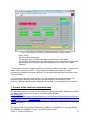
Copy the storage path of the BY-HESS-File and the EBAS NASA-Ames Level 0
and 1 files in the “Directory-path of SMPS BY-HESS-Files (no.conc)+Level 0,1”
box. Be sure that there’s no backslash at the end of the path-string. It is also
possible to click on the folder sign right of the box and choose the storage folder
via the open file dialog box.
- Check or modify (if necessary) the file extension. “.txttv” is the default file
extension for the SMPS BY-HESS-File (no.conc). The file extension supplement
..tv..points out that these are technical validated data.
- Repeat the last two steps for the “Directory-path of SMPS BY-HESS-Files (total
number N2-N8)” box. “.n8tv” is the default file extension for the SMPS BY-HESSFile (N2-N8). The file extension supplement ...tv..points out these are technical
validated data.
- Check the default settings in the choice box “Settings for measured value
identification”. The listed diagnostic parameters were used for automatic flagging
of measurement data outside the given confidence range. To fulfill the
requirements given in the ACTRIS recommendations (Standard Operating
Procedure by Wiedensohler et al., 2012) the confidence ranges are:
o Confidence range of the aerosol air flow is 0.95/1.05 (±5% from the setpoint value of 1 liter per minute)
o Confidence range of the sheath air flow is 4.9/5.1 (±2% from the set-point
value of 5 liter per minute)
o Confidence range of the temperature of the aerosol and sheath air flow is
10/30°C
o Confidence range of the relative humidity of the aerosol and sheath air
flow is 0/40 RH
- Check the default settings in the choice box “Settings for measured value
identification 2”. Times of service maintenance, diffusion screen measurements
and zero-air measurements were flagged, if the individual checkmark is activated.
- If the automated function control unit (optional) is installed, decide if you want to
store the data from the diffusion screen measurements in a separate file. (light
green button = for saving; dark green button = for not saving).
☞ If the file should be saved, be sure that flagging of diffusion screen measurements is
active.
- If the total particle filter (optional) is installed, decide if you want to store the data
from the zero-air measurements in a separate file. (light green button = for saving;
dark green button = for not saving).
☞ If the file should be saved, be sure that flagging of zero is active.
-
2. RUN! the program
-
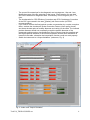
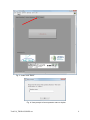
To run the program, switch from index card “Output-Variables” to the index-card
“RUN!” (red arrow; Fig. 3)
Do a Left-click on the button “5. Click to run” (the color and the title of the button
changes from grey to green and from “5. Click to run” to “started…”)
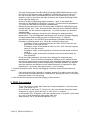
A user-prompt (Fig. 4) appears. Insert the operator name or a cipher of your name
(e.g. mm for max musterman) and confirm with “OK”.
After pressing “OK” a sub-window appears (Fig. 5)
TechVal_TROPOS-SMPS.exe
7