1
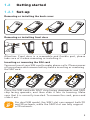
Installing or removing the battery
• Insert and click the battery into place, then close the phone
cover.
• Unclip the cover, then remove the battery.
Installing and removing the microSD card
To release the microSD card holder, slide it in the direction of
the arrow and lift it. Then insert the microSD card with the golden contact downward. Finally, turn down the microSD holder
and slide it in the opposite direction to lock it.
Charging the battery
Standard charger
Connect the battery charger to your phone and mains socket
respectively.
6
To reduce power consumption and energy waste,
when battery is fully charged, disconnect your charger
from the plug; switch off Wi-Fi, GPS, Bluetooth or
background-running applications when not in use;
reduce the backlight time, etc.