1
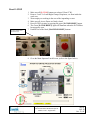
9. The interlocks in the system should all be “satisfied”, and the interlock
status in the lower left corner will turn green for each area. If any interlock
is not properly reset it’s interlock status will be red. Check that all doors
are securely closed and push the black [MACHINE RESET] buttons
again.
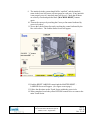
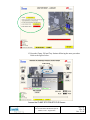
10. Turn on the conveyor by touching the Conveyor On control indicated by
green circle above.
11. Access the Labeler Status Screen by touching the control indicated by the
blue circle above. The Labeler Status Screen will appear.
12. Push the RESET LABELER control and the MASTER RESET –
LABELER Screen will appear. (See figure on next page.)
13. Follow the directions on the Touch Screen within the green circle.
14. When completed, touch the yellow RETURN control twice to return to the
main Touch Screen.
Operation & Maintenance Manual
Artisan Automated Production System
Model # 1290 - August 2009
Page 9
Rev D
Oct. 23, 09