1
T A B LE OF C ON TENTS
Starting your computer
4
Wireless connection ........................................... 4
Registration ........................................................ 5
Software installation ........................................... 6
Recovery ............................................................ 6
Having trouble? .................................................. 6
Computer Basics
8
Battery pack characteristics .....................
Replacing the battery pack.......................
Installing or removing the battery pack ....
Charging the battery.................................
Checking the battery level........................
Optimizing battery life...............................
Battery-low warning..................................
34
36
36
37
37
38
38
40
Safety and comfort ............................................. 8 Power management
Safety precautions ...................................... 8 Saving power................................................... 40
Health precautions .................................... 11 Software
43
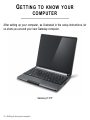
Getting to know your computer
14 Using Windows and your software ..................
Internet security offer ...............................
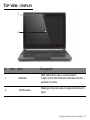
Top view - display ............................................ 15
Gateway Recovery Management.............
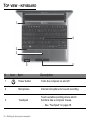
Top view - keyboard......................................... 16
Left view ........................................................... 18 Internet
Right view......................................................... 19
First steps on the net .......................................
Base view......................................................... 20
Protecting your computer .........................
Choose an Internet Service Provider .......
Using the keyboard
22
Network connections................................
Lock keys and numeric keypad........................ 22
Surf the Net! .............................................
Special keys.............................................. 23
Security ....................................................
Windows keys .................................................. 25
Touchpad
26 Recovery
Touchpad basics .............................................. 26 Creating a recovery backup.............................
Touchpad gestures .......................................... 27 Creating a drivers and applications backup.....
Recovering your system ..................................
Upgrading your computer
28
Reinstalling drivers and applications........
Expanding through options .............................. 28
Returning to an earlier system
Connectivity options.................................. 28
snapshot...................................................
Returning your system to its factory
Power supply
33
condition...................................................
AC power adapter ............................................ 33
Recovering from Windows .......................
Battery pack ..................................................... 34
Recovering from a recovery backup ........
2 - Table of Contents
43
43
43
44
44
44
44
46
50
50
59
59
63
66
67
70
71
72
76