1
The Encryption Wizard For Oracle User Manual.
Relational Database Consultants, Inc.
Chapter Nine - Management Reports
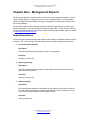
The Encryption Wizard for Oracle provides you with three useful management reports. The first
of these reports allow you to keep track of your current encrypted columns. The two auditing
reports are designed to track auditing and usage of encrypted columns that we learned to set in
the Security Manager.
We recommend that the output of these reports be exported into MS Word or a similar tool for
advanced formatting. If you are looking for reports that output .PDF or .HTML files you will need
to use Oracle*Reports with the Oracle*Forms version of the Encryption Wizard, which is available
at: [email protected].
Report Descriptions
All of the Encryption Wizard management reports are files within the installation directory with the
extension “.rep”. At the writing of this manual the current provided managements reports are:
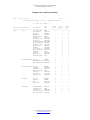
1. Current Encrypted Columns
Description:
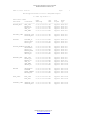
This report displays basic information on all of your encryptions.
File Name:
encrypted_columns.rep
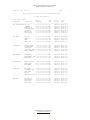
2. Audit Log Summary
Description:
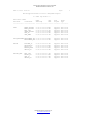
This report displays summary statistics for any audited columns that you have set for
either read or write auditing.
File Name:
audit_log_summary.rep
3. Audit Log Details
Description:
This report displays detailed row information for any audited columns that you have set
for either read or write auditing, including failed transactions due to restricted user lists
set up in the Security Manager of the Encryption Wizard.
File Name:
audit_log_details.rep
Relational Database Consultants, Inc.
www.relationalwizards.com
Copyright 2002-2013