1
11 PPMonitor – Session
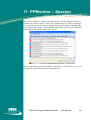
The session window is similar to the Unit History, but this displays the history
for all units and the software itself. The session history for today is displayed
when opened, but the date can be changed using the drop down calendar at the
lower right of the window. Clicking Refresh allows you to view events that
have happened since the window was opened.
The session history can be exported as a text file by clicking Save, or it can
be exported in printable format by clicking Print.
PPM Technology Standalone System - User Manual
24