1
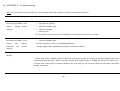
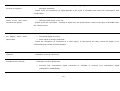
4.2. APPENDIX B - Troubleshooting
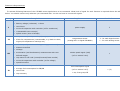
Each unit is tested by the manufacturer. The following table lists examples of issues and possible solutions:
problem
possible solution
and
•
No power supply,
connecting UTCOMP in the
•
No power at ignition,
vehicle
•
Defective display tape,
•
Defective display,
•
Burned fuse.
After
mounting
display
shows
nothing.
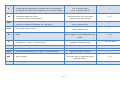
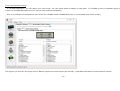
You should also check whether the UTCOMP is communicating with a PC (via USB).
and
•
To low contrast on LCD display
connecting UTCOMP in the
•
Defective display tape.
vehicle
Set LCD contrast to 7/10 (in UTCOMP application).
After
mounting
illuminate
LCD
but
display
shows
Change display tape if adjusting contrast not fixed the problem.
nothing.
USB communication is not
•
USB communication error
working
Please hard-reset UTCOMP module: disconnect main power supply for at least 5 minutes (USB should not be
connected during this time). After 5 minutes connect main power supply. UTCOMP will "beeep" for about 0.5s it means that it have been successful restarted. On next step you can connect USB to PC and device should be
already recognized.
- 46 -