1
body while using the AG-5, including, but not limited to, your back, neck, shoulders, arms,
wrists, hands, or fingers, discontinue use and consult a healthcare professional.
Use of the AG-5 is at your own risk. AlphaGrip, Inc., its employees, shareholders,
consultants, affiliates, marketers, resellers, and manufacturing partners, hereby disclaim any
liability whatsoever for any injuries or damages that may arise as a result of your use of the
AG-5.
Additional safety guidelines:
1. Keep your elbows near your body in a relaxed posture. Do not move them out for support
on your chair’s arm rests.
2. Keep your thumbs and fingers in a relaxed, natural position and press the buttons lightly
with your finger tips.
3. Try to keep your wrists at a comfortable angle.
4. Rest the AG-5 in your lap while typing whenever possible.
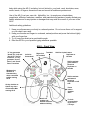
AG-5 – Front View
“C” key generates
“Arrow Up” (red) and
“Scroll Up” (green)
functions, “L” key
generates “Arrow
Down” and “Scroll
Down” functions
Trackball
Left click
for trackball
Right click
for trackball
Shift for Capital Letters
Duplicate on
left side
Shift to activate
green-lettered
functions
Duplicate on
left side
Windows key
doubles as
Command key
when connected
to Mac running
OS X
Shift to activate
red-lettered
functions
Duplicate on left
side
Alt key doubles as
Option key when
connected to Mac
running OS X
Pause
button
disables
AG-5
Num Lock
enables redlettered functions
without shift key
Fn Lock
converts back
keys into F1F12 keys.