1
monocular is not in use or when checked out in daylight conditions. You might test the
device through the pinhole in the center of protective cover (4) and it shouldn’t last more
than 10 minutes.
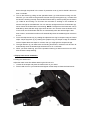
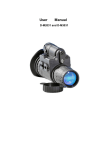
3. Turn on the device by pressing power button (1). After this, you can observe a greenish-lit
screen through the eyepiece (5). It means that the device is working normally. To activate
the IR illuminator (8) by pressing IR switch (10) when the monocular is working in the
conditions of extreme low light or total darkness. A red light emits from IR illuminator (9) to
indicate that the IR illuminator is functioning. NOTE: The light from the illuminator can be
detected by others that are using night vision devices.
4. Focus the objective lens (3) by rotating the objective lens ring for sharper image of viewed
object. Adjust eyepiece (5) by rotating the eyepiece ring for sharper image of intensifier
screen. Repeat above two steps for 3 times, then you might gain the sharpest image.
5. The light detector (9) can detect the surrounding illuminance, the device will be shut off
automatically when the ambient light exceeds 40 Lux in 10 seconds.
6. When you finish observing, A short press on power button (1) to turn off the device.
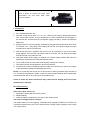
H. Mechanical parts code and name on D-M2021 (rotary switch)
I.
Device operating instructions on D-M2021 (rotary switch)
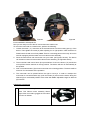
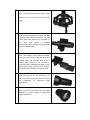
1. Put one 3V CR-123 lithium battery observing the polarity indications on the battery
compartment (2) surface.
2. Remove the protective cover (4) when it’s used at night or in low light condition. NOTE: To
protect the image intensifier tube, keep the lens cap on the objective lens when the
monocular is not in use or when checked out in daylight conditions. You might test the