1
Commodore Free Magazine
www.commodorefree.com
News
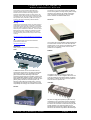
8 bit designs gets a new website
Ultimate 1541 Update Dec 14th 2007
http://www.8bitdesigns.ath.cx/
I knew about it for some days now, but Gideon now
announced it officially: The 1541 Ultimate will also
be available with a 32MB SDRAM chip that is used
to emulate a Commodore REU with 16MB RAM!
The site should be more accessible to Commodore
users due to its design. This is still a work in progress
but the design is looking good (well it looks good to
me)
HOXS 64 v1.0.5.10 15:24
Hey folks,
the newest Version of the HOXS64 is out. Check it
at: http://www.btinternet.com/~hoxs64/
So what’s new?
1) Fixed SounDemon’s sid emulation compatibility
that was broken in the previous release.
2) Adjusted memory-reset pattern. An optional
memory pattern file called c64.ram has been
added. The file was sampled and extrapolated from
the memory-reset pattern of a C64C. If the c64.ram
file is missing then a default pattern is generated.
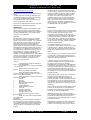
The features of the cartridge are very impressive:
- 512kB SRAM
- 4MB Flash Rom
- 32MB SDRAM (only on the Ultimate Plus)
- SD card Interface
- AR and FC3 cartridge emulation
- file browser to select disk images +DMA-load PRGs
- fully compatible 1541 emulation
- fully compatible REU emulation with up to 16MB
(only Ultimate Plus)
- file browser also works in C128 mode for disk
image selection!
The price is Euro 99 plus shipping for the 1541
Ultimate, and Euro 119 plus shipping for the 1541
Ultimate plus. You are encouraged to send your
preorder now, so Gideon can order
components appropriately. some more info:
http://commodoregg.hobby.nl/innovatie_1541kaart_eng.htm
Cevi-aktuell 11/07 released 21:59
Come and grab the last issue for this year of the
German papermag Cevi-aktuell!
www.webgestalter.com/ceviaktuell1107.pdf
I Adore my 64
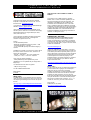
Think geek are selling a rather nice Commodore tshirt with the words I adore my 64 and a picture of
the machine disk drive and monitor
http://www.thinkgeek.com/tshirts/generic/8113/
Issue 15 January 2008
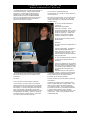
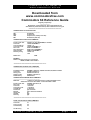
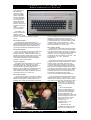
The construction + future of the 1541 "Ultimate"
Update December 14, 2007
A lot of work has been done to integrate exciting new
features and improve ease of use of the “1541
Ultimate”. The following text describes the current
status.
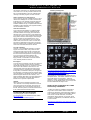
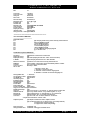
User Menu
When used as a cartridge on your C64, the “1541
Ultimate” now has a nice user inferface, which can be
started by pressing the middle button on the board.
The current program that the C64 is running is frozen
and a black screen with a nifty blue bar appears,
showing the files and directories that are on the SDcard. The “1541 Ultimate” supports FAT, FAT16 and
FAT32 formats and also supports long filenames
(truncated to 22 characters to be able to show it on a
40 column screen). By using the cursor keys on the
Commodore keyboard, the user can travel quite
smoothly through the directories of the SD-card.
The 1541 "Ultimate"
This screen allows the user to select a floppy image
to mount (i.e. to change floppy disks) or to create
new floppies or new directories. This makes it easy to
manage large numbers of floppies. The menu also
allows the user to change the IEC address of the
1541 drive by simply pressing 8, 9, 0 or 1. Since this
also resets the 1541 drive, it can also be used for a
manual reset of the drive. In addition to mounting
floppies to the 1541 drive, the user can also select
separate program. These can be loaded directly into
the memory of the C64, using DMA. Pressing ‘R’
instead of SPACE or RETURN to select the file even
runs the program immediately after loading. This
operation is possible on separate programs, but also
on files within a .d64 or .t64 files (yes you can browse
.d64 and .t64 files as well!). As you will start using the
1541 Ultimate, you will notice that it is faster than you
have ever seen before on any C64!The user menu
can be left by pressing RUN STOP, after which the
page - 3 -